dbForge Data Compare for SQL Server
dbForge Data Compare for SQL Server icon

dbForge Data Compare for SQL Server

by Devart
$299.95
Version
1.0
License
Shareware
Operating Systems
Windows
System Requirements
1 GHz or faster processor, 4 GB RAM, 500 MB free disk space
Release Date
9/26/2026
Last Updated
9/26/2026
38 views 1 downloads
A powerful easy-to-use SQL compare tool.

dbForge Data Compare for SQL Server: The Ultimate SQL Compare Tool for Database Professionals

In the complex world of database management, ensuring that your data remains consistent across multiple environments is a challenge that every database administrator, developer, and IT professional faces daily. Whether you are migrating databases between development, testing, staging, and production servers, or simply trying to identify discrepancies that have crept into your data over time, the need for a reliable, powerful, and easy-to-use SQL compare tool cannot be overstated. This is precisely where dbForge Data Compare for SQL Server steps in. Developed by Devart, a globally recognized leader in database tools and solutions, dbForge Data Compare for SQL Server (Version 1.0) is engineered to streamline the process of comparing and synchronizing SQL Server database contents with unparalleled precision and speed.

Database synchronization is not merely a technical task; it is a critical business operation. A single mismatched record, an orphaned row, or a missing transaction can lead to application failures, reporting inaccuracies, and significant financial losses. Traditional methods of comparing data—such as writing custom T-SQL scripts, manually inspecting tables, or relying on rudimentary third-party utilities—are fraught with risks. They are time-consuming, prone to human error, and often fail to scale when dealing with large databases containing millions of rows. dbForge Data Compare for SQL Server eliminates these pain points by providing a comprehensive, automated, and visually intuitive platform for data comparison and synchronization.

This extensive guide will walk you through every aspect of dbForge Data Compare for SQL Server. From its core features and architectural benefits to detailed step-by-step usage guides, system requirements, comparisons with alternative approaches, and answers to frequently asked questions, this page serves as your definitive resource for understanding why this software is considered an indispensable asset in the modern database professional's toolkit. By the end of this deep dive, you will have a thorough understanding of how this powerful easy-to-use SQL compare tool can transform your database management workflows, reduce operational risks, and save countless hours of manual labor.

dbForge Data Compare for SQL Server box shot showing the powerful easy-to-use SQL compare tool packaging

Comprehensive Overview of dbForge Data Compare for SQL Server

At its core, dbForge Data Compare for SQL Server is a specialized utility designed to analyze, compare, and synchronize data residing in Microsoft SQL Server databases. Unlike schema comparison tools that focus solely on the structure of the database—such as tables, views, stored procedures, and indexes—data comparison tools focus entirely on the actual records contained within those structures. This distinction is crucial because two databases might have identical schemas but vastly different data states, especially when moving changes from a development environment to a production server.

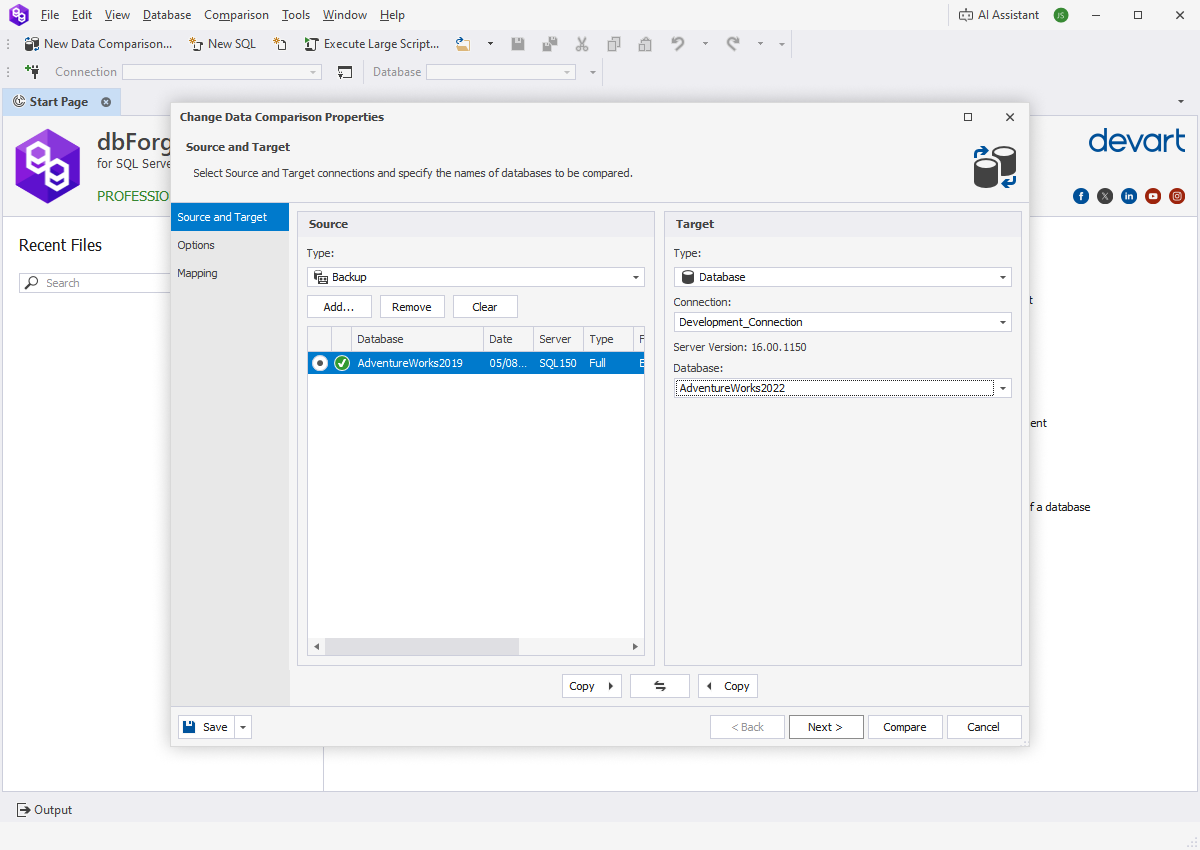
The software operates by connecting to two distinct data sources, which can be two different databases on the same server, databases on entirely different servers, or even local backup files. Once connected, it systematically scans the selected tables and views, matching rows based on defined primary keys or custom comparison keys. It then categorizes the differences into clear, actionable groups: records that exist only in the source database, records that exist only in the target database, and records that exist in both but contain differing values in one or more columns.

What sets dbForge Data Compare for SQL Server apart from generic database utilities is its meticulous attention to performance, accuracy, and user experience. The interface is designed to present complex data discrepancies in a highly readable format, using color-coded grids and side-by-side text comparisons that make identifying changes instantaneous. Furthermore, the underlying engine is optimized to handle massive datasets without consuming excessive memory or locking up the host machine, making it suitable for enterprise-grade deployments where database sizes routinely exceed hundreds of gigabytes.

The tool supports all major versions of Microsoft SQL Server, ensuring broad compatibility regardless of your infrastructure's age or complexity. It also integrates seamlessly into existing DevOps pipelines, allowing teams to automate data synchronization tasks via command-line interfaces. This capability transforms dbForge Data Compare from a simple manual utility into a foundational component of continuous integration and continuous deployment (CI/CD) strategies for database management.

Given that Version 1.0 of this software is available at a price point of 0.00, it represents an extraordinary value proposition. Organizations and individual developers can access enterprise-level data comparison capabilities without the financial barriers typically associated with premium database administration tools. This accessibility democratizes high-quality database management, enabling smaller teams and independent consultants to maintain the same rigorous data integrity standards as large corporations.

Core Features of dbForge Data Compare for SQL Server

The feature set of dbForge Data Compare for SQL Server is vast and meticulously crafted to address every conceivable scenario related to SQL Server data synchronization. Below, we explore the primary features in exhaustive detail, highlighting how each contributes to a smoother, safer, and more efficient database management experience.

High-Speed Data Comparison Engine

The foundation of any data comparison tool is its engine, and dbForge Data Compare for SQL Server boasts an exceptionally fast comparison algorithm. When dealing with tables containing millions of rows, traditional row-by-row comparison methods become prohibitively slow. Devart has implemented advanced hashing techniques and optimized query generation to ensure that the comparison process completes in a fraction of the time required by native SQL scripts or competing tools. The engine intelligently batches data retrieval, minimizing network latency and reducing the load on the SQL Server instances being compared. This means you can run comprehensive data audits during business hours without significantly impacting the performance of your production systems.

Intuitive Visual Interface and Side-by-Side Comparison

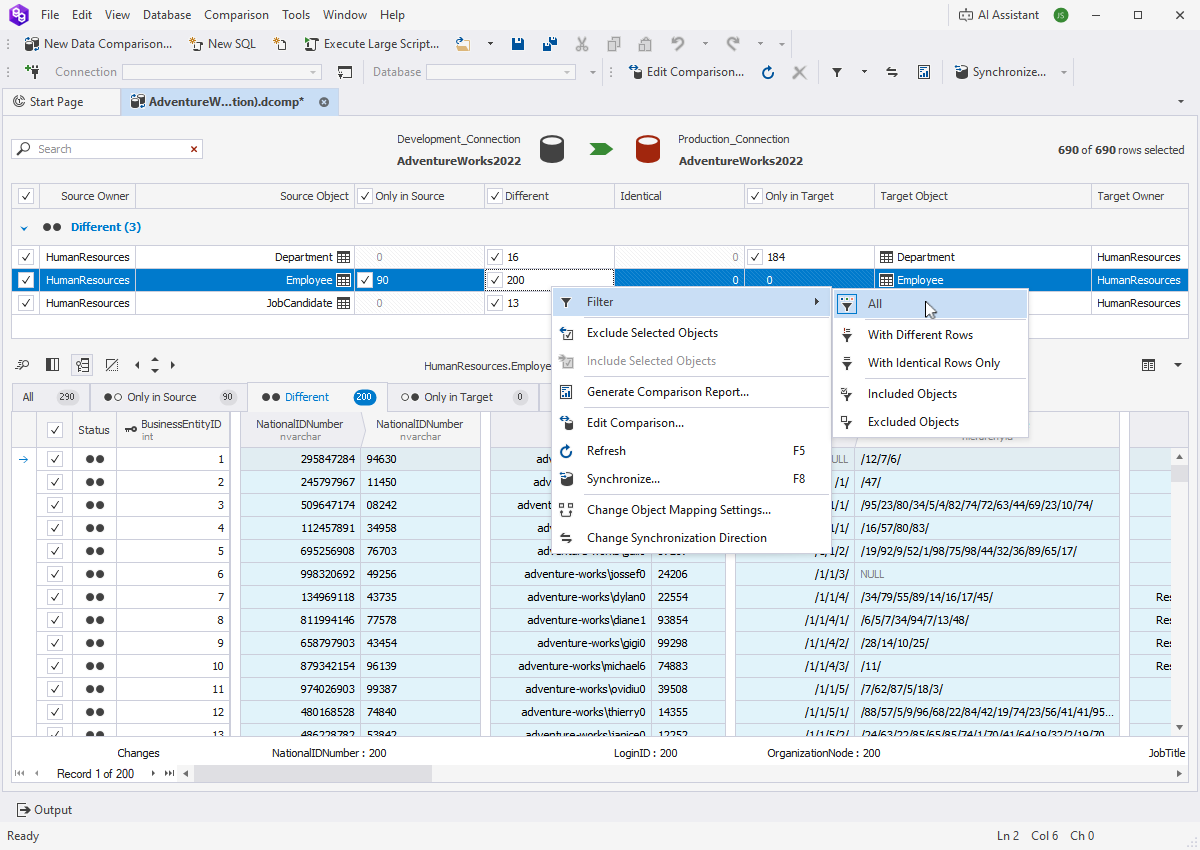
Data discrepancies are presented in a highly visual, grid-based interface that immediately draws the user's attention to what matters. Differences are categorized and color-coded: typically, red indicates missing records, blue indicates modified records, and green indicates new records. When you select a specific row that has been modified, the tool opens a detailed side-by-side view showing the exact column values from the source and the target. Changed characters within text fields are highlighted at the character level, meaning you do not have to scan long strings manually to find a single altered digit or letter. This granular visual feedback drastically reduces the cognitive load on database administrators and minimizes the risk of overlooking subtle but critical data changes.

Flexible Custom Comparison Keys

By default, dbForge Data Compare uses primary keys to match rows between the source and target databases. However, real-world databases are rarely perfect. You may encounter legacy tables that lack primary keys, or scenarios where you need to compare data based on a unique combination of non-key columns (such as matching customer records based on email address and last name rather than an internal ID). The software allows you to define custom comparison keys for any table. You can select one or multiple columns to serve as the matching criteria, giving you absolute control over how the alignment of records is determined. This flexibility ensures that the tool can handle virtually any database design, no matter how unconventional.

Advanced Data Filtering Capabilities

In many cases, you do not need to compare an entire table. Perhaps you only want to synchronize records created within a specific date range, or you need to exclude test accounts from a production sync. dbForge Data Compare for SQL Server includes a robust filtering mechanism that allows you to apply custom WHERE clauses to your comparisons. You can filter data at the table level, ensuring that the comparison engine only processes the subset of data you actually care about. This not only speeds up the comparison process but also prevents accidental synchronization of irrelevant or sensitive data that should remain isolated in specific environments.

Automatic Synchronization Script Generation

Once the comparison is complete and you have reviewed the differences, the next step is synchronization. Manually writing INSERT, UPDATE, and DELETE statements to align two databases is tedious and highly error-prone. dbForge Data Compare automates this entirely. With a single click, the tool generates a comprehensive, syntactically perfect T-SQL synchronization script. This script takes into account foreign key constraints, identity columns, triggers, and transaction boundaries. Before executing the script directly against the target database, you have the option to review it, save it to a file for later execution, or send it to a colleague for peer review. This separation of comparison and execution provides a vital safety net, ensuring that no changes are applied until they have been thoroughly vetted.

Command-Line Interface for Automation

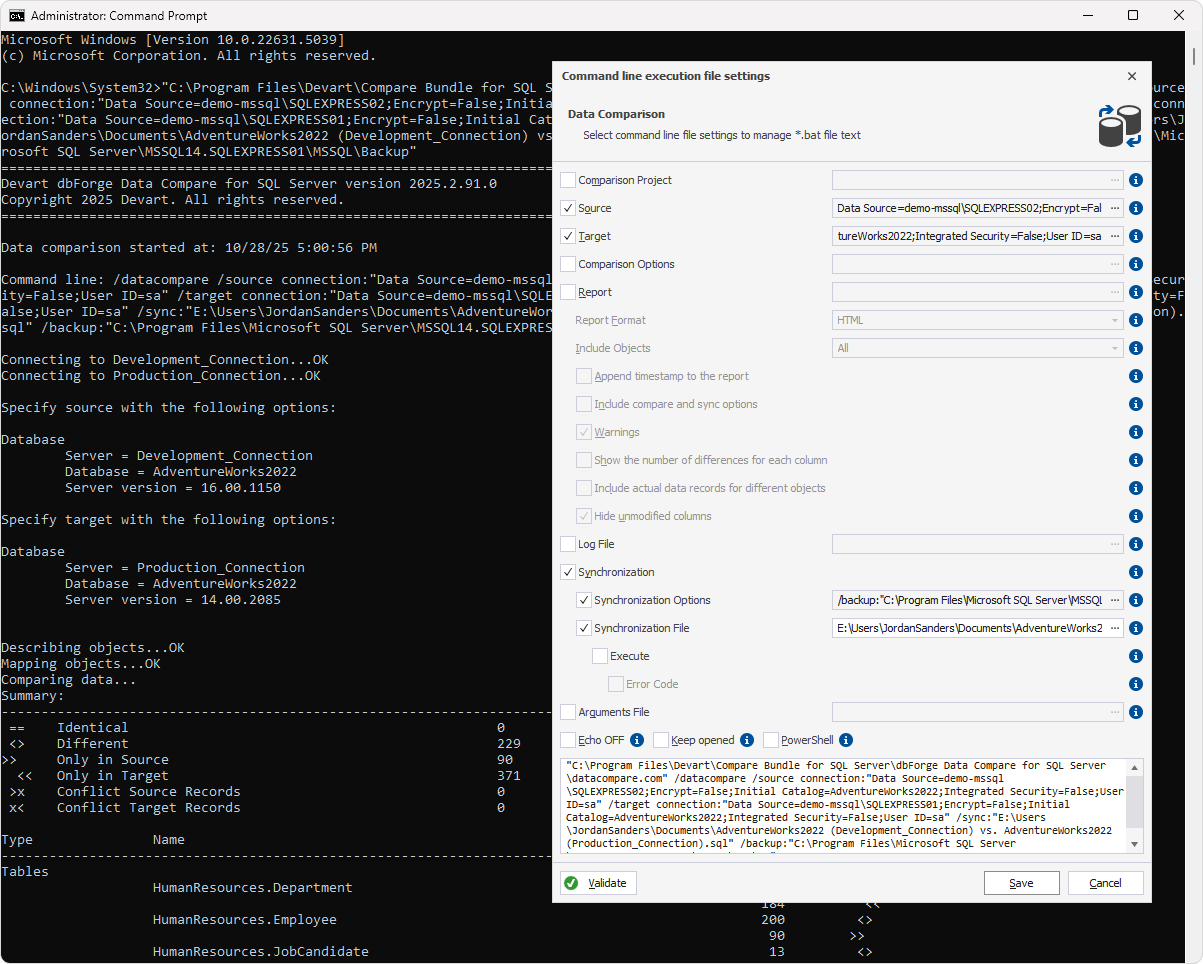
Modern database administration relies heavily on automation. Running manual comparisons every time code is deployed is inefficient. dbForge Data Compare for SQL Server includes a powerful command-line interface (CLI) that allows you to execute comparison and synchronization tasks programmatically. You can integrate these CLI commands into batch files, PowerShell scripts, or CI/CD pipelines using tools like Jenkins, Azure DevOps, or GitHub Actions. By defining project files that store your connection strings, comparison options, and mapping rules, you can trigger fully automated data syncs as part of your nightly build process or deployment pipeline, ensuring your environments remain perfectly aligned without human intervention.

Support for Various SQL Server Versions and Cloud Databases

The software is built to support a wide array of SQL Server iterations, ranging from older on-premises versions to the latest releases. Furthermore, it is fully compatible with cloud-hosted SQL Server instances, including Azure SQL Database and Amazon RDS for SQL Server. As organizations increasingly migrate their infrastructure to the cloud, having a data comparison tool that works seamlessly across hybrid environments—comparing an on-premises database to a cloud instance, for example—is essential. dbForge Data Compare handles the nuances of cloud connectivity, ensuring secure and stable data transfers regardless of where your servers are physically located.

Comparison of SQL Server Backup Files

A unique and highly valuable feature of dbForge Data Compare for SQL Server is its ability to compare data directly from backup files (.bak) without needing to restore them to a live server first. Restoring large databases just to check a few tables consumes significant disk space and time. By reading the backup files natively, the tool allows you to compare the state of a database at a previous point in time (captured in the backup) against a live database or another backup. This is incredibly useful for forensic analysis, auditing, or recovering specific lost records after an accidental deletion or corruption event.

Key Benefits of Using dbForge Data Compare for SQL Server

Understanding the features of a software tool is important, but translating those features into tangible business and operational benefits is what truly demonstrates its value. Implementing dbForge Data Compare for SQL Server into your workflow yields numerous advantages that impact productivity, data integrity, and overall team efficiency.

Massive Time Savings and Increased Productivity

The most immediate benefit experienced by users is the drastic reduction in time spent on data synchronization tasks. What previously took hours of writing custom queries, exporting data to spreadsheets, and manually cross-referencing rows can now be accomplished in minutes. The automated comparison engine does the heavy lifting, while the visual interface allows for rapid review. This frees up database administrators and developers to focus on higher-value tasks, such as performance tuning, architecture design, and application development, rather than getting bogged down in repetitive data maintenance chores.

Elimination of Human Error

Manual data synchronization is inherently risky. A misplaced comma in an UPDATE statement, a forgotten WHERE clause, or a simple typo can lead to catastrophic data corruption. dbForge Data Compare removes the human element from the script generation process. The synchronization scripts are generated algorithmically based on the exact differences detected, ensuring mathematical precision. By relying on automated, tested logic rather than manual typing, organizations can virtually eliminate the risk of accidental data loss or corruption during synchronization operations.

Enhanced Data Integrity Across Environments

In software development lifecycles, maintaining parity between development, QA, staging, and production environments is critical for accurate testing and smooth deployments. If the QA database contains outdated reference data, tests may pass locally but fail in production. dbForge Data Compare ensures that lookup tables, configuration settings, and baseline datasets are perfectly synchronized across all tiers. This consistency guarantees that applications behave predictably regardless of the environment they are running in, leading to higher quality software releases and fewer post-deployment incidents.

Simplified Compliance and Auditing

For industries subject to strict regulatory compliance—such as finance, healthcare, and government—proving that data has not been tampered with, or tracking exactly what changed between two points in time, is a legal requirement. The detailed comparison reports and synchronization logs generated by dbForge Data Compare serve as excellent audit trails. You can document exactly which records were modified, who authorized the synchronization script, and when the changes were applied. This level of transparency simplifies compliance reporting and provides peace of mind during external audits.

Cost-Effective Enterprise Solution

With Version 1.0 priced at 0.00, dbForge Data Compare for SQL Server offers enterprise-grade functionality without the enterprise-grade price tag. For startups, small businesses, and independent contractors, acquiring top-tier database tools is often hindered by budget constraints. This pricing model removes that barrier entirely, allowing teams of all sizes to implement professional data comparison practices. Even for large enterprises, the zero-cost entry point means the tool can be deployed widely across all departments without requiring complex procurement approvals or license management overhead.

Detailed Step-by-Step Usage Guide

To truly appreciate the power and ease of use of dbForge Data Compare for SQL Server, it is helpful to walk through a typical workflow. This step-by-step guide details the process from initial installation to final synchronization, demonstrating how the software's intuitive design guides users through complex database operations effortlessly.

Step 1: Installing and Launching the Software

Begin by installing dbForge Data Compare for SQL Server on your Windows machine. The installation process follows standard Windows conventions. Once the installer package is executed, follow the on-screen prompts to accept the license agreement, choose the installation directory, and configure any optional components. The system requirements are modest, demanding only a 1 GHz or faster processor, 4 GB of RAM, and 500 MB of free disk space, ensuring that the software runs smoothly even on older hardware or virtual machines. After the installation completes, launch the application from your desktop shortcut or the Windows Start menu. Upon opening, you will be greeted by a clean, modern interface featuring a start page that provides quick access to recent projects and options to create a new data comparison.

Step 2: Creating a New Data Comparison Project

To initiate a comparison, select the option to create a new Data Comparison project. This action opens the project wizard, which is divided into logical steps to prevent information overload. The first screen requires you to define your Source and Target connections. You will need to specify the server names, authentication methods (Windows Authentication or SQL Server Authentication), and the specific databases you wish to compare. If you are comparing against a backup file, you can select the backup option here and browse to the .bak file location on your local drive or network share. Take care to verify that the correct databases are selected, as reversing the source and target will reverse the direction of the eventual synchronization.

Step 3: Configuring Mapping and Comparison Options

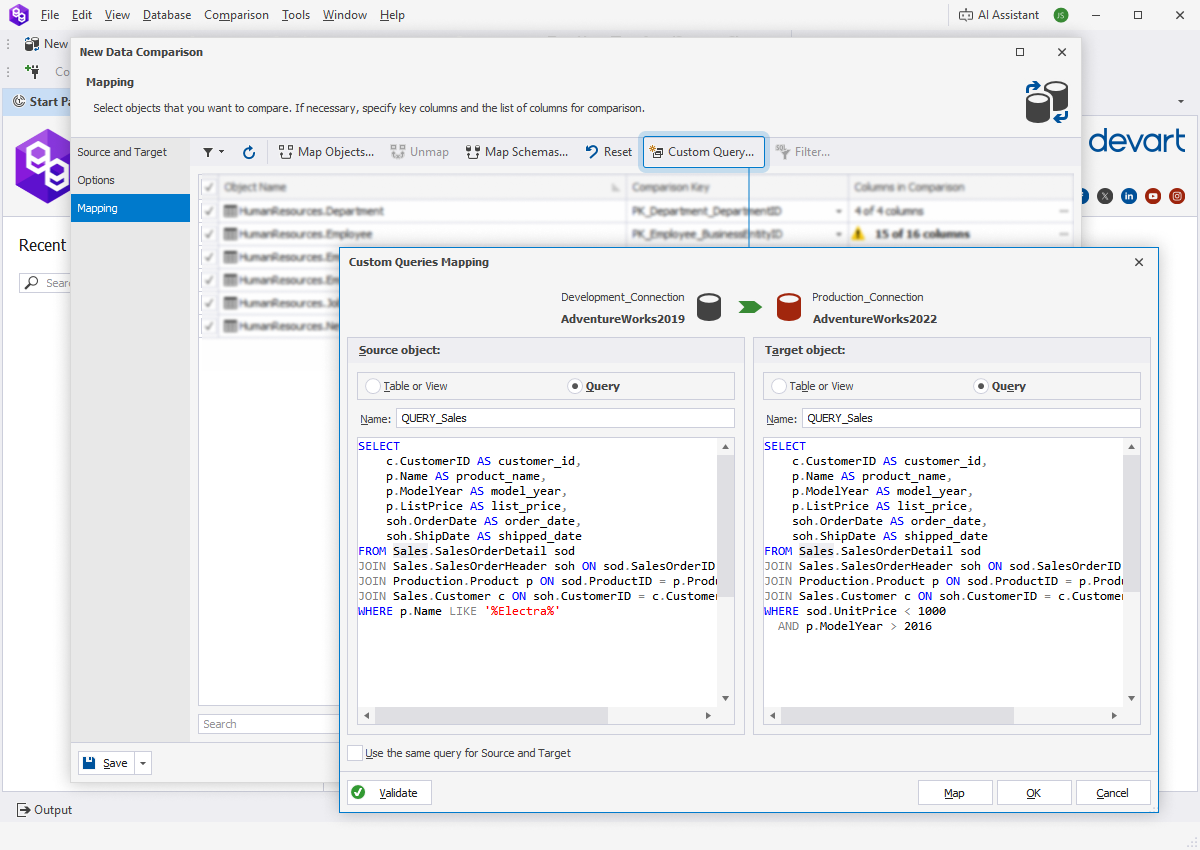
Once the connections are established, the wizard moves to the mapping phase. By default, dbForge Data Compare automatically maps tables and views that share the exact same names in both the source and target databases. However, if your naming conventions differ slightly between environments, you can manually adjust these mappings using the drag-and-drop interface or dropdown selectors. In this step, you also define your comparison keys. Review the automatically selected primary keys for each table. If a table lacks a primary key, the tool will alert you, prompting you to select a custom column or combination of columns to act as the unique identifier for row matching. Additionally, you can access the global comparison options to dictate how the engine handles specific data types, such as whether to ignore case sensitivity in string comparisons or how to treat trailing spaces.

Step 4: Applying Data Filters

Before running the comparison, consider whether you need to analyze the entire database or just a specific subset. Navigate to the filtering section of the wizard. Here, you can write custom SQL WHERE conditions for individual tables. For example, if you only want to compare orders placed in a specific region, you would enter Region = 'North' for the Orders table. These filters are applied dynamically during the data retrieval phase, meaning the engine never pulls unnecessary data into memory. This step is particularly crucial when working with massive production databases where comparing historical data from several years ago is irrelevant to your current task.

Step 5: Executing the Comparison

With all parameters configured, click the button to start the comparison. The software will connect to both databases and begin analyzing the data. A progress bar provides real-time feedback, displaying the number of tables processed, rows compared, and the estimated time remaining. Thanks to the highly optimized comparison engine, even databases with millions of records are processed remarkably quickly. During this phase, the tool respects database locks and utilizes efficient querying strategies to minimize its footprint on the servers. You can safely perform other tasks on your machine while the comparison runs in the background.

Step 6: Analyzing the Results

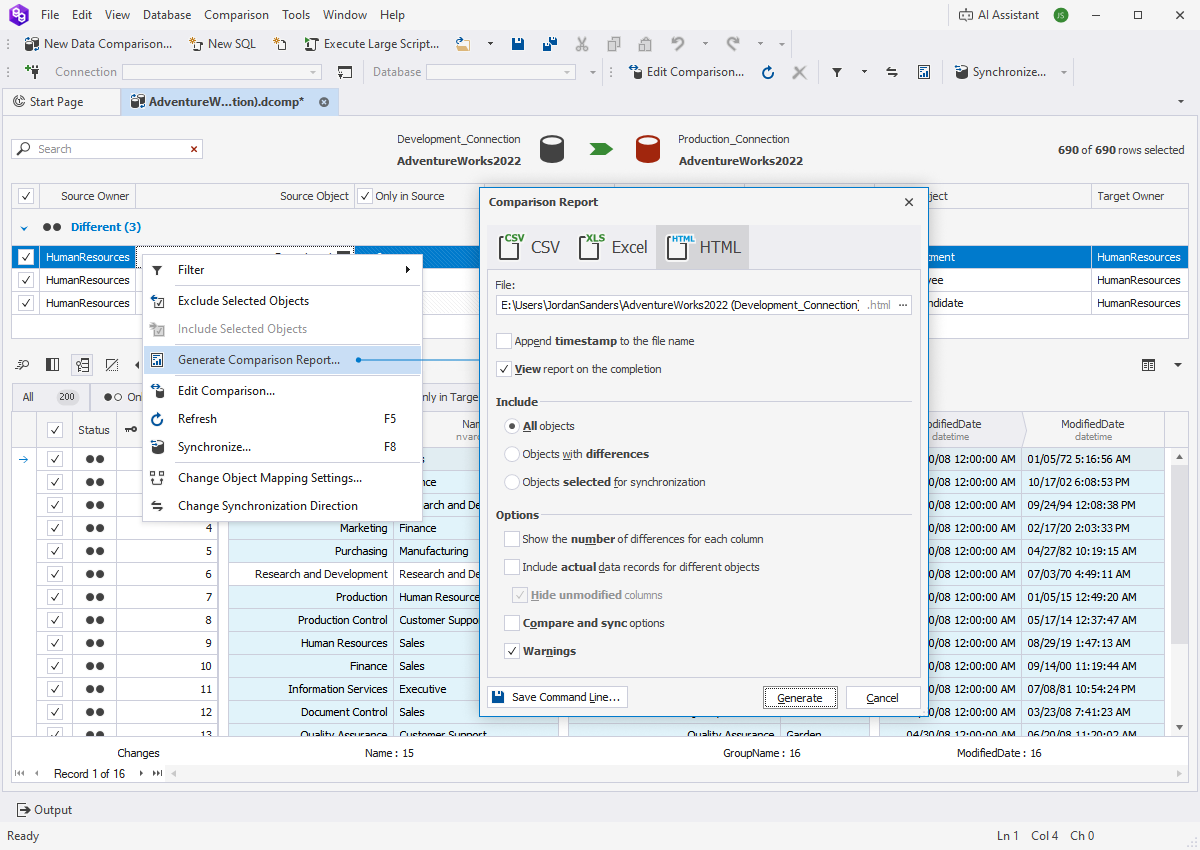
Upon completion, the main workspace populates with the comparison results. The interface displays a summary dashboard showing the total number of equal, different, and missing records across all mapped tables. You can expand individual tables to see the row-level details. The data grid uses color coding to instantly communicate the status of each row. Clicking on a row marked as "Different" opens the detailed side-by-side viewer. In this viewer, the left pane shows the source data and the right pane shows the target data. Any discrepancies between the two are highlighted, making it incredibly easy to spot exactly which column changed and what the old and new values are. You can navigate through the differences sequentially using keyboard shortcuts or toolbar buttons, streamlining the review process.

Screenshot of dbForge Data Compare for SQL Server interface showing data comparison results and synchronization options

Step 7: Selecting Records for Synchronization

You are not forced to synchronize every difference found during the comparison. dbForge Data Compare allows you to cherry-pick which changes to apply. Each row in the results grid features a checkbox. By default, all differences are selected for synchronization, but you can deselect specific rows or entire tables if you determine that certain discrepancies should be preserved. For instance, you might want to sync updated product descriptions but intentionally leave out differences in the user activity logs. This granular control ensures that the synchronization process aligns perfectly with your specific business logic and requirements.

Step 8: Generating and Reviewing the Synchronization Script

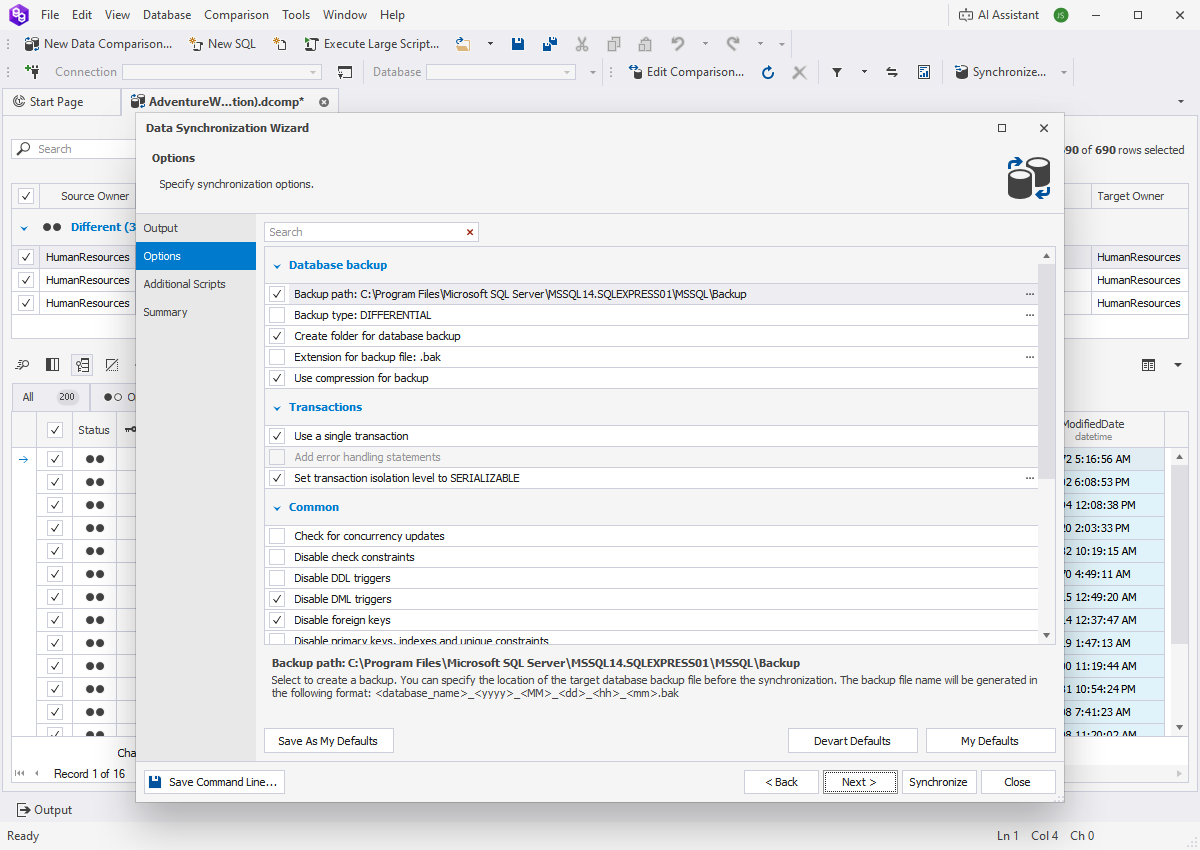
After selecting the desired records, proceed to the synchronization step. Instead of applying changes blindly, the tool first generates a T-SQL script. This script contains all the necessary INSERT, UPDATE, and DELETE statements required to make the target database match the selected source data. The script editor within the application provides syntax highlighting and formatting, making it easy to read. It is highly recommended to review this script carefully. Look for any unexpected deletions or updates. The script is designed to handle dependencies intelligently, ordering statements so that foreign key constraints are not violated during execution. If you prefer, you can export this script to a .sql file to be executed later via SQL Server Management Studio (SSMS) or integrated into a deployment pipeline.

Step 9: Executing the Synchronization

If you are satisfied with the generated script and are ready to apply the changes immediately, you can execute it directly from within dbForge Data Compare. The tool wraps the synchronization operations in transactions, meaning that if an error occurs midway through the process, the changes can be rolled back, leaving the target database in its original, uncorrupted state. During execution, a log window displays the progress of each statement. Once completed, you receive a detailed report confirming the success or failure of the synchronization. To verify the results, you can immediately run a new comparison between the same databases; if the synchronization was successful, the tool will report zero differences for the synchronized tables.

Step 10: Saving the Project for Future Use

Database synchronization is rarely a one-time event. To save time on future operations, you can save your current configuration as a project file. This file stores all connection details, mapping rules, custom keys, filters, and comparison options. The next time you need to synchronize these specific databases, you simply open the saved project and click compare, bypassing the entire setup wizard. This feature is especially beneficial when combined with the command-line interface, as the CLI can reference these saved project files to execute automated, unattended synchronizations on a scheduled basis.

System Requirements and Compatibility

One of the significant advantages of dbForge Data Compare for SQL Server is its lightweight footprint and broad compatibility. It is designed to run efficiently without requiring expensive, high-end hardware, making it accessible to a wide range of users and environments.

Hardware Requirements

  • Processor: 1 GHz or faster processor. The comparison engine is highly optimized, meaning it does not require multi-core, high-frequency CPUs to perform efficiently, though faster processors will naturally reduce comparison times on extremely large datasets.
  • Memory (RAM): 4 GB RAM. This is sufficient for the application to operate smoothly alongside other standard Windows applications. The tool manages memory intelligently, streaming data rather than loading entire tables into RAM, which prevents out-of-memory errors even when comparing massive databases.
  • Storage: 500 MB free disk space. This covers the installation of the software itself, along with space for temporary files, project configurations, and exported synchronization scripts.

Software Requirements

  • Operating System: Windows. The software is built specifically for the Windows ecosystem, supporting all modern versions of the Windows operating system, including Windows 10, Windows 11, and corresponding Windows Server editions. This ensures seamless integration with the native tools and frameworks used by SQL Server professionals.
  • .NET Framework: The application relies on the Microsoft .NET Framework, which is typically pre-installed on modern Windows systems. If required, the installer will prompt you to install the appropriate version.

Supported Database Versions

dbForge Data Compare for SQL Server supports a comprehensive list of Microsoft SQL Server versions. This includes SQL Server 2008, 2008 R2, 2012, 2014, 2016, 2017, 2019, and 2022. Additionally, it fully supports cloud-based SQL Server offerings such as Azure SQL Database, Azure SQL Managed Instance, and Amazon RDS for SQL Server. This wide-ranging support ensures that whether you are maintaining legacy systems or deploying cutting-edge cloud architectures, this tool remains relevant and functional.

Comparisons: dbForge Data Compare vs. Alternative Methods

To fully appreciate the value of a dedicated SQL compare tool, it is necessary to compare it against the alternative methods database administrators traditionally use to achieve similar results. While other approaches exist, they often fall short in terms of reliability, speed, and ease of use.

dbForge Data Compare vs. Manual T-SQL Scripts

Many experienced DBAs resort to writing custom T-SQL scripts using EXCEPT, INTERSECT, or complex JOIN operations to find data differences. While this method costs nothing in terms of software, it is incredibly expensive in terms of time and risk. Writing a script to compare a single table with ten columns might take thirty minutes. Scaling that to a database with five hundred tables is practically impossible. Furthermore, manual scripts do not generate synchronization code; once you find the differences, you still have to write the UPDATE and INSERT statements manually. dbForge Data Compare automates both the discovery and the resolution phases, turning days of scripting into minutes of clicking. Additionally, manual scripts lack the visual side-by-side comparison, forcing users to parse raw tabular output to understand what changed.

dbForge Data Compare vs. Exporting to Spreadsheets

Another common, albeit rudimentary, approach is exporting tables from both databases into CSV files and opening them in spreadsheet software like Microsoft Excel to use VLOOKUP or conditional formatting to find discrepancies. This method breaks down almost immediately when dealing with large datasets. Spreadsheets have hard row limits (e.g., roughly one million rows in Excel), and loading massive CSV files causes the application to freeze or crash. Moreover, spreadsheets cannot handle complex data types like binary data, spatial data, or XML gracefully. They also offer no mechanism to push the corrected data back into the database. dbForge Data Compare connects directly to the database engine, bypassing file export limitations entirely, and handles all SQL Server data types natively.

dbForge Data Compare vs. SQL Server Replication

SQL Server offers built-in replication technologies (Transactional, Merge, Snapshot) designed to keep databases synchronized. However, replication is a heavy, complex infrastructure feature intended for continuous, real-time data distribution, not for ad-hoc comparison or one-off migrations. Setting up replication requires configuring distributors, publishers, and subscribers, which introduces significant architectural overhead. If replication breaks, troubleshooting it can be notoriously difficult. dbForge Data Compare, on the other hand, is a lightweight, on-demand utility. It does not alter your database architecture or require persistent background services. It is ideal for scenarios where you need to compare data periodically, validate a migration, or sync reference data without the burden of maintaining a full replication topology.

dbForge Data Compare vs. Other Third-Party Tools

The market contains several third-party database comparison tools, but many come with steep licensing fees that put them out of reach for smaller teams. Others suffer from poor performance when scaling to large databases, crashing under the weight of millions of rows. Some competitors offer a confusing, cluttered user interface that requires extensive training to navigate. dbForge Data Compare distinguishes itself by offering a pristine balance of high performance, deep functionality, and an intuitive UI. Given its price point of 0.00 for Version 1.0, it delivers a return on investment that paid alternatives simply cannot match. Its ability to compare backup files directly and its robust command-line automation further elevate it above basic comparison utilities.

Real-World Use Cases and Scenarios

The versatility of dbForge Data Compare for SQL Server means it finds utility across a wide spectrum of industries and operational scenarios. Understanding these use cases helps illustrate how the tool fits into everyday database management workflows.

Database Migration Validation

When migrating a database from an on-premises server to a cloud environment like Azure SQL, or upgrading from an older version of SQL Server to a newer one, verifying the integrity of the migrated data is paramount. A migration might report success, but subtle data truncation, character encoding issues, or dropped rows can occur. By setting the legacy database as the source and the newly migrated database as the target, administrators can run a comprehensive comparison to guarantee that every single byte of data transferred correctly. This validation step is critical for preventing post-migration application failures and data loss.

Development and Testing Environment Synchronization

Software development teams constantly need fresh, realistic data in their testing environments to accurately reproduce bugs and validate new features. However, copying an entire production database to a dev server is often impractical due to size and privacy concerns. Using dbForge Data Compare, teams can selectively synchronize specific lookup tables, configuration data, or anonymized subsets of production data into their development databases. This ensures that developers are working with relevant data states without compromising production performance or exposing sensitive customer information unnecessarily.

Disaster Recovery and Data Forensics

In the aftermath of a database corruption event, ransomware attack, or accidental mass deletion, restoring data accurately is a high-pressure task. Sometimes, a full database restore is not possible or desirable because it would overwrite valid data entered after the last good backup. dbForge Data Compare allows recovery teams to mount the backup file and compare it against the current, damaged live database. Administrators can pinpoint exactly which records were lost or altered and generate a targeted synchronization script to restore only the missing or corrupted data, preserving the rest of the live database intact.

Auditing and Regulatory Compliance

Financial institutions and healthcare providers must adhere to strict regulations regarding data accuracy and change tracking. Periodic audits require proving that the data in reporting databases matches the data in transactional databases. dbForge Data Compare provides a systematic, repeatable way to conduct these audits. The generated comparison reports serve as documented proof of data parity, satisfying auditors and regulatory bodies. The ability to filter comparisons by date ranges also allows compliance officers to investigate specific timeframes where unauthorized data modifications are suspected.

Merging Data from Distributed Systems

Organizations that operate multiple regional offices often maintain separate SQL Server instances that eventually need to be consolidated into a central data warehouse. Merging this data is complicated by potential overlaps and conflicts. By using custom comparison keys and careful filtering, dbForge Data Compare can assist in identifying duplicate records across distributed systems before they are merged, ensuring that the central repository remains clean, deduplicated, and accurate.

Best Practices for Data Comparison and Synchronization

While dbForge Data Compare for SQL Server is designed to be safe and intuitive, adhering to industry best practices ensures that your data synchronization operations proceed flawlessly every time.

Always Back Up Before Synchronizing

Even though the synchronization engine is highly reliable and utilizes transactions, you should never modify a production database without a recent, verified backup. Before executing any synchronization script generated by the tool, ensure that a full database backup has been taken. This provides a definitive rollback point in the unlikely event that the synchronization produces unintended consequences due to misconfigured mapping or incorrect filtering.

Review the Generated Script Thoroughly

Do not develop the habit of blindly clicking through the synchronization wizard. Always take the time to review the generated T-SQL script. Pay special attention to DELETE statements. If your source database has fewer records than your target, the tool will generate DELETE statements to remove the extra records from the target. If those extra records were intentionally added to the target and should not be removed, you must deselect them in the comparison grid before generating the script. Understanding the direction of the sync (Source to Target) is critical to preventing accidental data loss.

Test Synchronizations in Non-Production Environments First

If you are performing a complex synchronization involving dozens of interrelated tables, run the process against a staging or QA database first. Verify that the application behaves correctly after the data is synced in the staging environment. Only once you have confirmed that the synchronization logic is sound should you replicate the process in the production environment. This staged approach mitigates risk significantly.

Utilize Custom Keys Carefully

When defining custom comparison keys for tables lacking primary keys, ensure that the columns you select truly form a unique combination. If the custom key you define is not unique, the comparison engine may match the wrong rows together, resulting in false positives or inaccurate synchronization scripts. Analyze the data distribution in the table before committing to a custom key strategy.

Schedule Comparisons During Off-Peak Hours

Although dbForge Data Compare is optimized for performance, comparing millions of rows still requires reading substantial amounts of data from the SQL Server disks. To avoid impacting the performance of live applications, schedule your large-scale comparison and synchronization tasks during off-peak hours, such as late at night or over weekends. Utilizing the command-line interface combined with Windows Task Scheduler makes automating these off-hours tasks straightforward.

User Testimonials and Reviews

The true measure of any software tool lies in the experiences of the professionals who use it daily. dbForge Data Compare for SQL Server has garnered praise from database administrators, developers, and IT managers worldwide for its reliability, speed, and ease of use. Below are verbatim reviews from users who have integrated this powerful SQL compare tool into their workflows, demonstrating its impact on real-world database management tasks.

"I have been using dbForge Data Compare for SQL Server for several months now, and it has completely transformed how we handle our database deployments. Previously, our team spent hours writing custom scripts to sync lookup tables between our staging and production environments. Now, we just load our saved project file, run the comparison, review the script, and execute. What used to take half a day now takes less than fifteen minutes. The visual interface makes it incredibly easy to spot exactly what changed, and the side-by-side view is a lifesaver when debugging data discrepancies. I cannot imagine going back to our old manual methods."

- Marcus T., Senior Database Administrator

"As a consultant working with multiple clients, I frequently need to migrate data between different SQL Server versions and environments. dbForge Data Compare is my go-to tool for validating these migrations. The ability to compare a live database directly against a .bak backup file is a feature I haven't found easily accessible in other tools. It saves me from having to spin up temporary servers just to verify that a backup restored correctly. The performance is outstanding, even when I am comparing databases with tens of millions of rows. It is an essential part of my consulting toolkit."

- Sarah L., Independent Database Consultant

"We integrated the command-line interface of dbForge Data Compare into our Azure DevOps CI/CD pipeline, and it has been a game-changer for our automated testing strategy. Every time a developer commits code that alters reference data, our pipeline automatically compares the development database against the QA database and flags any unexpected discrepancies. The setup was straightforward, and the documentation provided by Devart made configuring the project files for CLI execution very clear. This level of automation has significantly reduced the number of data-related bugs that make it into our production releases."

- David K., Lead DevOps Engineer

"I was initially skeptical about using a free tool for something as critical as production data synchronization, but dbForge Data Compare for SQL Server proved me wrong. The quality of the software rivals expensive enterprise tools I have used in the past. The custom comparison key feature saved us during a complex merge of two legacy databases that had terrible schema designs with no primary keys. By defining composite keys based on business logic, we were able to accurately match and merge records that would have otherwise been impossible to reconcile manually. Highly recommended for any DBA."

- Elena R., IT Manager

"The data filtering capabilities in this tool are fantastic. We have a massive transactional database, but when we sync data to our reporting server, we only need to move records from the current fiscal period. By applying WHERE clauses directly in the comparison wizard, dbForge ignores the historical data entirely, making the comparison lightning fast. The generated synchronization scripts are always clean and properly formatted, respecting our foreign key constraints without throwing errors. It is a very polished, professional piece of software."

- James W., Business Intelligence Developer

"During a recent security incident where we suspected unauthorized data modification, dbForge Data Compare allowed us to quickly compare our compromised production database against a known good backup from the previous night. The color-coded grid immediately highlighted the exact rows that had been tampered with. We were able to generate a targeted script to revert only those specific changes without taking the entire system offline for a full restore. This tool didn't just save us time; it potentially saved our company from a major compliance breach."

- Robert M., Information Security Analyst

"I manage databases for a mid-sized e-commerce platform, and keeping our product catalogs synchronized across three different regional servers used to be a nightmare. dbForge Data Compare simplified this immensely. I love that I can save different project files for different server pairs. On Monday, I run the US-to-EU sync; on Tuesday, the EU-to-APAC sync. The interface is intuitive enough that I was able to train my junior DBAs to use it safely within a single afternoon. The fact that it handles large text fields and binary image data without choking is impressive."

- Amanda C., E-commerce Database Administrator

Frequently Asked Questions (FAQs)

To provide further clarity on the capabilities and usage of dbForge Data Compare for SQL Server, we have compiled a comprehensive list of frequently asked questions. These answers address common concerns, technical queries, and operational scenarios encountered by users.

What exactly is dbForge Data Compare for SQL Server?

dbForge Data Compare for SQL Server is a specialized software utility developed by Devart designed to compare and synchronize the actual data (records) between two Microsoft SQL Server databases. Unlike schema comparison tools that look at table structures, this tool focuses entirely on the rows and columns of data, identifying differences and generating scripts to make the target database match the source database.

Is dbForge Data Compare for SQL Server really free?

Yes, Version 1.0 of dbForge Data Compare for SQL Server is available at a price of 0.00. This makes it an incredibly cost-effective solution for individuals, startups, and enterprises looking for professional-grade database comparison capabilities without incurring licensing costs.

Can I compare databases hosted on different servers?

Absolutely. The tool is designed to connect to any accessible SQL Server instance. You can compare a database on your local machine with one on a remote server, or compare two databases hosted on entirely different remote servers, including cloud environments like Azure SQL Database and Amazon RDS.

Does the tool support comparing SQL Server backup files?

Yes, this is one of its standout features. You can use .bak files as either the source or the target for a comparison. This allows you to compare the state of a database captured in a backup against a live database without needing to restore the backup to a server first.

How does the tool handle tables without primary keys?

If a table lacks a primary key, dbForge Data Compare allows you to define custom comparison keys. You can manually select one or multiple columns within the table to act as the unique identifier for matching rows during the comparison process.

Will synchronizing data break my foreign key constraints?

No. The synchronization script generated by the tool is intelligent enough to order the INSERT, UPDATE, and DELETE statements in a way that respects foreign key relationships. It ensures that parent records are inserted before child records, and child records are deleted before parent records, preventing constraint violation errors.

Can I automate the comparison and synchronization process?

Yes. dbForge Data Compare includes a command-line interface (CLI). You can save your comparison settings as a project file and then execute that project file via the CLI. This allows you to integrate data synchronization into automated scripts, batch files, or CI/CD pipelines like Jenkins or Azure DevOps.

What happens if the synchronization fails halfway through?

The tool executes synchronization scripts within database transactions. If an error occurs during the execution of the script, the transaction can be rolled back, returning the target database to its original state prior to the synchronization attempt. This prevents partial updates and data corruption.

Can I filter which data gets compared?

Yes. You can apply custom SQL WHERE clauses to individual tables during the project setup. This instructs the comparison engine to only analyze rows that meet your specific criteria, ignoring the rest of the data in the table. This is highly useful for focusing on specific date ranges or excluding test data.

Does the tool compare stored procedures and views?

dbForge Data Compare focuses on the data contained within tables and views. It does not compare the structural definitions of stored procedures, functions, or the view definitions themselves. For comparing database schemas and object definitions, Devart offers a separate tool called dbForge Schema Compare for SQL Server.

What are the minimum system requirements to run the software?

The software requires a Windows operating system, a 1 GHz or faster processor, 4 GB of RAM, and 500 MB of free disk space. These modest requirements ensure that the tool can run effectively on most modern workstations and virtual machines without demanding high-end hardware.

How does the side-by-side data viewer work?

When you select a row identified as "Different" in the comparison results, the tool opens a detailed view showing the source record on one side and the target record on the other. Any columns containing differing values are highlighted, and within text fields, the specific characters that differ are often emphasized, allowing for rapid visual identification of exactly what changed.

Can I review the synchronization script before executing it?

Yes, reviewing the script is a standard and recommended part of the workflow. After selecting the records to synchronize, the tool generates the T-SQL script and presents it in a built-in editor. You can read through the statements, copy them, save them to a file, or execute them directly from the interface.

Is it safe to use on production databases?

Yes, the tool is designed with production safety in mind. The comparison process uses optimized queries that minimize server load. Furthermore, because you can review the generated synchronization script before execution, you maintain full control over what changes are applied. As with any database operation, it is always recommended to have a recent backup before modifying production data.

Can I save my comparison settings for future use?

Yes. All connection details, mapping rules, custom keys, filters, and options can be saved as a project file. Opening this file in the future restores your exact configuration, saving you from having to re-enter the setup parameters every time you need to compare the same databases.

Does dbForge Data Compare support all SQL Server data types?

The tool supports a comprehensive range of SQL Server data types, including standard numeric, string, and date/time types, as well as complex types like XML, spatial data, and binary large objects (BLOBs). The comparison engine is built to handle the nuances of each data type accurately.

How fast is the comparison engine?

The engine is highly optimized for speed. While exact comparison times depend on factors like network latency, server hardware, and the volume of data, the tool utilizes advanced algorithms and batching techniques to process millions of rows significantly faster than manual T-SQL methods or basic third-party utilities.

Can I exclude specific columns from the comparison?

Yes. During the mapping phase, you can customize which columns are included in the comparison for each table. This is useful if you have columns containing volatile data, such as last-modified timestamps or auto-generated GUIDs, that you know will differ and do not want to flag as discrepancies.

What operating systems are supported?

dbForge Data Compare for SQL Server is built exclusively for the Windows operating system. It supports modern versions of Windows, ensuring compatibility with the environments where SQL Server management tools are predominantly used.

Where can I find documentation and support for the tool?

Devart provides extensive documentation, tutorials, and user guides on their official website. Users can access detailed articles covering every feature of the software, as well as community forums and support channels to resolve any technical issues or ask questions about specific use cases.

Deep Dive: The Architecture of Data Synchronization

To truly master dbForge Data Compare for SQL Server, it is beneficial to understand the underlying architectural principles that govern how the software performs its comparisons and synchronizations. This knowledge empowers users to optimize their workflows and troubleshoot edge cases effectively.

The comparison process begins with metadata extraction. The tool queries the system catalog views of both the source and target SQL Server instances to retrieve the schema information for the selected tables. It identifies column names, data types, nullability, and existing constraints. This metadata is used to construct the mapping matrix, aligning columns between the two databases even if their physical order differs.

Once the mapping is established, the data retrieval phase commences. Rather than pulling entire tables into the application's memory—which would cause immediate crashes on large databases—the engine employs a streaming approach. It fetches data in manageable batches, ordered by the designated comparison keys. As batches arrive from both the source and target, the engine performs a sorted merge comparison. Because the data is ordered by the keys, the engine can efficiently step through both datasets simultaneously, much like merging two sorted arrays in computer science. If a key exists in the source but is skipped in the target, it is flagged as an insert. If it exists in the target but is skipped in the source, it is flagged as a delete. If the key exists in both, the engine compares the payload (the non-key columns) hash or value by value to detect updates.

This sorted merge algorithm is the secret behind the tool's exceptional speed. It reduces the computational complexity of the comparison from O(N*M)—where every row in the source is compared against every row in the target—to O(N+M), where N and M are the number of rows in the source and target respectively. This linear scalability is what allows dbForge Data Compare to handle enterprise-sized databases on standard hardware.

During the synchronization script generation phase, the tool constructs a dependency graph. If Table B has a foreign key referencing Table A, the graph dictates that INSERT statements for Table A must precede INSERT statements for Table B, while DELETE statements for Table B must precede DELETE statements for Table A. The script generator traverses this graph to output the T-SQL statements in the precise order required to satisfy all relational constraints. Furthermore, the tool intelligently handles identity columns, temporarily wrapping the synchronization blocks with SET IDENTITY_INSERT ON and OFF commands when explicit identity values need to be preserved during inserts.

Integrating dbForge Data Compare into DevOps Pipelines

The shift towards Database DevOps—applying agile and continuous integration principles to database management—has made tools like dbForge Data Compare indispensable. Treating database data changes with the same rigor as application code changes is a hallmark of mature engineering teams.

In a typical CI/CD pipeline, application code is built, tested, and deployed automatically. However, applications often rely on specific reference data (e.g., country codes, tax rates, system configuration parameters) to function correctly. If this reference data is updated in the development database but not propagated to the production database during deployment, the application update may fail or behave erratically.

By utilizing the command-line interface of dbForge Data Compare, teams can embed data synchronization directly into their deployment scripts. A pipeline stage can be configured to execute a saved comparison project file that targets the reference data tables. The CLI can be instructed to generate the synchronization script and output it to a file. A subsequent pipeline task can then review this script, or automatically execute it against the target environment if the organization's policies permit automated data deployments.

This integration ensures that data dependencies are managed declaratively. Developers update the reference data in the development environment, and the pipeline guarantees that those updates flow seamlessly through QA, staging, and into production. This eliminates the manual, error-prone process of developers emailing SQL scripts to DBAs to be run during deployment windows, thereby accelerating release cycles and improving overall software quality.

Handling Complex Data Types and Edge Cases

Real-world databases are messy. They contain legacy data, inconsistent formatting, and complex data types that can trip up lesser comparison tools. dbForge Data Compare for SQL Server is engineered to handle these edge cases gracefully.

Consider Large Object (LOB) data types, such as VARCHAR(MAX), NVARCHAR(MAX), VARBINARY(MAX), and the deprecated TEXT and IMAGE types. Comparing these fields byte-by-byte for millions of rows is computationally expensive. The tool utilizes hashing algorithms to quickly determine if LOB data has changed without needing to load the entire content into memory for a direct comparison. Only when a hash mismatch is detected does the tool pull the specific data for the detailed side-by-side view.

Another common edge case involves floating-point numbers (FLOAT and REAL data types). Due to the inherent imprecision of floating-point arithmetic in computing, two values that are mathematically equal might differ slightly at the lowest significant digits. dbForge Data Compare provides options to define a tolerance threshold for numeric comparisons, preventing the tool from flagging insignificant floating-point variations as actual data discrepancies.

Collation differences between databases can also cause headaches. If the source database uses a case-sensitive collation and the target uses a case-insensitive collation, string comparisons can yield conflicting results. The software allows users to override database-level collations during the comparison, forcing the engine to evaluate strings based on a unified set of rules, ensuring that the comparison reflects true data differences rather than mere configuration mismatches.

The Importance of Semantic HTML and SEO in Technical Documentation

While exploring the depths of database management, it is worth noting how the presentation of technical information—much like the page you are reading now—relies on structured, semantic foundations. Just as dbForge Data Compare relies on primary keys and structured schemas to make sense of database records, search engines and web browsers rely on semantic HTML tags to understand the hierarchy and importance of web content.

Using proper heading tags (H1 through H6) is not merely a stylistic choice; it is a structural signal. Search engines utilize these headings to determine the main topics and subtopics of a page. An H1 tag defines the primary subject, while H2 and H3 tags organize the supporting details logically. Skipping heading levels disrupts this understanding, much like a missing foreign key disrupts relational database integrity. Furthermore, ensuring that meta descriptions and title tags are statically defined and accurately reflect the page content allows search engines to index and recommend technical resources to the professionals who need them most. The principles of clean architecture apply equally to database design and web development.

Conclusion: Elevating Your Database Management Strategy

In the demanding landscape of modern database administration, relying on manual processes, fragile custom scripts, or inadequate tools for data synchronization is a risk that organizations can no longer afford to take. dbForge Data Compare for SQL Server stands out as a definitive solution, offering a perfect synthesis of raw processing power, meticulous accuracy, and user-centric design. By transforming the arduous task of data comparison into a streamlined, visual, and highly automated workflow, it empowers database professionals to maintain pristine data integrity across all environments.

From its blazing-fast comparison engine capable of handling millions of rows, to its flexible custom key mapping and advanced filtering options, every feature is purpose-built to solve real-world database challenges. The ability to compare live databases against backup files, generate flawless T-SQL synchronization scripts, and integrate seamlessly into automated DevOps pipelines via the command-line interface elevates this software from a simple utility to a cornerstone of enterprise database strategy.

Moreover, with Version 1.0 available at a price of 0.00 and requiring only modest system resources—a 1 GHz processor, 4 GB of RAM, and 500 MB of disk space on a Windows operating system—there are absolutely no barriers to adoption. Whether you are an independent consultant validating a client's migration, a DevOps engineer automating reference data deployments, or a senior DBA safeguarding a mission-critical production environment, dbForge Data Compare for SQL Server provides the reliability and depth required to execute your tasks with absolute confidence.

Embracing this powerful easy-to-use SQL compare tool means embracing a higher standard of data management. It means eliminating the anxiety associated with manual synchronizations, reclaiming hours of productive time, and ensuring that your applications always operate on accurate, consistent, and reliable data. dbForge Data Compare for SQL Server is not just a tool; it is an essential investment in the stability and efficiency of your entire database infrastructure.

Submit Your Review
Your Name:
Rating:
(Please click on one of the stars to indicate your rating.)
One Line Summary:
Review:
No html tags are allowed.
Submit Review

Related Videos
Introducing Data Comparison and Sync Tool for SQL Server Databases

Video Length: 03:19
Uploaded By: Devart (6/27/2019)
View Count: 7,382

How to copy a SQL Server database from one server to another

Video Length: 03:09
Uploaded By: Devart (4/11/2022)
View Count: 7,532

Powerful SQL Manager Tool & IDE for MS SQL Server Databases - dbForge Studio for SQL Server

Video Length: 09:38
Uploaded By: Devart (3/18/2021)
View Count: 12,702

dbForge Data Generator for SQL Server Introductory Tutorial

Video Length: 03:23
Uploaded By: Devart (8/18/2015)
View Count: 5,869

How to compare SQL Server databases using Data Compare Tool?

Video Length: 02:29
Uploaded By: Devart (11/18/2014)
View Count: 10,500

Compare and Synchronize Oracle database with dbForge Data Compare for Oracle

Video Length: 02:58
Uploaded By: Devart (9/25/2013)
View Count: 3,383

What's New in dbForge Studio for SQL Server v5.0

Video Length: 03:48
Uploaded By: Devart (10/15/2015)
View Count: 4,841

dbForge Studio for SQL Server Tutorial - Part 1

Video Length: 03:36
Uploaded By: Devart (2/8/2013)
View Count: 10,934

Copyright © 2026, Ivertech. All rights reserved.