Coolmuster Lab.Fone for Android: Recover Deleted Texts, Contacts and SD Card Photos From Windows
Coolmuster Lab.Fone for Android is a $49.95-a-year Windows data recovery program that scans an Android phone for deleted contacts, text messages, call logs, photos, videos, music and documents, and pulls deleted files off a phone's SD card. A lifetime license is $59.95, and both cover one PC and up to 5 phones. The catch comes first: recovering from the phone's internal memory requires a rooted phone, and most people's phones aren't rooted. Without root it's mainly an SD card recovery tool.
Quick facts
- Version: 6.2.18 for Windows, released August 7, 2026 (a separate Mac version is sold)
- Developer: Coolmuster
- Runs on: Windows 11, 10, 8 and 7
- Phones: Android 6 and up, including Android 17; recovery from internal memory needs root
- Recovers: contacts, SMS, call logs, photos, videos, music and documents
- Price: $49.95 a year for 1 PC and 5 devices (renews automatically), or $59.95 for a lifetime license
- Trial: free download that scans only; previewing and recovering need a license
- Guarantee: 7 days money back, shorter than Coolmuster's usual 30, because it's a recovery product
- What we checked: we downloaded the 27.3 MB Windows installer from coolmuster.com and matched its date to the vendor's release notes for version 6.2.18, and confirmed the order page charges $49.95 for the 1-year, 1-PC, 5-device license with a 12-month renewal on November 8, 2026. We didn't run a recovery on a phone.
Before you buy: root, the trial and the 7-day window
Coolmuster's own FAQ is frank about three things. First, to scan internal memory you must root the phone, and rooting is hard on modern phones and usually voids the warranty. If your phone isn't rooted, expect a scan of 0 contacts and 0 messages. Second, the FAQ says recovering photos stored in internal memory "doesn't support recovering it well currently", so photos are best recovered from an SD card. Third, the trial only scans, so you can't preview what it found before you pay, and the refund window for recovery products is 7 days.
Stop using the phone as soon as you notice the loss. New messages, photos and app updates overwrite deleted data, and nothing recovers data after a factory reset.
Download Free TrialBuy Now
Overview
Lab.Fone for Android has two recovery modes and a toolkit. Android Data Recovery connects to the phone by USB, asks which data types to look for, and scans the internal memory and SIM card, with root access granted on the phone. SD Card Recovery scans a memory card you put into a card reader on the PC, with no phone connection and no root. Super Toolkit is where you back up existing data to the PC.
Results appear by category on the left, with a switch to show only deleted items. Tick what you want and click Recover to save it to your computer. Contacts, messages and call logs come out as HTML or XML you can open in a browser, and media files keep formats such as JPG, PNG, HEIC, MP4 and PDF.
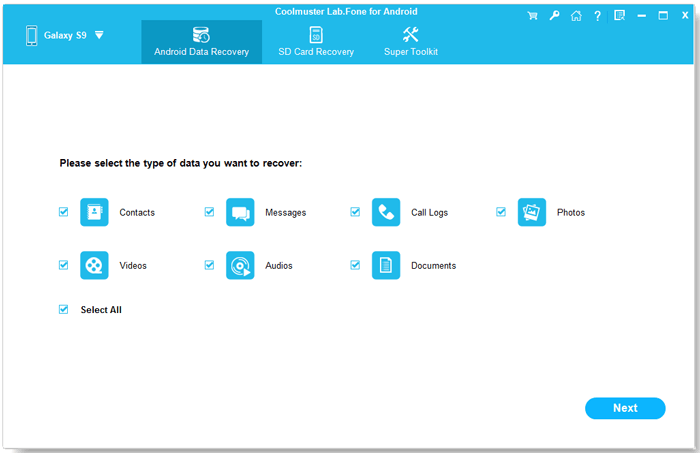
Android Data Recovery: tick the data types to scan, then Next.
Features
Recover deleted texts, contacts and call logs (rooted phones)
Coolmuster Lab.Fone for Android scans a rooted phone's internal memory and SIM card for deleted text messages, contacts and call logs, and shows them next to the existing ones, with a toggle to list only the deleted items. Recovered contacts keep names, numbers, emails, job titles and addresses.
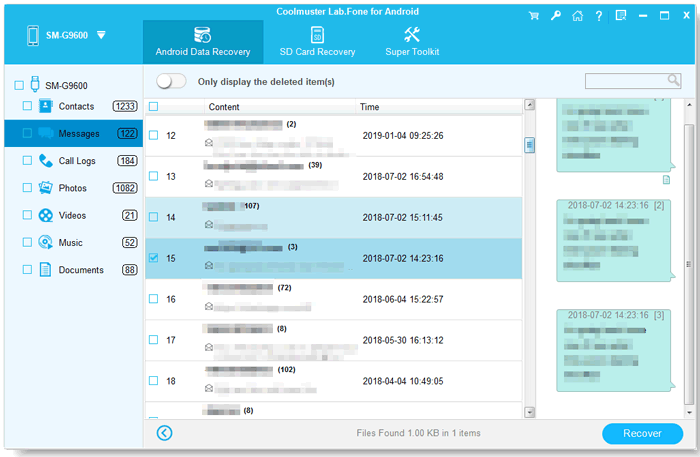
Scan results: messages by thread, with counts for every category on the left and Recover at the bottom.
Root permission is part of the scan
Coolmuster Lab.Fone for Android asks for superuser access during the scan. On a rooted phone you tap Grant or Allow in the root manager's prompt. Without that permission it can only scan what's left in the normal storage areas, not the deleted data.

The root prompt: the program waits for you to grant superuser access on the phone. This older screenshot shows a Nexus 5.
Quick Scan or Deep Scan for media
Coolmuster Lab.Fone for Android offers two scans for photos, videos, music and documents. Quick Scan is faster, and Deep Scan takes longer but finds more files, so run Deep Scan when Quick Scan comes up short.
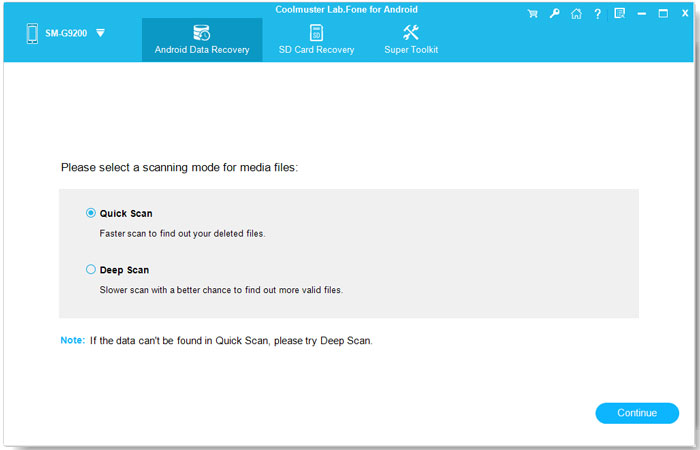
The scan mode choice for media files.
SD card recovery without root
Coolmuster Lab.Fone for Android's SD Card Recovery mode scans a memory card in a card reader for deleted photos, videos, music and documents. The phone doesn't need to be connected or rooted, which makes this the mode most people will actually use.
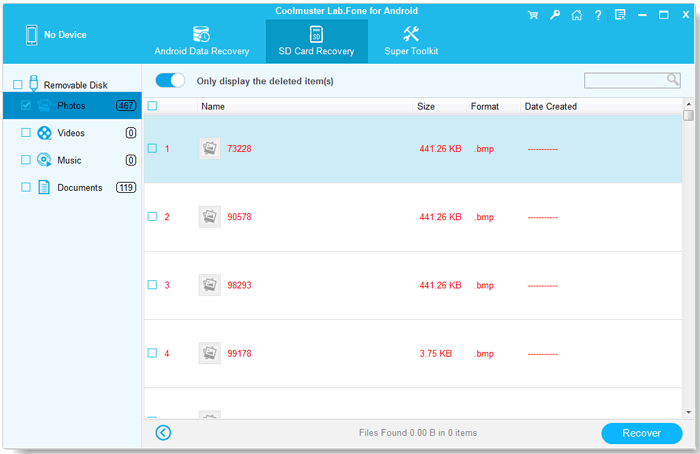
SD Card Recovery: deleted photos found on a removable disk.
Back up what's still there
Coolmuster Lab.Fone for Android can also export existing contacts, messages, call logs and media from the phone to your PC, so after a scare you can keep a copy before anything else goes missing.
Benefits
- Readable results. Recovered messages and contacts open in a web browser, with dates and numbers, so they're easy to print or share.
- Local and private. Everything happens between the phone, the card and your PC, with no upload to a recovery service.
- One license, several phones. The basic license covers 5 devices, useful in a family where more than one phone needs checking.
Real-World Uses
- Photos deleted from an SD card, or a card that was formatted by mistake: put it in a reader and run SD Card Recovery.
- A text thread deleted on a rooted phone that you need as evidence or as a memento.
- Contacts lost after a sync went wrong, on a phone that's already rooted.
- Checking an old phone with a memory card before you sell it or throw it away.
Who It's For, and Who Should Skip It
It's for two kinds of Android owners: people with an SD card that lost photos or videos, and people with a phone that's already rooted who want deleted messages or contacts back.
Skip it if your phone isn't rooted and you don't want to root it, since internal memory scans are where most of your texts and photos live today. Skip it too if you've done a factory reset, if your phone's screen is broken (you need to unlock it and turn on USB debugging), or if your photos were backed up to Google Photos, which keeps deleted items in its trash for a while at no cost. iPhone owners need a different program, such as Coolmuster iPhone Data Recovery.
Usage Guide
- Download the installer with the Download Free Trial button, install and launch Coolmuster Lab.Fone for Android on your PC.
- Connect the phone by USB and turn on USB debugging when the program asks. Let it install its driver if prompted.
- Choose Android Data Recovery, tick the data types and click Next. For media, pick Quick Scan or Deep Scan.
- Grant superuser permission on the phone when asked. If the phone isn't rooted, the program offers to scan the incomplete data it can reach without root.
- When the scan ends, switch on "Only display the deleted item(s)", tick what you want and click Recover.
- For a memory card, choose SD Card Recovery, insert the card in a reader, select the drive and click Next to scan.
Where it falls short
- Root is required for internal memory, and the FAQ admits rooting often fails.
- Internal-memory photos recover poorly. The FAQ says so, and one testimonial on Coolmuster's own page reports a Galaxy S6 photo scan that found nothing.
- The trial can't show results. You only find out what's recoverable after paying.
- Short refund window. Recovery products get 7 days, not 30, and the 1-year license renews unless you cancel.
- Some recovered photos may be damaged. Another testimonial on the vendor's page says "fairly some pics are broken."
What Users Say
Independent testing of Lab.Fone for Android is scarce. G2 has no reviews of it, and we didn't find a magazine test. The best evidence is the vendor's own testimonials, which to Coolmuster's credit include two critical ones, plus the company-wide Trustpilot score.
Coolmuster's product page testimonials
- "Great tool, I was able to get all of my lost information from my Android. Works good on my samsung Note. It's exactly what I need." Meeno
- "Generally speaking, the program works well and I also use it to regain my lost contacts. However, when I tried to scan the lost photos on my Samsung Galaxy S6, the program remind me there is no results. All my photos are saved in the device itself." Richard
- "Hmmm... I mean it is good in most aspects. But fairly some pics are broken. Anyway it helped me a lot to recover my data." Liliam
Coolmuster's review page: 4.9 from 197 reviews (vendor's own figure)
The newest reviews on the vendor's review page are one or two lines each, posted every week or so and very alike ("It helped me find lost files from my Android phone. The recovery steps are clear and easy to follow." Grace Taylor, September 17, 2026). They don't say which phone, whether it was rooted or what was recovered, so we don't give them much weight.
Trustpilot: 4.6 from 222 reviews (all Coolmuster products)
The score covers the whole company, and the visible reviews are mostly praise for quick support and refunds handled without fuss. We found none that names Lab.Fone for Android, so it says more about Coolmuster's service than about this program's recovery rate.
The pattern: contacts and SD card files come back for people, while photos in internal memory are the weak spot, and some recovered images are damaged. That matches what Coolmuster's FAQ says.
Comparisons
Coolmuster Lab.Fone for Android vs Coolmuster Android SMS + Contacts Recovery
Coolmuster calls Lab.Fone for Android the pro version of Android SMS + Contacts Recovery. The cheaper program covers texts and contacts only, while Lab.Fone adds call logs, photos, videos, music, documents and the SD card mode.
Coolmuster Lab.Fone for Android vs Coolmuster Android Assistant
Android Assistant manages and backs up what's on the phone now, with no root needed. Lab.Fone looks for what was deleted. If nothing is lost yet, Android Assistant is the better buy, so you have a backup next time.
Coolmuster Lab.Fone for Android vs a general SD card recovery tool
For a memory card alone, any general file recovery program can scan it in a card reader too. Lab.Fone's advantage is having the phone-side recovery of texts, contacts and call logs in the same package.
Editions and Pricing
All plans have the same features. Prices are for the Windows version and exclude VAT.
| Plan | Price | Term | Computers / devices |
|---|
| 1 Year | $49.95 | Renews yearly | 1 PC / 5 devices |
| Lifetime | $59.95 | One payment | 1 PC / 5 devices |
| Business 1 Year | $59.95 | Renews yearly | 3 PCs / 9 devices |
| Business Lifetime | $99.95 | One payment | 3 PCs / 9 devices |
| Business Lifetime | $299.95 | One payment | 1 PC / 30 devices |
A 1-year 30-device license ($199.95) and a 2-PC unlimited-device lifetime license ($499.95) are also sold. The Buy Now buttons on this page open the 1-year, 1-PC, 5-device license. A lifetime license is only $10 more if you think you'll need it again.
FAQs
Can Coolmuster Lab.Fone for Android recover deleted texts without root?
Usually not. Coolmuster Lab.Fone for Android needs root access to scan the phone's internal memory, where text messages are stored. Without root it can still recover media from an SD card.
Can Coolmuster Lab.Fone for Android recover data after a factory reset?
No. Coolmuster says a factory reset erases the data permanently, so no recovery is possible afterwards.
Does Coolmuster Lab.Fone for Android run on the phone itself?
No. Coolmuster Lab.Fone for Android is a desktop program for Windows (or Mac), and the phone connects to it by USB.
How many phones can I scan with one Coolmuster Lab.Fone for Android license?
The standard Coolmuster Lab.Fone for Android license covers 1 PC and 5 devices. Business licenses cover 9, 30 or unlimited devices.
What's the refund policy for Coolmuster Lab.Fone for Android?
Coolmuster Lab.Fone for Android has a 7-day money-back guarantee, because Coolmuster treats recovery tools differently from its other products. You request a refund by email to support@coolmuster.com with your order details.
Does the Coolmuster Lab.Fone for Android 1-year license renew automatically?
Yes. The 1-year license renews through the 2Checkout order system unless you cancel, and a reminder arrives 7 days before. Coolmuster says renewal charges are generally non-refundable.
Can Coolmuster Lab.Fone for Android recover WhatsApp messages?
Coolmuster Lab.Fone for Android doesn't list WhatsApp among its data types. Coolmuster sells a separate Android WhatsApp Recovery program for that.
System Requirements
- Windows 11, 10, 8 or 7
- 1 GHz processor (32 or 64 bit) or faster
- 256 MB RAM or more (1 GB recommended)
- 200 MB free disk space
- Android 6 or later, rooted for internal memory recovery
- A USB cable, and a card reader for SD Card Recovery
Conclusion
Coolmuster Lab.Fone for Android is worth $49.95 for a narrow group: people recovering photos and videos from an Android SD card, and owners of an already-rooted phone who need deleted texts, contacts or call logs back. The reason to buy it is that it handles both jobs in one simple program. The reason not to is just as clear: on an unrooted phone it can't reach the internal memory, the trial won't show you results before you pay, and the refund window is 7 days. Check whether your phone is rooted, or whether your lost files were on an SD card, before you buy.
Download Free TrialBuy Now