Coolmuster PDF Password Remover: Strip Owner Passwords from PDFs in a Batch
Coolmuster PDF Password Remover is a $19.95-a-year Windows program that removes printing, copying and editing restrictions from PDFs, up to 200 files at a time. It can also remove an open password, but only when you can type that password in.
You have a contract, a manual or a form that opens fine, yet Print is greyed out and you can't copy a line of it. That restriction comes from an owner password, and it's the case this tool handles without asking you for anything.
Quick facts
- Version: 2.3.3 for Windows (February 2, 2026)
- Developer: Coolmuster
- Platforms: Windows 11, 10, 8, 7 (the Mac edition is a separate product at version 2.1.18, from May 2020)
- PDF support: Adobe PDF 1.0 to 1.7
- Batch size: up to 200 PDFs at once
- Trial: free download, limits not published
- Price: $19.95 for one PC for one year at checkout, renewing automatically unless you cancel
- Refund: 30 days on one-year and lifetime licenses, 7 days on monthly ones
- What we checked: the trial installer from coolmuster.com (6.67 MB, server date February 2, 2026) and the $19.95 price on the order page on November 10, 2026. We read Coolmuster's specifications and user guide, but we didn't install the program or run it on our own files.
Before you buy
This is not a password cracker. If a PDF needs a password just to open and you don't know it, this program can't get you in. A small lock icon in the file list marks those files, and you must enter the correct open password. A cross icon means the file isn't supported. Only remove protection from documents you own or have permission to change.
Download Free TrialBuy Now
Overview
PDF Password Remover does one job. You load protected PDFs, pick an output folder and press Start, and it writes copies with the security removed. The program looks at each file and shows you which kind of protection it found, so you know before you start whether you'll need to type anything.
It's a standalone program: neither Adobe Reader nor Acrobat has to be installed, and because it runs on your PC your files aren't uploaded to a web service.
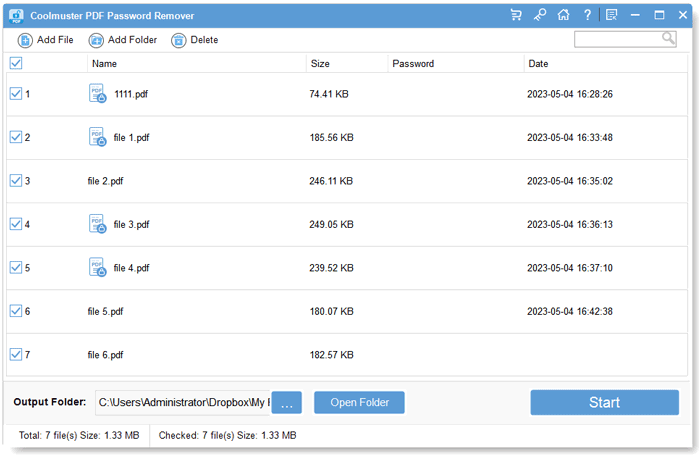
The file list with seven PDFs loaded. Files with a lock icon need their open password typed into the Password column.
Features
Removes owner passwords with no input from you
Coolmuster PDF Password Remover decrypts a file protected only by an owner password straight away. These are the PDFs you can read but can't print, copy from or edit, and no lock icon appears next to them in the list.
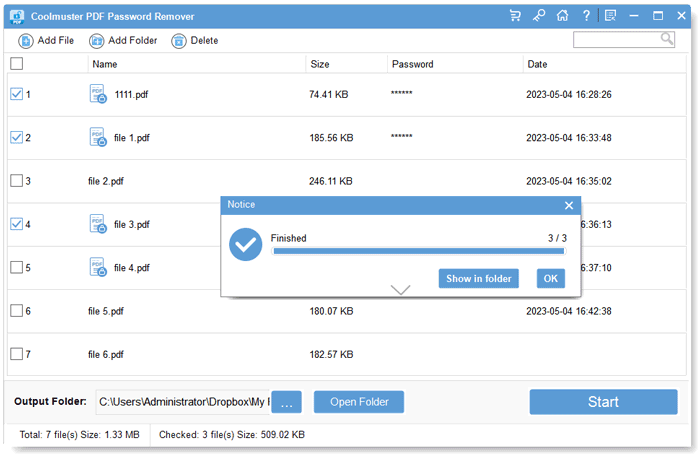
The Finished notice after three selected files, with a Show in folder button.
Removes open passwords you already know
PDF Password Remover can take the open password off a file if you enter it correctly, so you stop typing it every time. Click the lock icon, type the password, and the output copy opens without one.
Batch and single-file decryption
PDF Password Remover processes up to 200 PDFs in one run. You can add files with the Add File and Add Folder buttons or by dragging them in. To do just one, right-click it and choose Decrypt Selected.
Output you can work with
The copies PDF Password Remover writes can be printed, copied from, edited, annotated or fed into a converter. It doesn't change the content, it only removes the security settings.
Benefits
- You get a usable copy of your own locked document without paying for a full PDF editor.
- Nothing is uploaded, which matters for contracts and financial files.
- A folder of restricted reports takes one run instead of dozens of manual saves.
Real-World Uses
- Printing a manual whose owner password blocks printing.
- Copying figures out of a restricted report you wrote yourself and lost the password for.
- Taking the open password off bank statements you keep in your own archive, so they open without typing it.
- Clearing restrictions from a batch of PDFs before converting them to another format.
Who It's For, and Who Should Skip It
It's for anyone who regularly receives restricted PDFs they're entitled to use, and who wants a small offline tool for it.
Skip it if your problem is a forgotten open password: you need a password recovery tool that attacks the file, and this isn't one. Skip it too for a single document, since a one-month license still costs $9.95 and a PDF reader's print-to-PDF sometimes does the job when printing is allowed.
Usage Guide
- Download the installer from the Download Free Trial button, install it and launch PDF Password Remover.
- Click Add File or Add Folder, or drag PDFs into the window.
- For any file showing a lock icon, click it and type the open password.
- Choose where to save the results with the button next to Output Folder.
- Click Start, or right-click one file and choose Decrypt Selected, then use Show in folder to see the results.
Where It Falls Short
- No password recovery. An unknown open password stops the job.
- The Windows version is current, but the Mac edition's last listed update is from May 2020 and targets macOS 10.15.
- PDF 1.0 to 1.7 is the stated range, so files that use later security may show the cross icon for unsupported files.
- One customer complains that the tool doesn't automatically clear the password after startup.
What Users Say
Coolmuster's site shows customer reviews, but it also runs a "Win Free Coolmuster License Code" offer for writing one, and many entries are short and unspecific. Treat them as a sign of what buyers care about, not as independent testing.
Reviews on Coolmuster's own site
- Saves time and effort "Could finally copy the information I need into my notes." FISDTE, November 5, 2026
- smooth PDF decryption process. "Suitable for unlocking standard PDF files." Agdk Dhb, October 22, 2026
- It consumes very little memory. "The entire operation is very simple; the only downside is that the tool does not automatically clear the password after startup." EchoFern+, September 14, 2026
- Concise and useful "Although the interface is simple, there are almost no unlocking restrictions" uRazekur, July 21, 2026
- Files do not need to be uploaded to external servers "Meet basic PDF unlocking requirements+easy-to-use+ad free." Idke, May 18, 2026
- Surprised by the smooth progress of the entire process "It does not require the installation of additional software such as Adobe Reader or Acrobat." McAllister, February 5, 2026
Coolmuster's page shows 36 reviews. The recurring points are simplicity, offline use and not needing Adobe software. We found no Softpedia, Trustpilot, Capterra or G2 review of this product, so there's little outside opinion to weigh against those.
Comparisons
PDF Password Remover vs PDF Locker
These are opposites. PDF Password Remover takes protection off, and Coolmuster PDF Locker adds it, with a user password, an owner password and a choice of encryption levels.
PDF Password Remover vs a free print-to-PDF
If a file allows printing, printing it to Microsoft Print to PDF makes an unrestricted copy for free, one file at a time. Many restricted PDFs block printing, and a batch of them is where a paid tool earns its $19.95.
Editions and Pricing
| Seats | 1 month | 1 year | Lifetime |
|---|
| 1 PC | $9.95 | $19.95 | Not on the order page |
| 5 PCs (business) | $19.95 | $29.95 | $49.95 |
| 10 PCs (business) | $29.95 | $39.95 | $89.95 |
Prices are for the Windows version and exclude VAT. One-year and one-month licenses renew automatically until you cancel. The one-year plan includes free upgrades for that year. Licenses are delivered by email.
FAQs
Can Coolmuster PDF Password Remover open a PDF when I've forgotten the password?
No. Coolmuster PDF Password Remover needs the correct open password for a file marked with a lock icon. It removes that password once you supply it, but it doesn't guess or recover it.
Does PDF Password Remover need Adobe Acrobat?
No. PDF Password Remover is a standalone program and doesn't need Adobe Reader or Acrobat on the PC.
Does the one-year PDF Password Remover license renew automatically?
Yes. The one-year PDF Password Remover license at $19.95 renews automatically after 12 months, and Coolmuster's order page says you get a notification email before the renewal date and can cancel at any time. It includes free upgrades during that year.
What is the refund period for PDF Password Remover?
PDF Password Remover has a 30-day money-back guarantee on one-year and lifetime licenses and 7 days on monthly licenses. Orders can't be canceled once payment has gone through, because the license is issued right away, and a refund goes through support@coolmuster.com with your order ID or receipt.
Is there a Mac version of PDF Password Remover?
Yes, but it's a separate product with its own license. Coolmuster lists its Mac version as 2.1.18, last updated in May 2020 for macOS 10.15, so check it against your macOS version first.
How do I activate PDF Password Remover after buying?
PDF Password Remover uses the same installer for the trial and the full version. It says Trial until you enter the license code from your order email, which is normal for Coolmuster products.
System Requirements
- Windows 11, 10, 8 or 7
- Intel or AMD processor faster than 750 MHz
- 512 MB RAM or more
- 1 GB of free disk space
Conclusion
Coolmuster PDF Password Remover is worth $19.95 if you handle restricted PDFs you have a right to use, and especially if you handle them in batches. It's small, offline and simple.
The one reason to buy it is batch removal of owner passwords. The main reason not to is a lost open password, which it can't help with. Try the trial on one of your own files first and see which icon it shows.
Download Free TrialBuy Now