Coolmuster Android Assistant: Manage and Back Up an Android Phone From Your Windows PC
Coolmuster Android Assistant is a $29.95-a-year Windows program that lets you back up, export, edit and restore an Android phone's contacts, text messages, photos, videos, music and apps from your PC. A lifetime license costs $39.95. It's for Android owners who want a local copy of their phone on their own computer, or who would rather sort contacts and answer texts with a keyboard than a thumb. It handles plain SMS only, not MMS or RCS chats, and it backs up apps without their data.
Quick facts
- Version: 6.4.56 for Windows, released October 20, 2026 (Mac version 6.1.22, sold separately)
- Developer: Coolmuster
- Runs on: Windows 11, 10, 8 and 7
- Phones: Android 6.0 and up, including Android 17, from Samsung, Xiaomi, OPPO, OnePlus, vivo, Motorola, Google Pixel and other brands
- Connection: USB cable, or Wi-Fi with the free Android Assistant app on the phone
- Price: $29.95 a year for 1 PC (renews automatically), or $39.95 for a lifetime license
- Trial: free download that scans and previews your phone's data, but can't export, import or back up
- Guarantee: 30 days money back on 1-year and lifetime licenses
- What we checked: we downloaded the 25.5 MB Windows installer from coolmuster.com and matched its date to the vendor's release notes for version 6.4.56, and confirmed the order page charges $29.95 for the 1-year, 1-PC license with a 12-month renewal on November 8, 2026. We didn't connect a phone or run a backup.
Before you buy: know what "messages" means here
Coolmuster Android Assistant reads SMS text messages only. MMS picture messages, RCS chats (Google Messages' chat features) and apps such as WhatsApp aren't included, and Coolmuster's FAQ says so. The FAQ also has an entry for the program detecting received messages but not sent ones.
Run the free trial first. It scans and previews everything without a license, so you can see exactly which messages, contacts and photos it finds on your phone before paying.
Download Free TrialBuy Now
Overview
Android Assistant turns your PC into a control panel for the phone. Once it connects, the left side lists Contacts, Call Logs, SMS, Music, Videos, Photos, Books and User Apps, with a count for each. Click a category and you get a list you can tick, export, delete or add to, the same way you'd work with files in a folder.
The second tab, Super Toolkit, holds the one-click Backup and Restore. Backup copies everything, or just the types you tick, into a folder on your PC. Restore puts a backup back onto the same phone or a different Android phone. Nothing goes to a cloud account, so there's no storage plan to pay for and no upload to wait on.
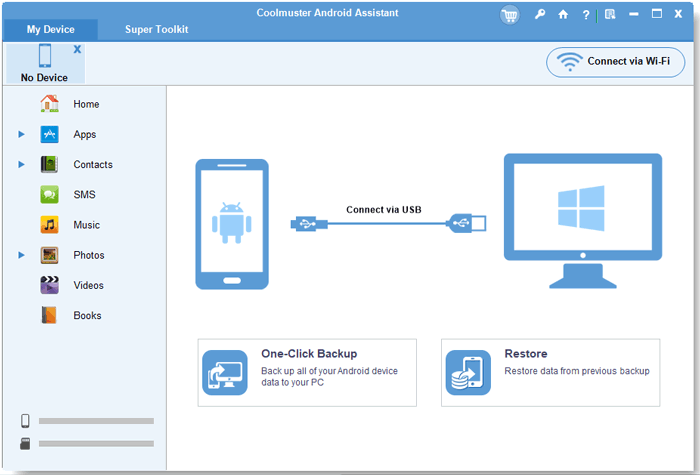
The start screen: connect by USB cable with USB debugging on, or click Connect via Wi-Fi.
Features
Back up the whole phone to your PC in one click
Coolmuster Android Assistant's Super Toolkit backs up apps, contacts, call logs, messages, music, photos, videos and books to a folder you choose on your PC, showing the count and total size before it starts. Restore puts a backup back onto any Android phone, which makes it handy when you change phones or reset one.
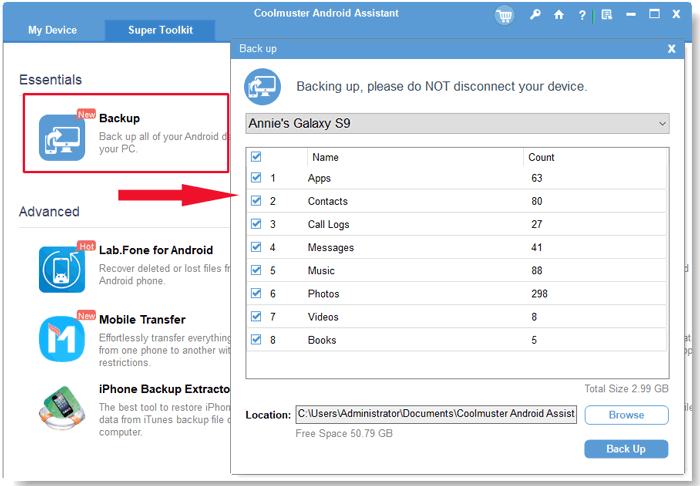
Super Toolkit's Backup: tick the data types, pick a folder, click Back Up.
Export, send and reply to text messages from the desktop
Coolmuster Android Assistant lists your SMS threads and lets you export them as HTML (plain, by date, or as chat bubbles), TEXT, CSV, BAK or XML. You can also type and send new texts, mass-text a group, resend, forward and delete messages from the PC keyboard.
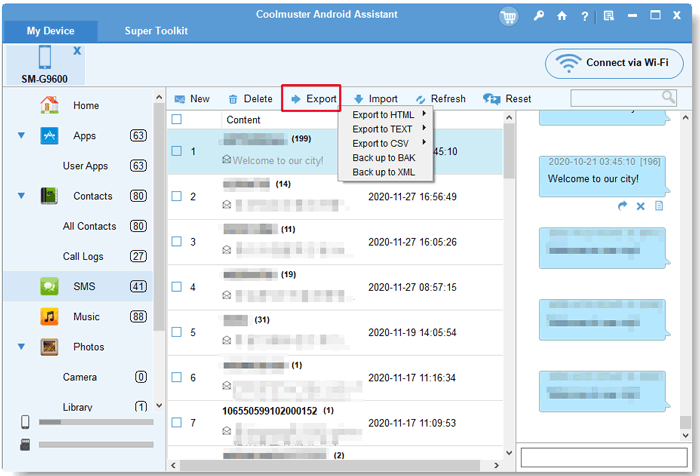
The SMS view with Export to HTML open: four HTML layouts, plus text, CSV and backup formats.
Edit and export contacts, with Outlook sync
Coolmuster Android Assistant adds, edits, deletes and groups contacts on the PC, and exports them to CSV, HTML, VCF, BAK or XML. It can also sync contacts between the phone and Outlook. Call logs export as XML or HTML and can be restored or cleared.
Install, uninstall and back up apps
Coolmuster Android Assistant's User Apps list shows each app's version, size and install date. You can batch-install APK files from your PC, uninstall apps in bulk and export the APKs as a backup. The app's own data, such as WhatsApp or LINE chats, isn't included.
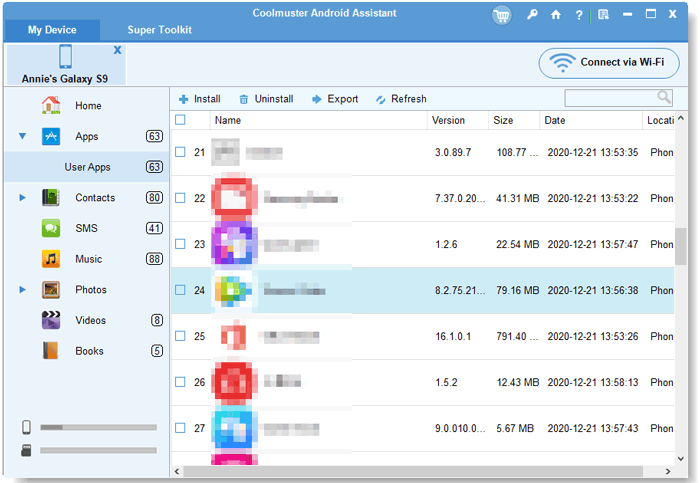
User Apps: version, size and date for each app, with Install, Uninstall and Export at the top.
Photos, videos, music and books
Coolmuster Android Assistant shows camera photos and albums, videos, music and e-books, and moves them between the phone and the PC in either direction. You can create albums, delete duplicates and take a screenshot of the phone's screen from the PC.
USB or Wi-Fi, and more than one phone at once
Coolmuster Android Assistant connects by USB cable with USB debugging turned on, or over Wi-Fi: you install the Android Assistant app on the phone and scan a QR code, with phone and PC on the same network. It can manage several Android phones connected at the same time.
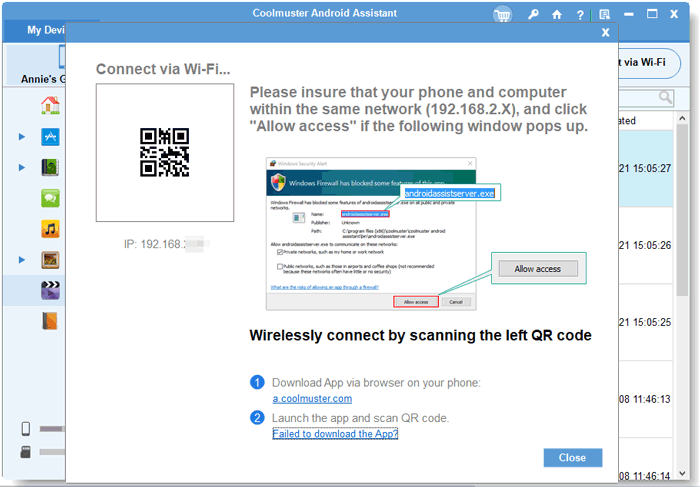
Wi-Fi connection: scan the QR code with the phone app, and allow the firewall prompt on Windows.
Benefits
- A copy you control. Your backup is a folder on your own drive, which you can copy to an external disk, with no subscription to a cloud service.
- Readable exports. HTML and CSV files open on any computer, so a message archive or contact list is still useful years later without the program.
- Keyboard instead of thumbs. Cleaning up hundreds of contacts or old texts is far quicker with a mouse and a big screen.
Real-World Uses
- Before a factory reset or repair. Back up the phone to the PC, hand it in, and restore when it comes back.
- Moving to a new Android phone. Back up the old one and restore it to the new one, including the apps (without their data).
- Keeping text records. Export a landlord, business or legal SMS thread to HTML or CSV with dates, for printing or filing.
- Clearing space. Move years of camera photos and videos to the PC and delete them from the phone in one pass.
Who It's For, and Who Should Skip It
It suits Windows users with an Android phone who want a local backup and easy exports, especially of contacts, SMS and photos, and anyone who prefers working on a PC.
Skip it if you mainly want to save WhatsApp or other chat apps (it doesn't read app data), if most of your conversations are RCS chats, or if you have an iPhone, which needs Coolmuster iOS Assistant instead. If all you want is photos and contacts synced automatically, Google's own backup and Google Photos do that for free in the cloud. And it can't help with a phone whose screen is broken or locked, because you must unlock the phone and approve the connection.
Usage Guide
- Download the installer from the Download Free Trial button, run it and launch Coolmuster Android Assistant.
- Connect your phone by USB, turn on USB debugging when the program asks, and tap Allow on the phone. The program installs its small companion app on the phone and asks you to grant it access.
- Or click Connect via Wi-Fi, install the Android Assistant app on the phone, and scan the QR code with phone and PC on the same network.
- Browse a category on the left, tick items and use Export, Import, New or Delete at the top.
- For a full backup, open Super Toolkit, click Backup, tick the data types and choose a folder. Use Restore to put a backup back on a phone.
- To register, click the key icon and enter the licensed email and registration code from your order email.
Where it falls short
- SMS only. MMS, RCS and chat apps aren't supported, and the FAQ lists exporting messages as PDF, deleting duplicate contacts, managing notes and calendars, and browsing the phone's file system or SD card as things it can't do yet.
- Apps without their data. It backs up APKs, not game saves, logins or chat history.
- Known bugs in the FAQ. Coolmuster's FAQ has entries for crashes while loading SMS, for videos that won't export, and for restores that stop at the app step because of app permissions.
- Mac version lags. The FAQ says SMS management in the Mac version has a problem the team is still working on, and that the Mac version supports OS X 10.9 to 10.14, while the tech spec says 10.10 or later. This page is about the Windows version.
- Subscription by default. The $29.95 license renews every year unless you cancel, and Coolmuster's refund FAQ calls renewal charges generally non-refundable.
What Users Say
There's little independent testing of Android Assistant. We found one hands-on magazine review, a set of Trustpilot reviews that mention it by name, and the vendor's own testimonials.
Beebom: hands-on review (Hamlin Rozario, October 2017)
Beebom's reviewer installed the program and backed up his phone. He liked the setup: "Above everything that Coolmuster Android Assistant has to offer, what I personally enjoyed the most is its ease of use."
On the design: "the user interface is quite basic and although it doesn't have all the bells and whistles like several similar software, it's simple enough so that users can easily figure out what they're doing."
And on the trial: "the limitations are pretty annoying as it only lets you scan and preview the data."
Trustpilot: 4.6 from 222 reviews (all Coolmuster products)
The score covers the whole company. Most reviews praise quick, helpful support (several name the same support agent). Reviews that mention Android Assistant are mixed:
- Randolph E.S. Pieternella, 5 stars, September 2021: "I was able to connect my Samsung Galaxy A01 Smartphone to the Coolmuster Android Assistant" (after help from support).
- Geoff, 5 stars, September 2022, titled "Coolmuster Android Asst SMS Limitations": "I purchased the CoolMuster Android Assistant primarily to back up my text messages," but it "only exported the received side of conversations."
- John Himmelstrup, 5 stars, November 2022: "I purchased a program that I use for transferring folders and SMS from my MB phone to my laptop."
- Independent_forever, 1 star, June 2026: "Android assistant software doesn't work well at all."
- Tim Dewever, 5 stars, December 2025, on a renewal he forgot to cancel: "I had an automatic renawal partly due to my own tardiness in cancelling my subscription" (support sorted it out).
Coolmuster's website: 5.0 from 240 reviews (vendor's own figure)
These appear on the vendor's own site, so treat them as a friendly sample. The newest dozen are one-line, near-identical comments, so we quote the longer testimonials from the product page instead:
- "I've been using Android Assistant for a few months now. And I can honestly say it is much better than any other management software out there." Marian
- "Works. Export & import text/sms, photos, videos, docs, etc, between my Samsung Android & Windows 10 64 bit pc. Been using lots for the past 12 months. Very happy with it." Arthur Cristian
- "Coolmuster has made it extremely easy to transfer files from my android to my PC. It's step by step process is easy to follow and I recommend it to anyone looking for help in this area." June
The pattern: people like how easy it is to connect and back up, and Coolmuster's support gets steady praise. The complaints are about text messages (missing sent messages, unsupported message types), a 1-star "doesn't work well", and a trial that shows data but won't save any. Test your own phone's messages in the trial before you buy.
Comparisons
Coolmuster Android Assistant vs Coolmuster Android Backup Manager
Both come from Coolmuster. Android Backup Manager only does the one-click backup and restore. Android Assistant includes the same backup in its Super Toolkit and adds browsing, editing and exporting individual contacts, messages, photos and apps, plus sending texts from the PC, so it's the better buy unless backup is truly all you need.
Coolmuster Android Assistant vs Google's built-in backup
Google's backup is free and automatic but lives in your Google account, counts against its storage, and doesn't give you files you can open on a PC. Android Assistant is a manual, local copy you can read, print and keep. Many people will want both.
Windows version vs Mac version
Coolmuster sells a separate Mac version at the same prices. On November 8, 2026 the Windows version (6.4.56) was more recent than the Mac version (6.1.22), and the FAQ flags SMS problems on the Mac, so Windows is the safer choice if you have both.
Editions and Pricing
All plans have the same features and free updates while the license is valid. Prices are for the Windows version and exclude VAT.
| Plan | Price | Term | Computers |
|---|
| 1 Month | $19.95 | Renews monthly | 1 |
| 1 Year | $29.95 | Renews yearly | 1 |
| Lifetime | $39.95 | One payment | 1 |
| Business 1 Year | $39.95 / $49.95 | Renews yearly | 5 / 10 |
| Business Lifetime | $59.95 / $99.95 | One payment | 5 / 10 |
The Buy Now buttons on this page open the 1-year, 1-PC license. If you'll keep using it beyond a year, the lifetime license costs only $10 more.
FAQs
Does Coolmuster Android Assistant work with Samsung Galaxy and Android 17 phones?
Coolmuster Android Assistant supports Android 6.0 and later, and Coolmuster's tech spec lists Android 17 and current Samsung Galaxy S, Z Fold and Z Flip models. Older Android versions below 6.0 aren't supported, and since not every model is tested, the free trial is the way to confirm your phone.
Can Coolmuster Android Assistant transfer data directly from one phone to another?
Coolmuster Android Assistant only copies between a phone and the PC. You can back up one phone and restore the backup to another, but for a direct phone-to-phone copy Coolmuster sells a separate program, Mobile Transfer.
Does Coolmuster Android Assistant back up WhatsApp chats?
No. Coolmuster Android Assistant backs up the WhatsApp app itself but not its chats or other app data.
What happens when the Coolmuster Android Assistant 1-year license ends?
The 1-year license renews automatically through the 2Checkout order system unless you cancel it first, and you get a reminder email 7 days before. Coolmuster says renewal charges are generally non-refundable, so cancel in advance if you don't want another year.
Can I get a refund on Coolmuster Android Assistant?
Coolmuster Android Assistant's 1-year and lifetime licenses have a 30-day money-back guarantee, subject to Coolmuster's refund policy (monthly licenses get 7 days). You request it by email to support@coolmuster.com with your order ID, and approved refunds usually arrive within 3 to 7 business days.
Can I use one Coolmuster Android Assistant license on two computers?
A standard Coolmuster Android Assistant license covers 1 PC. For more computers, the Business licenses cover 5 or 10 PCs.
Can Coolmuster Android Assistant read a phone with a broken screen?
Usually not. Coolmuster Android Assistant needs you to unlock the phone, turn on USB debugging and approve the connection. Coolmuster says there's a small chance only if all of that was already done on that computer before the screen broke.
System Requirements
- Windows 11, 10, 8 or 7
- 1 GHz processor (32 or 64 bit) or faster
- 256 MB RAM or more (1 GB recommended)
- 200 MB free disk space
- Android 6.0 or later
- A USB cable, or the phone and PC on the same Wi-Fi network
Conclusion
Coolmuster Android Assistant is worth $29.95 a year, or better $39.95 once, if you're a Windows user who wants a real, local backup of an Android phone and easy exports of contacts, texts and photos. The reason to buy it is that it puts all of a phone's everyday data on your PC in readable files with very little setup. The reason not to is its narrow idea of "messages": no MMS, no RCS, no chat apps, and a few open bugs around SMS. Run the free trial, check that your messages appear, and then decide.
Download Free TrialBuy Now