Coolmuster iPhone Backup Extractor for Mac: Open an iPhone Backup on Your Mac and Take Out Only What You Need
Coolmuster iPhone Backup Extractor for Mac is a $19.95-a-year macOS app that opens the iPhone, iPad and iPod touch backups that iTunes or Finder saved on your Mac and copies the items you choose to a folder, without the phone connected. It can recover deleted contacts, messages and SMS attachments from a backup, and exports photos, notes, WhatsApp and other data that the backup still holds.
Apple's own tools only let you restore a whole backup over a device. If the phone is lost or broken, or you just want three photos and one conversation out of a backup from last spring, this is the cheaper way in.
Quick facts
- Version: 4.0.8 for Mac, released December 22, 2025
- Developer: Coolmuster
- Runs on: macOS 10.10 or later. Intel build, so Apple silicon Macs run it through Rosetta 2
- Reads: iTunes and Finder backups on the Mac, including encrypted ones when you know the password
- Doesn't read: the phone itself or iCloud
- Price: $19.95 for one year on one Mac, $29.95 lifetime
- Trial: free download that scans and previews backups. Saving needs a license
- What we checked: Mac version 4.0.8 in the vendor release notes and inside the downloaded app's Info.plist, a 6.1 MB disk image from the vendor (file dated December 22, 2025) with Intel-only program files, checkout price $19.95 on November 11, 2026. We worked from the vendor's Mac manual and screenshots and didn't extract a real backup.
Before you buy
- You need a backup on this Mac (or a copied backup folder). If there's no backup, this app has nothing to read.
- Only contacts, messages and SMS attachments are listed as recoverable when deleted. Everything else must still be in the backup.
- Coolmuster lists Backup Extractor among its recovery products: a 7-day guarantee on paper, but its refund policy says refund requests for recovery products will not be approved. Let the free scan show you the items first.
- The one-year plan renews automatically until you cancel it.
Download Free Trial Buy Now
Overview
Backup Extractor for Mac is the backup-only member of Coolmuster's iPhone recovery family. Its sidebar has just two entries, Recover from iTunes Backup File and Toolkit, and the workflow is three steps: pick a backup, pick data types, preview and save. It shares its scanning engine and interface with the larger iPhone Data Recovery for Mac, minus the device and iCloud modes.
The December 2025 release updated the interface, added fourteen interface languages from Chinese to Dutch, and supports macOS 10.10 and later.
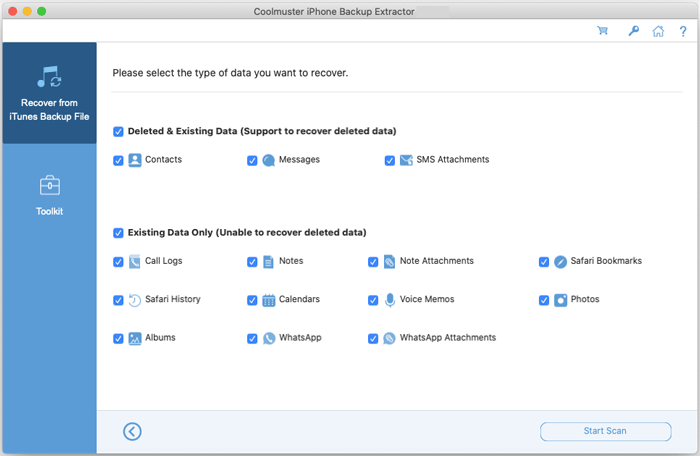
Data type selection: contacts, messages and SMS attachments under "Deleted & Existing Data", eleven more types under "Existing Data Only".
Features
Coolmuster iPhone Backup Extractor for Mac finds your backups for you
Coolmuster iPhone Backup Extractor for Mac looks in the Mac's default backup folder and lists every backup with its device name, date, size, iOS version and model, so you can pick the one made before the data went missing. A Select button opens a backup stored on an external drive or another folder, and encrypted backups open after you type the backup password.
Recovers deleted texts and contacts that a backup still holds
Coolmuster iPhone Backup Extractor for Mac searches the backup's databases for deleted contacts, messages and SMS attachments as well as existing ones, and marks the deleted entries in the list. That only works if the backup was made while the item, or its traces, were still on the phone.
Exports photos, WhatsApp, voice memos and call logs
Coolmuster iPhone Backup Extractor for Mac also copies call logs, notes with attachments, Safari bookmarks and history, calendars, voice memos, photos, albums, WhatsApp chats and WhatsApp attachments that exist in the backup. Photos and attachments are shown as thumbnails; text items are shown as lists with dates.
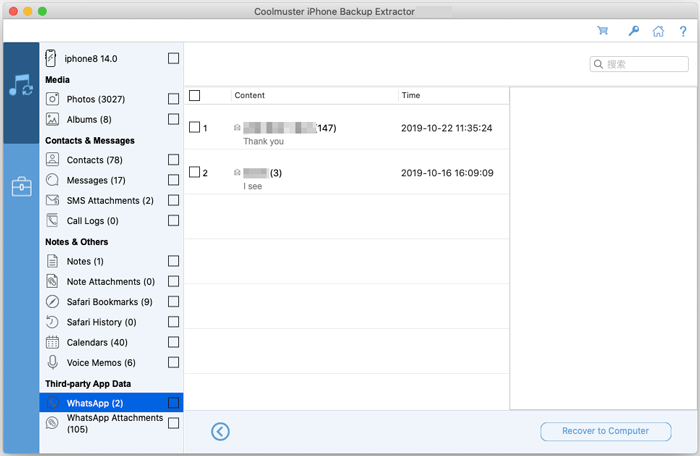
WhatsApp chats inside an iOS 14 backup, with counts for every category in the left column.
Selective saving instead of a full restore
Coolmuster iPhone Backup Extractor for Mac lets you tick single items or whole categories and click Recover to Computer. Nothing is written to a phone, so your current device stays exactly as it is.
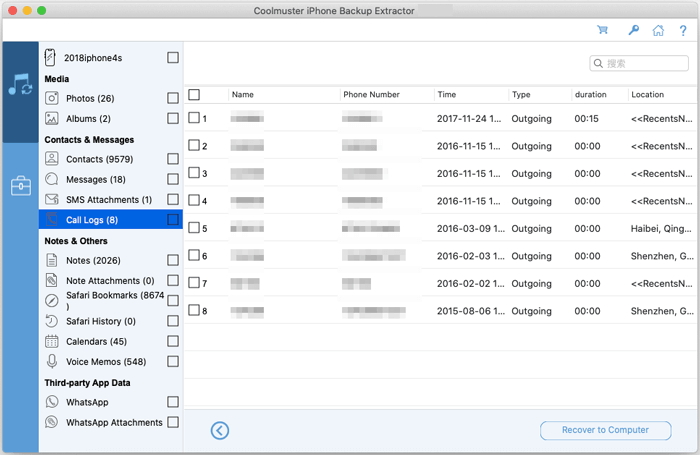
Call logs from an old iPhone 4s backup, with number, time, direction, duration and location columns.
Benefits
- At $19.95 it's the cheapest Coolmuster way to read an iPhone backup on a Mac.
- It works when the phone is lost, broken or already wiped, as long as the backup survived.
- Old backups stop being opaque folders and become files you can open, search and archive.
Real-World Uses
- Your iPhone was stolen, and the only copy of your photos and voice memos is a Finder backup on the MacBook.
- You need a text conversation for a dispute, and it's in a backup from before you deleted it.
- You're clearing out years of old device backups and want to keep the WhatsApp attachments first.
- A relative's old iPhone backup holds contacts you want, but you don't want their data on your phone.
Who It's For, and Who Should Skip It
It's for Mac users who have an iPhone backup on the computer and want specific items out of it, at the lowest price in Coolmuster's line.
Skip it if there's no local backup: Coolmuster iPhone Data Recovery for Mac also scans the phone and iCloud. Skip it too if you back up only to iCloud, or if you want the data back on your iPhone rather than on the Mac.
Usage Guide
- Open the .dmg, drag Coolmuster iPhone Backup Extractor into Applications and launch it (Apple silicon Macs may first install Rosetta 2).
- Choose your backup from the list, or click Select to browse to one in another folder, and click Start Scan. Enter the password if the backup is encrypted.
- Tick the data types you want and click Start Scan again.
- Browse the categories and tick the items you need.
- Click Recover to Computer and choose a folder on the Mac. This step needs a license.
Where it falls short
- No native Apple silicon build: the Mac app is Intel code only.
- A forgotten encrypted-backup password stops it; it doesn't crack passwords.
- One reviewer on Coolmuster's page asks why it didn't detect all backups, and another wished it could merge recovered data back into the iPhone.
- The one-Mac license can't be moved to a Windows PC; the Windows edition is sold separately.
What Users Say
We couldn't find an independent review of the current Mac edition; its Product Hunt page has no written reviews. The comments below come from Coolmuster's review page, which covers the Windows and Mac editions together, and from Trustpilot's company page. Coolmuster offers free licenses for reviews, so read its own page with that in mind.
Praise on Coolmuster's review page (89 reviews)
"My old backup finally became useful for something. Wish I'd found this tool sooner."
Ethan Parker, October 19, 2026
"I only needed a few photos, so the preview-and-select feature was super handy."
Mark Wilson, September 4, 2026
"I liked being able to check backup contents before restoring anything."
William Davis, July 17, 2026
"The preview feature helped me find exactly what I needed."
Christopher Moore, June 18, 2026
Questions and complaints on the same page
"Found most contacts, but why didn't it detect all backups?"
David Miller, April 3, 2026
"Efficient recovery from iTunes backup. Can it merge recovered data with current iPhone content?"
Matthew Collins, May 9, 2026
"I wonder if more file types can be supported."
Robert Turner, July 31, 2026
Trustpilot, for Coolmuster as a company
Coolmuster has a 4.6 out of 5 TrustScore from 223 reviews (read through a page summarizer), mostly about support. One mixed review sums up the common experience:
"Although the software did not meet me needs there support was responsive and prompt."
Chris Rotella, October 2, 2025
Buyers like the preview and pick-what-you-need approach. The complaints are about backups that don't show up, and that the data lands on the computer rather than back on the phone.
Comparisons
Backup Extractor for Mac vs Coolmuster iPhone Data Recovery for Mac
iPhone Data Recovery for Mac ($49.95 a year) reads the same backups and adds a direct device scan and iCloud downloads. Buy Backup Extractor only if the backup on your Mac is where the data is.
Backup Extractor for Mac vs Coolmuster iPhone WhatsApp Recovery for Mac
WhatsApp Recovery for Mac ($35.95 a year) focuses on WhatsApp and also scans the phone. For WhatsApp chats that are in a Mac backup, Backup Extractor already exports them for less.
Backup Extractor for Mac vs restoring the backup in Finder
A Finder restore is free but overwrites the phone with the whole backup. Backup Extractor costs money and leaves your phone alone.
Editions and Pricing
| Plan (Mac) | Price | Term | Macs |
|---|
| 1 Year | $19.95 | 1 year, renews automatically | 1 |
| Lifetime | $29.95 | One payment, lifetime updates | 1 |
| 1 Year | $29.95 | 1 year, renews automatically | 5 |
| Lifetime | $49.95 | One payment, lifetime updates | 5 |
| 1 Year | $39.95 | 1 year, renews automatically | 10 |
| Lifetime | $89.95 | One payment, lifetime updates | 10 |
The lifetime license is only $10 more than a year, so it's the better buy unless you need it for one job and will cancel.
FAQs
Does Coolmuster iPhone Backup Extractor for Mac work with Finder backups?
Yes. Coolmuster iPhone Backup Extractor for Mac reads the backups in the Mac's default backup folder, which is where both iTunes and Finder save them, and can open a backup copied to another folder.
Can Coolmuster iPhone Backup Extractor for Mac read iCloud backups?
No. Coolmuster iPhone Backup Extractor for Mac reads only backups stored on the computer. Coolmuster's iCloud Backup Recovery and iPhone Data Recovery handle iCloud.
Does Coolmuster iPhone Backup Extractor for Mac run natively on Apple silicon?
No. Version 4.0.8 contains Intel program code only, so M-series Macs run Coolmuster iPhone Backup Extractor through Rosetta 2.
Can Coolmuster iPhone Backup Extractor for Mac open a backup made on a Windows PC?
Coolmuster iPhone Backup Extractor for Mac has a Select button for backups outside the default folder, so a backup folder copied from a PC can be pointed to. Coolmuster's manual doesn't address PC-made backups specifically, so check it in the free scan.
Does the lifetime license of Coolmuster iPhone Backup Extractor for Mac include updates?
Yes. Coolmuster's Mac order page lists the lifetime license with lifetime free upgrades, and the one-year license with one year of upgrades.
Is a Windows version of Coolmuster iPhone Backup Extractor available?
Yes, sold separately with its own license. A Mac license doesn't activate the Windows program.
System Requirements
- macOS 10.10 or later (Intel Mac, or Apple silicon with Rosetta 2)
- Intel Core 1 GHz or faster, 1 GB RAM, 1 GB free disk space
- An iTunes or Finder backup of an iPhone, iPad or iPod touch (iOS 5 through iOS 27)
Conclusion
Worth it if you have an iPhone backup on your Mac and need a few things out of it without restoring the phone. At $19.95 a year or $29.95 for life it's cheap, and the free scan shows exactly what's in the backup before you pay.
The reason not to buy is when there's no local backup, or the data lives only on the phone or in iCloud. Then you need iPhone Data Recovery for Mac instead.
Download Free Trial Buy Now