Coolmuster Android SMS + Contacts Recovery: Get Back Deleted Texts and Contacts on a Rooted Phone
Coolmuster Android SMS + Contacts Recovery is a $35.95-a-year Windows program that scans an Android phone over USB for deleted text messages and contacts and saves them to the PC. It only works on deleted data if the phone is rooted, which most people's phones aren't.
That one requirement decides whether this page is worth your time. If you've rooted your phone, or you're willing to, read on. If not, the tool can't reach your deleted messages.
Quick facts
- Version: 6.2.10 for Windows, released August 7, 2026
- Developer: Coolmuster
- Works with: Android 6 and later, up to Android 17
- Covers: contacts and SMS, with attachments, from phone memory and SIM card
- Price: $35.95 for one year (3 devices on 1 PC), $45.95 lifetime
- Trial: free download for scanning and previewing
- What we checked: Windows version 6.2.10 in the vendor release notes, 26 MB installer from the vendor (file dated August 7, 2026), checkout price $35.95 on November 10, 2026. We worked from the vendor manual and its screenshots and did not root a phone to run a recovery.
Before you buy
- Root access is required. The vendor's manual says so at the first step: without it the program can't scan for your contacts and SMS. Rooting can void a warranty and on many phones wipes the data you're trying to rescue, so think hard before you do it.
- It covers only contacts and text messages. For call logs and media, look at Coolmuster Lab.Fone for Android.
- Coolmuster's refund policy says refund requests for recovery products will not be approved, even though the product page advertises a 30-day guarantee.
- The one-year plan renews automatically until you cancel it.
Download Free Trial Buy Now
Overview
Connect a phone by USB, enable USB debugging, let the program install its driver and companion app, and pick Contacts, Messages or both. After a scan it shows both deleted and existing items, with deleted ones in red, and lets you tick what you want to save as HTML or XML.
A second use needs less drama: saving the messages and contacts that still exist to your PC as readable files. The vendor's site also advertises recovery from internal memory and SIM cards.
Features
Coolmuster Android SMS + Contacts Recovery shows deleted items alongside existing ones
After the scan, deleted contacts and messages appear in red in the same list as current ones, and a switch filters to deleted items only. Contact details include name, phone number, address, email, company and job title. Messages include attachments, according to the vendor.
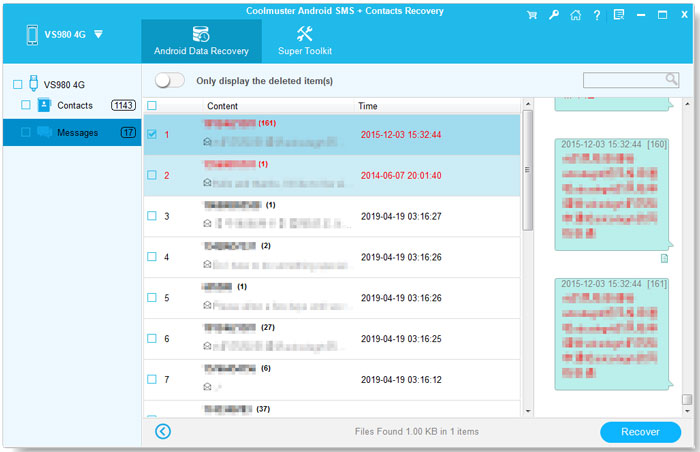
Message preview, with deleted threads in red and the conversation at the right (from the vendor manual).
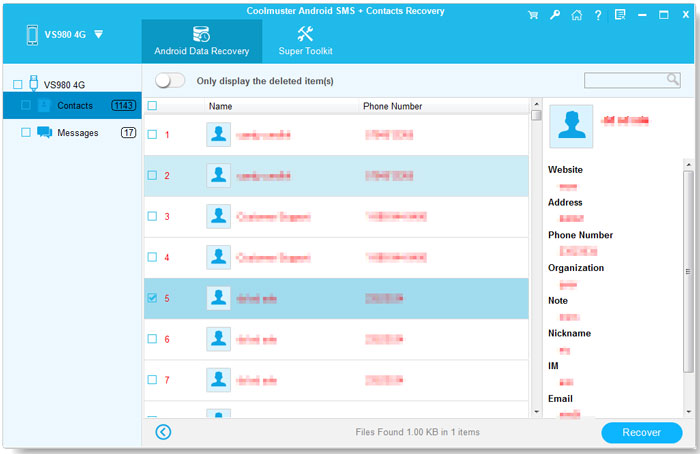
Contact preview with the extra fields such as address, organization and email.
Save to HTML or XML files you can read and print
Coolmuster Android SMS + Contacts Recovery exports messages and contacts as HTML or XML, so you can open them in a browser or print them, for example for a record of a conversation.
Back up what still exists on the phone
Coolmuster Android SMS + Contacts Recovery can also export current messages and contacts to the PC, giving you a plain copy before a reset or phone change.
Wide Android handset support
The vendor lists Samsung, Huawei, HTC, LG, Sony, Motorola and ZTE among others, and the tech specs list Android 6 and later, including Android 17. A device that isn't listed may still connect, and the vendor suggests testing it with the free trial.
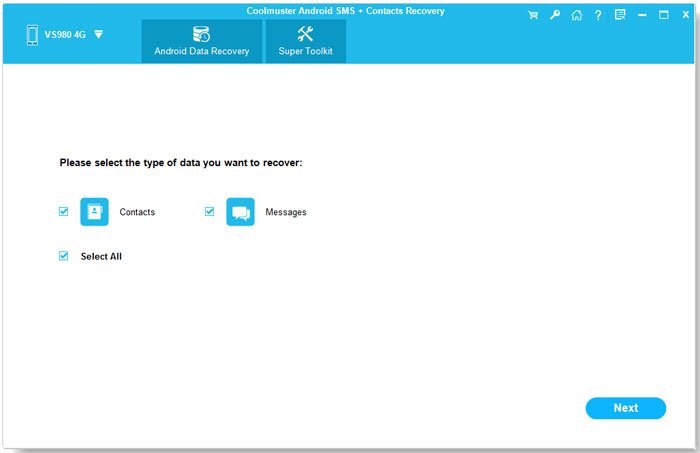
Choosing whether to scan contacts, messages or both.
Benefits
- For users with a rooted phone, it goes straight to the two data types people most often lose.
- You see the recovered items before saving them.
- Readable HTML or XML files don't lock your messages into any app.
- It's cheaper than the broader Lab.Fone for Android.
Real-World Uses
- You already use a rooted phone and just deleted a thread you need.
- You need a copy of a text conversation in a form you can print.
- You want a snapshot of all your contacts on the PC before switching phones.
- A technician helping several rooted test devices needs one tool for SMS and contacts.
Who It's For, and Who Should Skip It
It suits Android enthusiasts whose phones are already rooted and who only care about texts and contacts.
Skip it if your phone isn't rooted and you aren't willing to root it. On most modern phones, rooting means unlocking the bootloader, which usually erases the phone and with it your deleted texts. People who just want a backup of current messages may prefer Coolmuster Android Backup Manager, which doesn't require root.
Usage Guide
- Install and launch the program, then connect the phone by USB.
- Enable USB debugging, allow the driver install, and approve the connection on the phone.
- Let the program install its companion app on the phone.
- Pick Contacts, Messages or both, then click Next. Grant root permission when asked. An unrooted phone stops here.
- Preview the results, tick what you want and click Recover.
Where it falls short
- Without root it can't scan for deleted data, and the page's headline doesn't make that obvious.
- Scanning can be slow on large message databases, according to customers.
- It handles SMS and contacts only, with no WhatsApp, as one customer points out.
- It connects by USB only, and a third-party cable can cause connection failures, one customer reports.
What Users Say
We found no independent test of this product, so all the product-specific quotes below come from Coolmuster's own site. Coolmuster runs a write-a-review-to-win-a-free-license promotion, so read the praise on its own site, and on small blogs, with that in mind.
On Coolmuster's product and review pages (125 reviews shown)
These appear on the vendor's own site.
"Even though the program are not powerful as the similar tool on the market, but it is enough for me! The program have helped me find back my lost contacts, but the scanning process is a little bit long."
Lina, vendor product page
"My little son accidentally deleted the phone number of my friend that I stored in my Galaxy note 2 internal phone memory and I tried this software, it helped me. thanks."
Annie, vendor product page
"I would love to see a feature added to support WhatsApp."
JamE Kelli, November 2, 2026, vendor review page
"The connection failed because a third-party data cable was used. Please switch to the original data cable to establish a successful connection."
OrBust_iT, October 19, 2026, vendor review page
"It allows me to save a readable backup on my computer."
Kawiik3ty, July 15, 2026, vendor review page
Trustpilot, for the Coolmuster company overall
Coolmuster scores 4.6 out of 5 from 223 Trustpilot reviews, read through a page summarizer. These mainly rate customer support.
"Support was very responsive to a special request to update my email address and send me a revised license key."
Charles Davis, November 9, 2026, Trustpilot (excerpt)
"The response was quick, within a few hours instead of 48 hours, on a Friday night too."
Haocheng, February 28, 2026, Trustpilot (excerpt)
Customers tend to praise the readable exports and easy steps, and to complain about long scans and connection problems. None of the reviews we read deals with the root requirement.
Comparisons
Android SMS + Contacts Recovery vs Coolmuster Lab.Fone for Android
Lab.Fone starts at $45.95, $10 more. Coolmuster's comparison table says Lab.Fone also restores call logs, backs up media from internal memory and recovers media from an SD card. If you need anything beyond texts and contacts, Lab.Fone is the better buy.
Android SMS + Contacts Recovery vs Coolmuster Android Backup Manager
Backup Manager doesn't need root, but it only backs up what's on the phone today. It can't find anything already deleted.
Editions and Pricing
| Plan | Price | Term | Covers |
|---|
| 1 Year, 3 devices on 1 PC | $35.95 | 1 year, renews automatically | 3 devices |
| Lifetime, 3 devices on 1 PC | $45.95 | One payment, lifetime updates | 3 devices |
| 1 Year, 9 devices on 3 PCs | $65.95 | 1 year, renews automatically | 9 devices |
| Lifetime, 9 devices on 3 PCs | $75.95 | One payment, lifetime updates | 9 devices |
| 1 Year, 30 devices on 1 PC | $189.95 | 1 year, renews automatically | 30 devices |
| Lifetime, 30 devices on 1 PC | $289.95 | One payment, lifetime updates | 30 devices |
The lifetime plan is only $10 more than one year, which makes it the better value if you'd use it again.
FAQs
Does Coolmuster Android SMS + Contacts Recovery work without root?
Coolmuster Android SMS + Contacts Recovery needs root to scan a phone for contacts and SMS, according to its manual, and unrooted phones are stopped at that step.
Can Coolmuster Android SMS + Contacts Recovery recover WhatsApp messages?
No. Coolmuster Android SMS + Contacts Recovery handles text messages and contacts only. WhatsApp is a separate Coolmuster product.
Which Android versions does Coolmuster Android SMS + Contacts Recovery support?
Coolmuster Android SMS + Contacts Recovery supports Android 6 and later, including Android 17, on its tech-spec page.
Can I connect over Wi-Fi with Coolmuster Android SMS + Contacts Recovery?
Coolmuster's manual describes only a USB connection for Android SMS + Contacts Recovery, so use a good cable, ideally the one that came with the phone.
Can I get a refund on Coolmuster Android SMS + Contacts Recovery if the phone isn't rooted?
Don't expect one. The refund policy lists this product under a 7-day guarantee and says refund requests for recovery products will not be approved, so check the root requirement before you pay.
Will Coolmuster Android SMS + Contacts Recovery change anything on my phone?
Coolmuster says Android SMS + Contacts Recovery only reads data, but it does install a companion app on the phone during connection.
System Requirements
- Windows 11, 10, 8 or 7 (a separate Mac edition exists)
- Android 6 or later, up to Android 17, with root access for scanning
- 1 GHz CPU or faster, 256 MB RAM, 1 GB recommended
- 200 MB free disk space, USB cable
Conclusion
Only worth buying if your phone is already rooted. For that small group, it's a low-cost way to get back deleted texts and contacts, and the HTML export is genuinely useful.
The main reason not to buy is the root requirement itself: on an ordinary phone, getting root can wipe the very data you were hoping to recover, and then the software has nothing to find.
Download Free Trial Buy Now