Coolmuster PDF to Word Converter: Batch PDF to DOCX on Windows
Coolmuster PDF to Word Converter is a $15.95-a-year Windows program that turns PDF files into editable Word documents, up to 200 at a time or just the pages you pick.
You've been sent a report as a PDF and you need to change two paragraphs and a table. Retyping it is out, and pasting from a PDF wrecks the layout. A converter gives you a Word file to edit instead.
Quick facts
- Version: 2.3.3 for Windows (February 2, 2026)
- Developer: Coolmuster
- Platforms: Windows 11, 10, 8, 7 (Mac is a separate product, version 2.1.18 from November 10, 2025)
- Output: Word DOC and DOCX, according to the specifications
- Batch size: up to 200 PDFs at once
- Trial: free download, limits not published
- Price: $15.95 for one PC for one year at checkout, renewing automatically unless you cancel
- Refund: 30 days on one-year and lifetime licenses, 7 days on monthly ones
- What we checked: the trial installer from coolmuster.com (18.13 MB, server date February 2, 2026) and the $15.95 price on the order page on November 10, 2026. We read Coolmuster's specifications and user guide, but we didn't install the program or run it on our own files.
Before you buy
Scanned PDFs are the catch. OCR isn't on the feature list, so don't count on a scan or a photographed page becoming editable text. Run the trial on your own hardest file before paying, because layout results depend heavily on how the PDF was built. If you can open the PDF in a recent version of Microsoft Word, try that first: it can convert a PDF on its own at no extra cost.
Download Free TrialBuy Now
Overview
PDF to Word Converter is a single-purpose program. You add PDFs, tell it which pages you want, and it writes Word files to a folder. Coolmuster says it keeps text style, images, graphics, tables, hyperlinks and layout. That's the vendor's claim, and how well it holds up varies from file to file.
The default output folder is the same folder as the source PDF, so unless you change it the Word file lands next to the original.
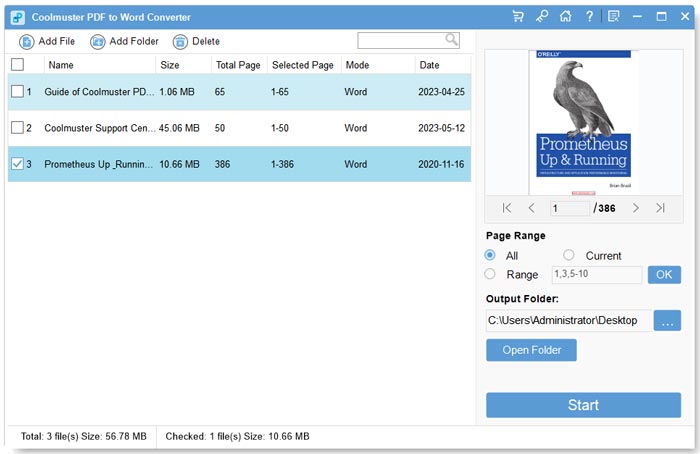
Three PDFs in the list with the preview pane on the right and the All, Current and Range options below it.
Features
Batch conversion of up to 200 PDFs
Coolmuster PDF to Word Converter takes up to 200 PDFs in one run. You can add them with Add File or Add Folder or drag them in, and right-click a single file to run Convert Selected on it alone.
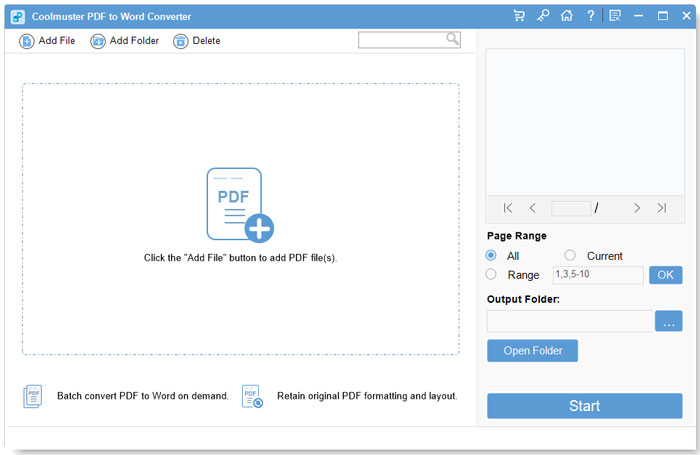
The window before any files are added, with the Add File and Add Folder buttons at the top.
Page ranges for partial conversion
PDF to Word Converter converts All pages by default, or the Current page you're previewing, or a Range you type as numbers and spans such as 1,3,4,5-10. That saves a long clean-up job when you only need a few pages of a large document.
Built-in PDF preview
PDF to Word Converter shows a page-by-page preview on the right of the window, so you can find the page numbers you want without opening a separate reader.
No Acrobat required
PDF to Word Converter runs on its own and doesn't need Adobe Acrobat to be installed.
Benefits
- You pay a small yearly fee instead of a full PDF editor subscription when conversion is all you need.
- The conversion happens on your PC, so confidential documents stay there.
- Page ranges keep you from converting and tidying pages you never wanted.
Real-World Uses
- Editing a contract or proposal that only exists as a PDF.
- Pulling three chapters out of a long manual into a Word file.
- Converting a folder of old reports so they can be searched and reused.
- Turning a PDF form letter back into a template you can edit.
Who It's For, and Who Should Skip It
It's a fit for office workers who convert PDFs now and then, and for anyone with a pile of text-based PDFs to process in one run.
Skip it if you mostly handle scanned documents, where a tool with OCR is what you need. Skip it too if you also want Excel, PowerPoint or ePub output: Coolmuster's PDF Converter Pro covers those for $29.95 a year.
Usage Guide
- Install PDF to Word Converter from the Download Free Trial button and launch it.
- Click Add File or Add Folder, or drag PDFs into the window.
- Choose All, Current or Range under Page Range, pressing OK after typing a range.
- Pick an output folder, or leave the default source folder.
- Click Start and wait for the progress bar to reach 100 percent.
- Open the Word files from the output folder and check tables and images.
Where It Falls Short
- OCR isn't listed, so scanned PDFs are a poor match.
- Word only. For Excel, PowerPoint, ePub, HTML or images you need a different Coolmuster product.
- Newer versions of Microsoft Word can open and convert PDFs themselves, which covers occasional use.
- No independent lab or magazine test of its layout accuracy turned up, so the "100% original layout" line on the vendor's page is untested marketing.
What Users Say
Coolmuster's site shows customer reviews, but it also runs a "Win Free Coolmuster License Code" offer for writing one, and many entries are short and unspecific. Treat them as a sign of what buyers care about, not as independent testing.
Reviews on Coolmuster's own site
- Clean "I don't have to spend a long time fixing indentation or retyping paragraphs." Ein Ro tna, October 12, 2026
- The output Word file looks exactly the same as the original PDF "Now I have enough free time to watch two episodes of my favorite show." Melissa Adams, August 10, 2026
- Just import the PDF and click convert "The title, bold font, and so on were left where they should be." DanielP .87, May 28, 2026
- Accurate "Can process multiple PDF to Word files simultaneously without slowing down" PaperTrailRlex, January 19, 2026
- "Amazing tool! I did not know what to do when i need to copy text from a PDF file, your product solves the problem for me. It converts PDF to Word docx format directly, so i can copy text from docx. Thanks." Tim, undated on the product page
- "Although its features are simple, it's helpful for people who need to handle a lot of PDF files, like me." Chuain, undated on the product page
Independent coverage
Softpedia's editor review describes a simple workflow built around batch processing and a customizable page range.
Buyers mostly praise simplicity and how well the formatting survives. Nobody on Coolmuster's page mentions scanned files, and a short list of positive entries is all the customer evidence there is, so your own trial run counts for more than these quotes.
Comparisons
PDF to Word Converter vs PDF Converter Pro
Coolmuster's own comparison shows PDF to Word Converter doing Word only, while PDF Converter Pro adds image, ePub, text, HTML, Excel and PowerPoint output for $29.95 a year against $15.95. Buy the cheaper one if Word is all you want.
PDF to Word Converter vs Microsoft Word
Microsoft Word can open a PDF and convert it to an editable document at no added cost if you already own it. The Coolmuster program's advantages are batches of up to 200 files and page ranges.
Editions and Pricing
| Seats | 1 month | 1 year | Lifetime |
|---|
| 1 PC | $9.95 | $15.95 | Not on the order page |
| 5 PCs (business) | $19.95 | $25.95 | $35.95 |
| 10 PCs (business) | $29.95 | $35.95 | $45.95 |
Prices are for the Windows version and exclude VAT. Monthly and yearly licenses renew automatically until you cancel, and the yearly plan includes free upgrades for that year.
FAQs
Does Coolmuster PDF to Word Converter need Microsoft Word installed?
Coolmuster doesn't list Word as a requirement for PDF to Word Converter. You'll need Word or another compatible editor to open and edit the output.
Can PDF to Word Converter handle password-protected PDFs?
Coolmuster PDF to Word Converter isn't sold as a decryption tool. For a PDF with an owner or open password, Coolmuster sells PDF Password Remover separately.
Does the one-year PDF to Word Converter license renew automatically?
Yes. The one-year PDF to Word Converter license at $15.95 renews automatically after 12 months, and Coolmuster's order page says you get a notification email before the renewal date and can cancel at any time. It includes free upgrades during that year.
What is the refund period for PDF to Word Converter?
PDF to Word Converter has a 30-day money-back guarantee on one-year and lifetime licenses and 7 days on monthly licenses. Orders can't be canceled once payment has gone through, because the license is issued right away, and a refund goes through support@coolmuster.com with your order ID or receipt.
Is PDF to Word Converter available for Mac?
Yes, as a separate product with its own license. Coolmuster lists its Mac version as 2.1.18, updated November 10, 2025, and sold under the Mac listing rather than this Windows one.
How many PCs does one PDF to Word Converter license cover?
The $15.95 one-year license covers one PC. Business plans cover 5 or 10 PCs and start at $25.95 a year for 5.
System Requirements
- Windows 11, 10, 8 or 7
- 1 GHz processor or faster (32 or 64 bit)
- 256 MB RAM, 1 GB recommended
- 200 MB of free disk space
Conclusion
Coolmuster PDF to Word Converter is a fair buy at $15.95 if you regularly convert batches of text-based PDFs and don't already have an editor that does it. It's a plain, focused tool.
The one reason to buy it is batch conversion with page ranges. The main reason not to is that recent Microsoft Word versions convert PDFs themselves, and scans are outside what it claims to do.
Download Free TrialBuy Now