Coolmuster iOS Assistant for Mac: Copy iPhone Data to Your Mac and Manage Backups
Coolmuster iOS Assistant for Mac is a $25.95-a-year macOS app that exports an iPhone's, iPad's or iPod touch's contacts, messages, notes, photos, videos, music and more to a Mac, and manages iTunes-style backups. A lifetime license costs $35.95. It's for Mac users who want their iPhone data as files they can open, rather than locked inside a Finder backup. Copying the other way is limited: only contacts, calendars, books and bookmarks go from the Mac to the device.
Quick facts
- Version: 5.1.47 for Mac, released December 18, 2025 (the Windows version, sold separately, is 4.6.38)
- Formerly: Coolmuster iPad iPhone iPod to Mac Transfer
- Developer: Coolmuster
- Runs on: macOS 10.10 or later, on Intel Macs and on Apple silicon Macs through Rosetta 2
- Devices: iPhone, iPad and iPod touch on iOS 5 and later, connected by USB cable
- Price: $25.95 a year for 1 Mac (renews automatically), or $35.95 for a lifetime license
- Trial: free download that exports 15 times, one file at a time
- Guarantee: 30 days money back
- What we checked: we downloaded the 5 MB Mac disk image from coolmuster.com, read version 5.1.47 and a minimum of macOS 10.10 from the app's own bundle, and found its program files are built for Intel processors only. The order page charged $25.95 for the 1-year, 1-Mac license on November 8, 2026. We didn't connect an iPhone or run a backup.
Before you buy: mostly a one-way street, and an Intel app
Coolmuster iOS Assistant for Mac is built to get data off the iPhone. Photos, videos, music, messages and notes export to the Mac, but the Mac guide says only contacts, calendars, books and bookmarks can be imported to the device. It also skips MMS, call logs, audiobooks, note attachments, photo metadata and app data such as WhatsApp.
The app is an Intel build, so an Apple silicon Mac runs it through Rosetta 2, which Apple has said it will cut back after macOS 27. The trial's 15 single-file exports are enough to check that your Mac runs it and your iPhone's data shows up, so try it first.
Download Free TrialBuy Now
Overview
Finder on a Mac will back up an iPhone, but the backup is a sealed folder you can't browse, and Photos only handles pictures. iOS Assistant for Mac opens the phone up category by category: Contacts, Messages, Notes, Calendars, Bookmarks, Music, Videos, Photos, Books and Apps, each with a count, a preview and an Export button.
The Super Toolkit tab adds an iTunes Backup & Restore manager: make a backup to the standard location or a folder you choose, restore one, import a backup file from elsewhere, or delete old backups that take up space. Version 5.0, released in January 2025, brought the Mac app in line with key features of the Windows version and fixed e-book transfers to iOS devices.
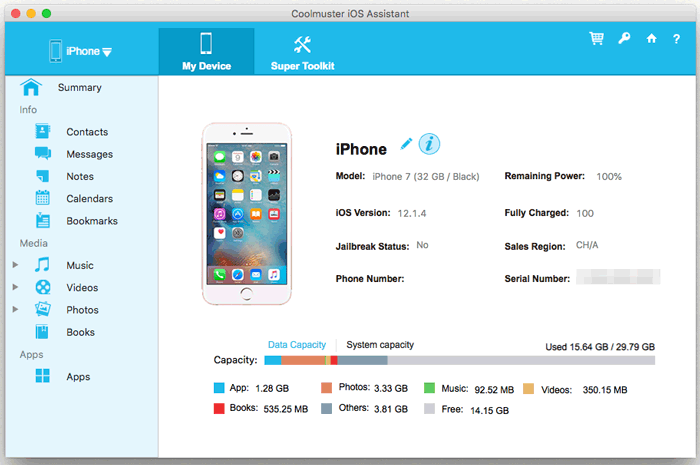
The device summary after connecting: model, iOS version and a breakdown of used storage. Screenshots on this page come from Coolmuster's Mac guide and show the interface before version 5.0.
Features
Export iPhone messages to the Mac
Coolmuster iOS Assistant for Mac lists your message threads with dates and shows the conversation beside them, so you can pick the threads to save and export them to the Mac. MMS picture messages aren't supported.
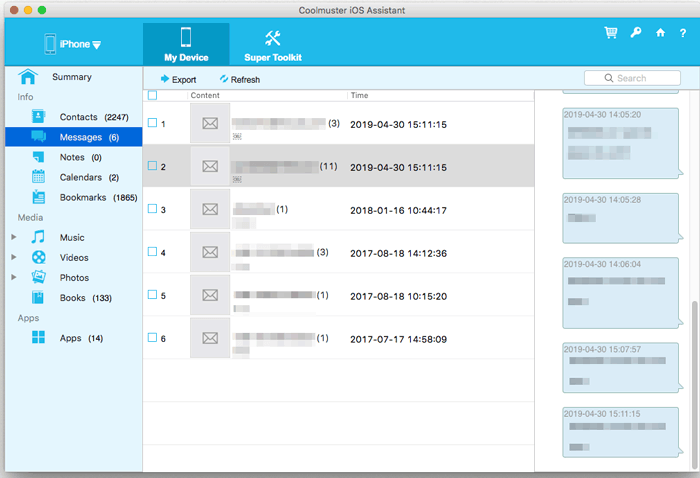
Messages: threads with dates on the left, the selected conversation on the right, Export at the top.
Manage contacts in both directions
Coolmuster iOS Assistant for Mac adds, edits and deletes contacts on the iPhone from the Mac, exports them, and imports contact files back. Contacts, calendars, books and bookmarks are the data types that can go from the Mac to the device.
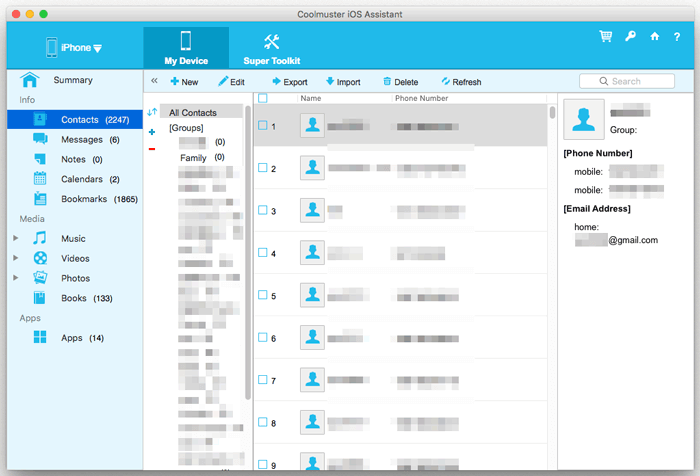
Contacts with groups, the selected contact's numbers and email, and New, Edit, Export, Import and Delete at the top.
Copy photos, videos, music, voice memos and books
Coolmuster iOS Assistant for Mac shows the camera roll and albums with size, format and date, plus videos, music, voice memos, ringtones and books, and exports what you tick to the Mac. Version 5.1.47 added export of Live Photos. You can also delete photos in batches to free space on the phone.
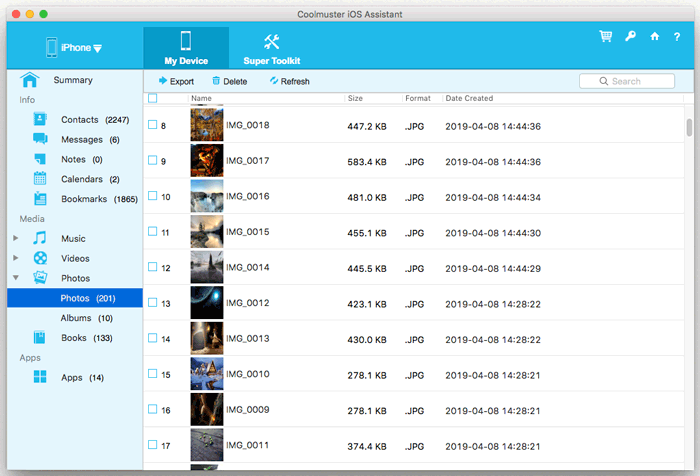
Photos: thumbnails with size, format and creation date, and Export and Delete at the top.
Notes, calendars, bookmarks and apps
Coolmuster iOS Assistant for Mac exports notes (without their attachments), calendars and Safari bookmarks, and lists installed apps so you can uninstall several at once from the Mac.
Back up, restore and clean up iTunes backups
Coolmuster iOS Assistant for Mac's iTunes Backup & Restore tool backs up a connected device to the default backup location or a custom folder, restores a chosen backup to a device, imports a backup file, and lists every backup on the Mac with its date, size, iOS version and device model so you can delete old ones.
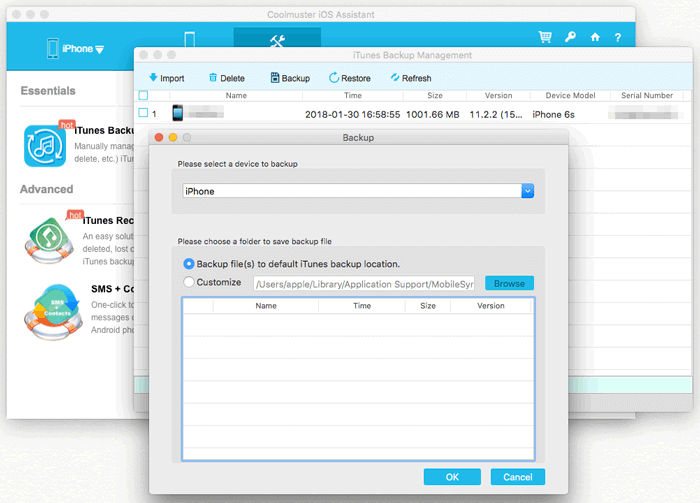
iTunes Backup Management: existing backups listed by date and device, and the Backup dialog for picking the device and location.
Benefits
- Readable copies. Messages, contacts and notes land on the Mac as files you can open, search and print, not inside an opaque backup.
- Pick what you save. Export one conversation or one album instead of the whole phone.
- Backup housekeeping. See every old device backup in one list and delete the ones eating disk space.
Real-World Uses
- Saving a message thread. Export a conversation with a landlord, employer or family member to keep or print.
- Clearing a full iPhone. Copy the camera roll and videos to the Mac, then delete them from the phone.
- Before trading in an old iPhone or iPad. Export contacts, notes and voice memos to the Mac and make a fresh backup.
- Tidying a Mac's drive. Find and delete old device backups from phones you no longer own.
Who It's For, and Who Should Skip It
It suits Mac users who want iPhone data, especially messages, contacts, notes and photos, saved to the Mac as files, and anyone who manages backups for several Apple devices.
Skip it if you want to load music, videos or photos onto the iPhone (Finder sync or a full device manager does that), if you need WhatsApp or other app data, or if you have an Android phone, which needs Coolmuster Android Assistant for Mac. If iCloud and the Photos app already cover what you care about, you may not need it at all.
Usage Guide
- Download the disk image from the Download Free Trial button, open it, click Agree, and drag Coolmuster iOS Assistant to the Applications folder. On an Apple silicon Mac, accept the prompt to install Rosetta if it appears.
- Launch it and connect the iPhone, iPad or iPod touch with a USB cable.
- Unlock the device, tap Trust on the "Trust This Computer?" prompt, then click Continue on the Mac. If no prompt appears, click "Can't see this popup".
- Pick a category on the left, tick the items and click Export, choosing the output format where offered.
- To import, open Contacts, Calendars, Books or Bookmarks and click Import.
- For backups, open Super Toolkit, choose iTunes Backup & Restore, and use Backup, Restore, Import or Delete.
- To register, click Register (the key icon) and enter the licensed email and registration code from your order email.
Where it falls short
- Exported messages named by number. Coolmuster's FAQ says exported conversations can be saved under the phone number instead of the contact's name, an issue still listed as being worked on.
- iCloud-related media errors. The FAQ lists photos, videos or music that won't load, delete or export when something is wrong with iCloud, also still open.
- Encrypted backups. Messages won't load if the device backup is encrypted, so you have to remove the backup password first.
- No direct device-to-device copy. Moving music or movies between two Apple devices means exporting to the Mac and syncing again.
- Dated guide. The vendor's Mac guide and its screenshots predate version 5, so some screens may not match what you see.
- Subscription by default. The $25.95 license renews yearly unless you cancel, and renewal charges aren't refunded.
What Users Say
There's little independent coverage of the Mac edition: Product Hunt's pages for it have no written reviews, and download sites repeat the vendor's text. The feedback below is about iOS Assistant in general, and most reviewers don't say whether they used the Mac or Windows edition.
FileHorse: editor review by Marian Marinescu (users 8.6/10 from 12 votes)
On the interface: "The UI of this software is clean, intuitive, and user-friendly." But "it lacks some modern flair; it leans more towards functional than flashy."
The verdict: "Coolmuster iOS Assistant is a solid option for users seeking a reliable and straightforward way" to manage iOS data, "While it may lack some of the bells and whistles of more expensive alternatives."
And on the trial: "Only one item can be transferred to the PC at a time. Limited functionality in the demo version."
Trustpilot: 4.6 from 222 reviews (all Coolmuster products)
The score covers the whole company, and most reviews are about quick support. Those about iPhones are mixed:
- Andrew, 5 stars, May 2025: "Coolmuster is a very useful and inexpensive program that I use to transfer my iphone pictures."
- Patricia Turner, 5 stars, April 2025: "The 1st time I ordered IOS assistant I ended up with a 1 year (1 PC) license instead of a Lifetime licence." Check which license is in your cart.
- Jim Hocut, 1 star, March 2024, titled "Buyer Beware.... useless product", about an Apple tablet: "it will only go from the Apple to PC."
- Gregory Montoya, 1 star, July 2024: "I backed up my iPod touch 4 gen with Coolmuster, only to have it restore it with 31.9 gb of no data!"
Coolmuster's website (vendor's own testimonials)
Hosted by the vendor, so treat them as a friendly sample:
- "I wanted to back up four years of iOS messages. Coolmuster did this like a breeze. I wasn't required to several pages of information." Ron Harris
- "It is a great and easy tool to back up contacts, photos, videos,etc. to iTunes, computer...So nice to have it." Nina
The pattern: people like how simply it gets photos, contacts and messages off an iPhone. The complaints are about what it can't do (copying media to the device), a restore that went wrong on old hardware, and a trial too small to judge a big job. Keep a second backup of anything irreplaceable.
Comparisons
Mac version vs Windows version
Both sell at the same prices under separate licenses. The version numbers differ (Mac 5.1.47 from December 2025, Windows 4.6.38 from August 2026) and both added Live Photos export in their latest release. The Windows version runs natively, while the Mac app needs Rosetta 2 on Apple silicon.
Coolmuster iOS Assistant for Mac vs Finder backups
Finder's backup is free and complete, but you can't open it to read a message or pull out one photo. iOS Assistant gives you individual files and lets you manage the backups themselves. Use Finder for the safety copy and iOS Assistant for what you want to read.
Editions and Pricing
All plans have the same features and free updates while the license is valid. Prices are for the Mac version and exclude VAT.
| Plan | Price | Term | Computers |
|---|
| 1 Year | $25.95 | Renews yearly | 1 |
| Lifetime | $35.95 | One payment | 1 |
| Business 1 Year | $35.95 to $185.95 | Renews yearly | 2-5 up to 26-30 |
| Business Lifetime | $45.95 to $245.95 | One payment | 2-5 up to 26-30 |
The Buy Now buttons on this page open the 1-year, 1-Mac license. For use beyond a year, the lifetime license costs only $10 more.
FAQs
Does Coolmuster iOS Assistant for Mac work on Apple silicon Macs?
Coolmuster iOS Assistant for Mac runs on M1 and later Macs through Rosetta 2, because the app is built for Intel processors. macOS offers to install Rosetta the first time you open it.
Is Coolmuster iOS Assistant for Mac the same as iPad iPhone iPod to Mac Transfer?
Coolmuster iOS Assistant for Mac is the current name of the product Coolmuster used to sell as iPad iPhone iPod to Mac Transfer. The old version (2.1) is no longer on the product pages, and version 5 is the one sold now.
Which iOS versions does Coolmuster iOS Assistant for Mac support?
Coolmuster iOS Assistant for Mac supports iOS 5 and later, and Coolmuster's tech spec lists iOS 27. It works with iPhone, iPad and iPod touch models over a USB cable.
Can Coolmuster iOS Assistant for Mac export to the Music app's library?
Not directly. Coolmuster iOS Assistant for Mac exports music and playlists to a folder on the Mac, and you can then add them to your library by hand.
Why are my exported e-books blank?
Books bought with DRM protection open only on the device that downloaded them, so Coolmuster iOS Assistant for Mac exports them but they can't be read elsewhere. It also only finds books in Apple Books that have been downloaded from iCloud, not books in Kindle or other reader apps.
Can I use my Windows license of iOS Assistant on a Mac?
No. Coolmuster iOS Assistant for Mac and the Windows version are separate products with separate license codes.
System Requirements
- macOS 10.10 or later
- Intel Core processor (1 GHz or faster), or Apple silicon with Rosetta 2
- 1 GB RAM or more
- 1 GB free disk space or more
- iPhone, iPad or iPod touch on iOS 5 or later, with a USB cable
Conclusion
Coolmuster iOS Assistant for Mac is worth $25.95 a year, or better $35.95 once, if you want to pull messages, contacts, notes and photos off an iPhone onto your Mac as files you can read, and keep old device backups under control. The reason to buy it is how directly it gets data out of the phone. The reasons not to are that it barely copies anything back to the phone, skips app data like WhatsApp, and is an Intel-only app on today's Apple silicon Macs. Try the free trial with your own iPhone first.
Download Free TrialBuy Now