Coolmuster Word to PDF Converter: Batch DOCX to PDF on Windows
Coolmuster Word to PDF Converter is a $15.95-a-year Windows program that converts a batch of DOCX Word files into PDFs, with your choice of page size and margins.
Saving one Word file as a PDF takes seconds. Saving eighty of them, one at a time, takes an afternoon. This tool exists for the eighty.
Quick facts
- Version: 2.7.3 for Windows (February 2, 2026)
- Developer: Coolmuster
- Platforms: Windows 11, 10, 8, 7 (Mac is a separate product, version 2.1.9 from January 2019)
- Input: DOCX Word files
- Output: PDF
- Trial: free download. A 2023 buyer on Coolmuster's site reported a limit of 3 items
- Price: $15.95 for one PC for one year at checkout, renewing automatically unless you cancel
- Refund: 30 days on one-year and lifetime licenses, 7 days on monthly ones
- What we checked: the trial installer from coolmuster.com (22.62 MB, server date February 2, 2026) and the $15.95 price on the order page on November 10, 2026. We read Coolmuster's specifications and user guide, but we didn't install the program or run it on our own files.
Before you buy
If you only ever convert one document at a time, you don't need this. Microsoft Word has Save As PDF built in, and one reviewer on Coolmuster's own site says exactly that. The specifications list only DOCX as input, so older .doc files need resaving in Word first.
Download Free TrialBuy Now
Overview
Word to PDF Converter handles one conversion in bulk. You add DOCX files or a whole folder, set the page options once, and it produces a PDF for each. A list on the left shows file names, sizes and dates, and the settings stay on the right.
Coolmuster says output keeps the layout, text and images. Page size can follow a preset such as A4 or a custom width and height in millimetres, and you can change the top, bottom, left and right margins.
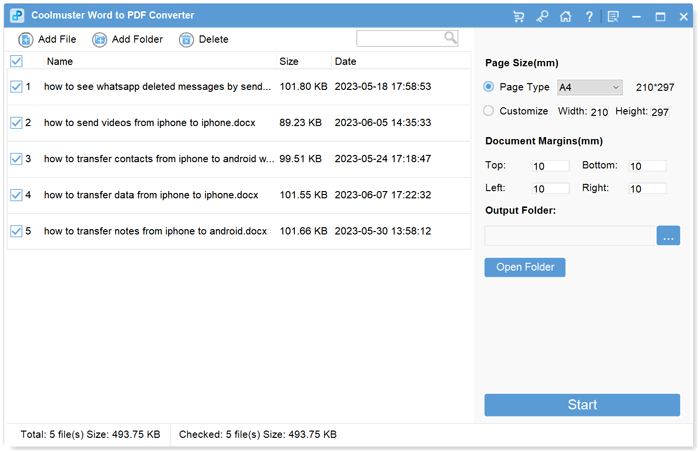
Five DOCX files selected, with page type, margins and output folder settings on the right.
Features
Batch conversion of DOCX files
Coolmuster Word to PDF Converter converts many DOCX files in one run. You can add them with Add File or Add Folder or drag them in, then tick the ones you want.
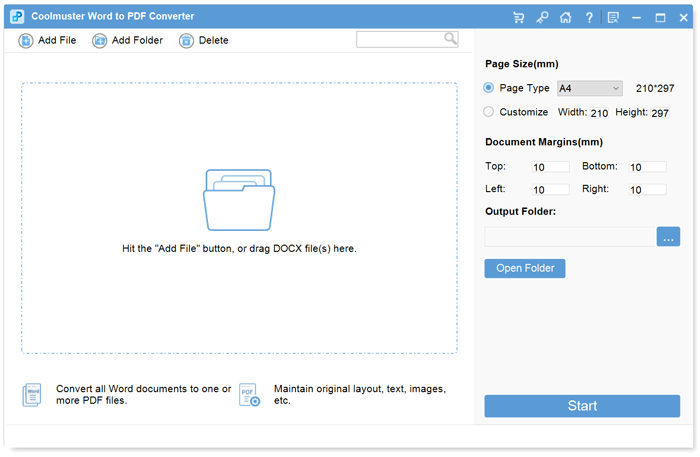
The start window, which accepts Add File, Add Folder or dragged DOCX files.
Page size and margin control
Word to PDF Converter lets you choose a page type such as A4 or enter a custom width and height, and set each of the four margins in millimetres, defaulting to 10.
Output folder and quick access
Word to PDF Converter writes to a folder you choose, and the Open Folder button takes you straight to the finished PDFs.
Offline conversion
Word to PDF Converter runs on your PC, so you don't upload documents to a web converter.
Benefits
- A large folder of DOCX files becomes PDFs in one run.
- Every PDF in a batch gets the same page size and margins.
- Confidential documents stay on your own PC.
Real-World Uses
- Turning a folder of invoices or letters into PDFs for sending.
- Producing a set of course handouts in a fixed page size.
- Archiving a department's DOCX files as PDFs.
- Preparing a stack of documents for a print shop that wants PDF.
Who It's For, and Who Should Skip It
It's for people who regularly convert DOCX files in batches and want every file set up the same way.
Skip it if you convert one file at a time, since Word already exports PDF. If your source files are also images, HTML, ePub or MOBI, Coolmuster's PDF Creator Pro at $29.95 a year covers those too.
Usage Guide
- Install Word to PDF Converter from the Download Free Trial button and launch it.
- Click Add File or Add Folder, or drag DOCX files into the window.
- Tick the files you want and set the page size and margins if needed.
- Choose an output folder.
- Click Start, then Open Folder to see the PDFs.
Where It Falls Short
- DOCX is the only listed input format, so .doc files need converting in Word first.
- Word's built-in PDF export is free for single files.
- The Mac edition's last listed update is from January 2019.
- A 2023 reviewer on the vendor's site reported the trial handled only 3 items, which isn't much of a test for a batch tool.
What Users Say
Coolmuster's site shows customer reviews, but it also runs a "Win Free Coolmuster License Code" offer for writing one, and many entries are short and unspecific. Treat them as a sign of what buyers care about, not as independent testing.
Reviews on Coolmuster's own site
- Good, but not the best. "As we all know, we can convert Word to PDF via Microsoft Word. And it's totally free. Of course, this tool can help me convert multiple Word files to PDF, and customize page size and margins for personalized PDF files." Cilen, October 10, 2023
- Convert my Word files to PDF easily "Althought it only supports 3 items, it worked well." Imaguran, July 19, 2023
- Fast and Accurate Conversion "It converted my Word documents quickly and kept all the formatting intact." doonerter, January 17, 2025
- Effortless Conversion and Reliable Results "The process was smooth, and the resulting PDF files maintained all formatting, images, and hyperlinks perfectly." Joe, June 14, 2023
- Excellent all the way "This is one fantastic Word to PDF converter." Shodan816, June 13, 2013
There are only seven reviews on Coolmuster's page, and the most useful one is Cilen's: it's good at batches and page settings, and otherwise Word does the job free.
Comparisons
Word to PDF Converter vs PDF Creator Pro
Coolmuster's comparison shows Word to PDF Converter accepting Word only, while PDF Creator Pro also takes images, text, MOBI, ePub, CHM and HTML for $29.95 a year against $15.95.
Word to PDF Converter vs Microsoft Word
Word's Save As PDF is free and fine for individual documents. Coolmuster's program earns its fee only when you have many files and want the same page settings on all of them.
Editions and Pricing
| Seats | 1 month | 1 year | Lifetime |
|---|
| 1 PC | $9.95 | $15.95 | Not on the order page |
| 5 PCs (business) | $19.95 | $25.95 | $35.95 |
| 10 PCs (business) | $29.95 | $35.95 | $45.95 |
Prices are for the Windows version and exclude VAT. Monthly and yearly licenses renew automatically until you cancel, and the yearly plan includes free upgrades for that year.
FAQs
Can Coolmuster Word to PDF Converter open old .doc files?
Coolmuster lists DOCX as the input for Word to PDF Converter, so old .doc files need saving as DOCX in Word first.
Does Word to PDF Converter merge documents into one PDF?
The start screen of Word to PDF Converter says it converts Word documents to one or more PDF files, but the how-to guide doesn't describe a merge step. Test this in the trial if a single merged PDF matters to you.
Does the one-year Word to PDF Converter license renew automatically?
Yes. The one-year Word to PDF Converter license at $15.95 renews automatically after 12 months, and Coolmuster's order page says you get a notification email before the renewal date and can cancel at any time. It includes free upgrades during that year.
What is the refund period for Word to PDF Converter?
Word to PDF Converter has a 30-day money-back guarantee on one-year and lifetime licenses and 7 days on monthly licenses. Orders can't be canceled once payment has gone through, because the license is issued right away, and a refund goes through support@coolmuster.com with your order ID or receipt.
Is Word to PDF Converter available for Mac?
Yes, as a separate product with its own license, listed at version 2.1.9 from January 2019.
Can I customize the PDF page size in Word to PDF Converter?
Yes. Word to PDF Converter offers a page type such as A4 or a custom width and height in millimetres, along with adjustable margins.
System Requirements
- Windows 11, 10, 8 or 7
- 1 GHz processor or faster (32 or 64 bit)
- 256 MB RAM, 1 GB recommended
- 200 MB of free disk space
Conclusion
Coolmuster Word to PDF Converter is worth $15.95 only if you convert DOCX files in bulk and want uniform page settings. For that job it's simple and inexpensive.
The one reason to buy it is batch conversion. The main reason not to is that Word already saves single documents as PDF for free.
Download Free TrialBuy Now