Stellar Data Recovery Technician for Mac: Recovery from Macs, NAS Boxes, Linux Drives and Virtual Machines
Stellar Data Recovery Technician for Mac is a $149-a-year macOS recovery tool for technicians, IT staff and NAS owners. It does everything Stellar's Mac Premium edition does (deleted files, lost volumes, Time Machine, a Mac that won't boot, photo and video repair) and adds recovery from Synology, QNAP and Asustor NAS devices, Linux EXT drives and VMDK, VDI, VHD and VHDX virtual machine files.
The NAS volume is still online but a share was wiped, or the box died and you're left holding four bare drives. Most Mac recovery apps stop there. This edition can scan a NAS over the network by its IP address, or read the pulled drives as an array once they're connected to your Mac.
Quick facts
- Version: 12.8.0.0, released September 2026
- Developer: Stellar, a data recovery company founded in 1993
- Platform: macOS Golden Gate 27, Tahoe 26, Sequoia 15, Sonoma 14 and older back to High Sierra 10.13, native on Apple silicon (M1 to M6) and Intel Macs. The Windows edition is a separate product
- Price: $149 for a one-year license at checkout (Stellar's own order page lists the same edition at $199)
- License: one Mac at a time, and it can be moved between machines
- Free trial: scans and previews what's recoverable; saving files needs a license
- Refunds: within 30 days of a first purchase, with exclusions (see Before you buy)
- What we checked: the trial download (a 354 MB DMG zip, dated September 30, 2026) from Stellar's server, and a checkout price of $149.00 for the one-year license on November 11, 2026. We didn't run a recovery, and didn't test it on a NAS or RAID.
Before you buy: check the edition and your macOS
Technician is the edition for NAS, Linux and virtual machine recovery. If you only need files back from a Mac drive, an external disk or a card, Stellar's own FAQ says home users are better served by Professional or Premium, which cost less. Two more limits to know: online NAS recovery needs macOS Big Sur 11 or later (older Macs can only do offline recovery from pulled drives), and RAID support is for NAS arrays only. A directly attached non-NAS RAID isn't supported.
Run the free scan first. Stellar's refund policy covers a first purchase within 30 days, but excludes buyers who didn't try the trial first, "Special Offer" purchases, renewals and wrong-product purchases.
Download Free TrialBuy TechnicianBuy PremiumBuy Professional
Overview
Stellar's Mac recovery line used to be sold as Stellar Phoenix Macintosh Data Recovery, with a "Tech" license for professionals. Today it comes in Standard, Professional, Premium and Technician editions, and Technician is the top one. It's built for people who recover data for others: repair shops, IT departments and service centers, though a home user with a failed NAS is just as good a fit.
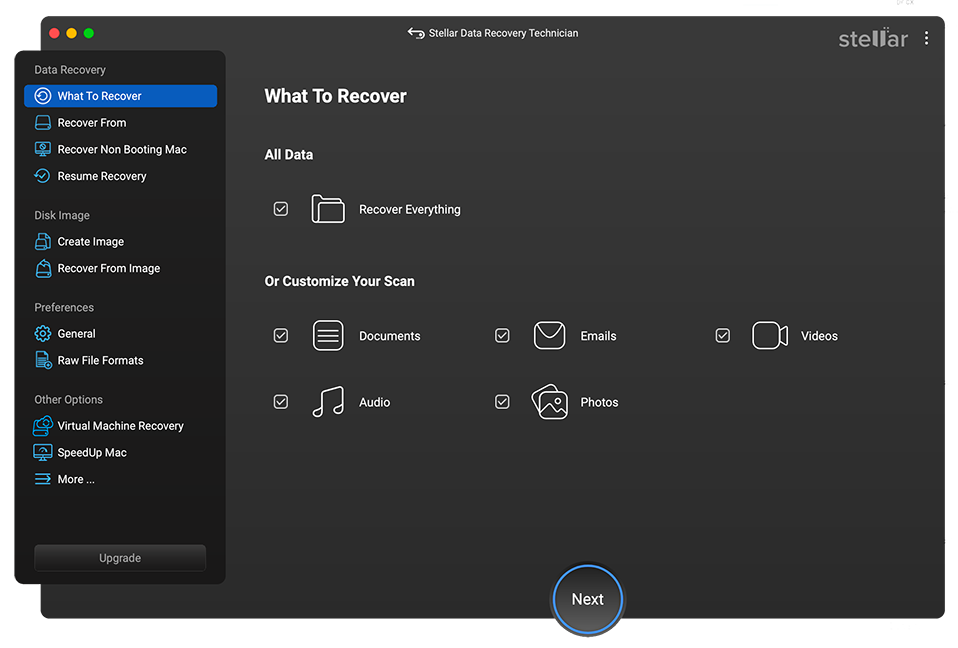
The workflow is the same wizard as the other Stellar Mac apps: choose what to recover (documents, emails, photos, audio, videos or everything), choose where, scan, preview, recover. The extra sources sit in the side panel under Other Options: Virtual Machine Recovery and Recover From NAS & Linux.
Recover From NAS & Linux System: choose NAS Recovery or Linux Recovery. The side panel also lists Recover Non Booting Mac, Recover From Time Machine, the disk image tools, Virtual Machine Recovery and SpeedUp Mac.
Features
NAS recovery over the network, without pulling a drive
Stellar Data Recovery Technician for Mac connects to a Synology, QNAP or Asustor NAS by its IP address, identifies it and scans its BTRFS or EXT4 volumes while the NAS stays running. QNAP Thin Volumes and Static EXT4 volumes (standalone, RAID 1, RAID 5, RAID 6) are covered. This online mode needs macOS Big Sur 11 or later.
Offline recovery from a dead NAS's drives
When the NAS itself has failed, Stellar Data Recovery Technician for Mac reads the drives you pull out and connect to the Mac, and handles BTRFS and EXT4 across RAID 0, RAID 5, RAID 6, SHR1 and SHR2. You don't rebuild the array first. The limit: this is NAS RAID only, so a RAID enclosure attached straight to a Mac isn't covered.
Virtual machine and Linux recovery
Stellar Data Recovery Technician for Mac mounts VMDK, VDI, VHD and VHDX files and recovers individual files from inside them, instead of restoring the whole image. It also reads Linux EXT2, EXT3 and EXT4 drives, either connected by cable or over the network by IP address, which macOS can't mount by itself.

Virtual Machine Recovery: add a VMDK, VDI, VHD or VHDX file (or use Find VM Image) and mount it for scanning.
Everything in the Mac Premium edition
Stellar Data Recovery Technician for Mac includes the lower editions' tools: recovery of 300+ file types including Apple Mail, lost or deleted volume recovery, recovery from a Mac that won't boot through a bootable recovery drive, Time Machine backups (APFS, HFS+, and sparsebundle or backupbundle archives on a Time Capsule or NAS), fragmented MOV and MP4 recovery, and photo and video repair for corrupt JPEG, CR2, TIFF, MOV, MP4 and other files.
No SIP changes, plus imaging and drive health
Stellar Data Recovery Technician for Mac only needs Full Disk Access: System Integrity Protection stays on and no kernel extension is installed, which matters on managed Macs. It can make a sector-by-sector image of a failing drive and scan the copy, shows S.M.A.R.T. health and temperature for each drive, and includes Duplicate Finder, Large Files Finder and SpeedUp Mac for cleaning up a machine before it goes back to its owner.
Pause, resume and preview mid-scan
Stellar Data Recovery Technician for Mac can pause a long scan and pick it up later, and files found so far can be previewed and recovered while the scan is still running. You can also limit the scan to certain file types and drives, which cuts the time on a large NAS volume.

Scan results in File List view, sorted by type, with a photo preview open and a Deep Scan link at the bottom.
Benefits
- One Mac tool for mixed storage. Mac drives, Windows-formatted disks, Linux drives, NAS volumes and virtual disks are all handled by the same app, so a service desk doesn't need four products.
- No NAS teardown for online cases. Scanning a running NAS by IP avoids pulling drives and the risk of putting them back in the wrong order.
- Works on locked-down Macs. Because SIP stays on, it fits company Macs where security settings can't be changed.
- Cheaper here than on Stellar's own store. $149 at checkout against $199 for a year on Stellar's order page.
Real-World Uses
- A deleted share on a Synology. Someone wiped a shared folder on a working Synology. You scan the BTRFS volume over the network from a MacBook and recover it to a USB drive.
- A dead QNAP. The power board on a four-bay QNAP died. You connect the drives to a Mac with adapters and run offline recovery on the RAID 5 set.
- A broken virtual machine. A Parallels or VMware Windows VM won't start. You mount its disk file and copy out the user's documents.
- A Mac that won't boot. A client's MacBook stops at the startup screen. You build a bootable recovery drive with the app and copy the files off before the reinstall.
Who It's For, and Who Should Skip It
It's for repair shops, IT staff and consultants who recover data on Macs for other people, and for anyone with a failed Synology, QNAP or Asustor NAS or a Linux drive to rescue. The license can move between machines, which suits a technician who works on a different Mac each day.
Skip it if:
- Your data was on your own Mac or an external drive. Stellar Data Recovery Professional or Premium for Mac covers that for less.
- Your RAID is a directly attached enclosure, not a NAS. That setup isn't supported.
- Your Mac runs Catalina or older and the NAS must stay online. Online NAS recovery needs Big Sur or later.
- The drive is physically damaged (clicking, not seen by Disk Utility). No software fixes that; a recovery lab is the next step.
- You use Windows. This license is for the Mac edition only.
Usage Guide
- Install. Unzip the download, open the DMG and drag the app to Applications. Never install to the drive you're recovering from.
- Give it Full Disk Access in System Settings when asked. Nothing else needs changing.
- Pick the source. For a Mac or external drive, use What To Recover and Recover From. For a NAS or Linux machine, open Recover From NAS & Linux and choose online (IP address) or offline (connected drives). For a VM, open Virtual Machine Recovery and add the disk file.
- Image a failing drive first. If a drive has bad sectors, use Create Image and scan the image instead.
- Scan. Start with the normal scan and switch to Deep Scan if files are missing. Deep scans of big volumes take a long time, and you can pause them.
- Preview and recover to a different drive with enough free space.
- Activate with the key from your order email to save files.
Where it falls short
- Long deep scans. MacTrast's reviewer warns "Deep scans take a long time, so bring your lunch", and NAS volumes over the network are slower than local disks.
- Recovered doesn't always mean usable. MacHow2 found that with the Professional edition many recovered files were corrupt, so preview before you count on a file.
- Quick Scan can come up thin. The same reviewer saw few or no results from the quick scan until he ran a deep one.
- Nothing is recovered until you pay. Unlike Stellar's free Mac edition (1 GB free), Technician's trial only scans and previews.
- Renewals. Some users report surprise auto-renewal charges on Stellar subscriptions, so check the renewal setting after you buy.
What Users Say
There are few reviews of the Technician edition itself, so this section also draws on reviews of Stellar's Mac recovery engine, which Technician shares with Professional and Premium.
MacTrast (Technician for Mac, July 2026): 9/10
Chris Hauk reviewed the Technician edition itself, scanning an M4 Mac mini: "I scanned my M4 Mac mini's 512GB internal SSD drive, which was about ⅔ full, and a full scan took just a little longer than 30 minutes."
His verdict: "I was quite impressed with Stellar Data Recovery Technician's capabilities.. While easy to use, the app is quite powerful, finding and recovering recovering deleted files with ease." He adds: "if you need to recover files from NAS drives or other networked storage, I recommend springing for the paid version of Stellar Date Recovery Technician".
His cons: "You need to pay for a license to actually recover any data" and "Deep scans take a long time, so bring your lunch".
MacHow2 (Professional for Mac, April 2025)
Nick Mead tested the Professional edition and found it easy: "There's no technical experience necessary and a step-by-step wizard guides you through the recovery process." On speed: "As a rough estimate, expect to wait around 5 minutes to scan 100GB".
His results were mixed: "In my tests, I found that Stellar Data Recovery successfully recovered a significant portion of lost files, including documents and images." But: "However, many of the recovered files were corrupted and unusable, meaning a lot of Stellar Data Recovery's usefulness depends on the file type and the extent of data loss." He also notes that "some users have reported unexpected charges due to auto-renewal policies."
Comparitech (Professional for macOS 11.2)
Marc Dahan was more positive: "The software performed exceptionally well in my tests and had a high recovery rate. However, it isn't cheap". He found the interface "extremely easy to use – perhaps to a fault", wishing he could narrow a scan to a specific file name or type.
Trustpilot
Stellar as a company scores 4.8 out of 5 on Trustpilot from about 5,600 reviews across all its products. The negative ones are mostly about files that didn't come back and about renewals.
The recurring themes: reviewers like the simple wizard, the range of storage it reads and, for Technician, NAS recovery without dismantling the box. The complaints are slow deep scans, recovered files that turn out corrupt, and subscription renewals.
Comparisons
Technician vs Premium for Mac
Premium already covers Mac drives, lost volumes, a Mac that won't boot, Time Machine and photo and video repair. Technician adds NAS (online and offline, including NAS RAID), Linux EXT drives and virtual machine files. If none of those three is your problem, Premium is the better buy.
Stellar Data Recovery Technician for Mac vs the Windows Technician edition
They're separate products with separate licenses. Pick the one for the computer you'll run the recovery on, not the one the lost data came from: the Mac edition reads NTFS and exFAT disks too.
Editions and Pricing
| Mac edition | 1 year on Stellar's order page | What it adds | Buy |
|---|
| Professional | $89.99 | Deleted files, lost volumes, a Mac that won't boot, disk images | Buy Professional |
| Premium | $99.99 | Photo and video repair | Buy Premium |
| Technician | $199 ($149 at checkout here) | NAS, NAS RAID, Linux and virtual machine recovery | Buy Technician |
Stellar's prices were checked on November 11, 2026, and are marked as a special offer there (list prices $99.99, $209.99 and $299). Lifetime licenses are also sold on Stellar's order page. Each Buy button orders that edition for one year: at checkout on November 11, 2026 that was $89.99 for Professional, $99.99 for Premium and $149 for Technician.
FAQs
Can I use one Stellar Data Recovery Technician license on several Macs?
Stellar Data Recovery Technician for Mac runs on one Mac at a time, but the license is transferable, so you can move it from one customer's machine to the next.
Can Stellar Data Recovery Technician recover a Synology SHR volume?
Yes, offline. Stellar Data Recovery Technician for Mac reads SHR1 and SHR2 (as well as RAID 0, 5 and 6) from Synology, QNAP and Asustor drives connected to the Mac, with BTRFS or EXT4 file systems.
Does Stellar Data Recovery Technician for Mac work with a NAS from another brand?
Stellar names only Synology, QNAP and Asustor for NAS recovery. A drive from another NAS may still be readable as a plain Linux EXT drive, but that isn't a listed scenario, so run the free scan first.
Do I need to disable SIP to scan the Mac's internal drive?
No. Stellar Data Recovery Technician for Mac only needs Full Disk Access in System Settings, and that holds on Apple silicon and T2 Macs too.
Can Stellar Data Recovery Technician recover from a clicking or dead hard drive?
No. Stellar Data Recovery Technician for Mac only works with drives that macOS still detects in Disk Utility. A physically damaged drive needs a recovery lab, and Stellar runs one as a separate paid service.
What happens when the one-year Technician license runs out?
The $149 Technician license at checkout runs for one year. Files you've already recovered stay yours. Renewals aren't refundable under Stellar's policy, so check whether the subscription renews automatically if you only needed it for one job.
System Requirements
- macOS Golden Gate 27, Tahoe 26, Sequoia 15, Sonoma 14, Ventura, Monterey, Big Sur, Catalina 10.15, Mojave 10.14 or High Sierra 10.13
- Online NAS recovery: macOS Big Sur 11 or later
- Apple silicon (M1 to M6) or Intel Mac
- 4 GB RAM minimum, 8 GB recommended
- 250 MB of disk space for the app, plus a separate drive for recovered files
Conclusion
Stellar Data Recovery Technician for Mac is worth $149 a year if you recover data for a living on Macs, or if you have a dead Synology, QNAP or Asustor NAS and a Mac to rescue it with. The one reason to buy it is NAS recovery, online by IP or offline from the bare drives, in an app that also covers everything else on a Mac without switching off SIP.
The main reason not to is that most people don't need it: for files lost on a Mac's own drive, Professional or Premium do the job for less. Deep scans are slow and not every recovered file opens, so scan with the trial first and buy when it shows your files.
Download Free TrialBuy TechnicianBuy PremiumBuy Professional