Stellar Converter for OLM Standard: Open Outlook for Mac Mail in Windows Outlook
Stellar Converter for OLM Standard is a Windows program that converts Outlook for Mac data files (OLM) into Outlook PST files, or into MSG and EML, with emails, attachments, contacts, calendars, tasks and notes kept in their folders. It costs $39 for a one-year license, and the free trial previews everything it converts.
You need it when you have moved from a Mac to a Windows PC, or received an OLM export from a Mac user, and Outlook for Windows refuses the file: it only opens PST. The Standard edition is the plain OLM-to-PST converter; the Technician edition adds PDF and HTML output and direct upload to Microsoft 365.
Quick facts
- Price: $39 for one year (Standard); the Technician edition is $99 for one year
- Developer: Stellar Information Technology (Stellar Data Recovery), Gurugram, India
- Version: 6.1.0.0 for Windows, released October 2026
- Runs on: Windows 11, 10 and 8.1, 64-bit only, on Intel, AMD or ARM PCs, and on a Mac through Parallels Desktop
- Reads: OLM files from Outlook for Mac 2024, 2021, 2019, 2016 and 2011, any size
- Saves to: a new PST, an existing Outlook profile, MSG or EML
- Free trial: converts and previews every item; saving needs a license key
- Guarantee: 30-day money-back guarantee on Stellar's pricing table
- What we checked: the trial installer is version 6.1.0.0 (28.7 MB), signed by Stellar Information Technology Private Limited and dated October 22, 2026; the Standard license at checkout on November 28, 2026: $39 for one year, with an "Enable auto-renewal for this order" box you can leave unticked. We didn't convert a real OLM file.
Download Free TrialBuy Now ($39 / year)
Overview
Stellar Converter for OLM looks like Outlook: a ribbon with Select OLM Mailbox and Save Converted Mailbox, a folder tree on the left, the message list in the middle and the message itself on the right. You select or find the OLM file, click Convert, browse the result like a mailbox, then save. Since version 6.1, released in October 2026, Outlook no longer has to be installed on the PC for the conversion; you only need Outlook afterwards to open the PST.
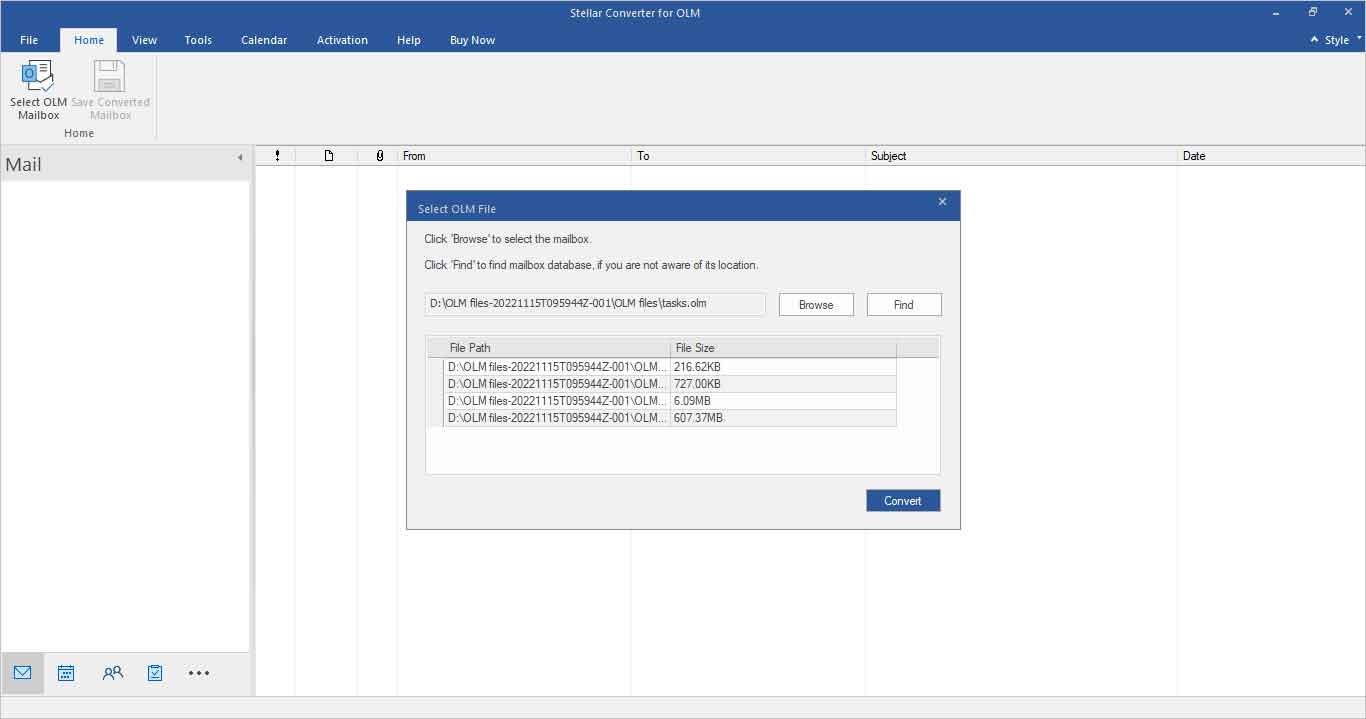
The first step: Browse to the OLM file, or use Find to list every OLM file on a drive, then Convert.
Features
Full OLM to PST conversion
Stellar Converter for OLM Standard converts mail, attachments, contacts, calendars, tasks, notes and journals from an OLM file into a PST, keeping the original folder hierarchy and mail properties, with no limit on the OLM file's size.
Free preview before you pay
Stellar Converter for OLM shows the converted mailbox in a three-pane view (folders, message list, message with its attachments), so you can confirm the file isn't damaged and the folders you need are there before you buy a key. A search box filters the message list.
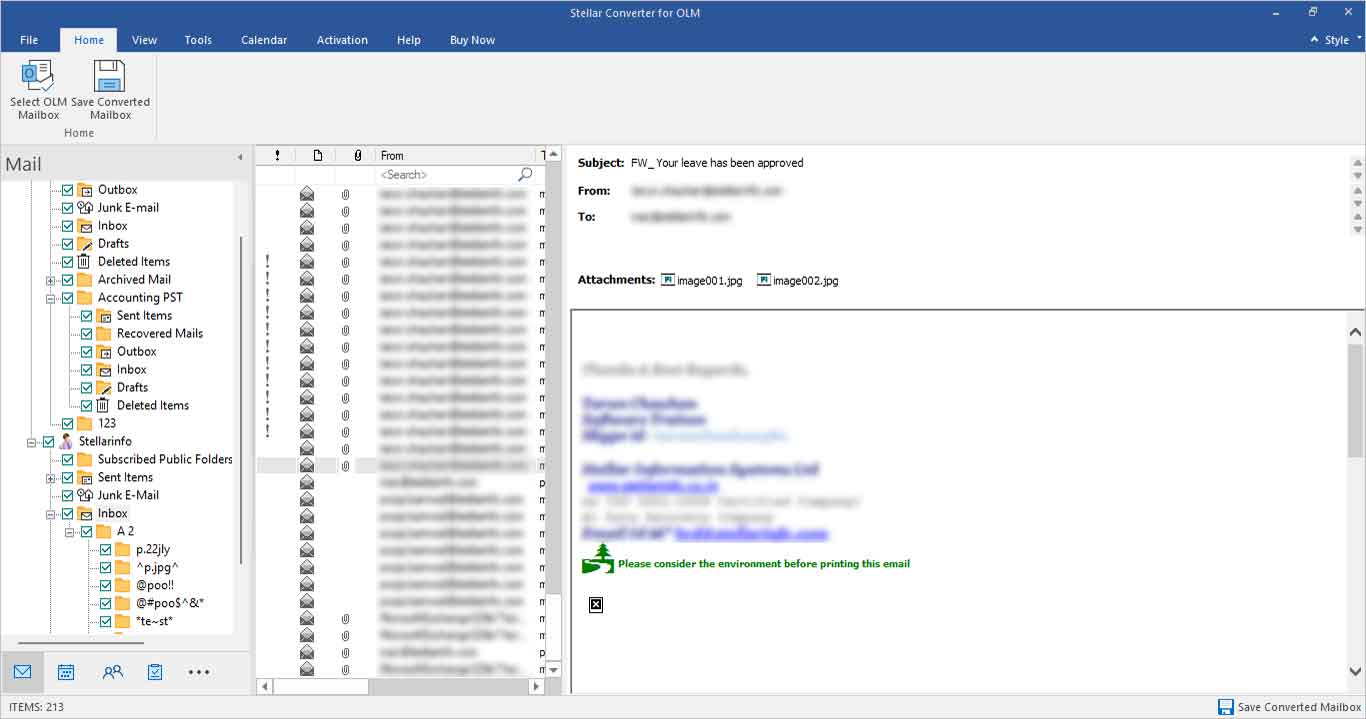
The preview: the converted folder tree, the message list (71 items here) and a message with its attachments.
New PST, existing Outlook profile, or MSG and EML
Stellar Converter for OLM Standard saves the converted mailbox as a new PST (one PST per mailbox or all mailboxes in one), exports it straight into an existing Outlook profile, or saves items as MSG or EML files. Date-range, sender and folder filters narrow what gets saved.
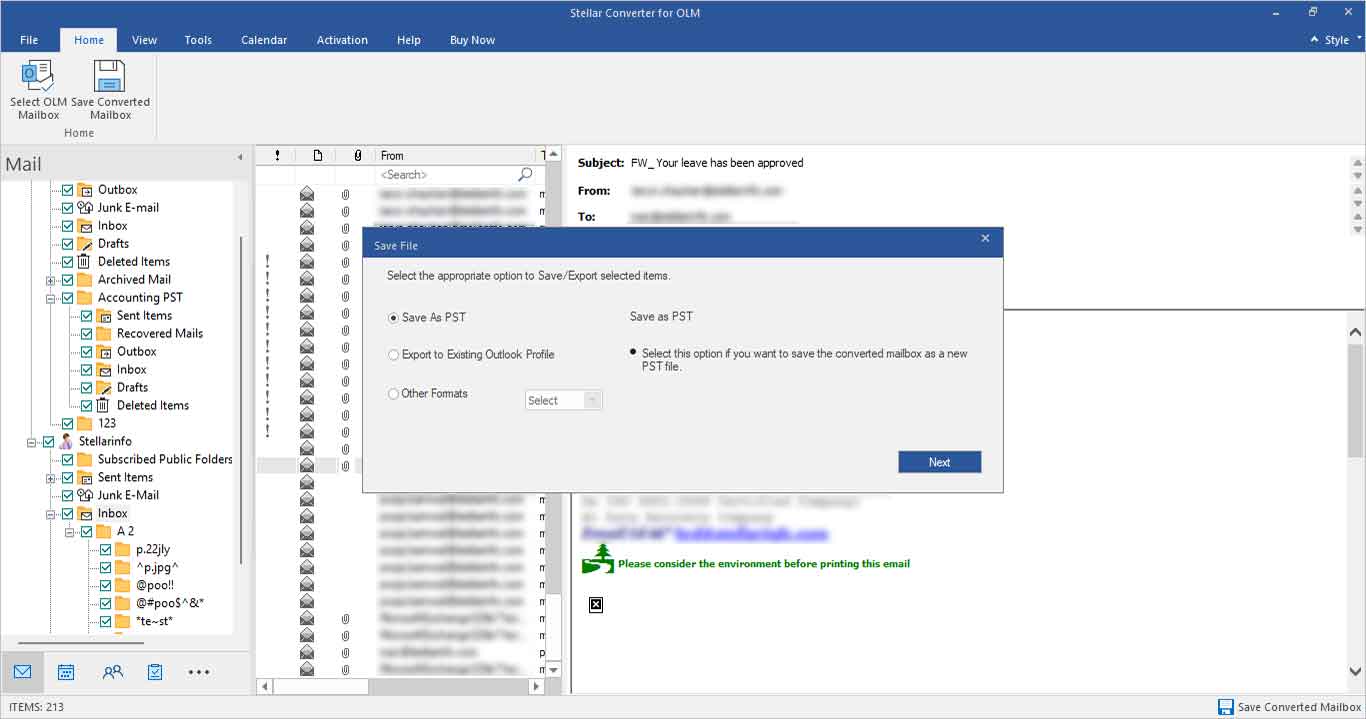
The save step: Save As PST, Export to Existing Outlook Profile, or Other Formats.
Automatic PST splitting and a log
Stellar Converter for OLM splits an oversized PST automatically at about 45 GB so Outlook stays responsive (you can turn it off), and keeps a log report of each conversion that you can save and check later.
Benefits
- No Mac required. You do the whole job on the Windows PC where the mail has to end up.
- See before you buy. The trial shows exactly which items come out of your file.
- Cheap for a one-off. $39 covers a year, which is plenty for a migration you do once.
Real-World Uses
- Switching from MacBook to a Windows laptop: export the mailbox from Outlook for Mac as OLM, copy it across, convert it, and open the PST in Outlook for Windows.
- An OLM archive from a colleague or client: read and keep the mail in Outlook without a Mac in the office.
- Saving a few messages as files: export selected emails as EML or MSG for a case file or a hand-over.
Who It's For, and Who Should Skip It
Standard is for one person with an OLM file and Outlook for Windows. If the goal is a Microsoft 365 mailbox, Standard can still do it by exporting into an Outlook profile that's connected to Microsoft 365, but direct export to Microsoft 365 is a Technician feature, and Kernel OLM to Office 365 includes that upload in its $99 one-time Home license. If you still have the Mac with Outlook on it, adding the new account there and dragging folders across costs nothing. Anyone who wants a perpetual license should note that Standard is sold for one year at a time.
Usage Guide
- Download and install the trial on a 64-bit Windows 11, 10 or 8.1 PC.
- Click Select OLM Mailbox, then Browse to the file, or Find to search a drive for OLM files.
- Click Convert and wait for the scan to finish.
- Check the folders and messages in the preview.
- Buy and activate a key from the Activation menu.
- Click Save Converted Mailbox, choose Save As PST (or Export to Existing Outlook Profile, or MSG/EML), pick a location and save.
- In Outlook for Windows, open or import the PST.
Before you buy
- The Standard license is for one year. At checkout there is an "Enable auto-renewal for this order" option; leave it unticked if you only need the license once.
- Standard saves to PST, MSG and EML. PDF, HTML and RTF output and direct Microsoft 365 export are in the Technician edition.
- The program converts one OLM file at a time (several mailboxes inside that file convert together).
- Stellar offers a 30-day money-back guarantee, but one recent Trustpilot reviewer says a refund was refused, so use the free preview to make sure it reads your file first.
Download Free TrialBuy Now ($39 / year)
Where it falls short
- Yearly, not perpetual. For a one-time migration a year-long license is fine, but you can't keep using it later without paying again.
- One OLM file per run. A user with several archives converts them one after another.
- 64-bit Windows only, with a recommended 16 GB of RAM (8 GB minimum), which is a lot for a file converter.
- No direct cloud export in Standard. Microsoft 365 upload needs the Technician edition.
What Users Say
Trustpilot (Stellar as a company)
Stellar holds a 4.8 out of 5 TrustScore on Trustpilot from about 5,600 reviews, mostly about its data recovery and PST repair tools; we found none that discuss the OLM converter specifically. Complaints there centre on refunds. Nick (1 star, November 2026): "They will not refund and will not tell me why."
Independent reviews
Reviews of Stellar Converter for OLM on tech blogs are few and mostly promotional, praising that it keeps the folder hierarchy without naming any drawbacks, so we don't quote them here.
The pattern
Stellar's tools are widely used and well rated overall, but there's little independent testing of this converter and refunds can be contested, which makes the free preview the step that matters.
Comparisons
Standard vs Technician
Stellar Converter for OLM Standard ($39 a year) converts to PST, MSG and EML and exports to an existing Outlook profile. Technician ($99 a year) adds PDF, HTML and RTF output and direct export to Microsoft 365. Buy Technician only if you need those outputs or the cloud upload.
Stellar Converter for OLM vs Kernel OLM to Office 365
Kernel OLM to Office 365 ($99 one-time) uploads to Microsoft 365 directly and saves to many formats, but its download is a 2023 build. Stellar Standard is cheaper and was updated in October 2026, but it's yearly and needs Technician for cloud upload. For a PST on a new PC, Stellar Standard is the simpler, cheaper buy.
Editions and Pricing
Prices checked on November 28, 2026.
| Edition | Price | License | Saves to |
|---|
| Standard | $39 | 1 year | PST, existing Outlook profile, MSG, EML |
| Technician | $99 | 1 year | Everything in Standard plus PDF, HTML, RTF and direct Microsoft 365 export |
FAQs
Do I need Outlook installed to use Stellar Converter for OLM?
No. Since version 6.1, Stellar Converter for OLM converts OLM files to PST, MSG and EML without Outlook on the PC; you need Outlook only to open or import the PST afterwards (and for the Export to Existing Outlook Profile option).
Can Stellar Converter for OLM run on a Mac?
Only through Windows. Stellar Converter for OLM is a Windows program, and Stellar says it runs on a Mac under Parallels Desktop, as well as on ARM-based Windows PCs.
Which Outlook versions can open the PST from Stellar Converter for OLM?
Stellar Converter for OLM creates PSTs that work with Outlook 2021, 2019, 2016, 2013, 2010, 2007 and 2003, in Unicode format for the newer versions.
Does Stellar Converter for OLM keep attachments?
Yes. Stellar Converter for OLM converts attachments along with the messages and keeps them attached in the PST.
What happens when the Stellar Converter for OLM license year ends?
Stellar Converter for OLM Standard is a one-year license, so after a year you can no longer convert with it unless you renew. At checkout you choose whether auto-renewal is on; the PSTs you already created stay yours.
Can Stellar Converter for OLM convert several OLM files at once?
No. Stellar Converter for OLM converts one OLM file at a time, though all mailboxes inside that file are converted together.
System Requirements
- Windows 11, 10 or 8.1, 64-bit only (Intel-compatible x64 or ARM); Mac through Parallels Desktop
- 8 GB of RAM minimum, 16 GB recommended
- 250 MB of free disk space
- OLM files from Outlook for Mac 2011 to 2024
Conclusion
Stellar Converter for OLM Standard is worth $39 if you have an OLM file and need it in Outlook for Windows: it's current (October 2026), doesn't need Outlook to convert, and the free preview proves it can read your file before you spend anything. The reason to look elsewhere is the license: it's a one-year term, and direct Microsoft 365 upload needs the $99 Technician edition. For a straightforward Mac-to-PC move ending in a PST, it's the simple, inexpensive choice; leave auto-renewal unticked if you only need it once.
Download Free TrialBuy Now ($39 / year)