Stellar Repair for QuickBooks: Get Your Books Back from a Corrupt Company File
Stellar Repair for QuickBooks Software is a $249-a-year Windows tool that repairs corrupt QuickBooks Desktop company files (QBW) and recovers data from QuickBooks backups (QBB), for QuickBooks Pro, Premier and Enterprise 2007 through 2024. It's for bookkeepers, ProAdvisors, IT consultants and business owners whose company file no longer opens and whose last good backup is too old to use.
The trouble usually starts with an error code: -6150, -6000 -80, -6189 816, or the QuickBooks Unrecoverable Error. Intuit's own File Doctor and Rebuild Data either fail or make no difference, and the file holds months of invoices, bills and payroll. Stellar reads the damaged file, shows you what it can recover, and writes it into a fresh company file that QuickBooks can open.
Quick facts
- Version: 14.0.0.2, released August 2026
- Developer: Stellar Data Recovery
- Edition: Technician, the only edition Stellar sells for this product
- Runs on: Windows 11, 10, 8.1 and 8, 64-bit only. There's no Mac version.
- Repairs: QBW company files and QBB backups from QuickBooks Desktop Pro, Premier and Enterprise Solutions 2007 to 2024
- Country editions: US, UK, Canada, Australia, New Zealand, Germany and South Africa
- Price: $249 for a 1-year, single-user license
- Free trial: scans the file and previews everything recoverable. Saving needs a license.
- Refunds: 30 days, for technical failures and wrong purchases, not for a change of mind
What we checked: the price on the order page ($249.00 for Stellar Repair for QuickBooks Software Technician, Windows, English) and the 12.8 MB trial installer from Stellar's download server (file version 14.0.0.2, digitally signed by Stellar Information Technology), both on October 29, 2026. We didn't repair a damaged company file with it ourselves.
Before you buy
- Run the free scan first. If your customers, vendors and transactions show up in the trial's preview, the licensed version can save them. If they don't, you haven't spent anything, and Stellar's refund policy expects you to have tried the trial before buying.
- Have QuickBooks ready. The repaired data goes into a new, blank company file that you create in QuickBooks Desktop first, in the same QuickBooks version as the damaged file.
- Check your QuickBooks year. Stellar lists support for QuickBooks 2007 through 2024. If your file comes from QuickBooks Desktop 2025 or later, make sure the trial reads it before you pay.
Download Free TrialBuy Now
Overview
Stellar Repair for QuickBooks is a small, single-purpose program. The start screen has one box: browse to the damaged QBW or QBB file, or click Find to search a drive when you don't know where the company file lives. A wizard then asks for a working backup (QBB) if you have one, scans, and opens a preview with tabs for Company, Customers, Vendors and Employees.
The program never writes to the damaged file. It reads it, rebuilds the lists and transactions it can find, and saves them into a separate new company file. That makes it safe to try on the only copy you have, though it's still wise to copy the file somewhere first.
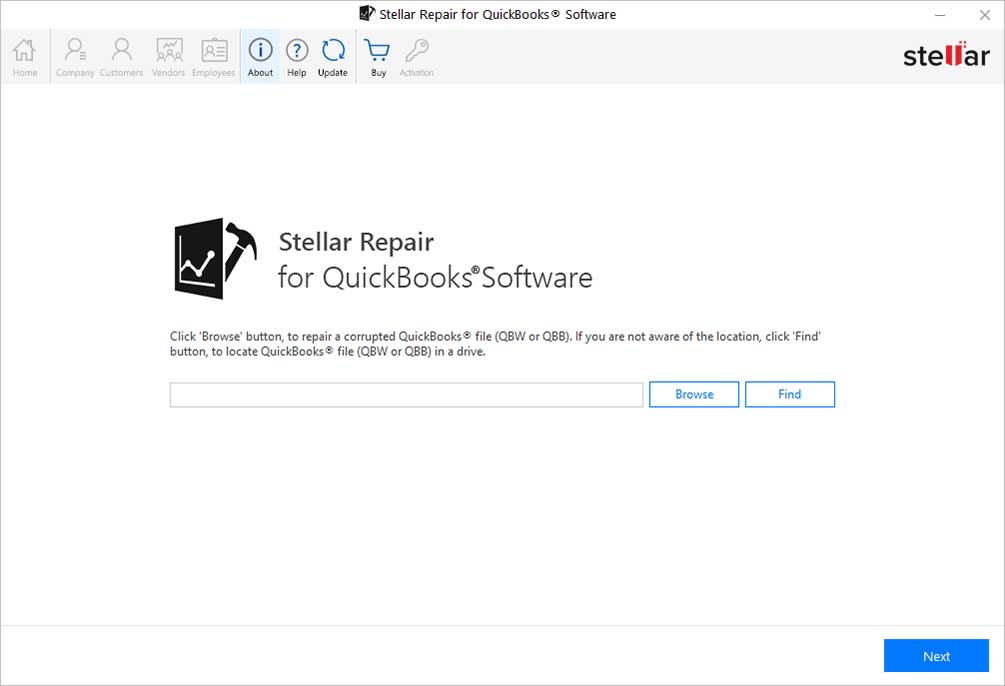
The start screen: Browse to a corrupted QBW or QBB file, or click Find to locate QuickBooks files on a drive. The Company, Customers, Vendors and Employees buttons stay greyed out until a file is scanned.
Features
Repairs damaged QBW company files
Stellar Repair for QuickBooks scans a corrupt QuickBooks company file and recovers the company information, Chart of Accounts, Items and Services, customers, vendors and employees, with their transactions. Stellar aims it at the errors that stop QuickBooks from opening or using the file: -6150 0, -6000 -80, -6000 -83, -6189 816, -6177 0, the C=43, C=44, C=47 and C=315 data errors, and the Unrecoverable Error. Multi-currency transactions are recovered too.
Recovers data from QBB backups
Stellar Repair for QuickBooks also reads QuickBooks backup files (QBB). You can pick a backup on its own, or add the latest working backup alongside the damaged QBW, which Stellar says gives better repair results. Either way the recovered data is saved as a QBW company file.

The Select Working Backup File step: point it at a recent QBB backup for better results, or click Skip to repair the QBW on its own.
Preview before you pay
Stellar Repair for QuickBooks shows every recoverable record before anything is saved, and the free trial includes this preview. After the scan, a summary counts the Charts of Accounts, Items and Services, Customers, Vendors and Employees it found. The preview then shows the full detail: company name, legal address and fiscal year; each customer's estimates, invoices and payments; each vendor's purchase orders, bills and checks; each employee's paychecks and liability payments.

The Scan Summary after a scan of a sample file: 69 Charts of Accounts, 133 Items and Services, 119 Customers, 35 Vendors and 24 Employees, labelled Present+Deleted.

The Company preview of Intuit's Rock Castle Construction sample file: address, phone, legal name and address, fiscal and tax year, with Chart of Accounts and Items & Services on the left.

The Customers tab: the customer and job list with balances on the left, and one job's estimates, received payments and invoices on the right.
Payroll and employee records
Stellar Repair for QuickBooks recovers employee details (name, address, phone, email) and their transactions: paychecks, liability checks and adjustments, year-to-date adjustments and non-payroll transactions. For a business that runs payroll in QuickBooks Desktop, this is often the data that matters most.

The Employees tab: three employees found, with one employee's paychecks listed by date, account and amount.
A detailed log of every repair
Stellar Repair for QuickBooks writes a log of each repair: start and end time, and, for each type of record, how many were present in the damaged file and how many were recovered (bills, purchase orders, checks, journal entries, paychecks and so on). You can save it, which is useful when you repair a client's file and need to show what came back.

The log report after a repair, with present and recovered counts for bills, purchase orders, checks, journal entries and paychecks, and the Repair process completed successfully message.
Benefits
- You know before you pay. The preview shows your own records, not a promise, so a $249 purchase isn't a gamble.
- Your original file stays as it is. If the repair isn't good enough, you still have the damaged file to send to a data recovery service.
- No waiting on a service queue. You run it yourself, on your own PC, with sensitive financial data that never leaves the building.
- A record of what came back. The log's present and recovered counts tell you quickly whether anything is missing.
Real-World Uses
- The file won't open after a power cut. QuickBooks shows -6150 or -6000 -80, File Doctor gives up, and the last backup is weeks old. Scan the QBW, check the preview, and save the data to a new company file.
- A ProAdvisor fixing clients' files. A client hands over a damaged company file. You repair it in your office, save the log as proof of what was recovered, and return a working file.
- Payroll is due. Employee records and paychecks are trapped in a file that crashes on open. Recover them and keep the pay run on schedule.
- Combining an old backup with a damaged file. You have a QBB from last quarter and a damaged QBW with everything since. Give the tool both and it uses the backup to improve the repair.
Who It's For, and Who Should Skip It
It's for QuickBooks Desktop users on Windows with a damaged company file, and for the accountants, ProAdvisors and IT consultants who support them. It makes the most sense when Intuit's free tools have already failed and there's no recent backup.
Skip it if you use QuickBooks Online: your books live on Intuit's servers and there's no QBW file to repair. Skip it if you're on a Mac, since this is Windows-only. Skip it, too, if you have a recent working backup: restoring that in QuickBooks is free. And if you don't want to run the repair yourself, Stellar also sells the software together with its repair service (see Editions and Pricing).
Usage Guide
- Install and launch. Download the trial (about 12.8 MB), install it on a 64-bit Windows 8 to 11 PC, and start Stellar Repair for QuickBooks.
- Copy the damaged file. Work on a copy of the QBW, so the original stays untouched no matter what.
- Select the file. Click Browse to pick the QBW or QBB, or Find to search a drive, then click Next.
- Add a backup if you have one. Select the latest working QBB, or click Skip.
- Scan. Review the selected files and click Scan. A Scan Summary lists the counts of each record type. Click OK.
- Check the preview. Use the Company, Customers, Vendors and Employees buttons to check your records and transactions.
- Create a blank company file. In QuickBooks Desktop, use File, New Company to create an empty company file in the same version as the damaged one, then close QuickBooks.
- Activate and save. Enter your license key, click Save, select the blank QBW and the QuickBooks version, and save. When the Repair Process Complete message appears, save the log and open the new file in QuickBooks.
Where it falls short
- Deleted company files aren't its job. Stellar says the program can't recover deleted files. If the QBW itself was deleted, you need a file recovery tool first, then this one if it comes back damaged.
- The scan counts deleted entries too. The summary is labelled Present+Deleted, because the program can't tell existing records from deleted ones. Expect some old, deleted entries in the result.
- Some sensitive fields may need retyping. One G2 reviewer who repairs clients' files found bank account and credit card numbers came back as stray ASCII characters and had to re-enter them one at a time.
- All or nothing. You can't recover only the company information. It saves the company, customers, vendors and employees together.
- It costs $249 a year. That's a lot for a one-off repair, and one accounting user on G2 called it "too costly, especially for my budget".
What Users Say
Independent reviews of Stellar Repair for QuickBooks are few, which is normal for a niche repair tool people buy in an emergency. G2 has six reviews with an average around 4.6 to 4.7 out of 5 (SaaSworthy, which republishes them, shows 4.7/5 from 6 ratings: four Excellent, two Very Good). Capterra and GetApp each show a single rating. Most of what's published comes from Stellar itself, so we've kept the two apart below.
G2 users
Merchant L, July 25, 2018 (G2): “The ease of use. Set up your new, blank, QuickBooks file. Click, "Select File" and browse to the QuickBooks file needing recovery, and click on, "Scan File". Walk through some of the entries and click on, "Repair".” The same reviewer, who repairs clients' files, warns: “The recovery file many times contains ASCII characters where the credit card number and bank :"Account Number" (in the account properties, your actual bank account number if entered). This is very difficult to explain to the client and so needs to be copied and pasted one at a time.” The verdict: “it works great. It's very fast and efficient and worth the money.”
Nandu G, September 10, 2021 (G2), "Now recover data from corrupted QuickBooks file": "Due to some hard disk issue, our QuickBooks files were corrupted. With the help of this software, we were able to recover data from the corrupted QuickBooks file."
Verified User in Retail, August 26, 2021 (G2), "Complete solution for QuickBooks problems": "It helps you to recover all the data like your recorded transactions, company files and much more.." and "All the data like payroll details, transactions got recovered."
Verified User in Accounting, May 6, 2022 (G2), "Good functional product": likes "That it can recover lost data including vital information such as information related to customers and vendors." Dislikes: "It takes some time getting used to. Set up can be long."
Verified User in Accounting, October 17, 2017 (G2): "The problem with this software is that it may be too costly, especially for my budget!"
Antony T, August 24, 2016 (G2), "The product is excellent, fast and precise.": "Dislike how its a separate program. Although its a separate program the functionality of it being on a separate program is justified and I would have no problem purchasing this again."
Customers in Stellar's case studies
Stellar publishes these on its product page, so read them as testimonials the vendor chose, not independent reviews.
Jay Holla, Lionbridge, whose QuickBooks Desktop 2014 file wouldn't open past the login screen: "The biggest problem I had to tackle was the last backup was 9 months ago and ADR was turned off, so the data had to be extracted from the broken file or it would be lost and Stellar did just as it said it would."
IT Consultant, BizReTek: "Stellar® Repair for QuickBooks® Software helped us recover our corrupted company file and regain access to critical payroll data when every other option failed."
Jennifer Peace, Director of Operations, Southeast Volusia Habitat for Humanity: "Stellar® Repair for QuickBooks® Software gave us back 13 days of data we thought were gone. Without it, we would have faced handwritten paychecks, a rescheduled audit, and weeks of 14-hour days trying to catch up"
Press and the company's ratings
The product page quotes Businessupside: "The best thing about this software is that it allows to preview the recoverable data from the file before saving. Thanks to its user-friendly interface, the repair process becomes easy and quick." iTWire's write-up of the product is marked as a sponsored review.
Stellar's Trustpilot profile covers all of its products and is rated 4.8 from about 5,600 reviews, so it says more about Stellar's ordering and support than about this tool in particular.
The pattern: people who used it say it did get their data back, including payroll, and that the steps are simple once the blank company file is set up. The complaints are about price, a setup that takes some getting used to, and sensitive fields such as bank account and card numbers coming back garbled. There's not much independent feedback, and none of it is recent, so the free scan matters more than the ratings.
Comparisons
Stellar Repair for QuickBooks vs Intuit's free tools
Intuit's QuickBooks File Doctor and the built-in Verify and Rebuild Data are free and should be your first try. They repair the file in place. Stellar Repair for QuickBooks is what you reach for when they fail: it reads the damaged file without changing it, shows you the recoverable records, and rebuilds them into a new company file. You pay $249 for that, but you see the result before you pay.
Stellar Repair for QuickBooks vs a repair service
A data repair service, Intuit's or a third party's, does the work for you but means sending your company file away and waiting. Stellar Repair for QuickBooks runs on your own PC the same day. Stellar also offers both together, the software plus its own repair service, for $349.
Editions and Pricing
Stellar Repair for QuickBooks comes in one edition, Technician. The choice is whether you also want Stellar's repair service.
| Plan | Price | License | What you get |
|---|
| Software | $249 | 1 year, single user | The repair program: QBW and QBB repair, preview, save to a new company file, log report |
| Software + Services | $349 | 1 year, single user | The same program plus Stellar's professional service for repairing a corrupt or damaged QuickBooks file |
The Buy Now button on this page is for the Software plan at $249.
FAQs
Does Stellar Repair for QuickBooks work with QuickBooks Online?
No. Stellar Repair for QuickBooks repairs QuickBooks Desktop company files (QBW) and backups (QBB) from Pro, Premier and Enterprise Solutions. QuickBooks Online keeps your data on Intuit's servers, so there's no local file for it to repair.
Does Stellar Repair for QuickBooks work with UK, Canadian or Australian QuickBooks?
Yes. Stellar Repair for QuickBooks supports the US, UK, Canada, Australia, New Zealand, Germany and South Africa editions of QuickBooks Desktop, and it recovers transactions in multiple currencies.
Is Stellar Repair for QuickBooks a one-time purchase?
No. Stellar sells Stellar Repair for QuickBooks as a 1-year license for a single user, at $249. There is no lifetime license for it on the order page or on the Stellar buy page.
Is there a Mac version of Stellar Repair for QuickBooks?
No. The current Stellar Repair for QuickBooks runs only on 64-bit Windows 11, 10, 8.1 and 8.
Can I get a refund for Stellar Repair for QuickBooks?
Stellar gives refunds within 30 days of a first purchase when the software can't do the job and support can't fix it, when the result after activation differs from the trial, or for a wrong or duplicate purchase. It doesn't refund a change of mind, a renewal, or a purchase made without trying the free trial first.
System Requirements
- Operating system: Windows 11, 10, 8.1 or 8, 64-bit only
- Processor: Intel-compatible, x64-based
- Memory: 4 GB minimum, 8 GB recommended
- Disk space: 250 MB for the installation files
- QuickBooks: QuickBooks Desktop installed, the same version as the damaged file, to save the repaired data
- Language: English
Conclusion
Stellar Repair for QuickBooks is worth $249 when a QuickBooks Desktop company file is damaged, Intuit's free tools have failed, and there's no recent backup. At that point, months of invoices and payroll are worth far more than the license, and the free scan tells you whether your data is recoverable before you pay. The one reason to buy it is that preview: you see your own customers, vendors and paychecks before you spend a cent.
The main reason not to is the price for a single emergency, along with the narrow fit: QuickBooks Desktop files on Windows, with QuickBooks itself needed to save the result. If you have a good backup, restore it instead. If you're on QuickBooks Online or a Mac, this isn't your tool. For ProAdvisors and IT consultants who see damaged files regularly, a year's license is easier to justify.
Download Free TrialBuy Now