Short answer
To repair a corrupted QuickBooks Desktop company file (.QBW), copy the file first, then try Intuit's free fixes in this order: Verify and Rebuild Data if the file still opens, Quick Fix my File and QuickBooks File Doctor in the QuickBooks Tool Hub if it doesn't, then a recent backup (.QBB) or the Auto Data Recovery copy QuickBooks keeps next to the file.
If none of that works and the backup is too old to use, Stellar Repair for QuickBooks Software ($249 for a one-year license, Windows) reads the damaged file without changing it, shows you the customers, vendors, employees and transactions it can recover in a free scan, and writes them into a new company file once you buy a license.
At a glance
| Fix |
Cost |
Works when the file won't open |
Keeps recent work |
Changes the original file |
| Verify and Rebuild Data (File > Utilities) |
Free |
✗ The file must open |
✓ |
✓ Repairs in place, after a forced backup |
| Quick Fix my File and File Doctor (QuickBooks Tool Hub) |
Free |
✓ |
✓ |
✓ Repairs in place |
| Restore a backup (.QBB) |
Free |
✓ |
✗ Loses everything since the backup |
✗ Creates a new .QBW (unless you overwrite) |
| Auto Data Recovery (.adr files) |
Free |
✓ |
Mostly: all but about the last 12 hours, or more with the original .TLG |
✗ You work on copies |
| Stellar Repair for QuickBooks Software |
Free scan and preview, $249 to save |
✓ |
✓ Whatever is still readable in the file |
✗ Saves into a new, blank company file |
How we put this guide together
- The free steps, menu paths, error codes and warnings come from Intuit's own QuickBooks Desktop support articles on the Tool Hub, File Doctor, data damage, restoring a backup and Auto Data Recovery, all updated by Intuit in August 2026.
- The Stellar steps, supported versions, editions and refund terms come from Stellar's product page, buy page and user guide for version 14.0.0.2, and the screenshots are Stellar's own.
- Reviews are quoted word for word from G2 and from the customer stories on Stellar's product page, kept apart so you can tell independent reviews from testimonials the vendor chose.
- What we checked: the $249.00 price on the order page for Stellar Repair for QuickBooks Software (Technician, Windows), version 14.0.0.2 on Stellar's product page, and the 12.8 MB trial installer on Stellar's download server, on November 3, 2026. This is a how-to guide built from Intuit's and Stellar's documentation. We didn't damage and repair a company file ourselves.
Step 1: copy the file and make sure it's really damaged
Before you run any repair, copy the company file (the .QBW and the .TLG next to it) to another folder or a USB drive. Rebuild Data and File Doctor both change the file in place, so a copy is your way back if a repair makes things worse.
Then check that the problem is the file, not the network or the account:
- H202 and other "H" errors are multi-user hosting problems, not file damage. Intuit's Tool Hub fixes them on its Network Issues tab, run on the computer that hosts the file. A repair tool won't help.
- QuickBooks Online keeps your books on Intuit's servers. There's no .QBW to repair, so everything in this guide is for QuickBooks Desktop.
- Error codes that point at the file, according to Intuit, include -6150, -6000 -82, -6000 -305, -6000 -301, -6147 and -6130, as well as customer, vendor or employee lists that suddenly show up blank.
Step 2: Verify and Rebuild Data, if the file still opens
Rebuild Data is QuickBooks Desktop's built-in repair for minor data damage, and Intuit lists it first. It only works on a file you can open.
- Go to File > Utilities > Rebuild Data. QuickBooks asks you to save a backup first. Do it.
- Let it run. Intuit warns that QuickBooks may look stuck, but as long as you can move your mouse, it's still working.
- When it finishes, go to File > Utilities > Verify Data. If no problems are found, you're done.
- If Verify finds problems, click Rebuild Now and repeat. Intuit says running the rebuild two or three times is common, and that if the first rebuild took more than two hours you should contact support instead.
If errors remain, the Verify Results window has an Expand All button, and each error links to an Intuit article on fixing it by hand. That's practical for one or two damaged transactions, and slow for more.
Step 3: Quick Fix my File and QuickBooks File Doctor
QuickBooks File Doctor is Intuit's free repair tool for company files that won't open, and you run it from the QuickBooks Tool Hub, a free download from Intuit's support site (version 1.6.0.8 in Intuit's File Doctor article, which recommends 64-bit Windows 11). Close QuickBooks before you start.
- Install and open the Tool Hub, and select Company File Issues.
- Run Quick Fix my File first, then try opening the file in QuickBooks.
- If it still fails, select Run QuickBooks File Doctor (it can take up to a minute to open), choose your company file or browse to it, select Check your file (the middle option), and enter the QuickBooks admin password.
- Wait. Intuit says the scan can take 10 to 15 minutes, depending on the file's size.
One quirk worth knowing: Intuit notes that File Doctor may report the scan as unsuccessful even when it has fixed the problem, so always try opening the file afterwards. The Tool Hub's other tabs cover Network Issues (such as H202), Program Problems, Installation Issues and a Password Reset tool.
Step 4: restore a backup or use Auto Data Recovery
When the free repairs fail, your next free option is an older copy of the file. Both routes below lose some recent work, so check how old the copy is before you rely on it.
Restore a backup (.QBB)
Restoring a QuickBooks backup creates a new, working .QBW from your .QBB file, as it stood on the day of the backup.
- Move the .QBB to your local hard drive first if it's on a USB drive or a hosting service. Intuit requires this.
- In QuickBooks Desktop, go to File > Open or Restore Company, choose to restore a backup copy, then the local backup option.
- Browse to the .QBB and pick a different folder for the restored file, or rename it. Intuit warns that restoring into the same folder as your existing company file may overwrite your data, and says not to overwrite anything unless you're sure.
- Re-enter everything you've recorded since the backup date.
Auto Data Recovery (ADR)
Auto Data Recovery is a set of automatic copies QuickBooks Desktop keeps in a QuickBooksAutoDataRecovery folder next to your company file. Intuit says to use it only after the other troubleshooting, and it has limits: it's only in QuickBooks Pro, Premier and Enterprise Solutions for Windows (not the Accountant editions), and QuickBooks doesn't create ADR files for a company file whose backup is larger than 1.5 GB.
- Recent transactions: copy your current .TLG file and the .QBW.adr file into a new folder (Intuit uses one called QBTest on the Desktop), remove ".adr" from the name, open it in QuickBooks, check the registers and run Verify Data.
- If the .TLG is damaged too: use both the .QBW.adr and .TLG.adr files the same way. Intuit says this recovers all but the last 12 hours of transactions.
- If the copy is good, move the damaged file somewhere else and put the QBTest copy in the original location.
If neither copy is usable (no backup at all, a backup from months ago, or ADR files that never got created), you're down to two choices: send the file to a repair service and wait, or run a third-party repair tool yourself. That's where Stellar comes in.
Step 5: Stellar Repair for QuickBooks Software
- Price: $249 at checkout for a one-year, single-user license. Stellar also sells the software with its own repair service for $349.
- Version: 14.0.0.2, released August 2026. Technician is the only edition.
- Runs on: Windows 11, 10, 8.1 and 8, 64-bit only. No Mac version.
- Repairs: .QBW company files and .QBB backups from QuickBooks Desktop Pro, Premier and Enterprise Solutions 2007 to 2024, in the US, UK, Canada, Australia, New Zealand, Germany and South Africa editions
- Free trial: scans the file and previews everything recoverable. Saving needs a license.
- Best for: a damaged Desktop company file that Intuit's tools couldn't fix, with no recent backup
Stellar Repair for QuickBooks works differently from Intuit's tools. It never writes to the damaged file: it reads it, rebuilds the lists and transactions it can find, and saves them into a separate, new company file. So it's safe to run on the only copy you have, and if the result isn't good enough you still have the original to send to a service.
The version range matters less than it looks. Intuit says QuickBooks Desktop Plus 2024 and Enterprise 24.0 were its final annual releases, with updates delivered to those versions since, so Stellar's 2007 to 2024 range covers current Desktop files. Run the free scan anyway: it's the only way to know whether your particular file is readable.
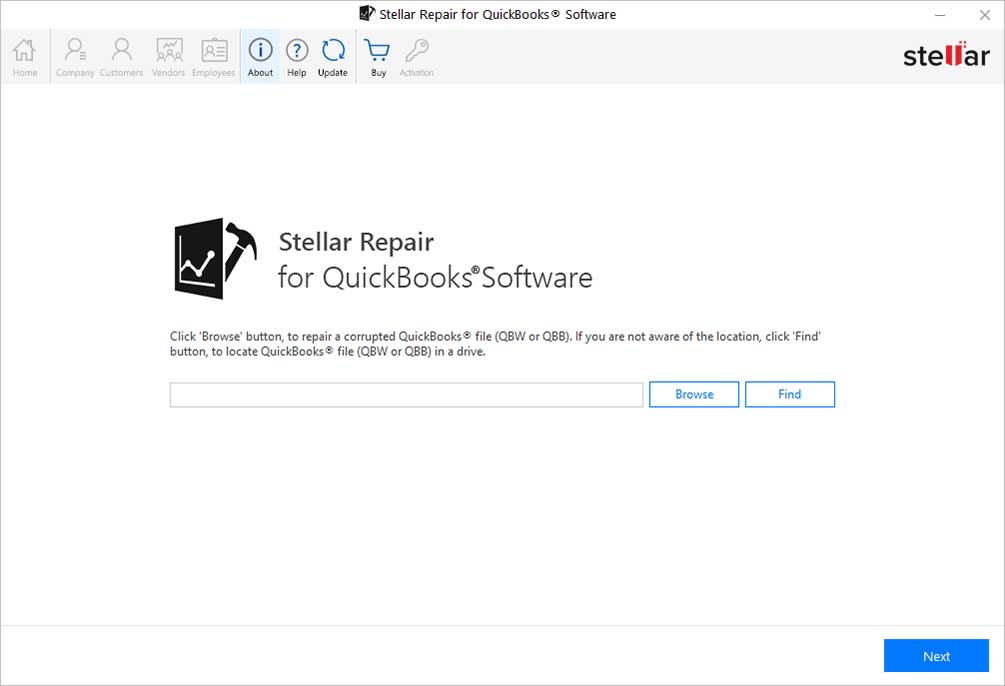
The start screen: Browse to a corrupted QBW or QBB file, or click Find to search a drive for QuickBooks files. The Company, Customers, Vendors and Employees buttons stay greyed out until a file is scanned.
How to repair the file with Stellar
- Install the trial (about 12.8 MB) on a 64-bit Windows 8 to 11 PC and start it.
- Select the damaged file. Click Browse to pick the .QBW (or a .QBB), or Find to search a drive, then click Next.
- Add a working backup if you have one. Stellar asks for the latest working .QBB, which it says gives better results. If you don't have one, click Skip.
- Scan. A Scan Summary counts the charts of accounts, items and services, customers, vendors and employees it found.
- Check the preview. The Company, Customers, Vendors and Employees tabs show each record with its transactions. This is where you decide whether to buy.
- Create a blank company file. In QuickBooks Desktop, use File > New Company to create an empty file in the same QuickBooks version as the damaged one, then close QuickBooks.
- Activate and save. Enter your license key, click Save, select the blank .QBW and the QuickBooks version, and let it write the data. Save the log when it finishes, then open the new file in QuickBooks and run Verify Data.

The Select Working Backup File step: point it at a recent QBB backup for better repair results, or click Skip to repair the QBW on its own.

The Scan Summary for a sample file: 69 charts of accounts, 133 items and services, 119 customers, 35 vendors and 24 employees, labelled Present+Deleted.

The Customers preview: the customer and job list with balances on the left, and one job's estimates, received payments and invoices on the right, with Save Log and Save buttons below.
Payroll is often the data that matters most when a file breaks, and Stellar Repair for QuickBooks recovers employee details along with paychecks, liability checks and adjustments. Each repair also writes a log of how many records of each type were present in the damaged file and how many came back, which tells you quickly whether anything is missing.

The Employees preview: three employees found, with one employee's paychecks listed by date, account and amount.

The log report after a repair: present and recovered counts for bills, purchase orders, checks, journal entries and paychecks, with the "Repair process completed successfully" message.
What we like
- The free scan shows your own records before you pay
- Never writes to the damaged file
- Works on files QuickBooks can't open at all
- Recovers payroll: paychecks, liabilities and adjustments
- Can use an old .QBB alongside the damaged .QBW
- A log of present and recovered counts for each record type
Watch out for
- $249 for a one-year license, a lot for a single emergency
- Windows only, 64-bit only, Desktop files only
- Needs QuickBooks Desktop installed, in the same version, to save
- The scan counts deleted entries too (Present+Deleted)
- Saves company, customers, vendors and employees together, not one part
- Can't recover a .QBW that was deleted
What users say
Independent reviews of Stellar Repair for QuickBooks are few, which is normal for a niche tool people buy in an emergency. G2 lists six reviews, with an average around 4.6 to 4.7 out of 5, and none of them is recent.
Merchant L, G2, who repairs clients' files, on the steps: “Set up your new, blank, QuickBooks file. Click, "Select File" and browse to the QuickBooks file needing recovery, and click on, "Scan File". Walk through some of the entries and click on, "Repair".” The same reviewer's warning: “The recovery file many times contains ASCII characters where the credit card number and bank :"Account Number" (in the account properties, your actual bank account number if entered). This is very difficult to explain to the client and so needs to be copied and pasted one at a time.”
Nandu G, G2: “Due to some hard disk issue, our QuickBooks files were corrupted. With the help of this software, we were able to recover data from the corrupted QuickBooks file.”
Verified User in Accounting, G2: “The problem with this software is that it may be too costly, especially for my budget!”
Jay Holla, Lionbridge, in a customer story on Stellar's product page (so a testimonial the vendor chose), on a QuickBooks Desktop 2014 file that wouldn't open past the login screen: “The biggest problem I had to tackle was the last backup was 9 months ago and ADR was turned off, so the data had to be extracted from the broken file or it would be lost and Stellar did just as it said it would.”
The pattern: people who used it got their data back, payroll included, and found the steps simple once the blank company file was set up. The complaints are the price and sensitive fields such as bank account and card numbers coming back garbled, so check those in the new file.
Download Free Trial of Stellar Repair for QuickBooksBuy Stellar Repair for QuickBooks
Which fix should you use?
Start with the free fixes every time, in the order above. Pay for Stellar only when they've failed and the newest usable copy of your books is too old to live with.
| Your situation |
Do this |
Why |
| The file opens, but reports are wrong or Verify finds errors |
Rebuild Data, then Verify Data |
Free, built in, and made for minor damage |
| The file won't open (-6150, -6000 errors) |
Tool Hub: Quick Fix my File, then File Doctor |
Intuit's free tools for exactly these errors |
| H202 or other "H" errors in multi-user mode |
Tool Hub: Network Issues, on the host computer |
It's a network problem, not a damaged file |
| The free repairs failed, and you have a backup from the last day or two |
Restore the backup, or use Auto Data Recovery |
Re-entering a day's work costs less than $249 |
| The free repairs failed, and the backup is weeks or months old (or missing) |
Stellar Repair for QuickBooks Software: free scan, then buy if the preview shows your data |
Recovers what's still in the damaged file, same day, on your own PC |
| You'd rather someone else did the repair |
Intuit support, or Stellar's Software + Services plan ($349) |
Intuit warns its data service can mean several days without QuickBooks |
| An accountant or ProAdvisor who sees damaged client files regularly |
Stellar Repair for QuickBooks Software |
A year's license covers every repair, and the log documents what came back |
Who should skip Stellar Repair for QuickBooks: anyone on QuickBooks Online (there's no file to repair), Mac users (it's Windows only), anyone whose free fixes worked, and anyone with a recent good backup. If the company file was deleted rather than damaged, you need a file recovery tool first (see our best data recovery software guide), and Stellar only after that if the recovered file won't open.
What commonly goes wrong
- Repairing without a copy. Rebuild Data and File Doctor change the file in place. Copy the .QBW and .TLG first, every time.
- Overwriting the damaged file with a restore. Restoring a backup into the same folder can replace your current file. Restore into a separate folder, so the damaged file is still there for a repair tool if the backup turns out to be too old.
- Treating a network error as file damage. H202 means the computers can't reach the hosted file. Paying for a repair tool won't fix it.
- Giving up after File Doctor says "unsuccessful". Intuit says it can report failure even when the repair worked. Open the file and check.
- Counting on Auto Data Recovery. ADR isn't in the Accountant editions and isn't created for files whose backup tops 1.5 GB. Look in the QuickBooksAutoDataRecovery folder before you assume it's there.
- Buying Stellar before running the scan. Stellar's refund policy expects you to have tried the free trial, and the preview is the only way to know your file is readable.
- Trusting every number after a repair. Stellar's scan includes deleted records, and one reviewer found bank and card numbers garbled. Run Verify Data on the new file and spot-check balances and account details against a recent report.
FAQs
Is QuickBooks File Doctor free?
Yes. QuickBooks File Doctor is free and comes inside the QuickBooks Tool Hub, which you download from Intuit's support site. You run it from the Tool Hub's Company File Issues tab, after Quick Fix my File.
How do I know if my QuickBooks company file is corrupted?
Run Verify Data (File > Utilities > Verify Data) if the file opens: "Your data has lost integrity" means it's damaged. If it doesn't open, errors such as -6150, -6000 -82, -6000 -301 or -6147, or customer and vendor lists that show up blank, point to a damaged file, according to Intuit.
Can I repair a QuickBooks file without losing data?
Often, yes. Rebuild Data, File Doctor and Stellar Repair for QuickBooks all work from the damaged file itself, so they can keep your most recent entries. Restoring a backup always loses what you entered after the backup date, and Auto Data Recovery can lose up to the last 12 hours.
Does Stellar Repair for QuickBooks change my original file?
No. Stellar Repair for QuickBooks only reads the damaged .QBW and saves the recovered data into a new, blank company file you create in QuickBooks. The original stays as it was.
Does Stellar Repair for QuickBooks work with QuickBooks Desktop 2025 or 2026?
Stellar Repair for QuickBooks lists QuickBooks Desktop 2007 to 2024. Intuit says Desktop Plus 2024 and Enterprise 24.0 were its final annual versions and that it now updates them through the year instead, so a current Desktop file is a 2024 or Enterprise 24 file. Run the free scan to confirm Stellar reads yours before you buy.
Can I open a QuickBooks backup (.QBB) without QuickBooks?
No, not to work in it. A .QBB has to be restored in QuickBooks Desktop to become a usable .QBW. Stellar Repair for QuickBooks can read a .QBB and preview its contents, but it also needs QuickBooks Desktop installed to save the result.
Is Stellar Repair for QuickBooks a one-time purchase, and can I get a refund?
No, Stellar Repair for QuickBooks is a one-year, single-user license at $249. Stellar refunds within 30 days of a first purchase when the software can't do the job and support can't fix it, or for a wrong or duplicate purchase, but not for a change of mind or a purchase made without trying the free trial first.
Can I repair a QuickBooks for Mac file with these tools?
Partly. QuickBooks Desktop for Mac has its own Verify Data and Rebuild Data under File > Utilities, but the Tool Hub, File Doctor and Stellar Repair for QuickBooks are Windows-only.
Conclusion
Most corrupted QuickBooks Desktop files never need a paid tool. Copy the file, then run Rebuild and Verify Data, then Quick Fix my File and File Doctor from the Tool Hub, then fall back to a recent backup or the Auto Data Recovery copy. All of that is free.
When those fail and the newest good copy is weeks or months old, Stellar Repair for QuickBooks Software is worth its $249. It reads the damaged file without touching it, and the free scan shows your own customers, vendors and paychecks before you spend anything. The main reason to hold off is the price for a single emergency, and it's no help on QuickBooks Online or a Mac.
Download Free Trial of Stellar Repair for QuickBooksBuy Stellar Repair for QuickBooks