Stellar Data Recovery for iPhone: Get Deleted Photos and Messages Back on Windows
Stellar Data Recovery for iPhone is a Windows program that scans an iPhone, iPad or local iTunes backup and restores deleted photos, messages, contacts and app chats, for $49.99 a year covering five iPhones at checkout. It's for anyone who deleted something by accident, lost data in a failed update, or can only get at an old backup.
Recovering directly from the phone is the hard case on any modern iPhone, and no tool can promise it. The free demo shows what the scan actually finds before you pay, and that preview is the most useful thing about the product.
Quick facts
- Developer: Stellar Data Recovery. Formerly Stellar Phoenix Data Recovery for iPhone
- Version: 9.0.0.2 for Windows, July 2026. A separate Mac version exists
- Windows: 11, 10, 8.1, 8 and 7, 64-bit
- Sources: a connected iPhone or iPad, and iTunes backups, including encrypted ones. No iCloud
- Price: $49.99 for one year and five iPhones at checkout
- Renewal: off unless you tick it on the order page
- Demo: scans, previews, and saves up to 10 photos or videos of up to 10 MB each
- Guarantee: 30-day refund window on annual licenses, under Stellar's conditions
- What we checked: the 283 MB installer's file version is 9.0.0.2, and the five-iPhone plan was $49.99 on the order page on November 6, 2026, when Stellar scored 4.8 out of 5 for this product on Trustpilot. We didn't scan a phone ourselves, so the recovery details come from Stellar's manual and the reviews quoted.
Before you buy
Stop using the phone. Stellar says deleted data can be recovered only until new data overwrites it, so every photo you take and app you update after the loss lowers your odds.
Run the demo first. Your purchase should depend on what the preview shows. If it can't see the file you need, the paid version won't find it either. Stellar's refund policy also excludes buyers who never used the evaluation version.
There's no iCloud recovery now. Stellar dropped direct extraction from iCloud backups, so older reviews that praise it no longer apply. You can still use a local iTunes backup.
Download Free TrialBuy Now
Overview
The program works in four steps. You pick the data types from a checklist, connect the device or select a backup, wait while it scans, then preview the results by category and save the ones you want. Recovered items are saved to your PC rather than written back onto the phone, and Stellar says the program doesn't modify anything on the device.
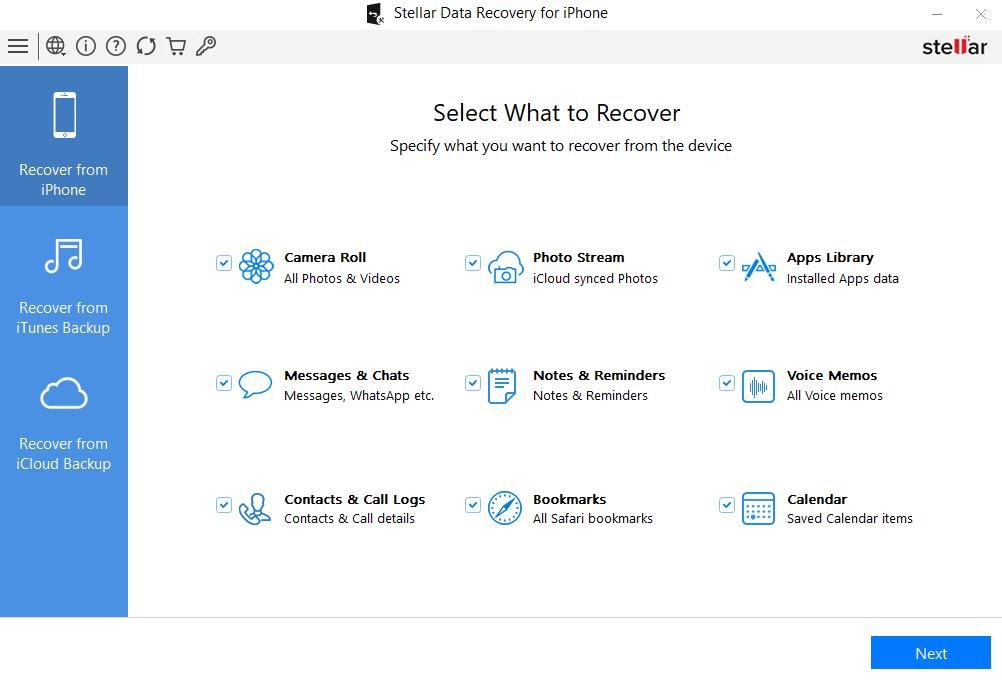
The first screen, where you choose the data types to look for.
You don't need to jailbreak the phone, and the current version no longer needs iTunes installed to run.
Features
Stellar Data Recovery for iPhone recovers everyday phone data
Stellar Data Recovery for iPhone looks for Camera Roll and Photo Stream images, videos, contacts, iMessages and attachments, call history, calendars, notes, reminders, voice memos, Safari bookmarks and FaceTime records. Contacts can be saved as VCF, CSV or HTML, which helps if you want to move them to another phone or just keep a readable copy.
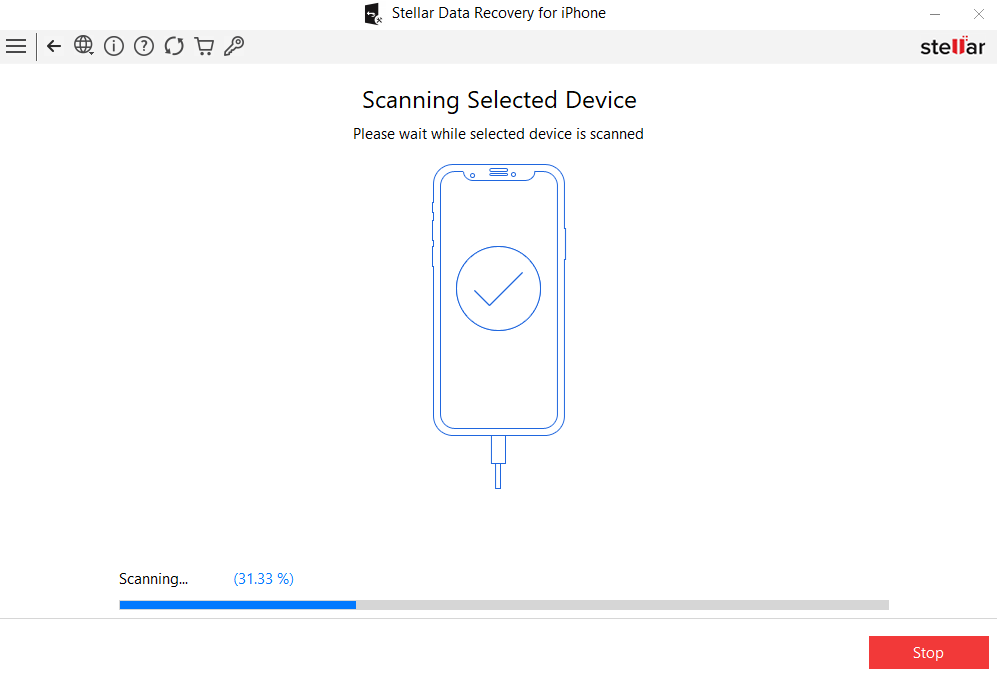
A scan in progress on an iPhone 12, with the time left shown at the bottom.
Stellar Data Recovery for iPhone also handles app chats
Stellar Data Recovery for iPhone recovers messages and attachments from WhatsApp, WeChat, Viber, Tango, Line and Kik, from the device or a local backup. That's useful because many people lose a chat history rather than a photo, and Apple's own recovery tools have no way to restore a single conversation.
Stellar Data Recovery for iPhone reads iTunes backups, even encrypted ones
Stellar Data Recovery for iPhone can open an iTunes backup on your PC and pull out only what you need, so you don't have to restore the whole phone and overwrite everything since then. It also works on encrypted backups. If your iPhone is locked and you've forgotten the passcode, a backup is the route Stellar points you to.
Stellar Data Recovery for iPhone previews before you commit
Stellar Data Recovery for iPhone shows contacts, messages, call history, calendars, notes, reminders, bookmarks and photos, plus video thumbnails, in a tree of categories with item counts. A Deep Scan button appears after the normal scan, and it searches by file signature when the first pass misses something.
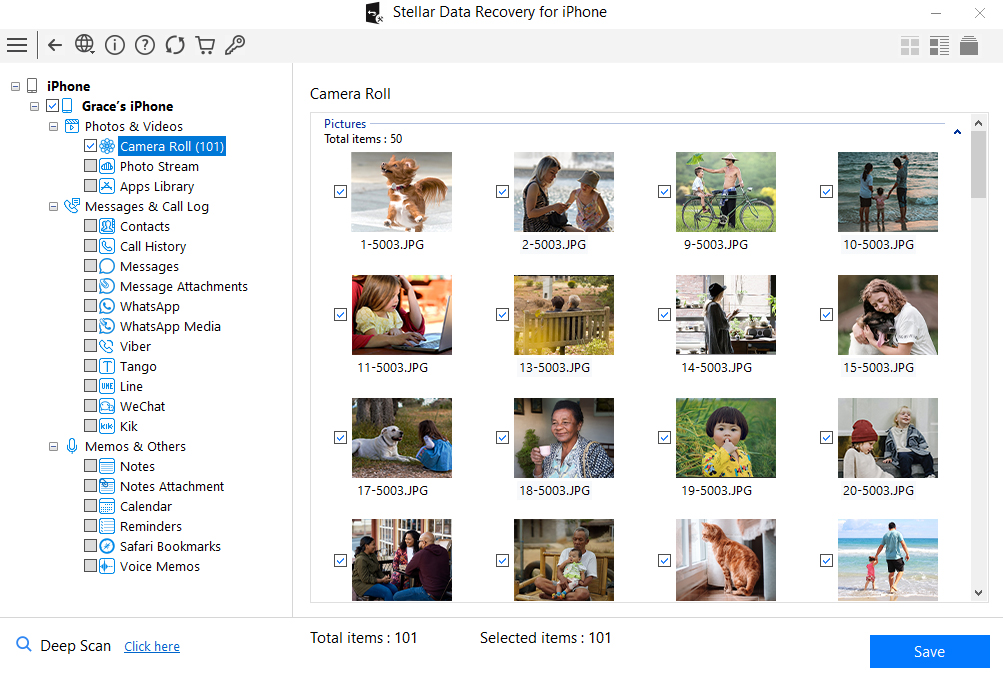
The results view, with item counts by category, thumbnails and the Deep Scan button.
Benefits
- You see before you pay. The preview turns a $49.99 gamble into an informed decision.
- Selective recovery. You restore one chat or album from a backup instead of rolling the whole phone back.
- Five phones on one plan. At this price, a family can share one year's license across their iPhones.
Real-World Uses
- A deleted photo album: photos that have aged out of Recently Deleted can still show up in a scan if nothing has overwritten them.
- A failed iOS update: scan the phone or the last iTunes backup, and save the contacts and notes you were missing.
- A broken or locked iPhone: if the screen is dead but you have a backup on your PC, extract the data from that.
- A lost WhatsApp thread: pull the chat and its attachments out of an old backup without touching your current phone.
- An encrypted backup from an old PC: open it with its password and keep only what you need.
Who it's for, and who should skip it
Buy it if the demo finds your lost data, or you have a local backup and need one thing out of it. Skip it if your data is safe in iCloud, since Apple's own restore costs nothing and this program can't read iCloud backups. Skip it too if your phone won't start or respond: Stellar steers those users to Stellar Toolkit for iPhone, which adds iOS repair. A Mac user needs the Mac edition, and an Android owner needs a different product altogether.
Usage Guide
- Download and install the program on your PC. iTunes isn't required.
- Connect the iPhone with a cable and tap Trust on the phone if it asks.
- On the What to Recover screen, tick the data types you want and click Next.
- Pick the device, or an iTunes backup, and let the scan finish.
- Browse the results by category. If something's missing, click Deep Scan.
- Select the items and click Save. Activate the license first if you need more than the demo allows.
Where it falls short
- Results vary by case. Macworld's "Reliable recovery" and users who got back "most of what was lost" describe a good outcome, not a promise. Modern iPhones encrypt storage, and overwritten items are gone.
- The demo limit is tight. Ten files of up to 10 MB each covers photos and short clips only, so it won't save contacts or messages for free, and it won't show you how a long video comes out.
- Connection trouble. The Mac Observer had to reconnect his iPhone several times before the Trust prompt worked.
- One device per run. Stellar's manual says that you can connect several but recover from only one in each process.
- Large, slow job. The installer is 283 MB, and a full scan on a well-filled phone can take a long time. The vendor's own screenshot shows an estimate of over an hour.
What Users Say
This product has a real base of buyer reviews, and two mainstream tech sites have looked at it. Most of the critical reviews you'll find online come from companies selling a rival, so we've left those out.
Macworld (independent roundup)
Lloyd Coombes included it in Macworld's best iPhone data recovery apps roundup, dated January 21, 2025. His pros: "Affordable for most users" and "Reliable recovery." His con: "Looks dated." He concluded that it "offers an impressive suite of recovery options at a solid price point."
The Mac Observer (hands-on review)
Nick deCourville wrote in February 2025: "The good: Easy-to-navigate UI, offers plenty of features." His first complaint was about the connection: "When first using Stellar, I did have some issues getting my iPhone to “Trust” the application." His second: "Another small issue is that finding extremely specific files may be something of a chore." He preferred the Toolkit, saying that he "would recommend going with the Toolkit," and he closed by saying that Stellar "provides excellent data recovery options."
Trustpilot (this product)
This product had 4.8 out of 5 from 428 reviews on November 6, 2026, with about 4% rated three stars or lower. Emadi, four stars, September 2026: "The product helped. I was able to recover most of what was lost." Naidoo, five stars, June 2026: "The software was easy to navigate, and the overall experience was positive." Bithin Kumar Bisw, five stars, April 2026: "The software is intuitive, fast, and dependable."
The more mixed comments are worth reading too. Caplow, four stars, June 2026: "However, the program is impossible for me to use without help." Frank Moerdijk, five stars, August 2026: "The scanning process gave a bit of a confusing message (error) but the actual work was done nevertheless." A reviewer signed 23, five stars, July 2026: "This software doesnt work as well at the toolkit verison, but will still get the job done."
Press quotes on Stellar's page
Stellar shows a quote from iLounge: "Stellar can recover data from a wide variety of iOS devices with an added option of importing to iPhone." Windows Report says it "even recovers data in the worst data loss scenarios that users fear, including iOS crashes, water damage, lost iPhone, or Jailbreak." The vendor picked these, so weigh them accordingly.
Trustpilot (Stellar as a company)
The company scored 4.8 out of 5 from 5,601 reviews on November 6, 2026, with 89% five-star and 4% one-star. Many recent reviews thank a named support agent. One-star reviews exist too. Ahmad wrote on November 1, 2026, without naming the product: "I fortunately when try to recover my photos didn't get any photo."
The themes: people like the interface, the preview and the support team. The recurring cautions are a dated look, trouble with the first connection, and a real chance that something won't come back.
Comparisons
Stellar Data Recovery for iPhone vs Stellar Toolkit for iPhone
The Toolkit is $49.99 a year for one iPhone or $69.99 for five, and adds iOS repair, a data eraser and Apple ID removal. Choose it if your phone is stuck, frozen or being sold. If you only need data back, this plan is enough, and it covers five phones for the same $49.99.
Stellar Data Recovery for iPhone vs Aiseesoft FoneLab iPhone Data Recovery
FoneLab does the same core job and also lists iCloud backup recovery, which Stellar has dropped. If your only copy is in iCloud, FoneLab is the one to try. Otherwise, run both free versions and buy whichever finds your data.
Editions and Pricing
| Plan | Devices | Price | Term |
|---|
| Standard, five iPhones (this listing) | 5 | $49.99 at checkout | 1 year |
| Standard, one iPhone | 1 | $39.99 on Stellar's store | 1 year, renews yearly |
| Technician | 50 | $99.99 | 1 year, renews yearly |
| Toolkit | 1 | $49.99 | 1 year, renews yearly |
| Toolkit, five iPhones | 5 | $69.99 | 1 year, renews yearly |
FAQs
Does Stellar Data Recovery for iPhone work with the latest iPhones and iOS?
Yes, Stellar Data Recovery for iPhone lists the iPhone 18 series and iOS 27 on its current product page, and supports models back to the iPhone 4.
Can Stellar Data Recovery for iPhone recover data from a locked iPhone?
Stellar Data Recovery for iPhone can't get past a forgotten passcode. If you have an iTunes backup on your computer, it can recover the data from that instead.
Can Stellar Data Recovery for iPhone recover from iCloud?
No, Stellar Data Recovery for iPhone no longer extracts iCloud backups directly, because of Apple's privacy and encryption changes. It works with the device itself and local backups.
Do I need iTunes for Stellar Data Recovery for iPhone?
No, the current Stellar Data Recovery for iPhone doesn't need iTunes installed, although its older requirements list still mentions it.
Will Stellar Data Recovery for iPhone change anything on my phone?
No, Stellar says Stellar Data Recovery for iPhone doesn't write or modify data on the iPhone or iPad. Recovered items are saved to your computer.
Can I use Stellar Data Recovery for iPhone on an iPad?
Yes, Stellar Data Recovery for iPhone also covers the iPad, iPad mini, iPad Air and iPad Pro.
What happens to Stellar Data Recovery for iPhone when the year ends?
Stellar Data Recovery for iPhone is sold on a one-year license, and this plan doesn't renew unless you opt in on the order page. Recovered files stay yours, and you can renew if you need it again.
Can I get a refund on Stellar Data Recovery for iPhone?
Stellar's product page offers a 30-day refund if Stellar Data Recovery for iPhone can't recover your lost data, but its policy excludes buyers who didn't try the demo first and those who don't meet the system requirements.
System Requirements
- Windows 11, 10, 8.1, 8 or 7, 64-bit
- Intel or AMD x64 processor
- 4 GB of memory, 8 GB recommended
- 250 MB of disk space, plus room for recovered files
- A cable to connect your iPhone or iPad
Conclusion
Worth paying for, but only after the demo finds your data. Stellar Data Recovery for iPhone is a straightforward way to dig through a phone or an iTunes backup, with good buyer ratings and five phones covered at this price. The one reason to buy it is the free preview: you know what you'll get before spending anything. The main reason not to is that iCloud is off the table, and a recovery from the phone itself can never be guaranteed. Run the scan, look at the results, then decide.
Download Free TrialBuy Now