Stellar Repair for PowerPoint: Recover Slides from a PPT or PPTX File That Won't Open
Stellar Repair for PowerPoint is a Windows tool from Stellar that repairs corrupt PowerPoint presentations (.ppt, .pptx and macro-enabled .pptm) and saves a working copy with the slides' text, tables, charts, images and other objects. It costs $39 for a 1-year license (renews automatically); the free download scans the file and previews every recoverable slide before you buy.
It's for the presenter whose deck suddenly shows "PowerPoint found a problem with content" or "PowerPoint can't read" the file, hours before a meeting, when there's no clean backup.
Quick facts
- Price: $39 for a 1-year license on one PC, renewing yearly; Stellar Toolkit for File Repair (Word, Excel, PowerPoint and PDF) is $69 a year
- Developer: Stellar Information Technology (Stellar Data Recovery)
- Version: 4.0.0.1 (December 2023)
- Runs on: Windows 11, 10, 8.1 and 8 (64-bit)
- Repairs: .ppt, .pptx and .pptm from PowerPoint 2019 and earlier versions
- Recovers: text, tables, charts, WordArt, headers and footers, slide numbers, hyperlinks, comments, OLE objects and VBA code
- Free version: scans and previews slides; saving needs a license
- What we checked: the trial installer from Stellar's product page (StellarRepairforPowerPoint.exe, "Stellar Repair for PowerPoint", file version 4.0.0.1, 7.7 MB, validly signed by Stellar Information Technology Private Limited, file dated December 15, 2023) and the price on the order page ($39, a 1-year subscription that renews automatically) on November 27, 2026. We didn't repair a damaged presentation ourselves.
Before you buy
- Not updated since December 2023. Stellar lists support up to PowerPoint 2019; files saved by PowerPoint 2021 or Microsoft 365 use the same PPTX format, but they're not on Stellar's list, so check the free preview with your file.
- Check the free preview first. If your slides show up there, the paid version will save them.
- Try PowerPoint's own options. Open and Repair, or inserting the slides into a new presentation (Reuse Slides), sometimes works for minor damage.
- It's a subscription. Turn off renewal after buying if it's a one-off rescue.
Download Free TrialBuy Now
Overview
A PowerPoint file is a package of slides, media and XML parts; one damaged part is enough for PowerPoint to refuse the whole deck. Stellar Repair for PowerPoint scans the file, rebuilds the slides it can, and shows them in a preview before you save a new, clean copy. For badly damaged files it uses a file-signature method that looks for recognizable pieces of the presentation rather than relying on the file's structure.
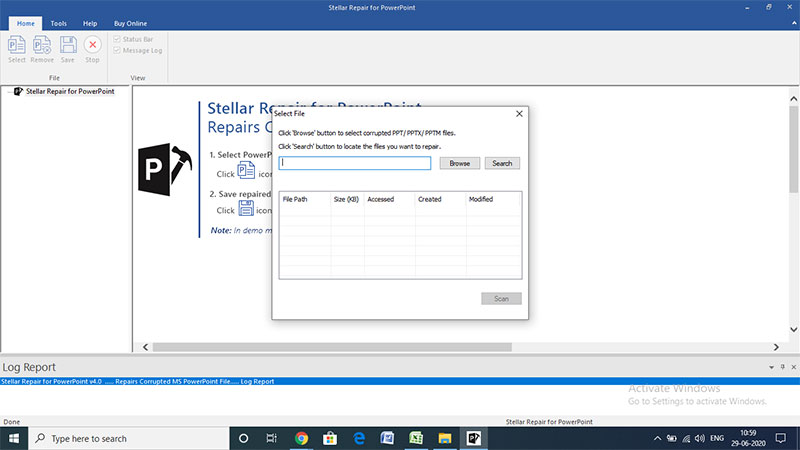
The Select File dialog: Browse for PPT, PPTX or PPTM files, or Search a drive for them.
Features
PPT, PPTX and macro-enabled PPTM
Stellar Repair for PowerPoint handles the old binary .ppt format, modern .pptx and macro-enabled .pptm presentations, and keeps the macros attached to a repaired PPTM.
Rebuilds slide content and objects
Stellar Repair for PowerPoint recovers text, tables, charts, WordArt, headers and footers, slide numbers, hyperlinks, comments, OLE objects and VBA code, so a repaired deck needs less rework than a text-only rescue.
Preview every slide
Stellar Repair for PowerPoint shows the repaired presentation slide by slide, in a PowerPoint-style view with thumbnails, before anything is saved.

Preview of a repaired presentation: the files list on the left, slide thumbnails and the first slide in full, with a log at the bottom.
Batch repair
Stellar Repair for PowerPoint can repair any number of PPT, PPTX and PPTM files together, useful after a drive or sync problem damages a whole folder of presentations.
Benefits
- Rescue a deck you can't rebuild in time.
- No guesswork: the free preview shows what you'll get.
- Keeps the design: charts, tables and WordArt come back as objects, not flattened text.
- Simple: select, repair, preview, save.
Real-World Uses
- Conference deck corrupted on a USB stick on the way to the venue.
- Training presentations with macros (PPTM) that stopped opening after an Office update.
- A folder of lecture slides recovered from a failing drive, several of which won't open.
Who It's For, and Who Should Skip It
Good fit: Windows users with a damaged presentation they can't recreate, after PowerPoint's own repair has failed.
Skip it if: a backup or OneDrive version history has a recent copy; the file is deleted rather than damaged (use recovery software first); or you also need Word, Excel and PDF repair, where the $69 Stellar Toolkit for File Repair is better value. There's no Mac version, though it repairs presentations made on a Mac.
Usage Guide
- Close PowerPoint, then install and launch Stellar Repair for PowerPoint.
- Click Select, then Browse for the damaged file(s) or Search a drive.
- Click Scan to repair the selected presentations.
- Click a file in the left pane to preview its slides.
- Activate the license, click Save, and choose a folder for the repaired copy.
- Open the saved file in PowerPoint and check every slide before deleting the original.
Where it falls short
- Older release. Version 4.0.0.1 dates from December 2023 and Stellar's compatibility list stops at PowerPoint 2019.
- Embedded media. Stellar's list covers slide objects and OLE objects but doesn't mention embedded video or audio, so check those in the preview.
- Subscription pricing for a typical one-time emergency.
- Few independent tests of this specific tool.
What Users Say
Reviews of this tool
We found no recent independent test of Stellar Repair for PowerPoint, and review sites list it without user ratings. It shares its repair engine and interface with Stellar Toolkit for File Repair, which bundles the Word, Excel, PowerPoint and PDF repair tools, so the best evidence is your own file in the free preview.
On Trustpilot (Stellar, all products)
Stellar scores 4.8 out of 5 on Trustpilot from about 5,600 reviews: 89% five stars and 4% one star. The reviews are about Stellar's whole range, mostly its data recovery software, and most praise named support agents:
"Within one minute in the chat I was contacted by Swatantra." (Frank Moerdijk, August 2026)
"Akshay Sahu was excellent at providing information and alternatives to the online repair tool" (Diego De La Vega, November 2026)
The one-star reviews are blunt: "Do not purchase. Software is terrible and customer service worse." (Nick, November 2026). Most of the negative ones are about photo and phone recovery that didn't bring files back, not about the file repair tools.
The pattern: Stellar's support is praised often and by name, and the complaints are mostly about data recovery jobs that didn't succeed. For PowerPoint repair, the free slide preview is the honest test: what you see there is what you get after buying.
Comparisons
Stellar Repair for PowerPoint vs PowerPoint's Open and Repair
PowerPoint's own repair is free and fixes minor problems, but it gives no preview and often fails on heavier damage. Stellar previews every slide and recovers objects from files PowerPoint won't open.
Stellar Repair for PowerPoint vs Stellar Toolkit for File Repair
The Toolkit ($69 a year) includes this PowerPoint repair plus Word, Excel and PDF repair. One damaged deck: buy this. Regular file emergencies across Office: buy the Toolkit.
Editions and Pricing
| Edition | Price | Term | PCs | Buy |
|---|
| Stellar Repair for PowerPoint | $39 | 1 year, renews automatically | 1 | Buy Now |
Price from the order page on November 27, 2026. Stellar's store shows it as a discount from $49.
FAQs
Is Stellar Repair for PowerPoint free?
Stellar Repair for PowerPoint is free to download, scan and preview. Saving the repaired presentation needs the $39 license.
Can Stellar Repair for PowerPoint fix "PowerPoint found a problem with content"?
That error usually means damaged parts inside the file, which is what Stellar Repair for PowerPoint is built to rebuild; the free preview shows whether your slides come back.
Does it repair presentations with macros?
Yes. Stellar Repair for PowerPoint repairs macro-enabled .pptm files and keeps the attached macros.
Will it change my original file?
No. Stellar Repair for PowerPoint saves the repaired presentation as a new file.
Does it work with PowerPoint 2021 or Microsoft 365 files?
Stellar lists PowerPoint 2019 and earlier. Newer versions save the same PPTX format, so test your file with the free preview before buying.
Is there a Mac version?
No. Stellar Repair for PowerPoint runs on Windows only, but it repairs presentations created on a Mac.
System Requirements
- Windows 11, 10, 8.1 or 8
- Intel-compatible 64-bit processor
- 2 GB RAM minimum (4 GB recommended)
- 250 MB free disk space
- PPT, PPTX or PPTM files from PowerPoint 2019 and earlier
Conclusion
Stellar Repair for PowerPoint is worth $39 when a presentation you can't rebuild won't open and PowerPoint's own repair has failed: it rebuilds slides with their charts, tables and objects, and the free slide preview tells you in advance whether it will work. The reasons to hesitate: it hasn't been updated since December 2023, its official support list stops at PowerPoint 2019, and the license is a yearly subscription. If you look after Word and Excel files too, the $69 Toolkit is the smarter buy.
Download Free TrialBuy Now