Stellar Data Recovery for Windows (Standard): Get Back Deleted Files, Formatted Drives and Lost Partitions
Stellar Data Recovery for Windows is Stellar's entry-level edition, sold as Standard: a Windows tool, $99 one-time for a lifetime license (or $59.99 a year), that recovers deleted and lost files from hard drives, SSDs, USB sticks and memory cards, including formatted drives, lost partitions and BitLocker-encrypted volumes. It's for home users who deleted or formatted the wrong thing and whose PC still starts.
You know the moment. The Recycle Bin is empty, the folder of holiday photos is gone, or a USB stick suddenly asks to be formatted. Usually the files are still on the disk, just no longer listed, and the next few hours decide whether you get them back. Stellar Data Recovery reads the drive without writing to it, shows you what it found, and copies the files you pick to a different drive. This is the product that used to be called Stellar Phoenix Windows Data Recovery, whose Home edition became today's Standard.
Quick facts
- Edition: Standard (Stellar's basic Windows edition)
- Version: 14.0.0.0, released October 2026
- Developer: Stellar Data Recovery (Stellar Information Technology, in business since 1993)
- Runs on: Windows 11, 10, 8.1 and 8, and Windows Server 2022, 2019 and 2016, 64-bit only
- Recovers from: internal and external hard drives, SSDs, USB flash drives and memory cards, up to 16 TB per drive
- File systems: NTFS, exFAT, FAT16 and FAT32
- Price: $99 one-time for a lifetime license for one PC, with no cap on how much you recover (a one-year license is $59.99 and renews yearly)
- Free trial: scans and previews everything it can find. Saving the files needs a license, though Stellar's free download on its own site recovers up to 1 GB.
- Refunds: claims within 30 days of a first purchase, only when the software can't do the job (see the note below)
- Languages: English, German, French, Brazilian Portuguese, Dutch, Italian, Spanish, Japanese, Korean, Hindi and Chinese
- What we checked: the trial installer from Stellar's download server is version 14.0.0.0 (203 MB, signed by Stellar Information Technology Private Limited), the order page charges $99.00 for the lifetime license, and the edition comparison on Stellar's buy page, all on November 2, 2026. We didn't run a recovery on a damaged drive.
Before you buy: scan first, and don't install onto the drive you're rescuing
Stop using the drive you lost files from. Every new file written there, including this program's 203 MB installer, can overwrite what you're trying to get back. Install the trial on a different drive, run the scan, and open a few files in the preview. If they look right, a license will save them. If they don't, you've spent nothing.
Doing it in that order also matters for refunds. Stellar's refund policy only covers a first purchase, within 30 days, when the product can't perform the task and support can't fix it. It excludes buyers who didn't try the trial first, renewals, and plain change of mind. The Buy Now button on this page is the lifetime license, a one-time payment with no renewal. If you pick the cheaper one-year license on Stellar's site instead, it renews automatically each year, so turn renewal off after your recovery if you only needed it once.
Download Free TrialBuy Now
Overview
Stellar Data Recovery Standard covers the everyday kinds of data loss: deleted files (including Shift+Delete and an emptied Recycle Bin), formatted drives, partitions that disappeared or turned unallocated, drives that Windows now calls RAW, and BitLocker-encrypted volumes. You choose what to look for (everything, or just photos, documents, audio, video or emails), pick a drive or a folder such as the Desktop, and start a Quick Scan. If that misses your files, a Deep Scan reads the drive sector by sector and finds files by their signatures.

The Standard edition's What To Recover screen: All Data, or a custom mix of Office documents, emails, audio, photos and videos. The sidebar shows Recover From, Resume Recovery and the Raw File Formats settings.
Version 14 reworked the program: a new interface with Dark, Light and Vibrant themes, a file tree that fills in as the scan runs, previews on double-click, a hex view, filters by size and modified date, and pause and resume for NTFS, exFAT and FAT32 scans. Stellar says you can now preview and save files from supported file systems while a scan is still running.
Features
Get back deleted files, even after the Recycle Bin is empty
Stellar Data Recovery Standard finds files you deleted with Shift+Delete or emptied from the Recycle Bin, on internal drives, external drives, USB sticks and memory cards. It recovers them with their original names and folder structure when the file system still holds that information, and it never writes to the drive it scans. A Deleted tab in the results lists only the deleted items, so you don't have to dig through every file on the disk.
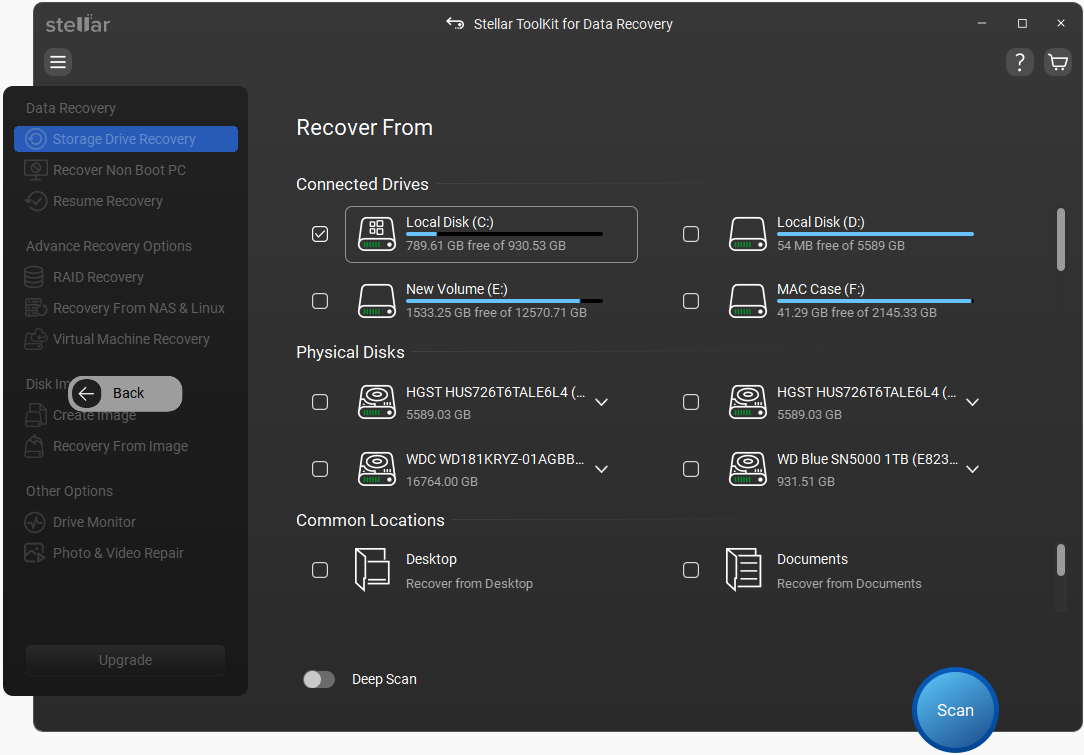
The version 14 Recover From screen: connected drives, physical disks and common locations such as the Desktop and Documents, with the Deep Scan switch at the bottom. This screenshot is from Stellar's Toolkit edition, so its sidebar also shows RAID, NAS and virtual machine options that Standard doesn't have.
Recover a formatted drive or a lost partition
Stellar Data Recovery Standard includes Stellar's lost-partition search. When a partition was deleted, shows as unallocated in Disk Management, or vanished after a Windows reinstall, you pick Can't Find Drive or the physical disk, and the program searches it for old volumes. Each one it finds can then be scanned like a normal drive. It also recovers files from a drive you formatted by mistake.
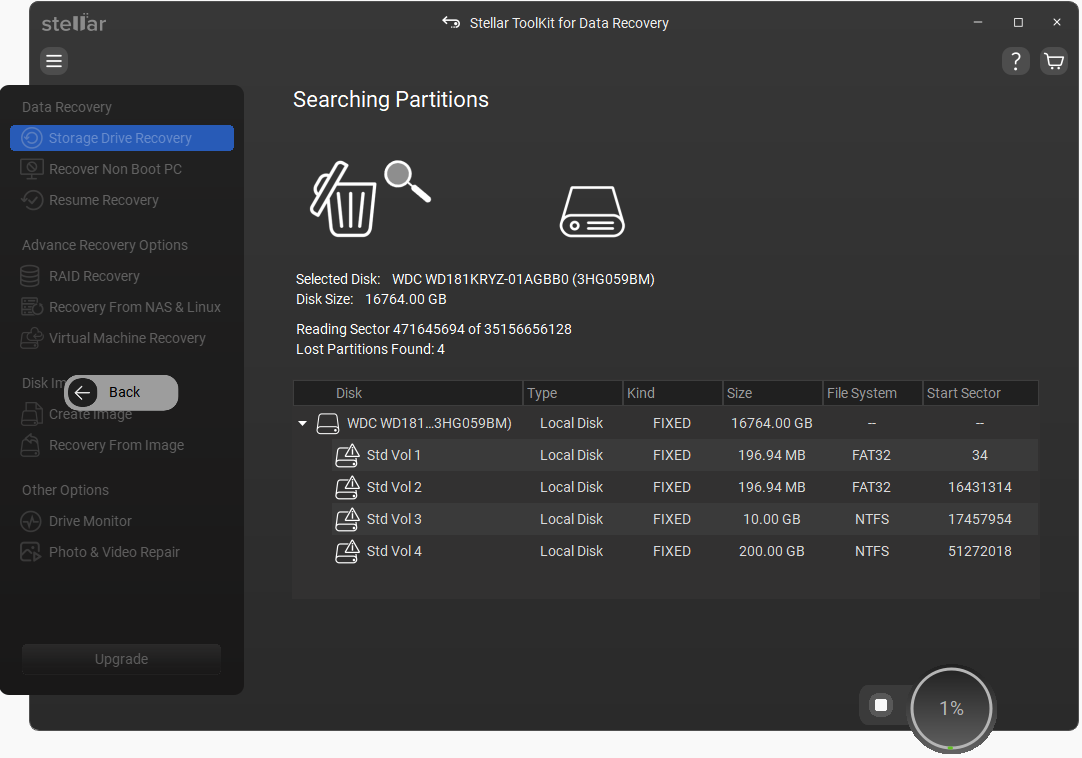
Searching Partitions: four lost FAT32 and NTFS volumes found on a 16 TB disk at 1% of the search. Also a Toolkit-edition screenshot of the version 14 interface.
Scan BitLocker-encrypted and RAW drives
Stellar Data Recovery Standard recovers from BitLocker-encrypted drives and BitLocker disk images: you open the drive with its password, recovery key or startup key, and it scans the volume like any other. For a drive Windows reports as RAW (the file system is too damaged to read), the Deep Scan ignores the file system and searches the raw sectors for known file signatures, so it can still find photos and documents, though usually without their original names.
Preview before you pay, and teach it new file types
Stellar Data Recovery Standard previews photos, video, audio, documents, archives and text files with a double-click, and a hex view shows the raw data of any file. Results can be sorted by path, file type or deleted status, searched by name and filtered by size and date. If your files are in an unusual format, the Raw File Formats setting lets you add a new file type for the signature search.
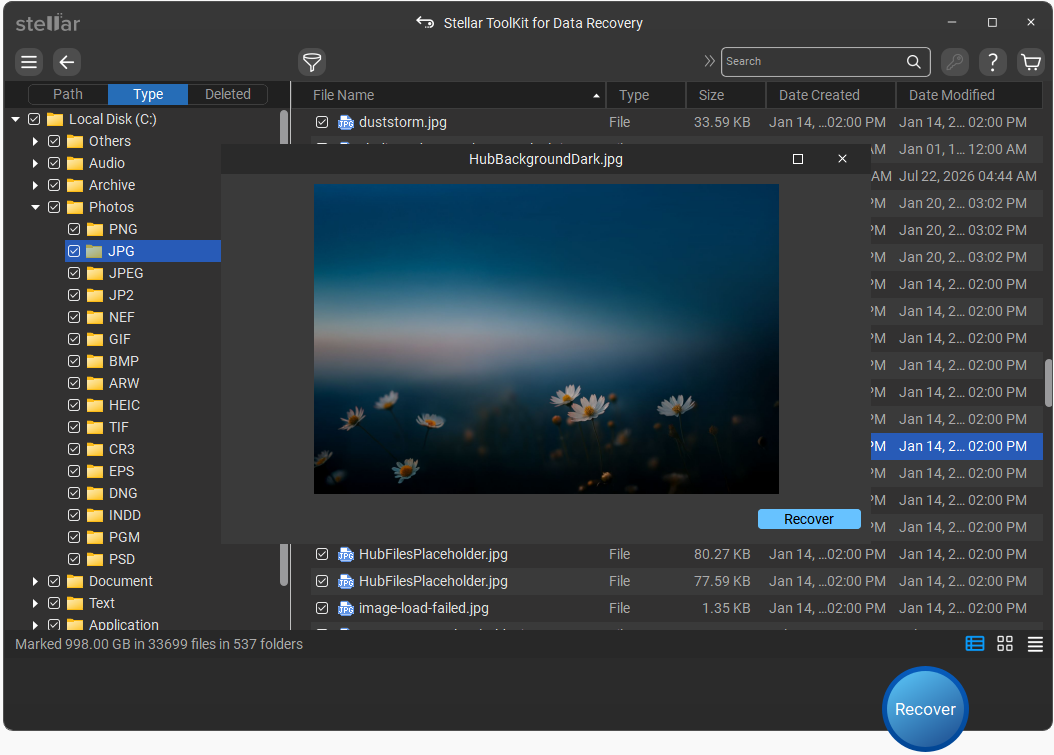
Scan results sorted by file type (Photos, with JPG, PNG, HEIC, RAW camera formats and more) and a found photo open in the preview window. The title bar reads Stellar ToolKit for Data Recovery: this is the version 14 results screen as shown in Stellar's help pages for the Toolkit edition.
Pause, save and resume long scans
Stellar Data Recovery Standard can pause a scan, save the scan information, and pick it up later from the same point through Resume Recovery. On a multi-terabyte drive, where a Deep Scan can take hours, that means you don't have to leave the PC running overnight or start again after a restart. Stellar also advises against rescanning after you buy: activating the trial keeps the results you already have.
Real-World Uses
- The emptied Recycle Bin. A tax folder deleted last week and the Bin emptied this morning: a Quick Scan of drive C: with only Office Documents ticked finds it in minutes.
- The camera card that "needs formatting". Windows wants to format an SD card that's turned RAW. Instead, scan it with the Photos option and a Deep Scan, and save the pictures to the PC.
- The partition that vanished. After a Windows reinstall the D: drive with ten years of documents is now unallocated space. Can't Find Drive locates the old NTFS volume and scans it.
- The wrong drive formatted. You meant to format a new USB disk and picked the backup drive. Stop using it, scan it, and recover what the format left behind.
- A locked BitLocker laptop drive. Files deleted from an encrypted volume can be recovered once you enter the BitLocker password or recovery key.
Who It's For, and Who Should Skip It
Buy Standard if you're a home user with a Windows PC that still starts, and you've lost files to deletion, formatting, a missing partition or a corrupted USB stick or memory card. It's also fine for a small office that needs an occasional undelete on one machine.
Skip it if:
- Your PC won't boot. Standard can't make a bootable recovery drive. You need Professional ($79.99 a year) or another tool with a boot disk.
- The drive is failing (clicking, slowing down, bad sectors). Standard can't image the drive first, so every scan stresses it further. Professional's disk imaging, or a professional lab for a mechanically dead drive, is the safer route.
- The data is on a RAID or NAS. That needs Technician.
- You're on a Mac. This edition is Windows-only, and Stellar sells a separate Mac version.
- You only need a few small files once. Stellar's free edition recovers up to 1 GB at no cost, which may be all you need.
Usage Guide
- Install on a different drive. Run the installer, pick a language, accept the license and choose an install folder that isn't on the drive you want to recover from.
- Choose what to recover. On the first screen, keep All Data or tick only the types you need (photos, documents, audio, video, emails). Fewer types means a shorter result list.
- Choose where to look. Pick a connected drive, a physical disk, or a common location such as the Desktop. Use Can't Find Drive when a partition is missing.
- Scan. Start with a Quick Scan. If your files aren't there, switch on Deep Scan and scan again. Pause and save the scan if you need to stop.
- Preview. Double-click files to check they open properly. Use the Deleted tab, search and filters to narrow the list.
- Activate and save. Click Unlock To Full Version, enter the activation key from your order email, then select the files, click Recover and save them to another drive.
Where it falls short
- Deep Scans are slow. TechRadar's quick scan of an external NVMe drive took over 25 minutes, ITPro warned a Deep Scan can take several hours, and one Trustpilot buyer reports 2% of a 1 TB disk after four hours. Pause and resume helps, but plan for it.
- SSDs are a gamble. On an SSD with TRIM enabled, Windows tells the drive to erase deleted blocks, so deleted files may be gone even when the scan runs fine. Stellar's own manual says recovery from TRIM-enabled SSDs can't be guaranteed.
- Found doesn't always mean usable. Several Trustpilot reviewers recovered files that wouldn't open, especially audio and files rebuilt by the signature search. Check files in the preview before you buy.
- Yearly licenses lapse into demo mode. When a one-year license ends, the program switches back to demo mode until you renew. The lifetime license avoids this.
- Activation is tied to the PC. The license is per PC, and a hardware change can require reactivation.
What Users Say
Stellar Data Recovery has been reviewed by tech magazines for years, and most praise the results and the breadth of file types while complaining about scan speed. User reviews are mixed in the same way: strong praise for the support staff, and a steady minority who found files that wouldn't open or disagreed with Stellar over refunds.
Tech press
TechRadar (Krishi Chowdhary, review last updated April 23, 2026) recovered every file of a deleted 22-file test folder from an NTFS drive. Its verdict: "Stellar Data Recovery is a reliable data recovery tool that recovers most file types across various storage devices. It offers useful features like disk imaging, encrypted drive support, and low resource usage. Although slower scans and minor usability issues hold it back, it still provides solid value for everyday recovery needs and remains a dependable choice overall."
The same review is blunt about the rough edges: "Now, the “pause” and “stop” features offered by Stellar are a bit buggy. If you click on “pause”, there is no way for you to go back to the main screen and scan any other drive." It also found that "There’s also a bit of a learning curve involved with the software, which isn't ideal for beginners." On cost it concluded that "Stellar still offers decent value for money, considering you can get an annual plan for $59.99." It measured CPU use at 7-10% during scans. (Disk imaging, which it praises, isn't in Standard.)
ITPro (Paul Kilinga, October 2022, testing version 10.2) gave it 4 out of 5, praising recovery from external drives and SD cards and the wide format support, with two cons: "Deep scan capability can be slow" and "Pricing and software options are confusing".
PCMag, as quoted on Stellar's product page: "Data recovery can be a pain, but “Stellar Data Recovery” takes most of that pain away. Keep this app for a rainy day of data recovery."
Trustpilot: praise
Stellar holds a TrustScore of 4.8 from about 5,590 reviews on Trustpilot. That score covers all Stellar products, not just this one, and 89% of the reviews are 5 stars. Many of them thank a named support agent.
John Backer (August 2026, 5 stars): "This recovery software is a game changer for me as I could lose many years of memories and data."
Grincavitch (October 2026, 5 stars): "Kush did a great job helping me recover 10 years of data while trying to transition between win to Mac."
Noa Bloch (October 2026, 5 stars), "Akshay guided me through every step": "Akshay guided me through every step, from finding the right program to getting comfortable using it."
Trustpilot: complaints
About 4% of Stellar's Trustpilot reviews are 1 star, and most of those about data recovery fall into three groups: slow scans, recovered files that won't open, and refunds.
Dušan Penkala (October 2025, 1 star), on a 1 TB disk: "The scanning process was extremely slow — after 4 hours, it had only scanned 2% of the disk."
Jörg Ingenpaß (May 2026, 1 star), "All data recoverd. No data usable anymore": "All headers were damaged, none of thre files was usable."
Paul (June 2025, 2 stars), "Do not rush into this product - check everything before proceeding": "Lesson learned, use the demo to determine how much, and what data is recoverable"
Joel M (October 2023, 2 stars), "Crashes all the time. Took time to get a refund": "the app was constantly crashing after 10-15 minutes of usage."
Maggie Maloney (March 2023, 2 stars), "Software did not work, and no refund was issued.": "Beware, the 30-day money back guarantee is not real!"
LP (November 2025, 1 star), "Lifetime is limited.", about a lifetime license of the Professional edition bought in 2020: "the lifetime purchase is not a true lifetime product." The reviewer added that Stellar later resolved it.
On Stellar's own page
Stellar's product page shows customer reviews without the year. Myers: "If I could give Stellar Data Recovery more than five stars, I would — this software (and the incredible team behind it) has genuinely blown me away!" And mr trent: "Customer support was online and available is less than 2 minutes, and was very responsive to my questions."
The pattern: people like that it finds a lot, that it's read-only, and that support answers quickly. The complaints are about Deep Scan speed on big drives, recovered files that turned out corrupt, and refunds refused because the policy only covers technical failures. All three point the same way: run the free scan, open your files in the preview, and only then buy.
Comparisons
Standard vs Professional vs Technician
Standard covers deleted files, formatted drives, lost partitions and BitLocker. Professional adds the tools for a sick drive or a dead PC: a bootable recovery drive for a PC that won't start, disk imaging for failing drives, a S.M.A.R.T. drive monitor, and repair of corrupt photos and videos. Technician adds recovery from RAID 0, 5 and 6 arrays, including rebuilding an array whose settings you don't know. If your PC starts and the drive isn't failing, Standard is enough.
Editions and Pricing
| Edition |
1-year license |
Lifetime license |
What it adds |
| Free |
$0 |
- |
Recovers up to 1 GB |
| Standard (this page) |
$59.99 |
$99 |
Unlimited recovery, lost partitions, BitLocker and RAW drives |
| Professional |
$79.99 |
$149 |
Non-booting PC recovery, disk imaging, drive monitor, photo and video repair |
| Technician |
$99.99 |
$399 |
RAID 0, 5 and 6 recovery and virtual RAID rebuild |
All paid editions are licensed per PC. The Buy Now button on this page is the lifetime Standard license at $99, a one-time payment; the 1-year license ($59.99) renews automatically. The lifetime and other prices are from Stellar's buy page on November 2, 2026.
FAQs
Is Stellar Data Recovery for Windows the same as Stellar Phoenix?
Yes. Stellar Data Recovery for Windows is the renamed Stellar Phoenix Windows Data Recovery, and the old Home edition corresponds to today's Standard edition.
What happens when the one-year Stellar Data Recovery license ends?
Only the one-year license expires. When it does, Stellar Data Recovery switches back to demo mode: you can still scan and preview, but not save, and it renews automatically unless you turn renewal off. The lifetime license sold through the Buy Now button on this page doesn't expire. Files you already recovered stay yours either way.
Can I get a refund on Stellar Data Recovery if it doesn't find my files?
Stellar Data Recovery comes with a 30-day refund window on a first purchase, but only when the product can't do what it's meant to and Stellar's support can't solve it, or when results after activation differ from the trial. Change of mind, renewals, and buyers who skipped the trial aren't covered. That's why the free scan and preview come first.
Can Stellar Data Recovery Standard recover files from a PC that won't start?
No. Stellar Data Recovery Standard has no bootable recovery drive. You can take the disk out and connect it to a working PC as an external drive and scan it there, or buy Professional, which creates bootable media for a crashed Windows PC.
Does Stellar Data Recovery work on SSDs?
Stellar Data Recovery scans SSDs, but deleted files on an SSD with TRIM enabled may already have been erased by the drive itself, so results vary. Start the scan as soon as possible and stop using the SSD meanwhile.
Can I use one Stellar Data Recovery license on two computers?
No. Stellar Data Recovery is licensed per PC: one activation key for one system. Moving it after a hardware change needs reactivation.
Is there a Mac version of Stellar Data Recovery?
Yes, Stellar Data Recovery is also sold for macOS, but as a separate product with its own license. This Windows Standard license doesn't cover a Mac.
Do I need to scan again after buying Stellar Data Recovery?
No. Stellar Data Recovery keeps the scan results when you activate the trial, so you can save the files straight away. You can also save a scan and resume it later instead of rescanning.
System Requirements
- Operating system: Windows 11, 10, 8.1 or 8, or Windows Server 2022, 2019 or 2016 (Service Pack 1)
- Processor: Intel-compatible x64 (64-bit only)
- Memory: 4 GB minimum, 8 GB recommended
- Disk space: 500 MB for the installation, plus room on another drive for the recovered files
- File systems: NTFS, exFAT, FAT16 and FAT32, drives up to 16 TB
Conclusion
Worth it if your PC still starts and the trial preview shows your files. At $99 one-time for a lifetime license, Stellar Data Recovery Standard is a fair price for a tool you keep for the next accident, and $59.99 for a year is fine for a single undelete job: deleted files, a formatted drive, a vanished partition or a BitLocker volume, with no limit on how much you recover. The best reason to buy it is that you can see exactly what you'll get before paying.
The main reason not to is a failing drive or a PC that won't boot, where Standard lacks the disk imaging and boot media you'd want, so step up to Professional. Also expect slow Deep Scans on big drives, and if you choose the one-year license instead of lifetime, it renews every year unless you switch it off.
Download Free TrialBuy Now