Leawo Tunes Cleaner: Fix Missing Artwork and Tags and Remove Duplicates in an iTunes Library
Leawo Tunes Cleaner is a Windows tool that scans an iTunes music library or a plain music folder, fills in missing album artwork, artist and album names, and finds and deletes duplicate songs. It costs $39.99 a year or $59.99 for a lifetime license. It was built for the iTunes era: the installer Leawo serves today is version 2.4.5.0, dated July 2020, and it still asks for iTunes.
If you've ripped CDs and bought tracks from three stores over fifteen years, you know the result: grey "no artwork" squares, "Unknown Artist", "Track 01", and the same song four times. Tunes Cleaner looks those songs up online, proposes the missing details, and writes them back to iTunes or to the files in one go.
Quick facts
- Current version: 2.4.5.0 for Windows
- Developer: Leawo Software Co., Ltd.
- Runs on: Windows 7, 8, 8.1, 10 and 11, with iTunes and an internet connection (a separate Mac version is sold)
- Cleans: the iTunes music library or local music folders
- Fixes: missing album artwork, artist, album and other tags; duplicate songs (quick or acoustic-fingerprint scan)
- Trial: scans and fixes, but won't apply the fixes to your library
- Price: $39.99 for 1 year (auto-renews) or $59.99 lifetime, 1 PC
- Interface languages: English, German, Japanese, Russian, Spanish, Arabic and Turkish
What we checked: the Windows installer from Leawo's download page (tunescleaner_setup.exe, file version 2.4.5.0, 24,624,768 bytes, file dated July 6, 2020) and the plan prices on Leawo's order page ($39.99 for 1 year, $59.99 lifetime) on November 1, 2026. We didn't run it on a music library.
Before you buy
- It's an iTunes tool, and iTunes is fading. On Windows 10 and 11, Apple now offers the Apple Music app, which takes over the music library from iTunes once installed. Tunes Cleaner's iTunes cleanup is built for the iTunes library; if you've moved to Apple Music, use its folder mode on your music files instead.
- Old code. The downloadable installer is the July 2020 build. Leawo's update log lists only "Compatible with 4K screen" and better duplicate accuracy as the latest changes.
- Back up your library first. Automatic tagging is only as good as the match, and reviewers report wrong covers on some songs (see What Users Say). Copy your music folder and iTunes library file before you click Apply.
- Try before paying. The trial runs the scan and the fixes so you can judge the results; only applying them needs a license.
Download Free TrialBuy Now
Overview
Leawo Tunes Cleaner opens on four big buttons: Start to Clean iTunes, Open Music Files (a folder outside iTunes), Clean-up Duplicates and Load Saved Result. A scan sorts problem songs into lists such as Songs Without Album Artwork, Songs Without Artist, Songs Without Album and Unrecognized Songs, and gives the library a "Music List Score" out of 100 before and after cleaning.
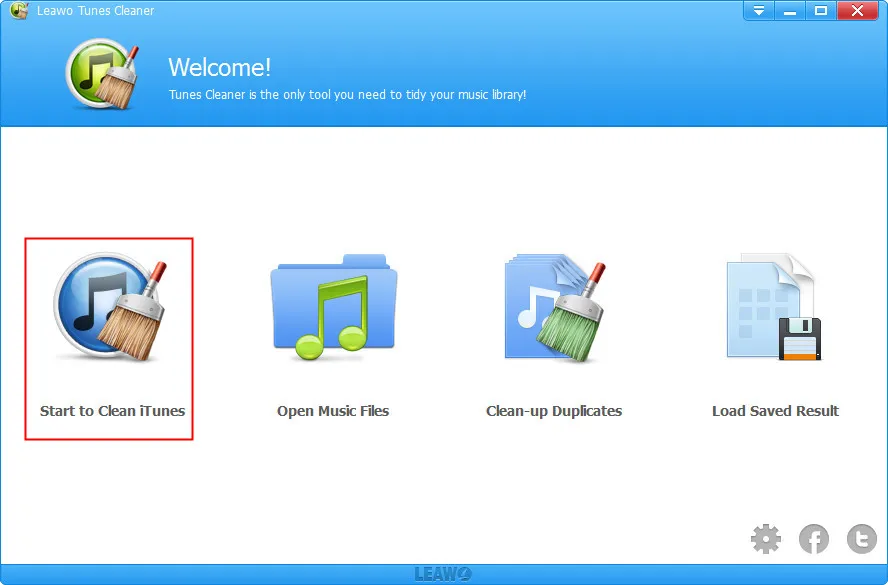
The welcome screen: Start to Clean iTunes, Open Music Files, Clean-up Duplicates and Load Saved Result.
Features
Automatic artwork and tag repair
Leawo Tunes Cleaner identifies songs with missing album artwork, artist or album information and fills them in with one Fix All click, which you can pause on a big library. Songs it can't identify stay in an Unrecognized list, and a Save Project option keeps unfinished work for later.
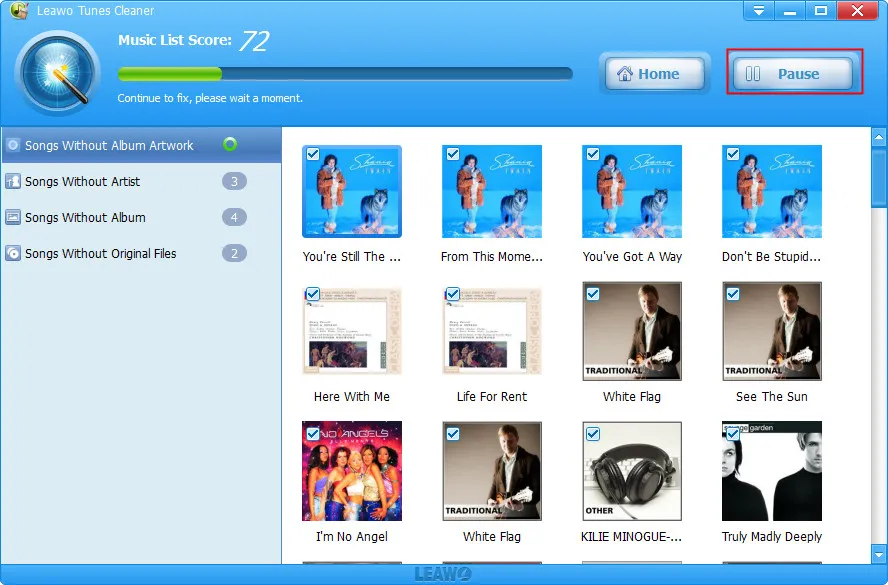
Fixing in progress with a Music List Score of 72: the Songs Without Album Artwork list as a grid of covers, with Pause and Home buttons at the top.
Original tag next to the new one
Leawo Tunes Cleaner shows each song's original tag beside the proposed one (name, artist, album, year, genre and cover), and a small tag editor lets you correct anything by hand before you click Apply.
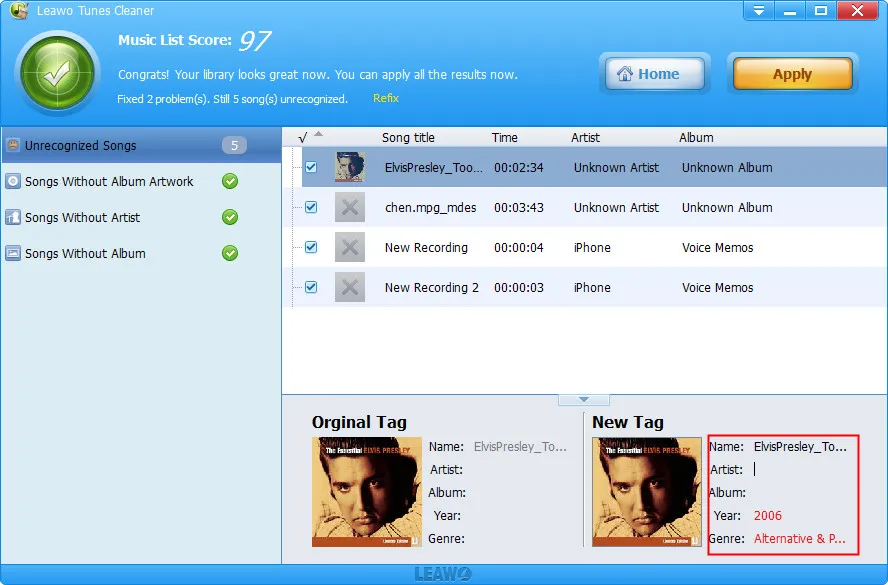
After fixing, a score of 97: the Unrecognized Songs list (voice memos and an untagged file), with the Original Tag and New Tag panes side by side and the Apply button at the top right.
Duplicate finder with two scan modes
Leawo Tunes Cleaner's Quick Scan treats songs as duplicates when the fields you tick (name, artist, album, file size, time) match; Deep Scan compares acoustic fingerprints, with an adjustable match degree, and takes longer. It works on the iTunes library or on folders you add or drag in, groups the copies, pre-ticks the ones it suggests deleting and keeps a remove history.
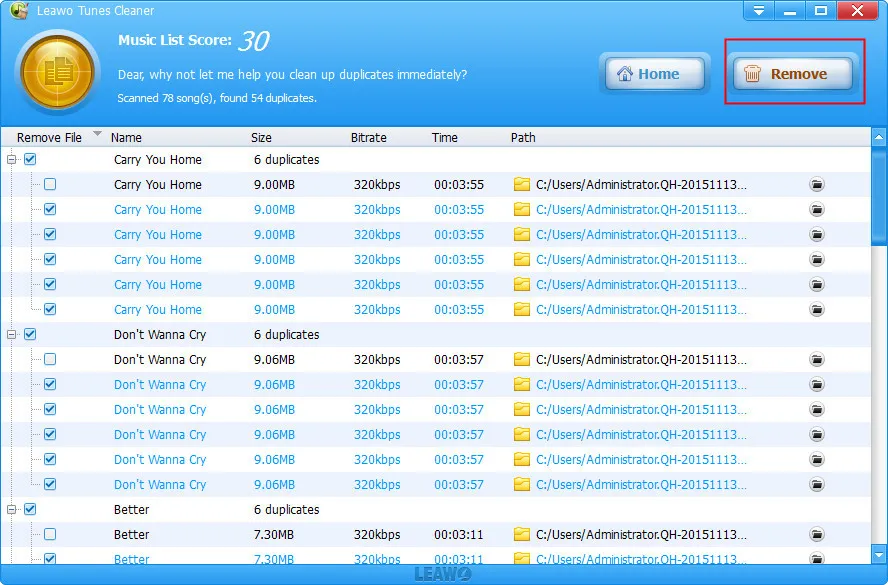
Duplicate results: "Scanned 78 song(s), found 54 duplicates", grouped by title (six copies each of two songs) with size, bitrate, length and path, and the Remove button at the top right.
Benefits
- Hours of hand-tagging saved. Reviewers describe libraries of 8,000 to 20,000 songs cleaned in minutes to a couple of hours.
- Disk space back. Removing duplicates frees real space when the same album was imported several times.
- Not only iTunes. The folder mode works on any collection of music files on the PC.
Real-World Uses
- A decade of ripped CDs with half the covers missing, before syncing to an old iPod.
- A merged library from two family PCs, full of duplicate albums.
- An MP3 folder for a car stick or media server, where every file shows "Unknown Artist".
Who It's For, and Who Should Skip It
It's for Windows users who still keep music in iTunes or in folders of their own files, with a big, messy library of mainstream music.
Skip it if you stream from Apple Music or Spotify and own few files, since there's nothing for it to clean. Skip it too if your collection is mostly bootlegs, mixtapes, soundtracks or spoken word: reviewers found those were the songs it couldn't identify or got wrong. A free tag editor such as Mp3tag gives you full manual control if you'd rather check each album yourself.
Usage Guide
- Back up your music folder and iTunes library, then install Tunes Cleaner (23.5 MB).
- Click Start to Clean iTunes (or Open Music Files for a folder). The scan runs automatically.
- Click Fix All, or tick individual songs. Pause if you need the PC.
- Review the New Tag pane and fix anything wrong with the edit icon.
- Click Apply to write the results to iTunes or the files (needs a license), or Save Project to finish later.
- For duplicates, open Clean-up Duplicates, pick Quick or Deep Scan, click Scan iTunes or Add, then check the ticks and click Remove.
Where it falls short
- Wrong matches on unusual music. Leawo Tunes Cleaner's lookups work best on popular albums; reviewers report wrong or inconsistent covers on compilations, soundtracks and obscure tracks.
- Quick Scan misses some duplicates. Several early reviewers found far fewer duplicates than they expected; Deep Scan is slower but compares the audio itself.
- Little fine control. Older reviews asked for more control over what gets replaced, and the cover previews are small.
- Slow on large libraries. Fixing thousands of songs can take a long time, as one reviewer found 30 minutes into a 6,733-song library.
What Users Say
Leawo Tunes Cleaner has a long review history on Leawo's own page, mostly from its launch in June 2013, when many users tested it with free codes. The critical reviews are as useful as the praise.
Leawo's review page (moderated by Leawo): 4.8 out of 5 from 1,740 ratings
Trina C. (5 stars, June 2013), "Fast and Effective": "I have over 12 thousand songs, very cluttered and in a complete array. The Tunes Cleaner quickly analyzed all of my files and MIRACULOUSLY figured out even the mysterious album artworks! Best of all, the duplicates were accurate, no false positives here."
Alex (5 stars, February 2015), "Works Wonders!": "I've tried other cleaners before, but they only clean part of your library, change correct names to incorrect ones or simply get all the wrong information and album artwork. This is the closest software I've seen to perfection. It even got the years and genres."
Mike (5 stars, June 2020): "Tried 4 other free cleaners & they all had problems.....very slow or just didn't work. Leawo was easy to install, simple interface & a fast scan."
john gallagher (5 stars, October 2013): "A really great programme fixed my iTunes library which was totally messed up by recent tuneup media's latest version."
The complaints
Natasha (3 stars, March 2014): "it did find artwork for most of my music [...] It turned a several hour job into something quick and easy." But: "It seems I have to put my registration in every time, which is a PITA. More concerning--a couple of my songs (out of 700) had wrong artwork and the wrong artist identified. [...] So overall, I like the utility, but it's not foolproof and it does have some flaws."
Dick Richards (2 stars, June 2013), "Lots of problems": "Sure, it finds a lot of album art, but it frequently chooses different covers for the same album. It fails big time with compilations like movie soundtracks."
Jordan (3 stars, June 2013): "I should have had at least 10 times as many duplicates as were found, but I am very pleased with the retrieval of artwork."
gary dean (3 stars, June 2013): "1170 problems fixed, 840 were not. Hard to tell how well the "fixed" ones are until I dig deeper."
bret (1 star, August 2014): "looks promising, payed for it, got sent code and entered it, and f...all, invalid code."
Press and Trustpilot
Leawo quotes a 2013 CNET editor's summary: "Leawo's Tunes Cleaner searches your iTunes library for duplicates, missing album art and song tags, and other issues, and automatically fixes it all without requiring an iTunes Store account." Leawo's Trustpilot page (4.4 out of 5 from 151 reviews, about the company) has nothing specific to Tunes Cleaner.
The pattern: people with big mainstream libraries were delighted with the artwork and tags; people with soundtracks, compilations or obscure music saw wrong matches; and Quick Scan's duplicate detection disappointed some. Almost all of this feedback dates from 2013 to 2016.
Editions and Pricing
| Plan | Price | Term | Money-back window |
|---|
| 1 Year | $39.99 | 1 PC, auto-renews | 5 days |
| Lifetime | $59.99 | 1 PC, one-time payment | 14 days |
Cleaning a library is usually a one-time job plus the odd touch-up, so the yearly plan suits one big clean-up as long as you cancel the renewal. Leawo refunds only for a reproducible bug its support can't fix, not a change of mind, which is another reason to judge the trial's results first.
FAQs
Does Leawo Tunes Cleaner work with the Apple Music app on Windows?
Leawo Tunes Cleaner is written for the iTunes library and lists iTunes in its requirements; Leawo doesn't mention the newer Apple Music app for Windows. Its Open Music Files mode still cleans the music files themselves in any folder.
What can the Leawo Tunes Cleaner trial do?
The Leawo Tunes Cleaner trial scans your library and shows what it would fix, but it doesn't apply fixed files to your library. Apply works only after you register.
Does Leawo Tunes Cleaner change my music files?
Yes, when you apply fixes. Leawo Tunes Cleaner writes the new tags and artwork to iTunes or to the original files, and its settings let you choose whether to replace the original song information. Back up first.
Does Leawo Tunes Cleaner need an internet connection?
Yes. Leawo Tunes Cleaner lists an internet connection in its requirements, since it looks up artwork and song details online. A proxy can be set in its Network settings.
Is there a Mac version of Leawo Tunes Cleaner?
Yes. Leawo Tunes Cleaner for Mac is sold separately at the same prices, as version 3.4.5 for Intel Macs running macOS 10.10 to macOS 11 Big Sur.
System Requirements
- Windows 7, 8, 8.1, 10 or 11
- 1 GHz or faster Intel or AMD processor
- 512 MB RAM (1 GB or more recommended)
- iTunes and an internet connection
- Installer size: 23.5 MB
Conclusion
Worth it for a big, messy library of your own music files, and only after the trial. Leawo Tunes Cleaner does a tedious job fast, and years of reviews agree it finds artwork and tags for mainstream music better than doing it by hand. Its weak spots are unusual music, Quick Scan's duplicate detection and an iTunes-centred design that hasn't been rebuilt since 2020.
Run the free scan and Fix All, look hard at the proposed tags, and buy only if they're right for your collection. If you mostly stream, you don't need it.
Download Free TrialBuy Now