Coolmuster iPhone SMS + Contacts Recovery: Find Deleted Texts and Contacts Directly or in a Backup
Coolmuster iPhone SMS + Contacts Recovery is a $35.95-a-year Windows program that looks for deleted text messages and contacts on an iPhone or in its iTunes and iCloud backups, then saves them to your PC. It's for someone whose loss is specifically texts or contacts and who doesn't want to pay for a full iPhone recovery suite.
It has three sources on one sidebar: the phone itself, an iTunes backup and iCloud. It doesn't require a jailbreak.
Quick facts
- Version: 5.0.19 for Windows, released September 23, 2026
- Developer: Coolmuster
- Works with: iPhone, iPad and iPod touch, iOS 5 through iOS 27
- Sources: the device over USB, iTunes backups, iCloud (contacts)
- Price: $35.95 for one year (3 devices on 1 PC), $45.95 lifetime
- Trial: free download for scanning and previewing
- What we checked: Windows version 5.0.19 in the vendor release notes, 32 MB installer from the vendor (file dated September 23, 2026), checkout price $35.95 on November 10, 2026. We worked from the vendor manual and its screenshots and did not attempt a recovery on an iPhone.
Before you buy
- Recovered data goes to the PC as HTML or XML files. It doesn't put messages back on the iPhone.
- iCloud access is for contacts, according to the manual. Messages and attachments come from the device or an iTunes backup.
- Coolmuster's refund policy says refund requests for recovery products will not be approved, even though the product page advertises a 30-day guarantee.
- The one-year plan renews automatically until you cancel it.
Download Free Trial Buy Now
Overview
Plug in the iPhone and tap Trust, and the program offers Contacts and Messages, listed as data it can recover when deleted. A scan shows deleted entries in red among your existing ones, with a switch to show only deleted items. From an iTunes backup you also get SMS attachments, and the iCloud tab asks you to sign in for contacts.
The September 2026 release fixed iCloud verification code delivery and added a prompt to accept iCloud terms before scanning, so the vendor is still keeping pace with Apple's sign-in changes.
Features
Coolmuster iPhone SMS + Contacts Recovery scans the iPhone directly
The program connects over USB without a jailbreak, scans for contacts and messages, and shows deleted and existing items together. Its success depends on whether iOS has already overwritten the deleted data, so results vary from phone to phone.
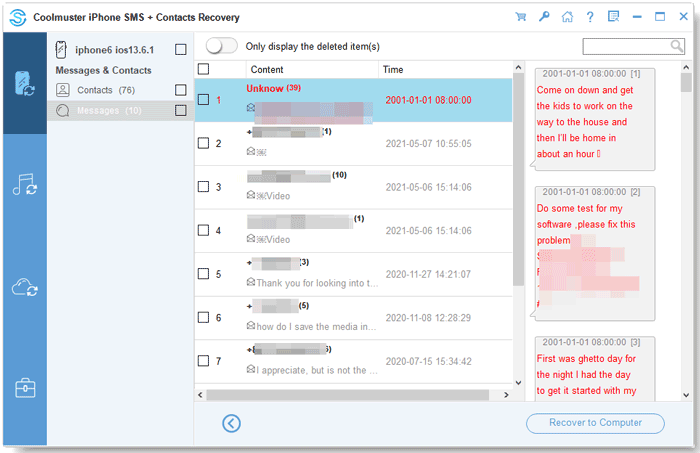
Message preview from a direct phone scan, with deleted threads in red (from the vendor manual).
Reads iTunes backups, including attachments
Coolmuster iPhone SMS + Contacts Recovery also opens backups stored on the PC, without connecting the phone, and adds SMS attachments such as photos, audio messages and videos to what you can retrieve.

SMS attachments listed with name, size, format and date, read from an iTunes backup.
Signs in to iCloud for contacts
Coolmuster iPhone SMS + Contacts Recovery has an iCloud tab for downloading contacts from your account. The vendor says it never stores your details, and warns you to keep the device disconnected during recovery so the iCloud files don't change.

The iCloud sign-in screen and its notes.
Exports readable files with full contact details
Coolmuster iPhone SMS + Contacts Recovery saves phone numbers, names, addresses, companies and emails, along with texts and attachments, as HTML or XML that you can read or print.
Benefits
- Three sources in one tool improve your odds compared with a phone-only scan.
- You see each deleted item before paying for a license.
- No jailbreak means you're not putting the phone at further risk.
- It costs $14 less than Coolmuster's full iPhone Data Recovery if texts and contacts are all you need.
Real-World Uses
- A long text thread disappeared after an iOS update and you have a recent iTunes backup.
- You deleted a contact and need the number today.
- You need to print a text exchange for a dispute and want it as a file.
- You've lost the phone but your contacts sync to iCloud.
Who It's For, and Who Should Skip It
It suits people who've lost messages or contacts on an iPhone and want a focused tool, especially if an iTunes backup exists.
Skip it if you need photos, notes or WhatsApp, which it doesn't touch. Coolmuster iPhone Data Recovery covers those. Also skip it if you expect to push the texts back into the Messages app, which it doesn't do. Mac users need the separate Mac edition.
Usage Guide
- Install and launch the program on Windows and connect the iPhone by USB.
- Tap Trust on the phone if asked, then choose Contacts and Messages and click Start Scan.
- For a backup, choose Recover from iTunes Backup File and pick one, or use the iCloud tab and sign in for contacts.
- Preview the results and use the deleted-only switch if you want.
- Tick the items you want and click Recover to Computer. This step needs a license.
Where it falls short
- Only contacts and messages are covered, plus attachments from a backup.
- The recovered data stays on the computer as files. It doesn't go back to the phone.
- A customer on the vendor's site reports incorrect timestamps on recovered messages, and the manual's own screenshot shows messages dated 2001-01-01, so don't rely on dates for a legal record without checking.
- Customers mention scans that take a while and too many clicks in places.
What Users Say
Independent reviews of this exact product are hard to find, so the product-specific quotes come from Coolmuster's own site. Coolmuster runs a write-a-review-to-win-a-free-license promotion, so read the praise on its own site, and on small blogs, with that in mind.
On Coolmuster's product and review pages (94 reviews shown)
These appear on the vendor's own site.
"Something went wrong while updating my iPhone to iOS 8.4.3. After working for several hours I finally made the iPhone work properly. However, all my important contacts were lost! I was looking for a program to recover the lost contacts then I found your guys."
Caroline, vendor product page
"It is really useful when I use your app to restore messages on my iPhone 6. Only few clicks, the deleted message have been found, and saved well on my desktop computer."
Nina, vendor product page
"Got my deleted messages back, but why are timestamps incorrect?"
Ethan Clark, April 3, 2026, vendor review page
"Too many clicks for some tasks, but the recovery options are pretty useful overall."
Ryan Mitchell, October 19, 2026, vendor review page
"Does what it promises, but pricing could be more flexible."
Sophia Martin, June 18, 2026, vendor review page
Trustpilot, for the Coolmuster company overall
Coolmuster scores 4.6 out of 5 from 223 Trustpilot reviews, read through a page summarizer. They mostly rate customer service.
"When I let the support know that I actually wanted to cancel and not renew they immediatly took care of it for me."
Tim Dewever, December 9, 2025, Trustpilot (excerpt)
Buyers mostly say it does the basic job with few steps. The complaints are about timestamps, the number of clicks and scanning speed. The vendor's support team gets the warmest words.
Comparisons
iPhone SMS + Contacts Recovery vs Coolmuster iPhone Data Recovery
iPhone Data Recovery costs $14 more per year and also exports existing photos, notes, WhatsApp, music and more from the phone, iTunes or iCloud. If you're sure you only want texts and contacts, this is the cheaper way to get them.
iPhone SMS + Contacts Recovery vs Coolmuster iPhone Backup Extractor
Backup Extractor is $16 less per year and covers more data types, but reads only iTunes backups. Pick SMS + Contacts Recovery if you need the direct phone scan.
Editions and Pricing
| Plan | Price | Term | Covers |
|---|
| 1 Year, 3 devices on 1 PC | $35.95 | 1 year, renews automatically | 3 devices |
| Lifetime, 3 devices on 1 PC | $45.95 | One payment, lifetime updates | 3 devices |
| 1 Year, 9 devices on 3 PCs | $65.95 | 1 year, renews automatically | 9 devices |
| Lifetime, 9 devices on 3 PCs | $75.95 | One payment, lifetime updates | 9 devices |
| 1 Year, 30 devices on 1 PC | $189.95 | 1 year, renews automatically | 30 devices |
| Lifetime, 30 devices on 1 PC | $289.95 | One payment, lifetime updates | 30 devices |
The lifetime plan is only $10 more than a year of updates, and it doesn't have to be cancelled.
FAQs
Does Coolmuster iPhone SMS + Contacts Recovery need a jailbreak?
No. Coolmuster iPhone SMS + Contacts Recovery connects with the normal Trust prompt and doesn't require a jailbreak.
Can Coolmuster iPhone SMS + Contacts Recovery get messages out of iCloud?
The manual's iCloud section covers contacts. Use the direct scan or an iTunes backup for messages and attachments.
Can Coolmuster iPhone SMS + Contacts Recovery recover iMessages?
Coolmuster's pages talk about messages and SMS without separating iMessage, so run the free scan and see whether your conversation appears before you buy.
Which iPhone models does Coolmuster iPhone SMS + Contacts Recovery support?
Coolmuster iPhone SMS + Contacts Recovery lists iPhone 18 models and earlier, with iOS 5 through iOS 27, on its tech specs page.
Are refunds available for Coolmuster iPhone SMS + Contacts Recovery?
Only in limited cases. The refund policy lists this product under a 7-day guarantee and says refund requests for recovery products will not be approved, so rely on the free scan.
Can I recover SMS attachments directly from the iPhone with Coolmuster iPhone SMS + Contacts Recovery?
The manual lists SMS attachments for the iTunes backup route, so an iTunes backup is the source to use for attachments.
System Requirements
- Windows 11, 10, 8 or 7 (a separate Mac edition exists)
- iOS 5 or later, up to iOS 27
- 750 MHz or faster CPU, 512 MB RAM
- 1 GB or more free disk space, USB cable
Conclusion
Worth it if texts and contacts are your whole problem and the free scan finds them. Being able to try the phone, an iTunes backup and iCloud in one program is a real advantage at this price.
The main reason not to buy is if you need anything else, such as photos or WhatsApp, or need the data back on the phone. Then the wider iPhone Data Recovery, or a restore, serves you better.
Download Free Trial Buy Now