AnyMP4 Blu-ray Ripper for Mac: Homemade Blu-rays to MP4, MKV and MOV on macOS
AnyMP4 Blu-ray Ripper for Mac converts homemade Blu-ray discs, Blu-ray folders and ISO files into MP4, MKV, MOV and dozens of other formats on an Intel or Apple Silicon Mac. A lifetime license costs $55.96 on the order page, and it is meant for people who burn their own Blu-rays or keep Blu-ray backups and want them as files.
macOS has had no built-in Blu-ray playback for years, and Apple never sold a Blu-ray drive. If your wedding video, camcorder archive or own productions live on Blu-ray, getting them into a file your Mac, iPhone or TV can play is the whole job.
Quick facts
- Version: 9.0.66
- Developer: AnyMP4 Studio
- Platform: macOS 10.12 to 15, Intel and Apple Silicon
- Input: homemade Blu-ray disc, folder and ISO, AVCHD disc and folder
- Output: MP4, MKV, MOV, ProRes, WebM, AVI and more, up to 4K, 5K and 8K; 3D; MP3, FLAC, ALAC and other audio
- Price: $55.96 lifetime license for 1 Mac (list $69.95)
- Guarantee: 30-day money-back
- What we checked: the 4.2 MB downloader DMG from AnyMP4 and the $55.96 lifetime price on the order page, both on November 25, 2026. We didn't rip a disc
Before you buy
AnyMP4 describes this ripper as working with homemade Blu-ray discs, folders and ISO files, so don't count on it for store-bought, copy-protected movies. You need a Blu-ray drive (a DVD drive won't read the discs), and AnyMP4's requirements list macOS 10.12 to 15, so on a newer macOS try the free download first.
Download Free TrialBuy Now
Overview
The window is built around three steps: Load Blu-ray, pick the output format under Rip All to, then click Rip All. When a disc loads, the ripper detects the main movie, and you can open the full title list if you want extras too. Each title row lets you choose the audio track and subtitles, rename it, and open the edit and cut tools.
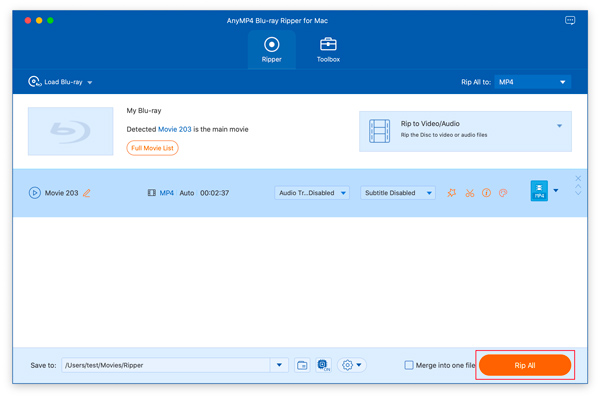
A loaded disc with "Movie 203" detected as the main movie, MP4 as the target, audio and subtitle menus on the title row, and the Rip All button (vendor screenshot).
Features
Rip Blu-ray to almost any format
AnyMP4 Blu-ray Ripper for Mac converts homemade Blu-ray discs, folders and ISO files to MP4, MKV, MOV, M4V, AVI, WMV, WebM, ProRes and more, with H.265, H.264, VP9 and other codecs, at up to 4K, 5K and 8K, or keeps the original with a "Same as source" preset.
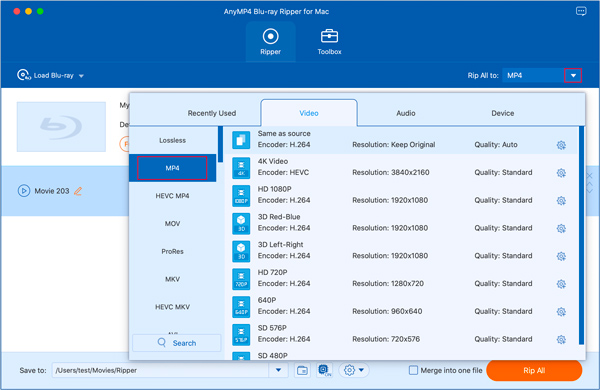
The format menu with Video, Audio and Device tabs; MP4 presets range from "Same as source" to 4K HEVC, 1080p, 720p and 3D (vendor screenshot).
Presets for phones, TVs and editors
AnyMP4 Blu-ray Ripper for Mac has ready-made profiles for iPhone, iPad, Android phones, Apple TV, Samsung and LG TVs, PlayStation and Xbox, and for editing in Final Cut Pro and iMovie.
Edit before you rip
AnyMP4 Blu-ray Ripper for Mac trims and merges clips, crops black bars, rotates and flips, adjusts brightness, contrast, saturation and hue, adds filters and text or image watermarks, swaps audio tracks and subtitles, and fixes audio that is out of sync.
Rip the soundtrack to audio
AnyMP4 Blu-ray Ripper for Mac saves a disc's audio as MP3, M4A, AAC, FLAC, ALAC, WMA and other formats, useful for concert discs.
Toolbox extras
AnyMP4 Blu-ray Ripper for Mac's Toolbox includes a media metadata editor, a video compressor, a GIF maker, a 3D maker, and a video enhancer that upscales, stabilizes and removes noise.
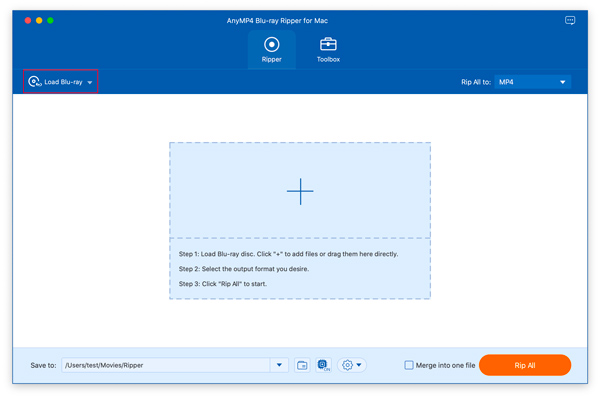
The start screen: Load Blu-ray at the top left, the three-step instructions in the middle, and the output folder and "Merge into one file" option at the bottom (vendor screenshot).
Benefits
- Turns discs you can no longer play on a Mac into files that play anywhere.
- H.265 output keeps 4K and 1080p rips much smaller than the disc.
- Batch ripping and multi-core support handle several titles in one go.
- One payment for a lifetime license, no subscription.
Real-World Uses
- Digitising wedding and event Blu-rays a videographer delivered, so the family can watch them on phones and TVs.
- Converting your own Blu-ray ISO backups to H.265 MP4 to save space on a NAS.
- Pulling a concert disc's soundtrack as FLAC or ALAC for a music library.
- Re-editing your own Blu-ray footage in Final Cut Pro or iMovie.
Who It's For, and Who Should Skip It
It suits Mac users with a Blu-ray drive and a stack of homemade or self-authored Blu-rays and ISOs who want them as files without learning encoder settings.
Skip it if your goal is ripping commercial, copy-protected Blu-ray movies: AnyMP4 markets this tool for homemade discs. Skip it if you only have DVDs (a DVD ripper is cheaper) or no Blu-ray drive, and if you run Windows, AnyMP4 sells a separate Windows Blu-ray Ripper.
Usage Guide
- Download the DMG from the button on this page, open it and install the app; the small downloader fetches the full program.
- Insert the Blu-ray in your drive and click Load Blu-ray (or load a Blu-ray folder or ISO). Choose the main title or the full title list and click OK.
- Open Rip All to and pick a format or device preset, then set audio track and subtitles on the title row.
- Optionally edit or trim the title, set the output folder next to Save to, and tick "Merge into one file" if needed.
- Click Rip All. To register, enter the e-mail address and registration code from your order.
Where it falls short
- Built for homemade discs, so protected commercial Blu-rays are not what it promises.
- Requirements stop at macOS 15 on AnyMP4's reference page.
- AnyMP4 doesn't publish the trial's limits, and the download is a small installer that fetches the program.
- Only one Mac per license; the 5-Mac license costs more.
- Independent reviews of the Mac version are scarce.
What Users Say
Ratings
AnyMP4 shows a 4.8 average from 1,185 ratings for the ripper on its own page, which is its own count. Trustpilot shows AnyMP4 as a company at a TrustScore of 4.2 from 239 reviews, covering all its products. Recent praise is short ("AnyMP4 is a great app with superb support," Karmenu Vella, November 2026), while the critical reviews are mostly about support and licensing: one buyer, Tom Schoute (May 2026, 3 stars), wrote "I sent support a message almost 2 weeks ago with the request to release my registration code," and AnyMP4 disputed his timeline in its reply. Another Trustpilot reviewer, Kain H.R. Abel (March 2026, 4 stars), wrote about AnyMP4's Blu-ray Player, a sister product, that screen-capture programs "don't seem to work if the player is in full" screen.
Testimonials on AnyMP4's page
"This Blu-ray ripper is easy to use and tells me how to rip Blu-ray on Mac quickly." (Cindy)
"I have many Blu-ray discs but do not have devices to play them. Thanks to AnyMP4 Blu-ray Ripper, I can convert my Blu-ray discs to digital videos for easier playback on my Mac computer." (Eve)
"This is a powerful tool because I can use it to rip Blu-ray and edit Blu-ray movies before ripping on Mac." (Mandy)
The themes: ease of use and editing before ripping are what people mention; the complaints about AnyMP4 in general are about support response and licensing. Vendor-page testimonials are AnyMP4's own selection.
Comparisons
vs MakeMKV and HandBrake (free)
MakeMKV pulls Blu-ray titles into large MKV files and HandBrake shrinks them, both free, but it is a two-tool workflow with more settings. AnyMP4 Blu-ray Ripper for Mac does it in one window with device presets, editing and audio extraction.
vs AnyMP4 Blu-ray Ripper for Windows
The same tool for Windows PCs is sold separately; buy the edition for the computer your Blu-ray drive is attached to.
Editions and Pricing
| License | Price | Term | Devices | Buy |
|---|
| Lifetime License | $55.96 (list $69.95) | One-time, lifetime updates | 1 Mac | Buy |
Price from the order page on November 25, 2026, in US dollars, with the discount already applied. AnyMP4's own store also sells a 1-month license and a 5-Mac license. The registration code arrives by e-mail, with a 30-day money-back guarantee.
FAQs
Can AnyMP4 Blu-ray Ripper for Mac rip store-bought Blu-ray movies?
AnyMP4 describes AnyMP4 Blu-ray Ripper for Mac as a ripper for homemade Blu-ray discs, folders and ISO files, so copy-protected commercial discs are not something it promises to handle.
Does AnyMP4 Blu-ray Ripper for Mac work on Apple Silicon Macs?
Yes. AnyMP4 lists Intel and Apple Silicon processors.
Which macOS versions does AnyMP4 Blu-ray Ripper for Mac support?
AnyMP4 lists macOS 10.12 to macOS 15. On a newer macOS, test the free download before buying.
Do I need a Blu-ray drive?
Yes, for discs. A standard DVD drive will not read Blu-ray discs. Blu-ray folders and ISO files on your drive need no disc drive.
Can AnyMP4 Blu-ray Ripper for Mac keep 4K quality?
It can output 4K H.265 and H.264 video, and higher 5K and 8K formats, as long as the source disc has that resolution.
Is the AnyMP4 Blu-ray Ripper for Mac license a subscription?
The $55.96 lifetime license is a one-time payment for one Mac with lifetime updates. AnyMP4 also sells a monthly license on its own store.
Can I get a refund on AnyMP4 Blu-ray Ripper for Mac?
AnyMP4 offers a 30-day money-back guarantee.
System Requirements
- macOS 10.12 to macOS 15
- Intel or Apple Silicon processor, 1 GHz or faster
- 2 GB RAM or more
- Internal or external Blu-ray drive for discs
Conclusion
AnyMP4 Blu-ray Ripper for Mac is worth $55.96 if you have homemade Blu-rays or Blu-ray ISOs and want them as Mac-friendly files with little effort: one window, good presets and editing built in.
The reasons to hold back are clear: it is pitched at homemade discs rather than protected movies, and its listed macOS support ends at version 15. Try the free download with one of your own discs first.
Download Free TrialBuy Now