Leawo Blu-ray to DVD Converter: Shrink a Blu-ray Movie onto a DVD, Folder or ISO
Leawo Blu-ray to DVD Converter is a Windows tool that compresses a Blu-ray movie (BD50 or BD25) to fit a DVD-9 or DVD-5 and writes it to a blank DVD, a DVD folder or an ISO image, so the film plays on an ordinary DVD player. The Buy Now button on this page sells Leawo Blu-ray Copy for $44.95 a year or $99.95 for life, a license that includes Blu-ray to DVD Converter plus three other copy modules. Leawo also sells the converter on its own for $44.95 a year or $69.95 for life on its website.
It's for the household where the Blu-ray collection grew but the car, the kids' room or the holiday flat still has a DVD player: you pick the main movie, keep the audio and subtitles you want, and burn a DVD the old player will read.
Quick facts
- Version: 13.0.1.6, a module of Leawo Prof. Media 13, released October 10, 2026
- Developer: Leawo Software Co., Ltd.
- Runs on: Windows 11, 10, 8.1, 8 and 7. The Mac version is a separate purchase.
- Reads: BD50 and BD25 Blu-ray discs, Blu-ray folders and ISO images
- Writes: DVD-9 or DVD-5, as a blank disc, a DVD folder or an ISO file
- What Buy Now sells: Leawo Blu-ray Copy, $44.95 for one year or $99.95 lifetime, one PC. It covers Blu-ray to DVD Converter, Blu-ray Copy, DVD Copy and Blu-ray Recorder Copy.
- Sold alone by Leawo: Blu-ray to DVD Converter, $44.95 for one year or $69.95 lifetime, one PC
- Free trial: 30 days, converts only the first 5 minutes of a movie
- Money-back period listed: 5 days (1-year license), 14 days (lifetime)
- Installer: 199.5 MB, the whole Leawo Prof. Media 13 suite
What we checked: the Windows installer behind the converter's download page (ltmcp_setup.exe, 209,171,392 bytes, the same file whose version we read as 13.0.1.6 on October 29, 2026), the order page behind the Buy Now button (Leawo Blu-ray Copy at $44.95 for 1 year, the lifetime option adding $55.00 for $99.95, automatic renewal unticked by default) and the order page for the stand-alone converter (Leawo Blu-ray to DVD Converter at $44.95, the lifetime option adding $25.00 for $69.95), all on October 30, 2026. We didn't convert a disc with it ourselves.
Before you buy
- The Buy Now button sells Leawo Blu-ray Copy, not the converter alone. Blu-ray to DVD Converter is one of the four modules that license covers. At one year both cost $44.95, so Blu-ray Copy gives you more for the same money. For a lifetime license the stand-alone converter is $30 cheaper ($69.95 against $99.95), but it does only Blu-ray to DVD.
- The result is a DVD, so it's standard definition. A DVD can't hold HD video, so the 1080p picture is scaled down to DVD resolution. That's the point for an old player, but it's a step down on a big HD TV.
- Cinavia isn't removed. A copy of a Cinavia-protected Blu-ray can still be muted on a Cinavia-compliant player. Leawo sells Blu-ray Cinavia Removal separately for that.
- Personal use only. Leawo's fair-use terms limit it to discs you've lawfully obtained and rule out rental discs and redistribution. Copying laws differ by country.
Download Free TrialBuy Now
Overview
Leawo Blu-ray to DVD Converter isn't a separate program any more. It's a module inside Leawo Prof. Media 13, the window that holds all of Leawo's disc tools. You install the suite, and the license you buy decides which tiles say "Registered". Blu-ray to DVD sits on the Home screen as its own tile and works from the shared Copy tab.
The job is narrow: squeeze a 25 to 50 GB Blu-ray into the 4.38 GB of a DVD-5 or the roughly 8 GB of a DVD-9, re-encoded as DVD video.
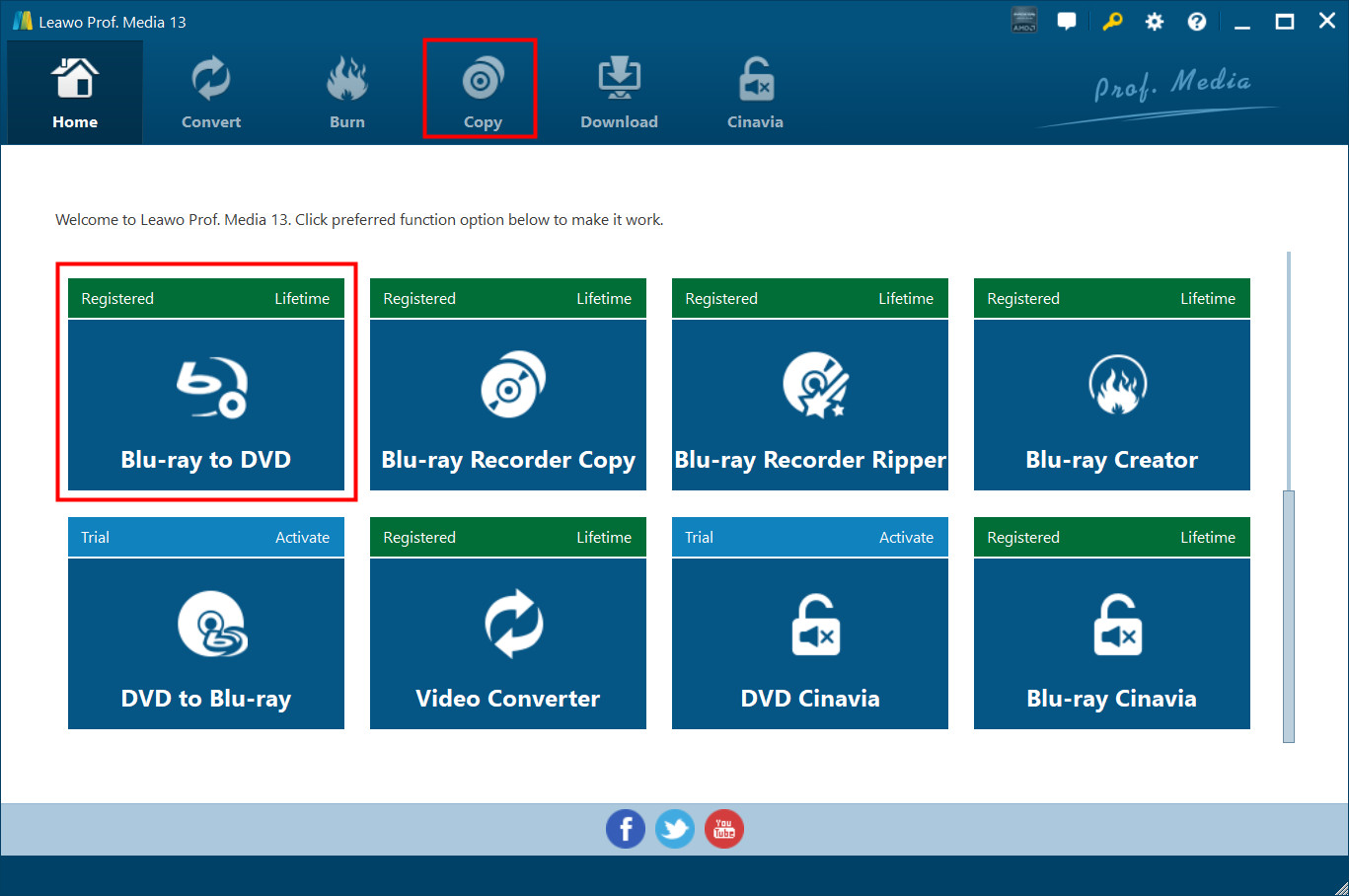
The Leawo Prof. Media 13 Home screen with the Blu-ray to DVD tile highlighted. Each tile shows whether that module is registered (and for how long) or still a trial. Vendor screenshot.
Features
Blu-ray compressed to DVD-9 or DVD-5
Leawo Blu-ray to DVD Converter re-encodes a BD50 or BD25 movie to fit the DVD size you choose in the drop-down at the bottom left: DVD-9 (dual layer) or DVD-5 (single layer). A bar beside it shows how much of the disc your selection fills before you start. DVD-9 gives the movie almost twice the room, so it's the better choice for a long film when you have dual-layer blanks.
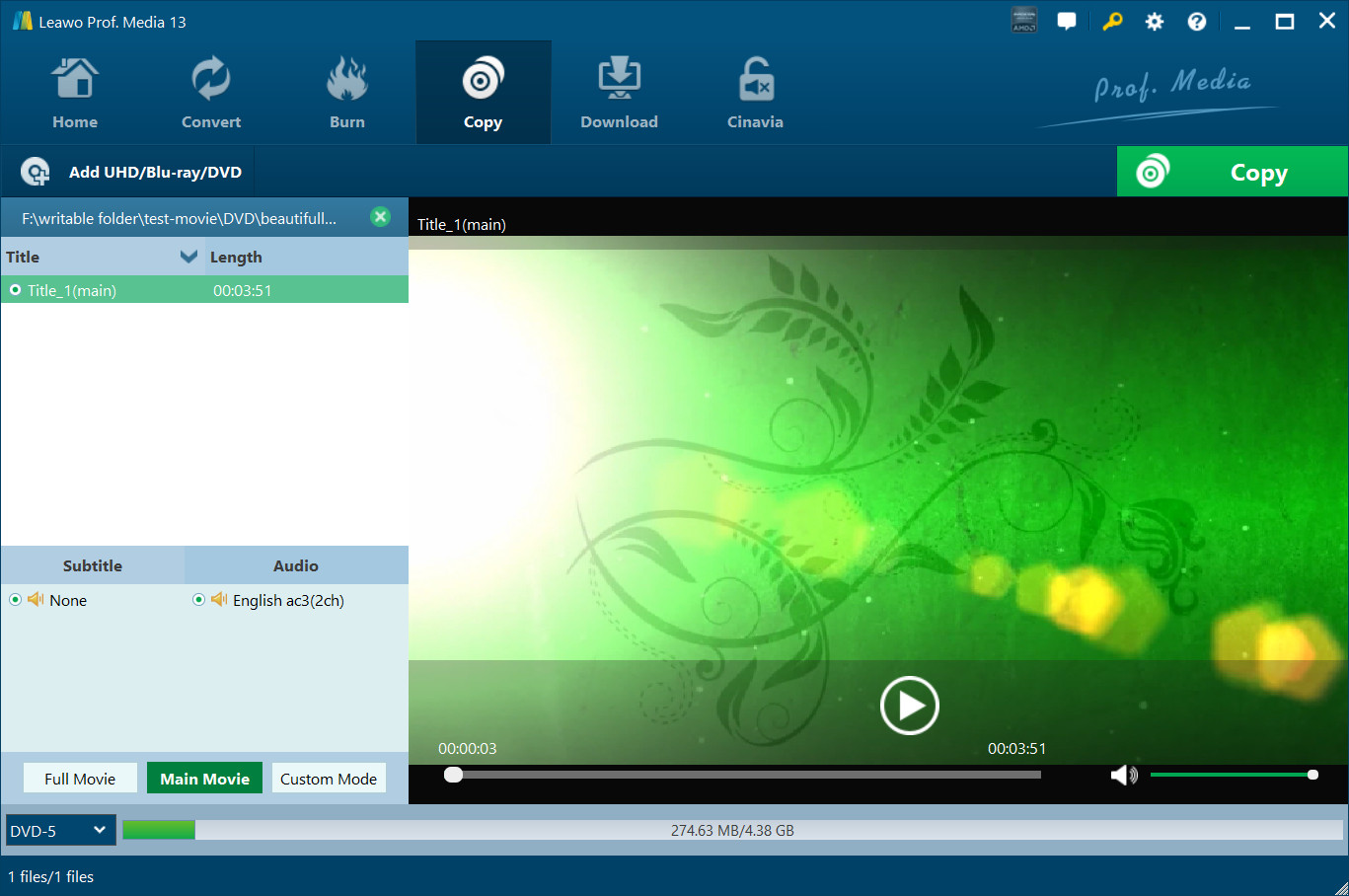
The Copy tab with a short test title loaded: Main Movie selected, subtitle None, English AC3 2-channel audio, and DVD-5 chosen at the bottom left with the size bar reading 274.63 MB of 4.38 GB. Vendor screenshot.
Main movie or hand-picked titles, with your audio and subtitles
Leawo Blu-ray to DVD Converter has two modes for what goes on the DVD. Main Movie picks the longest title, normally the film, and you can switch it to another title. Custom Mode lets you tick any titles you want. In both you choose the subtitle and audio tracks for each title, and a built-in player lets you check a title first. The shared Copy tab also shows a Full Movie button, but Leawo lists only these two modes for Blu-ray to DVD.
Output to a blank DVD, a DVD folder or an ISO, even with one drive
Leawo Blu-ray to DVD Converter writes to any mix of three targets, each a checkbox in the "Copy to" sidebar: a DVD folder, an ISO file and a blank DVD in your burner, with a disc label and the number of copies for disc output. The sidebar shows the hard disk space the job needs next to what's free. With only one drive, you choose the drive as the target, and when the conversion finishes it asks you to swap the Blu-ray for a blank DVD.
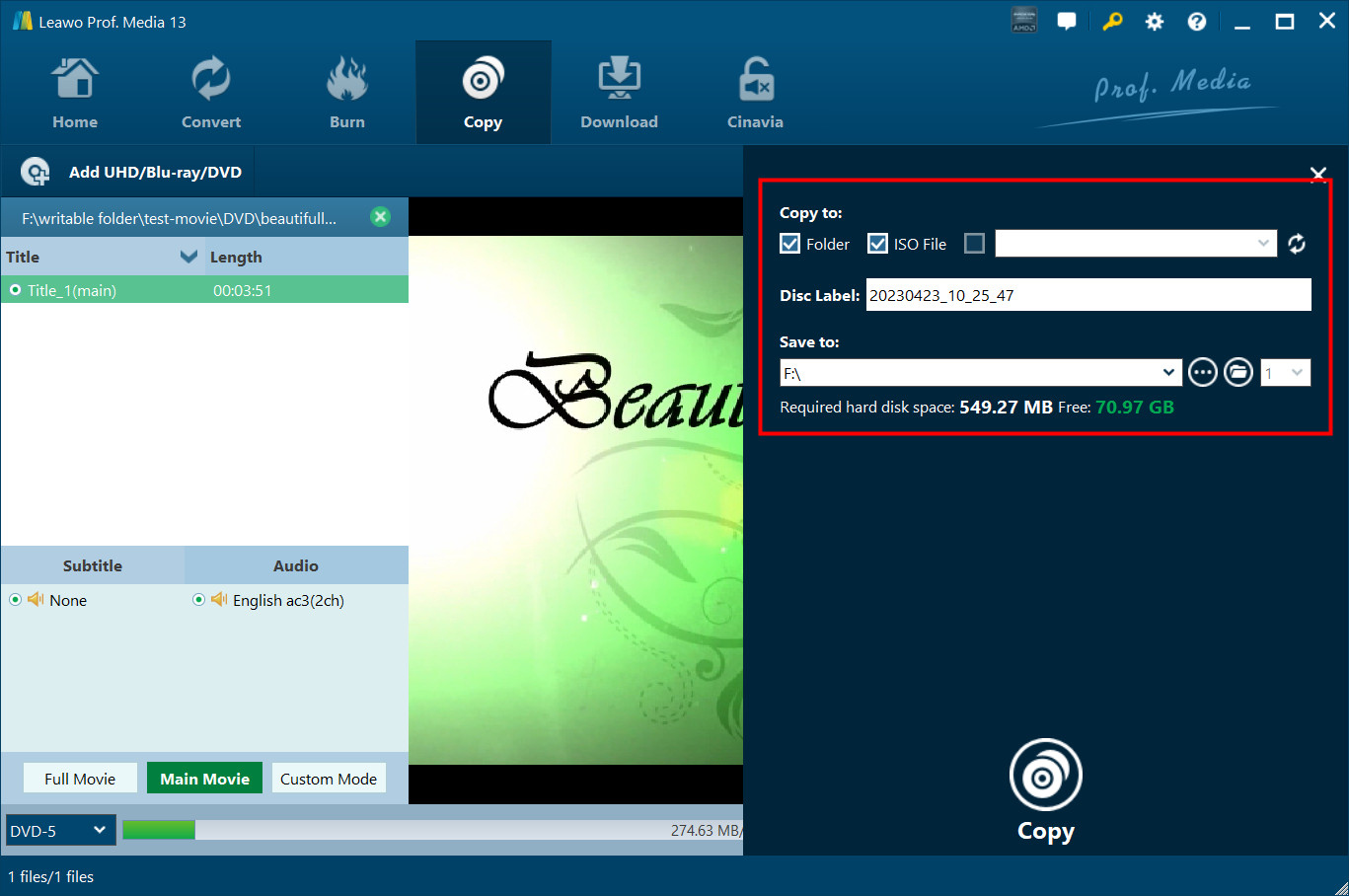
The "Copy to" sidebar: Folder and ISO File ticked, an empty burner slot, the disc label, the save location and "Required hard disk space: 549.27 MB Free: 70.97 GB". Vendor screenshot.
NTSC or PAL output, and the Blu-ray region
Leawo Blu-ray to DVD Converter takes its DVD video mode from the Copy & Burn settings: NTSC (United States and Canada) or PAL (Australia, parts of Asia and much of Europe). Set it to match the player you're burning for. The same page sets the source Blu-ray region (A, B or C groups, or ask each time) and the burning engine.
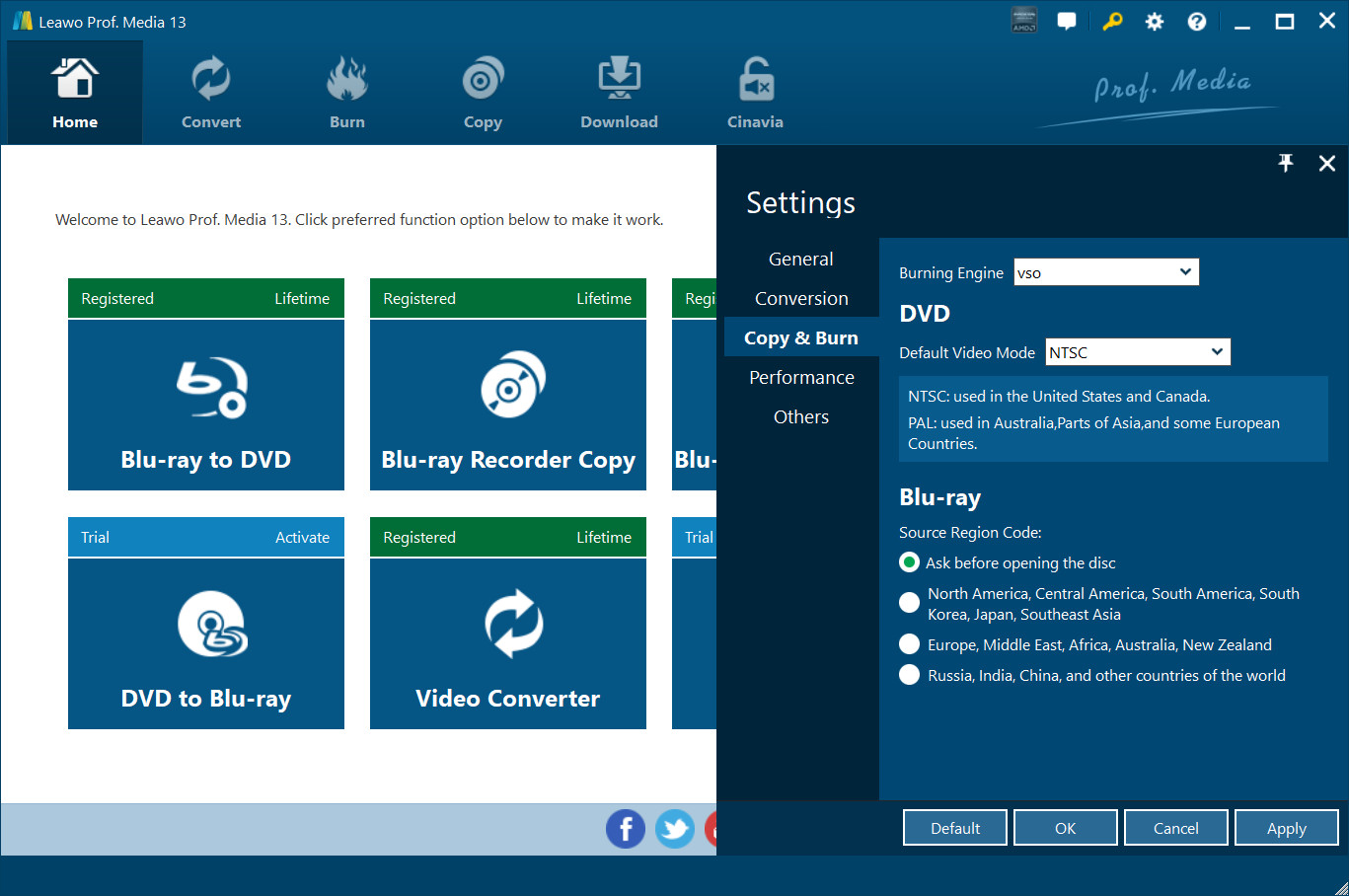
Settings, Copy & Burn tab: Burning Engine "vso", DVD Default Video Mode NTSC with a note on where NTSC and PAL are used, and the Blu-ray Source Region Code set to "Ask before opening the disc". Vendor screenshot.
Decryption and GPU acceleration
Leawo Blu-ray to DVD Converter is meant to read commercial discs: Leawo's guide says it handles Blu-rays "regardless of disc protection and region restriction". It can use NVIDIA CUDA, AMD APP and Intel Quick Sync graphics acceleration. The speed claim varies: the product page says "50X higher speed", while Leawo's own user guide says "6X higher speed".
Real-World Uses
- The car or minivan player: burn DVD-5 copies of the kids' Blu-rays for a DVD-only headrest player, and keep the originals at home.
- A second home or holiday rental: leave DVD copies of a few films there instead of the Blu-rays.
- Smaller archives: save a movie as a DVD ISO of a few gigabytes instead of a 40 GB Blu-ray image, for a NAS where space matters more than HD.
Who It's For, and Who Should Skip It
It's for Windows users who own Blu-rays but still have DVD players to feed, and who want a playable DVD with menus left behind and the right language track kept, in a few clicks.
Skip it if you want to keep HD quality: a 1:1 Blu-ray copy or BD50 to BD25 compression (Leawo Blu-ray Copy, which this license includes anyway) keeps the picture sharp. Skip it too if you want MP4 or MKV files for phones, tablets or Plex, which is a ripper's job, if your discs are 4K Ultra HD (only BD50 and BD25 are listed as input), or if they carry Cinavia.
Usage Guide
- Install and launch. Run the Prof. Media 13 installer from the Download Free Trial button, open it, and click the Blu-ray to DVD tile on the Home screen or the Copy tab. After buying, paste your license code into the Activation Center (the key icon at the top right) and click Register.
- Add the Blu-ray. Click Add UHD/Blu-ray/DVD and choose Add from CD-ROM, Add from folder or Add iso file.
- Pick the content. Choose Main Movie or Custom Mode, then the subtitle and audio tracks, and set DVD-9 or DVD-5 at the bottom left.
- Set the output. Click the green Copy button, tick Folder, ISO File and/or your DVD burner, and set the disc label and save location. On the trial, a red Notice explains the limits and you click Agree to carry on.
- Convert. Click Copy at the bottom of the sidebar. The progress screen shows the current file and the whole job, and "When All Tasks End" decides what the PC does afterwards.
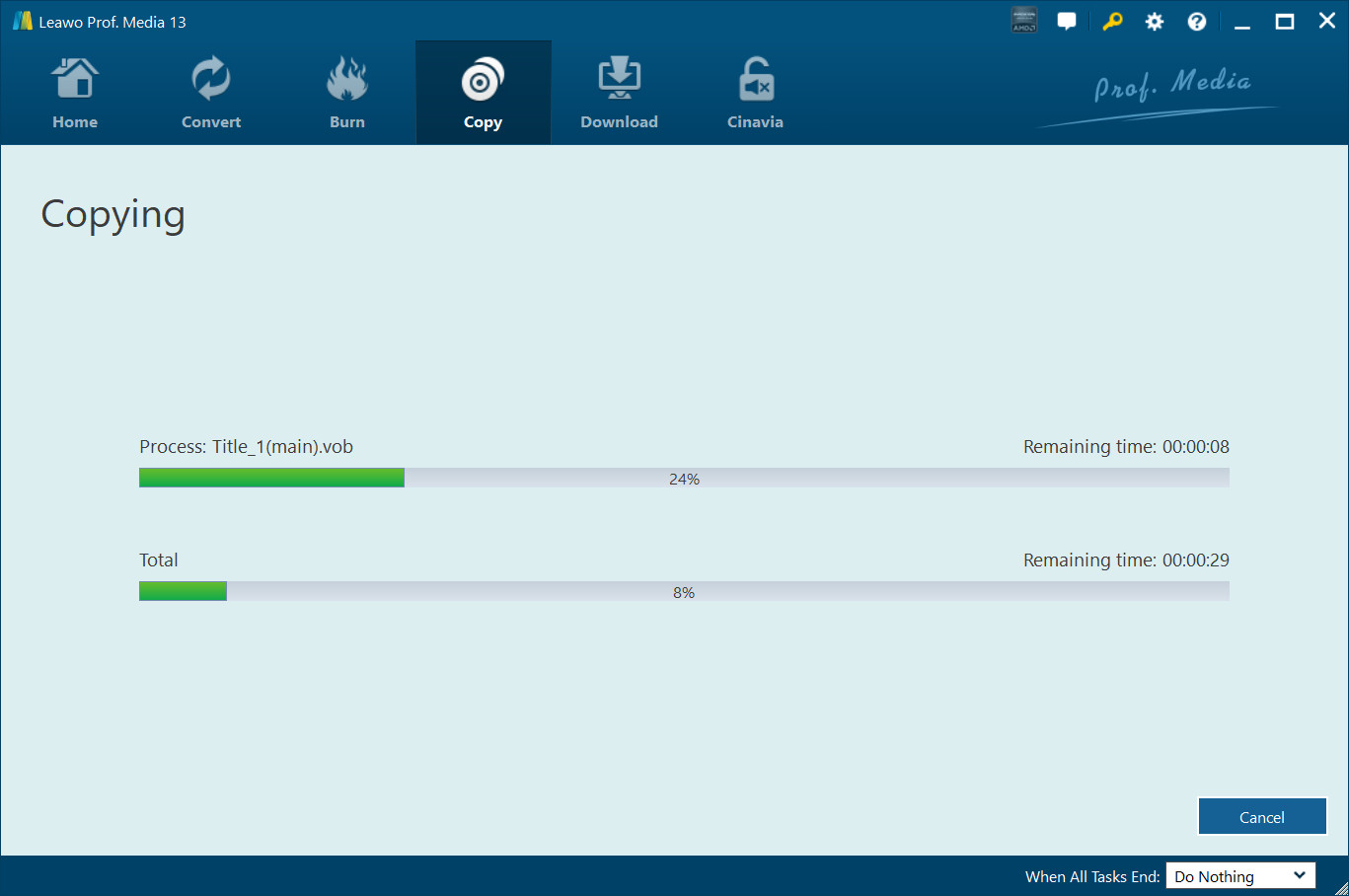
Step 5: the Copying screen, with progress for Title_1(main).vob and for the whole job, remaining times, Cancel, and the "When All Tasks End" option. Vendor screenshot.
Tips
- Test with the trial while it can still read your discs. After the 30 days, the trial stops loading encrypted Blu-rays, which means nearly every store-bought movie.
- Use Main Movie for DVD-5. Leaving out trailers and extras gives the film itself more of the 4.38 GB.
Where it falls short
- No reviews of its own. There are no buyer reviews of the Blu-ray to DVD module on Leawo's site and no independent hands-on test of it. Most of the feedback below comes from Blu-ray Copy buyers and Trustpilot.
- Some discs won't copy. Buyers of Leawo's copy tools report the odd disc that fails, and one Trustpilot reviewer says results depend "on the bluray movie". New discs with fresh protection are the usual cause.
- Blu-ray work is slow. Several Blu-ray Copy buyers call it slow, and the vendor's own speed claims range from 6X to 50X.
- A big suite for one job. You install a 200 MB suite with tabs for products you didn't buy, and license activation on a new PC is a common support topic.
What Users Say
Real feedback on the Blu-ray to DVD module alone is scarce. The reviews below come from three places: Leawo's product page, the review page of Leawo Blu-ray Copy (the license the Buy Now button sells, which includes this module), and Trustpilot reviews of Leawo as a company.
On Blu-ray to DVD conversion
Kay (5 stars, Blu-ray Copy review page, January 2013): "Easy to use, good choice of copy options with good quality results for each. The blu-ray to DVD is particularly sharp and very useful. I've not had a disc so far that it was unable to copy." Kay's listed con: "Slower than some I've used but that's not much of a problem."
Leawo's product page adds three undated testimonials of its own choosing, such as Michael Stan's "High quality compression with little quality loss."
Leawo Blu-ray Copy buyers (4.9 out of 5 from 74 ratings)
Leawo's review page for Blu-ray Copy averages 4.9 from 74 ratings, with no one- or two-star ratings. The reviews are moderated before they appear and most are short and several years old.
Michael (5 stars, March 2018): "This software has copied DVDs 99% of the time. The few it wouldn't copy seemed to play poorly from the original disc."
wakerat (5 stars, Blu-ray Copy review page, September 2014) found the program worked where others hadn't but warned about disc sizes: "this is the first program I have used that will truly burn a Blu-ray but it is a 1 to 1 ratio so you will pay more for disc".
Bob (4 stars, February 2013): "Have found 2 blu ray disk so far it would not copy." Leawo's support replied asking for the disc names.
Leawo on Trustpilot (4.3 out of 5 from 158 reviews)
Leawo has a TrustScore of 4.3 from 158 reviews, with 63% five-star and 25% one-star ratings. Most reviews are about Leawo's disc tools in general, and support gets most of the praise.
Guido (5 stars, September 2026), who bought DVD Copy and DVD Ripper in Prof. Media 13 for Windows, said "they worked flawlessly both in copying 1:1 physical media" and that support "promptly helped me sorting out issues with license activation".
Leon Andrews (5 stars, February 2026): "I had been using Prof Media 13 blu-ray ripper and video Converter for many years and they have served me well." After a computer crash, support helped him reinstall and reactivate.
josuemendez (5 stars, October 2025): "This software was easy to use ..with the right bluray writer unlocked ..also with a bluray decrypter software", adding "sometimes it may come clear or not depending on the bluray movie".
Mand (5 stars, October 2025): "Had problems with several Blueray i couldn't ripp in certain settings." Support sent a fix, including a software update.
Peter Madden (2 stars, November 2025) left only a title: "Will not copy TV mini series ." Leawo replied offering a remote session.
The recurring themes: buyers like how simple the copy screen is, the picture quality they get, and the support team's quick replies. The complaints are slowness on Blu-ray, the occasional disc that won't copy, and activation on a new PC. There is no independent test of the Blu-ray to DVD module, so the 5-minute trial on your own discs is the best evidence you'll get.
Comparisons
Blu-ray to DVD Converter vs Leawo Blu-ray Ripper
Leawo Blu-ray Ripper turns a Blu-ray into video files (MP4, MKV and others) for phones, tablets and media servers. Blu-ray to DVD Converter makes a disc or disc image. Leawo's store sells a lifetime Blu-ray Ripper + Blu-ray Copy bundle, which covers both, for $119.94.
Editions and Pricing
| License |
Price |
Term |
Money-back period listed |
Modules |
| Leawo Blu-ray Copy, 1 Year (Buy Now on this page) |
$44.95 |
One year, one PC |
5 days |
Blu-ray to DVD Converter, Blu-ray Copy, DVD Copy, Blu-ray Recorder Copy |
| Leawo Blu-ray Copy, Lifetime |
$99.95 |
One-time payment, one PC |
14 days |
The same four modules |
| Blu-ray to DVD Converter alone, 1 Year |
$44.95 |
One year, one PC |
5 days |
Blu-ray to DVD Converter only |
| Blu-ray to DVD Converter alone, Lifetime |
$69.95 |
One-time payment, one PC |
14 days |
Blu-ray to DVD Converter only |
| Blu-ray Ripper + Blu-ray Copy, Lifetime |
$119.94 (list $199.90) |
One-time payment, one PC |
14 days |
Seven modules, the four above plus Blu-ray, DVD and Blu-ray Recorder Ripper |
The Buy Now buttons on this page open the Leawo Blu-ray Copy 1-year license at $44.95, and the order page lets you switch it to lifetime for $55.00 more. The stand-alone converter and the bundle are sold on Leawo's own store.
FAQs
Do I need a Blu-ray burner to convert Blu-ray to DVD with Leawo?
No. Leawo Blu-ray to DVD Converter needs a drive that reads Blu-rays and, for disc output, a DVD burner, which many Blu-ray drives also are. One drive can do both: it reads the Blu-ray, then asks you to insert a blank DVD. For a folder or ISO you don't need to burn anything.
Will a DVD made by Leawo Blu-ray to DVD Converter play in any DVD player?
Leawo Blu-ray to DVD Converter makes standard DVD video, which Leawo says plays on standalone DVD players and software. Match the NTSC or PAL setting to the country of the player, and use DVD-5 blanks if an old player is fussy about dual-layer discs.
Can Leawo Blu-ray to DVD Converter convert 4K Ultra HD Blu-rays to DVD?
Leawo lists only BD50 and BD25 Blu-ray discs, folders and ISO files as input for Blu-ray to DVD Converter. The "Add UHD/Blu-ray/DVD" button belongs to the shared Prof. Media window. For 4K discs, try the trial before you count on it.
I already own Leawo Blu-ray Copy. Do I need to buy Blu-ray to DVD Converter?
No. A Leawo Blu-ray Copy license already includes Blu-ray to DVD Converter, according to Leawo's pricing. Its tile in Prof. Media 13 should show as registered once your Blu-ray Copy code is activated.
Is there a Mac version of Leawo Blu-ray to DVD Converter?
Yes. Leawo sells a Mac version for macOS 10.13 High Sierra through macOS 27 on Intel or Apple M1/M2 Macs, with its own license. A Windows license doesn't cover a Mac.
Does the Leawo 1-year license renew automatically?
Only if you choose it. On the order page behind the Buy Now button, the automatic renewal box was unticked by default when we checked. Leawo's own pricing table describes the 1-year plans as auto-renewing with cancellation at any time. Lifetime licenses are a single payment.
Can I get a refund from Leawo if a disc won't convert?
Leawo refunds within 14 days for a reproducible bug its support can't fix, hardware incompatibility or a duplicate order, and expects you to work with support first. Buying the wrong product or simply not needing the program any more is refused, so test your discs with the trial first.
System Requirements
- Operating system: Windows 11, 10, 8.1, 8 or 7
- Processor: 1 GHz Intel or AMD CPU
- Memory: 512 MB RAM (1 GB or more recommended)
- Free disk space: 5 GB or more for DVD output, 25 GB or more for Blu-ray
- Graphics: NVIDIA GeForce GTX 260 or better
- Drives: a Blu-ray drive, a DVD burner for disc output, and an Internet connection
Conclusion
Leawo Blu-ray to DVD Converter is worth having if you own Blu-rays and still need DVDs that play on old players, and the best way to get it is the one the Buy Now button sells: Leawo Blu-ray Copy at $44.95 a year, which costs the same as the converter alone and adds full Blu-ray, DVD and recorder-disc copying. The one reason to buy it is how little work a playable DVD takes: load the disc, pick Main Movie and DVD-5 or DVD-9, choose NTSC or PAL, and burn.
The main reason not to is what a DVD is: standard definition, so the copy will never look like the Blu-ray. Add the lack of Cinavia removal, slow Blu-ray jobs and almost no independent testing of this module. Run the 5-minute trial on your hardest disc within the 30 days. If you only ever want DVDs and plan to keep the program for years, Leawo's $69.95 lifetime converter on its own costs less than the $99.95 lifetime Blu-ray Copy.
Download Free TrialBuy Now