Leawo Photo Recovery for Mac: a 32-Bit App That Current macOS Can't Open
Leawo Photo Recovery for Mac is a $49.99 (lifetime) Mac tool for recovering deleted photos, videos and music from a hard drive, memory card, USB stick or camera. The problem is the download: the app Leawo serves is version 2.1.0, built in November 2014 as a 32-bit Intel program, and Apple removed support for 32-bit apps in macOS 10.15 Catalina. On any Mac running Catalina or later, including every Apple silicon Mac, it won't open, whatever the product page says.
Quick facts
- App in the download: Leawo Photo Recovery 2.1.0, 32-bit Intel (i386), minimum Mac OS X 10.6, files dated November 26, 2014
- Version Leawo's update feed names: 4.3.0, January 2018 ("Added support for the latest Mac OS")
- macOS Leawo lists: 10.10 Yosemite to macOS 26 Tahoe; in practice 32-bit apps run only up to macOS 10.14 Mojave
- File systems: HFS+, FAT16/32, NTFS (no APFS or exFAT in the list)
- Recovers: photos (JPG, PNG, TIFF, PSD and camera RAW such as CR2, NEF, ORF, RAF, DNG), video (MOV, MP4, AVI and more) and audio (MP3, M4A, WAV and more)
- Price: $49.99, lifetime license for 1 Mac, 14-day money-back window
What we checked: the download from Leawo's download page (macphotorecovery_setup.zip, 2,644,308 bytes, server date July 6, 2020), which contains Leawo Photo Recovery 2.1.0 with 32-bit Intel executables built November 26, 2014, and the price on Leawo's order page ($49.99 lifetime) on November 1, 2026. We didn't run it on a Mac.
Before you buy
- It won't run on a current Mac. The app and its recovery library are 32-bit Intel code. macOS 10.15 Catalina and later refuse to open 32-bit apps, and Apple silicon Macs (which start at macOS 11) can't run them even through Rosetta.
- The product page doesn't match the download. Leawo's page lists support up to macOS Tahoe and its update feed names version 4.3.0, but the installer it serves is the 2014 build, version 2.1.0.
- No APFS. Mac startup SSDs have used APFS since macOS 10.13 High Sierra (and all startup drives since Mojave), and APFS isn't among the supported file systems. Even on an old Mac, think of it as a tool for FAT32 memory cards and older HFS+ or NTFS drives.
- Use the free download as the test. If the Mac can't open it, there's nothing to buy. Leawo's refund policy doesn't cover features it never advertised.
Download Free TrialBuy Now
Overview
Leawo Photo Recovery for Mac comes from the Snow Leopard years, and its windows show it: the title bar reads "Photo Recovery Pro" and the example drive is named "mac os 10.6". The idea is the classic memory-card rescue. You formatted the camera card by mistake, or emptied the Trash, and the photos are still physically on the card until something overwrites them. The program reads the drive sector by sector, recognizes files by their content, and copies them to another disk.
It works in three steps: choose Photo, Music or Video and a drive, let it scan, then pick files from a tree sorted by type and click Recover.
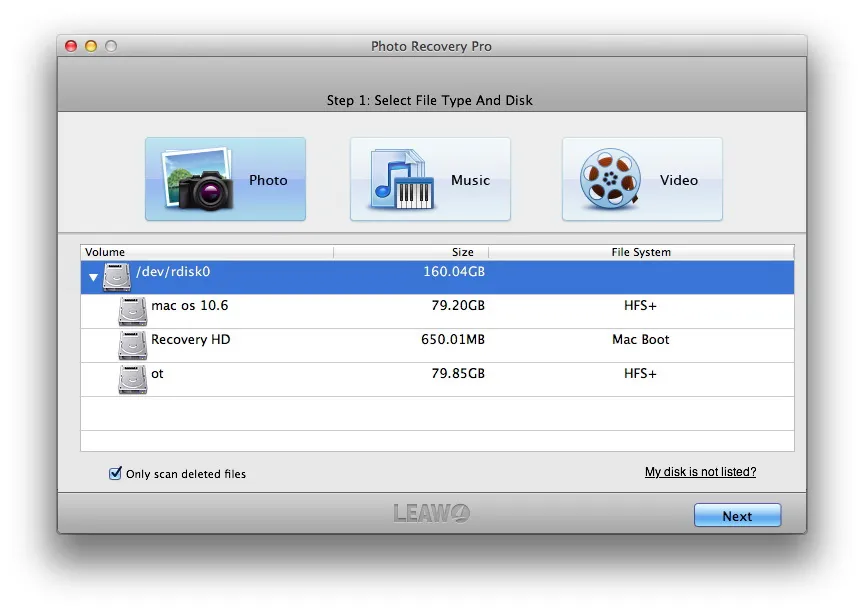
Step 1, Select File Type And Disk: Photo, Music and Video buttons above a volume list showing a 160 GB disk with "mac os 10.6" (HFS+), Recovery HD and a second HFS+ volume, plus an "Only scan deleted files" box.
Features
Photos, video and music, including camera RAW
Leawo Photo Recovery for Mac recognizes common image formats plus RAW files from Canon (CRW, CR2), Nikon (NEF), Olympus (ORF), Fuji (RAF), Sony (SR2), Minolta (MRW) and Kodak (DCR), and Adobe DNG, along with MOV, MP4, AVI, MPG and FLV video and MP3, M4A, WAV, AIFF, OGG and AAC audio.
Cards, sticks, cameras and old iPods
Leawo Photo Recovery for Mac scans hard drives, USB drives, SD cards, digital cameras, phones and MP3 players connected as drives, and iPod nano, classic and shuffle, for deleted files, formatted cards and corruption from pulling a card out mid-write.
Preview before recovering
Leawo Photo Recovery for Mac sorts found files into folders by format and previews the selected one. Recovered files get generic numbered names such as f00000003.png, with no original name or date, which is normal for this kind of content-based recovery and means sorting the results by hand.
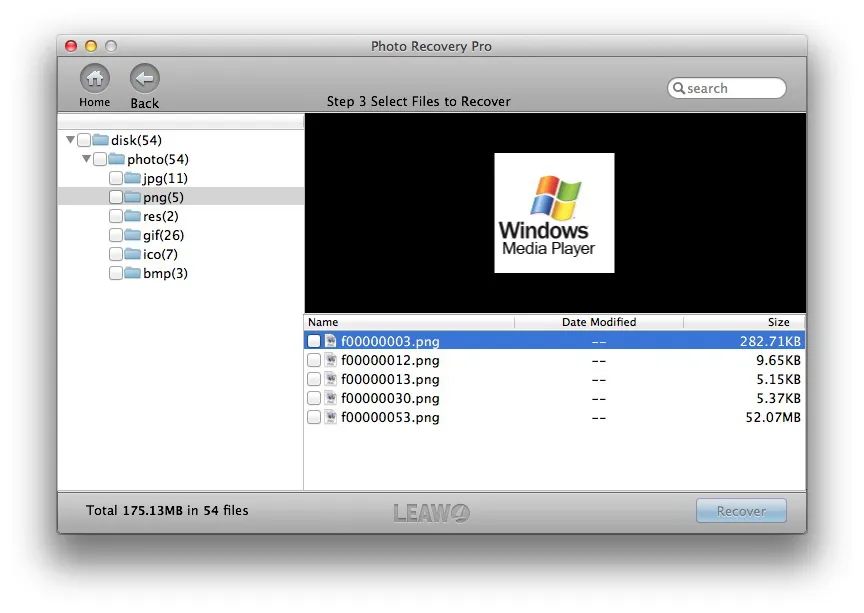
Step 3, Select Files to Recover: 54 found photos sorted into jpg, png, gif, ico and bmp folders, a preview of the selected PNG, numbered file names with no modified date, and the Recover button.
Who It's For, and Who Should Skip It
It could suit someone who still has an Intel Mac on macOS 10.14 Mojave or earlier and a FAT32 camera card or an older HFS+ or NTFS drive with deleted photos on it.
Everyone else should skip it: anyone on macOS Catalina or later, anyone with an Apple silicon Mac, and anyone trying to recover from a Mac's internal APFS drive. For a memory card on a current Mac, look for a recovery app that is still updated and lists your macOS version and exFAT, the format most large SD cards use.
Usage Guide (on a Mac that can run it)
- Stop using the card or drive straight away, so nothing overwrites the deleted files.
- Download and unzip the 2.6 MB file, then open Leawo Photo Recovery.
- Pick Photo, Music or Video, select the card or drive and click Next. Keep "Only scan deleted files" ticked for a quicker scan.
- Wait for the scan. Leawo's example shows almost an hour estimated for a 160 GB disk.
- Tick the files you want and click Recover, saving them to a different drive from the one you're scanning.
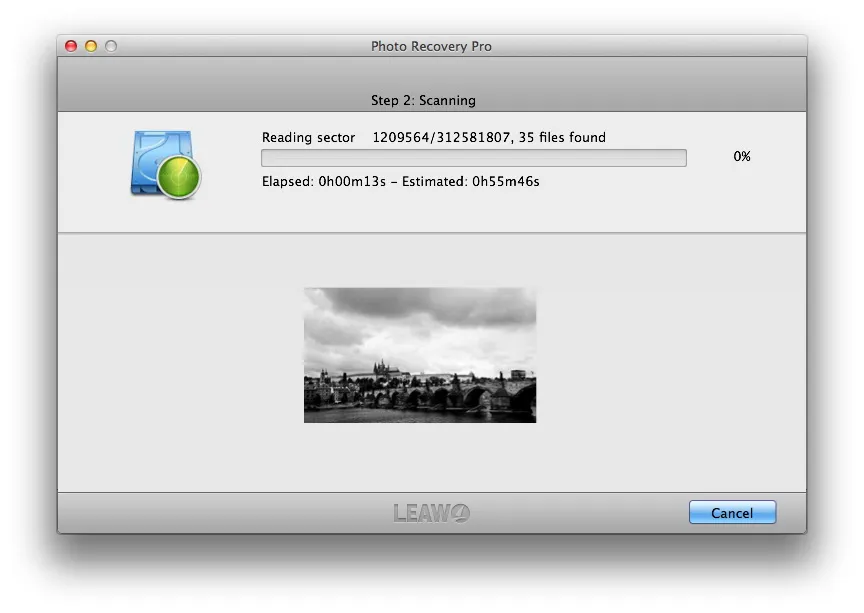
Step 2, Scanning: reading sector 1,209,564 of 312,581,807 with 35 files found, 13 seconds elapsed and an estimated 55 minutes 46 seconds to go.
What Users Say
Leawo's review page (moderated by Leawo): 2 reviews, both from August 2012
William (4 stars), "Powerful, worth the price": "not just recover deleted photos, but also music and videos too. easy to use and scans the disk very fast. And the search settings can be more specific"
Harvey23 (5 stars), "Nice tool!": "it is cheaper than its data recovery, but it also can recover music and video,not only photos! it is worth and should be install in our mac!"
Those are the only reviews we found, and both predate the 2014 build that's available now. Leawo's Trustpilot page (4.4 out of 5 from 151 reviews) is about the company's video products and doesn't mention this app.
FAQs
Does Leawo Photo Recovery for Mac work on macOS Sonoma or Sequoia?
No. The Leawo Photo Recovery for Mac download is a 32-bit app, and macOS has refused to open 32-bit apps since 10.15 Catalina, so Sonoma, Sequoia and Tahoe can't run it even though Leawo's page lists them.
Will Leawo Photo Recovery for Mac run on an M1 or M2 Mac?
No. Leawo Photo Recovery for Mac is 32-bit Intel code, and Apple silicon Macs run Intel apps through Rosetta 2 only if they are 64-bit.
Can Leawo Photo Recovery for Mac recover photos from an SD card formatted as exFAT?
Leawo Photo Recovery for Mac lists HFS+, FAT16/32 and NTFS only. Most SD cards larger than 32 GB come formatted as exFAT, which isn't on the list.
Is there a Windows version of Leawo Photo Recovery?
Leawo sells this product only as a Mac app; there's no Windows edition on its product page.
System Requirements
- A Mac that runs 32-bit apps: macOS 10.14 Mojave or earlier on an Intel Mac (the app asks for Mac OS X 10.6 or later)
- Intel processor, 1 GHz or faster
- 512 MB RAM and 1 GB of free disk space
- Source drive formatted as HFS+, FAT16/32 or NTFS
Conclusion
Don't buy it for a Mac made or updated in the last seven years. Leawo Photo Recovery for Mac was a simple, cheap way to pull deleted photos off a camera card in 2012, but the app on offer is a 32-bit 2014 build that macOS Catalina and later, and every Apple silicon Mac, can't open, and it doesn't read APFS or exFAT.
The only case for it is an old Intel Mac on Mojave or earlier and a FAT32 or HFS+ card or drive. Even then, download it free first and make sure it opens and finds your photos before paying $49.99.
Download Free TrialBuy Now