AnyMP4 iPhone Transfer Pro for Mac: Move iPhone, iPad and iPod Data to and from Your Mac Without iTunes
AnyMP4 iPhone Transfer Pro for Mac is a macOS app ($49.96 for a lifetime licence for one Mac) that copies photos, music, videos, contacts, messages and books between an iPhone, iPad or iPod and your Mac, between two iOS devices, or into the Music/iTunes library, picking exactly the files you want. It replaces AnyMP4's older iPod to Mac Transfer, and there's a free trial to test it with your own device.
Apple's own route is all-or-nothing: Finder or iTunes syncs whole libraries and can overwrite what's on the phone, and getting a single chat or a folder of photos off an iPhone is harder than it should be. A transfer manager like this one shows the phone's contents in a window and lets you drag out only what you need.
Quick facts
- Developer: AnyMP4 Studio
- Version: 9.0.98 (Mac)
- Platform: macOS, from Mac OS X 10.7 to macOS Tahoe 26, on Intel and Apple M-series Macs. The Windows edition, AnyMP4 iPhone Transfer Pro, is a separate product.
- Devices: iPhone (from the iPhone 3GS to the newest models), iPad, iPad mini, Air and Pro, and iPod, iPod touch, nano, shuffle and mini, on iOS 6 or later and iPadOS 13 or later
- Moves: photos, music, videos, contacts, messages (iMessage/SMS, WhatsApp, Kik, Line, Viber, Messenger), ringtones, audiobooks, voice memos, playlists, ePub and PDF books
- Price: $49.96 for a lifetime licence for one Mac at checkout (a one-time payment, no renewal); $99.96 lifetime for 5 Macs
- Free trial: yes, with limits on how many items and how many times you can transfer
- Refund: 30-day money-back guarantee, subject to AnyMP4's refund policy
- What we checked: the app bundle inside the DMG from AnyMP4's download server is version 9.0.98, a 4.3 MB online installer, on November 3, 2026, and the order page showed a lifetime licence for one Mac at $49.96 (down from $62.45) on November 4, 2026. We didn't connect an iPhone to it.
Before you buy
- It's for Apple devices only. The start screen's drawing shows an Android phone, but the app manages iPhone, iPad and iPod. Moving data between Android and iPhone needs a different tool.
- Not a full-device backup. It copies chosen data types to the Mac and back. It doesn't make a complete restorable iPhone backup the way Finder does, and it can't recover deleted data.
- Our Buy Now button opens the lifetime licence. The order page it opens is for a one-time lifetime licence for one Mac, with no automatic renewal. AnyMP4's own store also sells monthly and 1-year plans.
- Licences are per platform. A Mac licence doesn't activate the Windows edition.
- Try the trial first with the iOS version on your phone and the data type you care about (for example WhatsApp chats), since the apps that store those messages change often.
Overview
Connect your iPhone with a USB cable, unlock it and tap Trust, and AnyMP4 iPhone Transfer Pro for Mac lists the phone's content in a left-hand sidebar: Photos, Music, Videos, Contacts, Messages, Others and a Toolbox. Each section shows the actual items with checkboxes, and a toolbar along the top sends the selection to the Mac, to another connected iOS device or to the iTunes library, adds files from the Mac, or deletes them from the phone. Videos and music in formats the iPhone can't play are converted on the way in.
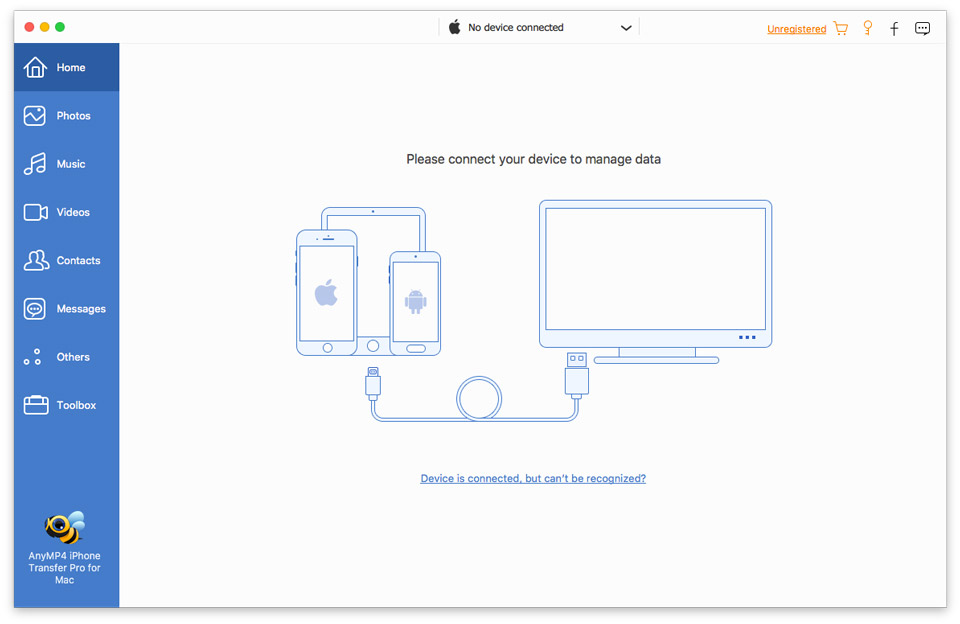
The home screen before a device is connected, with the Photos, Music, Videos, Contacts, Messages, Others and Toolbox sections in the sidebar and the Unregistered link at the top right.
Features
Pick-and-choose transfers between iPhone, Mac and iTunes
AnyMP4 iPhone Transfer Pro for Mac copies individual items, not whole libraries: tick a few albums, songs or videos and export them to a Mac folder, or add files from the Mac to the phone. It also moves music, movies, TV shows, podcasts, audiobooks, voice memos and playlists from the device into the iTunes (Music) library and back, without erasing what's already on the phone.
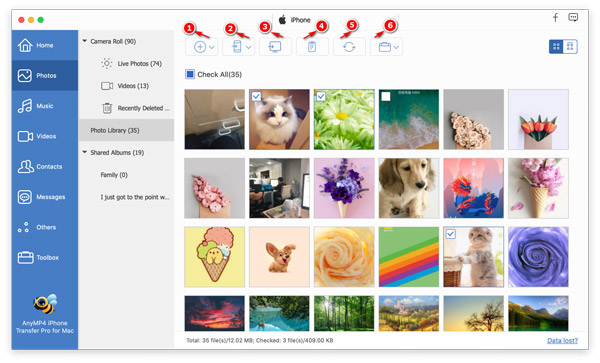
The Photos section: Camera Roll, Live Photos, Videos, Recently Deleted, Photo Library and Shared Albums on the left, thumbnails with checkboxes, and the numbered add, export, delete, sync and toolbox buttons above.
Phone-to-phone sync
AnyMP4 iPhone Transfer Pro for Mac can copy photos, music, videos, ringtones, contacts and playlists directly between two connected iOS devices, for example from an old iPhone to a new one or from an iPhone to an iPad, without going through iCloud.
Messages and app chats saved to the Mac
AnyMP4 iPhone Transfer Pro for Mac reads iPhone text messages and iMessages with their attachments and exports them to the Mac, and lists chats from WhatsApp, Kik, Line, Viber and Messenger in the same view. That's the feature most buyers mention: keeping an important conversation as a file before changing phones.
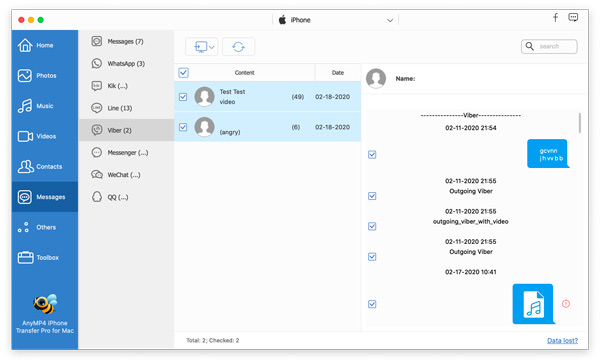
The Messages section with Messages, WhatsApp, Kik, Line, Viber, Messenger, WeChat and QQ in the list, two Viber conversations selected and the chat shown on the right.
Contact management and one-click contact backup
AnyMP4 iPhone Transfer Pro for Mac lets you add, edit and delete contacts, sort them into groups and merge duplicates, working with local, iCloud and other accounts on the phone. The Toolbox has a one-click contacts backup to the Mac and a one-click restore, without iTunes or iCloud.
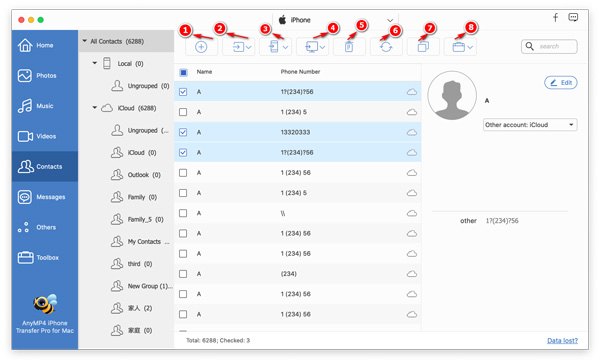
Contacts: local and iCloud groups on the left, the contact list with checkboxes, the toolbar for adding, importing, exporting, deleting and deduplicating, and an Edit button for the selected contact.
Whole categories to the Mac in one go
AnyMP4 iPhone Transfer Pro for Mac's Phone to PC tool copies entire categories (photos, music, videos, contacts, messages and books) to a folder on the Mac at once, showing the total size and the free space left before you start.
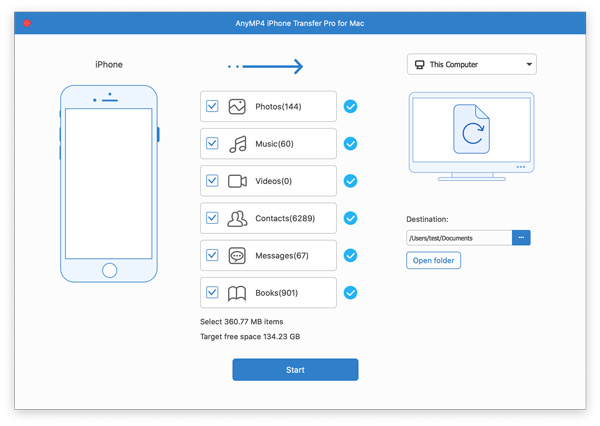
The one-click transfer: Photos, Music, Videos, Contacts, Messages and Books ticked, the destination folder, the selected size (360.77 MB) and the free space on the Mac.
Ringtone maker and HEIC converter
AnyMP4 iPhone Transfer Pro for Mac's Toolbox turns a song from the phone or the Mac into an M4R ringtone, with start and end points, fade in and out and volume, and can put it straight on the device. A HEIC converter turns iPhone photos into PNG for sharing with Windows or Android users, and the Photos section can show each picture's date, format and size.
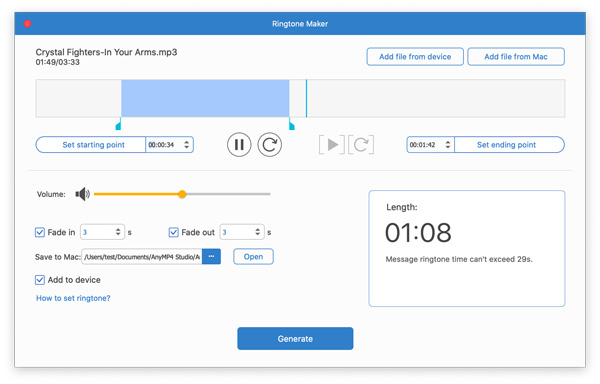
Ringtone Maker: the selected part of a song, start and end points, volume, fade-in and fade-out, the save folder, an Add to device box and the ringtone length.
Benefits
- No accidental wipes. Because you add and export single items, you avoid the Finder/iTunes sync that replaces the phone's library with the Mac's.
- Free space without losing anything. Move years of photos and videos to the Mac, check they arrived, then delete them from the phone from the same window.
- Your chats outside the phone. Message threads become files you can keep or print, which matters for receipts, legal or family records.
Real-World Uses
- Switching iPhones. Plug in the old and new phone and copy photos, contacts and music across, as one reviewer did moving from an iPhone 7 to an iPhone 14.
- Rescuing an old iPod's music. Copy the songs and playlists from an old iPod nano or iPod touch back into the Mac's music library.
- Archiving a conversation. Export a WhatsApp or iMessage thread with its attachments before deleting it or trading in the phone.
- Loading a tablet for a trip. Add movies from a Mac folder to an iPad without syncing the whole library; files are converted to a format the iPad plays.
Who It's For, and Who Should Skip It
Good fit: Mac users who want to move specific photos, songs, chats or contacts between their iPhone and Mac without iCloud or a full sync, people moving to a new iPhone, and anyone with an old iPod whose music isn't on the Mac any more.
Skip it if: you only need the occasional photo, since AirDrop and the Photos app's import already do that free. Skip it too if you need a complete, restorable backup of the phone (Finder does that free), want to recover deleted data (that's a data recovery tool), or are moving between Android and iPhone.
Usage Guide
- Install. Download the DMG, open it and run the installer, which downloads and installs the app, then launch AnyMP4 iPhone Transfer Pro for Mac.
- Connect the device. Plug the iPhone, iPad or iPod in with its USB cable, unlock it and tap Trust. On iOS 13 and later the app may ask for your screen passcode on the phone before it can read some data.
- Pick a section. Choose Photos, Music, Videos, Contacts, Messages or Others in the sidebar and tick the items you want.
- Transfer. Use the toolbar to export to the Mac, to another connected device or to iTunes, or the plus button to add files from the Mac.
- Use the Toolbox for phone-to-phone copying, the one-click Phone to PC transfer, contacts backup and restore, the ringtone maker and the HEIC converter.
- Register. After buying, click Unregistered at the top right and enter your email address and licence key to remove the trial limits.
Where it falls short
- An older-looking interface. The design hasn't changed much in several versions, and the vendor's screenshots still show early macOS window styles.
- The trial's limits are vague. AnyMP4 says only that the trial limits "numbers, times", so you won't know exactly how much you can move before buying.
- Activation can need support. Trustpilot reviewers of AnyMP4 products describe contacting support to reset or release a licence key after changing computers; some got a quick fix, one waited almost two weeks.
- Few independent reviews. Most published feedback is on AnyMP4's own site; we found no recent hands-on test from a major tech publication.
What Users Say
On AnyMP4's site
AnyMP4 shows a 4.9 rating from 1,349 reviews for the product. These are collected by the vendor, so take them as the happy side:
- "Best iTunes alternative. I purchase this iPhone transfer tool mainly for backing up some important messages and contacts to Mac, it works just as I expected!" (Linda)
- "I have used this program in the past. It worked very well. It's a program you use often, especially when you want to make data sync. It is easier than iTunes. So thank you AnyMP4!" (Terry)
- "This what I need at my skill. I store my important data on my old iPhone 7, and now I get a new iPhone 14. I can already access all my messages and photographs in my new phone without iCloud." (Paul)
Trustpilot (AnyMP4 as a company)
AnyMP4 scores 4.2 out of 5 from 237 reviews, with 66% five-star and 24% one-star. None of the visible reviews is about iPhone Transfer Pro; most are about support and licences for AnyMP4's other programs. The text below came to us through a page summarizer.
- "They responded quickly and helped resolve an issue I had with my account." (Shadowgreywolf, 5 stars, June 2026, about iPhone GPS Spoofer)
- "customer service was very efficient and helpful to reset the license keys" (Andrew, 5 stars)
- "I sent support a message almost 2 weeks ago with the request to release my registration code." (Tom Schoute, 3 stars, May 2026)
The pattern: buyers use it as an easier iTunes replacement, mostly to save messages and contacts and to move data to a new iPhone without iCloud. Complaints about AnyMP4 in general are about licence keys after a computer change, not about lost data. There's little independent testing, so the trial is your best check.
Comparisons
AnyMP4 iPhone Transfer Pro for Mac vs Finder and the Photos app
Finder backs up and syncs a whole iPhone for free, and the Photos app imports pictures. Neither exports a message thread, copies music from an iPhone or iPod back to the Mac, or moves single items between two iPhones. That gap is what you pay for here.
AnyMP4 iPhone Transfer Pro for Mac vs AnyMP4 iPod to Mac Transfer
iPod to Mac Transfer was AnyMP4's older, iPod-only tool for copying music and video to the Mac. iPhone Transfer Pro for Mac now takes its place: AnyMP4's iPod to Mac Transfer page downloads and sells this app, which does the same job for iPods and adds iPhones, iPads, messages, contacts and two-way transfers.
Editions and Pricing
| Licence | Price at checkout | Macs | Term |
|---|
| 1 Month | $31.20 | 1 | Renews monthly, cancel any time |
| Single licence, lifetime (our Buy Now button) | $49.96 (list $62.45) | 1 | Lifetime, one-time payment |
| 5-User | $99.96 | 5 | Lifetime, with free updates |
Prices are in US dollars as shown on the order page on November 4, 2026. AnyMP4 also quotes team and business licences on request.
FAQs
Does AnyMP4 iPhone Transfer Pro for Mac work on Apple Silicon Macs?
Yes. AnyMP4 lists Apple M-series chips (including M3) and Intel processors, and macOS versions up to macOS Tahoe 26.
Can AnyMP4 iPhone Transfer Pro for Mac copy music from an old iPod to my Mac?
Yes. AnyMP4 iPhone Transfer Pro for Mac supports the iPod, iPod touch, nano, shuffle and mini and copies their music, playlists, podcasts and audiobooks to the Mac or the iTunes library.
Can I transfer WhatsApp messages to my Mac with it?
AnyMP4 iPhone Transfer Pro for Mac exports WhatsApp, Kik, Line, Viber and Messenger chats from the iPhone to the Mac as part of its Messages section. For moving WhatsApp history from one phone to another, AnyMP4 sells a separate WhatsApp Transfer for iOS.
Does it need iTunes or iCloud?
No. AnyMP4 iPhone Transfer Pro for Mac talks to the device over USB, so you don't need to sync with iTunes or Finder or upload anything to iCloud. It can still send files to your Music/iTunes library if you want them there.
Will the Mac licence work on my Windows PC?
No. AnyMP4 iPhone Transfer Pro for Mac and the Windows edition, AnyMP4 iPhone Transfer Pro, are licensed separately.
Can I use one licence on two Macs?
No. An AnyMP4 iPhone Transfer Pro for Mac single licence covers one Mac. For more, the 5-User licence covers five Macs for $99.96.
Can it recover photos I deleted from my iPhone?
No. AnyMP4 iPhone Transfer Pro for Mac only moves data that's still on the device. Deleted data needs a recovery tool such as AnyMP4 iPhone Data Recovery.
System Requirements
- macOS: Mac OS X 10.7 or later, up to macOS Tahoe 26
- Processor: 1 GHz Intel processor or Apple M-series chip
- Memory: 1 GB RAM or more
- Devices: iPhone, iPad and iPod on iOS 6 or later, iPadOS 13 or later
- Connection: a USB cable for the device; the installer downloads the app, so you need an internet connection to install it
Conclusion
AnyMP4 iPhone Transfer Pro for Mac is worth $49.96 for a lifetime licence if you regularly move specific things between iPhones, iPods and a Mac, and especially if you want your messages and contacts saved outside the phone or your old iPod's music back. The one reason to buy it is selective, two-way transfer that Finder and iCloud don't offer. The main reason not to is that for an occasional photo or a full backup, Apple's free tools are enough. Run the trial with your own phone first.
Download Free TrialBuy Now