Leawo iTransfer: Move Music, Photos, Contacts and Messages Between iPhone, iTunes and PC
Leawo iTransfer is a Windows file manager for iPhone, iPad and iPod that copies music, videos, photos, contacts, text messages, notes and other files between your iOS device, iTunes and your PC in any direction, without an iTunes sync. It costs $19.95 for a year or $29.95 for a lifetime license, which makes it one of the cheaper ways to get your files off an iPhone and onto a computer (or the other way round).
The usual reason people look for it: you want the songs, photos or messages on your iPhone saved on your PC, or you want to put music on an old iPod, and iTunes keeps threatening to erase the device to "sync". iTransfer copies only what you select and leaves everything else alone.
Quick facts
- Current version: Leawo iTransfer 2.0.0.9 for Windows
- Developer: Leawo Software Co., Ltd.
- Runs on: Windows 7, 8, 8.1, 10 and 11 (a separate Mac version is sold)
- Needs: iTunes installed on the PC (Leawo says the latest version) and an internet connection
- Price: $19.95 for 1 year (renews automatically) or $29.95 lifetime, 1 PC
- File types: 12 kinds, including music, movies, TV shows, ringtones, books (PDF, ePub), photos and Camera Roll, contacts, SMS, notes and bookmarks
- Refunds: Leawo shows a 5-day money-back guarantee on the yearly plan and 14 days on the lifetime license, for confirmed technical problems only
What we checked: the Windows installer from Leawo's download page (file version 2.0.0.9, last updated April 8, 2026), and the plan prices on Leawo's iTransfer order section ($19.95 for 1 year, $29.95 lifetime) on October 31, 2026. We didn't connect an iPhone to test transfers ourselves.
Before you buy
- Check your device first. Leawo's compatibility list still ends at the iPhone XR and the original iPad Pro, even though the software was rebuilt in April 2026. Run the free trial with your own iPhone before paying.
- iTunes must be installed. iTransfer doesn't replace iTunes' device drivers; it works alongside them.
- iCloud Contacts gets in the way. Download.com's review notes that iCloud backup for Contacts must be turned off before iTransfer can read the contacts on the device.
- Refunds are narrow. Leawo refunds only for reproducible bugs it can't fix, hardware incompatibility or duplicate orders, within 14 days. Buying the wrong product or simply not needing it doesn't qualify.
Download Free TrialBuy Now
Overview
Leawo iTransfer looks like a classic two-pane file manager. The left column lists each connected device and your iTunes library, with a Library tree underneath: Music, Movies, TV Shows, Books, Ringtones, Camera, Photos, Contacts, SMS, Bookmarks, Notes and USB Storage, plus your playlists. The right pane lists the files of whatever you select, with name, length, artist, album and genre columns. Transfers start from a right-click menu or the big arrow button in the corner.
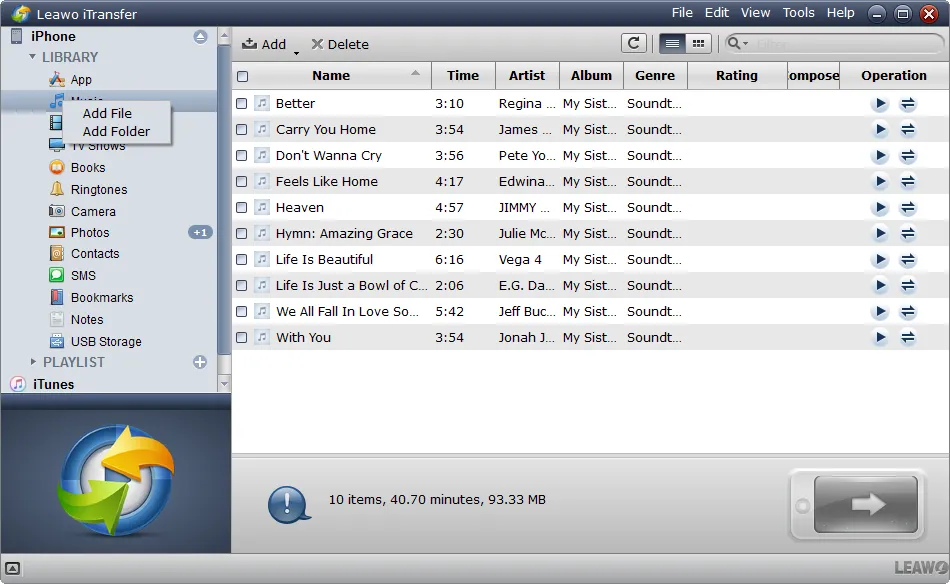
Leawo iTransfer with an iPhone connected: the device's Library tree on the left, its ten songs on the right, and the Add File / Add Folder menu for copying files from the PC to the phone.
Leawo describes it as working in three steps: connect, select, transfer. Files you already have on the target aren't overwritten unless you delete them yourself.
Features
Transfer in every direction, without an iTunes sync
Leawo iTransfer copies files from the PC to the iPhone, from the iPhone to the PC, from iTunes to the device and between two iOS devices connected at the same time. You pick the files, right-click and choose Transfer to with a target (My Computer, iTunes or another device). Because nothing is synced, the device keeps everything you didn't touch.
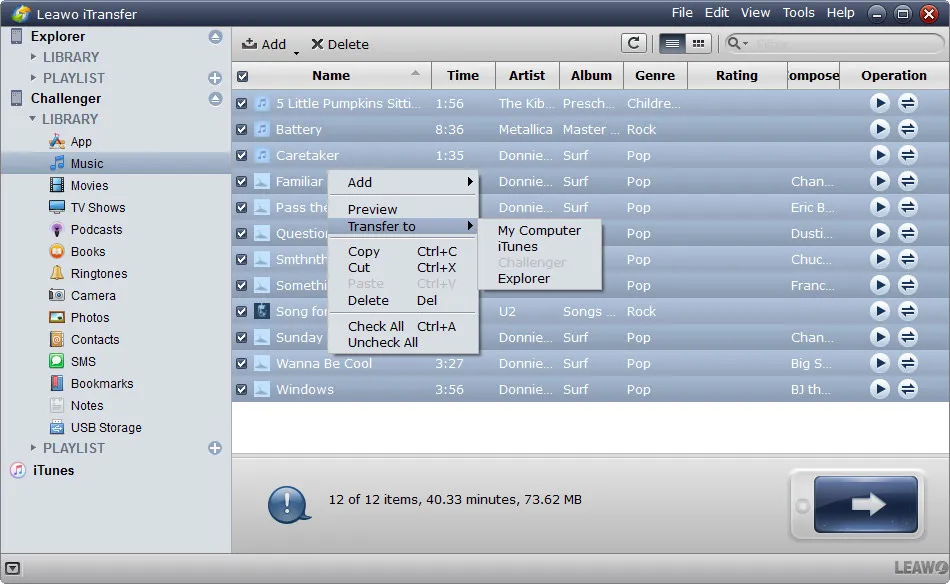
Two devices connected at once: the right-click Transfer to menu offers My Computer, iTunes and the other device ("Explorer") as destinations for the selected songs.
Back up contacts, messages, notes and bookmarks
Leawo iTransfer saves the personal data that's hardest to get off an iPhone. Contacts can be backed up and restored, imported from Gmail and exported as CSV or VCF files, and you can add, edit and group them from the PC. Text messages, Safari bookmarks and notes can be exported to the computer for safekeeping and imported back.
Manage playlists from the PC
Leawo iTransfer lets you create, rename and delete playlists on the device, add songs from the music library, and import or export songs in and out of playlists. Download.com's reviewers singled this out: you can build playlists on the PC "rather than fiddling with the phone or tablet itself."
Use the iPhone as a USB drive
Leawo iTransfer adds a USB Storage area to the device, where you can keep any file, even ones iOS can't open. The catch, as Download.com notes, is that every PC you want to read it from needs iTransfer installed.
Preview and choose where files go
Leawo iTransfer previews music, photos and videos before you copy them. When you send files to the computer, a Transfer window shows how many files and megabytes you're moving and lets you save them to a folder or straight into an iTunes list.
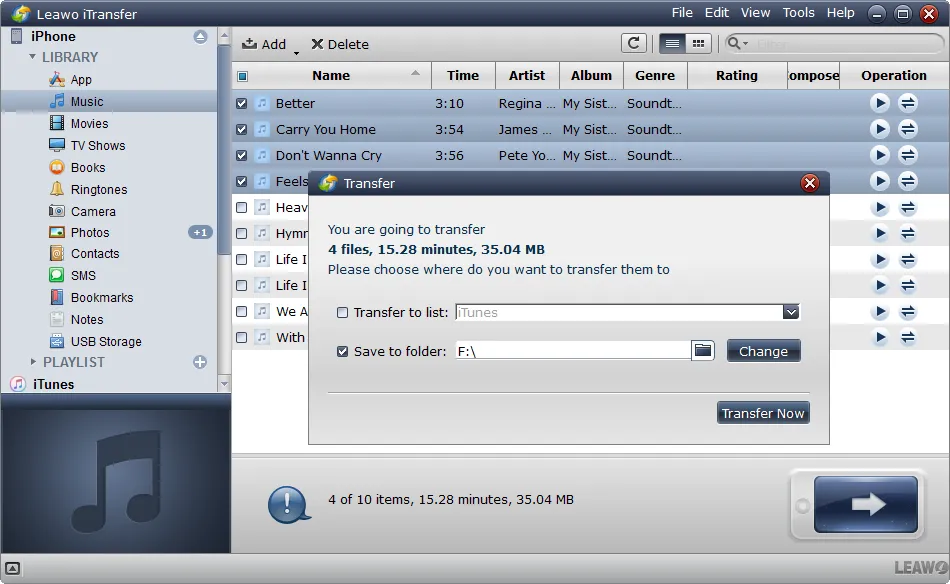
The Transfer window: 4 files (15.28 minutes, 35.04 MB) about to be saved to a folder on drive F:, with the option to add them to an iTunes list instead.
Benefits
- No accidental wipes. You copy only what you choose, so an iPhone filled from another computer stays as it is.
- Your messages and contacts on your own disk. CSV/VCF contacts and exported messages are easy to keep, print or move to another phone.
- Cheap. At $29.95 for a lifetime license it costs less than most iPhone managers.
Real-World Uses
- Rescue an old iPod's music: copy the songs from an iPod Classic or Nano back to the PC, where iTunes won't let you.
- Keep a text message record: export a conversation before trading in an old iPhone.
- Load a family iPad: drop a folder of movies and audiobooks onto the iPad without syncing it to your own iTunes library.
- Move contacts to a new phone: export them as VCF and import them anywhere.
Who It's For, and Who Should Skip It
Good fit: Windows users with older iPhones, iPods and iPads who want a simple, low-cost way to copy media and personal data to and from the PC.
Skip it if:
- Your phone is a recent iPhone and the trial doesn't see it. The published compatibility list stops at the iPhone XR.
- Your contacts and photos live in iCloud. iCloud already syncs them to your PC; iTransfer can't read contacts while iCloud Contacts is on.
- You want a full phone backup to restore later. iTunes' or Finder's own backup is the tool for that.
Usage Guide
- Install: install iTunes if you don't have it, then run the iTransfer installer.
- Connect: plug the iPhone, iPad or iPod into the PC with its cable and start iTransfer. Tap "Trust" on the device if asked.
- Browse: open the device's Library on the left and pick a file type, such as Music or SMS.
- To the device: right-click the file type and choose Add File or Add Folder.
- From the device: select files, right-click, choose Transfer to > My Computer, pick a folder and click Transfer Now.
Where it falls short
- An old-looking interface. The window still has its Windows 7-era look, and reviewers have called it "bland and uninspired".
- No emoji in messages. Download.com found that emoji in text messages show up as squares inside the app.
- Typos in the menus. Benchmark Reviews listed "typo and grammar errors in menu" as a con.
- Old compatibility list. Leawo hasn't updated the supported-device list past the iPhone XR, so newer iPhones are untested as far as the published list goes.
What Users Say
Independent reviews of Leawo iTransfer are few and mostly older, so take them as a picture of how the app works rather than how it performs with current iPhones.
Tech press
Download.com (CNET's download site, review of version 1.8.0.5, republished on Yahoo in August 2014) found it capable but plain: "Leawo iTransfer backs up your app data effectively," but the app "feels bland and uninspired" and "The visual style leaves much to be desired." Its listed cons were the iCloud Contacts conflict, the interface and the missing emoji support.
Benchmark Reviews (Aidan Moore, June 2013, updated April 2018): "The iTransfer is a much more polished tool for managing files on an Apple device," adding that "One of the best features of the iTransfer is its intelligent use of right-click menus." Its one con: "Typo and grammar errors in menu".
On Leawo's own page
Leawo's product page quotes a customer, Salik Khan: "I was shocked by how complete and thorough this program is! I had first downloaded and paid for a competitive program but it was horrible!" (a testimonial chosen by the vendor). Leawo's page data shows 4.9 out of 5 from 163 ratings, also on its own site.
Trustpilot
Leawo's Trustpilot page showed a TrustScore of 4.4 out of 5 from 151 reviews on October 31, 2026, mostly about its disc software and support; none of the recent reviews names iTransfer.
The pattern: reviewers like the right-click transfers, contact and message backup and the low price, and dislike the dated look and small rough edges. What nobody has covered recently is how it handles current iPhones, which is why the free trial matters.
Comparisons
Leawo iTransfer vs iTunes / Apple Devices app
Apple's own tools are free and make full backups, but they sync: the device ends up matching one library, and you can't simply drag a song off an iPhone. Leawo iTransfer copies individual files both ways and exports messages and contacts, which Apple's tools don't do on Windows.
Editions and Pricing
| Plan | Price | Term | Money-back |
|---|
| 1 Year | $19.95 | 1 PC, renews automatically | 5 days |
| Lifetime | $29.95 | 1 PC, one-time payment | 14 days |
Both plans include free upgrades. The Mac version is sold at the same prices.
FAQs
Does Leawo iTransfer work without iTunes?
No. Leawo iTransfer needs iTunes installed on the PC to talk to the device, but it doesn't use iTunes syncing, so nothing on the device is erased.
Can Leawo iTransfer copy text messages from an iPhone to a PC?
Yes. Leawo iTransfer exports SMS, notes and bookmarks to the computer and can import them back. Emoji appear as squares, according to Download.com's review.
Will Leawo iTransfer work with my iPhone 15 or 16?
Leawo's published device list ends at the iPhone XR, so newer models aren't listed. Try the free trial with your phone before you buy, since refunds aren't given for buying a product that doesn't suit you.
Why can't Leawo iTransfer see my contacts?
Leawo iTransfer can't read the device's contacts while iCloud Contacts is turned on. Turn it off in the iPhone's iCloud settings first.
Does the yearly Leawo iTransfer plan renew automatically?
Yes. The $19.95 one-year plan renews each year until you cancel it in your account or through Leawo support. The $29.95 lifetime license is a one-time payment.
Is there a Mac version of Leawo iTransfer?
Yes. Leawo sells iTransfer for Mac separately at the same prices; a Windows license doesn't activate the Mac version.
System Requirements
- Windows: 7, 8, 8.1, 10 or 11
- Processor: 1 GHz Intel or AMD or faster
- Memory: 512 MB RAM (1 GB or more recommended)
- Other: iTunes installed, internet connection
Conclusion
Leawo iTransfer is worth its $29.95 lifetime price if you need to copy music, photos, contacts or messages off an iPhone, iPad or iPod on Windows without an iTunes sync. Right-click transfers in every direction, CSV/VCF contact export and message backup cover what Apple's tools leave out, and it's cheap.
The reason to hold back is its age: an old interface and a compatibility list that stops at the iPhone XR. Connect your own device with the free trial first. If it shows up and transfers, the lifetime license is a good buy.
Download Free TrialBuy Now