Leawo Blu-ray Ripper for Mac: Rip Your Blu-rays and DVDs to MP4 and MKV on a Mac
Leawo Blu-ray Ripper for Mac is a $44.95-a-year (or $99.95 lifetime) macOS tool that decrypts Blu-ray and DVD discs and converts them to MP4, MKV and more than 180 other video and audio formats, so you can watch your movie collection on a Mac, iPhone, iPad, Apple TV or media server without the disc. It's for people who own a shelf of discs and want them as files, and it needs a Blu-ray drive plugged into the Mac.
Macs haven't shipped with an optical drive in years, and macOS has no built-in way to play a Blu-ray. Even with an external drive you can't drag the movie off the disc: it's encrypted and region-locked. Leawo Blu-ray Ripper reads the disc, removes the protection and writes a normal video file you can keep on a drive, a NAS or Plex.
Quick facts
- Developer: Leawo Software Co., Ltd. (Shenzhen, China)
- Version: 13.0.8 of Leawo Prof. Media for Mac, updated June 2026. Blu-ray Ripper is one module of that program.
- Platform: macOS 10.13 High Sierra through macOS 27, Intel and Apple silicon (a native Apple silicon build is a separate download). The Windows version is a separate license.
- What a license includes: three modules for one Mac: Blu-ray Ripper, DVD Ripper and Blu-ray Recorder Ripper
- Input: Blu-ray and DVD discs, folders and ISO files, including AACS, BD+ and MKB protected Blu-rays and CSS DVDs, Blu-ray regions A, B, C and DVD regions 0-6
- Output: 180+ profiles, including 4K and 1080p MP4/MKV, H.265, lossless multi-track MKV and MP4, MP3, AAC and FLAC audio
- Price: $44.95 for one year (renews automatically) or $99.95 lifetime
- Trial: free download, converts only the first 5 minutes of each title
- Guarantee: 5 days on the 1-year plan, 14 days on the lifetime license
- What we checked: the Mac installer on the vendor's download page (version 13.0.8, ltmcu_setup.dmg, 241 MB, plus a 316 MB Apple silicon DMG), the Mac system requirements and trial limits on Leawo's site, and the order page, which charged $44.95 for one year and $99.95 for the lifetime option on October 29, 2026. We didn't rip a disc on a Mac.
Before you buy
- You need a Blu-ray drive. A DVD drive only reads DVDs. Ripping a Blu-ray on a Mac takes an external Blu-ray drive.
- 4K Ultra HD discs aren't included. UHD Blu-rays need Leawo's separate UHD Ripper.
- The 1-year plan renews itself. If you only want to rip your collection once, cancel the renewal after you buy, or pay $99.95 once for the lifetime license.
- Pick the right download. The default installer is the Intel build. On an M1 to M4 Mac, Leawo offers a native Apple silicon DMG as well.
- Personal use only. Leawo's terms limit the software to discs you lawfully own. Whether removing copy protection is legal depends on where you live.
Download Free TrialBuy Now
Overview
Leawo doesn't ship Blu-ray Ripper as a stand-alone app any more. You install Leawo Prof. Media for Mac, a single program with Convert, Burn, Copy, Download and Cinavia tabs, and your license switches on the modules you paid for. A Blu-ray Ripper license turns on three of them: Blu-ray Ripper, DVD Ripper and Blu-ray Recorder Ripper (for BDAV discs recorded on a Blu-ray recorder). The other tiles stay locked until you buy them.
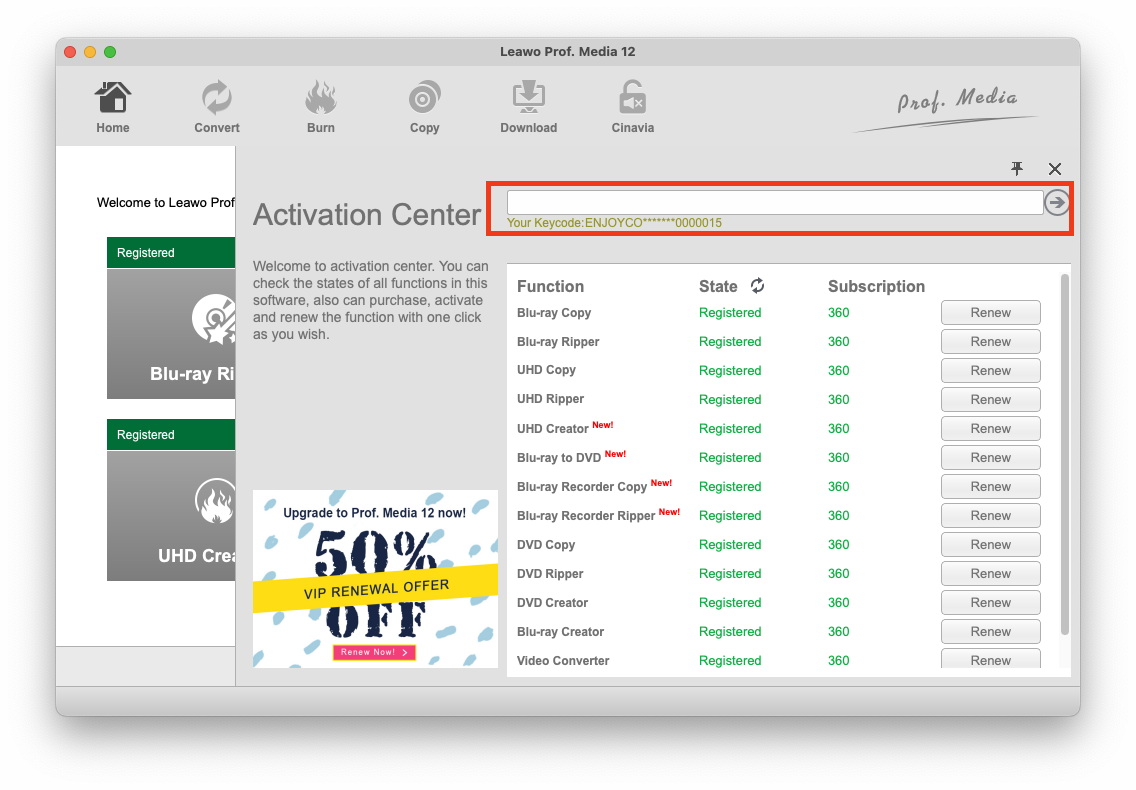
The Mac version's Activation Center (shown in Prof. Media 12 for Mac), where you enter your code. Each module, including Blu-ray Ripper, DVD Ripper and Blu-ray Recorder Ripper, is listed with its registration state.
The workflow is short: add a disc, folder or ISO, choose what to load, pick an output profile, choose a folder and press Convert. Leawo's own user guide uses screenshots of the Windows build for most steps, and the Mac build follows the same layout, so several screenshots below come from Windows.
Features
Decrypts protected and region-locked discs
Leawo Blu-ray Ripper for Mac removes AACS, BD+ and MKB protection from Blu-rays and CSS from DVDs, and ignores region codes: Blu-ray regions A, B and C and DVD regions 0 to 6. That means an imported region B disc rips on a US Mac the same way a local one does. It handles both commercial and homemade discs, and reads discs, Blu-ray/DVD folders and ISO images.
Rip the whole disc, the main movie, or only the titles you pick
Leawo Blu-ray Ripper offers three loading modes when you add a disc. Full Movie imports every title, Main Movie takes only the longest title (the film itself, without trailers and menus), and Custom Mode lets you tick the titles you want. Main Movie is the quick choice for a film. Custom Mode is what you'd use for a TV season disc.

The Full Movie, Main Movie and Custom Mode tabs, with the main title selected and a preview on the right (Windows build).
Choose subtitles, audio tracks, chapters and angles
Leawo Blu-ray Ripper shows a subtitle and an audio-track menu on every loaded title. For MP4 you pick one of each. For MKV you can tick several, so an English and a Japanese track and three subtitle languages all end up in one file. A Chapters switch lets you convert only a range of chapters, and an Angle menu appears on multi-angle discs.

Two loaded Blu-ray titles with subtitle and audio menus (a Japanese PCM track selected), the Angle menu and the Chapters switch (Windows build).
180+ output profiles, including lossless and 4K
Leawo Blu-ray Ripper groups its profiles under Format (common video, common audio, HD, 2K/4K and lossless video) and Device (phones, tablets, consoles and TVs). The lossless options keep the original video with all audio tracks and subtitles in an MKV or MP4. "Audio Copy" passes 5.1 and 7.1 surround through unchanged. If a preset isn't quite right, you can change the video codec (H.264 or H.265), bit rate, resolution, frame rate, aspect ratio, audio codec, sample rate and channels, and save the result as a custom profile.

Profile settings for an MP4 output: H.264 video at original resolution and frame rate, AAC stereo audio at 44100 Hz, and a Save to Custom button (Windows build).
Basic editing before you convert
Leawo Blu-ray Ripper has a small editor for each title: Trim (by dragging or typing start and end times), Crop (drag the frame or use the Letter, Pan, Full, 16:9 and 4:3 zoom presets to cut off black bars), Watermark (text or image, with transparency and position), Effect (brightness, contrast, saturation), and a Video & Audio tab for playback speed from 1/4x to 4x, noise removal, volume and rotation. Several titles can also be merged into one file.

The Trim tab of the editor, with a preview, a timeline slider and start/end time fields (Windows build).
3D Blu-ray output and 2D-to-3D conversion
Leawo Blu-ray Ripper converts 3D Blu-rays to 3D video and can turn a 2D movie into 3D. You choose one of six modes to match your glasses or screen (Red/Cyan, Red/Green, Red/Blue, Blue/Yellow, Interleaved or Side by Side) and set the 3D depth with a slider.

The 3D tab with 3D Mode switched on, a Red/Cyan preview, and buttons for the six 3D effects (Windows build).
Batch conversion and a built-in player
Leawo Blu-ray Ripper queues several titles or discs and converts them one after another, with a "When All Tasks End" setting at the bottom of the window for what happens when the queue finishes. A built-in player previews titles and your edits before you commit to a long rip. Leawo lists GPU acceleration (NVIDIA CUDA, AMD APP and Intel Quick Sync), and Prof. Media's settings let you choose how many CPU cores to use.
Benefits
- Your discs work on devices that have no drive. An MP4 plays on an iPhone, iPad, Apple TV or smart TV, and Plex or Jellyfin can stream it around the house.
- Nothing is lost if you want it that way. Lossless multi-track MKV keeps every audio track and subtitle, so the file is as good as the disc.
- Three rippers for one price. DVD Ripper and Blu-ray Recorder Ripper come with the license, so DVDs and home-recorded BDAV discs are covered too.
Real-World Uses
- Moving a disc collection to a NAS. Rip each film with Main Movie mode to MKV, drop it on a Synology or QNAP, and let Plex serve it to every TV in the house.
- Keeping kids' discs safe. Rip the cartoons once, put the discs away, and play the files on a tablet so scratched discs aren't a problem.
- Watching on a flight. Convert a film to an iPad profile in H.265 and it fits on the device with room to spare.
- Watching an imported region B disc on a US Mac without changing the drive's region setting.
Who It's For, and Who Should Skip It
It's a good fit if you own Blu-rays and DVDs, use a Mac, and want them as files that play anywhere. It suits people who want presets and a clear four-step process rather than command-line tools, and anyone with foreign-region discs.
Skip it if:
- Your discs are 4K UHD. This product doesn't cover them. You'd want Leawo's UHD Ripper or the Prof. Media bundle instead.
- You want a 1:1 copy to burn to another disc. That's Leawo Blu-ray Copy, a different product.
- You only have DVDs. Leawo's DVD Ripper alone, or a free tool like HandBrake (which handles unprotected DVDs), may be all you need.
- You want precise subtitle styling or SRT files. The ripper uses the disc's own subtitles and has no font or position settings (a complaint in the reviews below).
Usage Guide
- Install and launch. Download the DMG (the Apple silicon build if you have an M-series Mac), drag Leawo Prof. Media to Applications and open it. Connect your Blu-ray drive and insert the disc.
- Open the ripper. On the home screen, click the Blu-ray Ripper tile, or the Convert tab at the top.
- Add the source. Click "Add UHD/Blu-ray/DVD" and choose Add from CD-ROM, Add from folder or Add iso file. You can also drag files onto the window.
- Choose what to load. Pick Full Movie, Main Movie or Custom Mode, click OK, then set the subtitle and audio track on each title. The edit icon at the end of a title opens the editor.
- Choose a profile. Click the Output Profile box (MP4 Video by default), choose Change, and pick a format or device. Choose Edit instead to adjust codec and bit rate.
- Convert. Click the green Convert button, set the "Save to" folder in the sidebar, and click Convert at the bottom.
- Register. To remove the 5-minute limit, open Help > Activate from the Mac menu bar and paste your registration code.

The Prof. Media home screen with module tiles (Blu-ray Copy, Blu-ray Ripper, UHD Copy, UHD Ripper, DVD Copy, DVD Ripper and others). The Blu-ray Ripper tile is outlined in red (Windows build).
Where it falls short
- TV discs can come out as one long file. A reviewer found that some Blu-rays converted to a single file for the whole disc instead of one file per episode, which then needed editing.
- No subtitle styling. There's no way to change the subtitle font, size, color or position.
- Not every disc loads. A Trustpilot reviewer had several Blu-rays they couldn't rip with certain settings, and another reported crashes and slow disc loading.
- The interface feels dated. It works, but one reviewer called the purchase, registration and interface "okay by 2010 standards".
- Leawo's GPU acceleration list names NVIDIA, AMD and Intel technologies. Leawo doesn't say what it uses on Apple silicon Macs, so don't expect the speed claims to carry over.
- Few Mac-specific instructions. Most of Leawo's tutorial screenshots show the Windows build.
What Users Say
We found no recent independent written review of the Mac version. Most published "reviews" of Leawo Blu-ray Ripper come from companies selling a competing ripper, so we left those out. Below is what customers wrote on Leawo's own review page and on Trustpilot. Most reviewers don't say whether they use a Mac or Windows, and the program is the same on both.
Leawo's review page for Blu-ray Ripper (4.7 out of 5, 104 ratings)
The positive reviews are mostly about how easy it is and about backing up a collection:
"I tried two other rippers on free trials but wasn't as impressed as I was with Leawo. I have subsequently ripped my entire DVD and Bluray collection to Hard Drive and now stream them without the needed cupboard space for discs." Wendy Nutland, 5 stars, February 2022
"Leawo Pro is very intuitive it doesn't take much to figure it out. It works as well as AnyDVD which I believe has gone out of business. I wish that UHD support was included with the suite." Kenton, 4 stars, "Excellent For Ripping Blu-ray Disc", April 2026
"Just bought this, it is the 5th ripping/video software I've purchased. I've been using it only a short time, but it has already handled the problem jobs I had been looking for a solution to fix. So far it is great." Gregory R Ballantyne, 5 stars, March 2021
"Very,very happy with the results of the Ripper software. I can save my movies I have bought as a backup before they get scratched or damaged by my kids." Eric Resetar, 5 stars, July 2021
The more detailed reviews add criticism, even when the star rating is high:
"A pretty good ripper. How ever when I have the software running I have to disable my screensaver or the video will be unusable and have to redo it. Also with some blu rays, instead of getting episode series converted to individual episodes it'll come out as one whole file for the disc." Jeff (KY), 4 stars, September 2021
"Great quality output, lots of options to control file type, not screamin fast (2x view rate at highest quality), but not bothered at all. The purchase/registration and product interface are okay by 2010 standards, but could use a refresh. But it works!" Julie, 5 stars, "Decent quality rip, if a bit clunky UI/UX", August 2021
"The interface is simple, but very efficient. You can choose from several export profiles and create your own custom profiles. Nice! There is, however, one feature missing, in my humble option that is ;-) I would really like to see a configuration option for customizing subtitles." René Keemink, 5 stars, September 2021
Testimonials on Leawo's product page
"I have tried a few digital coping software's and Leawo Prof. Media works as good but a whole lot faster. The one thing I am wanting to see in the future is this software that allows for close captioning that can be turned on and off." Eddie Lusk
"Super programme group. Fast and flawless copying or ripping. I protect my original DVDs and BR by using them on a NAS. This keeps the original DVDs scratch-free and in good condition." Ivan
Trustpilot (Leawo as a company: 4.4 TrustScore, 151 reviews for leawo.org; 4.3, 158 reviews for leawo.com)
Trustpilot reviews cover all of Leawo's products, and most of them praise customer support. A few are about the ripper:
"Blu-ray Ripper and UHD Ripper Work Great." Alexander Robinson, 5 stars, "Works", September 2026
"Blu-ray/dvd ripper works great; easy to use." Fred Rogers, 5 stars, June 2026
"Had problems with several Blueray i couldn't ripp in certain settings." Mand, 5 stars, "Great Service", October 2025
On the negative side, Leviticus Stroud gave Leawo 1 star in July 2025 ("Absolutely less than useless"), reporting crashes, slow disc loading and a forced restart, and Kenny75 Photography titled a February 2026 review "Problematic software but excellent customer service" after Leawo offered a refund.
The recurring themes
People like that it's easy to learn, rips their whole collection, keeps the quality, and that support answers and fixes problems, often within a day. The complaints are consistent too: a dated interface, no subtitle customization, TV discs that don't always split into episodes, the occasional disc that won't load or a crash, and UHD not being included. Several long-time users recommend the lifetime license over the yearly plan.
Comparisons
Blu-ray Ripper vs Blu-ray Copy
Leawo Blu-ray Ripper turns a disc into video files (MP4, MKV and so on) for computers, phones and media servers. Leawo Blu-ray Copy makes a disc-to-disc copy or an ISO/folder backup to burn to another Blu-ray. If you want to watch your movies without discs, you want the Ripper. Leawo sells both together for $119.94 lifetime.
Blu-ray Ripper vs UHD Ripper
Blu-ray Ripper handles standard Blu-rays (including 3D) and DVDs and can upscale output to 4K. Native 4K Ultra HD discs need Leawo UHD Ripper, a separate module.
Blu-ray Ripper vs HandBrake
HandBrake is free and converts video very well, but it doesn't remove Blu-ray or DVD copy protection by itself, so commercial discs need another tool first. Leawo does the decryption and conversion in one program, with presets, a preview and an editor. If your discs aren't protected, HandBrake may be all you need.
Editions and Pricing
| Option |
Price |
License term |
Modules |
Money-back guarantee |
| Blu-ray Ripper for Mac, 1 year |
$44.95 |
1 year, renews automatically, 1 Mac |
Blu-ray Ripper, DVD Ripper, Blu-ray Recorder Ripper |
5 days |
| Blu-ray Ripper for Mac, lifetime |
$99.95 |
One-time payment, 1 Mac |
Blu-ray Ripper, DVD Ripper, Blu-ray Recorder Ripper |
14 days |
| Blu-ray Ripper + Blu-ray Copy bundle |
$119.94 |
Lifetime, 1 computer |
7 modules, adding Blu-ray Copy, DVD Copy, Blu-ray Recorder Copy and Blu-ray to DVD |
14 days |
Leawo lists unlimited free upgrades on both plans. Leawo also sells larger Prof. Media bundles that add the creators, the video converter and its CleverGet downloader.
FAQs
Does Leawo Blu-ray Ripper for Mac run natively on Apple silicon (M1, M2, M3, M4)?
Yes. Leawo Blu-ray Ripper for Mac has a separate native build for Apple silicon Macs, released with version 13.0.8, next to the default Intel installer on the download page. The system requirements list Intel processors and Apple M1/M2 chips.
Which macOS versions does Leawo Blu-ray Ripper support?
Leawo Blu-ray Ripper for Mac supports macOS 10.13 High Sierra through macOS Sequoia (15), macOS Tahoe (26) and macOS 27, according to Leawo's requirements.
Can I use one Leawo license on both my Mac and my Windows PC?
No. The Mac and Windows versions of Leawo Blu-ray Ripper are sold as separate products, and each license covers one computer. You'd need a Windows license for a PC.
What happens when the 1-year Leawo Blu-ray Ripper license ends?
The 1-year Leawo Blu-ray Ripper license is an auto-renewing subscription, so it's charged again each year unless you cancel the renewal. The lifetime license at $99.95 is a one-time payment with no renewals.
Can Leawo Blu-ray Ripper rip 4K UHD Blu-ray discs?
No. Leawo Blu-ray Ripper handles standard and 3D Blu-rays and DVDs. 4K Ultra HD discs need Leawo UHD Ripper, which is sold separately or in the Prof. Media bundles.
Can I get a refund on Leawo Blu-ray Ripper if it doesn't read my discs?
Leawo Blu-ray Ripper comes with a 5-day money-back guarantee on the yearly plan and 14 days on the lifetime license. Trustpilot reviewers describe Leawo's support trying fixes first and then refunding, but test your hardest disc in the trial before you buy.
What languages does the Leawo interface come in?
Leawo Prof. Media, which runs Blu-ray Ripper, offers 11 interface languages: English, German, Japanese, Simplified Chinese, Russian, Hungarian, Armenian, Spanish, French, Portuguese and Dutch.
System Requirements
- OS: macOS 10.13 High Sierra, 10.14 Mojave, 10.15 Catalina, 11 Big Sur, 12 Monterey, 13 Ventura, 14 Sonoma, 15 Sequoia, 26 Tahoe, 27
- Processor: 1 GHz or faster Intel processor, or Apple M1/M2
- RAM: 512 MB or more
- Disk space: 5 GB+ free for DVD, 25 GB+ for Blu-ray
- Drive: a DVD drive for DVDs, an external Blu-ray drive for Blu-ray discs
- Other: Internet connection
- Download size: 241 MB (Intel DMG) or 316 MB (Apple silicon DMG)
Conclusion
Leawo Blu-ray Ripper for Mac is worth buying if you have a Blu-ray drive and a shelf of standard Blu-rays and DVDs you want as files. It decrypts and converts in one program, keeps every audio track and subtitle in lossless MKV if you want it, and the license covers DVD and recorder discs as well. Users consistently say it's easy to learn and that support answers.
The one reason to buy it: it gets protected, region-locked discs off the shelf and onto your Mac, iPad or Plex server without a separate decryption tool. The main reason not to: 4K UHD discs aren't included, and the interface and subtitle options are dated. If you're keeping the files for years, the $99.95 lifetime license makes more sense than the $44.95 yearly plan. Try your most awkward disc in the 5-minute trial first.
Download Free TrialBuy Now