Leawo Blu-ray Ripper: Turn Blu-ray and DVD Discs Into MP4 or MKV Files on Windows
Leawo Blu-ray Ripper is a Windows program that decrypts regular, 3D and multi-angle Blu-ray discs and DVDs and converts them to MP4, MKV and 180+ other video and audio formats. It costs $44.95 for a 1-year license or $99.95 for a lifetime license, and the lifetime license also includes Leawo DVD Ripper and Blu-ray Recorder Ripper. It's for people who own a shelf of Blu-rays and want to watch them on a laptop, phone, tablet or media server instead of a disc player.
Your Blu-ray player is in another room, the laptop has no disc drive, and the kids want the movie on the tablet in the car. A ripper like this one copies the film off the disc once, so you can play it anywhere afterwards.
Quick facts
- Current version: 13.0.1.6, part of the Leawo Prof. Media 13 suite (installer updated October 10, 2026)
- Developer: Leawo Software Co., Ltd.
- Runs on: Windows 7, 8, 8.1, 10 and 11. A Mac version is sold separately.
- Reads: Blu-ray and DVD discs, Blu-ray/DVD folders and ISO image files
- Removes: AACS, BD+ and MKB protection on Blu-ray, CSS on DVD, and region codes (Blu-ray A, B and C, DVD 0 to 6)
- Writes: MP4, MKV, H.265 MP4/MKV, AVI, MOV, WMV, M2TS and 180+ formats and device presets, plus MP3, AAC and FLAC audio
- Price: $44.95 per year (auto-renews) or $99.95 lifetime, 1 PC
- Free trial: converts the first 5 minutes of each title, and decrypts protected Blu-rays for 30 days
What we checked: the installer Leawo's Blu-ray Ripper download page serves (ltmcp_setup.exe, "Leawo Prof. Media", file version 13.0.1.6, 209,171,392 bytes, dated October 10, 2026), and the prices and refund windows on the order page ($44.95 for 1 year with a 5-day money-back guarantee, $99.95 lifetime with 14 days), on October 31, 2026. We didn't rip a disc with it ourselves.
Before you buy
- It doesn't rip 4K Ultra HD Blu-rays. Leawo sells that as a separate module, Leawo UHD Ripper. Blu-ray Ripper covers standard, 3D and multi-angle Blu-rays plus DVDs.
- The 1-year plan renews automatically and has only a 5-day money-back window. The lifetime license has 14 days, and costs about the same as two years of the subscription.
- The lifetime license is the better deal if you also have DVDs. Leawo's order page says the $99.95 Blu-ray Ripper lifetime license includes DVD Ripper and Blu-ray Recorder Ripper as well.
- You need a Blu-ray drive. A DVD drive can't read Blu-ray discs, and many laptops have no drive at all. An external USB Blu-ray drive works.
- Personal use only. Leawo's own FAQ says ripping is "not illegal if you decrypt, rip and convert Blu-ray discs for personal use only", and illegal for business or profit without authorization. Copyright law differs by country, so check yours.
Download Free TrialBuy Now
Overview
Leawo Blu-ray Ripper isn't a stand-alone program. It's one module of Leawo Prof. Media 13, a suite whose window has tabs for Convert, Burn, Copy, Download and Cinavia. Buying Blu-ray Ripper activates the Convert functions for Blu-ray and DVD sources. The other modules in the same window (Blu-ray Copy, DVD Creator and so on) stay in trial mode until you buy them.
The workflow takes three steps: add a disc, folder or ISO under Add UHD/Blu-ray/DVD, pick an output profile, and click Convert. When you load a disc, Leawo asks how much of it you want.

The loading window in Leawo Prof. Media 13: Full Movie, Main Movie and Custom Mode tabs, the title list with lengths on the left, and a preview on the right.
Full Movie imports every title on the disc, Main Movie picks only the feature film (the quickest choice for most people), and Custom Mode lets you tick the episodes or extras you want.
Features
Decrypts protected and region-locked discs
Leawo Blu-ray Ripper removes the AACS, BD+ and MKB protection used on commercial Blu-rays and the CSS protection on DVDs, and ignores region codes, so a Region B disc bought in the UK rips on a North American PC. It handles discs from the major studios as well as homemade ones.
Keeps the subtitles and audio tracks you choose
Leawo Blu-ray Ripper lets you pick the subtitle, audio track and camera angle for each title before converting, or keep them all. Its lossless multi-track MKV and MP4 outputs carry several audio tracks and subtitles in one file, and the "Audio Copy" setting passes 5.1 or 7.1 surround sound through untouched.

Two titles loaded in the Convert tab, each with its own subtitle, audio track (PCM 2-channel highlighted), angle and chapter settings, at 1920 x 1080 output.
3D Blu-ray to 3D video, and 2D to 3D
Leawo Blu-ray Ripper converts 3D Blu-rays into 3D video files in six modes: Red/Cyan, Red/Green, Red/Blue and Blue/Yellow anaglyph, Interleaved, and Side by Side for 3D TVs and VR headsets. A depth slider sets how strong the effect is, and the same tool can turn a 2D movie into 3D.

The 3D tab of the built-in editor: a Red/Cyan preview, the 3D Depth slider (set to -2) and the six 3D modes along the bottom.
Output from phone-sized to 4K
Leawo Blu-ray Ripper writes 720p, 1080p or original-quality video and can upscale to 4K MP4 or MKV. The profile picker groups formats under Common Video, Common Audio, HD Video, 2K/4K Video and Lossless Video, and a Device tab has ready-made presets for iPhone, Android, smart TVs, Xbox and PlayStation. You can set codec, bit rate, resolution, frame rate, aspect ratio and audio channels by hand.
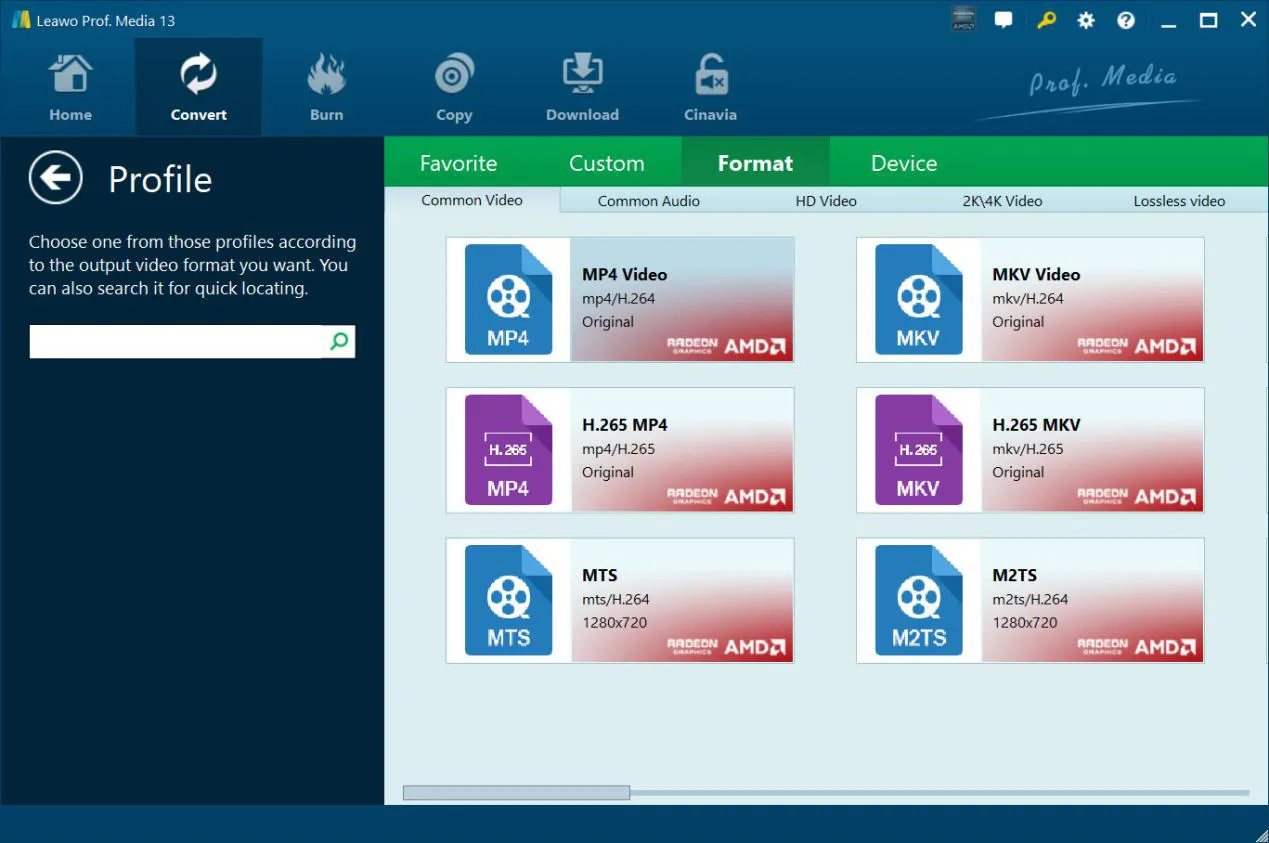
The Profile window's Format tab: MP4 and MKV with H.264, H.265 MP4 and MKV, MTS and M2TS, with Favorite, Custom and Device tabs above.
A basic editor and GPU-accelerated batch conversion
Leawo Blu-ray Ripper's editor merges titles into one file, trims, crops black bars, adjusts brightness and contrast, and adds a text or image watermark. Conversion can use NVIDIA CUDA, Intel Quick Sync or AMD graphics acceleration, and several discs or titles can be queued in one batch.
Benefits
- Your discs play on anything. One MP4 copy works on phones, tablets, smart TVs, Plex or Jellyfin servers and laptops without drives.
- The originals stay safe. Kids' movies get scratched; a digital copy means the disc can stay in its case.
- One purchase covers Blu-ray and DVD. The lifetime license includes DVD Ripper, so a mixed collection needs only one program.
Real-World Uses
- A Plex library: rip each film to a lossless multi-track MKV with every audio track and subtitle, and let the server pick the right one for each device.
- Movies for a trip: use Main Movie mode and an iPad preset to get a compact MP4 with just the film.
- Imported discs: rip a Region B Blu-ray bought abroad that a North American player refuses to play.
- A 3D collection: convert 3D Blu-rays to Side by Side files for a VR headset or 3D TV.
Who It's For, and Who Should Skip It
Good fit: Windows users with a collection of regular Blu-rays (and often DVDs too) who want simple, menu-driven ripping with presets, plus 3D and multi-track options.
Skip it if:
- Your collection is mostly 4K Ultra HD discs. Buy Leawo UHD Ripper instead; it handles 4K UHD discs and also needs a UHD-friendly drive.
- You only have DVDs. Leawo DVD Ripper does the DVD part for $29.95 a year or $39.95 lifetime.
- You want a 1:1 backup on a blank disc rather than a video file. That's Leawo Blu-ray Copy's job.
Usage Guide
- Install: download the Prof. Media installer from Leawo's download page and run it. Blu-ray Ripper is one of the modules it installs.
- Add the disc: open the Convert tab, click Add UHD/Blu-ray/DVD and choose the disc, a folder or an ISO file.
- Choose what to rip: pick Full Movie, Main Movie or Custom Mode, then set subtitles and audio for each title.
- Pick the output: open Output Profile, click Change, and choose a format or a device preset.
- Convert: click the green Convert button, choose the output folder, and start.
Where it falls short
- Not every disc loads. A minority of users report freezes on particular discs or titles; even a 5-star Trustpilot reviewer wrote of Blu-rays they couldn't rip "in certain settings". Test your newest discs during the trial.
- The trial can confuse. It converts only the first 5 minutes of each title, which several unhappy buyers of Leawo modules didn't realize before paying.
- Speed claims are marketing. Leawo advertises "50X faster" conversion with GPU acceleration; real speed depends on your drive, graphics card and output settings.
- Disk space adds up. Leawo asks for 25 GB free per Blu-ray, and a lossless MKV is as large as the disc's main movie.
What Users Say
Trustpilot
Leawo's Trustpilot page for leawo.org showed a TrustScore of 4.4 out of 5 from 151 reviews on October 31, 2026, with 83% five-star and 9% one-star reviews. Reviews that mention ripping Blu-rays:
- Alexander Robinson (5 stars, September 2026), "Blu-ray Ripper and UHD Ripper": "Blu-ray Ripper and UHD Ripper Work Great."
- Fred Rogers (5 stars, June 2026): "Blu-ray/dvd ripper works great; easy to use."
- Keith Lo Bue (5 stars, May 2024): "Dynamite software that breezed through blu-ray rips where others can't."
- Mand (5 stars, October 2025, "Great Service"): "Had problems with several Blueray i couldn't ripp in certain settings."
- Michael Lawson (5 stars, July 2024): "Very helpfull when needing to cancel and get refunded within the 14 day period, refund received timely."
- Dave (1 star, September 2023, "Bait-and-switch scheme"): "Leawo refused to refund my money and even disabled the product on my computer!"
From Leawo's own product page
Leawo's page quotes customer Ivan: "Super programme group. Fast and flawless copying or ripping. I protect my original DVDs and BR by using them on a NAS." These testimonials are chosen by the vendor.
The pattern: buyers who rip regular Blu-rays and DVDs praise the results and the ease of use, and many mention fast, helpful support. Complaints center on particular discs that won't load, the 5-minute trial, and refunds. Leawo's money-back windows are short (5 days on the yearly plan), so do your testing during the trial.
Comparisons
Blu-ray Ripper vs Leawo UHD Ripper
Both cost $44.95 a year. Leawo UHD Ripper adds 4K Ultra HD discs with AACS 2.0 and HDR10 output, but needs a newer PC (4 GB RAM, Kaby Lake or Ryzen CPU, GTX 1050-class graphics) and a UHD-friendly drive. Blu-ray Ripper runs on almost any Windows PC with a Blu-ray drive. Buy UHD Ripper only if you own 4K discs.
Blu-ray Ripper vs Leawo DVD Ripper
Leawo DVD Ripper ($29.95 a year, $39.95 lifetime) handles DVDs only. Blu-ray Ripper handles both, and its $99.95 lifetime license already includes DVD Ripper, so don't buy both.
Editions and Pricing
Leawo's order page showed these options on October 31, 2026 (one license for one PC):
| Plan | Price | Term | Money-back window |
|---|
| Blu-ray Ripper, 1 Year | $44.95 | 1 year, auto-renews | 5 days |
| Blu-ray Ripper, Lifetime (includes DVD Ripper and Blu-ray Recorder Ripper) | $99.95 | One-time | 14 days |
| Blu-ray Ripper + Blu-ray Copy, Lifetime | $119.94 | One-time | 14 days |
| Prof. Media BD/DVD Pack + CleverGet Video Downloader, Lifetime | $169.94 | One-time | 14 days |
FAQs
Can Leawo Blu-ray Ripper rip 4K Ultra HD Blu-rays?
No. Leawo Blu-ray Ripper covers standard, 3D and multi-angle Blu-rays and DVDs. 4K Ultra HD discs need Leawo UHD Ripper, which is sold separately.
Does the Leawo Blu-ray Ripper license include DVD Ripper?
The lifetime license does. Leawo's order page lists the $99.95 Blu-ray Ripper lifetime license as including Leawo Blu-ray Ripper, Leawo DVD Ripper and Leawo Blu-ray Recorder Ripper. The 1-year plan is sold as Blu-ray Ripper alone.
Will Leawo Blu-ray Ripper work with an external USB Blu-ray drive?
Yes. Leawo Blu-ray Ripper only needs Windows to see a Blu-ray drive, internal or external. A DVD drive can't read Blu-ray discs.
Can I keep every subtitle and audio track in one file?
Yes. Leawo Blu-ray Ripper's lossless multi-track MKV and MP4 outputs keep all or selected audio tracks and subtitles in a single file, which media servers and players like VLC can switch between.
Does Leawo Blu-ray Ripper use my graphics card?
Yes. Leawo Blu-ray Ripper supports NVIDIA CUDA, Intel Quick Sync and AMD graphics acceleration for faster conversion; the option is in the program's Performance settings.
What happens when the 1-year license ends?
Leawo's 1-year plan renews automatically unless you cancel it ("Auto-renewal. Cancel Anytime" on the order page). The lifetime license is a one-time payment with unlimited free upgrades.
System Requirements
- Windows: 7, 8, 8.1, 10 or 11
- Processor: 1 GHz Intel or AMD
- Memory: 512 MB RAM, 1 GB or more recommended
- Graphics: NVIDIA GeForce GTX 260 or better for acceleration
- Disk: 5 GB free for DVDs, 25 GB for Blu-rays
- Other: a Blu-ray drive and an internet connection
Conclusion
Leawo Blu-ray Ripper is worth buying if you own regular Blu-rays and DVDs and want them as files you can play anywhere. It decrypts protected and region-locked discs, keeps the subtitles and surround sound you choose, and adds 3D output and device presets most rivals skip. The $99.95 lifetime license is the one to get: it costs about two years of the subscription and also covers DVD Ripper.
The main reasons to hold back are 4K discs, which need UHD Ripper, and the occasional disc that won't load. Run the 5-minute trial on your newest Blu-rays before you pay, because the money-back windows are short.
Download Free TrialBuy Now