Leawo Blu-ray Creator: Burn Videos and Photo Slideshows to Blu-ray or DVD With Menus
Leawo Blu-ray Creator is a Windows disc-authoring tool that burns video files and photo slideshows to Blu-ray discs, DVDs, folders or ISO images, with disc menus. It costs $39.95 for one year or $59.95 for a lifetime license, and either license also includes Leawo DVD Creator. It's for people who want to put home movies, phone videos or downloaded clips on a disc that plays in a living-room Blu-ray or DVD player.
You've got a folder of MP4s and a box of blank discs, and you want something your parents can just put in the player and watch, with a menu to pick the chapter. That's the job this program does.
Quick facts
- Current version: 13.0.1.6, part of the Leawo Prof. Media 13 suite (installer dated October 10, 2026)
- Developer: Leawo Software Co., Ltd.
- Runs on: Windows 7, 8, 8.1, 10 and 11. A Mac version is sold separately.
- Input: more than 180 video and photo formats, including MP4, AVI, MKV, MOV, WMV, MPEG, VOB, MTS, JPG and BMP
- Output: Blu-ray or DVD disc, a disc folder, or an ISO image file
- Price: $39.95 for 1 year (auto-renews, 5-day money-back guarantee) or $59.95 lifetime (14-day money-back guarantee), 1 PC, both including DVD Creator
- Trial: Leawo's support FAQ says the unregistered version outputs at most 5 minutes of video
- You'll need: a recordable Blu-ray drive to burn Blu-ray discs (a DVD burner can't write them)
What we checked: the Windows installer Leawo's download page serves (ltmcp_setup.exe, Leawo Prof. Media, file version 13.0.1.6, 209,171,392 bytes, dated October 10, 2026) and the prices in the product page's order box ($39.95 for 1 year, $59.95 lifetime), on October 31, 2026. We didn't burn a disc with it ourselves.
Before you buy
- The installer is the whole Prof. Media suite. Leawo's FAQ explains that its Blu-ray/DVD ripper, copy and creator tools now ship inside Leawo Prof. Media, and your registration code activates only the module you bought. Don't be surprised when the download is called Prof. Media.
- Pick the license term carefully. The 1-year plan renews automatically and has only a 5-day money-back window. The lifetime license has 14 days.
- It's HD Blu-ray, not 4K. Burning 4K Ultra HD Blu-ray discs is a separate Leawo product, UHD Creator.
Download Free TrialBuy Now
Overview
Blu-ray Creator lives in the Burn tab of Leawo Prof. Media. You add videos (or a whole folder, or an ISO) with Add Video, or pictures with Add Photo, choose a menu template from the panel on the right, set the disc type, quality and aspect ratio at the bottom left, and click the green Burn button to choose where the result goes.
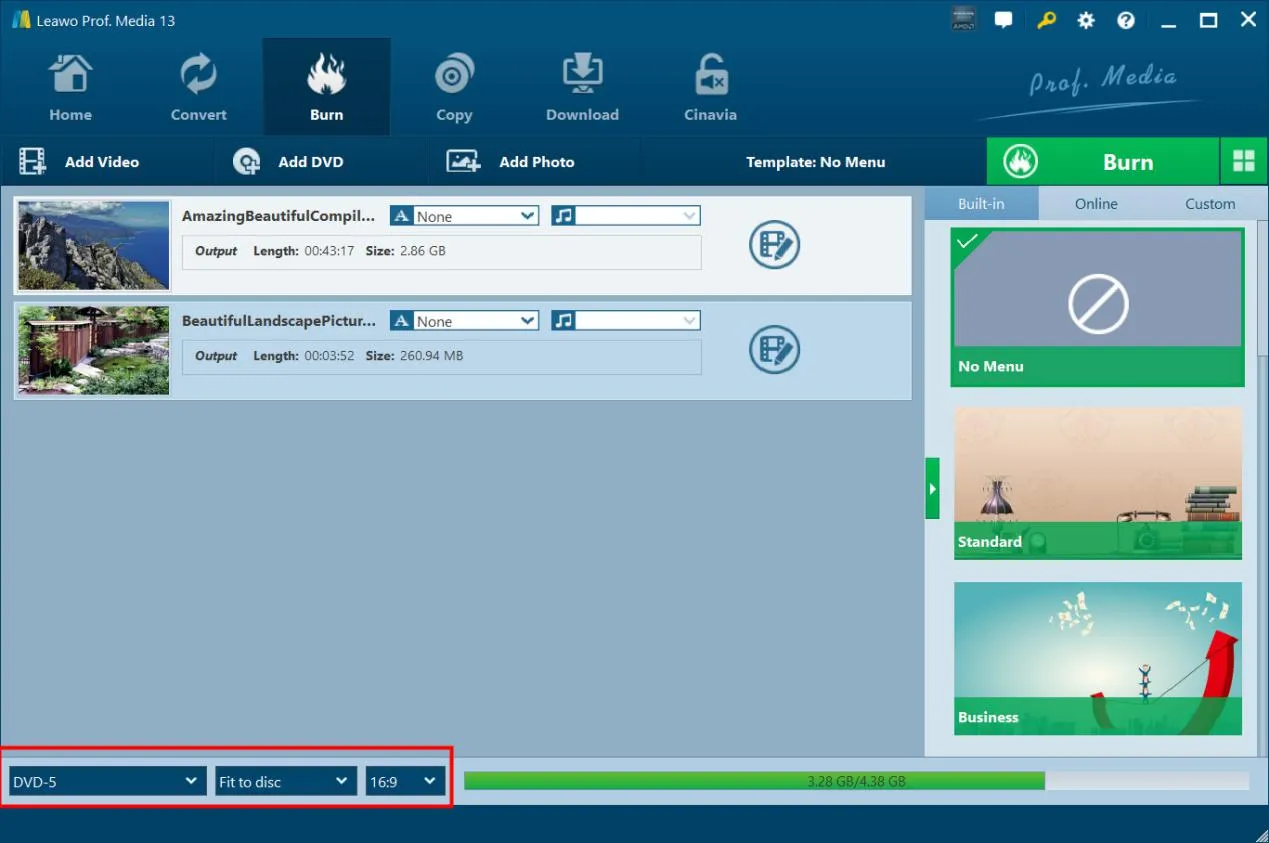
The Burn tab in Leawo Prof. Media 13 with two videos loaded, the Built-in menu templates (No Menu, Standard, Business) on the right and the DVD-5, Fit to disc and 16:9 settings highlighted at the bottom.
Features
Disc menus from templates or your own design
Leawo Blu-ray Creator comes with more than 40 menu templates in eight themes (Standard, Business, Childhood, Education, Holiday, Nature, Sports and Wedding). If none fits, the menu designer lets you add your own background picture, video or music, move and restyle the titles, and save the result as a template for the next disc. You can also burn with No Menu when the disc should just play.
Photo slideshows on disc
Leawo Blu-ray Creator turns photos from a phone or camera into a Blu-ray or DVD slideshow. The slideshow editor lets you add, remove and reorder pictures, set the transition effect and add background music.
Basic editing before you burn
Leawo Blu-ray Creator includes a simple editor for each clip: trim, crop away black bars, rotate, adjust brightness, contrast and saturation, remove background noise, and add a text or image watermark. It can turn 2D video into 3D (red/cyan, red/green, red/blue, blue/yellow, interleaved or side-by-side), and it creates chapters by count or length, or keeps the chapters from MP4, MKV and Blu-ray sources.
Disc, folder or ISO in one pass
Leawo Blu-ray Creator can write to a blank disc, a disc folder and an ISO file at the same time, and it shows the disk space the job needs before you start. Batch burning puts several videos on one disc.
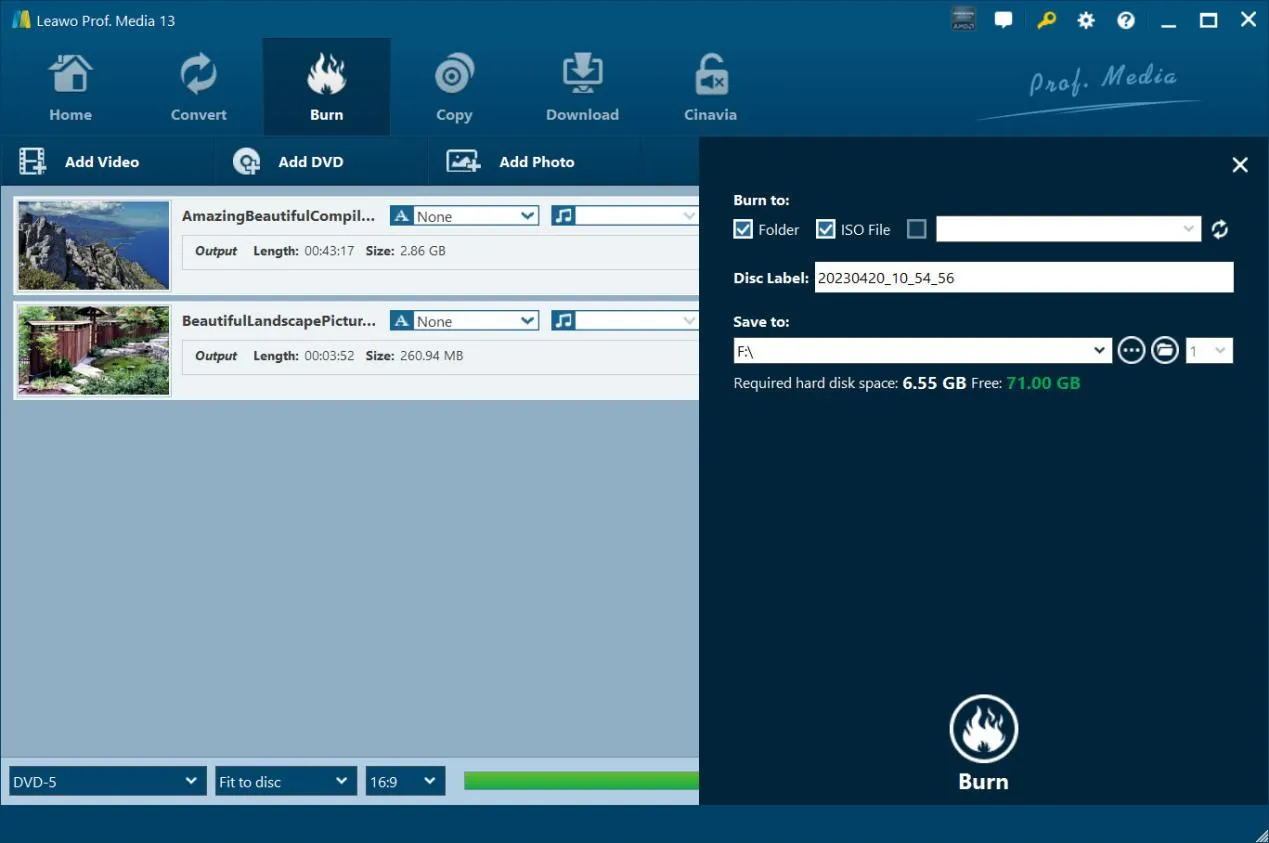
The burn settings sidebar: Burn to Folder and ISO File (with a disc drive option), Disc Label, Save to, and the required versus free disk space (6.55 GB needed, 71 GB free).
Benefits
- Discs that play anywhere. A burned Blu-ray or DVD works in a standalone player, so relatives who'll never open a video file can still watch.
- One license, two burners. Both licenses include DVD Creator, so you can make Blu-rays for your own TV and DVDs for older players.
- An archive copy as an ISO. Saving an ISO alongside the disc means you can burn another copy later without redoing the menu.
Real-World Uses
- A wedding video for the family: the Wedding menu theme, chapters every ten minutes and a DVD version for grandparents with an older player.
- A year of phone photos: a slideshow with background music burned to Blu-ray for the holidays.
- A school or club event: several clips batched onto one disc with an Education or Sports menu.
Who It's For, and Who Should Skip It
Good fit: families, event videographers and small clubs who hand out discs, and anyone who wants menus without learning professional authoring software.
Skip it if:
- Nobody you know uses disc players any more. A shared folder or a USB stick is simpler.
- You need professional Blu-ray authoring with pop-up menus, multiple angles and subtitle streams you build yourself.
- You want to burn 4K Ultra HD discs. That's Leawo UHD Creator.
Usage Guide
- Install and register: install Leawo Prof. Media and enter your registration code through the key icon (Activation Center) at the top right.
- Add files: open the Burn tab and click Add Video or Add Photo.
- Set the disc: at the bottom left choose the disc type (such as DVD-5), quality and aspect ratio, and pick a menu on the right.
- Burn settings: click the green Burn button and choose Burn to (disc, folder, ISO), Disc Label and Save to.
- Start: click Burn at the bottom of the sidebar.
Tips
- Test on rewritable discs. Leawo's own support FAQ answers a customer who wasted several Blu-ray discs by suggesting BD-RE (and DVD-RW for DVDs) for test burns.
- Save an ISO too. If a burn fails, you can write the ISO again without re-encoding.
Where it falls short
- Failed burns happen. Leawo's support pages carry several "Failed to burn disc" troubleshooting articles, and the wasted-discs question above.
- Simple editing only. The editor trims, crops and adjusts clips; it isn't a timeline video editor.
- Little independent testing. We found no current independent review of this module; most "reviews" online come from competing disc-software makers.
- Stability complaints about the suite. One Trustpilot reviewer of Leawo said the software crashed unless run as administrator.
What Users Say
Independent reviews of Leawo Blu-ray Creator itself are scarce. What there is:
Tech press
Softpedia reviewed an older version of Leawo Blu-ray Creator in 2013. It found the program easy to use and quick, while noting it isn't the most advanced tool for authoring your own Blu-ray discs. The review predates the current Prof. Media 13 release.
Trustpilot (Leawo as a company)
Leawo's two Trustpilot pages showed 4.3 out of 5 from 158 reviews (leawo.com) and 4.4 out of 5 from 151 reviews (leawo.org) on October 31, 2026. These cover all Leawo products; none of the reviews we could read named Blu-ray Creator.
- Robert (5 stars, December 2025): "I have used Leawo Prof. Media 13 for many years ripping DVDs and Blue-ray disks; it has worked flawlessly."
- Leon Andrews (5 stars, February 2026): "I had been using Prof Media 13 blu-ray ripper and video Converter for many years and they have served me well."
- Leviticus Stroud (1 star, July 2025): "Crashed every time I tried to run it normally, seemed it had to run in admin mode."
- Maite Matar (1 star, December 2025): "there's no helpline or customer support. Completely unreliable and not as advertised."
The pattern: long-time Prof. Media users are happy with the suite, and the complaints are about stability on some PCs and slow support. Run the free trial on your own PC and burn a test to a rewritable disc before you pay.
Comparisons
Blu-ray Creator vs DVD Creator
Leawo DVD Creator burns DVDs only; Blu-ray Creator burns both, and its licenses include DVD Creator anyway. If you'll only ever make DVDs, DVD Creator alone is cheaper ($29.95 a year).
Blu-ray Creator vs Blu-ray Copy
Blu-ray Creator makes a new disc from your own videos and photos. Leawo Blu-ray Copy duplicates an existing Blu-ray disc. They're different jobs.
Editions and Pricing
| License | Price | Includes | Money-back |
|---|
| 1 Year (auto-renews) | $39.95 | Blu-ray Creator and DVD Creator, 1 PC | 5 days |
| Lifetime | $59.95 | Blu-ray Creator and DVD Creator, 1 PC | 14 days |
| Blu-ray Creator + Video Converter (lifetime) | $69.92 | Adds Leawo Video Converter | 14 days |
These were the prices in Leawo's order box on October 31, 2026. Leawo lists unlimited free upgrades with both licenses.
FAQs
Can I burn a Blu-ray with Leawo Blu-ray Creator on a DVD burner?
No. Leawo's support FAQ is clear that a DVD writer can't write Blu-ray discs, so you need a Blu-ray writer. With a DVD burner you can still make DVDs, or create a Blu-ray folder or ISO to burn elsewhere.
Why does Leawo Blu-ray Creator only output 5 minutes of video?
That's the trial limit. Leawo's FAQ says the unregistered version outputs video for 5 minutes at most, and a registration code removes the limit.
I bought Blu-ray Creator but received Leawo Prof. Media. Is that right?
Yes. Leawo Blu-ray Creator is a module of Leawo Prof. Media. Click the key icon at the top right to open the Activation Center and paste your registration code to activate the module you ordered.
Can Leawo Blu-ray Creator make 3D Blu-rays?
Yes, from 2D sources. Leawo Blu-ray Creator's 3D option creates red/cyan, red/green, red/blue, blue/yellow, interleaved or side-by-side 3D with an adjustable depth. You need matching 3D glasses or a 3D TV to watch it.
Does the license cover more than one computer?
No. Both Leawo Blu-ray Creator licenses are for 1 PC. The Mac version is sold separately.
System Requirements
- Windows: 7, 8, 8.1, 10 or 11
- Processor: 1 GHz Intel or AMD
- Memory: 512 MB RAM (1 GB or more recommended)
- Disk: 5 GB free for DVD, 25 GB for Blu-ray
- Graphics: NVIDIA GeForce GTX 260 or better
- Other: a recordable Blu-ray drive and an internet connection
Conclusion
Leawo Blu-ray Creator is worth the $59.95 lifetime license if you regularly turn videos or photos into discs with menus for people who watch on a Blu-ray or DVD player. It's easy, it makes DVDs too, and an ISO copy keeps every project re-burnable.
The reasons to hesitate are the thin independent testing and the stability complaints some users have about Leawo's suite. Use the free trial to burn a short test to a rewritable disc on your own PC first. If you'll only make DVDs, DVD Creator alone costs less.
Download Free TrialBuy Now