Short answer
Most people should buy Movavi Video Editor ($69.95 a year) if they only edit, or Movavi Video Suite (Video Suite Plus, $99.95 a year) if they also record the screen or convert files. Choose Movavi Unlimited ($189.95 a year) only when you want the full Movavi Effects store for a year on top of every program, because that store is the one thing the cheaper bundles don't include. Movavi Video Editor Lite ($11.95 a month) suits a single short project where a small corner watermark doesn't matter.
The deciding number: Video Suite + Photo Editor costs $104.95 a year and already has the editor, converter, screen recorder, disc burner, player and photo editor. Unlimited's extra $85 buys a year of effects that Movavi otherwise sells at $49.95 a month.
At a glance
| Video Editor Lite | Video Editor | Video Suite | Unlimited |
|---|
| Price | $11.95 a month | $69.95 a year, $19.95 a month, $149.95 lifetime | $99.95 a year (Plus), $29.95 a month | $189.95 a year |
| Lifetime license | ✗ | ✓ $149.95 | ✓ $199.95 with Photo Editor | ✗ |
| Watermark on paid exports | ✓ small, in the corner | ✗ | ✗ | ✗ |
| Video Converter, Screen Recorder | ✗ | ✗ | ✓ | ✓ |
| Disc burning, media player, webcam capture | ✗ | ✗ | ✓ | ✓ |
| Photo Editor | ✗ | ✗ | Only in Video Suite + Photo Editor ($104.95) | ✓ |
| Full Movavi Effects store | Add-on | Add-on ($49.95 a month) | Add-on ($49.95 a month) | ✓ for 1 year |
| Free trial | Video Editor trial | ✓ watermark, 60-second video | ✓ 7 days, watermark | Trial of each program |
| Windows version checked | 27.4.0 | 27.4.0 (November 23, 2026) | 27.0.0 | Same programs |
How we compared them
- We read every plan and price on Movavi's Video Editor and Video Suite order pages and on the Unlimited and Lite pages, in USD for Windows.
- We read Movavi's own plan comparison table for the three Video Suite plans, row by row, to see which tools each plan has.
- We checked the trial limits on Movavi's product pages and the version numbers in each product's tech specs.
- We worked out what each option costs over 12 months and over three years, from those prices.
- We collected what reviewers and Trustpilot users say about the programs inside the bundles.
- What we checked: all of the above on November 25, 2026: Video Editor $19.95 a month, $69.95 a year, $149.95 lifetime; Video Suite $29.95 a month, Video Suite Plus $99.95 a year, Video Suite + Photo Editor $104.95 a year or $199.95 lifetime; Unlimited $189.95 a year; Lite $11.95 a month; Video Editor and Lite at version 27.4.0.
We compared plans, prices, contents and trial limits, and didn't edit a project in each plan. This article covers the Windows versions; Movavi sells the Mac versions separately.
Movavi Unlimited: every program plus a year of effects
- Price: $189.95 a year at checkout (Movavi Unlimited Business, for commercial use, $339.95)
- Includes: 7 programs (Video Editor, Screen Recorder, Video Converter, Photo Editor, VHS Capture, Media Player, ChiliBurner) and 1 year of full Movavi Effects store access
- Runs on: Windows 10 and 11, 64-bit; Movavi Unlimited for Mac is a separate plan
- Best for: people who use Movavi's effects packs, titles and music heavily, and the photo editor too

The Movavi launcher, Video tab: tiles for Video Editor, Video Converter, Screen Recorder, Capture from cameras, VHS, TV, Watch video and more, each with a Launch button.
Movavi Unlimited is one yearly subscription that opens Movavi's whole Windows lineup from one launcher. The programs are the same ones sold separately, so the reason to pay more is the Movavi Effects store: over 6,000 titles, stickers, overlays, LUTs, transitions, intros, outros, backgrounds, frames and music tracks, with at least 100 new effects a month, according to Movavi's Unlimited page. On the Video Editor and Video Suite order pages, the same store is an optional add-on that renews at $49.95 a month after a 7-day free trial.
The math is simple. Video Suite + Photo Editor ($104.95 a year) has the editor, converter, screen recorder, webcam capture, disc burning, the player and the photo editor, according to Movavi's plan comparison table. Unlimited adds a year of the effects store for $85 more. If you'd keep the effects add-on for even two months, Unlimited is the cheaper way to get it. If you never browse effects packs, it's money spent on nothing.
Movavi shows the $189.95 price as a dated special offer against a much higher crossed-out figure. It was $189.95 on October 31 and again on November 25, 2026. Movavi's FAQ says a subscription bought at the special price renews at that same price.
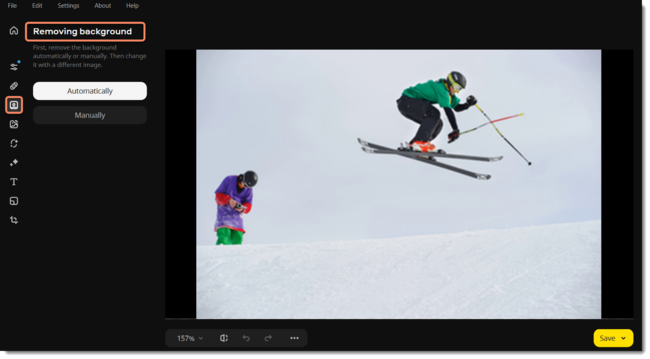
Movavi Photo Editor, one of the Unlimited programs, with the Removing background panel open (Automatically and Manually) next to a ski photo.
What we like
- Every Movavi Windows program in one launcher
- A year of the full effects store, which costs $49.95 a month as an add-on
- Exports stay yours after the subscription ends
Watch out for
- Subscription only: the programs stop working when you stop paying
- Video Suite + Photo Editor gives you every program for $85 less
- Windows only; the Mac plan is separate and has six programs (no ChiliBurner)
- No independent review of the bundle itself, only of the programs inside it
Movavi's own Unlimited page shows a 4.7 rating from 471 reviews on its site, which is the vendor's figure. The independent reviews are of the programs inside it (see the Video Editor and Video Suite sections).
Download Movavi Unlimited Free TrialBuy Movavi Unlimited
Movavi Video Suite: editor, converter and screen recorder
- Price: Video Suite Plus $99.95 a year, Video Suite $29.95 a month, Video Suite + Photo Editor $104.95 a year or $199.95 lifetime
- Includes: Video Editor, Video Converter, Screen Recorder, webcam and mic capture, screenshots, disc burning, a media player and AI upscaling; Video Suite Plus adds three bonus effects packs
- Version: 27.0.0 for Windows 10 and 11, 64-bit; Movavi Video Suite for Mac is sold separately
- Best for: YouTubers, teachers and small businesses who record, edit and convert

Movavi Video Converter, part of Video Suite: three clips queued with SuperSpeed conversion, and the Video tab of formats and presets (MP4, AVI, WMV, MOV, DVD, HEVC, 4K, HD).
Movavi Video Suite is the bundle most buyers actually need. Movavi's comparison table for the three suite plans lists the same video tools in each: create and edit videos, record the screen, convert media, AI video denoise and automatic subtitles, upscale video up to 8 times, compress large files, grab webcam and mic output, take screenshots, burn CD, DVD and Blu-ray discs, and play videos and music. What changes between plans is only the extras: Video Suite Plus ($99.95 a year) adds three bonus effects packs, and Video Suite + Photo Editor ($104.95 a year) adds the AI photo editor instead.
That makes Video Suite + Photo Editor the best value in the lineup: for $5 more than Video Suite Plus you get the photo editor, and it's the only bundle with a lifetime license ($199.95). The monthly Video Suite plan ($29.95) costs more than the yearly plan after four months, so treat it as a one-project option.
The free download installs Video Suite with a 7-day trial. Trial exports carry a watermark and are limited to 60 seconds of video or half the length of an audio file, which is enough to test the tools but not to finish anything.
What we like
- Editor, converter, screen recorder and disc burner for one price
- A lifetime option (Video Suite + Photo Editor, $199.95)
- TechRadar scored the suite 4.5 out of 5
Watch out for
- The full effects store and the full template library are separate subscriptions
- The monthly plan is poor value beyond a few months
- Trial exports are watermarked and capped at 60 seconds
What reviewers say
TechRadar (Steve Paris, August 2025, 4.5 out of 5): "Movavi Video Suite 2025 offers a good range of tools to edit your project, and also comes with dedicated apps to convert video and photos, as well as one for screen capture. Everything works well, with elegant interfaces that are designed for ease of use - including powerful AI tools that simplify complex tasks." On the converter: "It's unexpectedly full featured." His complaint: on first launch "everything was in Japanese," and the app didn't default to his computer's language.
Trustpilot (all Movavi products, 3.5 out of 5 from 22,156 reviews on October 31, 2026): Wayne K (5 stars, October 2026): "First I use Movavi Screen Recorder, and I find it is excellent for what I wanted to do with audio files." Felipe Borges (1 star, October 2026): "I wanted to get a refund that same day and at that very hour, but according to their Terms of Service, that's not possible."
Download Movavi Video Suite Free TrialBuy Movavi Video Suite
Movavi Video Editor: the editor on its own
- Price: $69.95 a year (Video Editor Plus, with three bonus effects packs), $19.95 a month, or $149.95 for a lifetime license
- Version: 27.4.0, updated November 23, 2026, for Windows 10 and 11, 64-bit; Movavi Video Editor for Mac is sold separately
- Free version: watermark on exports, 60-second video or half-length audio limit
- Best for: people who only edit, from family videos to YouTube uploads
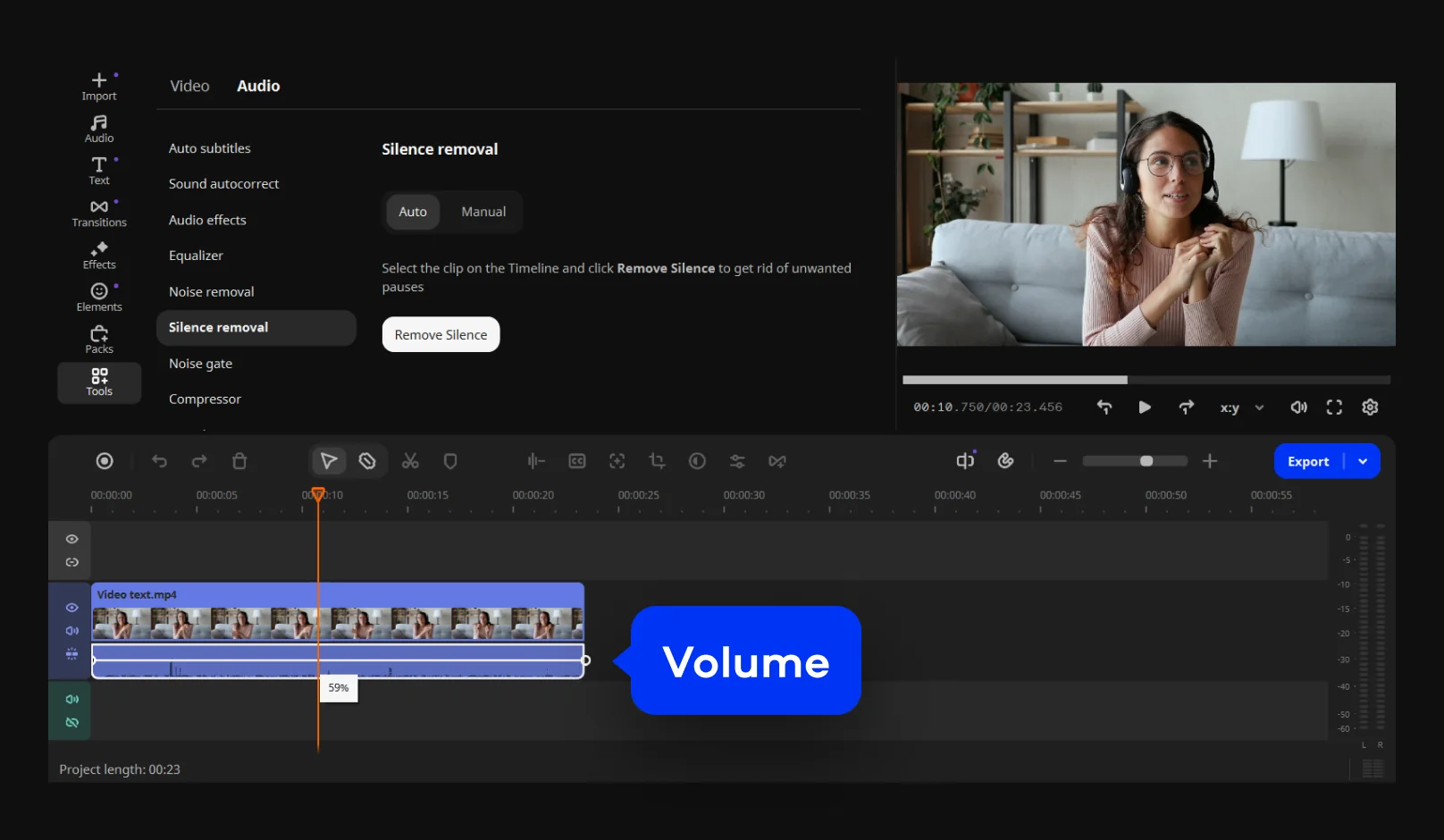
Movavi Video Editor: the Audio tools list (Auto subtitles, Sound autocorrect, Noise removal, Silence removal and more) above the timeline, with the Silence removal panel open.
Movavi Video Editor is the program every bundle is built around, and on its own it's the cheapest way to edit without a watermark. You get a multi-track timeline, titles, transitions and filters, plus one-click AI tools: automatic subtitles with word-by-word highlighting, noise removal, silence removal, video denoise, background removal and auto-tracked cropping that turns horizontal clips into vertical ones.
The yearly plan ($69.95) is the sweet spot. The lifetime license ($149.95) pays for itself in just over two years, but Digital Camera World noted: "You can buy it outright, but the app won't be updated." If you want the new AI tools Movavi adds through the year, the subscription is the safer pick. Our guide to editing a YouTube video with Movavi Video Editor shows the editor in use, and Filmora vs Movavi Video Editor compares it with its closest rival.
What we like
- The lowest price for watermark-free editing ($69.95 a year)
- AI subtitles, noise and silence removal in one click
- A lifetime option for people who don't need updates
Watch out for
- No screen recorder or converter; Video Suite Plus adds both for $30 more a year
- Extra effects cost $49.95 a month as an add-on
- The free version's watermark and 60-second cap surprise some users at export time
What reviewers say
Digital Camera World (George Cairns, July 2026, 4.25 out of 5): "One click on this tool's icon, and the background noise disappeared from Maryna's audio track, and her voice sounded much clearer too!" And: "It only took a few seconds for Movavi's AI-powered Auto subtitles tool to generate accurate subtitles from Maryna's interview and place them above the appropriate footage in the timeline."
Trustpilot: Graham Voss (5 stars, September 2026): "So easy to use, especially for a pensioner like me. You can do so much like, brightening, cropping, adding titles, etc." Alexis Gagnon (1 star, October 2026): "had i known before working 8h+ on my video that i had to pay 60$ SIXTY DOLLARS to download it"
Download Movavi Video Editor FreeBuy Movavi Video Editor
Movavi Video Editor Lite: a cheap month, with a watermark
- Price: $11.95 a month, monthly only (no yearly or lifetime plan)
- Watermark: yes, "A small watermark in the corner", even on the paid plan
- Version: 27.4.0, the same Movavi Video Editor program with a shorter tool list
- Best for: one birthday clip, school project or Reel, then cancel

The Silence removal panel (Auto and Manual, Remove Silence) over a clip on the timeline in Movavi Video Editor 27, the program Lite runs.
Movavi Video Editor Lite is a cut-price monthly plan of the same program. Its page lists the essentials: the blade tool and cropping, automatic subtitles, silence removal, filters and LUTs, transitions, titles, stickers, slow motion, picture in picture, color correction and audio editing. It doesn't list the AI noise reduction, background removal or motion tracking that the full Video Editor plan has, and it keeps a small watermark on every export.
Lite only makes sense for a short burst. Five months of Lite cost $59.75; a sixth takes you past the $69.95 yearly price of the full editor, which has no watermark.
What we like
- The lowest entry price Movavi offers
- Monthly, so you can cancel after one project
Watch out for
- A watermark stays on paid exports
- No noise removal, background removal or motion tracking on the Lite feature list
- Twelve months cost $143.40, about double the full editor's yearly plan
Download Movavi Video Editor FreeBuy Movavi Video Editor Lite
Price and licensing: the yearly plans win
Movavi's yearly plans are the cheapest way to use any of these programs for more than a few months, and the monthly plans only make sense for one project. Here's what 12 months cost at the November 25, 2026 prices:
Cost of 12 months (USD)
Movavi Video Editor, 1-year plan$69.95
Video Suite Plus, 1-year plan$99.95
Video Suite + Photo Editor, 1-year plan$104.95
Video Editor Lite, 12 monthly payments$143.40
Movavi Unlimited, 1-year plan$189.95
Video Editor, 12 monthly payments$239.40
Video Editor 1-year plan + 12 months of the Effects add-on$669.35
Prices on Movavi's Windows order pages on November 25, 2026, in USD including VAT. Monthly totals use the regular monthly price; Movavi often discounts the first month.
The last bar is the case for Unlimited: if you want the full effects store all year, buying it as an add-on next to the editor costs far more than Unlimited. If you don't, the editor or Video Suite is the better buy.
Cost over three years (USD), if prices stay the same
Movavi Video Editor, lifetime license$149.95
Video Suite + Photo Editor, lifetime license$199.95
Movavi Video Editor, 3 yearly plans$209.85
Video Suite + Photo Editor, 3 yearly plans$314.85
Movavi Unlimited, 3 yearly plans$569.85
Worked out from the November 25, 2026 prices. Lifetime licenses don't include the updates a subscription gets, according to Digital Camera World's review.
Features: the suite plans share the same tools
Movavi Video Suite's three plans have the same video tools; only the extras differ, and Unlimited adds the photo editor and the effects store. Movavi's comparison table for the suite plans shows this:
| What Movavi lists | Video Suite ($29.95/month) | Video Suite Plus ($99.95/year) | Video Suite + Photo Editor ($104.95/year) |
|---|
| Create and edit videos | ✓ | ✓ | ✓ |
| Record screens, convert media, compress files | ✓ | ✓ | ✓ |
| AI video denoise, auto subtitles, noise reduction | ✓ | ✓ | ✓ |
| Upscale video up to 8 times | ✓ | ✓ | ✓ |
| Webcam and mic capture, screenshots | ✓ | ✓ | ✓ |
| Burn CD, DVD and Blu-ray, play video and music | ✓ | ✓ | ✓ |
| 3 bonus effects packs | ✗ | ✓ | ✗ |
| AI photo editing (enhance, restore, remove backgrounds and objects) | ✗ | ✗ | ✓ |
| Movavi Effects store | 7-day trial, then $49.95/month | 7-day trial, then $49.95/month | 7-day trial, then $49.95/month |
Movavi Unlimited has everything in the right-hand column plus a year of the full effects store. Movavi Video Editor on its own has the first and third rows, without the screen recorder, converter or disc tools.
Which should you choose?
| Your situation | Pick | Why |
|---|
| You only edit videos | Movavi Video Editor, 1-year plan ($69.95) | No watermark and every AI editing tool at the lowest yearly price |
| You edit, record your screen and convert files | Video Suite Plus ($99.95 a year) | Adds the converter, screen recorder and disc tools for $30 more |
| You also edit photos | Video Suite + Photo Editor ($104.95 a year) | Every program in Unlimited except the effects store, for $85 less |
| You hate subscriptions | Video Editor lifetime ($149.95) or Video Suite + Photo Editor lifetime ($199.95) | Pay once; you give up future updates |
| You use effects packs, titles and stock music in every video | Movavi Unlimited ($189.95 a year) | The effects store alone costs $49.95 a month as an add-on |
| One short project this month | Video Editor Lite ($11.95) | Cheapest entry, if a small watermark is fine; cancel afterwards |
Who should skip each one: skip Unlimited if you won't use the effects store, since Video Suite + Photo Editor has the same programs for less. Skip Video Suite if you never record the screen or convert files. Skip the Video Editor lifetime license if you want the AI tools Movavi keeps adding. Skip Lite for anything a client or a business channel will see, because of the watermark. And skip Movavi altogether if you need multicam editing or professional color grading: these are beginner-friendly editors.
What commonly goes wrong
- Finishing a project in the trial. Trial exports are watermarked and capped at 60 seconds of video. Several Trustpilot complaints come from people who found this out after hours of editing. Test on a short clip first.
- Leaving the effects box ticked. The Video Editor and Video Suite order pages offer a 7-day free trial of Movavi Effects that renews at $49.95 a month. Untick it at checkout unless you want it, or cancel before the trial ends.
- Forgetting the renewal date. Yearly plans renew. Trustpilot complaints about Movavi are mostly about renewals and refunds, not the programs.
- Expecting a refund for a change of mind. Movavi's 14-day guarantee covers "technical or other problems that cannot be solved," so decide during the trial.
- Buying the Windows plan for a Mac. Windows and Mac versions are separate purchases.
FAQs
Is Movavi Unlimited worth it compared with Video Suite?
Movavi Unlimited is worth it only if you'll use the full Movavi Effects store. Video Suite + Photo Editor ($104.95 a year) has the same editor, converter, screen recorder, disc tools and photo editor, so Unlimited's extra $85 a year pays for the effects store, which costs $49.95 a month as an add-on.
Does Movavi Video Editor have a lifetime license?
Yes. Movavi Video Editor has a lifetime license at $149.95, and Video Suite + Photo Editor has one at $199.95. Movavi Unlimited and Video Editor Lite are subscriptions only. Digital Camera World notes that a program bought outright isn't updated.
Does the Movavi free trial add a watermark?
Yes. Movavi's trial and free version put a watermark on exported videos and limit exports to 60 seconds of video or half the length of an audio file. Video Suite's trial also ends after 7 days.
Does Movavi Unlimited include the Mac versions?
No. Movavi Unlimited for Windows covers the Windows programs. Movavi Unlimited for Mac is a separate plan with six programs; it doesn't include ChiliBurner.
What happens to my videos when a Movavi subscription ends?
Your exported videos stay yours. Movavi Unlimited's FAQ says the programs stop working when the subscription ends, but you keep access to all exported files, so export anything you may want to reuse.
Is Movavi Effects included with Video Editor Plus?
No. Movavi Video Editor Plus includes three bonus effects packs. The full Movavi Effects store is an optional add-on on the order page, free for 7 days and then $49.95 a month. Only Movavi Unlimited includes a year of it.
Can I use Movavi for my business?
Yes, with a business plan. Movavi sells Video Editor Business at $94.95 a year, Video Suite Business at $169.95 a year and Unlimited Business at $339.95 a year; the personal plans are for non-commercial use.
Can I get a refund from Movavi?
Sometimes. Movavi offers a 14-day money-back guarantee "if you experience technical or other problems that cannot be solved," so it's for problems with the program rather than a change of mind.
Conclusion
For most Windows users, the right Movavi purchase is Video Suite: Video Suite Plus at $99.95 a year if you record and convert as well as edit, or Video Suite + Photo Editor at $104.95 a year (or $199.95 once) if you edit photos too. Movavi Video Editor at $69.95 a year is the pick if editing is all you do. Movavi Unlimited at $189.95 a year is the right buy for one kind of user: someone who reaches for effects packs, titles and stock music in every video, because a year of the effects store is what it adds, and that store costs $49.95 a month on its own. Try the programs first with the free download, and test on a short clip, since trial exports are watermarked.
Download Movavi Unlimited Free TrialBuy Movavi UnlimitedBuy Movavi Video Suite