Short answer: for an office with one or two physical Windows Servers and a handful of PCs, the best-value single-vendor setup we found is AOMEI Backupper Server ($299 once per server) plus AOMEI Backupper Workstation for each PC ($79.95 once, or $399.75 for five). From nine PCs on one server, or six PCs on two servers, AOMEI Backupper Technician Plus ($999 once, every PC and server in the company) costs less. If the servers run SQL Server, Exchange or Active Directory, EaseUS Todo Backup Advanced Server ($299 a year) is the one that backs those up as applications. If your servers are VMware or Hyper-V hosts and you want one web console for everything, AOMEI Cyber Backup ($1,999 once for unlimited VMs) is the only centralized, VM-aware tool here.
Read the AOMEI security note below before you buy any AOMEI product. If you would rather avoid AOMEI after its 2026 update-server breach, EaseUS Todo Backup Server ($199 a year per server) and EaseUS Todo Backup Technician are the alternatives. Backing up a single home PC is a different job: see our Best Backup Software for Windows 11 roundup.
At a glance
| Product | What one license covers | Price at checkout | Central console | Best for |
|---|
| AOMEI Cyber Backup | Unlimited VMware and Hyper-V VMs (PCs, servers and SQL databases are licensed separately) | $1,999 once | ✓ (web console) | VM hosts, central management |
| AOMEI Backupper Server | 1 Windows Server or PC | $299 once, $149 a year | ✗ | One or two physical servers |
| AOMEI Backupper Technician | Unlimited PCs for one technician (Technician Plus adds servers) | $799 once, $499 a year (Plus: $999 once, $699 a year) | ✗ | IT staff and MSPs imaging many machines |
| AOMEI Backupper Workstation | 1 business PC (no Windows Server) | $79.95 once, $49.95 a year, 5 PCs $399.75 | ✗ | Office PCs next to a Server license |
| EaseUS Todo Backup Server | 1 Windows Server | $199 a year, $359 lifetime | Sold separately (EaseUS Backup Center) | AOMEI alternative for one server |
| EaseUS Todo Backup Advanced Server | 1 Windows Server, plus SQL, Exchange and Active Directory backup | $299 a year, $459 lifetime | Sold separately | Servers running SQL or Exchange |
| EaseUS Todo Backup Technician | One license for up to 99 computers, PCs and servers | $999 a year, $2,499 lifetime | Sold separately | Service providers |
| Hasleo Backup Suite Professional | 1 business PC (Windows Server needs Hasleo's Server edition) | $64.95 once | ✗ | Cheapest commercial PC license |
| Zoolz Business Cloud Backup | 2.5 TB cloud storage, 5 users and 1 server | $199.99 a year | ✓ (web dashboard) | The offsite copy |
Before you buy AOMEI: the 2026 update-server breach
Between April and July 2026, attackers altered configuration files on AOMEI's servers so that AOMEI Backupper's own update and notification features downloaded and ran malware. The campaign, reported on October 19, 2026, put a downloader and a backdoor on machines at IT services, telecom and higher-education organizations in six countries. AOMEI Backupper 8.5.1, released the same day, switches off automatic in-app updates and pop-ups, stops using the old update domain and rejects configuration files that fail a signature check. AOMEI hasn't said how the attackers got in.
What that means for you: install only the current builds (Backupper 8.5.1 and Cyber Backup 4.6.4 when we checked). If any server or PC ran an older Backupper, run AOMEI's Security Scanner, update, run a full antivirus scan and change the Windows and domain passwords used on that machine. Backup software runs with full access to every disk, so it's a fair reason to pick EaseUS instead, and this article says which EaseUS edition fits each job.
How we picked
- We started from every backup product listed on this site that is still sold and licensed for business use on Windows Server, and dropped the home editions and the old listings whose products are discontinued.
- We read each order page in US dollars for the license terms that decide the real cost in an office: per server, per PC, per technician or per workload, yearly or lifetime.
- We checked each product's current version on the vendor's changelog or by downloading the trial installer, and which Windows Server, SQL Server and hypervisor versions the vendor lists.
- We collected published tests (PCWorld, TechRadar, MSPoweruser) and user ratings (Trustpilot), including the complaints.
What we checked: checkout prices of $1,999 (AOMEI Cyber Backup, perpetual unlimited VMs), $299 and $149 (Backupper Server, lifetime and yearly), $799 and $499 (Technician), $999 and $699 (Technician Plus), $79.95, $49.95 and $399.75 (Workstation lifetime, yearly and 5-PC Team), $64.95 (Hasleo Backup Suite Professional) and $199.99 a year (Zoolz Business, 2.5 TB); EaseUS's order page at $199, $299 and $999 a year for Server, Advanced Server and Technician; the AOMEI Cyber Backup 4.6.4 and Hasleo Backup Suite 6.0.2 trial installers; and the EaseUS Todo Backup Enterprise 16.3 trial, all on November 23, 2026. We compared licenses, features and published tests, and didn't back up or restore a server ourselves.
Start free: what Windows Server and the free editions already do
Windows Server Backup is a feature of Windows Server that you add in Server Manager. It backs up a full server, selected volumes, the system state or chosen files and folders, runs on a schedule, and makes the backup you need for a bare metal recovery onto a new disk. On a Hyper-V host it can back up and restore individual virtual machines. It's a real, free safety net for one or two servers. What it lacks is everything around that: no disk cloning, no PC edition for your desktops, and retention rules only when the target is a local disk or volume.
The free edition of AOMEI Cyber Backup goes much further for a small office: it backs up up to 3 Hyper-V VMs, 3 VMware ESXi VMs, unlimited VMs on the free ESXi hypervisor, 3 SQL Server databases and 3 Windows PCs, all from one web console, with no time limit. If your whole estate fits inside those numbers, start there and spend nothing.
The home editions are not an option. AOMEI Backupper Professional is sold for personal use, and AOMEI lists business use from Workstation upward. Hasleo's Home edition must not be used commercially, and EaseUS sells its business line separately from Todo Backup Home.
Per server, per PC, per technician or per workload: what you actually pay
The four vendors license the same job in four different ways, and that, more than any feature, decides what an office pays.
- Per server and per PC (AOMEI Backupper Server and Workstation, EaseUS Server and Workstation, Hasleo): one license per machine. Cheap for a few machines, and each one is managed where it runs.
- Per technician (AOMEI Backupper Technician and Technician Plus, EaseUS Todo Backup Technician): one license, many machines. AOMEI's covers unlimited PCs, and Technician Plus unlimited PCs and servers in one company; one technician can also use it for paid service to clients. EaseUS's covers up to 99 computers.
- Per workload (AOMEI Cyber Backup): VMs, SQL databases, PCs and servers are each licensed separately. The $1,999 plan covers unlimited VMs; AOMEI's yearly plans run from $99 per VM (minimum 5) to $999 a year for unlimited VMs, and the same $999 a year for unlimited Windows Servers.
One Windows Server, lifetime license (USD)
AOMEI Backupper Server$299
EaseUS Todo Backup Server$359
EaseUS Todo Backup Advanced Server (adds SQL, Exchange, AD)$459
AOMEI price at checkout, EaseUS prices on its order page, both on November 23, 2026. Yearly plans: AOMEI $149, EaseUS $199 and $299.
One office PC, one-time business license (USD)
Hasleo Backup Suite Professional$64.95
AOMEI Backupper Workstation$79.95
EaseUS Todo Backup Workstation$89
Checkout prices for Hasleo and AOMEI, EaseUS's order page, November 23, 2026. EaseUS takes 20-40% off automatically when you order more than 3 units; AOMEI's 5-PC Team license is the same $79.95 per PC.
For the common case of one server and five PCs, paid once:
| Setup | One-time cost | What you get |
|---|
| AOMEI Backupper Server + Workstation Team (5 PCs) | $698.75 | Lifetime upgrades on all six machines |
| AOMEI Backupper Technician Plus | $999 | Every PC and server in the company, plus Image Deploy and a portable version |
| AOMEI Backupper Server + 5 x Hasleo Backup Suite Professional | $623.75 | Cheapest mix: lifetime licenses, two vendors' tools to learn |
| EaseUS Todo Backup Server + 5 x EaseUS Todo Backup Workstation lifetime | $804 at list, less the automatic multi-unit discount on the PCs | EaseUS's lifetime licenses |
The break-even for AOMEI Backupper Technician Plus is easy to work out from the AOMEI prices (Server plus Workstation at $79.95 per PC): with one server, separate lifetime licenses cost less up to eight PCs (8 x $79.95 + $299 = $938.60) and more from nine; with two servers, Technician Plus wins from six PCs. On the yearly plans ($149 per server, $49.95 per PC, $699 for Technician Plus), one server and up to eleven PCs are cheaper licensed one by one.
AOMEI Cyber Backup
AOMEI Cyber Backup: best for VMware and Hyper-V hosts, and one console
- Price: $1,999 once for unlimited VMware and Hyper-V VMs at checkout; free edition for small estates
- Version: 4.6.4, released November 17, 2026
- Protects: VMware ESXi and vCenter 6.0 to 8.0, Hyper-V, SQL Server 2005 to 2025, Windows PCs and Windows Server 2008 to 2025
- Console: web console installed on Windows or Windows Server (Ubuntu 20.04 for VM backup only)
- Trial and refund: 30-day Premium trial, 90-day money-back guarantee
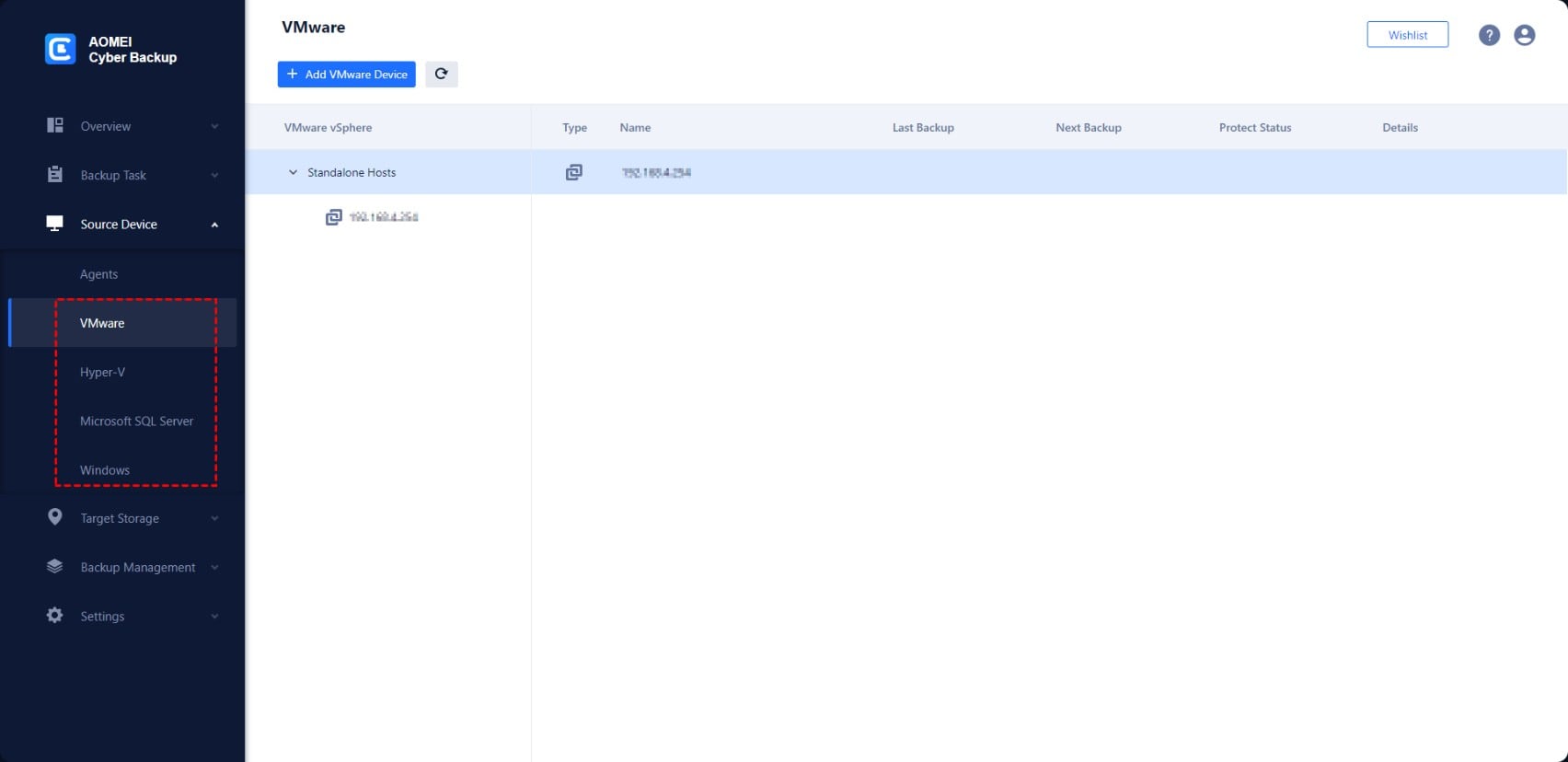
The AOMEI Cyber Backup console: under Source Device, VMware, Hyper-V, Microsoft SQL Server and Windows agents are added from one menu, here with a standalone ESXi host.
AOMEI Cyber Backup is the only product here built around a central console. You add ESXi or vCenter hosts, Hyper-V hosts, SQL Servers and Windows agents, then create backup tasks with schedules, incremental and differential backups and retention rules, all from a browser. VMware VMs are backed up agentless through the host; Hyper-V moved to an agent on the host in version 4.2.0. Restores include whole VMs, single files and instant recovery of a VMware or Hyper-V VM. Backups go to local disks, NAS, network shares or Amazon S3.
The catch is the license. The $1,999 plan covers VMs only, so a site that also wants its physical servers, PCs or SQL databases in the same console pays for those workloads separately. For a single physical server with no VMs, it's the wrong buy: Backupper Server does that job for $299.
What we like
- One web console for VMs, SQL Server databases, PCs and servers
- Agentless VMware backup and instant VM recovery
- A free edition that covers a small office (3 VMs per hypervisor, 3 PCs, 3 SQL databases)
- Version 4.6.4 tightened console sign-in, file-backup browsing and NAS credential handling
Watch out for
- Each workload type is licensed separately
- The Linux console backs up VMs only
- A long run of ESXi fixes from 4.5.0 to 4.6.3 (stuck tasks, schedules that didn't run): test on your own hosts
- Few independent reviews; most published praise comes from AOMEI's own sites
What users say
Trustpilot rates AOMEI (aomeitech.com) 4.8 out of 5 from 786 reviews, mostly praising support. Orestis Michail Fronistas, November 13, 2026: "Prompt response to my enquiry, fast an excellent service and support".
The criticism is older but specific. Andreas Lange, August 19, 2025, 1 star, titled "AOMEI Cyber Backup for VMware on Linux BUGGY": "There is no actual Version and Version 2.3 has massive bugs in the VM Snapshots." That was an old Linux build; the changelog has had many ESXi fixes since.
Download AOMEI Cyber Backup Trial
Buy AOMEI Cyber Backup
AOMEI Backupper Server
- Price: $299 once with lifetime upgrades, or $149 a year, per server, at checkout
- Version: 8.5.1, released October 19, 2026
- Runs on: Windows Server 2025, 2022, 2019, 2016, 2012 (including R2) and SBS 2011, plus Windows 11 to 7
- Not included: Hyper-V or VMware VM-level backup, SQL Server database backup, a central console
- Trial and refund: 30 days, 90-day money-back guarantee
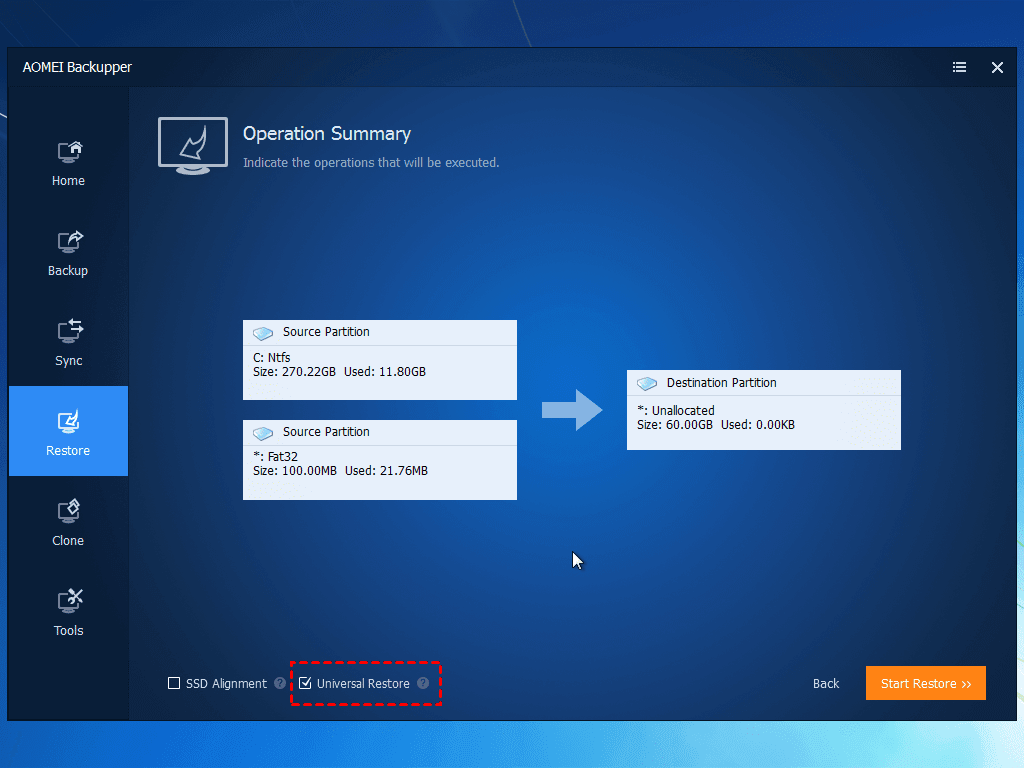
AOMEI Backupper's restore summary: the source system partitions (ESP, Recovery, C: Windows) above the target disk layout, with Universal Restore ticked for different hardware.
AOMEI Backupper Server is the same Backupper engine licensed for Windows Server: system, disk, partition and file images with full, incremental and differential backups on a schedule, disk and system cloning, file sync, and Universal Restore to bring a server image back on different hardware. At $299 once it's the cheapest lifetime server license in this roundup.
It is a standalone tool: you set up and check each server where it runs, and it doesn't understand SQL Server or Exchange as applications. PCWorld's November 2026 test of the Backupper 8.5 engine found it fast and reliable but hit the program's long-standing weak spot, rescue media that wouldn't boot until written with another tool. On a server, test your boot media the day you install.
What we like
- Cheapest lifetime license for one server ($299)
- Universal Restore and system cloning for hardware swaps
- 90-day money-back guarantee, the longest here
- Same interface as the PC editions, so one tool on every machine
Watch out for
- The 2026 update-server breach (see the note above)
- No application-aware SQL Server, Exchange or VM backup
- Boot media has been a recurring problem in PCWorld's tests
- Support is by email, with no phone or chat line
What reviewers say
PCWorld, Jon L. Jacobi, Backupper Professional 8.5, November 6, 2026: "Backupper is a very good performer and super reliable with most tasks — but, geez, Aomei, fix the darn boot media!"
MSPoweruser, Dennis Otieno, 8 out of 10: "The tool offers a quick and easy way to backup, sync, restore, and clone your data." Against that: "there are no options for chat and phone support for urgent issues."
Download AOMEI Backupper Server Trial
Buy AOMEI Backupper Server
AOMEI Backupper Technician and Technician Plus
- Price: Technician $799 once or $499 a year; Technician Plus $999 once or $699 a year, at checkout
- Covers: Technician: unlimited PCs. Technician Plus: unlimited PCs and Windows Servers in one company
- Adds over Workstation: AOMEI Image Deploy over the network, a portable version that runs from a USB drive, billable service to clients
- Version: 8.5.1, released October 19, 2026
- Trial and refund: 30 days, 90-day money-back guarantee
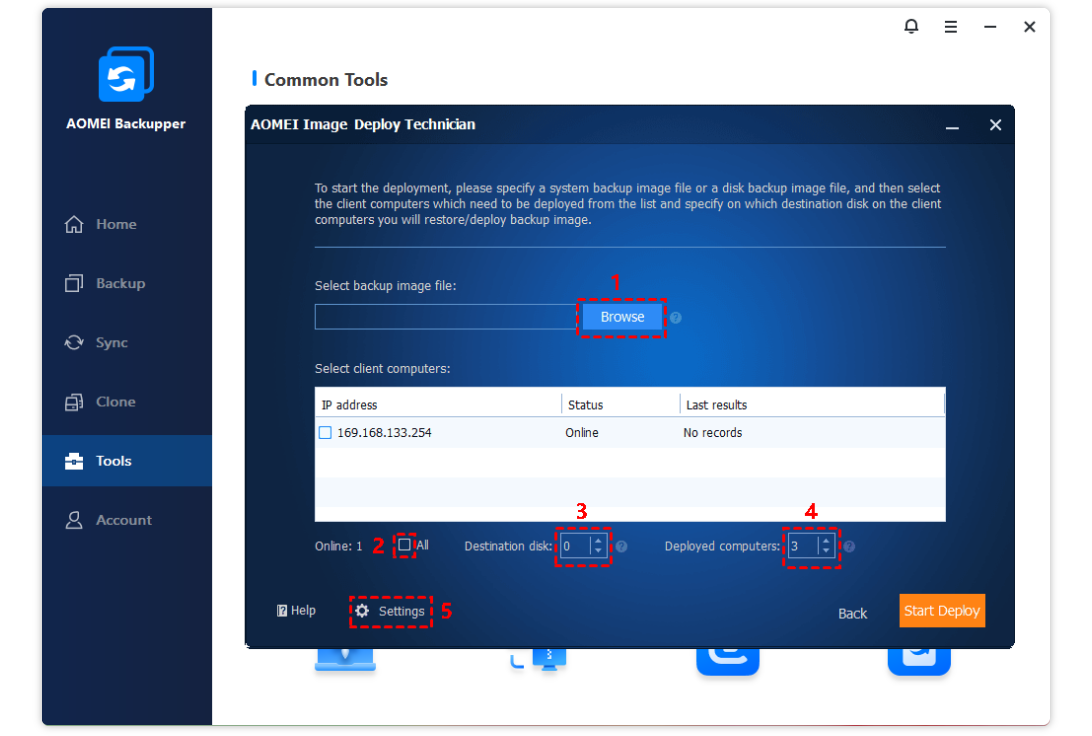
AOMEI Image Deploy Technician inside Backupper's Tools: pick a system or disk image, tick the client computers found on the network, choose the destination disk and start the deployment.
AOMEI Backupper Technician is the per-technician license: one key, unlimited machines, and the right to use it on clients' PCs for paid work. Make sure you buy the right one. Plain Technician covers PCs only. If any machine is a Windows Server, you need Technician Plus, which this site doesn't sell as a separate button; the Technician page and AOMEI's order page list both.
Image Deploy is the real extra: it pushes one system image to many PCs booted over the network, which is how you set up a room of identical machines. AOMEI's PXE FAQ requires wired clients on the same network segment and a DHCP server on the LAN. There's still no dashboard: each machine's jobs are checked where they run.
What we like
- Technician Plus covers every PC and server for $999 once
- Image Deploy and a portable version for field work
- Billable use on clients' machines is allowed
Watch out for
- Plain Technician doesn't cover Windows Server
- Network deployment needs wired clients on one segment
- Any client machine that ran an older Backupper needs the security steps above
Download AOMEI Backupper Technician Trial
Buy AOMEI Backupper Technician
AOMEI Backupper Workstation
- Price: $79.95 once with lifetime upgrades, $49.95 a year, or $399.75 for a 5-PC Team license, at checkout
- Runs on: Windows 11, 10, 8.1, 8 and 7 (no Windows Server)
- Extra over Professional: business use and the PXE Boot Tool
- Version: 8.5.1, released October 19, 2026

AOMEI Backupper's Tools page with the PXE Boot Tool highlighted; Image Deploy and Create Portable Version carry a Tech label because they belong to the Technician editions.
AOMEI Backupper Workstation is AOMEI Backupper Professional with a business license and the PXE Boot Tool, which boots several office PCs over the network into a recovery environment. It's the PC half of the cheapest AOMEI setup: one Server license for the server, one Workstation license per desktop or laptop.
The 5-PC Team license costs exactly five single licenses, so buy it for convenience, not a discount. Trustpilot rates ubackup.com 4.9 out of 5 from 2,597 reviews, mostly short thanks for support staff; John Browning, October 9, 2026: "I got a fast service response and fix. These guys are on the ball and I love using the backer upper."
Download AOMEI Backupper Workstation Trial
Buy AOMEI Backupper Workstation
EaseUS Todo Backup Server and Advanced Server
- Price: Server $199 a year, $299 for 2 years, $359 lifetime; Advanced Server $299 a year, $419 for 2 years, $459 lifetime, on EaseUS's order page
- Version: Todo Backup Enterprise 16.3 (trial installer dated August 5, 2026)
- Runs on: Windows Server 2025 back to 2003, SBS 2003 and 2008, plus Windows 11 to Vista
- Advanced Server adds: SQL Server 2005 to 2022, Exchange Server 2003 to 2016 and Active Directory backup, plus priority support
- Refund: 30-day money-back guarantee if the software can't solve your issue
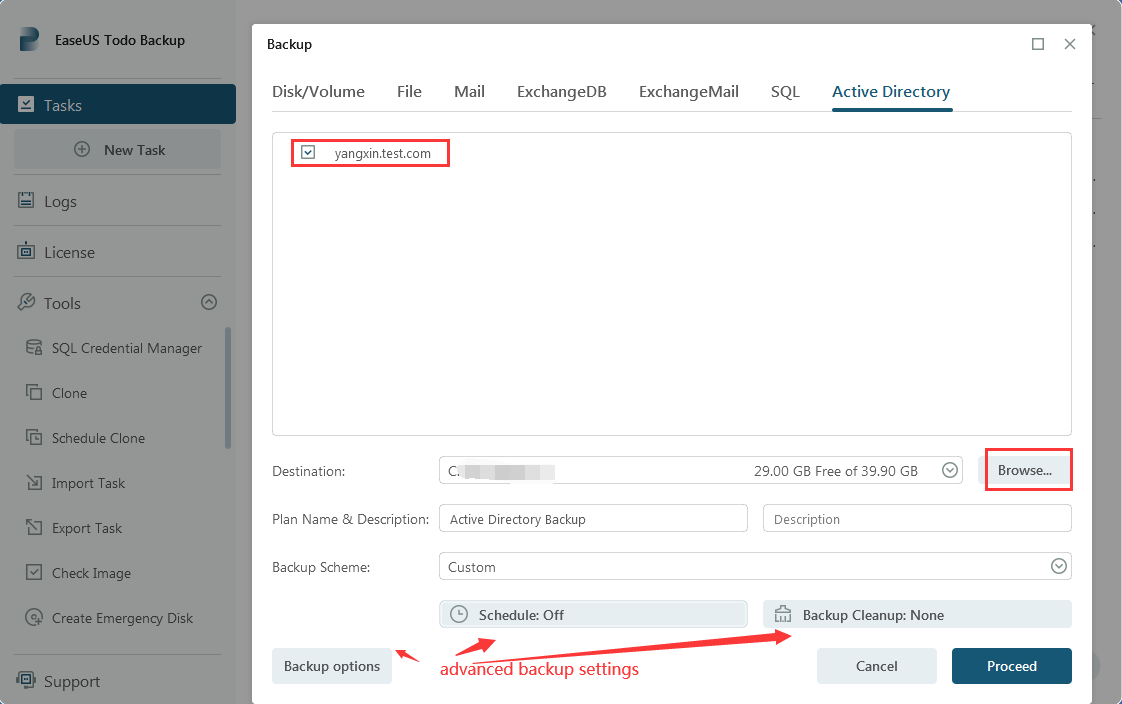
EaseUS Todo Backup's Backup dialog on the Active Directory tab, with ExchangeDB, ExchangeMail and SQL tabs beside it, a destination, schedule and Backup Cleanup setting (EaseUS's annotated help screenshot).
EaseUS Todo Backup Server images Windows Server systems, disks and files on a schedule, clones disks, restores to different hardware, and includes PXE network boot tools. EaseUS Todo Backup Advanced Server is the edition to buy when the server runs SQL Server or Exchange: it backs up SQL databases and Exchange data and Active Directory as applications, which none of the AOMEI Backupper editions do. Note that EaseUS lists Exchange only up to 2016.
Central management is a separate product, EaseUS Backup Center, priced per managed machine from $59 a year per PC and $199 a year per server. EaseUS also says it will reset a license when you move it to a new computer. Compared with AOMEI, you pay more per server for a lifetime license ($359 against $299), and you get a vendor without a supply-chain incident on record.
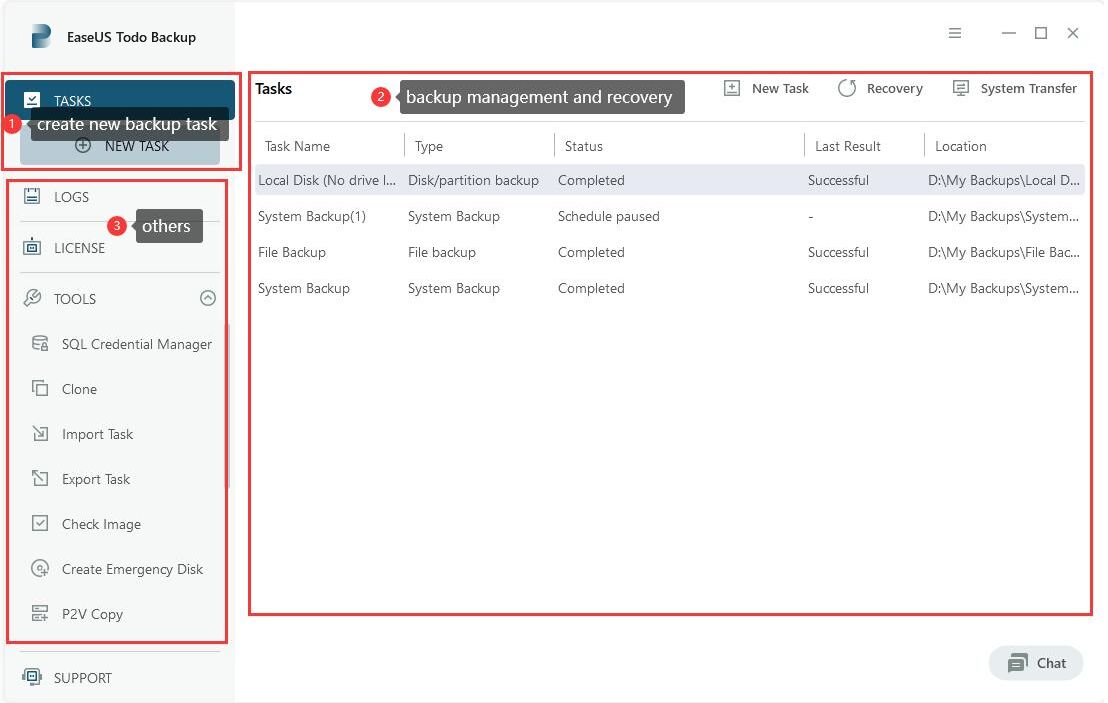
The Todo Backup Enterprise main window, annotated by EaseUS: the task list with each job's status and location, and Tools including SQL Credential Manager, Clone, Create Emergency Disk and P2V Copy.
What we like
- SQL Server, Exchange and Active Directory backup in Advanced Server
- A lifetime option, and 2-year plans in between
- Automatic 20-40% discount on orders of more than 3 units
- TechRadar found Todo Backup the fastest backup app it tested
Watch out for
- Lifetime licenses cost more than AOMEI's
- Exchange support stops at Exchange Server 2016
- The central console is an extra yearly cost per machine
- TechRadar lists "Constant popups" and "Limited customer support"
What reviewers say
TechRadar (Daniel Blechynden, with Mike Jennings, updated September 2, 2024): "EaseUS Todo Backup is the fastest backup app we've tested, and it's got a good range of features, too". Its cons: "Business options get pricey", "Constant popups" and "Limited customer support".
On the server tier TechRadar notes: "Server Edition includes Windows Server backup and PXE network boot tools for $199 per year per server."
Download EaseUS Todo Backup Server Trial
Buy EaseUS Todo Backup Server
EaseUS Todo Backup Technician
- Price: $999 a year, $1,399 for 2 years, $2,499 lifetime, on EaseUS's order page
- Covers: one license for up to 99 computers, PCs and servers, with SQL, Exchange and Active Directory backup
- Version: Todo Backup Enterprise 16.3
EaseUS Todo Backup Technician is for technicians who support clients' machines. It includes everything Advanced Server does, so it's the per-technician license that also backs up SQL and Exchange. For one office, it's expensive: AOMEI Technician Plus covers unlimited PCs and servers for $999 once, against $999 a year here. TechRadar's summary fits: "Technician packages start at $999 for people who need to manage loads of devices."
Download EaseUS Todo Backup Technician Trial
Buy EaseUS Todo Backup Technician
Hasleo Backup Suite Professional
- Price: $64.95 once with lifetime upgrades, at checkout
- Version: 6.0.2 (trial installer, November 23, 2026)
- Runs on: Windows 11 to Vista, on x86, x64 and ARM64; not Windows Server
- Refund: 30 days, for technical problems support can't fix
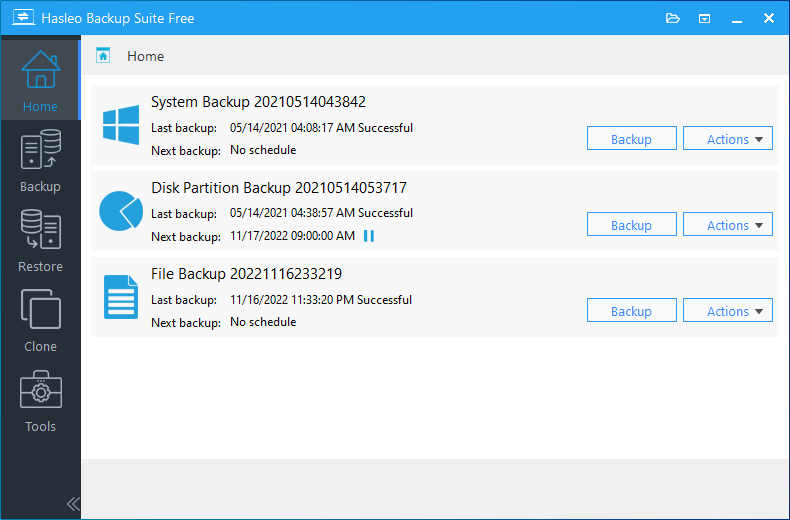
Hasleo Backup Suite's Home screen with three backup tasks and their last and next backup times; the vendor's screenshot shows the Free edition, which has the same interface.
Hasleo Backup Suite Professional allows commercial use on one PC and does system, disk, partition and file backups, cloning and restore to new hardware. It's $15 less per PC than AOMEI Workstation. It doesn't run on Windows Server, has no central console and no cloud target, and support is by email and forum.
TechRadar (Mike Jennings, September 2024) rated the free edition 3.5 out of 5: "Hasleo Backup Suite Free offers a rock-solid core range of backup features alongside good speed", with "Few high-end options" and "Limited support" as the reasons to avoid it.
Download Hasleo Backup Suite Trial
Buy Hasleo Backup Suite Professional
Zoolz Business Cloud Backup
- Price: $199.99 a year at checkout for 2.5 TB (2 TB Cold + 500 GB Instant), 5 users and 1 server
- Runs on: Windows 7 SP1 to 11, Windows Server 2008 R2 SP1 and 2012 or newer, macOS 10.11 or later
- Trial and refund: 14 days with no credit card; 30-day money-back, except orders discounted by 80% or more
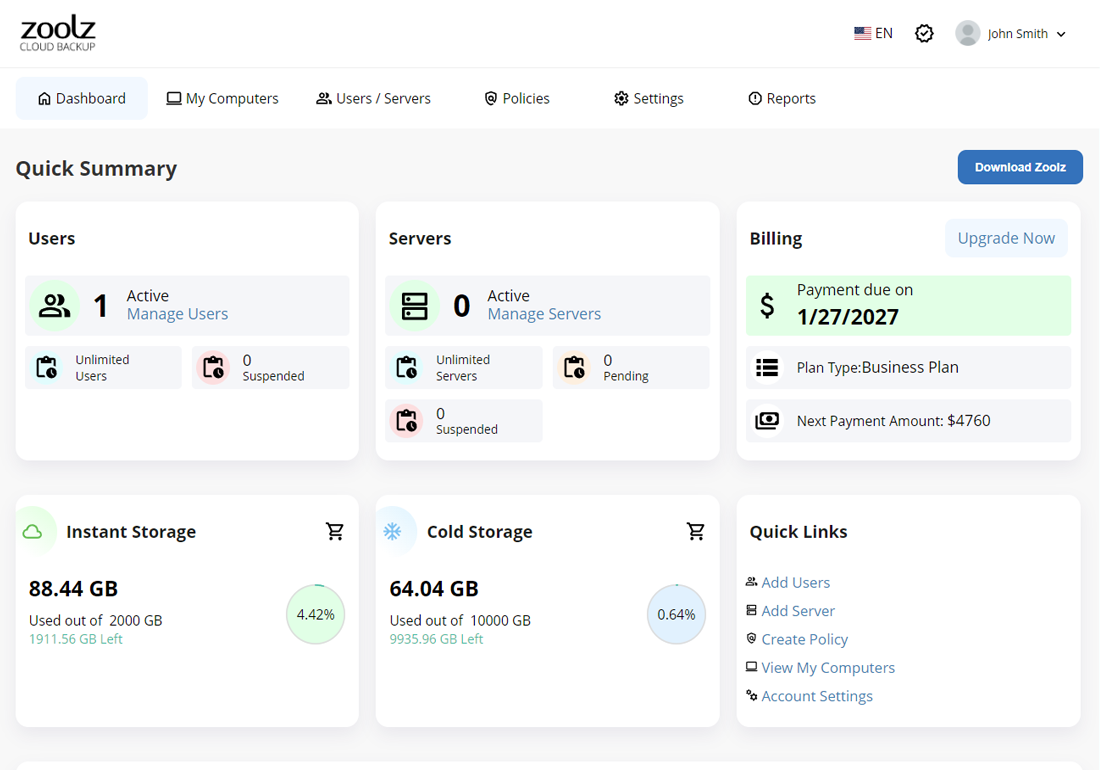
The Zoolz web dashboard: users, servers, billing, and the Instant and Cold Storage used, managed from one admin account.
None of the image tools above keep a copy away from the office on their own (Cyber Backup can write to Amazon S3, EaseUS to Google Drive or Dropbox, and AOMEI sells its own AOMEI Cloud space). Zoolz Business Cloud Backup fills that gap: a small client on each PC and server sends encrypted copies to Amazon Web Services, managed from one web dashboard. It backs up files, not bootable images.
Two cautions. Restores from Cold Storage take 3 to 12 hours to start, so keep anything you'd need during an outage in Instant Storage. And Trustpilot rates Zoolz 3.7 out of 5 from 1,040 reviews, with over half at 1 star; the complaints center on cancelled "lifetime" deals bought through deal sites, not on this yearly business plan.
Download Zoolz Trial
Buy Zoolz Business Cloud Backup
Which should you choose?
| Your situation | Pick | Why |
|---|
| 1 physical server, up to 8 PCs, no VMs | AOMEI Backupper Server + AOMEI Backupper Workstation | $299 + $79.95 per PC, lifetime; one vendor, one interface (Hasleo Professional on the PCs is $15 less each) |
| 1 server and 9+ PCs, or 2 servers and 6+ PCs | AOMEI Backupper Technician Plus | $999 once covers every PC and server in the company |
| Servers run SQL Server, Exchange or Active Directory | EaseUS Todo Backup Advanced Server | The only one here that backs those up as applications per server |
| VMware or Hyper-V hosts, or you want one console | AOMEI Cyber Backup | Agentless VMware, Hyper-V, SQL and PCs in one web console; free up to 3 VMs per hypervisor |
| You won't run AOMEI after the 2026 breach | EaseUS Todo Backup Server (Advanced Server for SQL/Exchange) | Same jobs, a different vendor, $199 a year or $359 lifetime per server |
| You look after several clients' offices | AOMEI Backupper Technician or EaseUS Todo Backup Technician | Per-technician licenses; AOMEI is $999 once with Plus, EaseUS $999 a year with SQL and Exchange |
| Office PCs on the tightest budget | Hasleo Backup Suite Professional | $64.95 once per PC with commercial use |
| You need a copy outside the building | Zoolz Business Cloud Backup alongside one of the above | 2.5 TB of cloud storage for $199.99 a year |
Who should skip which:
- Skip AOMEI Cyber Backup if you have one or two physical servers and no VMs: Backupper Server does that for $299, and the $1,999 plan doesn't cover physical machines.
- Skip plain AOMEI Backupper Technician if any machine is a Windows Server; you need Technician Plus.
- Skip EaseUS Todo Backup Technician for a single office: a yearly $999 is hard to justify against AOMEI Technician Plus at $999 once, unless you need its SQL and Exchange backup on many servers.
- Skip Hasleo Backup Suite Professional for the server itself; it doesn't run on Windows Server.
- Skip Zoolz as your only backup: it restores files, not a bootable server.
What commonly goes wrong
- Buying the home edition. AOMEI Professional, Hasleo Home and EaseUS Home are licensed for personal use, and none of them is licensed for Windows Server.
- Never testing the rescue media. PCWorld's November 2026 test found AOMEI Backupper's USB boot drive wasn't recognized until written with another tool. Boot every server's rescue disk once, before you need it.
- Assuming a disk image protects SQL Server. An image of a running database server isn't the same as an application-aware database backup. Use EaseUS Advanced Server or Cyber Backup for SQL, or SQL Server's own backups.
- One copy, in the same room. A NAS next to the server dies in the same fire or ransomware attack. Keep a second copy offsite or in the cloud.
- Old builds of backup software. The AOMEI breach reached machines through the update channel. Keep backup tools current and watch the vendor's security notices.
- Network deployment surprises. AOMEI's PXE tools need wired clients on one network segment and a DHCP server on the LAN; Wi-Fi laptops won't boot that way.
FAQs
Can I use AOMEI Backupper Professional or EaseUS Todo Backup Home on Windows Server?
No. AOMEI Backupper Professional is sold for personal use on Windows PCs, and Windows Server needs AOMEI Backupper Server or Technician Plus. EaseUS's home editions don't cover servers either; its business line starts at Todo Backup Workstation for PCs and Todo Backup Server for servers.
Is AOMEI safe to use after the 2026 update-server hack?
AOMEI Backupper 8.5.1 and later stop automatic in-app updates, drop the old update domain and refuse unsigned configuration files, which blocks the method the attackers used. It doesn't clean a machine that was already hit, and AOMEI hasn't said how the attackers got in. If that's a deal-breaker for a server with access to every disk, choose EaseUS Todo Backup Server instead.
What's the cheapest way to back up one Windows Server and five PCs?
AOMEI Backupper Server on the server plus Hasleo Backup Suite Professional on each PC costs $623.75 once at checkout. With one vendor throughout, AOMEI Backupper Server plus a Workstation Team license is $698.75, and EaseUS Server plus five Workstation lifetime licenses lists at $804 before its multi-unit discount.
Does AOMEI Cyber Backup back up Hyper-V without agents?
No. AOMEI Cyber Backup backs up VMware ESXi and vCenter VMs agentless, but since version 4.2.0 Hyper-V backup uses an agent installed on the Hyper-V host.
Which backup software here backs up SQL Server and Exchange?
EaseUS Todo Backup Advanced Server backs up SQL Server 2005 to 2022, Exchange Server 2003 to 2016 and Active Directory. AOMEI Cyber Backup backs up SQL Server 2005 to 2025 databases centrally but not Exchange. The AOMEI Backupper editions image the server but aren't application-aware.
Is Windows Server Backup good enough for a small business?
Windows Server Backup is enough for a basic, scheduled full-server backup with bare metal recovery, at no cost. It doesn't clone disks, doesn't cover your PCs and keeps versions under a retention policy only on local disks or volumes. Most small offices add a paid tool for the PCs and the restore-to-new-hardware cases.
Should I buy a lifetime or a yearly license?
For servers you'll keep more than two years, AOMEI Backupper Server's $299 lifetime license costs two years of its $149 plan. EaseUS's lifetime Server license ($359) is under two years of its $199 plan. Yearly plans suit offices that expect to replace their setup or want the lowest upfront cost.
What are the refund terms?
AOMEI gives 90 days money back on Backupper and Cyber Backup. EaseUS offers 30 days if the software can't solve your issue, Hasleo 30 days for technical problems support can't fix, and Zoolz 30 days except on orders discounted by 80% or more.