Zoolz Business Cloud Backup: Cheap Terabytes for Companies That Can Wait for Old Files
Zoolz Business Cloud Backup is a subscription cloud backup service for companies, with desktop clients for Windows, Windows Server and Mac, starting at $199.99 a year for 2.5 TB. It suits a business with a lot of archive data and an admin to run it, and it comes with a 14-day trial.
Most of that 2.5 TB is Cold Storage, which is why the price per terabyte is low. The trade-off is plain: a restore from Cold Storage takes 3 to 12 hours just to begin. If your old project files can wait that long and your current ones sit in Instant Storage, the arithmetic works in your favor.
Quick facts
- Version: Windows client 2.2.16.600, Mac client 2.2.4.300
- Developer: Genie9
- Platforms: Windows 7 SP1 through 11, Windows Server 2008 R2 SP1 and 2012 or newer, macOS 10.11 or later, plus a web console
- Entry plan: 2.5 TB (2 TB Cold + 500 GB Instant), 5 users and 1 server, files up to 20 GB
- Price: $199.99 a year at checkout, billed every 12 months
- Trial: 14 days, no credit card
- Guarantee: 30-day money-back, except orders discounted by 80% or more
- What we checked: Windows installer version 2.2.16.600 (13 MB, file dated September 8, 2026) downloaded from the vendor, and checkout price $199.99 with a 12-month renewal, both on November 9, 2026. We didn't run a backup or a restore.
Download Free TrialBuy Now
Overview
You install a lightweight client on each computer or server, choose what to protect, and Zoolz sends encrypted copies to Amazon Web Services. An administrator controls the whole account from a web console: who is on it, how much storage each person gets, and which backup policy applies to which machine.
Genie9 has shipped the Windows client regularly. The release notes list updates in February and May 2026, and the installer on the download server is newer still. The Mac client moves more slowly, with its last listed update, 2.2.4.300, in February 2025.
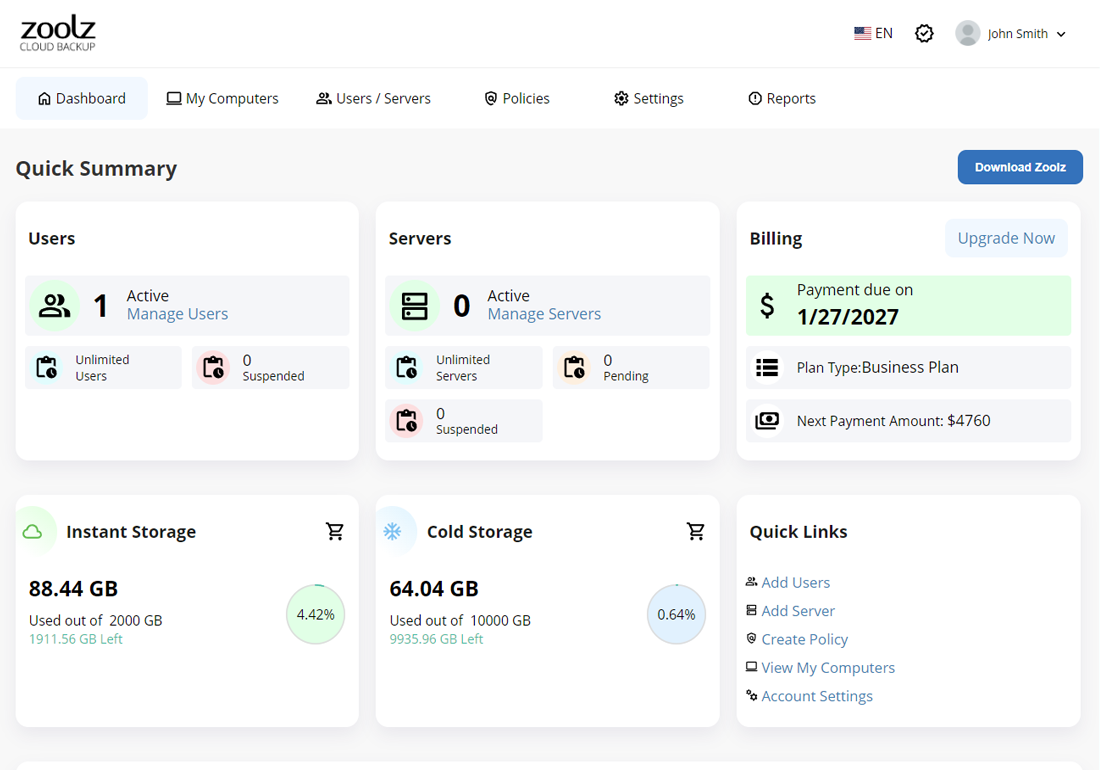
The web console dashboard: users, servers, billing, and separate usage meters for Instant Storage and Cold Storage.
Features
Three places for your data to live
Zoolz Business splits a backup across Instant Storage on Amazon S3 for files you may need right away, Cold Storage on Amazon Glacier for archives, and an optional local copy called Hybrid+ for faster recovery. You choose what goes where, and a file selected for both Instant and Cold goes to Instant only, so it isn't stored twice.
Backup that covers more than the C: drive
Zoolz Business protects desktops, laptops, servers, external drives and network drives, and it backs up open files. It watches for changes as they happen or runs on a schedule. Large files go up block by block, deduplication cuts repeat data, and rename detection stops a renamed file from uploading again.
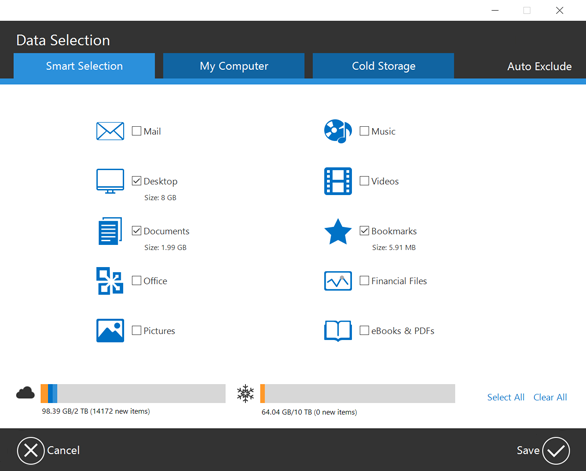
The desktop client's Data Selection window, with Smart Selection, My Computer and Cold Storage tabs and meters for both storage types.
Central control for an admin
Zoolz Business lets an admin invite users by email or CSV, deploy through Active Directory, and set storage limits per person. Backup policies are configured remotely and apply straight away, and they can set what is backed up, filter by size or date, limit bandwidth and fix retention. The Home plan has none of the remote policy, CSV or Windows Server features.
Encryption before upload
Zoolz Business encrypts files with 256-bit AES on your computer before they travel, and they stay encrypted at rest on AWS. The account's custom encryption option and GDPR compliance matter most to firms handling client records.
Several ways to get files back
Zoolz Business restores from the desktop app or the web console, to the original folder or another one. You can pull an older version, recover deleted files, restore onto a new computer without starting a backup there, or have an admin restore to a user's machine remotely.
Backup modes for working hours
Zoolz Business has turbo, smart, battery-saving and presentation modes, plus pause and resume, so an upload doesn't take over a laptop in the middle of a client meeting.
Benefits
- A lower bill for data nobody opens. Moving finished work to Cold Storage is where the savings come from, and Genie9 charges nothing extra to restore it.
- Fewer machines to visit. Policies reach every client from one screen, which is the difference between a 20-minute change and an afternoon walking the office.
- Protection for drives that are usually forgotten. External and network drives count, on every plan.
Real-World Uses
- A small architecture firm keeps live drawings in Instant Storage and sends closed projects to Cold Storage.
- A video team backs up external drives full of raw footage that it hopes never to download again.
- An IT contractor pushes one policy to a client's laptops and restores a lost folder to a user's machine without going on site.
- A company with more than a few terabytes to seed ships the data on a physical drive instead of waiting weeks on an office uplink.
Who It's For, and Who Should Skip It
Good fit: companies with terabytes of archive data, at least one person comfortable managing policies, and tolerance for a wait on old files.
Skip it if: you're one person backing up a home PC, because this is priced and built for an organization and a personal backup plan will cost far less. Skip it too if you need every file back within minutes, or if you run Linux servers, since the clients are Windows and Mac only. Businesses that need full-machine disaster recovery should look at an image-based tool instead, because Zoolz's feature list covers files, not full-system images.
Usage Guide
- Create an account for the 14-day trial, then download and install the Zoolz client.
- Sign in and open Data Selection in the desktop app. Tick categories or browse to folders, and add archives on the Cold Storage tab.
- Set a schedule, a bandwidth limit and a backup mode, then start the first upload.
- To add a server, open Users/Servers in the web console, click Add Server, copy the Activation Token and run the setup on the server under an administrator account.
- Use Policies in the web console to set rules for groups of users.
- To recover files, click Restore in the desktop app. Keep the computer awake and logged in until the job finishes.
Before you buy
The 2.5 TB plan is the only tier with limits beyond storage: 5 users, 1 server and a 20 GB maximum file size. Zoolz's general marketing talks about unlimited users, which applies from 7 TB up. A company with two servers or large video masters needs the 7 TB plan.
Where it falls short
- Cold Storage is slow to start. Zoolz's support documentation gives 3 to 12 hours before a restore begins. Don't put anything there that you'd need during an outage.
- It has a trust problem with older deals. The loudest complaint on Trustpilot comes from people who bought "lifetime" plans, often through deal sites, and later had them cancelled. This plan is a yearly subscription, so that exact risk doesn't apply, but it's fair to weigh when you're choosing where your company's data lives.
- It takes some learning. Reviewers find the storage tiers and policies more complicated than a small team needs.
- A browser restore has limits. One Trustpilot reviewer had to switch to the local restore app after browser restores hit a daily size limit, so plan large recoveries around the desktop app.
What Users Say
Creative Bloq (Michael Graw, September 2021, 3.5 out of 5)
"Zoolz Cloud Backup is a flexible and inexpensive cloud backup solution for big businesses. However, if you only have a handful of employees, the service can be overly complex."
On the storage design: "the tribrid backup system is what enables Zoolz Cloud Backup to be so cheap compared to other business cloud storage services."
On the console: "The interface looks a little bit outdated, but it was straightforward to use."
On help: "Zoolz offers technical support by email only. This is okay, but we’d like to see phone or live chat support so that your business can get help instantly."
Tom's Guide (Catherine Miller, May 2021, 4 out of 5)
"Zoolz cloud storage is great for a larger business and offers plenty of features for individuals if you’re looking for a more sophisticated backup service."
On value, the review is less generous than Creative Bloq: "although on the pricier side, it includes features you won’t find with cheaper competitors, which is especially useful if you’re looking to store large amounts of data."
Trustpilot praise (3.7 out of 5 from 1,040 reviews)
"I have been using Zoolz for a decade now, without any issues." Péter Tárczy, 5 stars, November 2026
"The Zoolz team went far above normal troubleshooting to solve my problem." Oather Belcher, 5 stars, July 2026
"They were quick on the response." Michael S. Smith, 5 stars, August 2026
Trustpilot criticism
"I purchased a Lifetime Plan through StackSocial on July 16, 2018 and recently discovered my account no longer exists." Graylon Prophet, 1 star, March 2026
"I bought a lifetime storage plan. After 2 years, I received an email saying the service was being canceled." Dorin, 1 star, October 2025
Over half of the reviews there give 1 star, and the complaints cluster on those lifetime deals rather than on the business plans, none of which the reviews on the page discuss directly. The summary across all of these: people like the price, the storage tiers and, when they reach them, the support staff. They complain about complexity, the wait for cold data and, loudest of all, how lifetime customers were treated.
Comparisons
Zoolz Business vs Polarbackup Business
Polarbackup Business has the same shape at its entry tier: 2 TB Cold plus 500 GB Hot, 5 users and 1 server, for $127.49 a year on its site in November 2026, against $199.99 here. If cost is your only criterion, compare the two during their free trials.
Zoolz Business vs BigMind Resilience
BigMind Resilience, also from Genie9, charges $10 per user per month with 500 GB each, so it's the better match for a small team that wants files quickly. Zoolz wins once you have far more data than people.
Editions and Pricing
| Plan |
Price per year |
Cold Storage |
Instant Storage |
Users and servers |
| 2.5 TB | $199.99 | 2 TB | 500 GB | 5 users, 1 server |
| 7 TB | $599.99 | 6 TB | 1 TB | Unlimited |
| 12 TB | $999.99 | 10 TB | 2 TB | Unlimited |
| 24 TB | $1,899.99 | 20 TB | 4 TB | Unlimited |
| 60 TB | $3,999.99 | 50 TB | 10 TB | Unlimited |
FAQs
Does Zoolz Business charge to restore from Cold Storage?
Zoolz Business doesn't charge a restore fee for Cold Storage. Once a restore is ready to begin, the wait is the only cost.
Can Zoolz Business back up Windows Server?
Zoolz Business backs up Windows Server 2008 R2 SP1, 2012 and newer. Windows Server backup is exclusive to Business accounts, and the 2.5 TB plan covers one server.
What is the refund policy for Zoolz?
Zoolz offers a 30-day money-back guarantee, requested by email to its support team. Orders discounted by 80% or more are excluded.
Can I ship my data instead of uploading it to Zoolz?
Zoolz supports physical data delivery to skip a long first upload. Creative Bloq's 2021 review describes sending your own hard drive for under 10 TB and requesting an AWS Snowball device above that.
Is Zoolz Business different from Zoolz Home?
Zoolz Business adds customizable file retention, three active backups per user, remote backup policies, Windows Server backup and bulk user upload by CSV. Home keeps ten versions of each file and allows one active backup per user.
Does Zoolz Business work on Linux?
Zoolz Business has no Linux client. The desktop app runs on Windows, Windows Server and macOS.
System Requirements
- Windows: 7 SP1, 8, 8.1, 10 or 11, or Windows Server 2008 R2 SP1, 2012 or newer, 32-bit or 64-bit
- Windows hardware: 512 MB RAM, Pentium 4 or Athlon 64, 200 MB free disk space
- Mac: macOS 10.11 or later, 2 GB RAM, 150 MB free space
- Not supported: Windows XP, Vista and Server 2003
Conclusion
Zoolz Business Cloud Backup is worth $199.99 a year for a small company with a couple of terabytes of files it must keep but rarely opens, and for whom one server and five users are enough. The one reason to buy it is cheap, encrypted, centrally managed storage for archive data on Windows and Mac. The main reason not to is the 3 to 12 hour wait on Cold Storage, followed closely by the vendor's record with its lifetime customers. Use the 14-day trial to run a real restore from Cold Storage before you commit.
Download Free TrialBuy Now