Aiseesoft iPhone Ringtone Maker for Windows: M4R Ringtones from Your Music and Videos
Aiseesoft iPhone Ringtone Maker is a $14.95 Windows program (lifetime license, one PC) that saves a piece of any song or video file as an M4R iPhone ringtone and can copy it straight onto a connected iPhone, iPad or iPod touch. It's for PC owners with an iPhone who want custom tones without fighting iTunes or the Apple Devices app.
On Windows there's no GarageBand, so Apple's own route to a custom ringtone is clumsy: convert to AAC, rename the file to .m4r, then sync it. This program puts the trimming, the conversion and the transfer in one window.
Quick facts
- Version: 7.0.88, program file dated December 29, 2023
- Developer: Aiseesoft Studio
- Windows: 11, 10, 8, 7, Vista and XP (SP2 or later). It's a 32-bit program, which runs normally on 64-bit Windows. The Mac edition is a separate purchase.
- Reads: audio such as MP3, AAC, AC3, WAV, WMA, M4A, OGG, AIFF, FLAC and APE, and video such as MP4, MKV, AVI, WMV, MOV, FLV, VOB, TS/MTS/M2TS and WebM
- Writes: M4R only
- Devices on Aiseesoft's list: iPhone 3GS through the iPhone 17 and 18 Pro models, iPad, iPad Air, iPad mini, iPad Pro and iPod touch
- Price: $14.95 once on the order page, lifetime license for one PC
- Trial: free download. Aiseesoft's own program description says the trial converts only 10 seconds of each file.
- Refunds: 30 days, for "a quality problem", in Aiseesoft's words
- What we checked: we downloaded the 65.7 MB installer, unpacked it and read the program's file version (7.0.88.137005, dated December 29, 2023), and the order page charged $14.95 for the lifetime license on November 4, 2026. We didn't run the program or connect an iPhone to it.
Before you buy
The Windows build was last rebuilt in December 2023, while Aiseesoft's device list now runs to the iPhone 18 Pro. Making the M4R file doesn't depend on the iPhone at all, so that part will keep working. Sending the tone directly to the phone is the part that can break when Apple changes iOS, so test the free download with your own iPhone before paying. If direct transfer fails, you can still save the M4R on the PC and add it to the phone another way.
The money-back promise covers "a quality problem within 30 days after purchasing". It isn't a no-questions refund, which is another reason to try the trial first.
Download Free TrialBuy Now
Overview
The program opens on a short Getting Started checklist and becomes a list of files once you add some. Each row shows the original length, the trimmed length and the output name. Below the list are the trim controls (a slider with two markers, plus Start Time and End Time boxes), a play button, the fade and volume settings, and two destination rows: Add to iPhone, with a drop-down of connected devices, and Add to PC, with a folder path. A big Generate button does the rest.

The unregistered Windows program with six songs (M4A, AAC, AIFF and MP3) queued. One clip is set from 0:02 to 0:16 with 2-second fades, the volume is at 153% and an iPod touch is picked under "Add to iPhone".
Features
Ringtones from video files, not just songs
Aiseesoft iPhone Ringtone Maker pulls the sound out of video files as easily as it reads audio. The input list on the Windows edition is long: MP4, MKV, AVI, WMV, MOV, FLV, SWF, 3GP, VOB, MPEG, TS, MTS, M2TS, WebM and more, plus RM/RMVB from older downloads. A clip from a phone video, a movie scene or a music video you saved becomes a ringtone without a separate audio extraction step.
Exact trimming with a preview
Aiseesoft iPhone Ringtone Maker lets you set the clip by dragging the markers or by typing the start and end down to the second, and the Trimmed Length readout updates as you go. The play button plays only the selection, so you hear exactly where the tone will start and stop before anything is converted.
Fade in, fade out and up to 200% volume
Aiseesoft iPhone Ringtone Maker adds a fade at either end, set in whole seconds, and a volume slider from 0% to 200%. The boost matters more than it sounds: a quiet live recording or a spoken line from a film is often too soft to hear as a ringtone, and doubling it fixes that.
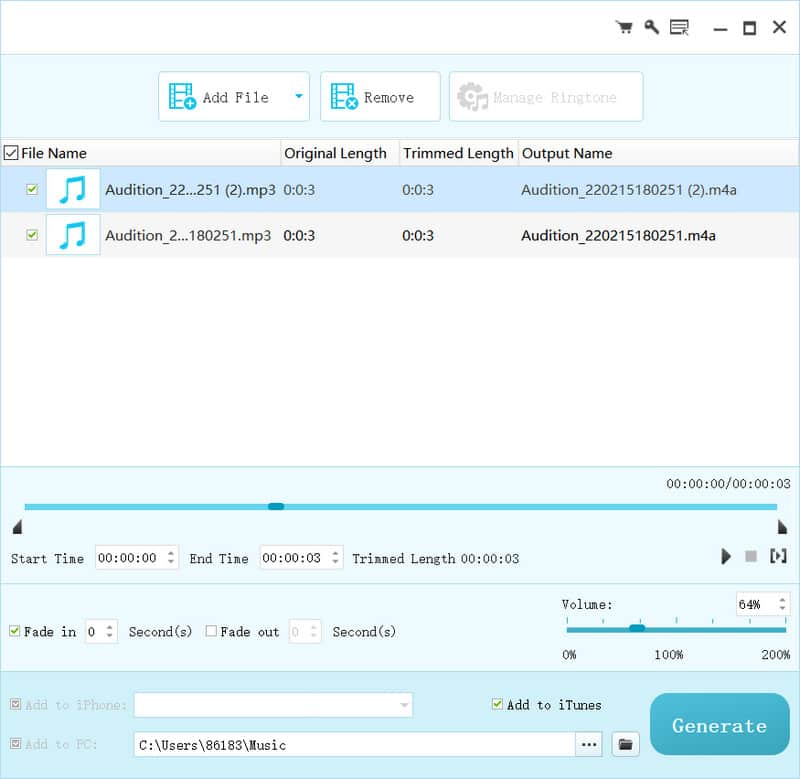
The editing area from Aiseesoft's product page: Start Time and End Time boxes, Fade in ticked, the volume at 64%, and "Add to iTunes" and "Add to PC" chosen as destinations.
Direct transfer to one or more connected devices
Aiseesoft iPhone Ringtone Maker copies the finished tone to an iPhone, iPad or iPod touch over USB, and Aiseesoft says you can connect more than one device at a time. The installer carries its own Apple device connection files (a "FoneTransDriver" folder, the same component Aiseesoft's FoneTrans transfer tool uses). You can also tick Add to iTunes or keep the M4R in a PC folder, or all three.
Manage the tones already on the phone
Aiseesoft iPhone Ringtone Maker's Manage Ringtone button lists the custom ringtones on the connected device so you can rename or delete them, and export existing ones to the PC or iTunes. That's handy when an old set of tones is cluttering the Sounds list.
Benefits
- A PC-friendly route. Windows users don't have GarageBand, so the free alternatives involve renaming files and syncing. This keeps it to one program.
- Batch work. Queue a dozen songs, trim each, and generate them all at once.
- A cheap, one-time price. $14.95 with no renewal, and the Windows build was updated more recently than the Mac edition's 2019 release.
Real-World Uses
- A different tone for each family member: queue four songs, give each a 25-second hook, generate once, then assign them to contacts on the phone.
- Something from your own videos: your dog barking in an MP4 from your phone, or a toddler's laugh, cut to five seconds and boosted to 180% as a text alert.
- A line from a film: load the MKV, type the exact start and end time of the quote, and send it to the iPhone.
- Cleaning up: plug in an old iPod touch or an iPhone you're handing down, open Manage Ringtone and delete the tones you made years ago.
Who It's For, and Who Should Skip It
It's for Windows PC owners with an iPhone who make custom ringtones more than once in a while and like a simple point-and-click window, especially when the source is a video.
Skip it if:
- You also have a Mac or only use your iPhone. GarageBand on the iPhone can export a ringtone for free.
- You want Android ringtones too. It only writes M4R, so a general audio converter suits you better.
- You need real editing: joining two clips, cutting out a middle section or seeing a waveform. Use an audio editor such as Audacity and export the result.
- You're buying Aiseesoft's FoneTrans anyway. Its toolbox has a ringtone maker of its own.
Usage Guide
- Install. Run the downloaded installer and start the program. If you want direct transfer, connect the iPhone with a USB cable and tap Trust on the phone.
- Add files. Click Add File (or drag files in). You can add several at once.
- Pick the clip. Select a file, drag the markers or type the times, and press play to check it.
- Polish it. Tick Fade in and Fade out with a second or two each, and move the volume slider if needed.
- Choose destinations. Pick the device under Add to iPhone, tick Add to iTunes if you use it, and set the PC folder.
- Click Generate. On the iPhone, the new tone appears under Settings, Sounds & Haptics, Ringtone.
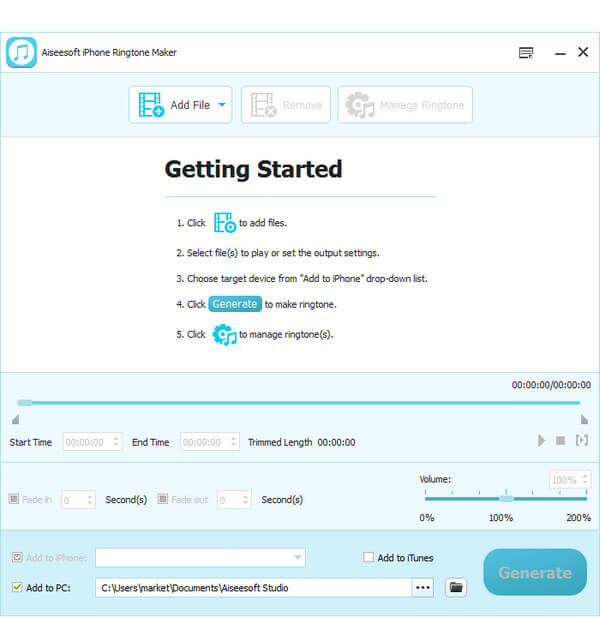
The empty window on first launch, with Aiseesoft's five-step Getting Started list: add files, select them, choose the target device, Generate, manage ringtones.
Tips
- Aim for 30 seconds or less. Aiseesoft's own page tells you to keep ringtones under 40 seconds, and alert tones work best at a few seconds.
- Keep "Add to PC" ticked even when sending to the phone, so you have the M4R files after a phone reset or upgrade.
- Start the clip a moment early and add a 1-second fade-in, so the first beat isn't chopped.
- Start from DRM-free files you own: MP3s, ripped CDs, your own recordings and videos. Aiseesoft doesn't say the program handles copy-protected streaming downloads.
Where it falls short
- Disc import is unclear. The tutorial screenshot shows an "Add File/Disc" button and older versions had a Load DVD option, but the current product page doesn't mention discs. Don't buy it for DVD audio without testing.
- Bare editing. One continuous clip per file, two fades and a volume level. No waveform, no splicing, no equalizer.
- A tight trial. Ten seconds per file is enough to test the transfer, not to make a real ringtone.
- Old-looking help. The FAQ and tutorial pages still talk about the iPhone X era, so you're mostly on your own if something goes wrong with a new iPhone.
- 32-bit program. Fine on Windows 10 and 11 today, but it hasn't been modernized.
What Users Say
Independent reviews of this program are thin. Download sites mostly reprint the vendor's description, and the user comments that exist are on Aiseesoft's own page, which shows 487 reviews and picks the ones it displays.
Comments on Aiseesoft's product page
"Before I always use iTunes to make my own ringtone, but I always fail for an accidental sync from iTunes to my iPhone. But this ringtone maker does me a great favor to transfer ringtone to iPhone and iTunes directly. Very helpful." Max
"Very great. I use the recorded smile audio file from my baby to make a special iPhone ringtone. Every time, when I listen to the ringtone outside, I feel very happy, just like my baby is around me." Chris
"Aiseesoft iPhone Ringtone Maker is very powerful to use. I can add video files with my favorite background music, and extract the wanted part to send my iPhone for setting as my ringtone. So powerful." Julia
"Very nice. Before I always make ringtones for my Android mobile phone with various tools on my Windows 8. Now I switch to iPhone, and create my own ringtone files with this iPhone ringtone maker." Bianca
"You would prefer this iPhone Ringtone Maker like me. I created so many great ringtone files for my iPhone 7 using this tool. The output files are so satisfying." Tim
Download sites
Free Download Manager's listing rates the Windows program 4.1 out of 5 from 91 votes. Its summary lists direct transfer to the iPhone and connecting several devices at once as pluses, and flags the 65.7 MB download size and says "the interface may be complex for first-time users to navigate without guidance".
The comments agree on the two things the program is built for: skipping the iTunes sync and turning your own recordings and videos into tones. Notice what's missing, though. The phones named (iPhone 7, a switch from Windows 8) show these comments are years old, and nobody reports on recent iOS versions, which is exactly what the trial should settle.
Comparisons
iPhone Ringtone Maker vs. the free Windows route
Without extra software, a Windows user converts the clip to AAC in iTunes or another tool, renames .m4a to .m4r, and drags it to the phone in iTunes or the Apple Devices app. It costs nothing but takes several steps per tone and doesn't read video. Aiseesoft's program is worth $14.95 if you do this regularly or start from video files.
iPhone Ringtone Maker vs. GarageBand on the iPhone
GarageBand is free and works on the phone itself, but you need the song in the Files app first, and trimming on a small screen is fiddly. The PC program is quicker for batches and for video sources.
Editions and Pricing
| Edition | Platform | Current build | License | Price |
|---|
| iPhone Ringtone Maker | Windows XP to 11 | 7.0.88 (December 2023) | Lifetime, 1 PC | $14.95 on the order page |
| iPhone Ringtone Maker for Mac | Mac OS X 10.7 or later | 7.1.10 (December 2019) | Lifetime, 1 Mac | $14.95, sold separately |
Aiseesoft's own site sometimes shows a coupon price ($11.96 when we looked).
FAQs
Does Aiseesoft iPhone Ringtone Maker need iTunes installed on Windows?
Aiseesoft iPhone Ringtone Maker installs its own Apple device connection files, and "Add to iTunes" is optional, so iTunes isn't required for making the M4R file. Whether direct transfer works on your PC without Apple's own drivers is something to confirm with the trial.
Will it work with my new iPhone and the latest iOS?
Aiseesoft lists every iPhone up to the iPhone 18 Pro and says it supports the latest iOS, but the Windows build dates from December 2023. Making the M4R file works regardless of the phone. For direct transfer, test the trial with your own device before paying.
Does the Windows license also cover the Mac version?
No. Aiseesoft iPhone Ringtone Maker is sold per platform: the Windows license covers one PC, and the Mac edition is a separate $14.95 product.
Is it a subscription?
No. Aiseesoft iPhone Ringtone Maker is a one-time $14.95 payment for a lifetime license on one PC.
Can I make a ringtone longer than 40 seconds?
Aiseesoft iPhone Ringtone Maker lets you set any start and end time, but Aiseesoft itself advises keeping iPhone ringtones under 40 seconds, so stay below that if you want the tone to sync and play reliably.
Can it turn an iPhone voice memo into a ringtone?
Yes. iPhone voice memos are M4A files, and M4A is on Aiseesoft iPhone Ringtone Maker's input list. Share or copy the memo to the PC, load it, trim it and raise the volume if the recording is quiet.
What happens to my license if I replace my PC?
Aiseesoft iPhone Ringtone Maker's license is for one PC at a time. Aiseesoft's support site has a page for retrieving a lost registration code, so keep the order email and reinstall on the new computer.
System Requirements
- Windows 11, 10, 8, 7, Vista or XP (SP2 or later)
- 1 GHz Intel or AMD processor or faster
- 1 GB RAM or more
- About 66 MB for the download
- A USB cable for sending ringtones directly to an iPhone, iPad or iPod touch
Conclusion
Aiseesoft iPhone Ringtone Maker is a small, single-purpose Windows tool that does what the free route on a PC makes tedious: trim, fade and boost a clip from a song or video and get it onto an iPhone in one pass. The one reason to buy it is convenience for Windows users, who don't have GarageBand. The main reason to hesitate is that the build is from December 2023 and the only praise comes from comments the vendor chose.
Our verdict: worth $14.95 if you make ringtones regularly on a PC and the trial's direct transfer works with your iPhone. If it doesn't, the program still makes the M4R files, but then the free rename-and-sync route is almost as quick.
Download Free TrialBuy Now