Aiseesoft iPad Converter Suite: Four iPad and iPhone Tools for Windows Under One License
Aiseesoft iPad Converter Suite is a $75 Windows bundle of four programs: iPad Video Converter (convert any video for the iPad), FoneTrans (move files between an iPad or iPhone and the PC without iTunes), DVD Creator (burn videos to DVD) and iPhone Ringtone Maker. The Buy button orders a lifetime license for one PC.
It's for Windows users with an iPad or iPhone who want to get videos onto the device, back files up from it, burn its videos to DVD and make their own ringtones.
Quick facts
- Price: $75.00 lifetime license for 1 PC
- Developer: Aiseesoft Studio
- Platform: Windows (the vendor lists Windows 10, 8 and 7); a Mac bundle exists separately
- What's inside: iPad Video Converter, FoneTrans, DVD Creator and iPhone Ringtone Maker, opened from one launcher (suite version 7.2.38)
- Free trial: the video converter converts 5 minutes of each longer file (half of a shorter one); DVD Creator watermarks its discs until you register
- Refund: 30-day money-back guarantee when there's a quality problem with the program
- What we checked: installer version 7.2.38 (103.4 MB, dated August 10, 2016) downloaded from the vendor, and the $75.00 lifetime price on the order page on November 26, 2026. We didn't install it or connect an iPad.
Before you buy
- The installer is from 2016. The suite's download hasn't changed since August 2016. FoneTrans and the ringtone maker talk to the iPhone and iPad directly, and a 2016 build may not recognize current devices or iOS versions. Connect your own device in the trial before you pay.
- The standalone apps are newer. Aiseesoft still sells FoneTrans, DVD Creator and iPhone Ringtone Maker on their own in current versions. If you need one of them, buy that one.
- Windows 11 isn't listed. The vendor's page names Windows 10, 8 and 7 only.
Download Free TrialBuy Lifetime License
Overview
The suite opens to a launcher with four buttons. iPad Video Converter turns MPG, VOB, TS, MTS, M2TS and other video into the MP4, M4V and MOV the iPad plays. FoneTrans copies photos, music, PDFs and videos to the iPad, and photos, music, videos, contacts and messages back to the PC, without iTunes. DVD Creator burns MTS, MP4, WMV, FLV, MKV, AVI and other files to a DVD disc, folder or ISO with a menu. iPhone Ringtone Maker cuts a piece of any song or video into an M4R ringtone and sends it to the iPhone.

The launcher with iPad Video Converter selected (1), beside the converter's file list (2) and progress window (3); the launcher shows version 7.2.38.
Features
Convert any video for the iPad
Aiseesoft iPad Converter Suite's iPad Video Converter converts MPG, MPEG, MPEG-2, VOB, HD TS, HD MTS, HD M2TS and other formats to iPad MP4, M4V and MOV, and can convert iPad video to other formats, including 4K, for other devices.
Transfer files without iTunes
Aiseesoft iPad Converter Suite's FoneTrans imports photos, music, PDFs and videos from the PC to the iPad, exports photos, music, videos, contacts and text messages to the PC, moves files between iOS devices, and sends iPad data to iTunes.

FoneTrans in the suite: the launcher (1), the connected-device screen (2) and the photo browser (3).
Burn videos to DVD
Aiseesoft iPad Converter Suite's DVD Creator burns videos from the iPad and other sources (MTS, M2TS, MP4, WMV, FLV, MKV, AVI, SWF and more) to a DVD disc, DVD folder or ISO file, with a menu, audio track and subtitle you choose.
Make your own ringtones
Aiseesoft iPad Converter Suite's iPhone Ringtone Maker converts any song or the audio of any video to M4R, lets you pick the part to use and add fade in and out, and sends the ringtone to the iPhone or iTunes.
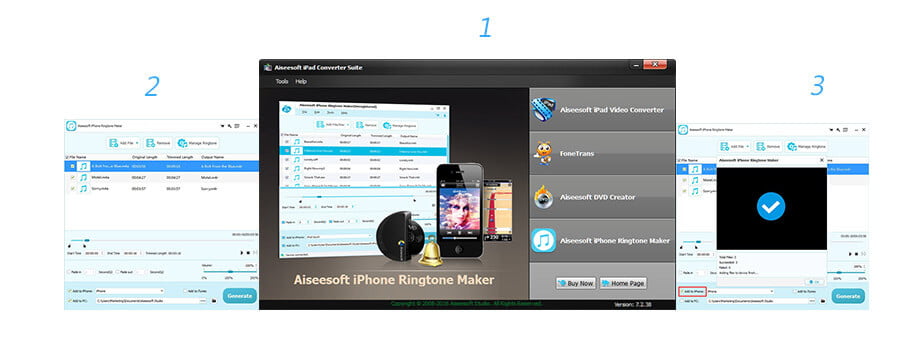
iPhone Ringtone Maker in the suite: the launcher (1), the ringtone editor (2) and the finished dialog (3).
Real-World Uses
- Movies for a long trip. Convert MKV and VOB files to iPad MP4 and copy them over with FoneTrans.
- Backing up an iPad. Copy photos and videos from the iPad to the PC before resetting it.
- A DVD of the kids' videos. Burn clips shot on the iPad to a DVD for grandparents.
- A custom ringtone. Cut 30 seconds of a favorite song into an iPhone ringtone.
Who it's for, and who should skip it
It suits Windows users who'd use at least two of the four tools and who've confirmed in the trial that FoneTrans and the ringtone maker see their device.
Skip it if you need only one tool, since Aiseesoft's current standalone version is the safer buy. Skip it if your iPhone or iPad is recent and the 2016 build doesn't recognize it. And if you only need to copy photos off the iPad, Windows' Photos app or Apple's own Apple Devices app can already do that for free. Mac users need iPad Converter Suite for Mac.
Usage Guide
- Download and install the suite, then launch it and pick a program in the launcher.
- Convert: in iPad Video Converter, click Add File, choose an iPad format under Profile and click Convert.
- Transfer: connect the iPad by USB, open FoneTrans, select the data and click Add or Export.
- Burn: insert a blank DVD, open DVD Creator, add videos, set the menu and click Burn.
- Ringtones: open iPhone Ringtone Maker, add a song, set the start, end and fades, and click Generate.
Where it falls short
- Very old build. A 2016 installer is the main risk, especially for the two tools that connect to iOS devices.
- Watermarked trial discs. DVD Creator's trial adds a watermark, and the converter stops after 5 minutes of each file.
- Refunds need a reason. The 30-day guarantee covers quality problems with the program, not a change of mind.
What Users Say
Aiseesoft's page shows 93 reviews for the suite. Independent reviews are scarce and old, so here are the buyer reviews on the vendor's page and what Trustpilot reviewers say about the company.
On Aiseesoft's product page
Susan: "All I want to say is Powerful! This Suite product covers video converter, transfer, burner and ringtone maker. It can meet almost all requirements of multimedia files for iPad user. Besides, the all-in-one product saves much than buying the programs one by one."
Nancy: "This is not just an iPad Converter Suite, right? It can be applied to iPhone, iPod and more iOS devices. This converter suite makes it easy to convert video and transfer files between iOS devices."
Delphine: "The most attractive point is the DVD creating function. I can burn all the recorded videos about my family party to DVD disc for keeping."
Mars: "How wonderful the ringtone creator. Now I can make and put various ringtone on my iPhone directly."
Dino: "How powerful the transfer tool. I can copy all my photos and videos from iPad to computer for backup."
Trustpilot (Aiseesoft as a company)
Aiseesoft has a TrustScore of 3.9 from 614 reviews on Trustpilot. Wayne Hall (October 14, 2026): "The software works great for me working with a USB attached iphone." Shirley Brown (September 8, 2026): "they were very helpful at getting my program back"
The 1-star reviews are about refunds: B Hackett (October 22, 2026), about the Mac FoneTrans transfer app: "They refused to issue the refund. and have not fixed the haptics". The page's summary also mentions users reporting tools failing on newer computers.
Buyers liked the four-in-one value, especially the transfer and ringtone tools. Given the age of the installer, the trial matters more here than for most products.
Editions and Pricing
| License | Price | Term | Computers | Order |
|---|
| iPad Converter Suite | $75.00 | Lifetime | 1 PC | Buy Lifetime |
The price is from the order page on November 26, 2026. Aiseesoft's own site shows it at $60 with a store coupon.
FAQs
Does Aiseesoft iPad Converter Suite support the newest iPads and iPhones?
Aiseesoft's page says the suite supports current Apple devices, but its installer dates from August 2016. Connect your iPad or iPhone to the free trial of Aiseesoft iPad Converter Suite and check that FoneTrans sees it before buying.
Does Aiseesoft iPad Converter Suite need iTunes?
No. Aiseesoft iPad Converter Suite's FoneTrans transfers files between the iPad and the PC without running iTunes, though Windows needs Apple's device drivers to talk to an iPad.
Is the iPad Converter Suite license a subscription?
No. The license the Buy button orders is a one-time lifetime license for one PC.
Can Aiseesoft iPad Converter Suite copy commercial DVDs to the iPad?
No. Aiseesoft iPad Converter Suite converts video files and burns your own videos to DVD; it isn't sold for ripping commercial discs.
Is there a Mac version of Aiseesoft iPad Converter Suite?
Yes, as a separate product: Aiseesoft iPad Converter Suite for Mac, with the Mac versions of the same four tools.
System Requirements
- Windows 10, 8 or 7 (per the vendor)
- USB cable for the iPad or iPhone
- A DVD writer to burn discs
- 103.4 MB download
Conclusion
Aiseesoft iPad Converter Suite was good value when it came out: four useful iPad tools for $75. Today the deciding fact is its age: the installer is from 2016, and the tools that connect to an iPad or iPhone are the ones most likely to fall behind. Buy it only if the free trial works with your device and you'll use several of the tools; otherwise Aiseesoft's current standalone apps are the safer choice.
Download Free TrialBuy Lifetime License