Aiseesoft MP4 Video Converter: Turn Almost Any Video into MP4 on Windows
Aiseesoft MP4 Video Converter is a Windows program that converts video files (MOV, MKV, AVI, WMV, FLV, MTS, MXF and more) to MP4, and MP4 to other formats, with device presets, batch conversion and basic editing. A lifetime license for one PC is $49.95 on the order page, or $29 for one year.
It's for Windows users who keep running into videos that won't play on a phone, TV, editor or website and want MP4 files without learning codec settings.
Quick facts
- Price: $49.95 lifetime license for 1 PC, or $29.00 for 1 year (auto-renewing)
- Developer: Aiseesoft Studio
- Platform: Windows 11, 10, 8.1, 8, 7 (a separate Mac edition exists)
- Converts: most common video formats to MP4 (HD and 4K included) and back; extracts audio as MP3, AAC, FLAC, WAV and more
- Extras: trim, crop, rotate, merge, watermark, 3D, effects; snapshots; NVIDIA CUDA and AMD acceleration
- Free trial: converts 5 minutes of each longer file (half of a file under 5 minutes)
- Refund: 30-day money-back guarantee when there's a quality problem with the program
- What we checked: installer version 9.2.52 (44.5 MB, dated January 9, 2024) downloaded from the vendor, and both licenses on the order page ($49.95 lifetime, $29.00 for 1 year) on November 26, 2026. We didn't run a conversion ourselves.
Before you buy
- Check the price of Video Converter Ultimate first. On November 26, 2026 the order page sold Aiseesoft Video Converter Ultimate, the company's all-format converter with a toolbox, for $49.96 lifetime after a discount, almost exactly this program's price.
- Free tools convert to MP4 too. HandBrake and VLC turn most files into MP4 at no cost. You're paying for the simpler interface, device presets and editing tools.
- Lifetime beats yearly. The 1-year license renews at $29 a year, so the lifetime license pays for itself in under two years.
Download Free TrialBuy Lifetime LicenseBuy 1 Year
Overview
MP4 is the format that plays almost everywhere: iPhones and Android phones, smart TVs, YouTube, Instagram and most editing apps. The problem is that cameras, screen recorders and downloads hand you everything else, from MOV and MKV to AVI, WMV, FLV and camcorder MTS or MXF files.
Aiseesoft MP4 Video Converter is a focused tool for that one job. You add files, pick an MP4 profile (or a device such as an iPhone, Samsung or PS4 by name) and click Convert. It handles batches, keeps HD and 4K resolution, and can also go the other way, from MP4 to MOV, MKV, AVI and others, or pull the soundtrack out as an audio file.
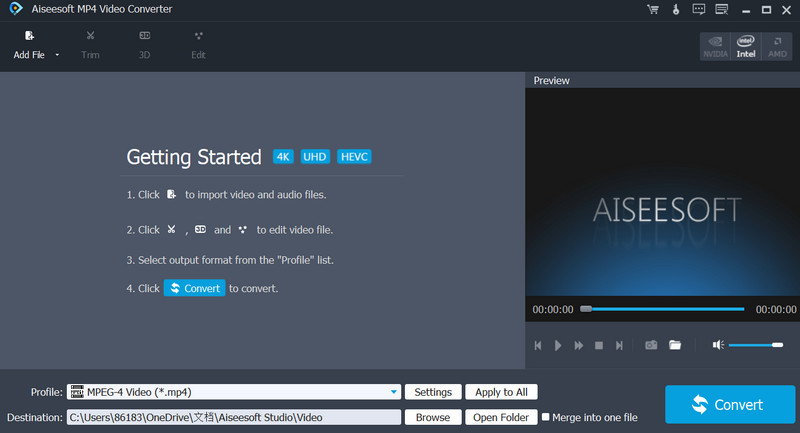
The getting-started screen of MP4 Video Converter: add files, edit, pick a profile and convert.
Features
Convert common formats to MP4, and back
Aiseesoft MP4 Video Converter converts MOV, FLV, AVI, WMV, MKV and other video to MP4 encodings such as HD MPEG-4 and H.264/MPEG-4 AVC, and converts MP4 to other formats. It also handles 4K: MP4, TS, MKV, AVI, FLV and WebM at 4K, and upscaling 480p, 720p and 1080p clips to 4K.
Ready-made profiles for devices
Aiseesoft MP4 Video Converter has presets named after devices, including iPhone, iPad, Apple TV, Samsung, Huawei, Sony, LG, Xiaomi, PS4, Xbox and Wii, so you choose the device rather than a resolution and bitrate.
Extract or convert audio
Aiseesoft MP4 Video Converter saves a video's soundtrack as MP3, OGG, M4A, AAC, AC3, AIFF, M4R and other formats, or lossless FLAC, ALAC, WAV and WMA. It also converts audio files from one format to another.
Edit before converting
Aiseesoft MP4 Video Converter can rotate and flip, crop, trim, merge files into one, add a text or picture watermark, apply 3D, deinterlace, and adjust brightness, saturation, contrast, hue and volume, with a preview of the original and the output side by side.
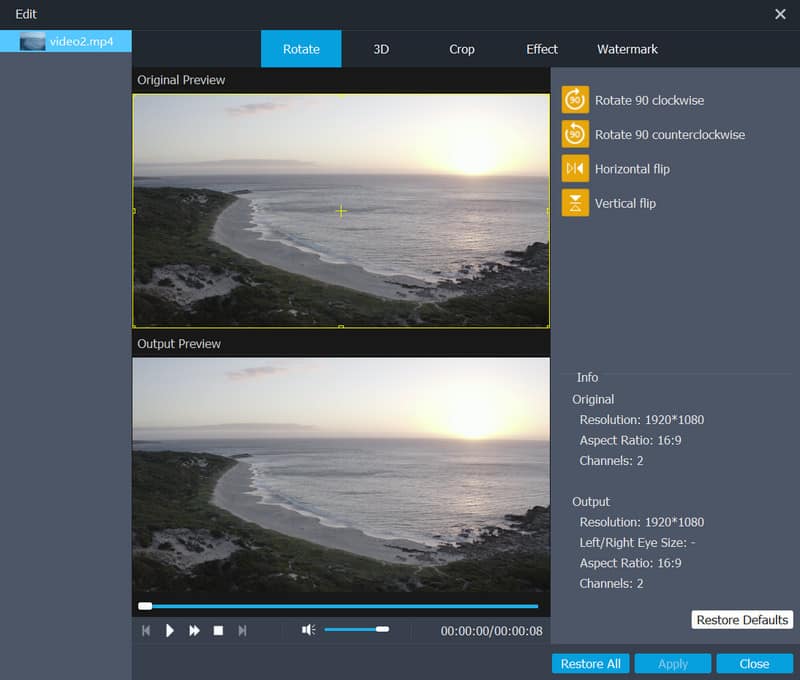
The Edit window: rotate and flip controls, with the original and output previews and the resolution info.
Batch conversion with your own settings
Aiseesoft MP4 Video Converter converts several files in one run and lets you set the encoder, frame rate, bitrate and resolution by hand. It uses NVIDIA CUDA and AMD acceleration to speed up conversion where your graphics card supports it.
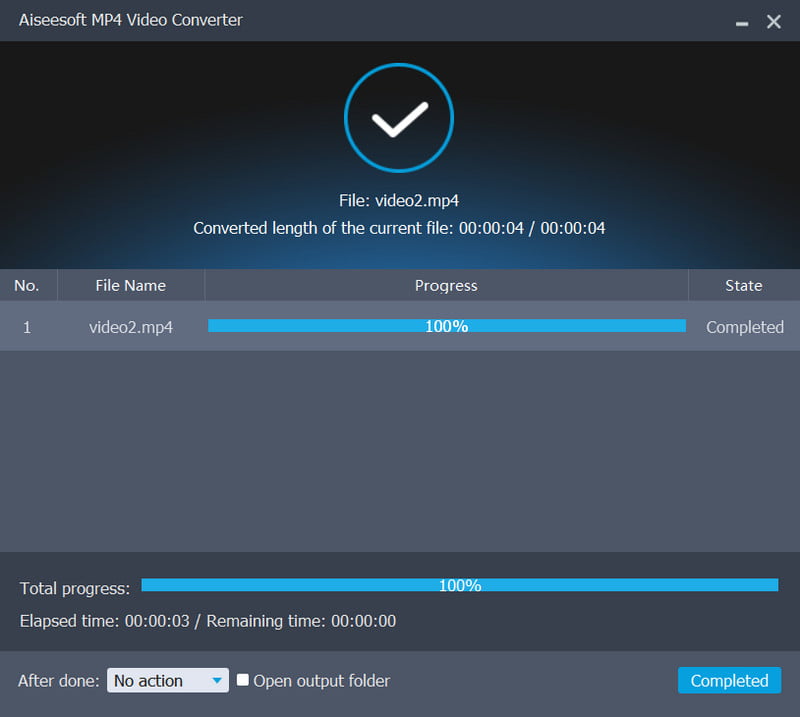
The progress window after a finished conversion, with the elapsed time and an "after done" option.
Real-World Uses
- Camcorder files for a phone. Convert a folder of MXF or MTS clips from a Canon or Sony camcorder to MP4 to watch them on an iPhone or upload them.
- Old downloads. Turn FLV and AVI files from years ago into MP4 so a smart TV's media player opens them.
- Quick fixes. Rotate a sideways phone video, crop black bars or trim a clip before sharing it.
- Audio only. Save the soundtrack of a lecture or concert video as MP3 for a commute.
Who it's for, and who should skip it
It suits Windows users who want a simple, offline MP4 converter with device presets, and who prefer a desktop program to uploading videos to a free website.
Skip it if you also want DVD ripping, a video compressor, GIF making or other tools: Aiseesoft's Video Converter Ultimate cost about the same on the day we checked and does more. Skip it too if you're comfortable with HandBrake, which is free and does the MP4 conversion part well. Mac users need the separate MP4 Converter for Mac.
Usage Guide
- Download and install MP4 Video Converter, then launch it.
- Click Add File and choose your videos, or drag them into the window.
- Optionally click Edit to rotate, crop, trim, watermark or adjust the picture.
- Choose an MP4 profile (or a device) in the Profile list and set the destination folder.
- Click Convert. The progress window shows the elapsed and remaining time.
Where it falls short
- The trial is short. It converts only 5 minutes of each longer file (half of a shorter one), so you can judge quality, not finish a job.
- Dated look. A buyer on the vendor's page asked for "a better interface"; the window looks like Aiseesoft's older converters.
- Narrow product. It is one part of what Video Converter Ultimate does, for a similar price.
- Refunds need a reason. The 30-day guarantee covers quality problems with the program, and Trustpilot reviewers report refused change-of-mind refunds.
What Users Say
Most reviews of this converter are on Aiseesoft's own site, which shows 215 ratings. Independent reviews are thin, so here is what we found, and what Trustpilot reviewers say about Aiseesoft.
On Aiseesoft's review page
Sriram (2018): "It works more than MP4 converter. I find I can export many other formats like MOV, MKV, AVI, WMV, 3GP, etc."
Shirley (2018): "I have a WMV video but it can't play on my iPhone SE. Thanks for the help of MP4 Video Converter, it converts WMV video to MP4 video with very simple steps, and now I can enjoy my video on iPhone."
Melody (2017): "I have many MXF videos of my family shot with my Canon camcorder. Since it can add many videos, I used it to convert all the MXF videos to MP4."
Cindy (2017): "The converting speed is fast, output quality is good, and support many kinds of videos. So it is a good converter. Hope it will have a better interface."
Tom (2017): "I just convert a lot of MTS video files to MP4 ones. The converting speed is so amazing."
Trustpilot (Aiseesoft as a company)
Aiseesoft has a TrustScore of 3.9 from 614 reviews on Trustpilot. Henry: "The software has done wonders in converting various formats to MP4 which I can easily play on my various devices." Pete Macay (October 27, 2026): "Other video converters couldn't handle the Sony proprietary format as well as Aiseesoft does." Vinnie M. (August 25, 2026): "I find the software well-designed and easy to use."
On the negative side, Yann Duval (October 14, 2026): "The SW does not work and they dont reimburse customers. It is a FRAUD," and Owend (September 14, 2026): "Whole point was to save time, and the return process was turning into an endless trap."
Buyers like the batch conversion and the speed, and camcorder owners like that it handles MXF and MTS. The criticisms are the older interface and Aiseesoft's refund policy, so try the trial on your own files first.
Editions and Pricing
Each button below orders that license.
| License | Price | Term | Computers | Order |
|---|
| Lifetime | $49.95 | Lifetime | 1 PC | Buy Lifetime |
| 1 Year | $29.00 | 1 year, renews automatically | 1 PC | Buy 1 Year |
Prices are from the order page on November 26, 2026. Aiseesoft's own site also sells a 1-month license and a 3-PC business license.
FAQs
Does Aiseesoft MP4 Video Converter work on Windows 11?
Yes. Aiseesoft MP4 Video Converter supports Windows 11, 10, 8.1, 8 and 7, and the vendor lists Vista and XP too. It needs a 1 GHz processor and 1 GB of RAM.
Is there a Mac version of Aiseesoft MP4 Video Converter?
Yes, as a separate product: Aiseesoft MP4 Converter for Mac. The licenses on this page are for the Windows program.
Can Aiseesoft MP4 Video Converter convert DVDs?
No. Aiseesoft MP4 Video Converter converts video and audio files. For discs, Aiseesoft sells other programs, such as Video Converter Ultimate.
Does converting to MP4 with Aiseesoft MP4 Video Converter lose quality?
Converting re-encodes the video, so some loss is possible, but Aiseesoft MP4 Video Converter lets you keep the original resolution and raise the bitrate in Settings to keep the loss small. Preview the output before converting a whole batch.
What's the difference between the lifetime and 1-year licenses?
The lifetime license for Aiseesoft MP4 Video Converter is a one-time payment of $49.95. The 1-year license costs $29.00 and renews automatically each year until you cancel.
Can I convert just part of a video?
Yes. Aiseesoft MP4 Video Converter's trim tool sets a start and end time, so only that part is converted, and you can merge several clips into one MP4.
System Requirements
- Windows 11, 10, 8.1, 8 or 7 (the vendor also lists Vista and XP SP2)
- 1 GHz Intel or AMD processor or faster
- 1 GB of RAM or more
- 44.5 MB download
Conclusion
Aiseesoft MP4 Video Converter does what its name says, simply and offline, and the $49.95 lifetime license means you pay once. It's a reasonable buy if all you need is MP4 conversion with device presets and light editing. The main reason not to buy it: Aiseesoft's own Video Converter Ultimate sold for about the same price on the day we checked and covers far more, and free tools handle plain MP4 conversion. Convert a few of your own files with the trial before deciding.
Download Free TrialBuy Lifetime LicenseBuy 1 Year