Aiseesoft MP4 Converter for Mac: Convert MKV, AVI, WMV, FLV and More to MP4 (and Back) on macOS
Aiseesoft MP4 Converter for Mac is a macOS app that converts MKV, AVI, WMV, FLV, MTS, MXF, WebM and other video to MP4, converts MP4 to other video and audio formats, and edits clips on the way. A lifetime license for one Mac is $49.95 on the order page, or $29 for one year.
It's for Mac users who keep getting videos QuickTime won't open, or who need MP4 files for a phone, a TV or a website.
Quick facts
- Price: $49.95 lifetime license for 1 Mac, or $29.00 for 1 year (auto-renewing)
- Developer: Aiseesoft Studio
- Platform: macOS on Intel and Apple M-series Macs (the app declares Mac OS X 10.7 or later); a separate Windows edition exists
- Converts: MKV, MOV, AVI, WMV, FLV, M4V, SWF, WLMP, WebM, 3GP, MTS, MXF, MPG to MP4, and MP4 to MOV, MKV, AVI, GIF, MP3, WAV and more, including H.265/HEVC and 4K
- Extras: clip, crop, rotate, watermark, effects, 2D/3D, add subtitles and audio tracks, merge, batch conversion
- Free trial: converts 5 minutes of each longer file (half of a file under 5 minutes)
- Refund: 30-day money-back guarantee when there's a quality problem with the program
- What we checked: the installer (51.9 MB disk image, dated January 31, 2024) downloaded from the vendor, with version 9.2.32 read from the app bundle, and both licenses on the order page ($49.95 lifetime, $29.00 for 1 year) on November 26, 2026. We didn't run it on a Mac.
Before you buy
- Compare with Mac Video Converter Ultimate. On November 26, 2026 the order page sold Aiseesoft Mac Video Converter Ultimate for $49.96 lifetime after a discount, practically the same price, and it adds DVD ripping and a toolbox.
- Free tools convert to MP4 too. HandBrake converts most formats to MP4 at no cost; this app is simpler and adds editing and device presets.
- Lifetime beats yearly. The 1-year license renews at $29; two years cost more than the lifetime license.
Download Free TrialBuy Lifetime LicenseBuy 1 Year
Overview
macOS handles MP4, MOV and M4V well and little else. Files from Windows PCs (WMV, AVI, WLMP from Windows Movie Maker), old Flash downloads (FLV, SWF), MKV movies and professional camcorder files (MTS, MXF) need converting before QuickTime, Photos, iMovie or an iPhone will use them.
Aiseesoft MP4 Converter for Mac does that conversion in one window. Add files, pick an MP4 profile or a device (iPhone, iPad, Samsung Galaxy, Google, LG, Sony, Avid, Adobe Premiere and others), and convert, in batches. It works the other way too: MP4 to MOV, MKV, AVI, GIF or audio formats such as MP3 and WAV.
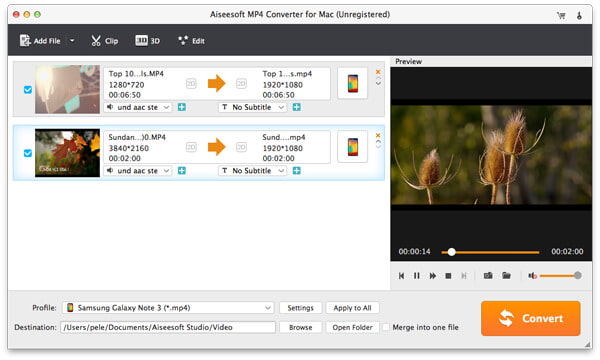
The main window with two clips (one 4K) loaded, a Samsung Galaxy profile selected and the preview on the right.
Features
Convert almost anything to MP4
Aiseesoft MP4 Converter for Mac converts MKV, AVI, WMV, FLV, M4V, 3GP, WebM, MTS, MXF, MPG, SWF and WLMP to MP4, handling HD and 4K video and H.265/HEVC, H.264 and MPEG encodings.
MP4 to other video, audio or GIF
Aiseesoft MP4 Converter for Mac converts MP4 to MP3, WAV, OGG and WMA for music players, and to SWF, GIF, MOV, MKV, M4V, AVI and MXF for other programs.
Device and editor profiles
Aiseesoft MP4 Converter for Mac lists ready-made profiles by device and app, from iPhone, iPad and iPod presets to Samsung, Huawei, Sony, LG, Xbox, PS4, Avid Media Composer and Adobe Premiere, so you pick a name rather than a codec.
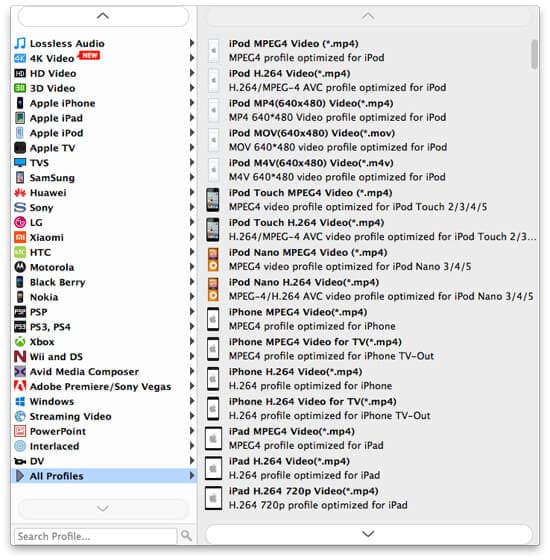
The profile list: device and format categories on the left, and the presets for the chosen device on the right.
Edit, subtitles and audio tracks
Aiseesoft MP4 Converter for Mac clips, crops, rotates and flips video, adds text or image watermarks, adjusts brightness, contrast, saturation, hue and volume, deinterlaces, and converts 2D to 3D or 3D to 2D. It can add or change subtitles and add one or more extra audio tracks.
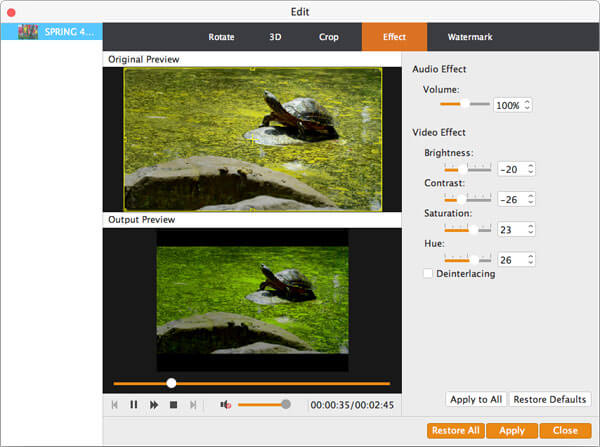
The Edit window's Effect tab, with original and output previews and the brightness, contrast, saturation and hue sliders.
Real-World Uses
- Windows Movie Maker projects. Convert WLMP and WMV files from an old PC so they play on the Mac.
- MKV movies for an iPad. Batch-convert MKV files to iPad MP4 before a trip.
- Camcorder MTS clips. Turn AVCHD footage into MP4 and trim it before uploading.
- GIFs and audio. Make a short GIF from an MP4, or save a lecture's audio as MP3.
Who it's for, and who should skip it
It suits Mac users who want a straightforward, offline MP4 converter with presets and a decent editor, paid for once.
Skip it if you'd also like DVD ripping or more tools: Aiseesoft's Mac Video Converter Ultimate cost about the same on the day we checked. Skip it if HandBrake already covers your needs. Windows users need Aiseesoft MP4 Video Converter instead.
Usage Guide
- Download the disk image, drag MP4 Converter for Mac to Applications and open it.
- Click Add File to import your videos.
- Click Edit to clip, crop, watermark, rotate or merge, if needed.
- Pick an output format or device under Profile and a destination folder.
- Click Convert.
Where it falls short
- Same price as the bigger app. At $49.95 it costs what Aiseesoft's broader Mac converter cost on the day we checked.
- Reviews read alike. The recent reviews on Aiseesoft's page are short and generic, and similar wording appears on other Aiseesoft product pages, so give them little weight.
- Short trial. The trial converts only 5 minutes of each longer file.
- Refunds need a reason. The 30-day guarantee covers quality problems with the program, not a change of mind.
What Users Say
Aiseesoft's page shows 144 reviews for the Mac edition. The older ones are more specific than the recent ones, so we quote those first. Independent reviews are scarce.
On Aiseesoft's review page
Jasmine (2018): "I downloaded many FLV videos and can't play them on my Mac with QuickTime Player. I purchased this MP4 converter for Mac to convert these videos to MOV for playback."
Carmelita (2018): "This MP4 video converter for Mac is more than just a converter. It also can work as a powerful video editor to edit video, like cut video and merge video clips and more."
Hondo (2018): "I use it to convert my recorded MTS file to MP4 file. Now I can watch MTS files on my iPad easily."
Metha (2018): "It lets you convert batch files. I just let them convert, and go outside to have a lunch. Then when I come back home, they are done."
Ethan Johnson (2024): "I've tried several MP4 converters, and this one is the best. The conversion speed is fast, and the output quality is excellent. Perfect for Mac users."
Trustpilot (Aiseesoft as a company)
Aiseesoft has a TrustScore of 3.9 from 614 reviews on Trustpilot. Henry: "The software has done wonders in converting various formats to MP4 which I can easily play on my various devices." Kirill Yanovsky (December 21, 2025): "I have been a happy user of Aiseesoft Mac Screen Recorder for over 6 years."
The 1-star reviews are about refunds and logins: Rb (September 15, 2026): "i cant login for some weird reason and if you email this company they will make circles with you on email". Yann Duval (October 14, 2026): "The SW does not work and they dont reimburse customers. It is a FRAUD,"
Buyers like the batch conversion and the editing tools. The weak spots are generic recent testimonials and Aiseesoft's refund policy, so judge it with the trial on your own files.
Editions and Pricing
Each button below orders that license.
| License | Price | Term | Computers | Order |
|---|
| Lifetime | $49.95 | Lifetime | 1 Mac | Buy Lifetime |
| 1 Year | $29.00 | 1 year, renews automatically | 1 Mac | Buy 1 Year |
Prices are from the order page on November 26, 2026. Aiseesoft's own site also sells a 1-month license and a 3-Mac business license.
FAQs
Does Aiseesoft MP4 Converter for Mac support Apple silicon?
Aiseesoft lists Intel processors and Apple M-series chips for MP4 Converter for Mac, with 1 GB of RAM. Use the free trial to confirm it on your Mac.
Can Aiseesoft MP4 Converter for Mac convert Windows Movie Maker files?
Yes. Aiseesoft MP4 Converter for Mac lists WLMP, the Windows Movie Maker project format, among the files it converts to MP4.
Can Aiseesoft MP4 Converter for Mac make GIFs?
Yes. Aiseesoft MP4 Converter for Mac can convert MP4 to GIF; trim the clip first to keep the GIF small.
Does Aiseesoft MP4 Converter for Mac rip DVDs?
No. Aiseesoft MP4 Converter for Mac converts video files. Aiseesoft's Mac Video Converter Ultimate also handles DVDs.
Is the 1-year license a subscription?
Yes. Aiseesoft MP4 Converter for Mac's 1-year license renews automatically until you cancel. The $49.95 lifetime license is paid once.
System Requirements
- macOS (the app declares Mac OS X 10.7 or later; the vendor names current macOS releases)
- Intel processor or Apple M-series chip
- 1 GB of RAM or more
- 51.9 MB download
Conclusion
Aiseesoft MP4 Converter for Mac is a capable, simple MP4 converter with a useful editor, and the $49.95 lifetime license means you pay once. The reason to buy it is fast batch conversion with presets and subtitle and audio-track tools. The main reason not to: on the day we checked, Aiseesoft's Mac Video Converter Ultimate cost the same and does more, and HandBrake is free. Try the trial on the files that gave you trouble.
Download Free TrialBuy Lifetime LicenseBuy 1 Year