Aiseesoft MOD Converter: Convert JVC, Panasonic and Canon MOD/TOD Camcorder Video on Windows
Aiseesoft MOD Converter (sold at checkout as Mod Video Converter) is a Windows program that converts the .MOD and .TOD files recorded by older JVC Everio, Panasonic SDR and Canon FS camcorders into MP4, WMV, AVI, MOV, MKV and other formats, or into MP3 and other audio. A lifetime license for one PC is $42 on the order page, or $29 for one year.
It's for people with a drawer of old camcorder footage that nothing on a modern PC, phone or TV wants to open.
Quick facts
- Price: $42.00 lifetime license for 1 PC, or $29.00 for 1 year (auto-renewing)
- Developer: Aiseesoft Studio
- Platform: Windows 11, 10, 8, 7 (a separate Mac edition exists)
- Input: MOD and TOD from JVC, Panasonic and Canon camcorders, plus MP4, WMV, AVI, MKV, FLV and other common formats
- Output: MP4, AVI, WMV, MOV, MKV, FLV, ASF, MPEG, VOB and more (4K supported); MP3, AAC, WMA, OGG, AC3, ALAC, FLAC audio
- Free trial: converts 5 minutes of each longer file (half of a file under 5 minutes)
- Refund: 30-day money-back guarantee when there's a quality problem with the program
- What we checked: installer version 9.2.36 (46.7 MB, dated January 9, 2024) downloaded from the vendor, and both licenses on the order page ($42.00 lifetime, $29.00 for 1 year) on November 26, 2026. We didn't convert footage ourselves.
Before you buy
- Try renaming first. MOD files are MPEG-2 video with an unusual extension, so some players (VLC, for example) open them as they are. If you only want to watch them, try that before buying.
- TOD is the HD cousin. JVC's HD Everio models (GZ-HD3 to GZ-HD40) record .TOD files; this converter handles both.
- The all-format converter is only a little more. On November 26, 2026 Aiseesoft Video Converter Ultimate was $49.96 lifetime on the order page and reads MOD too.
Download Free TrialBuy Lifetime LicenseBuy 1 Year
Overview
Many older tapeless camcorders (JVC's Everio GZ-MG and GZ-MS series, Panasonic's SDR models and Canon's FS series) saved standard-definition video as .MOD files, and JVC's HD models saved .TOD. Phones, smart TVs, YouTube and most editing apps today don't recognize those extensions.
Aiseesoft MOD Converter turns them into everyday formats. Add the files, choose MP4 (or a device, or a preset for Premiere Pro, iMovie, Final Cut Pro, Sony Vegas Pro or Magix), and convert. You can trim, crop, rotate sideways clips, add 3D, watermark, adjust contrast, saturation and hue, merge clips, and add or remove subtitles and audio tracks first.
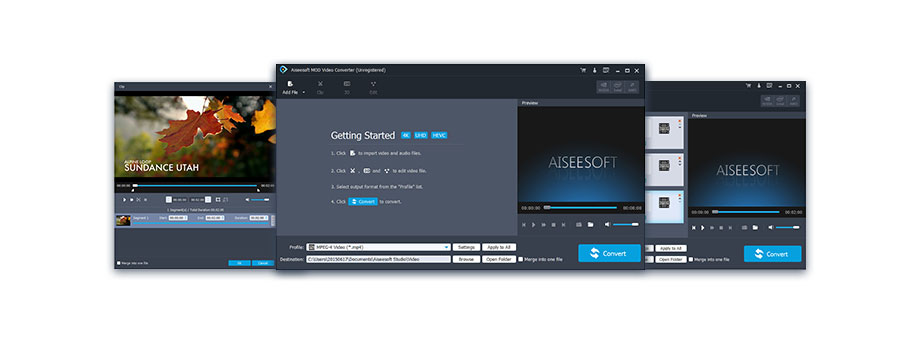
MOD Converter as shown on the vendor's guide: the getting-started screen with the file list and profile windows beside it.
Features
Convert MOD and TOD to common formats
Aiseesoft MOD Converter converts MOD and TOD from JVC, Panasonic and Canon camcorders to MP4, AVI, WMV, MOV, MKV, FLV, ASF, MPEG, VOB and other formats, including 4K output, and saves the audio as MP3, AAC, WMA, OGG, AC3, ALAC or FLAC. It also converts other common video formats.
Presets for devices and editors
Aiseesoft MOD Converter has ready-made profiles for iPhone, iPad, Samsung Galaxy, HTC, Sony and LG phones, PS3, PS4, Xbox 360 and Wii, and for editing in Adobe Premiere Pro, iMovie, Final Cut Pro, Sony Vegas Pro and Magix Video Pro.
Subtitles and audio tracks
Aiseesoft MOD Converter can remove a video's subtitles or add external SRT, SSA and ASS subtitle files, and add an external audio track or keep several audio tracks in the output.
Edit, merge and speed up
Aiseesoft MOD Converter clips, crops, rotates and flips video, adds 3D and text or picture watermarks, adjusts contrast, saturation and hue, and merges several files into one. It uses NVIDIA CUDA and ATI/AMD acceleration for faster conversion.
Real-World Uses
- Rescuing a JVC Everio hard drive. Copy the MOD files off an old GZ-MG camcorder and convert them to MP4 for a family cloud album.
- Editing old footage. Convert MOD to a Premiere Pro or Vegas profile to cut a wedding video from 2008.
- Watching on a phone. Convert TOD clips from a JVC HD camcorder to iPhone MP4.
- Sideways clips. Rotate videos filmed with the camcorder on its side and merge a day's clips into one file.
Who it's for, and who should skip it
It suits Windows users with MOD or TOD footage who want a simple converter with camcorder-aware presets and a one-time price.
Skip it if you only want to watch a few files (VLC plays MPEG-2 MOD files), or if you have other video to convert too, where Aiseesoft's Video Converter Ultimate cost only about $8 more on the day we checked. HandBrake, which is free, can also read MOD files. Mac users need MOD Converter for Mac instead.
Usage Guide
- Copy the .MOD or .TOD files from the camcorder (usually in an SD_VIDEO folder) to your PC.
- Download and install MOD Converter, then launch it.
- Click Add File and choose the clips.
- Click Clip, 3D or Edit to trim, rotate, crop or adjust them, if needed.
- Choose a format under Profile and click Convert.
Where it falls short
- Standard-definition sources. MOD is 480i/576i video; converting it to 4K output doesn't add detail, it only makes files bigger.
- Interlaced footage. Camcorder MOD files are interlaced, so turn on deinterlacing for clean playback on computer screens and phones.
- Short trial. The trial converts only 5 minutes of each longer file.
- Refunds need a reason. The 30-day guarantee covers quality problems with the program, not a change of mind.
What Users Say
Aiseesoft's page shows 78 reviews for MOD Converter. Independent reviews are scarce, so here are the buyer reviews on the vendor's page and what Trustpilot reviewers say about the company.
On Aiseesoft's product page
Anna: "I have a JVC GZ-MG630 camcorder and it records mod video. Thank you very much for this mod video converter. It converted my mod video files to mp4 format. Now I can edit my mod videos easily. Definitely a thumb up!"
Deshan: "Easily convert my .mod videos to .mp4. Now, I can play it on my iPhone conveniently."
Steve: "I try the free version of this software, and find it works wonderful. It helps me extract audio file from the video and keep the background music on my computer forever."
Oberholzer: "I can change the subtitle for my original video file and watch the video files happily."
Verner: "This MOD Converter is compatible with CUDA Hardware Acceleration technology on my computer. The converting speed is 10X faster than online converters."
Trustpilot (Aiseesoft as a company)
Aiseesoft has a TrustScore of 3.9 from 614 reviews on Trustpilot. Pete Macay (October 27, 2026): "Other video converters couldn't handle the Sony proprietary format as well as Aiseesoft does." Vinnie M. (August 25, 2026): "I find the software well-designed and easy to use."
The negative reviews are about refunds: Owend (September 14, 2026): "Whole point was to save time, and the return process was turning into an endless trap." Yann Duval (October 14, 2026): "The SW does not work and they dont reimburse customers. It is a FRAUD,"
Owners of JVC Everio camcorders like that it turns MOD files into MP4 without fuss. The complaints are company-wide, about refunds, so convert one of your own clips with the trial first.
Editions and Pricing
Each button below orders that license.
| License | Price | Term | Computers | Order |
|---|
| Lifetime | $42.00 | Lifetime | 1 PC | Buy Lifetime |
| 1 Year | $29.00 | 1 year, renews automatically | 1 PC | Buy 1 Year |
Prices are from the order page on November 26, 2026. Aiseesoft's own site also sells an 8-PC multi-user license.
FAQs
Which camcorders record MOD files that Aiseesoft MOD Converter reads?
Aiseesoft MOD Converter lists JVC Everio GZ-MG and GZ-MS models (for example GZ-MG130, GZ-MG155 and GZ-MG630), Panasonic SDR models (SDR-H20, SDR-S7, SDR-H85 and others) and Canon FS10, FS11, FS100, FS200, FS21 and FS22. JVC's GZ-HD models record TOD, which it also reads.
Does Aiseesoft MOD Converter work on Windows 11?
Yes. Aiseesoft MOD Converter supports Windows 11, 10, 8 and 7 (the vendor also lists Vista and XP), with a 1 GHz processor and 1 GB of RAM.
Can I keep the camcorder's original quality with Aiseesoft MOD Converter?
Aiseesoft MOD Converter re-encodes the video, so choose a high bitrate and keep the original resolution. MOD is standard definition, so a higher output resolution won't make it sharper.
Is the 1-year Aiseesoft MOD Converter license a subscription?
Yes. Aiseesoft MOD Converter's 1-year license renews automatically each year until you cancel. The $42 lifetime license is a one-time payment.
Is there a Mac version of Aiseesoft MOD Converter?
Yes, as a separate product: Aiseesoft MOD Converter for Mac. The licenses on this page are for Windows.
System Requirements
- Windows 11, 10, 8 or 7 (the vendor also lists Vista and XP SP2)
- 1 GHz Intel or AMD processor or faster
- 1 GB of RAM or more
- 46.7 MB download
Conclusion
Aiseesoft MOD Converter is a reasonable $42 one-time buy if you have hours of JVC, Panasonic or Canon MOD/TOD footage to turn into MP4 for phones, editors or the cloud, with presets that know those cameras. The reason to buy it is a simple, dedicated tool for an awkward old format. The reason not to: VLC plays MOD files for free, and Aiseesoft's all-format converter cost only a little more on the day we checked. Convert a clip with the trial first.
Download Free TrialBuy Lifetime LicenseBuy 1 Year