Aiseesoft Mac iPhone Converter Suite: Mac FoneTrans and Mac Video Converter Ultimate in One Old Package
Aiseesoft Mac iPhone Converter Suite costs $79 for a lifetime license on one Mac and pairs Mac FoneTrans (backing up and moving iPhone photos, music, contacts, messages and call logs) with Mac Video Converter Ultimate (batch video and audio conversion with basic editing). It's an Intel-only package from 2018 that needs Rosetta 2 on any Apple silicon Mac, so it fits owners of older Macs and older iOS devices far better than anyone with current hardware.
On a Mac, Apple already handles a lot of this for free: Finder syncs music and video, Photos imports the camera roll, and AirDrop moves files between devices. The suite's pitch is the rest: pulling messages, contacts and call logs off the phone, and converting video the Mac's own apps won't open.
Quick facts
- Suite launcher: version 6.3.6, disk image dated November 1, 2018
- Programs inside: Mac FoneTrans 8.2.10 and Mac Video Converter Ultimate 9.2.18
- Developer: Aiseesoft Studio
- macOS: Mac OS X 10.7 or later. Intel code only, so Apple silicon Macs run it through Rosetta 2. A Windows edition is sold separately.
- Price: $79 once on the order page, lifetime license for one Mac
- Trial: free download. Aiseesoft's converters convert 5 minutes of each file in trial mode. No trial limit is published for the transfer part.
- Guarantee: 30-day money-back guarantee
- What we checked: we downloaded the 102.8 MB disk image, opened it and read each app's own version (launcher 6.3.6.79874, Mac Video Converter Ultimate 9.2.18.79982, Mac FoneTrans 8.2.10.80292, minimum system 10.7) and found only Intel (x86_64 and i386) program code, no Apple silicon code. The order page charged $79 for the lifetime license on November 4, 2026. We didn't install the apps or connect an iPhone.
Before you buy
Two risks come with the 2018 builds. First, the iPhone side: Mac FoneTrans 8.2.10 predates every iOS version from iOS 13 on, and Aiseesoft now sells a separately updated Mac FoneTrans for current iPhones. Second, the Mac side: with no Apple silicon code, both apps depend on Rosetta 2 on M-series Macs. Apple announced in 2025 that Rosetta stays a general-purpose tool only through macOS 27, so these apps are expected to stop launching on Apple silicon Macs that move past it.
Run the free download on your own Mac with your own iPhone first. Aiseesoft's guarantee refunds within 30 days, but don't count on it as a way to try the product.
Download Free TrialBuy Now
Overview
Open the disk image and you'll find one app, "Aiseesoft Mac iPhone Converter Suite", with the two real programs packed inside it. The launcher sends you to either Mac FoneTrans or Mac Video Converter Ultimate, each with its own window, menus and settings. Aiseesoft's product page puts the emphasis on 4K conversion, batch jobs and iOS backups.
Features
Back up what Finder doesn't
Mac FoneTrans in Mac iPhone Converter Suite copies contacts, messages, call logs, photos, videos and songs from an iPhone, iPad or iPod touch to folders on the Mac, item by item. Finder only makes a whole-device backup you can't browse, so being able to save a conversation or a contact list as files is the useful part.
Device to device, and Mac to device
Mac FoneTrans can also push videos and photos from the Mac onto an iPhone or iPad and copy files between two connected iOS devices, which Aiseesoft describes as a three-click job.

The Mac FoneTrans guide image on the suite's product page: a connected iPhone on iOS 12.4 with one-click buttons such as Device to PC, Contacts Backup, iTunes Library and Ringtone Maker, plus the music list and a photo grid. iOS 12.4 came out in 2019, so this shows a newer Mac FoneTrans than the 2018 build the suite installs.
Batch conversion, 4K included
Mac Video Converter Ultimate in this suite converts several files in one run, from 4K UHD and 1080p down to SD, into MOV, MP4, AVI, FLV, MKV and other formats, or pulls the soundtrack out as MP3, FLAC or other audio. It's the answer when QuickTime refuses an AVI or MKV file, or when you want lossless audio from a concert video.
Editing before export
Mac Video Converter Ultimate in the suite lets you split a video into parts, crop the frame, rotate it, merge segments, add a text or image watermark and adjust image and sound effects before converting. Aiseesoft also lists quality enhancement and a speed-up "acceleration technique".
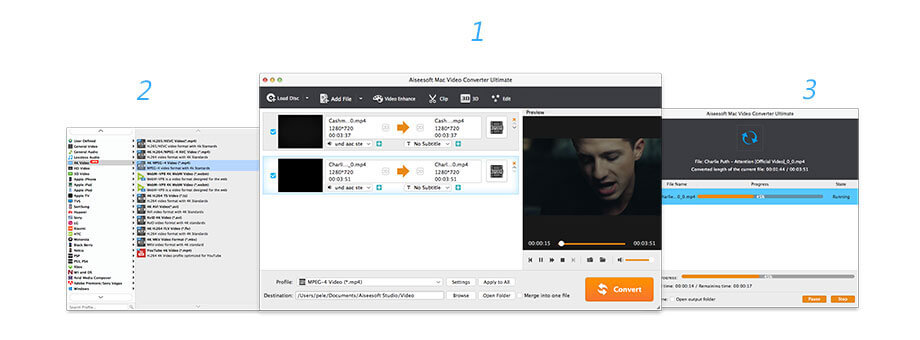
The Mac Video Converter Ultimate guide image from the suite's page: two 720p clips set to MPEG-4 output with Load Disc, Add File, Video Enhance, Clip, 3D and Edit buttons, the format list, and the conversion progress window.
Benefits
- Browsable backups. Messages and contacts saved as files you can open, rather than a sealed Finder backup.
- Formats Apple skips. A converter for the AVI, MKV and FLV files that Photos, QuickTime and the TV app won't touch.
- One payment. A lifetime license for both apps on one Mac, with no renewals.
Real-World Uses
- Saving an old iPhone's history: export the messages and call log of a retired iPhone 6 or 7 before it's wiped.
- An Intel MacBook in the family: convert a folder of old camcorder files to MP4 in one batch.
- Audio from video: extract FLAC from a concert recording to play in the Music app.
- A shared family iPad: copy an album from one child's iPod touch to the iPad without uploading anything.
Who It's For, and Who Should Skip It
It's for owners of Intel Macs, and older iPhones, iPads or iPod touches, who've confirmed with the trial that both apps work on their setup.
Skip it if:
- Your Mac has an M-series chip. The apps rely on Rosetta 2, which Apple is phasing out after macOS 27.
- Your iPhone runs a current iOS. A transfer tool that's still updated is the safer buy, Aiseesoft's own current Mac FoneTrans included.
- You just want media on and off the phone. Finder, Photos and AirDrop do that for free.
- You need only the converter. Free converters such as HandBrake cover basic format changes.
Usage Guide
- Install. Open the DMG, drag the app to Applications and launch it. On an Apple silicon Mac, accept the prompt to install Rosetta 2 if it appears.
- Back up the phone: connect the iPhone by USB, tap Trust, pick a category such as Messages or Contacts, tick the items and click Export to.
- Copy to the phone: in Photos or Videos, click Add and choose files on the Mac.
- Convert: open the converter, click Add File and add several videos at once.
- Click Edit to trim, crop, rotate or watermark, then pick a profile (MP4, MOV, MP3, FLAC and others).
- Click Convert. All the queued files process in one batch.
Where it falls short
- Built for Mac OS X 10.7 era hardware. Both apps are on the Qt 5.6 framework and contain no Apple silicon code.
- Older than Finder sync. The 2018 apps came out before macOS Catalina replaced iTunes with Finder for iPhone syncing, so expect rough edges on newer macOS versions.
- Two apps behind one icon. Settings and registration may need doing in each.
- Thin trial information. Aiseesoft states the converter's 5-minute limit but nothing for the transfer app.
What Users Say
There are no independent reviews of the Mac suite on review sites, app stores or tech sites that we could find. Aiseesoft's product page counts 243 reviews and shows four, picked by the vendor:
Shown on Aiseesoft's page
"Best alternative to iTunes. This powerful iOS transfer can help me directly transfer videos and music from my Mac to iPhone and iPad. It's really convenient!" Carter
"I want to transfer some iPhone photos to Mac, iTunes won't help me to do that. Finally I find this fantastic product. I can handily copy the treasured files from iPhone to Mac." Duncan
"This iPhone Converter Suite provides lots of functions I need. Now I can easily transfer files from iPhone and Mac. And I can use it to convert videos to MP4 format for my iPad." Grado
"It is really an excellent program. It is easy to use and download. A quality product at a great price." Picky
The recurring theme is iTunes: three of the four praise the suite as a way around it. That dates them, since iTunes left the Mac in 2019. None says which Mac or iOS version they used.
Comparisons
Mac suite vs. the current Aiseesoft Mac apps
Aiseesoft still sells Mac FoneTrans and Mac Video Converter Ultimate on their own, with updated builds (the current Mac Video Converter Ultimate installer is from August 2026 and lists macOS 10.12 or later). Aiseesoft's store sells each as a lifetime one-Mac license for $49.96 with its coupon ($62.45 list), so about $100 for the pair against the suite's $79, but they're maintained. The suite is cheaper only because it freezes both at their 2018 versions.
Mac suite vs. Windows suite
The Windows iPhone Converter Suite is the same idea with the Windows programs (FoneTrans 8.3.60 and Video Converter Ultimate 9.2.56, also October 2018) and the same $79 price. Licenses don't cross platforms.
Editions and Pricing
| Option | What you get | Apple silicon | Price |
|---|
| Mac iPhone Converter Suite | 2018 builds of both apps, lifetime, 1 Mac | Rosetta 2 only | $79 on the order page |
| iPhone Converter Suite (Windows) | 2018 Windows builds, lifetime, 1 PC | Not applicable | $79, sold separately |
Aiseesoft's own store shows a coupon price of $63.20 for the Mac suite.
FAQs
Does Aiseesoft Mac iPhone Converter Suite run on an M1, M2, M3 or M4 Mac?
Aiseesoft Mac iPhone Converter Suite contains only Intel code, so on an M-series Mac it runs through Rosetta 2. That works on current macOS versions, but Apple plans to limit Rosetta after macOS 27, so it's a short-term option.
Will it see an iPhone running a current iOS?
Aiseesoft Mac iPhone Converter Suite's Mac FoneTrans is the 8.2.10 build from 2018, and Aiseesoft lists no supported iOS versions for the bundle. Connect your iPhone to the trial before buying.
Can I export iPhone text messages to my Mac with it?
Aiseesoft Mac iPhone Converter Suite lists messages, contacts and call logs among the data Mac FoneTrans copies to the Mac. Whether it can read them from your iPhone depends on the iOS version, which is the part to test in the trial.
Does the suite license work on the Windows version too?
No. Aiseesoft Mac iPhone Converter Suite is licensed for one Mac. The Windows iPhone Converter Suite is a separate $79 product.
Do I get updates to the newest Mac FoneTrans?
Aiseesoft Mac iPhone Converter Suite's pages don't promise that, and the suite's own download is still the 2018 build. Ask Aiseesoft's support before buying if you need the current apps.
Is there a subscription?
No. Aiseesoft Mac iPhone Converter Suite is a single $79 payment for a lifetime license on one Mac.
System Requirements
- Mac OS X 10.7 or later
- Intel Mac, or an Apple silicon Mac with Rosetta 2
- About 103 MB for the download
- A USB cable for the iPhone, iPad or iPod touch
Conclusion
Aiseesoft Mac iPhone Converter Suite packs two useful Mac apps, but both are frozen at their 2018 versions, Intel-only, and living on Rosetta 2 time on any new Mac. The reason to buy it is a cheap lifetime license for an older Intel Mac and an older iPhone or iPad that the trial handles well. The reason not to is everything else: a current iPhone, an M-series Mac, or any plan to keep using it for years.
Our verdict: not recommended for a modern Mac and iPhone. Consider it only if the free trial works on the exact hardware you'll keep using.
Download Free TrialBuy Now