Aiseesoft iPhone Converter Suite (Windows): A 2018 Bundle of FoneTrans and Video Converter Ultimate
Aiseesoft iPhone Converter Suite is a $79 Windows bundle (lifetime license, one PC) of two Aiseesoft programs: FoneTrans, for copying photos, music, videos, contacts and messages between an iPhone and a PC, and Video Converter Ultimate, for converting and editing video. The catch is the age of what you get: the installer Aiseesoft serves today holds versions of both programs built in October 2018.
The idea behind the bundle is sensible. You want your phone's photos and videos on the PC, and you want the PC's movies in a format the iPhone plays. One purchase covers both directions. Whether the 2018 programs still do that with a current iPhone is the question this page keeps coming back to.
Quick facts
- Bundle version: 9.0.28 (installer dated November 1, 2018)
- What's inside: FoneTrans 8.3.60 and Video Converter Ultimate 9.2.56, both built October 22, 2018
- Developer: Aiseesoft Studio
- Windows: Aiseesoft's page lists Windows 10, 8 and 7. The programs are 32-bit. A Mac edition is sold separately.
- Price: $79 once on the order page, lifetime license for one PC
- Trial: free download. Aiseesoft's trial rules for its video converters allow 5 minutes of each file. No limit is published for the transfer part.
- Guarantee: 30-day money-back guarantee
- What we checked: we downloaded the 108 MB installer and unpacked it: the suite launcher is version 9.0.28.80753 (October 23, 2018), Video Converter Ultimate is 9.2.56.79982 and FoneTrans is 8.3.60.80370 (both October 22, 2018). The order page charged $79 for the lifetime license on November 4, 2026. We didn't install it or connect an iPhone.
Before you buy
This bundle hasn't been updated since 2018. FoneTrans 8.3.60 was built a month after iOS 12 came out. Every iPhone release since, up to iOS 26, arrived after it, and iPhone transfer tools normally need updates to keep connecting to new iOS versions. Aiseesoft still updates the standalone programs: its current iPhone transfer tool (now sold as Aiseesoft iOS Transfer) advertises iOS 26 and 27 support, and Video Converter Ultimate reached version 11 with a July 2026 installer. The suite gets none of that.
Aiseesoft doesn't say whether a suite license also activates the current standalone versions. Ask its support team before buying, and test the free download with your own iPhone. If the transfer part can't see your phone, the bundle is mostly a 2018 video converter.
Download Free TrialBuy Now
Overview
Installing the suite gives you a small launcher and two full programs in their own folders. Aiseesoft's guide treats them as two modes: Mode 1 connects one or two iOS devices and moves data with Export to or Add, and Mode 2 loads video or audio files, edits them and converts them. Nothing is shared between the two, so think of it as two licenses sold together rather than one combined app.
Features
FoneTrans: iPhone to PC, PC to iPhone, and phone to phone
FoneTrans in iPhone Converter Suite copies photos, videos, music, contacts, messages and other files from an iPhone, iPad or iPod touch to the PC, and adds videos and photos from the PC back to the device. With two devices plugged in, it moves files directly between them, which Aiseesoft pitches as the missing "Bluetooth for iPhones" for sharing with a friend's iPad.

Aiseesoft's guide image for the transfer mode: an unregistered FoneTrans showing a device summary (an iPhone 5C on iOS 7.1, with To iTunes, To Folder and To Device buttons), a photo album view and a song list.
Video Converter Ultimate: formats the iPhone plays
Video Converter Ultimate in iPhone Converter Suite converts videos, 4K included, between common formats, with ready-made profiles for Apple devices that output MP4, MOV or M4V. You can change the encoder, frame rate, bitrate and resolution yourself, and Aiseesoft says its acceleration technique speeds up conversion.
Basic editing and four enhancement switches
Video Converter Ultimate in this bundle can clip, crop, merge, rotate, flip and watermark video, with a preview window and a one-click snapshot button for grabbing a still frame. Its Video Enhance panel has four options: upscale resolution (SD to HD or 4K), auto-optimize brightness and contrast, remove video noise, and reduce shaking. These are the 2018 tools, not the AI enhancer Aiseesoft advertises for the current standalone version.
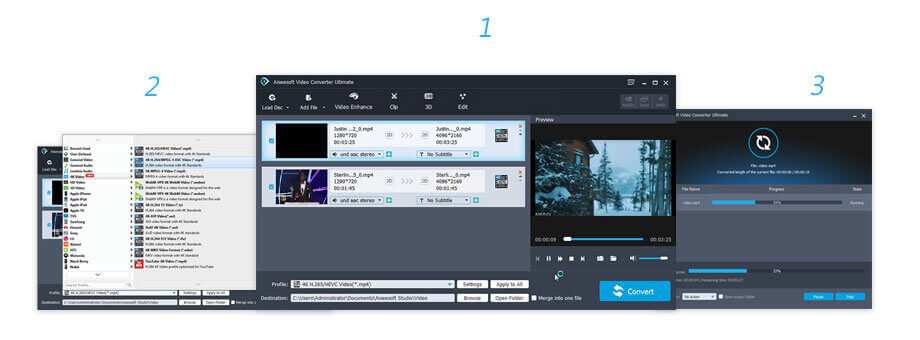
Aiseesoft's guide image for the convert mode: the Video Converter Ultimate window with Load Disc, Add File, Video Enhance, Clip, 3D and Edit buttons, two clips set to H.265 MP4, the output profile list, and the progress window.
Benefits
- Both jobs, one license. Moving phone data and converting video for the phone are covered by one $79 purchase.
- No subscription. It's a lifetime license, while Aiseesoft also sells some current programs as monthly plans.
- Offline and local. Files go over the USB cable to your own PC, with no cloud account.
Real-World Uses
- An older iPhone or iPod touch in the family: back up its camera roll and contacts to the PC before it's retired, assuming FoneTrans 8 still recognizes it.
- Films for a flight: convert a few MKV or AVI files to an iPad-friendly MP4 profile and copy them across.
- Tidying home videos: trim, rotate and stabilize clips shot sideways on the phone, then merge them into one file.
- Sharing between two devices: plug in an iPhone and an iPad and copy a holiday album from one to the other.
Who It's For, and Who Should Skip It
It suits a narrow group: Windows 7, 8 or 10 users with an older iPhone, iPad or iPod touch who've tried the free download, seen both parts work, and want a cheap lifetime license for both.
Skip it if:
- You have a recent iPhone. Buy a transfer tool that's still updated for current iOS versions, Aiseesoft's own iOS Transfer included.
- You want current video features such as AI upscaling or newer codecs. The standalone Video Converter Ultimate 11 has them, and this 2018 version doesn't.
- You only need one half. Aiseesoft sells each program on its own, current version included.
- You're on Windows 11. It isn't on Aiseesoft's compatibility list for this bundle.
Usage Guide
- Install. Run the 108 MB installer and start the suite. It opens the transfer or convert mode.
- Transfer: connect the iPhone by USB, tap Trust on the phone, then click a data type in the left column (photos, music, contacts and so on).
- Tick the items and click Export to to copy them to the PC, or Add to copy files from the PC to the device.
- Convert: click Add File, pick a video, and choose an output profile, such as an Apple device or MP4.
- Click Edit or Video Enhance to trim, crop, rotate, watermark or clean up the clip, and preview it.
- Choose the destination folder and click Convert.
Where it falls short
- Frozen in 2018. The installer's file dates, the iOS 7.1 phone in the guide image and the missing Windows 11 listing all point the same way: this bundle is kept on sale, not developed.
- No stated transfer trial limit. You can see whether FoneTrans detects your phone, but Aiseesoft doesn't say what the unregistered transfer mode holds back.
- Two separate programs. The "suite" is a launcher in front of two apps, each with its own window and settings.
- Old naming. The product page and download still use the "dvd-to-iphone-suite" file names of an even older product, which makes support searches confusing.
What Users Say
We found no independent review of iPhone Converter Suite itself, on review sites or in tech magazines. The comments below are the four Aiseesoft shows on the product page, which counts 54 reviews. They are the vendor's selection, they're all positive, and none mentions a phone or Windows version.
On Aiseesoft's product page
"Easy to use! The video editor and converter is very useful. What's more, the iPhone data transfer also helps me a lot. It is definitely easier to use than iTunes." Kevin
"Two of the most useful Aiseesoft tools, FoneTrans and Video Converter Ultimate, all combined together, what's the reason not to buy it?" Edmund
"This product is what I am looking for. I use it all the time and find that it is powerful and easy to use. The functions really meet my need." Alice
"FoneTrans and Video Converter Ultimate are the most impressive products I've ever seen in iPhone transfer and Video converter. iPhone Converter Suite bundles these two together, it really is a fortune." Harrison
Edmund's question has an answer these comments don't give: the versions inside are from 2018. Read the praise as being about FoneTrans and Video Converter Ultimate in general, not about how this bundle runs with today's iPhones.
Comparisons
The suite vs. buying the current programs separately
On Aiseesoft's own store, the current iPhone transfer tool (iOS Transfer, the successor to FoneTrans) and the current Video Converter Ultimate each sell for about $49.96 for a lifetime single-PC license with the store's coupon, so roughly $100 for both. The suite saves you about $21 compared with that, but gives you the October 2018 versions. For anyone with a recent iPhone, the extra money buys the part that matters: support for current iOS versions.
Editions and Pricing
| Product | Platform | Versions inside | License | Price |
|---|
| iPhone Converter Suite | Windows 10/8/7 | FoneTrans 8.3.60, Video Converter Ultimate 9.2.56 | Lifetime, 1 PC | $79 on the order page |
| Mac iPhone Converter Suite | Mac OS X 10.7 or later | Mac FoneTrans 8.2.10, Mac Video Converter Ultimate 9.2.18 | Lifetime, 1 Mac | $79, sold separately |
Aiseesoft's product page shows a 20% coupon price of $63.20 on its own store.
FAQs
Does Aiseesoft iPhone Converter Suite work with the latest iPhone?
Aiseesoft iPhone Converter Suite's transfer part is FoneTrans 8.3.60 from October 2018, and Aiseesoft publishes no device list for the bundle. The only way to know is to install the free download and see whether your iPhone shows up.
Will my suite license activate the current FoneTrans or Video Converter Ultimate?
Aiseesoft iPhone Converter Suite's product and purchase pages don't say. They're sold as different products with different order codes, so don't assume it. Ask Aiseesoft's support before you buy if that's what you're after.
Does it run on Windows 11?
Aiseesoft iPhone Converter Suite's page lists Windows 10, 8 and 7 only. The 32-bit programs may well start on Windows 11, but it isn't an advertised platform, so test the trial first.
Can it rip DVDs?
Aiseesoft iPhone Converter Suite's current page doesn't advertise DVD ripping, although the Video Converter Ultimate window in Aiseesoft's guide image has a Load Disc button. The bundle used to be sold as "DVD to iPhone Suite". Treat disc support as untested, and expect no help with copy-protected discs.
Is it a subscription?
No. Aiseesoft iPhone Converter Suite is a one-time $79 payment for a lifetime license on one PC.
What does the trial let me do?
Aiseesoft iPhone Converter Suite's converter follows Aiseesoft's video-converter trial rule: 5 minutes of each file (half of a file shorter than that). Aiseesoft doesn't publish the transfer side's trial limit, but the trial is still enough to check whether your iPhone is detected.
System Requirements
- Windows 10, 8 or 7 (Aiseesoft's listing)
- About 108 MB for the download, more once both programs are installed
- A USB cable for the iPhone, iPad or iPod touch
Conclusion
Aiseesoft iPhone Converter Suite is a fair idea in poor shape. The two programs are capable, and $79 for lifetime licenses to both looks cheap, but you get the October 2018 versions, sold years after Aiseesoft moved the standalone products on. The one reason to buy it is a lifetime license for both tasks when the trial proves both parts work with your PC and phone. The main reason not to is that the transfer half was built before most of today's iPhones and iOS versions existed.
Our verdict: not worth it for most buyers. If you have a recent iPhone, buy a transfer tool that's still updated instead. Consider the suite only for an older device that the trial version clearly recognizes.
Download Free TrialBuy Now