Able Image Browser: A Small, One-Time-Purchase Thumbnail Viewer for Windows
Able Image Browser is a $19.95 Windows image viewer from GraphicRegion that shows a folder of pictures as a thumbnail grid with a large preview, and adds printing, quick fixes, batch renaming and conversion to PDF or PostScript. It suits people who want a plain, offline browser for JPEG, TIFF, GIF, BMP and PNG files and don't want a subscription. The catch: version 2.0 dates from February 2011, so it's an old tool that still sells, not an actively developed one.
If you've ever clicked through a folder of 300 photos one at a time in the Windows Photos app, you know the problem it solves. Able Image Browser puts the folder tree on the left, every image as a numbered thumbnail on the right, and the picture you clicked in a preview pane below, so you can scan a whole shoot at a glance.
Quick facts
- Developer: GraphicRegion (graphicregion.com), maker of Able Fax Tif View and Able Photo SlideShow
- Version: 2.0 (installer file version 2.0.14.14), dated February 3, 2011
- Platform: Windows only. The vendor marks it compatible with Windows 8, 10 and 11
- Price: $19.95, one-time, personal license
- Download: 4.4 MB installer, with a trial version
- Formats: JPEG, GIF, BMP/RLE/DIB, TIFF and fax, WMF/EMF, ICO, PNG, PCX, TGA, PBM/PGM/PPM
- Export to: Adobe PDF, PostScript, EPS, wireless bitmap (WBMP)
- Updates: free upgrades for one year after purchase
- What we checked: installer version 2.0.14.14 (4.4 MB) downloaded from graphicregion.com on November 4, 2026, and the price on the order page, $19.95 for the personal license, on November 4, 2026. We didn't install or run the program.
Before you buy
GraphicRegion still lists Able Image Browser as version 2.0 from February 2011, and GraphicRegion's own page says it's working on other graphic tools for now. The format list stops at the classic formats: there's no mention of camera RAW, WebP, HEIC or AVIF, so photos from a recent iPhone or a mirrorless camera won't open. Download the trial and point it at your own picture folders before you pay.
Download Free TrialBuy Now
Overview
Able Image Browser is a three-pane viewer. The top-left pane holds a drive and folder tree (with a Favorites tab next to it), the right side shows numbered thumbnails with file names, and the bottom-left pane shows a large preview of the selected image. The status bar gives the zoom level, the selection count and the image's path, pixel size, color depth and file size.
Around that browser sit the jobs people usually do right after looking at photos: print them, fix a red-eye shot, turn a sideways picture upright, rename a batch, send one by email, or save a copy as a PDF. It's the same idea as the bigger free viewers, in a much smaller program.
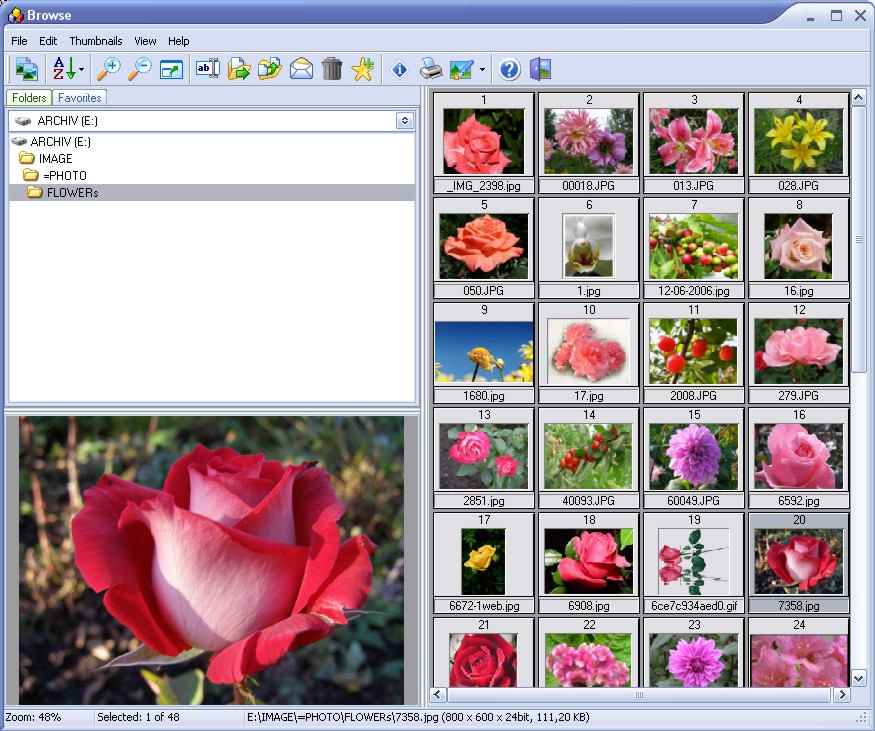
The Browse window: folder tree and Favorites tab at top left, 48 flower photos as numbered thumbnails on the right, the selected rose in the preview pane, and the file's size and color depth in the status bar.
Features
Thumbnails you can size and cache
Able Image Browser keeps thumbnails in memory and on disk, so a folder you've opened before shows up fast the next time. You choose the size of the thumbnails and of the preview area, and you can set a default starting folder so it opens straight on your photo library.
Three ways to print
Able Image Browser prints the selected images, every image in the current folder, or a contact sheet of thumbnails for the whole folder. It picks portrait or landscape for each picture on its own. The thumbnail sheet is the handy one: a one-page index of a folder you can file with a CD or a box of prints.
Quick fixes without a separate editor
Able Image Browser has the basic edits built in: brightness, contrast, crop, rotate, flip and resize, red-eye removal for flash photos, color adjustment, color mode conversion, and a set of effects (Negative, Bump map, Lens, Wave, Morph and a user-defined filter). Auto Adjust Orientation turns pictures the right way up. It isn't a photo editor, but it covers the fixes most snapshots need.
Conversion to PDF and PostScript
Able Image Browser saves images in other formats, including Adobe PDF, PostScript and EPS, besides the usual image conversions. That's useful when a print shop or a form wants a PDF, or when you need an EPS for an old layout program.
Favorites, descriptions and file management
Able Image Browser lets you add images to a Favorites list and save that list as a collection, attach a text description to an image, copy and rename several files at once, email pictures from the program, and do the normal file and folder tasks (move, copy, delete) without switching to File Explorer.
Benefits
- You pay once. $19.95 buys the program, with no account or subscription.
- It's light. A 4.4 MB installer is a fraction of the size of most current photo apps, which matters on an old laptop.
- It works offline. Everything happens on your PC: no cloud library, no upload.
- Old formats still open. TIFF fax files, PCX, TGA and Windows metafiles are in the list, which newer viewers sometimes drop.
Real-World Uses
- Printing an index of a photo archive. Open each folder of scanned prints and print a thumbnail sheet to keep with the originals.
- Sorting a batch of scans. Turn sideways scans upright, rename the files in one go, and mark the keepers as favorites.
- Sending a picture as a PDF. Convert a scanned receipt or a drawing to PDF before attaching it to an email or uploading it to a form.
- Fixing family snapshots. Remove red eye and brighten a dark party photo before printing it.
Who It's For, and Who Should Skip It
Able Image Browser fits someone with a folder-based collection of ordinary JPEG and TIFF images who wants thumbnails, printing and simple fixes in one small program, and prefers a one-time payment.
Skip it if:
- Your photos are RAW, HEIC or WebP. Those formats aren't in its list. A current viewer that's still updated is the better buy.
- You want something maintained. The current version is from 2011. If you need fixes for future Windows versions, choose a tool with recent releases.
- You need a real editor. Layers, retouching and exposure work need a proper photo editor.
- Free is fine for you. Several long-running free viewers cover browsing, batch renaming and conversion, so try one of those before you pay for a 2011 program.
- You use a Mac. There's no Mac version.
Usage Guide
- Install it. Download the 4.4 MB installer from GraphicRegion and run it, then start Able Image Browser from the Start menu.
- Open a folder. Pick a drive in the drop-down at the top left and click through the folder tree. The thumbnails fill the right side.
- Set it up once. Choose the thumbnail size, the preview size and a default starting folder so it opens on your pictures every time.
- Look and fix. Click a thumbnail to see it in the preview pane. Rotate, crop, adjust brightness or remove red eye from the toolbar or menus.
- Print or convert. Print the selection, the folder or a thumbnail sheet, or save the image as PDF, PostScript or EPS.
- Register. After buying, enter the serial number you get by email in the program.
Where it falls short
- Its interface shows its age. The program's own screenshot has the toolbar icons and window style of Windows XP, so don't expect a modern dark-mode look or touch-friendly controls.
- No slideshow or library tools. There are no tags, ratings, face or date search. For slideshows GraphicRegion sells Able Photo SlideShow, and for a fuller manager, Able Graphic Manager.
- The update clock runs out. Free upgrades last one year, but with version 2.0 still current after all these years, there's little to upgrade to.
Comparisons
Able Image Browser vs the Windows Photos app
The Photos app that comes with Windows is free and opens HEIC and RAW files with the right extensions, but it shows one picture at a time or a date-based gallery. Able Image Browser adds the folder tree and thumbnail grid, contact-sheet printing, batch renaming and PDF/EPS export. If you only look at photos, Photos is enough; if you print and organise by folder, Able Image Browser does more.
Able Image Browser vs Able Graphic Manager
Both come from GraphicRegion. Able Graphic Manager is the bigger program, at $34.95 for a personal license, $59.95 for business use and $499.95 for a site license. Able Image Browser is the cheaper, single-price option for someone who mainly wants to browse, print and convert.
Editions and Pricing
| License |
Price |
Term |
Updates |
| Able Image Browser, personal license |
$19.95 |
One-time purchase |
Free upgrades for one year |
GraphicRegion's checkout runs on PayPro Global and takes the major credit cards. The serial number arrives by email once the order is processed. The vendor also takes purchase orders and bank wire payments, and offers cryptocurrency payment on request.
FAQs
Does Able Image Browser run on Windows 11?
Able Image Browser carries GraphicRegion's "Compatible with Windows 11" badge, along with Windows 8 and 10. The program itself dates from 2011, so test the trial on your own PC first.
Can Able Image Browser open iPhone HEIC photos or camera RAW files?
Able Image Browser doesn't list HEIC, WebP or camera RAW formats. Its list covers JPEG, GIF, BMP, TIFF, PNG, PCX, TGA, icons, Windows metafiles and PBM/PGM/PPM.
Is Able Image Browser a subscription?
No. Able Image Browser is a one-time $19.95 purchase. Registered users get free upgrades for a year after purchase.
How do I move my Able Image Browser license to a new computer?
GraphicRegion's FAQ says to deactivate the program on the old computer, then install and activate it on the new one. Activation is done from the program's Help menu, with a manual option if automatic activation fails.
Is there a Mac version of Able Image Browser?
No. Able Image Browser is Windows only, like the rest of GraphicRegion's tools.
Can Able Image Browser make a slideshow?
Able Image Browser is a browser and viewer, not a slideshow maker. GraphicRegion sells Easy Photo SlideShow and Able Photo SlideShow for that.
System Requirements
- Windows 8, 10 or 11 (the vendor's compatibility badges)
- About 4.4 MB for the installer
- No camera RAW, HEIC or WebP support
Conclusion
Able Image Browser is worth $19.95 only for a narrow buyer: someone with folders of JPEG and TIFF images who wants thumbnails, contact-sheet printing, quick fixes and PDF export in one small program, paid for once. The reason to buy it is that combination in a 4.4 MB download. The reason not to is its age: version 2.0 is from 2011, the developer's attention is on other products, and modern phone and camera formats aren't supported. Run the trial on your own folders first, and if your photos come from a recent phone, look at a maintained viewer instead.
Download Free TrialBuy Now