Advanced TIFF Editor Plus: Edit Huge Multipage TIFF and PDF Scans Without Running Out of Memory
Advanced TIFF Editor Plus is a $65 Windows program for viewing, editing, cleaning up and converting multipage TIFF, fax and PDF files, built for documents that run to hundreds of pages. It does everything the standard Advanced TIFF Editor does, but it loads only the page you're working on into memory, so a 300-page scan opens and saves where the standard edition starts throwing errors.
If you've ever had a document viewer freeze on a scanned court file, a year of faxes merged into one TIFF or a digitized book, that's the problem Plus exists to solve. It's a plain, dense desktop program, not a pretty one, and it's aimed at people who handle scanned paper every working day.
Quick facts
- Version: 4.26.10.9, released October 9, 2026
- Developer: Graphic-Region Development (GraphicRegion)
- Platform: Windows only (the developer lists XP through Windows 11 and Windows Server 2003-2012)
- Opens: TIFF, fax, PDF, EPS, PS, AI, GIF, DCX, JBIG and DICOM, plus JPEG, PNG, BMP, WebP, HEIC and other common image formats
- Price: $65 for a personal license (home use, one computer), $99 for a business license, one-time payment
- Updates: free for one year, then upgrades at 50% off; the program never expires
- Trial: 30 days
- Guarantee: the developer offers a refund if a problem with the program can't be resolved
- What we checked: installer advtiffeditorplus_setup.exe, file version 4.26.10.9 (43.3 MB), downloaded from tiffedit.com on November 8, 2026, and the prices of all five licenses on the order page ($65 personal, $99 business, $400 virtual, $1,700 site, $5,150 world-wide) on November 8, 2026. We didn't open a 500-page file to time it.
Before you buy
- The personal license is for home use only. Any business, government or office use needs the $99 business license, and running it in a virtual machine needs the virtual, site or world-wide license.
- PDFs become images. Advanced TIFF Editor Plus converts a PDF to graphics when it opens it, so text you could select before is part of a picture after saving, and the file usually grows. The built-in OCR text search still finds words.
- PDF, EPS, PS and AI files need a free GhostScript plug-in. You install it once from Settings, User settings, Plug-in tab. TIFF and image files work without it.
- Small files don't need Plus. If your documents are a few dozen pages, the standard Advanced TIFF Editor at $56 has the same editing tools.
Download Free TrialBuy Now
Overview
Advanced TIFF Editor Plus looks like a classic Windows document tool: page thumbnails down the left, the current page in the middle and a long toolbar on top. The difference from the standard edition is under the hood. The standard editor reads a whole multipage file into memory; Plus reads the current page only, which is why the developer points anyone with very large files to it.
Plus is actively maintained, with releases every few months. The October 2026 build added automatic border-color detection, a Crop Threshold and an Inner Crop option to AutoCrop, and new Layers tool shapes. Earlier 2026 builds added WebP (including lossless) loading and saving, EXIF auto-rotation on open and new effects.
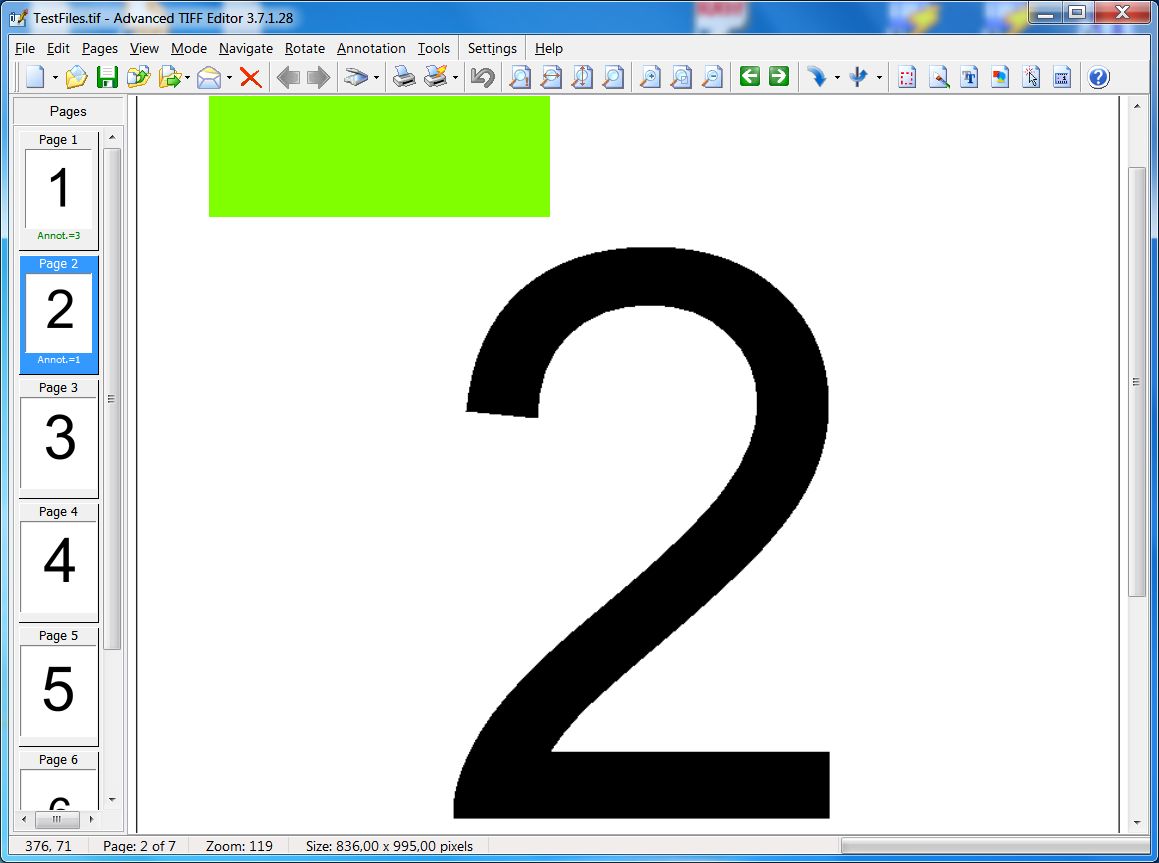
The main window with a 7-page TIFF open, page thumbnails and annotation counts on the left. The developer shows the same window for both editions; this one is the standard edition, version 3.7.1.28.
Everything happens on your own PC. Nothing is uploaded to an online converter, which matters when the files are contracts, medical records or tax forms.
Features
Large files that load one page at a time
Advanced TIFF Editor Plus keeps only the current page in memory instead of the whole file. That's the whole reason the edition exists: scans of 100, 150 or 200+ pages, merged fax archives and digitized books open and save without the memory errors the standard edition can hit on the same files.
Extra tools only in Plus: Booklet, Stacked pages & Crop, webcam capture
Advanced TIFF Editor Plus adds a Booklet command to the Pages menu, Stacked pages & Crop to the Tools menu and webcam capture to the File menu. The developer has a video tutorial for Stacked pages & Crop on TIFF and PDF documents.
Page surgery: split, merge, reorder, delete blanks
Advanced TIFF Editor Plus inserts, moves, copies and deletes pages, splits a multipage file into single pages or groups, and merges files into one. You can merge selected files straight from Windows Explorer with a "Merge Files" context-menu item, without opening the program, and the batch Merge Files command combines every file in each folder into one multipage file named after the folder.

The Merge Files (Batch mode) dialog: pick a parent folder, include sub-folders, choose TIF or PDF output, and optionally delete the originals.
Scan cleanup that shrinks files
Advanced TIFF Editor Plus deskews pages, rotates by fractions of a degree, crops borders automatically, removes noise, isolated pixels and punch holes, and cuts out large white gaps. Its Cut Out White Space command and batch action remove white space above a size you set. Cleaner pages read better and compress smaller.
Annotations, stamps, signatures and QR codes
Advanced TIFF Editor Plus adds text, highlights, arrows, stamps, date stamps and image objects such as a signature with a transparent background, and it reads and writes Wang/Kodak Imaging annotations. A Layers tool builds images from shapes, and Tools, Add Barcode inserts a QR code. You can keep annotations editable or burn them into the page.
Batch processing, OCR and a page counter
Advanced TIFF Editor Plus runs a saved list of actions (deskew, crop, margins, rotation, format conversion and more) on whole folders, recognizes text on scanned pages for search, and edits TIFF tags without opening the file. Its TIFF PDF Counter totals the pages in a set of files and exports the list to CSV, useful when a scanning job is billed per page.

TIFF PDF Counter with four files loaded, one of them a 5,474-page TIFF, and the page totals for PDF and TIFF at the top.
Conversion, scanning and a virtual TIFF printer
Advanced TIFF Editor Plus saves to TIFF (with a different compression per page if you like), PDF, PS/EPS, JPEG, PNG, GIF, BMP, WebP, DCX and more, scans many pages at once from TWAIN or WIA scanners, and installs an optional "GraphicRegion TIF printer" so any program that can print can produce a TIFF. A command line handles merging and batch jobs from scripts.
Benefits
- No more splitting a file just to edit it. Large documents stay in one piece instead of being cut into chunks a smaller tool can handle.
- One window for viewing, cleanup and conversion. You don't move files between a viewer, a splitter and a converter.
- Lower storage costs. Noise removal, cropping and per-page compression make big archives smaller.
- Old document systems keep working. Wang/Kodak annotation support and fax-resolution handling make it a practical replacement for the old Kodak Imaging viewer.
Real-World Uses
- A records office merges a month of single-page scans into one multipage TIFF, then deletes blank backs and rotates pages fed upside down.
- A library volunteer digitizing a bound book runs AutoCrop and deskew over every page in a batch to trim borders and straighten the text.
- A scanning bureau quality-checks a 400-page job, counts the pages with TIFF PDF Counter for the invoice and batch-converts the result to PDF.
- An engineering office adds text and revision notes to scanned drawings, then burns the annotations in before sending them on.
- A choir director cleans dirt and pencil marks off scanned sheet music before running it through music-recognition software.
Who It's For, and Who Should Skip It
Advanced TIFF Editor Plus is for people whose scanned or faxed documents are long: archives, legal and medical records teams, scanning bureaus, engineers with drawing sets and anyone digitizing books.
Skip it if your files are short (the $56 standard edition does the same editing), if you edit text PDFs and need the text to stay live (a real PDF editor fits better), or if you use a Mac or Linux, since there's no version for either. If you only need to look at and print multipage TIFFs, the developer's $19.99 Multipage TIFF Viewer is cheaper.
Usage Guide
- Install and launch. Download the 41 MB installer (or the 57 MB one with the virtual TIFF printer) from the developer and run it. The trial runs for 30 days.
- Add PDF support if you need it. Go to Settings, User settings, Plug-in tab, download the 32- or 64-bit GhostScript plug-in, install it and press Auto Search.
- Open a file. Every page appears as a thumbnail in the Pages panel, even in a very large file.
- Rework pages. Select thumbnails to move, delete, rotate or extract them, or use the Pages menu to split, merge, booklet or insert scanned pages.
- Clean up. Use Tools for AutoCrop, deskew, noise and punch-hole removal, and Stacked pages & Crop to crop a whole document.
- Annotate and save. Add notes in Mode, Annotation, combine them with the page if the recipient's viewer can't show them, then use File, Save as to pick TIFF, PDF or another format.
Where it falls short
- Some big operations are slow. A site-license customer who moved to Plus for 200-page scans reported hangs and long waits when emailing a large file or saving a copy to the desktop.
- Memory warnings on some PCs. The developer's FAQ answers a user with "out of memory" popups and crashes by suggesting running the program as administrator, which fixed it for that user.
- Annotations are private by default. They're saved in the program's own format unless you switch to the Wang/Kodak-compatible one or merge them into the page, so another viewer may not show them.
- Dated interface. The toolbar-heavy layout takes time to learn.
What Users Say
Almost all published feedback on Advanced TIFF Editor Plus is on the developer's own testimonials page, so it leans positive, but several users name real limits. We found no in-depth review by an independent magazine, and download sites list the program without user reviews worth quoting.
Why they chose Plus
Kevin Phillips' company had a site license for the standard edition, but its scans grew to "100, 150, 200+ pages": "The standard version just can't handle that size of a file and we began getting errors frequently. So, today I tried out the personal version of the PLUS product and it worked very well." The company bought the Plus site license the same day.
JDA: "I use Advanced TIFF Editor Plus to add additional tif images to a multi-tif file. Frequently I add scans to the original tiff file and there are only a few software packages which I can afford that do this."
Dale A. Brueggemann, who scans journal articles and essays from books: "it's the greatest thing I know of for producing clean copies from bound materials without the shadow of the gutter, mess in the borders, and so forth. Even though I use Adobe Acrobat Pro a lot, I still prefer TIFF editor for bound work."
Everyday use
An international organization that publishes scanned treaties every year: "All these tiff images have to be processed, cropped, cleaned, annotated, etc. Advanced TIFF Editor is an essential tool for this process." Its favorite features: "Auto crop, very good noise removal."
John Emhof runs a scanning service bureau and uses Plus "to edit and quality control some jobs that produce TIFF output."
Clint Strain: "Advanced TIFF Editor Plus gives me the ability to add/modify text for any font on my system as well as rotate the text to any desired angle. I primarily use it to modify engineering design drawings that will then be inserted into AutoCAD drawings."
Brian Brooker digitizes books from his own library: "I was attracted by price and ease of use. Specifically, the program gives me control over small tilts/slants in the text."
SALAMA Youssef: "Advanced TIFF Editor Plus is the best TIFF editor I have used. It helps me deal with drawings and documents, and helps me process and archive documents." He adds that the developers added features he asked for, such as a filled polygon tool.
The criticisms
Kevin Phillips again, on Plus: "It has some issues such as hangs or taking way too long for sending a large file via email or saving a copy of the file to the desktop. But, those are not deal breakers."
Steve B.: "When modifying a pdf that contains text, ATE converts the text to images when it is saved, which increases the size of the file and eliminates the ability to search the text, so I use a different editor that doesn't convert the text." The developer replied that PDFs are converted to graphics on opening and that OCR text search still works.
JDA, on adding scans to existing files: "Cut and pasting of images can get a little tedious but it works."
The pattern: people who work with long scans every day, from treaty archives to sheet music and engineering drawings, praise the cleanup tools, the page handling and the developer's willingness to add requested features. The complaints are about slow saving and emailing of very large files, PDFs turning into images, and a workflow that can feel fiddly.
Comparisons
Advanced TIFF Editor Plus vs Advanced TIFF Editor
Both share the same editing, cleanup, annotation, OCR and conversion tools. Plus loads one page at a time for very large files and adds Booklet, Stacked pages & Crop and webcam capture. It costs $9 to $10 more per license ($65 vs $56 personal, $99 vs $89 business). Choose the standard edition only if your files stay small.
Advanced TIFF Editor Plus vs Multipage TIFF Viewer
The developer's Multipage TIFF Viewer ($19.99) views, prints, scans and does automatic cleanup, but it can't edit and save your TIFF files the way Plus does. If you only read and print multipage files, it's the cheaper choice.
Editions and Pricing
| License |
Price |
Who it covers |
| Personal | $65 | One computer, non-commercial home use |
| Business | $99 | One computer, commercial, government or office use |
| Virtual | $400 | Commercial use in a virtual environment |
| Site | $1,700 | Unlimited computers of one organization within a 20-mile radius |
| World-wide | $5,150 | All locations of one organization |
Every license is a one-time purchase with a year of free updates. Personal and business licenses get volume discounts from three copies (business drops to $89 each for 3-4 copies), and site and world-wide buyers can ask for an MSI package.
Buy Personal ($65)Buy Business ($99)Buy Virtual ($400)Buy Site ($1,700)Buy World-wide ($5,150)
FAQs
Does Advanced TIFF Editor Plus work on Windows 11?
Advanced TIFF Editor Plus shows Windows 11 alongside Windows 10 and 8 on its download page, and the current build is from October 2026. Its older system list stops at Windows 10, so try your own files in the 30-day trial before buying.
Is there a Mac version of Advanced TIFF Editor Plus?
No. Advanced TIFF Editor Plus is Windows-only.
What happens to Advanced TIFF Editor Plus after the first year?
Advanced TIFF Editor Plus keeps working forever; only the free updates end after one year. After that, the developer sells upgrades to the latest version at a 50% discount, and you can skip them and keep the version you have.
Can I upgrade from Advanced TIFF Editor to Plus?
Advanced TIFF Editor and Advanced TIFF Editor Plus are sold as separate products, and the order pages show no discounted switch between them, so ask the developer before buying if you already own the standard edition. Install the Plus trial next to your standard copy first to check that your large files behave better.
Can several people share one Advanced TIFF Editor Plus license?
Not by taking turns. A personal or business license of Advanced TIFF Editor Plus activates on one computer and can't be shared between users. For several users on one PC, the developer offers business-license buyers a version that activates per computer, and site and world-wide licenses cover unlimited computers.
Can Advanced TIFF Editor Plus run from a script?
Yes. Advanced TIFF Editor Plus accepts command-line parameters, for example /merge with a file list and an output file, so you can merge or batch-process files from a BAT file or scheduled task.
How do I get my serial number after buying Advanced TIFF Editor Plus?
Advanced TIFF Editor Plus is activated with a serial number sent by email once the order is processed. You enter it under Help, Activation; if it hasn't arrived within two business days of a card payment, the developer asks you to contact support, since a mistyped email address is the usual cause.
System Requirements
- Windows 11, 10, 8, 7, Vista or XP, or Windows Server 2003-2012
- 41 MB download (57 MB with the virtual TIFF printer)
- Free GhostScript plug-in for PDF, EPS, PS and AI files
- TWAIN or WIA scanner (optional, for scanning)
Conclusion
Advanced TIFF Editor Plus is worth $65 (or $99 for business use) if your scanned documents run to hundreds of pages and other editors choke on them. That's the one reason to buy it over the cheaper standard edition, and its users say it delivers, from treaty archives to digitized books. The main reason not to: it treats PDFs as images, and very large files can still be slow to save or email. Run the 30-day trial on your biggest real file before you pay.
Download Free TrialBuy Now