Multipage TIFF Viewer: A Low-Cost Windows Viewer for Multipage TIFF, Fax and PDF Files
Multipage TIFF Viewer is a $19.99 Windows program from Graphic-Region Development, the makers of Advanced TIFF Editor, for opening, printing, scanning and searching multipage TIFF, fax and PDF files. It suits offices and home users who need a dependable replacement for the old Kodak Imaging viewer but don't need a full editor.
Windows' own photo viewers are built for single pictures. Open a 40-page fax or a scanned contract and you scroll page by page with no thumbnails, no proper multipage printing and no way to read old Wang or Kodak annotations. Multipage TIFF Viewer handles all of that for the price of a takeaway lunch.
Quick facts
- Version: 2.24.9.9, released September 9, 2024
- Developer: Graphic-Region Development (GraphicRegion)
- Platform: Windows only (the developer shows Windows 8, 10 and 11, and older versions back to XP)
- Opens: TIFF, fax, PDF (including password-protected), EPS, PS, AI, GIF, DCX, JBIG and DICOM, plus JPEG, PNG, BMP, HEIC, WebP and other common formats
- Price: $19.99 personal (home use), $29.99 business, one-time payment
- Updates: free for one year; the license never expires
- Trial: 30 days
- What we checked: installer multipagetiffviewer_setup.exe, file version 2.24.9.9 (39.4 MB), downloaded from tiffedit.com with a valid digital signature on November 8, 2026, and both license prices on the order page on November 8, 2026. We didn't test it on a Windows 11 PC.
Before you buy
- Updates are slow. The current build is from September 2024, and the version history lists only two feature updates since the first version in May 2022. The developer's editors were updated in October 2026, so the company is active, but don't expect frequent new features here.
- It's a viewer. It has cleanup, text-insert and resize tools, but the developer positions Advanced TIFF Editor Plus as the product for editing and saving your TIFF files. If you need to reorder, split or merge pages, buy an editor instead.
- The personal license is for home use. Office, business or government use needs the $29.99 business license.
Download Free TrialBuy Now
Overview
Multipage TIFF Viewer is built on the same engine as Advanced TIFF Editor, trimmed down to viewing, printing, scanning and OCR. The window has a thumbnail panel on the left, rulers around the page and a toolbar for navigation, zoom, rotation and printing. A Files list lets you step through a folder of documents with Next File and Previous File buttons.
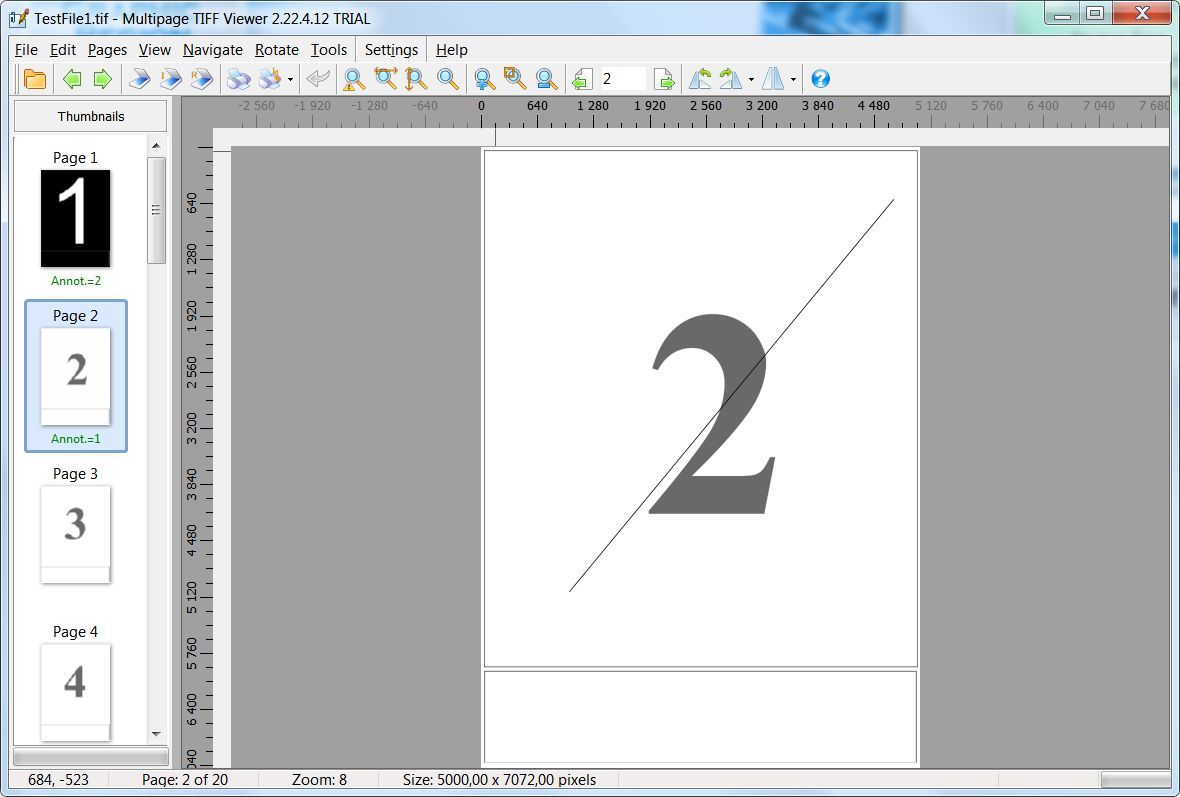
The main window (version 2.22.4.12, trial) with a 20-page TIFF open: page thumbnails with annotation counts on the left, rulers around the page and the zoom level in the status bar.
Everything runs on your own PC. Nothing is uploaded to a web service, which matters for the medical, legal and tax documents that most often arrive as TIFF faxes.
Features
Viewing built for multipage documents
Multipage TIFF Viewer shows every page as a thumbnail, scrolls through pages continuously, zooms to width, height or actual size, and corrects faxes with different horizontal and vertical resolutions so pages don't look squashed. It has a magnifier, a white-on-black mode for readers with impaired vision, dual-monitor support and selection of odd, even or ranges of pages.
Printing that handles a whole document
Multipage TIFF Viewer prints a multipage TIFF as one print job, at actual size or fit to page, with or without annotations, with page numbers and collation. You can save print presets, print without the dialog using Easy Print, or print from the command line with /print.
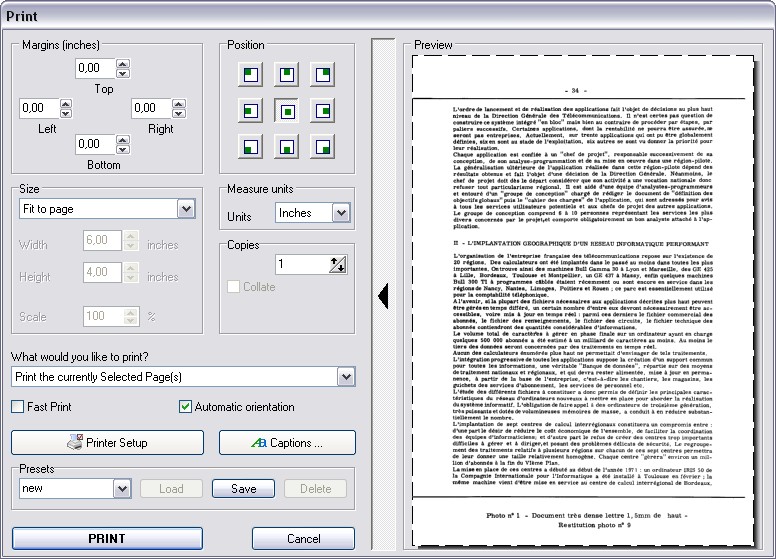
The Print dialog the developer shows for Multipage TIFF Viewer (shared with Advanced TIFF Editor): margins, page position, fit-to-page sizing, copies, presets and a preview.
Scanning and scan cleanup
Multipage TIFF Viewer scans many pages at once from TWAIN or WIA scanners and saves them into one multipage file or separate files. Its cleanup tools deskew pages, remove noise, isolated pixels and black areas, and detect and remove punch holes automatically.
OCR, text search and a page counter
Multipage TIFF Viewer recognizes text on scanned pages in more than 40 languages, including in batch mode for many files at once, and Text Search finds words in the current document or across a folder. TIFF PDF Counter totals the pages in a set of TIFF and PDF files and shows their size, dates and dimensions.

The TIFF PDF Counter window with four files, one of them a 5,474-page TIFF, and the total page counts at the top.
Reads Wang and Kodak Imaging annotations
Multipage TIFF Viewer displays annotations made in Wang and Kodak Imaging (Imaging for Windows) and shows an annotation count on each thumbnail, so notes from older document systems aren't lost when you replace the old viewer.
Benefits
- Proper multipage handling for $19.99. Thumbnails, one-job printing and page selection without paying for a full editor.
- Searchable scans. OCR and folder-wide text search make a pile of faxes findable.
- A path forward. If you later need editing, Advanced TIFF Editor Plus uses the same interface.
Real-World Uses
- A medical office opens incoming fax TIFFs, reads the doctor's annotations and prints the whole referral as one job.
- A home user scans a stack of tax papers into one multipage TIFF and runs OCR so they can search them later.
- A scanning contractor runs TIFF PDF Counter over a delivered folder to check the page total against the invoice.
- An office that still has documents from an old Kodak Imaging system keeps reading their annotations after moving to Windows 11.
Who It's For, and Who Should Skip It
Multipage TIFF Viewer is for people who mainly read and print multipage TIFF and fax files and want a cheap, local tool for it.
Skip it if you need to rearrange, split or merge pages or edit and annotate documents (Advanced TIFF Editor or Advanced TIFF Editor Plus fits), if you mostly work with text PDFs (a PDF reader is better), or if you use a Mac, since there's no Mac version.
Usage Guide
- Install and launch. Download the 39 MB installer from the developer and run it. The trial runs for 30 days.
- Open a file. Use the open dialog with preview, or set Multipage TIFF Viewer as the default program for TIFF files in its settings.
- Navigate. Click thumbnails or use the page box on the toolbar; Next File and Previous File move through a folder.
- Print. Choose pages, size and presets in the Print dialog, or use Easy Print for the default printer.
- Search. Run Tools, Text Recognition on scanned pages, then Tools, Text Search to find words.
Where it falls short
- Old-fashioned interface. A dense toolbar and classic Windows dialogs; functional, not modern.
- Annotations are read-only here. It shows Wang and Kodak annotations but you need the editor to add or change them.
- Little outside feedback. As a niche, low-cost tool it has almost no independent reviews, so the trial is the best test.
What Users Say
Reviews are scarce
We found no independent review and no user ratings for Multipage TIFF Viewer itself: download sites list it with the developer's description, and the developer's testimonials page is about Advanced TIFF Editor and Advanced TIFF Editor Plus. Those users mostly praise the shared cleanup tools (noise removal, deskew, punch-hole removal) and the long-term support, and complain about very large files and PDFs being treated as images, which matters less in a viewer. Use the 30-day trial on your own files before you buy.
Comparisons
Multipage TIFF Viewer vs Advanced TIFF Editor Plus
Advanced TIFF Editor Plus ($65 personal, $99 business) has every feature of Multipage TIFF Viewer and adds full editing: page reordering, split and merge, annotation editing, batch conversion and very large file support. Multipage TIFF Viewer costs less than a third as much and is enough if you only view, print, scan and search.
Multipage TIFF Viewer vs Windows' built-in viewers
The Photos app and other free viewers can show a multipage TIFF, but they don't read Wang/Kodak annotations, fix fax resolution, OCR scans or print a document with presets. If you open a TIFF once a month, a free viewer is fine; if TIFF faxes are part of your job, this is a cheap upgrade.
Editions and Pricing
| License |
Price |
Who it covers |
| Personal | $19.99 | Non-commercial use at home |
| Business | $29.99 | Corporate, government or business use |
Both are one-time purchases with a year of free updates. The order page gives volume discounts from three copies ($17.99 personal or $27.99 business each for 3-4 copies, falling further for larger orders).
Buy Personal ($19.99)Buy Business ($29.99)
FAQs
Does Multipage TIFF Viewer open password-protected PDFs?
Yes. Multipage TIFF Viewer can open password-protected PDF files, along with TIFF, fax, DCX, EPS, PS, AI and DICOM files.
Can Multipage TIFF Viewer replace the Kodak Imaging viewer?
Yes, for viewing and printing. Multipage TIFF Viewer reads Wang and Kodak Imaging annotations and handles fax resolutions, which are the main things the old viewer did. To create or change annotations, you need Advanced TIFF Editor.
What happens to Multipage TIFF Viewer after the first year?
Multipage TIFF Viewer keeps working; the license is permanent and only the free updates end after one year.
Can several people use Multipage TIFF Viewer on one computer?
Multipage TIFF Viewer licenses are per user, but for business-license buyers the developer offers, on request, a version that activates once per computer for several users.
Can I print from Multipage TIFF Viewer in a script?
Yes. Multipage TIFF Viewer accepts /print and /printwodialog on the command line, so a batch file can print a document without opening the dialog.
System Requirements
- Windows 11, 10, 8, 7, Vista or XP
- 39 MB download
- TWAIN or WIA scanner (optional, for scanning)
Conclusion
Multipage TIFF Viewer is worth $19.99 if you regularly read, print or search multipage TIFF faxes and scans and don't need to edit them. The one reason to buy it is that it handles multipage documents, fax resolutions and old Kodak annotations properly for very little money. The main reason not to: it's updated rarely, and as soon as you need to rearrange or edit pages you'll want Advanced TIFF Editor Plus instead. Try it free for 30 days first.
Download Free TrialBuy Now