DVD Snapshot: Save Any Frame of a DVD as a Picture for $9.95
DVD Snapshot is a $9.95 Windows program that plays a DVD, stops on the frame you pick and saves it as a picture. It's aimed at people with a DVD drive and a shelf of discs who want stills for covers, inserts, menus or family photos.
It does one job, and it is the kind of small utility you keep around for a specific collection of discs.
Quick facts
- Version: 1.24.8.27, released August 27, 2024
- Developer: GraphicRegion.com
- Platform: Windows (the vendor lists versions through Windows 10), DVD drive needed
- Languages: English, German, Arabic, Russian
- Price: $9.95, one payment, with free upgrades for one year
- Trial: 30 days
- Refund: GraphicRegion promises its money back if a problem can't be resolved
- What we checked: installer version 1.24.8.27 (5.05 MB) downloaded from the vendor and the $9.95 order page price on November 10, 2026. We read the installer's file details and did not install it or capture a frame from a disc.
Download Free Trial
Buy Now ($9.95)
Overview
Insert a disc, click Disc, and pick the title and chapter from the toolbar. Press Play, Pause near the scene you want, then press the large SnapShot button and choose where to save the picture.
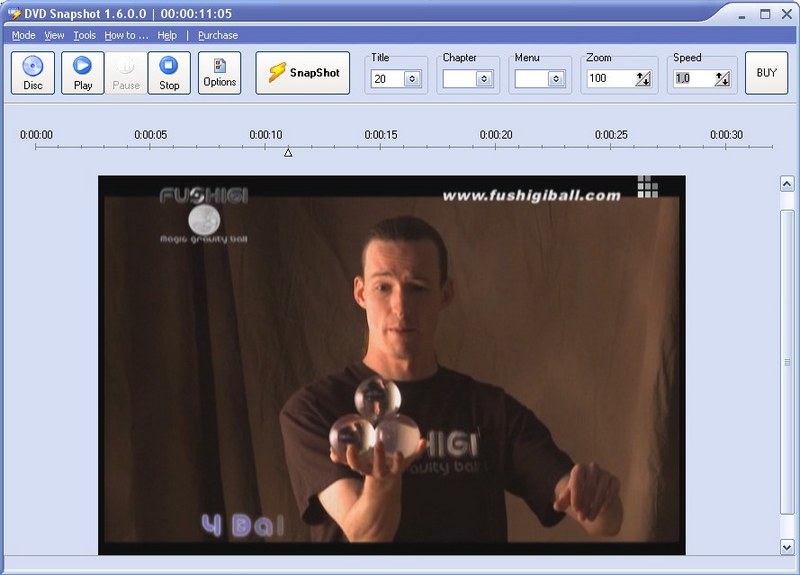
The main window, from the vendor's site, with title, chapter and menu selectors. This picture shows the older version 1.6.0.0.
Features
Navigate a disc by title and chapter
DVD Snapshot puts Title, Chapter and Menu selectors on the toolbar next to a timeline, so you can get to a scene without watching your way there. A fix in its history also covers choosing between several available DVDs.
Find Frame after you pause
DVD Snapshot has Find Frame buttons on the toolbar for hunting down the frame you want once playback has stopped. Zoom, including a Fit setting, and a speed list are on the same toolbar.
Color work before you save
DVD Snapshot's Edit dialog offers contrast, HSV, HSL, RGB, equalization, FFT, gamma and sharpen adjustments, with Auto Equalize and Undo. Older discs with dull color benefit most.
Effects, flips and aspect ratio
DVD Snapshot includes bump map, lens, wave, morphing and user-defined filters, rotation, vertical and horizontal flips, and a Geometry setting for aspect ratio, which matters because DVD frames are stored non-square.
Real-World Uses
- Making a cover image for the jewel case of a home-burned movie.
- Grabbing stills from family films on DVD to print as photographs.
- Building introduction screens and menus for your own DVD projects.
- Collecting pictures from a disc to use in an illustration.
Who It's For, and Who Should Skip It
It fits people who still work with physical DVDs on Windows and want a dedicated tool with picture adjustments, for less than the cost of a takeaway lunch.
Skip it if your PC has no DVD drive, or if your movies are video files: GraphicRegion's own Able Video Snapshot is the tool for files. Blu-ray isn't among the discs it's described as handling, so look elsewhere for those.
Usage Guide
- Download the trial and run the installer.
- Put a DVD in the drive and start DVD Snapshot.
- Click Disc, then choose the title and chapter.
- Play, Pause near your moment, and use Find Frame to settle on the frame.
- Click SnapShot, edit if you like, and save.
Before you buy
Test the 30-day trial with the discs you actually care about, both home-burned and store-bought, because playback depends on your disc and your Windows setup. Windows 11 isn't on the vendor's list of supported systems.
Where it falls short
- Development has slowed to translations: the newest additions in its history are German and Arabic interface languages, and the core feature set dates from version 1.7.
- It needs a physical DVD drive, which most new laptops no longer include.
What Users Say
We found no recent independent reviews with real testing. These comments come from the testimonials GraphicRegion publishes, so expect them to lean positive.
From the vendor's testimonials
Paul Herrmann: "I found the software by Googling "snapshots from DVDs." I have VLC Media Player on my PC which I used successfully to do snapshots when my operating system was Windows XP. It doesn't seem to work with Windows 10. I use the snapshot software to get photos for the covers of the jewel boxes in which I put the movie DVD's."
Zeno Joseph: "I use this program when I video parties, church services,ect. I design dvd inserts and I use the snapshots to put on the cover."
Gianna P.: "The programs is very user friendly"
John Wylde: "I use DVD snapshot to extract pictures for DVD introductions and menu's."
Disc covers and inserts come up again and again, along with how easy it is to use. That is an honest picture of its audience: people making or labeling their own discs.
Editions and Pricing
| License | Price | Includes |
|---|
| Personal license | $9.95 (one payment) | Full version, free upgrades for one year, email support |
Buy Personal License ($9.95)
FAQs
Does DVD Snapshot work on Windows 10?
DVD Snapshot lists Windows 10 among its supported systems, and one published customer comment describes using it on Windows 10 when VLC's snapshot no longer worked for him.
Does DVD Snapshot run on Windows 11?
DVD Snapshot's published system list stops at Windows 10, so Windows 11 is a case for the free trial.
Is DVD Snapshot a subscription?
DVD Snapshot is one payment of $9.95. Free upgrades last a year from purchase, and the program keeps working afterward.
What languages does DVD Snapshot come in?
DVD Snapshot is available in English, German, Arabic and Russian.
What is the difference between DVD Snapshot and Able Video Snapshot?
DVD Snapshot plays discs and offers title and chapter selection, while Able Video Snapshot opens AVI, MPG, MPEG, VOB and WMV files. They cost the same.
System Requirements
- Windows 10, 8, 7, Vista, XP or 2000, or Windows Server 2003 through 2012
- Pentium-400 or better
- 64 MB of RAM
- A DVD drive
Conclusion
Worth $9.95 if you have DVDs to work with and a drive to read them. The reason to buy it is that it handles one awkward job and adds color controls that simple players lack. The reason not to is a shrinking use case and a program that isn't gaining features, so run the trial on your own discs first.
Download Free Trial
Buy Now ($9.95)