Easy Photo Slide Show: Turn a Folder of Photos into a Full-Screen Slideshow for $7.95
Easy Photo Slide Show is a $7.95 Windows program from GraphicRegion that plays every picture in a folder as a full-screen slideshow, with transitions, background music and captions, and no project to build first. It's aimed at people who want an old PC or a TV screen to show family photos, shop specials or club notices on a loop, and it's the middle step between GraphicRegion's Free Photo SlideShow and the $25 Able Photo SlideShow.
Windows can show a folder as a basic slideshow, but it won't watch the folder for new files, mix several folders or play music behind the pictures. Easy Photo Slide Show starts from the same folder-first idea and adds the parts a lobby screen or a digital photo frame needs: folder monitoring, several folders at once, music and a caption line.
Quick facts
- Developer: GraphicRegion (graphicregion.com)
- Version: 2.24.8.24, released August 24, 2024
- Platform: Windows only, marked compatible with Windows 8, 10 and 11
- Price: $7.95, one-time, personal license (private, non-commercial use)
- Download: 6 MB installer, with a trial version
- Transitions: more than 250, with preview
- Formats: JPEG, PNG, GIF, BMP, TIFF and fax, PCX, TGA, ICO, WMF/EMF and more, plus HEIC, HEIF and WebP through Windows codecs
- Updates: free upgrades for one year
- What we checked: installer version 2.24.8.24 (6.0 MB) downloaded from graphicregion.com on November 4, 2026, and the price on the order page, $7.95 for the personal license, on November 4, 2026. We didn't install or run the program.
Download Free TrialBuy Now
Overview
You point Easy Photo Slide Show at a folder, pick how long each picture stays up and which transitions to use, and press Start. Every image is resized on the fly to fit the screen with its proportions kept, and centered, so a mix of portrait phone shots and wide scans still looks tidy. A counter at the top shows where you are ("5/13").
The main window is mostly picture, with a slim toolbar down the left side: Open Folder, Open Files, Music, Options, Previous, Start, Next, three rotate buttons and Full Screen. In full-screen mode the cursor can be hidden and hotkeys handle back, forward, start, stop, the caption panel and exit.

The main window (version 2.18 in the title bar) showing image 5 of 13, with the file name across the top and the Open Folder, Music, Options, Start, rotate and FullScreen buttons on the left.
Features
Folder monitoring for a self-updating display
Easy Photo Slide Show can watch a folder and add new files to the running show as they land, which is what turns it into a screen you never have to touch. Drop a new photo, a menu or a results sheet into the folder from another PC on the network, and it appears in the loop. There's also a folder-monitoring command-line switch, so a shortcut in the Startup folder can launch the show watching the right folder.
Over 250 transitions and full control of timing
Easy Photo Slide Show has more than 250 transition effects with a preview, a slide delay and a separate transition delay, forward, reverse or random order, and a repeat option. You can show the selected images only, or a whole folder with its subfolders, and choose a background color, a gradient or a background image for the space around pictures that don't fill the screen.
Music and a recorded voice track
Easy Photo Slide Show plays a list of WAV, MIDI and MP3 files behind the pictures (MP3 needs a codec installed in Windows), and you can reorder the list. It can also record a track from a microphone, such as a short spoken introduction or music played into the mic.
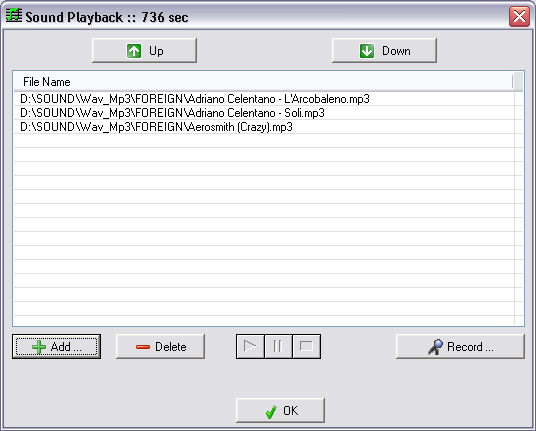
The Sound Playback window: three MP3 files queued (736 seconds in total), Up and Down to reorder, Add, Delete and Record.
Several pictures per slide, and captions
Easy Photo Slide Show can put more than one image on a slide, and show a caption bar. Version 2.21 added a Zoom Filter setting.
iPhone HEIC and WebP photos, via Windows
Easy Photo Slide Show reads the classic formats itself and hands HEIC, HEIF, WebP, JXR and DDS to the Windows Imaging Component. For HEIC that means Windows needs Microsoft's free HEVC Video Extensions (and on older systems the HEIF Image Extensions) from the Microsoft Store; GraphicRegion says the same for WebP codecs.
Command line and Explorer integration
Easy Photo Slide Show starts from the command line with a folder or files and switches such as /fullscr (start full screen), /exit (close when the show ends) and /splash (skip the splash screen), and it adds a slideshow command to the Explorer right-click menu. It can also reopen the last folder automatically and remember its window size and toolbar position.
Benefits
- Set it and walk away. With folder monitoring and auto-start, the screen keeps itself current.
- Almost no learning curve. A folder, a delay and Start is the whole job; the options are there when you want them.
- Cheap and permanent. $7.95 once, with no account and no cloud service.
- Gives old hardware a job. A 6 MB program runs happily on a retired laptop or tablet driving a TV.
Real-World Uses
- A digital photo frame from an old laptop or Surface. Point it at a synced photo folder and leave it running in full screen.
- A shop or restaurant display. A monitor at the entrance cycles through today's specials, updated by dropping new images into the folder.
- A club or lobby notice board. Office staff copy event posters and results into a shared folder from their own PCs and the screen picks them up.
- Family gatherings and anniversaries. Play years of photos from many subfolders on the TV, in random order, with music behind them.
- Classroom picture sets. Show a folder of images with a fixed time per slide alongside a lesson, without building a presentation.
Who It's For, and Who Should Skip It
Easy Photo Slide Show is for anyone who wants a folder of images to play on a Windows screen, reliably and without fuss, and wants music, captions or a self-updating folder that the free version doesn't have.
Skip it if:
- You need a video file or a slideshow to send to someone. Easy Photo Slide Show plays shows on the PC. Making an MP4, a standalone EXE, a screensaver or a web gallery is Able Photo SlideShow's job.
- You need audio synced to slides, Panorama and Zoom modes, or watermarks. Those are also Able-only features.
- A single folder with no music is enough. GraphicRegion's Free Photo SlideShow does that at no cost for personal and educational use.
- You want to play video clips or animated GIFs in the show. Only the Able edition displays them.
- You're on a Mac, or want to edit photos. It's Windows only and has no image editing.
Usage Guide
- Install it. Download the 6 MB installer from GraphicRegion, run it, and start Easy Photo Slide Show.
- Choose the pictures. Click Open Folder for a folder (with subfolders if you like), or Open Files for a hand-picked set.
- Set the timing. In Options, pick the slide delay, transition delay, transitions, order (forward, reverse, random) and repeat.
- Add music. Click Music, add WAV, MIDI or MP3 files, and drag them into order, or record a track.
- Go full screen. Press Start, then FullScreen, and hide the cursor.
- Make it permanent. For an unattended display, turn on folder monitoring and launch it from a shortcut with
/fullscr and the folder-monitoring switch.
Where it falls short
- The personal license is for home use only. GraphicRegion's personal license excludes business, government and commercial settings, and the order page sells only the $7.95 personal license. A shop or office display needs a business license: ask GraphicRegion before you buy (the product page mentions $15 for business use).
- HEIC needs extra Windows codecs. Without Microsoft's HEVC extension, iPhone photos won't show.
- MP3 depends on Windows too. Music in MP3 format plays only when an MP3 codec is installed.
- Updates are modest. Recent versions added small settings (zoom filter in 2.21, window state and single-instance in 2.19); the current build is from August 2024.
- The look is plain. The interface is a utility, not a design tool, and there are no themes or templates.
What Users Say
Independent user reviews of Easy Photo Slide Show are scarce. The comments below are testimonials GraphicRegion publishes on its own site, so they're the vendor's selection and lean positive.
Testimonials on graphicregion.com
Larry W., on why he uses it: "I use Easy Photo Slide Show in Windows 10, because unlike previous versions of Windows, such as Windows 7, which had a slide show built within the folder options, Windows 10 does not." He adds: "However, Easy Photo Slide Show restores the ability to do easy slide shows within the Windows 10 environment and works great in the Windows 10 operating system."
Douglas Carraway, Photographer, uses it to show client shoots as he works: "As I take my clients images I wanted the images to automatically be displayed in a slideshow." His favorite feature: "The hot folder. Automatically plays the image in the folder without removing the file from the folder."
Herve Thery uses it for "Geography lessons at Sao Paulo University (as a complement to Powerpoint)", and named as the most useful feature "The possibility to choose the time each slide stays on the screen".
The common thread is the folder-first approach: people like that there's nothing to prepare, and the hot-folder trick gets singled out. With no independent reviews or published complaints to weigh against them, treat these as a sign of what the program is good at rather than as a rating, and use the trial to judge it yourself.
Comparisons
Free vs Easy vs Able Photo SlideShow
GraphicRegion sells three versions of the same slideshow engine. Free Photo SlideShow plays one folder with 100 transitions and costs nothing for personal and educational use. Easy Photo Slide Show adds 250+ transitions, several folders at once, music, folder monitoring, multiple images per slide and the caption bar. Able Photo SlideShow ($25) adds everything you'd need to produce something: a project manager, audio sync, pan and zoom modes, watermarks, an image browser with edits, web galleries, EXE and screensaver files, MP4 video slideshows, and playback of GIFs and video clips.
| Feature |
Free Photo SlideShow |
Easy Photo Slide Show |
Able Photo SlideShow |
| Price | Free (personal, educational) | $7.95 | $25 |
| Transitions | 100 | 250+ | 250+ |
| Several folders at once | No | Yes | Yes |
| Music, folder monitoring, captions | No | Yes | Yes |
| Video, EXE, screensaver, web gallery output | No | No | Yes |
Editions and Pricing
Easy Photo Slide Show is sold as one personal license for $7.95, a one-time payment that includes free upgrades for a year. Checkout runs through PayPro Global and the full version arrives by email. GraphicRegion also accepts purchase orders, bank wire transfers and, on request, cryptocurrency.
FAQs
Can I use Easy Photo Slide Show on a screen in my shop or office?
Easy Photo Slide Show's $7.95 license is a personal license for non-commercial use at home. GraphicRegion requires a business license for corporate, government or business use, and its product page lists $15 for a business license, so contact the vendor to buy one.
Does Easy Photo Slide Show show iPhone HEIC photos?
Easy Photo Slide Show opens HEIC and HEIF files through Windows, once Microsoft's free HEVC Video Extensions are installed from the Microsoft Store (older systems may also need HEIF Image Extensions).
Can Easy Photo Slide Show start by itself when the PC boots?
Easy Photo Slide Show can auto-start a slideshow and accepts command-line switches such as /fullscr and one for folder monitoring, so a shortcut in the Windows Startup folder can open a full-screen, self-updating show at login.
Can Easy Photo Slide Show save my slideshow as a video?
No. Easy Photo Slide Show only plays slideshows on the PC. To export an MP4, an EXE or a screensaver you need Able Photo SlideShow.
What's the difference between Easy Photo Slide Show and the free version?
Easy Photo Slide Show adds music, folder monitoring, several folders at once, multiple images per slide, a caption bar and 250+ transitions instead of 100. If you only need one folder in silence, Free Photo SlideShow is enough.
How do I move Easy Photo Slide Show to a new computer?
GraphicRegion's FAQ says to deactivate the program on the old computer, then install and activate it on the new one.
System Requirements
- Windows 8, 10 or 11 (the vendor's compatibility badges)
- About 6 MB for the installer
- An MP3 codec for MP3 music
- Microsoft's HEVC/HEIF extensions for HEIC photos, and a WebP codec for WebP
Conclusion
Easy Photo Slide Show is worth $7.95 if you want a Windows PC to play a folder of photos on a screen, with music, and especially if you want that folder to update itself: folder monitoring is the one feature that justifies paying over the free edition. The main reason not to buy it is scope. It won't make a video or a file you can share, and the cheap license covers home use only, so a business display needs the business license and anyone producing slideshows should go straight to Able Photo SlideShow. Try the trial on your own folders, with HEIC codecs installed if your photos come from an iPhone.
Download Free TrialBuy Now