MobiKin Backup Manager for Android (Mac): Keep an Android Phone's Data on Your Mac for $29.95
MobiKin Backup Manager for Android (Mac Version) is a $29.95 one-time Mac program that copies an Android phone's contacts, messages, call logs, photos, videos, music, documents and apps to your Mac and restores them to that phone or another one. It's for Android owners who use a Mac and want more than dragging photos across by cable.
It answers an awkward gap, because Macs don't natively browse Android phones or read their contacts and messages. You still have to run each backup by hand, and app data isn't saved.
Quick facts
- Version: 4.1.45, released July 3, 2026
- Developer: MobiKin
- Runs on: Mac OS X 10.10 or later, on an Intel Core 1 GHz or faster according to the spec sheet
- Connection: USB cable or Wi-Fi
- Price: $29.95 one time for 1 PC. The license is separate from the Windows version's
- Trial: backs up but can't restore
- Guarantee: 30 days, with listed exceptions
What we checked: the 9.8 MB disk image, which holds an Intel-only app, MobiKin's trial and refund terms, and the order page, which showed a one-time $29.95 lifetime license with no renewal, on November 6, 2026. We looked inside the image but didn't run it on a Mac or back up a phone, so performance claims here are the vendor's or its users'.
Download Free TrialBuy Now
Overview
Once your phone is connected, the program offers two choices: Backup and Restore. Backup shows every data type with its count and size, you tick what you want, and the files go to a folder on your Mac. Restore lists your saved backups so you can send some or all of the data back.
Your phone needs the small MobiKin Assistant for Android helper app. By USB, the program installs it after you turn on USB debugging. For Wi-Fi, you download it yourself and scan a QR code.
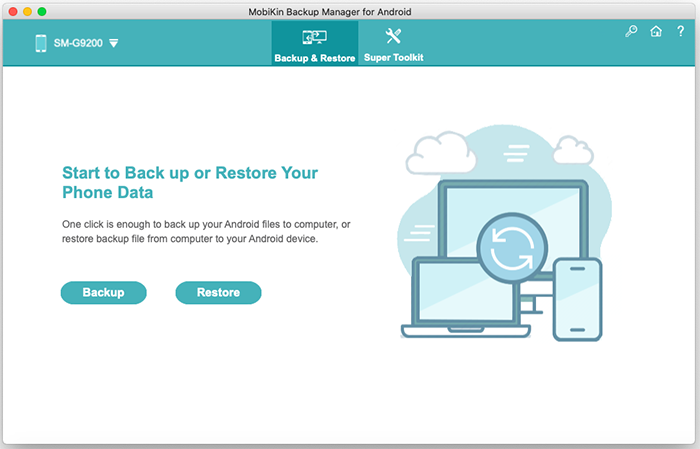
The Mac main window. MobiKin's Mac screenshots are older ones, from a 2020 Samsung test phone.
Features
Back up eight kinds of data to your Mac
MobiKin Backup Manager for Android (Mac) saves contacts, messages, call logs, photos, videos, audio, documents and apps. New backups don't overwrite old ones, so you can keep a copy from before a phone change alongside the latest one.
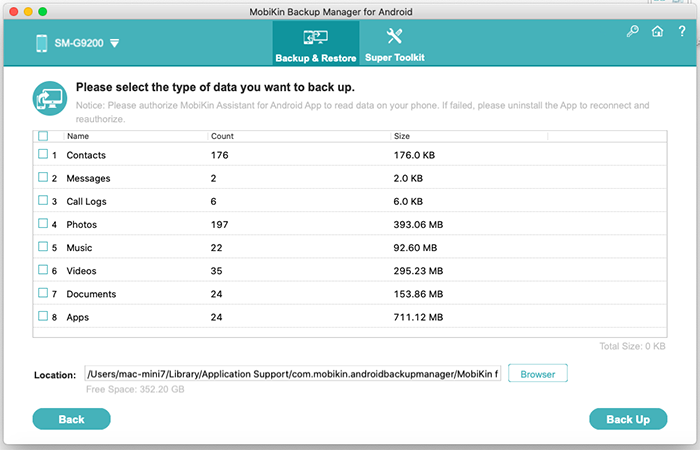
The backup screen, with the save location at the bottom.
Restore to the same phone or a new one
MobiKin Backup Manager for Android (Mac) can send selected data types to the original phone or a different Android device. Since version 3.2.2 you can also pick individual apps to restore.

Choosing a saved backup and the data types to restore.
Your choice of keeping or clearing phone data
MobiKin Backup Manager for Android (Mac) leaves existing data alone by default. Tick Clear data before restoring only if you want the selected data types removed from the phone first.
Backups from other folders
MobiKin Backup Manager for Android (Mac) can add a backup folder outside its default location with Add Backup Folder, which helps if you keep older backups on an external drive.
Cable or Wi-Fi
MobiKin Backup Manager for Android (Mac) works over USB or over a shared Wi-Fi network through a QR code. One user on MobiKin's site found the cable setup fiddly and Wi-Fi easier, so it's useful to have both.

The Wi-Fi dialog. The phone and Mac must share a network.
Benefits
- Contacts and messages, not only photos. Those are what you'd miss most, and basic file transfer tools don't touch them.
- A local copy. Your data sits on your Mac, where Time Machine can include it if you set the folder that way.
- A small download. The installer is under 10 MB.
Real-World Uses
- Trading in an Android phone: save everything to the Mac first, then restore selected data to the replacement.
- A mixed household: keep your Android phone's data on the family iMac.
- Before a factory reset: move your contacts and messages somewhere safe.
- Saving a relative's photos: one reviewer on MobiKin's page bought it to move photos from a parent's Galaxy S8 to a Mac.
Who It's For, and Who Should Skip It
Buy it if you own a Mac and an Android phone and want a full backup without learning command-line tools. It suits occasional backups before a phone change or a reset.
Skip it if you want automatic backups, since Google's backup does that for free. Skip it if you only need photos, because Google Photos or a free file transfer app will do. You should also skip it if you need app logins or game progress saved, as app data isn't included. Windows users need the separate Windows version, which is newer.
Usage Guide
- Download the DMG, install the program and open it. Close any other phone management software on the Mac.
- Connect the phone by USB, enable USB debugging, and allow the Mac on the phone. Or click the Wi-Fi icon and scan the QR code with the helper app.
- Click Backup and tick the data types you want.
- Click Browser to choose a folder, then click Back Up. Don't disconnect the phone until it finishes.
- To restore, click Restore, select a backup and tick the data you want, then click Restore.
- Tap Yes on the phone if it asks about restoring text messages.
Before you buy
- Expect Rosetta on a newer Mac. The app inside the disk image is built for Intel only, so an Apple silicon Mac has to run it through Apple's Rosetta 2, which Apple plans to phase out in later macOS releases. Install the trial before paying.
- Test your phone too. The version history last names a range of Android 6 to 14, in November 2024, while the page says it's compatible with the latest phones. A user on the review page reports success with Android 15 and failure with an old Android 5.1 phone.
- Restoring is locked in the trial. Check your backup right after buying, while the 30-day guarantee still applies. That guarantee doesn't cover a change of mind.
- Buy the right platform. Windows and Mac are separate products with separate license codes. MobiKin lists mixing them up as a cause of invalid license codes.
Where it falls short
- Manual only. You can't schedule a backup, and several users on MobiKin's review page ask for that.
- No cloud option. Backups stay on the Mac unless you copy them elsewhere.
- No app data. MobiKin says apps are backed up without their data.
- Slower updates than Windows. The Windows version moved to 3.0.10 in October 2026, with better progress displays, while the last Mac update, in July 2026, fixed installation issues.
- Large files take time. A user says videos "take a while to transfer."
What Users Say
We found no independent test of the Mac version. The Consuming Tech and FileHorse reviews cover Windows, so what follows is mostly from MobiKin's own page.
On MobiKin's review page
The product page shows 4.5 out of 5 from 85 reviews. These are vendor-hosted comments that we can't verify, and many are short, but the specific ones are informative:
"MobiKin Backup Manager did the job of backing up my OnePlus data on my Mac, but the interface is not what I expected." - Wilson
"Actually works as expected (Mac OS 12.5 RC 2 & Android 15)" - Thn Schre
"The connection (with a USB cable) setup took a bit of patience, but it is another story when connecting via WIFI." - Bal thazar
"Good..but..it can't schedule auto-backups.." - maxteo
"Work well with my wife's device. My only gripe is the fact that it doesn't support my old phone running Android 5.1." - Thorne Ashvale
"Good..though,, it doesn't support cloud backup options" - Z.C. Leopold
The Windows version, tested
On Consuming Tech, Mat Diekhake tested the Windows version 1.4.10 and said: "I found MobiKin Backup Manager 1.4.10 easy to use." He also reported a phone notification still showing as processing after 21 minutes. The program flow is much the same on a Mac, but this wasn't a Mac test.
MobiKin on Trustpilot
The company page shows 3.6 out of 5 from 48 reviews, read through a page summarizer. Most reviews cover refunds and support rather than this program:
"I got my refund back with no hassle." - Harris Karagiaouris, September 12, 2025
"Peter was kind enough to grant me a refund after my year 2 payment had already gone through" - Dante, August 28, 2026
The pattern: people say it does the basic job on a Mac. Complaints are about scheduling, cloud support and the odd connection problem, and very old phones can be left out.
Comparisons
MobiKin Backup Manager (Mac) vs Google's Android backup
Google's backup is free and automatic but depends on your Google storage. MobiKin Backup Manager for Android (Mac) costs $29.95 and needs you to run it, but it puts a complete copy of your files on the Mac.
Mac version vs Windows version
Both cost $29.95 for a 1 PC Lifetime license and share the same backup and restore flow. The Windows version is further along, runs on Android 6 and above including Android 17 by its spec, and lists export to HTML, CSV and vCard files. If you have both computers, the Windows version is the safer pick.
Editions and Pricing
| License | Term | PCs | Price |
|---|
| Lifetime (this listing) | One time | 1 PC | $29.95 |
| Lifetime | One time | 2-5 PCs | $49.95 |
| Lifetime | One time | 6-10 PCs | $89.95 |
| 1 Year | Auto-renews | 1 PC | $19.95 |
| 1 Year | Auto-renews | 2-5 PCs | $39.95 |
| 1 Year | Auto-renews | 6-10 PCs | $79.95 |
At $10 more, Lifetime pays for itself in the second year, because the 1-Year license keeps renewing until you cancel it.
FAQs
Does MobiKin Backup Manager for Android (Mac) work without rooting my phone?
Yes. MobiKin Backup Manager for Android (Mac) uses USB debugging or Wi-Fi and a helper app.
Can MobiKin Backup Manager for Android (Mac) back up an iPhone?
No. It handles Android phones and tablets only. MobiKin sells separate iOS tools.
Where does MobiKin Backup Manager for Android (Mac) save backups?
In a folder you choose with the Browser button. The default sits inside your Mac user Library, under Application Support.
Can I restore a Mac backup to a phone I don't own yet?
Yes, as long as it runs Android. MobiKin Backup Manager for Android (Mac) can restore a saved backup to the original phone or another Android device, so a backup taken today can move to your next phone.
Does the MobiKin Backup Manager for Android (Mac) Lifetime license include updates?
Yes. MobiKin says updates are free, and the license code you bought stays valid for later versions.
Can I use MobiKin Backup Manager for Android (Mac) to back up a phone with a broken screen?
Only if USB debugging was turned on before the screen broke, according to MobiKin's FAQ.
System Requirements
- Mac OS X 10.10 or later
- Intel Core 1 GHz or faster
- 1 GB or more of free disk space, plus room for your backups
- An Android phone or tablet connected by USB cable or Wi-Fi
Conclusion
MobiKin Backup Manager for Android (Mac) is a fair buy at $29.95 if you want a full Android backup on a Mac and don't mind running it yourself. The reason to buy is that it handles contacts and messages as well as files, without a subscription. The main reason not to is uncertainty: there's no independent Mac test, and you can't try a restore first. Install the trial on your own Mac and phone before you pay.
Download Free TrialBuy Now