MobiKin Eraser for Android: Wipe an Android Phone From Your PC for a One-Time $39.95
MobiKin Eraser for Android is a $39.95 one-time Windows program that permanently wipes an Android phone or tablet connected to your PC, overwriting its data after a factory reset and saving a report as proof. It's for people selling, trading in or passing on a phone who want more assurance than a reset alone, and for small shops that clear a few devices and need a record.
Think carefully before you buy: this license covers 3 devices, the trial can't erase anything, and the refund window is only 7 days.
Quick facts
- Version: 5.1.28, released November 5, 2026
- Developer: MobiKin
- Runs on: Windows 11, 10, 8 and 7. A separate Mac version exists
- Erases: Android phones and tablets on Android 6 and above, including Android 17
- Price: $39.95 one time for 3 devices on 1 PC
- Trial: connects your device but doesn't erase, so it only tests compatibility
- Guarantee: 7 days under the refund policy, with listed exceptions
What we checked: the installer (41 MB, digitally signed by Shenzhen Qixingshi Technology Co., Ltd), the 7-day term in MobiKin's refund policy, and the order page, which showed a one-time $39.95 lifetime license with no renewal, on November 5, 2026. We didn't erase a phone or try to recover data afterwards, so the erasure claims here are the vendor's.
Download Free TrialBuy Now
Overview
You install the program on a Windows PC and connect the phone by USB or Wi-Fi. The first time, it installs a driver on the PC and a helper app, MobiKin Assistant for Android, on the phone. After that, you choose a security level, confirm by typing "delete", and let it run.
The process has two parts. The phone gets a factory reset, then the program scans the device and overwrites what's there. That reset step is built into the workflow and the vendor recommends it, so expect the phone to restart and need a quick setup partway through.
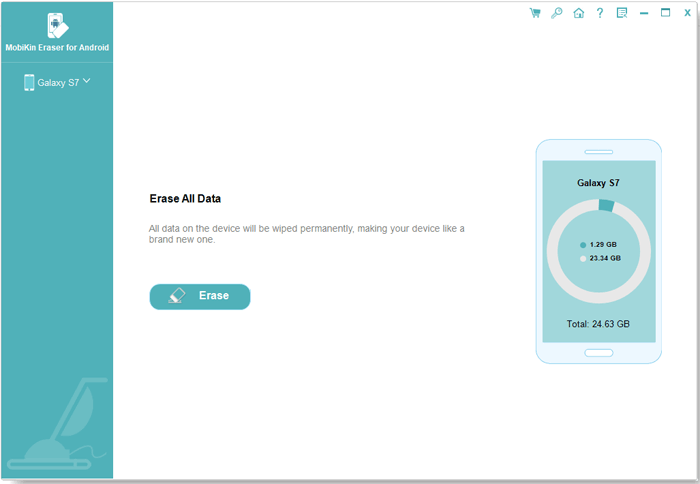
The main window with a Galaxy S9 connected, showing used and free storage.
Features
Three erasing levels
MobiKin Eraser for Android offers Low, Medium and High levels. MobiKin's guide says Low and Medium overwrite the device once and High overwrites it three times. The dialog says the High standard is based on the U.S. DoD 5220.22-M method. Medium is the recommended default, and High suits a phone that held banking or other sensitive data.
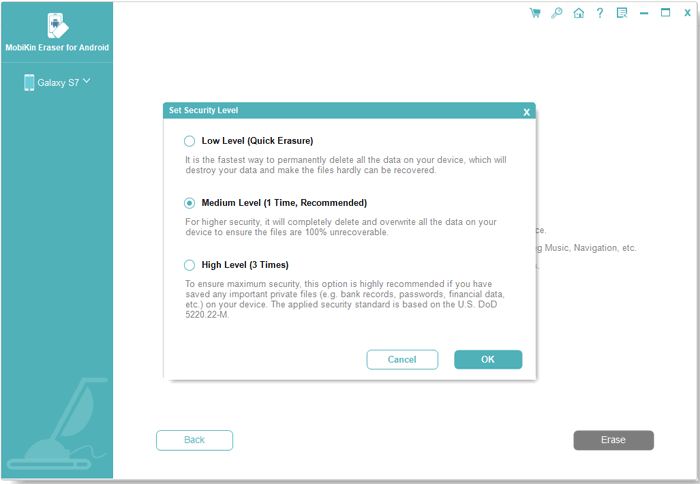
The Set Security Level dialog, with descriptions of the three levels.
Erases more than your photos
MobiKin Eraser for Android targets contacts, messages, call logs, photos, videos, music, calendars, notes, apps and books, plus accounts, passwords, financial data and browsing history. It also overwrites previously deleted files. To clear SMS messages, its helper app has to become the phone's default SMS app for a while, and a prompt on the phone asks you to allow it.
Guided factory reset
MobiKin Eraser for Android asks whether the phone has been reset. If not, it walks you through doing it, then waits while the phone restarts and is set up again. Keep the program open at this stage, as the guide warns that closing it can interrupt the job. You then reconnect and repeat the level choice before overwriting starts.
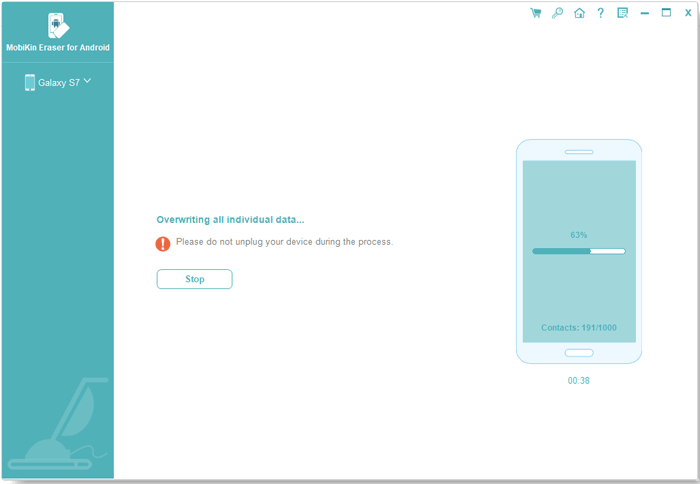
The overwrite stage at 41%. A warning says not to unplug the device.
Erasure report for your records
MobiKin Eraser for Android can save a report listing the device details, erasure standard, number of overwrite passes, method and result. It was added in version 5.1.10 in July 2026, and it's useful for a repair shop or an office that needs to show a device was wiped before it left the building.
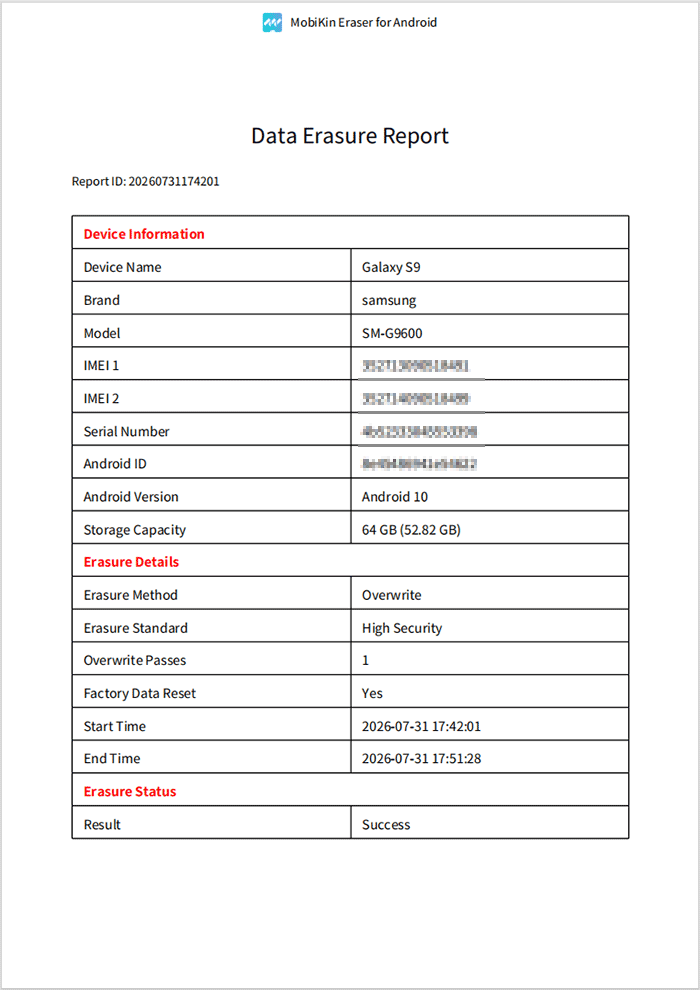
A sample report. It lists High Security with 1 overwrite pass, although the guide says High makes 3 passes, so read your own report closely.
Benefits
- A second layer after the reset. Overwriting aims to leave nothing useful for a recovery tool to find.
- Paper trail. A saved report beats your memory if a buyer or employer ever asks.
- No subscription. This license is one payment, which suits a job you do every couple of years.
Real-World Uses
- Selling an old Samsung: back up, wipe at High level, then hand it over.
- Passing a phone to a relative: wipe it so old messages and banking apps are truly gone.
- Trade-ins: clear the device before it goes to a store.
- A small repair shop: keep a report for each customer device. For more than 3 phones, look at the larger license.
Who It's For, and Who Should Skip It
Buy it if you're cautious about what's left on a phone that held sensitive data, or if you need a report you can file. It helps to have a Windows PC and an hour to spare.
Skip it if you have one ordinary modern phone to clear. Android phones have encrypted storage by default, so the built-in factory reset already protects most people well, and it's free. It's also not for wiping iPhones, which need MobiKin's separate Eraser for iOS, or for anyone who can't risk a compatibility problem after paying, since the trial can't prove the erase works.
Usage Guide
- Back up anything you want to keep. Erased data can't be brought back.
- Install the program on your PC and connect the phone by USB, or by Wi-Fi with the phone and PC on the same network.
- Enable USB debugging if prompted, allow the driver install, and approve the computer on the phone.
- Click Continue, then choose your level next to Security Level.
- Follow the factory reset steps, or confirm the phone has already been reset. Type "delete" to confirm.
- Allow the helper app as the default SMS app when the phone asks.
- Leave the phone plugged in until the scan, erase and overwrite finish, then click Save Report.
Before you buy
- Test the connection in the trial. It won't erase, but it shows whether your phone is detected. That's the main thing that can go wrong.
- Take the 7-day limit seriously. The product page shows a 30-day badge, but MobiKin's refund policy lists Eraser for Android under a 7-day guarantee and rejects change-of-mind requests.
- Pick Lifetime for a one-off job. The 1-year plans auto-renew, and that has caught out at least one buyer.
Where it falls short
- The 100% claim is the vendor's own. We found no independent lab test of its erasure. Flash storage can also hold data in places software can't reach.
- Some phones don't connect. A Trustpilot reviewer says it didn't recognize a Motorola Moto G6 and aborted at least twice.
- It needs a lot of phone-side setup. You'll deal with USB debugging, a driver, a helper app, default SMS permissions and a restart.
- Support pages lag behind. The FAQ still says Android 5 to 14, while the product page says Android 6 and above, including 17.
- The system stays. It wipes your data, not the Android operating system, so don't expect it to fix a broken phone.
What Users Say
Independent reviews of this product are rare. Most "reviews" online are giveaway pages or come from companies selling a rival eraser, so we left those out and kept what we could verify.
On the vendor's page
MobiKin's page says more than 740,000 people use the program and shows three comments, including a surprisingly lukewarm one:
"Erased all kinds of personal data on my android phone that I want to give away. Well protect my private information from leaking. It is easy to use and suitable to a computer novice just like I." - Joe Rose
"Just so so...Actually, it is a simple app and needs to improve more functions. But good enough. :)" - Tom
Software Giveaway
This giveaway site gives it an expert score of 6.5 and says: "MobiKin Eraser for Android is a reliable tool for erasing data from Android devices." It also says: "Despite competitive pricing and customer support, there's room for improvement in feature richness." Pros listed include "Multiple erasing levels" and "Comprehensive data erasure," and the cons are "One function only (erasure)" and "Pricey." The site gives no named author or test results.
MobiKin on Trustpilot
The company page shows 3.6 out of 5 from 48 reviews, read through a page summarizer, and Trustpilot notes the company hasn't recently invited customers to review. One review is directly about this product:
"If you choose the subscription plan, it's set to automatically renew." - Niels Kistrup, June 23, 2025. He adds that the app "didn't recognize my Motorola Moto G6 phone" and that he "Just needed the app to erase one phone." MobiKin replied that it would "make the auto-renewal policy clearer in future updates."
Others cover the company's handling of refunds, which is often good:
"I got my refund back with no hassle." - Harris Karagiaouris, September 12, 2025
"Peter was kind enough to grant me a refund after my year 2 payment had already gone through" - Dante, August 28, 2026
"But, I cannot re-activate the Mobikin that I already paid for." - Joseph C Gravina, February 4, 2026, who also reports no reply from customer service
The pattern: people find it simple and treat it as a single-purpose tool. Complaints focus on auto-renewal and devices that won't connect. Support is often praised for refunds, though not universally, and the 7-day policy is stricter than that praise suggests. Nobody we could verify has tested whether wiped data truly can't be recovered.
Comparisons
MobiKin Eraser for Android vs a factory reset
A factory reset is free, built in and enough for most modern encrypted phones. MobiKin Eraser for Android adds overwriting on top and a saved report. MobiKin claims a reset alone leaves data accessible on many used phones. Consider that claim in light of the fact that it sells the alternative, and decide based on how sensitive your data is.
Lifetime vs 1-Year license
The 3-device Lifetime license at $39.95 costs just $10 more than the 1-Year plan at $29.95, and the 1-Year plan auto-renews. Unless you're sure you'll only ever use it once and will cancel promptly, Lifetime is the safer choice.
Editions and Pricing
| License | Term | Devices and PCs | Price |
|---|
| Lifetime (this listing) | One time | 3 devices, 1 PC | $39.95 |
| Lifetime | One time | 9 devices, 3 PCs | $59.95 |
| Lifetime | One time | 30 devices, 1 PC | $259.95 |
| 1 Year | Auto-renews | 3 devices, 1 PC | $29.95 |
| 1 Year | Auto-renews | 9 devices, 3 PCs | $49.95 |
| 1 Year | Auto-renews | 30 devices, 1 PC | $249.95 |
FAQs
Can I try MobiKin Eraser for Android for free before buying?
Only partly. MobiKin Eraser for Android's free trial lets you connect and detect your device, but its FAQ says erasing is limited to the full version. Treat the trial as a compatibility test.
Does the MobiKin Eraser for Android Lifetime license ever renew?
No. MobiKin Eraser for Android's Lifetime license was a one-time $39.95 on the order page, with the renewal term shown as lifetime. Only the 1-Year plans renew automatically.
How many phones can I wipe with MobiKin Eraser for Android?
This MobiKin Eraser for Android license covers 3 devices on 1 PC. If you wipe phones for customers, the 9-device and 30-device licenses are the ones to look at.
Will MobiKin Eraser for Android remove a Google account lock?
MobiKin doesn't list this as a feature. Sign out of your Google account on the phone before you start so the next owner isn't blocked by a Factory Reset Protection prompt.
Does MobiKin Eraser for Android work on Samsung phones and tablets?
Yes. MobiKin lists Samsung Galaxy S, Z, A, Note and Tab models, including recent ones such as the Galaxy S26, plus phones from Xiaomi, OPPO, OnePlus, vivo and many other brands.
Can I wipe an iPhone with MobiKin Eraser for Android?
No. MobiKin sells Eraser for iOS as a separate product for iPhones and iPads.
How long does MobiKin Eraser for Android take?
It depends on the storage size and the level you choose. The sample report on MobiKin's site shows about 10 minutes for a 64 GB Galaxy S9, not counting the factory reset and setup steps.
System Requirements
- Windows 11, 10, 8 or 7
- 750 MHz Intel or AMD processor
- 512 MB RAM or more
- 1 GB or more of free disk space
- An Android phone or tablet on Android 6 or above, connected by USB cable or Wi-Fi
Conclusion
MobiKin Eraser for Android is worth $39.95 if you want an extra overwrite and a saved report on top of a factory reset. The reason to buy is peace of mind when a phone with sensitive data changes hands. The main reason not to is that a free factory reset already does the job for most modern phones, and you can't test an erase before paying, with just 7 days to get your money back. Check the connection in the trial first.
Download Free TrialBuy Now