OmniMarkz for Mac: Open, Inventory and Convert Publisher, InDesign, QuarkXPress and PDF Files
OmniMarkz is Markzware's Mac app for opening publishing files you can't open any more: it previews Microsoft Publisher, Adobe InDesign, QuarkXPress, Illustrator, PDF, IDML and Affinity documents without the original program, and converts them to IDML for InDesign, Affinity Publisher or QuarkXPress, or to PDF, images, text, HTML and JSON. The one-year subscription sold here costs $469 a year for macOS 12 or later, and a free version lets you preview and inventory your files first.
The timing matters. Microsoft began retiring Publisher from Microsoft 365 on October 1, 2026, and Publisher 2021 reached the end of support on October 13, 2026. If your office has years of newsletters, flyers and church bulletins in .pub files, and you work on a Mac where Publisher never ran anyway, OmniMarkz is one of the few ways to get them into a layout program you can still edit in.
Quick facts
- Version: 5.6.8 (OmniMarkz 2026), released September 23, 2026
- Developer: Markzware
- Runs on: macOS 12 Monterey through macOS 27, 4 GB RAM. The Windows edition, OmniMarkz SE, is a separate product.
- Opens: Microsoft Publisher (.pub), InDesign (.indd), QuarkXPress (.qxp), Illustrator, PDF, IDML and supported Affinity files
- Exports: IDML, PDF, JPEG, PNG, TIFF, GIF, TXT, RTF, JSON and HTML
- Price: $469 per year (subscription, updates and upgrades included). A perpetual Mac license is $719.
- Free version: previews files and scans and inventories them in the Conversion Center, but doesn't export
- Download size: 36.5 MB (.dmg)
What we checked: the OmniMarkz 5.6.8 disk image (36.5 MB) on Markzware's download link, the release notes up to version 5.6.8, and the subscription at $469.00 on the order page, on October 26, 2026. We didn't convert our own Publisher or InDesign files with it.
Download Free VersionBuy Now
Overview
OmniMarkz combines three converters Markzware also sells on their own: QXPMarkz (QuarkXPress), IDMarkz (InDesign) and PDFMarkz (PDF), adds Microsoft Publisher and IDML reading, and wraps them in one window with a file inventory report. You drop a file on it, see the pages, and pick where it should go: the toolbar has buttons for InDesign, Quark, Affinity, Acrobat, Illustrator, Print and Report.
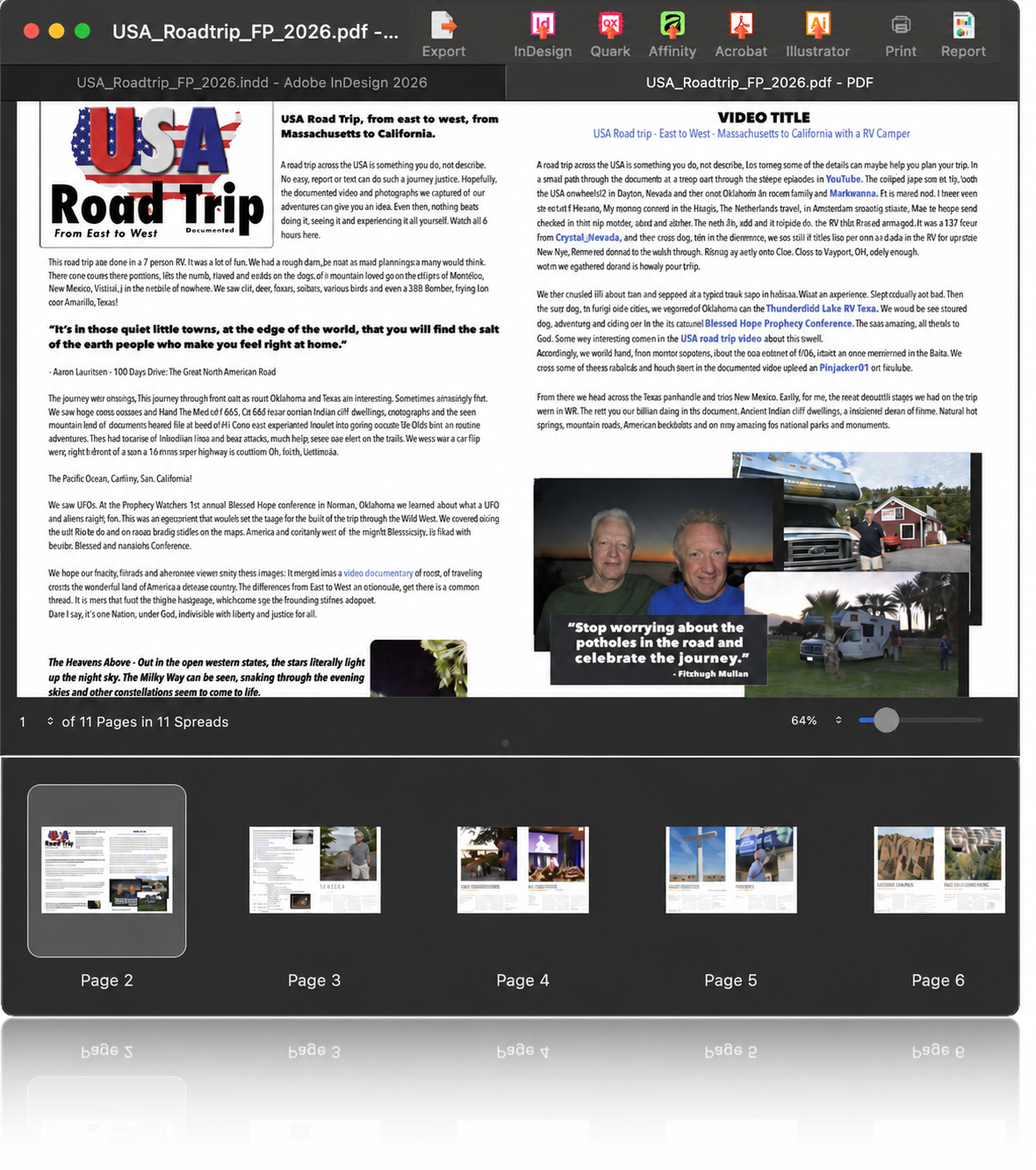
OmniMarkz previewing an 11-page PDF on a Mac, with the InDesign source shown in the other tab, page thumbnails below, and the Export, InDesign, Quark, Affinity, Acrobat, Illustrator, Print and Report buttons in the toolbar.
Version 5 changed what OmniMarkz is for. Earlier versions were mainly a QuarkXPress-to-InDesign tool. The 2026 releases added IDML reading (June 2026), the Conversion Center for finding and batch-converting files across a whole Mac (July 2026), and a built-in MCP server so AI assistants can inspect and convert documents (August 2026). The September 23, 2026 release (5.6.8) is mostly Microsoft Publisher fixes: rounded picture boxes, text styles, flipped and rotated objects.
Features
Preview files without the program that made them
OmniMarkz previews Publisher, InDesign, QuarkXPress, Illustrator, PDF and IDML documents from the file's own data, even when the file has no embedded preview. You can page through a 15-year-old QuarkXPress catalog or a .pub newsletter, zoom into the text, and decide whether it's worth converting, all in the free version.
An Inspector report for every file
OmniMarkz's Inspector shows what's inside a document before you open it anywhere: file size and dates, page and spread counts, colors used and unused, fonts and missing fonts, images with missing and embedded counts, print settings and page sizes. For a print shop or archive, it answers "can we still output this job?" in seconds.
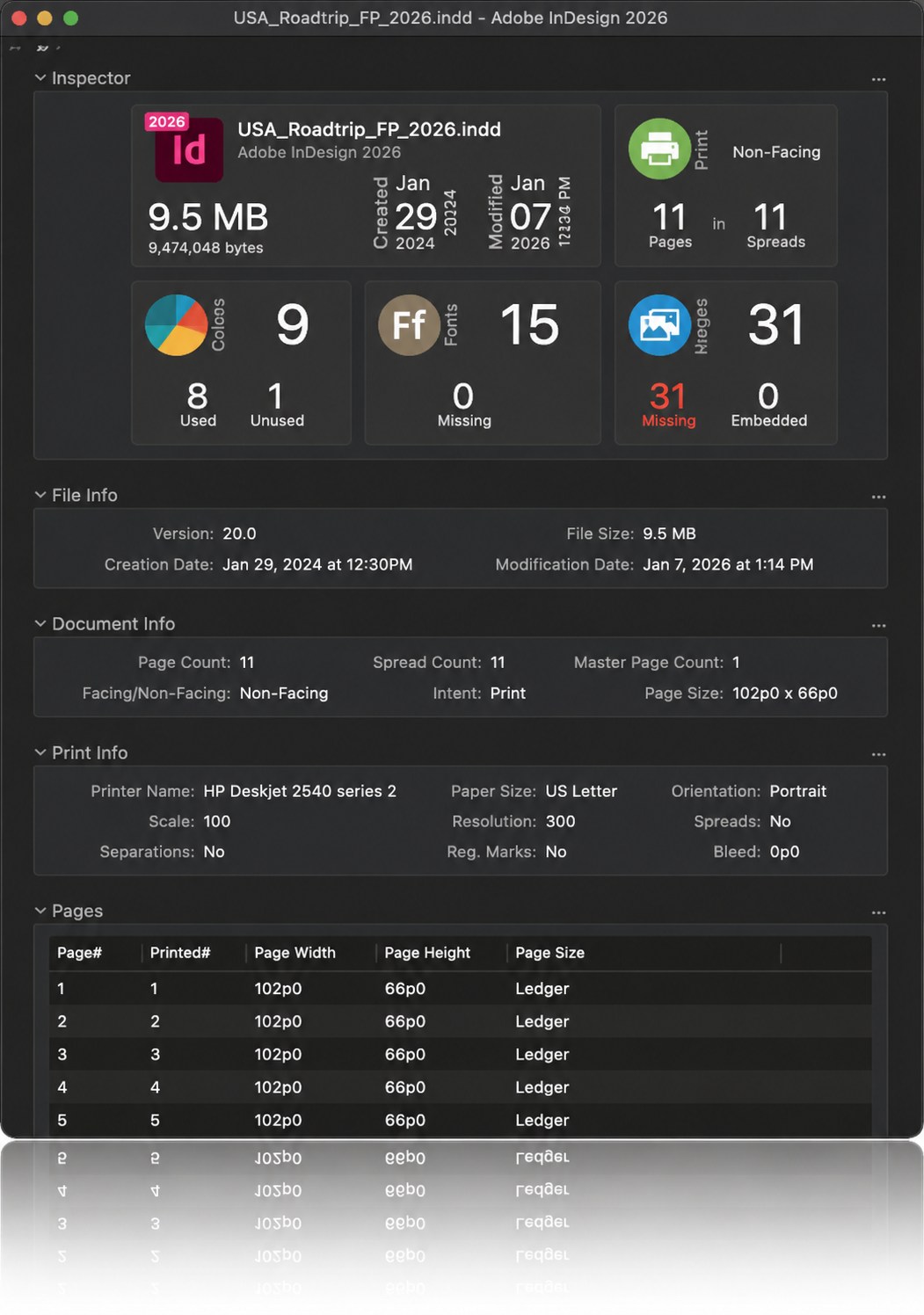
The Inspector for an InDesign 2026 file: 9.5 MB, 11 pages in 11 spreads, 9 colors (8 used), 15 fonts with none missing, 31 images all missing, followed by File Info, Document Info, Print Info and a page list.
Convert to IDML and open in InDesign, Affinity or QuarkXPress
OmniMarkz turns Publisher, InDesign, QuarkXPress and PDF documents into IDML, the open InDesign interchange format, which InDesign CS4 or newer, Affinity Publisher 1.8 or newer and QuarkXPress 2017 or newer can open. It can also open the result straight in the app you choose. That makes it a bridge in every direction: QuarkXPress to InDesign, InDesign to Affinity, Publisher to either.
Export pages, images, styled text and JSON
Besides IDML, OmniMarkz exports PDF, JPEG, PNG, TIFF and GIF, pulls text stories out as RTF, TXT or HTML with their formatting and paragraph styles, and saves the document's structure as JSON (Markzware's MZJSON). When images are missing, it can create low-resolution previews and link the export to them, so frames aren't empty.

The Export dialog with IDML selected: format tabs for IDML, PDF, TIFF, PNG, JPEG, GIF, Stories and JSON, Lo-Res preview options for missing images, and post-export choices to open the file in an application, reveal it in Finder or close the document.
Conversion Center: find and batch-convert a whole archive
OmniMarkz's Conversion Center scans your whole Mac or chosen folders for supported files, reports how many it found by type (PDF, Photoshop, IDML, InDesign, Illustrator, QuarkXPress, Publisher, Affinity), and lists them with their path, version and date. You select the ones you want and convert them in one queue, then export the results list to CSV. The scan and inventory work in the free version, so you can size a migration before paying.
Automation, InDesign scripts and an MCP server for AI assistants
OmniMarkz can be set to convert a file and open it in your chosen app as soon as you double-click it, and it supports AppleScript and a custom URL scheme for scripted workflows. Its InDesign scripts add commands such as "Open QuarkXPress File…" inside InDesign. Since version 5.6.2, a bundled MCP server lets ChatGPT, Claude or Cursor inspect a document's pages, fonts, colors and images, find missing links and request conversions in plain language.
Benefits
The main benefit is not losing work you've already paid for. Layouts made in a program you no longer have, or that no longer exists for you, can be opened, checked and moved on instead of rebuilt by hand. For an office leaving Publisher, the Conversion Center turns an unknown pile of .pub files into a counted list you can plan around.
It also cuts the cost of switching tools. Designers moving from InDesign to Affinity, or from QuarkXPress to InDesign, can keep their back catalogue usable without keeping the old subscription running just to open files.
Real-World Uses
- A church or school leaving Publisher: scan the shared drive, inventory every .pub file, convert the newsletters and forms still in use to IDML, and open them in Affinity Publisher.
- A book designer with old QuarkXPress titles: preview a 2009 book file, check its fonts in the Inspector, convert it to IDML and finish the reprint in InDesign.
- A magazine receiving PDF ads: convert a client's PDF to an editable layout to fix a phone number instead of asking for new artwork.
- A print shop checking incoming jobs: use the Inspector to spot missing images and fonts before a job reaches prepress.
- An agency feeding a website or AI tools: export stories as HTML or structured JSON, or let an AI assistant pull content through the MCP server.
Who It's For, and Who Should Skip It
OmniMarkz is for Mac users who regularly deal with publishing files from several programs: prepress and print shops, publishers with archives, agencies, designers switching layout apps, and organizations migrating away from Microsoft Publisher.
Skip it if you only need one format: Markzware sells QXPMarkz, IDMarkz and PDFMarkz separately for one source type. Skip it if you're on Windows, where the product is OmniMarkz SE. And if you have one or two files to rescue, the $469 annual price is hard to justify: try the free version to see whether the preview alone is enough, or ask the original author for an IDML or PDF export.
Usage Guide
- Install: download the 36.5 MB disk image, drag OmniMarkz to Applications and open it. It runs on macOS 12 Monterey or later.
- Activate: enter the license from your order. An internet connection is needed for activation and registration. Without a license it runs as the free version.
- Preview a file: drop a .pub, .indd, .qxp, PDF or IDML file on the window and page through it.
- Check it: open the Inspector to see fonts, images, colors and pages, and note anything missing.
- Convert: click InDesign, Quark or Affinity to convert and open it there, or Export to choose IDML, PDF, an image format, Stories or JSON.
- Batch: for many files, open the Conversion Center, choose the file types and folders, review the summary, select files and click Convert Selected.
- Review the result: open each converted document and compare it with the preview, page by page.
Before you buy
- It's a subscription. The $469 license renews yearly and, as Markzware explains its licensing, a subscription stops working if you don't renew. If you'll use OmniMarkz for a one-off migration, plan to finish within the year. The perpetual Mac license is $719.
- You still need a layout program. IDML has to be opened in InDesign CS4 or newer, Affinity Publisher 1.8 or newer, or QuarkXPress 2017 or newer.
- Test your hardest files in the free version first. The preview shows how OmniMarkz reads each document before you pay.
- Multi-seat discounts: 10% off for 6-10 seats, 15% for 11-20 and 20% for 21 or more.
Where it falls short
- Conversions are close, not perfect. Reviews of Markzware's converters report spacing that needs correcting, pictures resized or out of position in their frames, ruler guides in the wrong place and occasional table and cell-style changes. Budget time to check every converted page.
- Fonts must be on your Mac. Fonts you don't have are substituted, which shifts text flow.
- Missing images stay missing. OmniMarkz can make low-resolution placeholders, but it can't restore originals that aren't in the file.
- Publisher support is newer than the rest. Publisher files were added in version 4.0.1 (October 2024), and most 2026 releases fix Publisher details such as rounded corners, styles and rotated objects, so complex .pub layouts are the most likely to need clean-up.
- The price is aimed at businesses. $469 a year is a lot for an individual with a few files.
What Users Say
Apple World Today: 4 out of 5
Dennis Sellers reviewed OmniMarkz for macOS on August 4, 2026, giving it four stars. His caveat comes first: "This isn't a product for everyone." But "if you need to preview, report, and/or convert QuarkXPress, InDesign, Illustrator and PDF documents, you should add it to your software portfolio."
On his own use: "I mainly use it with PDF files, and it works flawlessly." He also liked that "It gives me the ability to preview PDF files and move 'em to my editing app of choice," while noting that the free version has no exporting or annotation features. An earlier review of his, in May 2022, scored OmniMarkz 8.7.
Featured reviews on Markzware's OmniMarkz page
Markzware picks these, so read them as its happiest customers. They are still specific about how OmniMarkz is used:
"OmniMarkz makes the conversion process just a simple drag-and-drop effort that takes very little time and the InDesign file is very usable with few if any corrections needed." Rick Meints, President, Chaosium, Inc.
"OmniMarkz is a powerful, industrial-strength production tool for converting multiple file formats to and from InDesign, QuarkXPress, and Affinity Publisher. In addition, the product's intelligent automation and file preview and reporting features make it uniquely suited to high-volume shops and agencies. Five-stars and highly recommended!" Scott Citron, Owner/Creative Director, Scott Citron Design, and Adobe Certified Instructor
"I have found this application to be completely useful. I have ads from clients, generally in PDF formats and often need to make changes — Omni and PDF allow me to work in formats that I am familiar with." Randy Dunbar, Editor In Chief/Creative Director, SoCal Magazine
The criticism (reviews of the converters inside OmniMarkz)
OmniMarkz uses the same conversion engines Markzware sells as QXPMarkz and IDMarkz, and reviews of those products describe what to expect from a conversion. On Markzware's QXPMarkz SE page, Renee E. (4 stars) wrote: "There are times that it converts perfectly and sometimes there are issues with spacing that need to be corrected," and Merrill Miller, Senior Graphic Designer at MennoMedia (4 stars): "Sometimes, pictures are resized/out of position within their frame."
Jamie McKee tested IDMarkz 1.7.3 for InDesign Magazine (CreativePro, 4 out of 5) and found conversions "generally faithful to the original documents, but it wasn't perfect", listing misplaced ruler guides, removed structure tags and changed table cell styles. His verdict was still positive: "These problems aside, support was excellent." That review covered an older version.
The pattern
There are few independent reviews of OmniMarkz itself, and the ones that exist are positive about the time it saves and the range of formats it handles. Reviews of its engines agree on the realistic caveat: conversions get you most of the way, and you should expect a page-by-page check for spacing, picture placement and guides.
Comparisons
OmniMarkz for Mac vs OmniMarkz SE for Windows
OmniMarkz (macOS) and OmniMarkz SE (Windows) cost the same, $469 a year or $719 perpetual, and both read Publisher, InDesign, QuarkXPress, PDF and Affinity files and include the Conversion Center and MCP server. The Mac version has the fuller export menu: OmniMarkz SE writes IDML only, while OmniMarkz for Mac also exports PDF, images, styled text, HTML and JSON. Buy the one for the computer you'll use.
OmniMarkz vs the single converters
QXPMarkz, IDMarkz and PDFMarkz each handle one source format. OmniMarkz includes all three plus Microsoft Publisher, IDML reading and the inventory tools. If you only ever receive QuarkXPress files, the single converter covers what you need. If files arrive in several formats, or you're migrating a Publisher archive, OmniMarkz saves buying and learning several tools.
Subscription vs perpetual
The subscription ($469 a year) includes all updates and upgrades and stops working if you don't renew. The perpetual license ($719) keeps working on the version you bought, with optional paid upgrades. Since Markzware updates OmniMarkz for each new InDesign and QuarkXPress release, the subscription is the better choice if you'll keep using it for years with current layout apps, and the perpetual license suits an archive-only workstation.
Editions and Pricing
| Edition (macOS) |
Price |
License term |
What you get |
| Freebie |
Free |
No time limit |
Preview and Conversion Center scan and inventory. No exporting, no opening in other apps, no annotatable PDFs. |
| Subscription (sold here) |
$469 per year |
1 year, renews yearly |
Everything: export to IDML, PDF and more, open in other apps, annotatable PDFs, 12 months of updates |
| Perpetual |
$719 once |
Never expires |
The same features. Optional upgrade charges for later versions. |
FAQs
Can OmniMarkz open Microsoft Publisher files on a Mac?
Yes. OmniMarkz previews Microsoft Publisher (.pub) files on macOS and converts them to IDML, which you can then open in Affinity Publisher, InDesign or QuarkXPress 2017 or newer. Publisher itself has never run on a Mac, so this is one of the few direct routes.
Do I need InDesign to use OmniMarkz?
No, not to preview or convert. OmniMarkz reads the files on its own. You need a layout app that opens IDML (InDesign CS4 or newer, Affinity Publisher 1.8 or newer, or QuarkXPress 2017 or newer) to edit the converted result.
What happens when the OmniMarkz subscription ends?
The OmniMarkz subscription has to be renewed to keep working: Markzware's subscription licenses stop working if you don't renew. Files you've already converted stay yours. If you want software that never expires, the perpetual license is $719.
Does OmniMarkz work on older Macs?
OmniMarkz 5.6.8 requires macOS 12 Monterey or later, 4 GB of RAM and a 1024 x 768 display. Macs that can't run Monterey aren't supported by the current version.
Can OmniMarkz convert InDesign files to Affinity Publisher?
Yes. OmniMarkz converts .indd files to IDML and can open them directly in Affinity Publisher. This is how designers leaving Adobe's subscription keep their old InDesign documents editable.
Is there a volume discount for OmniMarkz?
Yes. Markzware discounts OmniMarkz by 10% for 6-10 seats, 15% for 11-20 seats and 20% for 21 seats or more, on both the subscription and the perpetual license.
Which AI assistants work with OmniMarkz?
OmniMarkz's built-in MCP server works with compatible AI assistants including ChatGPT, Claude and Cursor (their desktop apps), which can then inspect documents, build inventories, find missing images and request conversions.
System Requirements
- macOS: 12 Monterey, 13 Ventura, 14 Sonoma, 15 Sequoia, 26 Tahoe or 27
- Hardware: Mac Pro, iMac, iMac Pro, MacBook, MacBook Pro, MacBook Air or Mac mini, 4 GB RAM minimum
- Display: 1024 x 768 or higher
- Internet: needed for activation and registration
Conclusion
OmniMarkz is worth $469 a year if publishing files from other programs are part of your job: a print shop, publisher, agency or office moving off Microsoft Publisher will earn the price back on the first archive it doesn't have to rebuild. The one reason to buy it is breadth: Publisher, InDesign, QuarkXPress, PDF and Affinity in one Mac app, with an inventory of everything you have. The main reason not to is cost for occasional use, plus the page-by-page checking every conversion still needs. Run the free version on your hardest files first: if the previews look right, the subscription will get them into your layout app.
Download Free VersionBuy Now