FlightCheck: Preflight and Package Print Files on a Mac Without Opening InDesign
FlightCheck is Markzware's macOS app that checks PDF, InDesign, IDML, Illustrator, Photoshop, QuarkXPress and Publisher files for print problems (missing fonts and images, low-resolution graphics, wrong color modes) and packages the whole job, without the original design applications installed. It costs $299 a year, or $479 for a perpetual license, and the full demo runs for 30 days.
It's built for prepress departments, print shops and production staff who receive files from many designers every day and need to know, before the job hits the press, whether a font is missing or a photo is 72 ppi.
Quick facts
- Current version: FlightCheck 2026, version 5.0.10
- Developer: Markzware
- Runs on: macOS 12 Monterey through macOS 26 Tahoe and macOS 27. There's no Windows version.
- Checks: PDF, Adobe InDesign (INDD), IDML, Illustrator (AI), Photoshop (PSD), QuarkXPress (QXP), Microsoft Publisher (PUB) and image files
- Price: $299 a year (subscription, 12 months of updates) or $479 once (perpetual)
- Free demo: fully functioning for 30 days
- Download: 28 MB disk image
- What we checked: the disk image we downloaded from Markzware on October 20, 2026 contains FlightCheck version 5.0.10 (build 13079), dated June 8, 2026. Markzware's product page listed the subscription at $299 a year and the perpetual license at $479 on October 20, 2026. We couldn't load the order page from our location to confirm the final checkout price, and we didn't preflight any files ourselves.
Before you buy
FlightCheck runs on macOS only and needs an internet connection to activate and register. The license sold here is the yearly subscription. If you'd rather pay once, Markzware's perpetual license is $479 and includes 12 months of updates, after which upgrades may cost extra. FlightCheck finds and reports problems and packages jobs, but it doesn't edit the files: you still fix a missing font or a low-resolution image in the design application.
Download Free TrialBuy Now
Overview
FlightCheck works in three steps: inspect, verify and package. You open a file, FlightCheck shows a preview of its pages, and a results panel on the right runs the file against a set of rules Markzware calls Ground Controls. Each rule lists its errors and warnings, and a FlightCheck score sums up how print-ready the file is. When it's right, the Package button gathers everything the printer needs into one place.

FlightCheck in dark mode, from Markzware's product page: an 11-page InDesign 2025 document in Preflight Mode, with 18 errors and 52 warnings, a 95% FlightCheck score, and Ground Controls such as Mode is RGB, Used in Overprint Fill and Color Res. Out of Range [300 - 600].
Features
Preview files without the design applications
FlightCheck opens InDesign, Illustrator, Photoshop, QuarkXPress, Publisher and PDF files on its own, so a print shop doesn't need a licensed copy of every design program on every desk. The Inspector shows the file type, the exact version (for example InDesign 2021), when it was last modified, whether it's meant for print, mobile or web, page and spread counts, and counts of missing or inactive fonts and missing or embedded images.
Ground Controls flag the problems that ruin print jobs
FlightCheck's Ground Controls flag errors such as missing fonts and images, and warn about embedded images, inactive fonts, RGB colors, overprints, scaled images and images outside a resolution range. Markzware has added checks for Type 1 fonts and the PANTONE colors Adobe no longer supports, images with an ICC profile override, and generative AI content in Photoshop files, including the prompt where it's stored. You can edit the rules to match your shop's standards.
A detailed inventory of every image, font and color
FlightCheck's Inventory View lists every linked and embedded image with its type, color mode, PPI, scaling and effective resolution, plus detailed file, page, print, color and font information. Tables can be exported as CSV, and a Locate Missing Images button helps relink what the designer forgot to send.
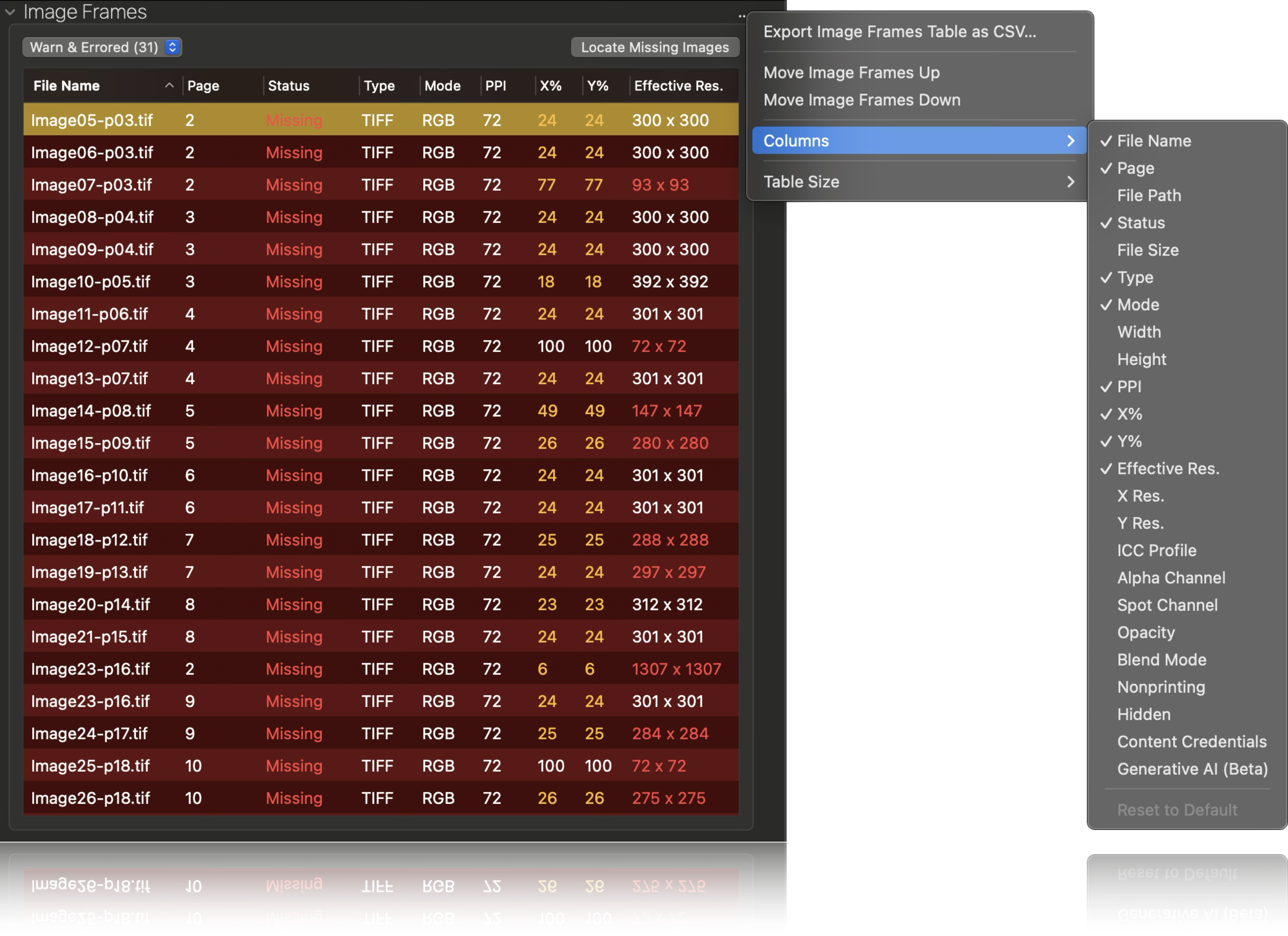
The Image Frames inventory, from Markzware's product page: 31 warned and errored TIFF images marked Missing, with their page, color mode, PPI, scaling and effective resolution, the Locate Missing Images button, and the menu to export the table as CSV or choose columns such as ICC Profile and Generative AI (Beta).
Package complete jobs for printing or archiving
FlightCheck collects the original file (INDD, QXP, PDF, AI and so on), an exported PDF, a converted IDML file, linked images, extracted embedded images, the used fonts, and inventory and package reports as HTML, TXT, RTF, JSON or XML. Packages can go to local drives, Creative Cloud, Dropbox, iCloud, Box or Google Drive.
Automation and white-label reports
FlightCheck can open a file and automatically create a report or a package, with Automation Preferences, AppleScript support and a custom URL scheme. With an Automator Folder Action it can watch a hot folder, build an HTML inventory report for each new file and email it with Apple Mail. Print shops can also brand FlightCheck's reports with their own logo for their customers.
Benefits
- Fewer reprints. A missing font or a 72 ppi image caught at file intake costs minutes. Caught on press, it costs a whole run.
- One tool for every incoming format. Customers' InDesign, Quark, Publisher and PDF files all go through the same check.
- Complete archives. Packages with fonts, images and reports mean a job can be reopened years later.
- Faster quotes. Customer-service staff can see page counts, colors and problems without asking a designer.
Real-World Uses
- Print shop intake: run every customer file through FlightCheck before it's quoted or scheduled, and send the report back when fonts or images are missing.
- Publisher archiving: package finished InDesign books with fonts, images and reports for the archive.
- Hot-folder checks: drop files into a watched folder and have FlightCheck email an inventory report to production.
- AI content policy: flag Photoshop files that contain generative AI content before they go into a publication.
Who It's For, and Who Should Skip It
FlightCheck suits prepress specialists, print shops, publishers and production departments on Macs that handle files in many formats from many sources.
Skip it if you work on Windows (there's no Windows version), or if you only check your own InDesign files, since InDesign's built-in live preflight and Package command may be enough. Skip it too if you need to fix PDFs automatically rather than report on them, which is a job for a PDF preflight-and-fix tool.
Usage Guide
- Install and launch. Download the demo, open the disk image and drag FlightCheck to Applications. Activation needs an internet connection.
- Open a file. Click Open, or drag an INDD, PDF, AI, PSD, QXP or PUB file onto FlightCheck.
- Read the results. Check the Ground Controls panel for errors and warnings and the FlightCheck score. Click a rule to see the objects that triggered it.
- Look deeper. Open the Inventory views for images, fonts, colors and pages.
- Report or package. Click Report to save an inventory report, or Package to collect the job.
- Automate (optional). Set Automation Preferences, or build an Automator Folder Action for a hot folder.
Where it falls short
- Mac only. Long-time users have asked for a Windows version, and there still isn't one.
- Reports, doesn't repair. It flags problems and packages jobs, but corrections happen in the design application.
- Few independent reviews. Almost all published feedback is on Markzware's own site.
- A change from the old FlightCheck. Users of the earlier FlightCheck Professional found the current version different at first. One preflighter wrote she "didn't want to use the new format" before Markzware's team added what she needed.
What Users Say
FlightCheck is a specialist prepress tool, and nearly all user feedback lives on Markzware's site: a review widget with 11 reviews and featured testimonials on the product page.
Featured testimonials
- Amybeth Menendez, Assistant Manager of Print Workflow at Macmillan: "I package files for archival with confidence, knowing all the assets have been collected. FlightCheck has the ability to automate my workflow. Win, Win!"
- Terri Wright, Owner/Principal at Book Lotus Productions: "So glad Markzware is accommodating all the changes in computers and software — couldn't work without FlightCheck!"
- Reza Alee, Packaging Quality Control at Sigmapackprint: "As a company active in Prepress, using the FlightCheck program was very valuable to us. Using this application can improve the production and lean printing process."
Markzware's review widget
- Debbie Pruett, Preflighter (January 2026): "At first I didn't want to use the new format because the old one had everything I needed. But as I went along if there is something I needed Mark or his team would improve it, I use this program everyday and without it I would be so behind on my work."
- Kathy Weaver (May 2024): "Such a time saver! Great product. Wish I had discovered it sooner."
- Matteo Baschera (December 2022): "I have used the earlier FlightCheck Pro for a long time. I was already excited about the new version during the beta phase. And this positive attitude has proven itself during productive use in our workflow. The only thing we wish for is a Windows-compatible version for Christmas ;-)"
The pattern
Users are daily prepress professionals who say FlightCheck saves time and that Markzware responds to requests. The wishes are for a Windows version and, for long-time users, getting used to the newer design. Keep in mind that these reviews are hosted by the vendor.
Comparisons
FlightCheck vs. InDesign's built-in preflight
InDesign's live preflight and Package command cover InDesign files you can open in your own copy of InDesign. FlightCheck adds the other formats (PDF, Illustrator, Photoshop, QuarkXPress, Publisher), works without the design applications, checks for Type 1 fonts, unsupported PANTONE colors and generative AI content, and automates reports. For a shop receiving files from many customers, that breadth is the point.
Editions and Pricing
| License |
Price |
Term |
Updates |
| Demo | $0 | 30 days, fully functioning | - |
| Subscription (sold here) | $299 a year | Yearly | Included while subscribed |
| Perpetual | $479 once | Forever | 12 months, then optional upgrade charges |
Prices are from Markzware's FlightCheck page on October 20, 2026. Markzware recommends the subscription.
FAQs
Does FlightCheck need InDesign or Illustrator installed?
No. FlightCheck previews and preflights InDesign, Illustrator, Photoshop, QuarkXPress, Publisher and PDF files on its own, without the original design applications or plug-ins.
Is there a Windows version of FlightCheck?
No. FlightCheck is a macOS application. Markzware sells other Windows tools, but not FlightCheck.
Does FlightCheck run on macOS Tahoe?
Yes. Markzware lists FlightCheck as compatible with macOS 12 Monterey through macOS 26 Tahoe, and macOS 27.
Can FlightCheck fix the problems it finds?
No. FlightCheck reports errors and warnings and packages the job, but you correct missing fonts, low-resolution images or color modes in the design application.
Can FlightCheck detect AI-generated images?
FlightCheck can flag generative AI content stored in Photoshop files, such as Adobe Firefly content, and show the prompt information where it's available.
What's the difference between the FlightCheck subscription and perpetual licenses?
The FlightCheck subscription is $299 a year with updates while you subscribe. The perpetual license is $479 once, keeps working indefinitely and includes 12 months of updates, after which upgrades may cost extra.
System Requirements
- macOS: 12 Monterey, 13 Ventura, 14 Sonoma, 15 Sequoia, 26 Tahoe or 27
- Mac: Mac Pro, iMac, iMac Pro, MacBook, MacBook Pro, MacBook Air or Mac mini
- Memory: 4 GB RAM minimum
- Display: 1024 x 768 or higher
- Internet: needed for activation and registration
Conclusion
FlightCheck is worth $299 a year for a Mac-based print shop, publisher or prepress department that checks files from many sources every day: one missed font caught before a press run pays for it. The one reason to buy it is breadth: it preflights and packages InDesign, Quark, Illustrator, Photoshop, Publisher and PDF files without those applications. The main reason not to is the platform: it's Mac only, and if you only preflight your own InDesign files, InDesign's built-in tools may do. Run the 30-day demo on a week of real incoming jobs before you decide.
Download Free TrialBuy Now