IDMarkz for Mac: Open, Preview and Convert InDesign Files Without InDesign
IDMarkz is a macOS app from Markzware that shows you what's inside an Adobe InDesign file without InDesign, and converts it to IDML, PDF or images, or straight into Affinity Publisher, QuarkXPress or an older InDesign. The preview is free; converting needs a license, which costs $219 once (perpetual) or $129 a year.
The usual story goes like this. A client sends you an .indd file, and you dropped your Creative Cloud subscription a year ago. Or you've switched to Affinity and you're sitting on ten years of InDesign work that Affinity can't open, because it reads IDML but not native INDD files. IDMarkz is the bridge: drag the file in, see the pages, and click once to send it to the app you actually use.
Quick facts
- Version: IDMarkz 2026, version 6.5.2 (build 2689), released September 23, 2026
- Developer: Markzware
- Runs on: macOS 12 Monterey or later, native on both Intel and Apple Silicon Macs
- Reads: InDesign documents and templates from CS4 through InDesign 2026, plus IDML files
- Sends files to: Affinity Publisher 1.8 or newer (including Affinity v3), QuarkXPress 2017 or newer, InDesign CS4 or newer, Acrobat and Illustrator
- Exports: IDML, PDF, JPEG, PNG, TIFF, GIF, and the text stories as RTF, HTML or TXT
- Price: $219 perpetual license (sold here), or $129 a year by subscription
- Free version: previews InDesign files, but can't export or convert
- What we checked: on October 24, 2026 we downloaded the 6.5.2 installer from Markzware (a 29.6 MB disk image), read the release notes back to version 1.x, and confirmed both prices on Markzware's product page. We couldn't open the order page itself, and we didn't convert our own InDesign files.
Before you buy
- Test your own files in the free version first. It opens the same files the paid version does, so you'll see straight away whether IDMarkz reads them. The license only switches on exporting and the "Open in" buttons.
- The perpetual license stays on the version you buy. Markzware ships a new IDMarkz each year, timed with InDesign. When InDesign 2027 arrives, files saved in it will need the next IDMarkz, and on a perpetual license that's an optional paid upgrade. The $129 subscription includes every update.
- Converted layouts usually need some tidying. IDMarkz writes the IDML, and Affinity or QuarkXPress then rebuild the page from it. Features the target app doesn't have can't come across.
- It's a Mac app. Windows users need IDMarkz SE, a separate product with its own license.
Download Free TrialBuy Now
Overview
IDMarkz opens to a simple window: drop an InDesign file on it and the pages appear, with a strip of page thumbnails along the bottom and a zoom slider. Above the page sits a row of one-click buttons: Export, then InDesign, Quark, Publisher, Acrobat and Illustrator. Each "Open in" button converts the document behind the scenes and launches it in that app. A separate inspector panel summarizes the file.
Markzware builds the preview from the document's own data, not from the small preview image InDesign can save inside a file, so it works on files that were never saved with previews. The 2026 line added InDesign 2026, QuarkXPress 2026 and Affinity v3 support (version 6.0.1, November 2025), reading and previewing IDML files (6.0.7, June 2026), and a Conversion Center for finding and batch-converting files (6.5.2, September 2026).

The IDMarkz window with an InDesign 2025 document open: the page preview with thumbnails below, the Export and "Open in" buttons across the top, and the inspector on the right listing 11 pages, 15 fonts (none missing), 9 colors, 31 images and 102 stories.
Features
Open InDesign files in Affinity Publisher or QuarkXPress
IDMarkz turns an InDesign document into an Affinity Publisher or QuarkXPress layout with one click. It writes an IDML version of the file, the open format both programs can read, and opens it in the app you chose. This is the feature most buyers come for: Affinity Publisher can open IDML but not native .indd files, so without InDesign you'd otherwise have no way in. You can also set which QuarkXPress version to use, from 2017 on.
Open newer InDesign files in an older InDesign
IDMarkz lets an older copy of InDesign, back to CS4, open files saved in a newer version. If you still run InDesign CS6 on an old Mac and a client sends an InDesign 2026 file, IDMarkz converts it to IDML and opens it in CS6 for you. InDesign CC can do a similar conversion through Adobe's servers; IDMarkz does it on your Mac without sending the file anywhere.
Export pages, PDFs and text
IDMarkz exports an InDesign document to IDML, PDF, JPEG, PNG, TIFF or GIF, for all pages or a page range. The Stories export pulls the text out of the document as RTF, HTML or plain text with its formatting, handy when you want to reuse the words in a website or a Word file. Markzware also highlights annotatable PDFs: export a PDF, mark it up in Acrobat, and the comments can be imported back into InDesign.
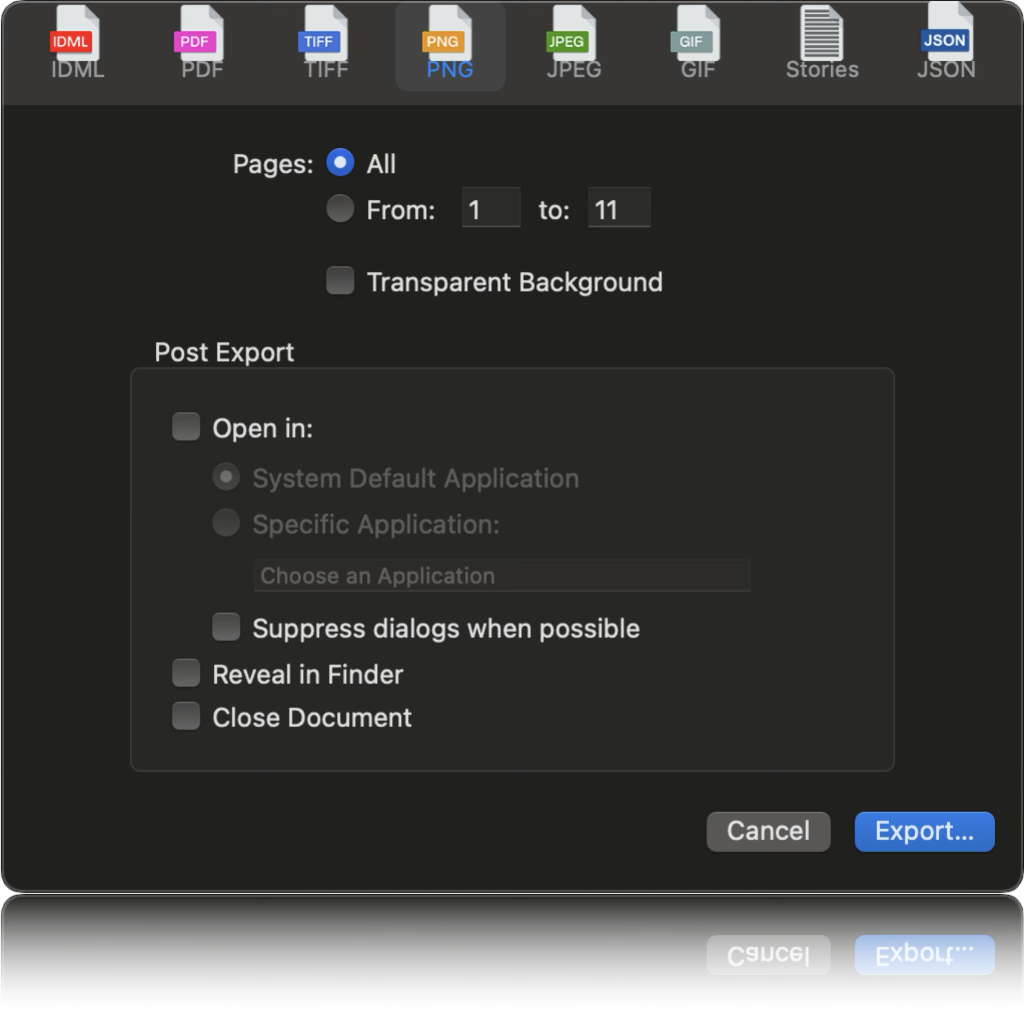
The export dialog with PNG selected: format tabs across the top, all pages or a page range, a transparent-background option, and post-export choices to open the result, reveal it in Finder or close the document.
Quick Look and Finder thumbnails for InDesign files
IDMarkz lets you preview InDesign, IDML and InCopy files right in the Finder: select one and press the spacebar. That's the feature long-time InDesign users mention most, because it saves opening hundreds of archived files to find the right one. You can also turn on Finder thumbnails that show the first page instead of the InDesign icon. Quick Look works in the free version too.

A Quick Look preview of an InDesign 2024 file from the Finder, with page thumbnails down the right side and "Preview provided by Markzware" at the bottom (from IDMarkz 2024).
A document inspector
The IDMarkz inspector gives you a one-glance summary of a file: the InDesign version it was saved in, file size, creation and modification dates, page and spread count, page size, and the number of fonts, colors, images and stories, including how many fonts and images are missing. A printer checking a job before quoting, or a designer wondering why a file won't package, learns a lot without opening InDesign.
Automatic exports and batch conversion
IDMarkz can do its work the moment you open a file. In the Automation preferences you tick the formats to export on open, choose where the files go, and optionally open the result in your default app and close the document. Set it to open IDML in Affinity Publisher and a double-click on any .indd in the Finder lands you in Publisher. For larger jobs, the Conversion Center added in version 6.5 finds supported files and converts them in a batch, and AppleScript support and a custom URL scheme let it fit into scripted workflows.
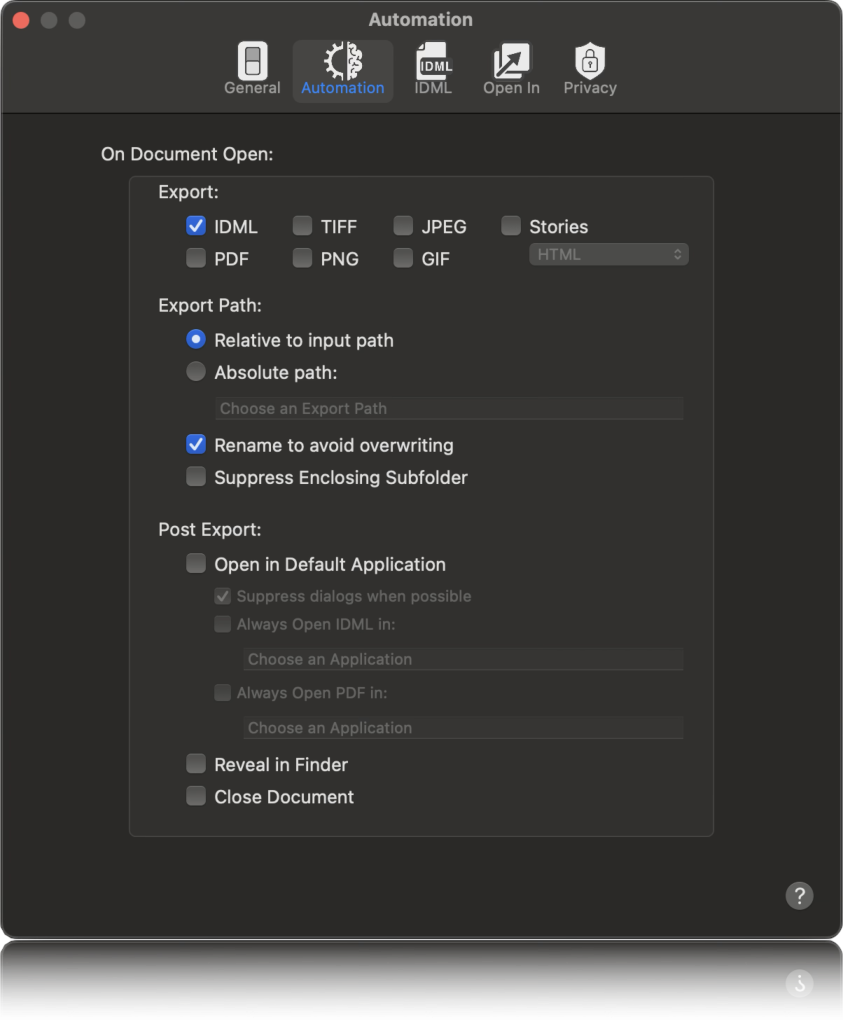
The Automation tab of IDMarkz Preferences: formats to export when a document opens (IDML is ticked), the export path, and post-export options such as opening the file in the default application or revealing it in Finder.
Benefits
- Leave Creative Cloud without losing your archive. Years of .indd files stay usable after you cancel InDesign, as previews at least and as editable layouts with a license.
- Answer client files the same day. No more asking a customer to "save back" to IDML because you're on an older version.
- Find files faster. Quick Look turns a folder of anonymous InDesign icons into something you can browse.
- Keep files on your Mac. Conversions happen locally, which matters for confidential publications.
Real-World Uses
- A small publisher switching to Affinity sends a back catalogue of book layouts to Affinity Publisher one file at a time, then fixes text flow and tables in Publisher.
- A print shop receives InDesign files from customers, checks page count, page size and missing fonts in the inspector, and exports a PDF proof without an InDesign seat.
- A freelancer still on InDesign CS6 opens a client's InDesign 2026 brochure in CS6 via IDMarkz instead of renting Creative Cloud for one job.
- A newsletter editor extracts the stories from an old issue as RTF to reuse the articles on a website.
- An archivist previews hundreds of old .indd files with Quick Look to find one layout without opening each file.
Who It's For, and Who Should Skip It
IDMarkz is for Mac users who receive or own InDesign files but don't run current InDesign: Affinity Publisher and QuarkXPress users, people who kept an old InDesign, printers and prepress staff, and anyone cleaning up an archive. If you only need to look at files, the free version may be all you ever need.
Skip it if you still pay for InDesign: InDesign exports IDML itself, and you can hand that to Affinity or Quark for free. Skip it on Windows (IDMarkz SE is the Windows version). And if you also need to convert QuarkXPress or PDF files, or export to JSON, look at Markzware's OmniMarkz, which bundles IDMarkz with its PDF and QuarkXPress converters.
Usage Guide
- Install. Download the IDMarkz disk image, open it and drag IDMarkz to your Applications folder. You need macOS 12 Monterey or later.
- Preview a file. Launch IDMarkz and drag an .indd, .indt or .idml file onto the window. Use the thumbnails and zoom slider to move around.
- Check it. Open the inspector to see the InDesign version, page size, and any missing fonts or images before you convert.
- Activate a license to switch on exporting and the "Open in" buttons.
- Convert. Click Publisher, Quark or InDesign to open the document in that app, or Export to save IDML, PDF, images or the text stories.
- Automate it (optional). In Preferences, set Automation to export or open files the moment you open them, and turn on Finder thumbnails if you want them.
Tips
- Start with your hardest file. Long documents with tables, footnotes and complex text wraps show you quickly how much clean-up a conversion will need.
- Keep the original .indd. Treat the converted Affinity or Quark file as a working copy, so you can convert again after an IDMarkz update.
- Use the inspector before converting. Missing fonts and images in the source will be missing in the result too.
Where it falls short
- Two translations, so some losses. IDMarkz writes the IDML, then Affinity or Quark convert that into their own format. In CreativePro's tests, guides, structure tags, table insets and cell styling didn't always survive, and Markzware's own staff say converted Affinity files often need text frames and text flow adjusted.
- Previews are representative, not exact. They're drawn by Markzware's engine, not by InDesign, and CreativePro's reviewer saw wrong fonts, ignored text wraps and some missing text in an earlier version.
- Stories export follows the document's internal order. In a heavily edited file, the extracted text may not come out in page order.
- Perpetual licenses age. Each year's IDMarkz reads up to that year's InDesign, so without the upgrade, newer files eventually won't open.
What Users Say
CreativePro (InDesign Magazine): 4 out of 5 stars
Jamie McKee reviewed IDMarkz 1.7.3 for InDesign Magazine (issue 140), testing it with "numerous files". On conversions: "In my testing of numerous files, I found their translation generally faithful to the original documents, but it wasn't perfect." He listed what went wrong: "Ruler guides were never in the correct place, structure tags were removed, tables occasionally had incorrect inset spacing, cell rules and cell fills were changed, and in one case pages across a spread were misalgined."
The previews had glitches too: "At times I saw incorrect fonts used, text wraps ignored, missing text, and garbled text." He found Quick Look and thumbnails "to be hit or miss". He also noted that exports were limited to 72 dpi and that version could preview InDesign documents but not IDML, which later versions added.
But his verdict was positive: "These problems aside, support was excellent." And: "Giving IDMarkz a spin is a no brainer." He added, "No other product out there allows you to preview, export, or convert InDesign documents without having a copy of InDesign running on your Mac."
Kevin Slimp, newspaper technology columnist
In a September 3, 2024 column on Markzware tools (tested with copies Markzware sent him), Kevin Slimp wrote: "Trust me. IDMarkz is worth its weight in gold." His reason was corrupt files: "Even though an InDesign file might become corrupt, IDMarkz still manages to open the file and export it to an IDML file that opens perfectly in InDesign." His bottom line: "One use of IDMarkz to save a corrupt document pays for the cost of a perpetual license."
Reviews on Markzware's IDMarkz page: 4.91 out of 5 from 34 reviews
Markzware collects reviews on its own product page, so read these as the happiest customers. They are still specific about why people bought it:
- "I discovered a brilliant program called ‘Affinity Publisher.’ ... My problem came when I decided to switch over to Publisher. InDesign did not provide an easy export route for me to save thousands of sermon files I had composed." — Bob, July 10, 2025, who wrote that IDMarkz "literally saved my quite extensive sermon library from being lost."
- "I just had to trawl through hundreds of archived Indesign files looking for something specific - without quick view I would have had to open each one in turn!" — munkee143, July 28, 2024
- "Not only does IDMarkz convert newer InDesign files to IDML, it also exports files for Affinity Publisher. And with excellent fidelity." — Marlene Hutchins, February 4, 2024
- "Now I can open, convert and use dozens of old InDesign files I didn't convert when I choose to not pay a monthly subscription/rent/ransom to Adobe and switched to the powerful Affinity suite" — Bill Langenes, October 16, 2022
- "I recently purchased IDMARKZ because I am running an older Mac and found out I can no longer upgrade to the most recent versions of Adobe Cloud products without replacing my perfectly good iMac." — Vicki Bryant, V Bryant Graphic Design, July 21, 2022
- "Wonderful tool, does everything I needed :-) Easy to download and easy to use." — David James Lawton, August 10, 2022
On the Affinity forum
IDMarkz comes up again and again on Serif's Affinity forum whenever someone asks why Publisher won't open their .indd files. Other members explain that Publisher reads IDML, not INDD, and point to Markzware's tool, or suggest exporting IDML from InDesign while you still have it. Markzware's own staff post there too, and are candid that most conversions get you most of the way and still need text frames and flow fixed by hand.
The pattern: people who left InDesign value IDMarkz enormously, because nothing else opens .indd files without Adobe. Independent testers agree it works, but say conversions are faithful rather than perfect, so plan on some clean-up for complex layouts. Support gets praise from almost everyone who mentions it.
Comparisons
IDMarkz vs exporting IDML from InDesign
If you still have InDesign, File > Export > IDML does the core job for free, and Affinity or Quark can open the result. IDMarkz earns its price when you no longer have InDesign, when files come from a newer version than yours, or when you want Quick Look, the inspector and one-click "Open in" for a steady stream of files.
IDMarkz vs IDMarkz SE vs OmniMarkz
IDMarkz SE is the Windows version at the same prices. OmniMarkz is Markzware's bigger Mac app that combines IDMarkz with PDFMarkz and QXPMarkz, so it also converts PDF and QuarkXPress files and exports JSON. It costs much more, so it makes sense for design studios and publishers, while IDMarkz alone covers InDesign files.
Editions and Pricing
| License | Price | Preview | Export and "Open in" | Updates |
|---|
| Freebie | $0 | Yes | No | Preview only |
| Subscription | $129 a year | Yes | Yes, plus annotatable PDFs | 12 months included, renews yearly |
| Perpetual | $219 once | Yes | Yes, plus annotatable PDFs | Fixes for the version you buy, optional paid upgrades |
The Buy Now button here sells the $219 perpetual license, for one Mac. Prices are from Markzware's product page on October 24, 2026. Markzware also gives seat-count discounts: 10% off for 6-10 seats, 15% for 11-20 and 20% for 21 or more.
FAQs
Do I need Adobe InDesign installed to use IDMarkz?
No. IDMarkz previews, exports and converts InDesign files on a Mac with no copy of InDesign installed. You only need the target app, such as Affinity Publisher or QuarkXPress, if you want to open the converted file there.
Can IDMarkz open InDesign 2026 files?
Yes. IDMarkz 2026 (version 6.0.1 and later) reads files from InDesign 2026 back to CS4. Files from a future InDesign release will need the next year's IDMarkz.
Does IDMarkz run natively on Apple Silicon Macs?
Yes. IDMarkz has been a Universal app since version 1.7.3 in November 2020, so it runs natively on M-series Macs as well as Intel Macs. The current version needs macOS 12 Monterey or later.
Which Affinity Publisher and QuarkXPress versions work with IDMarkz?
IDMarkz opens its converted files in Affinity Publisher 1.8 or newer, including Affinity v3, and in QuarkXPress 2017 or newer. Those are the first versions that can read IDML.
Should I buy the IDMarkz perpetual license or the subscription?
The IDMarkz perpetual license suits you if you mainly need to convert an existing archive: pay $219 once and keep using that version. The $129 yearly subscription is cheaper up front and keeps you current with each new InDesign release, which matters if clients keep sending you files from the latest InDesign.
Does IDMarkz work with InDesign templates and IDML files?
Yes. IDMarkz opens InDesign templates (.indt) as well as documents, and since version 6.0.7 in June 2026 it also reads and previews IDML files.
Can IDMarkz rescue a corrupt InDesign file?
Sometimes. IDMarkz reads the document's data with its own engine, and columnist Kevin Slimp reports it opening InDesign files that InDesign itself refused and exporting them to IDML that opened cleanly. Try the free preview first: if IDMarkz shows the pages, a licensed export has a good chance of working.
System Requirements
- macOS 12 Monterey or later
- Intel or Apple Silicon Mac (Universal app)
- About 30 MB download
- Affinity Publisher 1.8 or newer, or QuarkXPress 2017 or newer, to open converted files in those apps
- InDesign CS4 or newer, only if you want to open files in an older InDesign
Conclusion
If you're on a Mac and have InDesign files you can no longer open, IDMarkz is worth buying: there's no other way to get native .indd files into Affinity Publisher or QuarkXPress without Adobe, and reviewers and customers alike say it does the job and that Markzware's support is excellent. The main reason to hesitate is that conversions are faithful, not perfect, so complex layouts will need some hand work afterward. Install the free version, preview your most important files, and buy the $219 perpetual license if you're converting an archive, or the subscription if new InDesign files keep arriving.
Download Free TrialBuy Now