PDFMarkz for macOS: Get an Editable InDesign Layout Back From a PDF
PDFMarkz is a $429 Mac app from Markzware that converts PDF files into editable layouts for Adobe InDesign, Affinity Publisher and QuarkXPress, and exports PDF pages and text to image and text formats. A free version previews any PDF and shows what's inside it before you buy.
It's for the designer or print shop holding a finished PDF and nothing else: the layout file is lost, the agency that made it is gone, or the client simply never had it. Instead of rebuilding the pages by hand, you convert the PDF into an IDML layout with live text and image frames, then fix what needs fixing.
Quick facts
- Current version: PDFMarkz 2026, version 3.5.2 (build 578), released September 23, 2026
- Developer: Markzware (US)
- Runs on: macOS 12 Monterey through macOS 26 Tahoe and macOS 27. Windows users need PDFMarkz SE, sold separately.
- Converts to: IDML for InDesign CS4 or newer, Affinity Publisher and QuarkXPress 2017 or newer
- Also exports: PDF, JPEG, PNG, TIFF and GIF pages, and text stories as TXT, RTF or HTML
- Price: $429 once (perpetual license, the one sold here) or $259 a year (subscription with 12 months of updates)
- Free version: previews PDFs and shows document information, with no exporting and no "Open in"
- Download: 23.4 MB disk image
- What we checked: the disk image we downloaded from Markzware on November 8, 2026 is PDFMarkz v3.5.2(578).dmg (24,556,370 bytes). On the order page the perpetual license cost $429.00 and the one-year subscription $259.00 on November 8, 2026. We didn't run the app or convert any PDFs ourselves.
Before you buy
Install the free version first and open a few of your own PDFs in it. The preview is drawn from the same internal data the conversion uses, so it's a fair first look at what you'll get. Then remember what a PDF can't tell any converter: paragraph styles, text threading, text wrap and tables aren't stored as such, so PDFMarkz rebuilds them as best it can. Missing fonts, outlined text, flattened transparency and scanned pages all need extra work afterwards. For a single file, Markzware's online MarkzPortal sells one-off conversions, which can be cheaper than a license.
Download Free VersionBuy Now
Overview
PDFMarkz replaced Markzware's older PDF2DTP, an InDesign plug-in that converted PDFs only from inside InDesign. PDFMarkz is a stand-alone app: it opens PDFs on its own, shows a sharp, zoomable preview and a summary of what each file contains, and converts without InDesign installed. When you do want the result in a layout program, one click sends it there.
The output is IDML, InDesign's open exchange format, which Affinity Publisher and QuarkXPress also read. That makes PDFMarkz useful beyond Adobe shops: a studio that moved to Affinity can revive old InDesign-era PDFs too. The 2026 edition (version 3.0.1, November 2025) added support for InDesign 2026, QuarkXPress 2026 and Affinity v3, and version 3.5 (September 2026) added the Conversion Center for finding and converting files in a batch.

PDFMarkz previewing an 11-page travel PDF: the toolbar sends it to InDesign, QuarkXPress, Affinity Publisher, Acrobat or Illustrator, and the side panel lists its size, pages, fonts, colors, images and stories.
Features
PDF to an editable layout in one click
PDFMarkz converts a PDF into an IDML document with live text, images, page geometry and layers, and can open it straight in InDesign, QuarkXPress, Affinity Publisher or another application you define. You get ordinary text frames and picture frames to edit, not a PDF page placed as a locked graphic. Double-clicking a PDF in Finder can even do the whole trip automatically once you set the automation preferences (below).
A document inspector that tells you what you're dealing with
PDFMarkz shows a summary of every PDF: the program that created it, file size, creation and modification dates, page and spread count, page size, and counts of fonts (and how many are missing), colors, images (missing and embedded) and text stories. Before you convert, you already know whether the fonts are on your Mac and how big the rebuild will be. The free version shows this too.

The inspector for a PDF made in QuarkXPress: 14.3 MB, 11 pages, 1224 x 792 pt, 6 fonts with none missing, 8 colors, 28 embedded images and 99 stories.
Export pages and text, not just layouts
PDFMarkz exports whole documents or page ranges as PDF, JPEG, PNG, TIFF or GIF, with an option for a transparent background, and pulls the text stories out as plain text, RTF or HTML with their formatting. That covers jobs where you don't need a layout at all: pulling the copy of a brochure into a web page, or making PNG previews of every page for a catalog site.
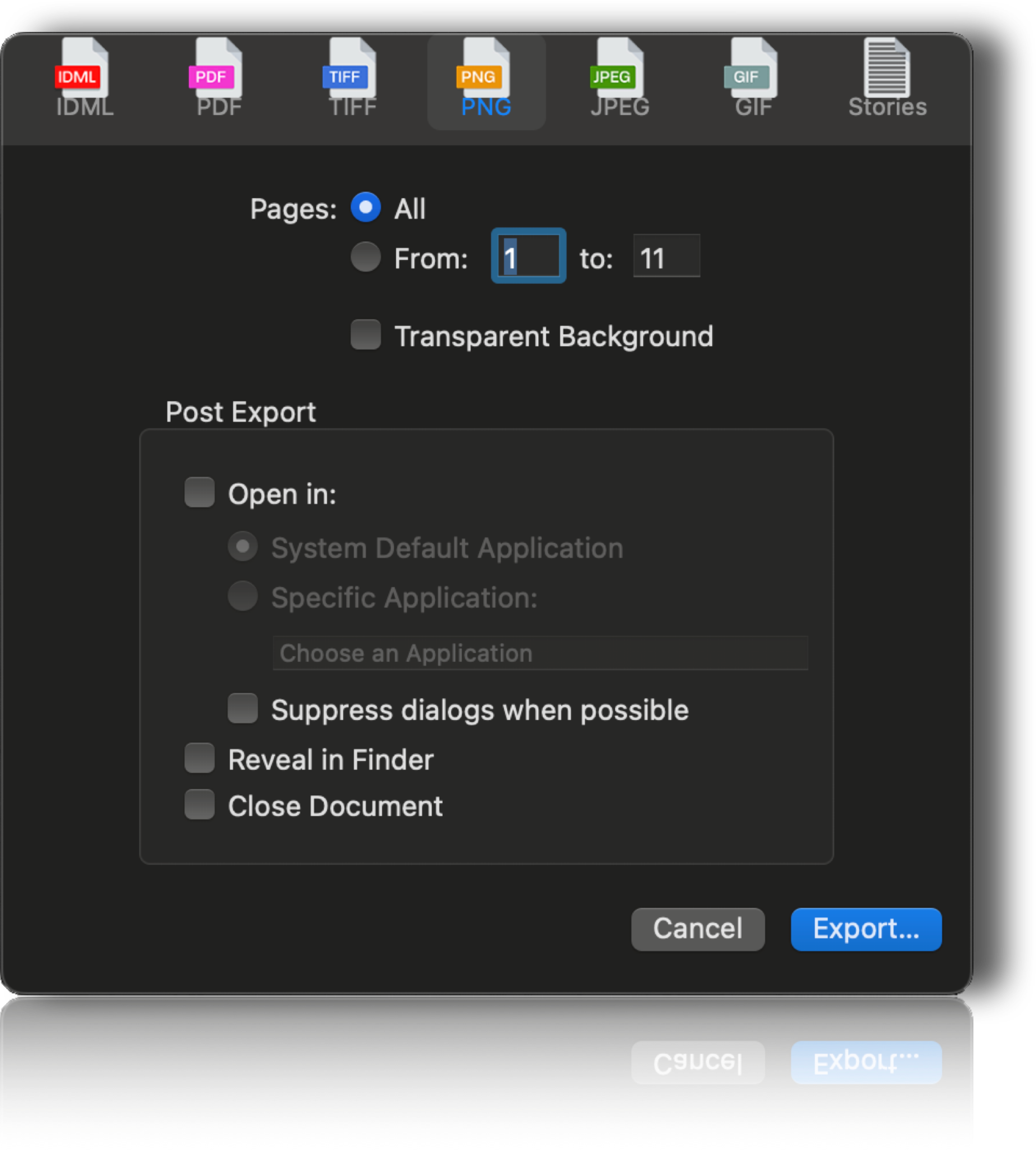
The export dialog (PDFMarkz 2024 build, dark mode) on the PNG tab: page range, transparent background, and post-export options to open the file in another app, reveal it in Finder or close the document.
Automation for repeat work
PDFMarkz can export automatically whenever a document opens: tick the formats you want, choose a path relative to the PDF or a fixed folder, and have the result open in its default app. Add AppleScript support and a custom URL scheme, and it fits into scripted prepress workflows. Markzware also supplies InDesign scripts so you can start a PDF conversion from inside InDesign. The Conversion Center in version 3.5 finds and lists supported files and converts the ones you pick in one batch.

Automation preferences: on document open, export IDML (or TIFF, JPEG, PDF, PNG, GIF, Stories) relative to the input path, then optionally open it in a chosen app for IDML or PDF.
Benefits
The obvious win is hours not spent rebuilding. Retyping and re-placing a 60-page document takes days; checking and correcting a converted one takes a fraction of that. Less obvious: the free inspector earns its place even if you never buy. Prepress staff can open any customer PDF and see at a glance whether fonts are missing or images are low-count, without launching Acrobat Pro.
Because it isn't tied to one layout program, PDFMarkz also keeps old work usable when your studio changes tools, and its text export makes old print content easy to reuse online.
Real-World Uses
- A book whose files were deleted. The printer lost the InDesign files; the author has the print PDF. Convert it, have a designer tidy the result, reprint.
- Customer files at a print shop. A PowerPoint deck arrives as a PDF for printing. Convert it, replace the blurry logos, upsample the photos and print something you can stand behind.
- Training materials that need a refresh. A team with hundreds of PDF handouts converts them in batches with the Conversion Center instead of recreating each one.
- Web reuse. Export the stories of an old brochure as HTML or RTF and its pages as PNG for a product site.
- Moving to Affinity. A studio leaving Adobe opens converted IDML from its PDF archive in Affinity Publisher.
Who It's For, and Who Should Skip It
It's for Mac-based designers, prepress departments, printers and publishers who regularly need to edit PDFs without their source files, and anyone who wants a free, quick inspector for incoming PDFs.
Skip it if:
- You have one file to rescue. A single MarkzPortal conversion or a pay-per-page service costs much less than $429.
- You only need to fix a typo or swap a photo. Acrobat Pro's Edit PDF tool does that inside the PDF.
- Your PDFs are scanned pages. There's no live text in them to recover; you need OCR software.
- You work on Windows. PDFMarkz SE is the Windows edition, and it exports IDML only.
- You also have Publisher, QuarkXPress or InDesign files to convert. OmniMarkz handles those plus PDF in one app.
Usage Guide
- Install: download the 23.4 MB disk image, open it and install PDFMarkz, then launch it. Without a license it runs as the free preview version.
- Inspect: open a PDF (or drag it onto the app). Check the inspector for missing fonts and images, and page through the preview.
- License: buy a perpetual or subscription license and activate it. Activation and registration need an internet connection.
- Convert: click InDesign, Quark or Publisher in the toolbar to convert and open the file there, or click Export and pick IDML, an image format or Stories.
- Automate (optional): in Preferences, set Automation to export and open files the moment you open a PDF, and install the InDesign scripts if you'd rather start from InDesign.
- Finish in the layout app: activate or replace fonts, relink images and check text flow on every page before you output.
Where it falls short
- Results depend on the source. Markzware's own FAQ says conversion results depend on how the original PDF was created, so two PDFs of the same design can convert very differently.
- Clean-up is part of the job. Even happy customers describe having a designer "tweak a few bits" afterwards. Plan time to rebuild styles and fix reflowed text.
- Badly built PDFs convert badly. PDFs from office programs, with outlined text or with flattened effects, give rougher layouts than PDFs exported cleanly from a layout program.
- The price has climbed. At launch in 2021 it was $199 a year or $299 perpetual; the 2026 edition is $259 and $429, and each new year's edition is a separate perpetual product, so staying current costs extra.
- Few independent tests. Most published reviews are on Markzware's own site; we found no in-depth independent comparison with other converters.
What Users Say
Markzware's PDFMarkz page shows 35 customer reviews averaging 4.74 out of 5. Independent opinion comes mainly from Adobe's InDesign community forum, where experts point people with lost layout files to it, plus a trade-analyst write-up from launch.
Customers on Markzware's site
Stephen Andrew, Landser Books, June 2025 ("It's a must have"): "You can restore your lost indesign files from a PDF... Markzware is a must have. My printer illegally deleted my published book indesign files even though he said this would never happen... all I had was a PDF of my published book."
Bart Simonis, September 2023 ("Really Great PDF Converter"): "Just got another PowerPoint delivered to print. Quality of course horrendous. Converted to pdf and opened in PDFMarkz. Quickly replaced some logos and upsampled some photos. At least then I'll get a printout I can dare to deliver."
Marcus Pungetti, April 2024: "If you are a busy 1 man band, it is a must have tool. It does exactly what it says on the tin....probably even more. The software is great but the support team is even better."
Christine Campbell, May 2023 ("Saved Us Easily 200 Hours!"): "And from what would have been hours upon hours – and we were getting so burnt out – it was done in seconds."
Ian Sayers, Customer Engagement and Training Director, Xencelabs: "I am not paid in any way to say this – This must be one of the Best Applications and Plugins available to designers. It has saved me so much time and just works perfectly."
Not every review gushes. Hanni Hediger, April 2023 ("I Like It"): "it's all ok, I like it".
Adobe InDesign community forum
Bill Silbert, Community Expert, December 2024, to someone asking how to make a PDF editable in InDesign: "I can recommend a plug-in called PDFMarkz. I have tested it and found it to be exceptional."
Steve Werner, Community Expert, in a January 2024 answer marked correct, to a user who had lost eight months of InDesign projects to a damaged drive but kept the PDFs: "There are two plug-ins which you can purchase to convert PDF files to InDesign", naming PDFMarkz and Recosoft's PDF2ID.
Joel Cherney, Community Expert, February 2025, on PDF conversion in general: "Personally, I'd bet on no PDF conversion tool ever handling everything perfectly."
Industry analysts
Christine Dunne of Keypoint Intelligence, writing at launch in July 2021: "We find this tool interesting, as most file conversion tools operate in the opposite way--converting other native file formats into PDFs. The ability to extract the PDF to IDML or other formats that can then be opened in creative tools like InDesign and QuarkXpress could be particularly beneficial for editing large amounts of text".
The pattern: users who came to it with a lost layout or a messy customer file are glad they did, and several praise Markzware's support as much as the software. The experts' caveat is the same everywhere: a converted PDF is a strong starting point, not a finished file, and quality follows the quality of the PDF you feed it.
Comparisons
PDFMarkz vs. PDFMarkz SE (Windows)
Same price, same core conversion to IDML. The Mac app does more: a free preview version, the document inspector, image and text exports, AppleScript and InDesign script integration. A license is for one platform.
PDFMarkz vs. OmniMarkz
OmniMarkz is Markzware's all-format Mac converter (Publisher, QuarkXPress, InDesign, PDF and more) and costs more. If PDFs are all you convert, PDFMarkz is the cheaper fit.
PDFMarkz vs. the old PDF2DTP plug-in
PDF2DTP was a plug-in that converted PDFs only from inside InDesign, and it's no longer sold; its product page now forwards to PDFMarkz. PDFMarkz is stand-alone, previews without a layout program, and exports to more formats.
Editions and Pricing
| License | Price | What you can do | Updates |
|---|
| Freebie | $0 | Preview PDFs only | - |
| Perpetual (sold here) | $429 once | Preview, export, open in other apps | Optional upgrade charges may apply |
| Subscription | $259 a year | Preview, export, open in other apps | 12 months included |
Paid prices are from the order page on November 8, 2026. Markzware recommends the subscription. The perpetual license costs the same as about 20 months of subscription, so it suits people who'll keep one version for years; if you need each new InDesign release supported, the subscription is simpler.
FAQs
Do I need InDesign installed to use PDFMarkz?
No. PDFMarkz previews, inspects and converts PDFs on its own. You need InDesign, Affinity Publisher or QuarkXPress only to edit the converted IDML.
Can PDFMarkz convert a PDF made in Word, Canva or PowerPoint?
Yes. PDFMarkz converts PDFs from any program, not just ones exported from InDesign. Expect more clean-up with PDFs from office programs, because they're often built less cleanly than PDFs from layout software.
Does PDFMarkz run on macOS Tahoe?
PDFMarkz 2026 supports macOS 12 Monterey through macOS 26 Tahoe and macOS 27, on any current Mac (Mac Pro, iMac, MacBook Air and Pro, Mac mini) with 4 GB of RAM or more.
What happens to my PDFMarkz perpetual license when the 2027 edition comes out?
Your PDFMarkz 2026 perpetual license keeps working. Moving to a newer edition is an upgrade, and Markzware says optional upgrade charges may apply; the store has an upgrade option that asks for your existing License ID.
Can PDFMarkz export to JSON?
No. PDFMarkz exports IDML, PDF, image formats and text (TXT, RTF, HTML). Markzware points users who need JSON to OmniMarkz.
Does PDFMarkz upload my files anywhere?
No. PDFMarkz converts on your Mac; it needs the internet only to activate and register the license. Markzware's separate MarkzPortal is the online, upload-based service.
System Requirements
- macOS: 12 Monterey, 13 Ventura, 14 Sonoma, 15 Sequoia, 26 Tahoe or 27
- Mac: Mac Pro, iMac, iMac Pro, MacBook, MacBook Pro, MacBook Air or Mac mini
- Memory: 4 GB RAM minimum
- Display: 1024 x 768 or higher
- Internet: needed for activation and registration
- To edit the IDML: InDesign CS4 or newer, Affinity Publisher, or QuarkXPress 2017 or newer
Conclusion
PDFMarkz is worth $429 for a Mac designer, printer or publisher who regularly has to edit PDFs without their layout files. It turns days of rebuilding into an hour of checking, it works with InDesign, Affinity and QuarkXPress alike, and its exports cover web reuse too. The reason to buy it: it gives you real, editable frames from a PDF, and the free version lets you judge your own files first. The reason not to: if you only have one or two files, a per-file conversion is far cheaper, and no converter spares you a careful page-by-page check. Start with the free download; if your PDFs preview well, the license will pay for itself on the first big job.
Download Free VersionBuy Now