Aiseesoft Audio Converter for Mac: Convert Audio and Pull the Sound Out of Video Files
Aiseesoft Audio Converter for Mac is a $29 Mac app (lifetime license for one Mac) that converts audio between formats such as MP3, AAC, M4A, WAV, AIFF and FLAC, and extracts the soundtrack from video files like MP4, MOV, MKV and AVI. It's for Mac users who want a simple drag-and-convert tool for batches of files, not an audio editor.
You have a folder of WAV recordings your phone won't play, a FLAC album your car stereo ignores, or a lecture video when all you want is the audio for a walk. This app's job is to turn those files into something your player accepts, many at a time, with a few clicks.
Quick facts
- Version: 9.2.22 (installer dated January 31, 2024)
- Developer: Aiseesoft Studio
- Runs on: Mac OS X 10.7 and later, including macOS Sequoia. It's an Intel app, so Apple silicon Macs run it through Rosetta 2
- Output formats: AAC, AC3, AIFF, AMR, AU, FLAC, M4A, MKA, MP2, MP3, OGG, WAV and WMA, plus ALAC, M4R ringtone and M4B audiobook profiles in the app
- Price: $29.00 for a lifetime license on one Mac, $19.00 for one year, $119.00 lifetime for up to 8 Macs
- Trial: free download that converts only the first 5 minutes of a longer file, or half of a file shorter than 5 minutes
- Guarantee: 30-day money-back guarantee for quality problems
What we checked: on October 18, 2026 we confirmed the $29.00 lifetime price on the order page, downloaded the Mac installer from Aiseesoft (52.5 MB), and read the app's version (9.2.22, build 97409), minimum macOS (10.7) and the trial-limit text from the installer's app bundle. All 57 program binaries inside are Intel-only, with no native Apple silicon code. We didn't run conversions on a Mac ourselves.
Before you buy
- The trial won't finish a full file. A 3-minute song comes out at about 1.5 minutes, and a 40-minute podcast stops at 5 minutes. That's enough to judge quality and speed, not enough to do real work.
- It isn't native on M-series Macs. Aiseesoft lists Apple M-series chips as supported, but the app contains only Intel code, so it runs through Rosetta 2 on every M-series Mac.
- It hasn't changed in a while. The current installer dates from January 2024, and Aiseesoft publishes no change log.
- The refund promise is narrow. Aiseesoft's guarantee covers "a quality problem within 30 days," not a change of mind.
Download Free TrialBuy Now
Overview
Aiseesoft Audio Converter for Mac uses the same layout as Aiseesoft's other Mac converters, cut down to audio. A toolbar holds Add File, Trim and Edit. Your files sit in a list, each showing the source name, length and the output format. A preview player fills the right side, and the bottom bar holds the Profile menu, the destination folder, a Merge into one file checkbox and a big orange Convert button.
Video goes in, audio comes out. There's no video output at all, which keeps the format menu short and hard to get wrong.
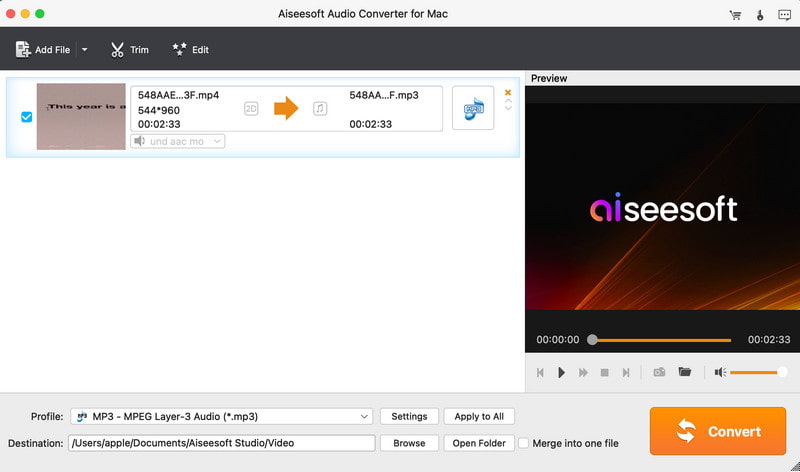
An MP4 video (544x960, 2:33 long) queued to become an MP3 of the same length, with the Profile set to MP3 - MPEG Layer-3 Audio and the preview player on the right.
Features
Converts between all the common audio formats, lossy and lossless
Aiseesoft Audio Converter for Mac writes AAC, AC3, AIFF, AMR, AU, FLAC, M4A, MKA, MP2, MP3, OGG, WAV and WMA, the 13 formats on its spec sheet. The app's profile list adds ALAC (Apple Lossless in an M4A file), M4R iPhone ringtones and M4B audiobooks. On the input side it reads those plus Monkey's Audio (APE), Real Audio (RA/RAM) and CUE sheets. So you can shrink WAV recordings to MP3, turn FLAC into Apple Lossless for your iPhone, or make an AMR file for an old phone.
Extracts the audio track from video
Aiseesoft Audio Converter for Mac pulls the sound out of video files and saves it as audio: MP4, M4V, MOV, MKV, AVI, WMV, ASF, FLV, F4V, SWF, 3GP, MPEG, VOB, DV, MOD, TOD, MJPEG, RM/RMVB, and HD camcorder and broadcast formats like MTS, M2TS, TS, TRP and MXF. A concert clip becomes an MP3, a recorded lecture becomes an M4A for your phone, and camcorder footage gives up its sound without a video editor.
Batch conversion, with an option to merge
Aiseesoft Audio Converter for Mac converts a whole list of files in one run. Drag in a folder's worth, set one profile with Apply to All, and click Convert. Tick Merge into one file and the list comes out as one long track instead, handy for joining chapters of an audiobook or parts of a recording. A progress window shows each file's state, the elapsed and remaining time, and can open the output folder when it's done.
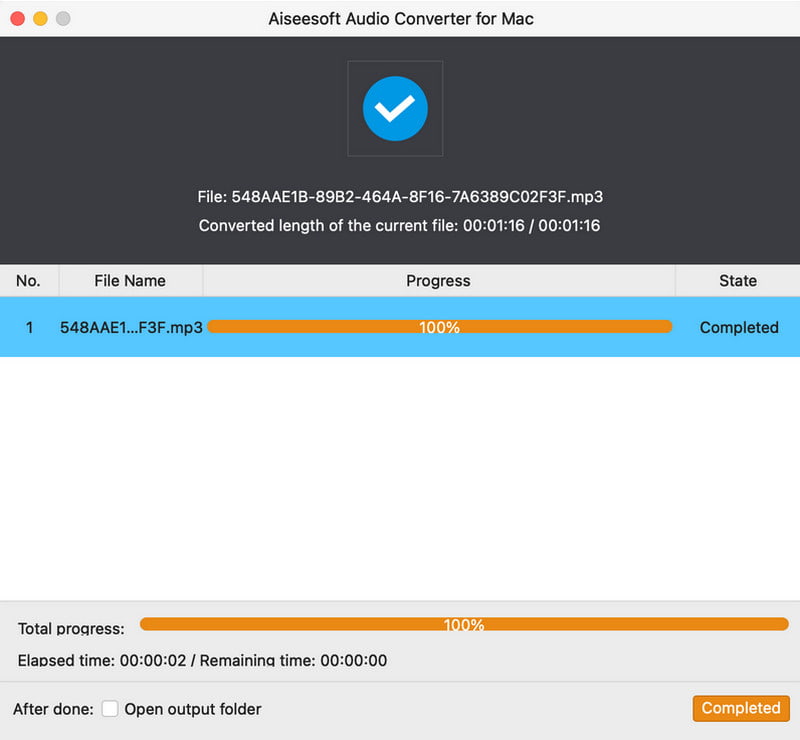
The conversion window after a 1:16 MP3 file finished: 100% progress, state Completed, elapsed time 2 seconds, and an "Open output folder" checkbox.
Trim, volume and output settings
Aiseesoft Audio Converter for Mac lets you cut and adjust a file before converting it. Trim sets a start and end point and can add several segments, so you keep only the part you want, for example a ringtone-length chorus. Edit opens a preview with a volume slider to make a quiet recording louder or a loud one gentler. The Settings button next to the Profile menu sets the encoder, sample rate, channels and bitrate.

The Edit window for a 3:40 audio track, with an output preview, playback controls and the volume set to 81%, plus Restore Defaults, Save and Cancel.
Preview before you convert
Aiseesoft Audio Converter for Mac has a built-in player that plays the selected file, so you can check you've got the right take before converting it. When the source is a video, a camera button saves a snapshot of the current frame, and a folder button opens where snapshots are saved.
Benefits
- You pay once. $29 buys it for good on one Mac, which is less than many converters charge per year.
- It's quick to learn. Add, pick a format, convert. There's nothing to configure unless you want to change the bitrate.
- It handles the odd files. APE, RealAudio, MXF and VOB are the kind of inputs free tools often choke on.
- It runs on old Macs. Mac OS X 10.7 is the minimum, so a 2011-era MacBook can still use it.
Real-World Uses
- Making a music library play everywhere: batch-convert a mix of FLAC, WMA and OGG files to MP3 or M4A so your phone, car and old iPod all accept them.
- Keeping just the audio: turn recorded webinars, lectures or concert videos into MP3s you can listen to on a commute.
- Making a ringtone: trim the 30 seconds you want from a song and raise the volume so it's heard in a pocket.
- Joining parts: merge a set of numbered recordings or audiobook chapters into one file.
- Handing files to a Windows user or an old device: convert AIFF or M4A to WAV or WMA.
Who It's For, and Who Should Skip It
It's a good fit if you convert audio often enough to want a dedicated, offline Mac app, you prefer a one-time price to a subscription, and your needs stop at converting, trimming, merging and changing volume.
Skip it if:
- You need to edit audio. There's no waveform editing, noise removal, fades or normalization. Audacity (free) or a real audio editor fits better.
- You only convert a song now and then. Apple's Music app can already make MP3, AAC, AIFF, WAV and Apple Lossless copies of tracks in your library, and free online converters handle the odd file.
- You need video output too. This app only writes audio. A full video converter, such as Aiseesoft's own Video Converter Ultimate for Mac, does both.
- You want a native Apple silicon app. It runs through Rosetta 2 and hasn't been updated since early 2024.
- You're on Windows. Aiseesoft sells a separate Windows edition, Aiseesoft Audio Converter.
Usage Guide
- Install and launch: download the DMG, drag the app into Applications and open it. On an Apple silicon Mac, macOS offers to install Rosetta 2 the first time.
- Add files: click Add File or drag audio and video files onto the window.
- Trim or edit (optional): select a file and click Trim to keep only part of it, or Edit to change the volume.
- Pick the output: choose a format in the Profile menu, click Settings to change the bitrate, sample rate or channels, and Apply to All to use it for every file.
- Choose where to save: set the Destination folder, and tick Merge into one file if you want a single output.
- Convert: click Convert and watch the progress window. Tick "Open output folder" to jump straight to the results.
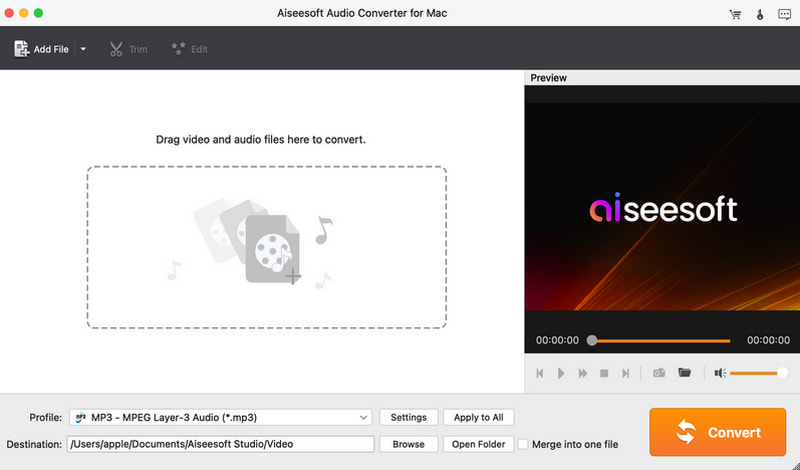
The empty main window with the "Drag video and audio files here to convert" area, MP3 selected as the profile and the Merge into one file option at the bottom.
Tips
- Test with a short file during the trial. A file under 5 minutes converts half-way, so a 1-minute clip shows you the quality in 30 seconds of output.
- Converting MP3 to FLAC doesn't add quality. Lossless output only keeps what was there. Go lossless-to-lossless (WAV, AIFF, FLAC) when quality matters.
- Raise the bitrate in Settings when converting to MP3 or AAC for music, and lower it for speech to save space.
Where it falls short
- No real editing. Trimming and a volume slider are all you get. There's no fade, no normalizing across files and no noise reduction.
- Licenses are tied to computers. One license covers one Mac. Aiseesoft customers on Trustpilot say moving a license to a new computer takes an email to support, and one wished it could be used on more than one computer.
- Refunds can be a fight. Several 1-star Trustpilot reviews of Aiseesoft describe refunds refused or dragged out because the software wasn't "faulty." Use the trial to decide before you pay.
- No tagging tools. There's no editor for artist, album or cover art, so plan to fix tags in Music or a tag editor afterwards.
What Users Say
Independent reviews of this particular app are scarce. We couldn't find a magazine review or a Capterra, G2 or Mac App Store listing for it. What's out there is the comments on Aiseesoft's own page and reviews of Aiseesoft as a company.
On Aiseesoft's product page
The product page shows a 4.5 rating from 246 reviews and a selection of short comments. These are chosen by the vendor, so treat them as the best case:
- "Works as advertised. I often use it to convert WAV to FLAC for my HIFI player. The conversion speed is fast, and I'm very satisfied with the output sound quality." (Rogers)
- "I've not had any issue during the conversion from WAV to MP3. I don't notice any quality loss after converting. Good product!" (Cindy)
- "Easy to use it. Moreover, it can help me to convert several audio files to MP3 at the same time. It's very convenient and really saves time." (Leo)
- "Work better than my imagination. It helps me batch extract AIFF from MOV files and save it to my Mac in. 5 minutes for 20 video files. Very fast." (Cathy)
- "Compared with the online audio converter, this software supports more video importing, and the converting quality is good." (Olson)
- "I use this tool to make an M4R ringtone for my grandfather and adjust the volume to high. He seems to be very content with that." (Kilian)
Aiseesoft on Trustpilot
Aiseesoft Studio has a TrustScore of 3.8 from about 600 reviews, and they're split: 59% five-star and 34% one-star, with little in between. None of the recent reviews is about the Audio Converter itself, but they show what buying from Aiseesoft is like. Praise is mostly about support:
- "I love that this app is simple to use and does not require a subscription." and "I had to get a new computer and the license was able to be transferred with one simple email. Thank you!" (Doug, 5 stars)
- "I've been buying Aiseesoft products for many years and always get quick support from them." (Hayden, 5 stars)
- "Company reset my registration to reregister my software on a new computer." (Lowell, 5 stars)
- "I don't use this app often, but I'm pleased with the format change process it provides." and "I do wish the app to be transferrable to multiple computers once purchased by the license service." (Renee Lee-Starks, 4 stars)
The complaints are mostly about refunds:
- "I was refused a return based on the product not being faulty due to their so called returns policy." (caitlin hardwick, 1 star, who adds that Aiseesoft later offered 80% back)
- "Asked for a Refund from Aiseesoft. That's where frustration began. It asked for 4 things, and I provided all of them." (Owend, 1 star, about Aiseesoft Data Recovery)
The pattern
People who use Aiseesoft's converters like that they're simple, fast at batches and sold without a subscription, and they rate the email support well. The recurring complaints are about the company rather than the conversions: a strict refund policy and licenses tied to one computer. With a converter this simple, the trial tells you most of what you need to know.
Comparisons
Aiseesoft Audio Converter for Mac vs Apple Music
Apple's Music app can make MP3, AAC, AIFF, WAV or Apple Lossless copies of songs in your library for free. Aiseesoft Audio Converter for Mac adds what Music can't do: FLAC, OGG, WMA and other non-Apple outputs, audio extraction from almost any video, trimming, merging and batch work outside your music library. If you only convert songs you already keep in Music, you don't need it.
Aiseesoft Audio Converter for Mac vs Audacity
Audacity is free and is a real audio editor, with waveform cutting, effects and noise removal, and it exports to many formats. It's slower for plain batch conversion and pulling audio from video needs an extra library. Aiseesoft is the quicker tool for "convert these 50 files"; Audacity is the better one for fixing a recording.
Aiseesoft Audio Converter for Mac vs Aiseesoft Video Converter Ultimate for Mac
Aiseesoft Mac Video Converter Ultimate converts video as well as audio, with editing tools on top, and needs macOS 10.12 or later. Its lifetime license for one Mac lists at $62.45 on Aiseesoft's store, against $29 for this app. If you'll ever need to convert video for a device or an editor, it covers both jobs. If you only ever want audio out, this smaller app is cheaper and simpler.
Editions and Pricing
| License |
Price |
Term |
Macs |
| 1 Year |
$19.00 |
1 year |
1 |
| Lifetime |
$29.00 |
Lifetime, with free updates |
1 |
| Multiple-User Personal |
$119.00 |
Lifetime, with free updates |
Up to 8 |
The lifetime license is the obvious pick for one Mac: it costs $10 more than a single year. The Buy Now button on this page opens the lifetime license.
FAQs
Does Aiseesoft Audio Converter for Mac run on M1, M2 or M3 Macs?
Yes, Aiseesoft Audio Converter for Mac runs on Apple silicon Macs, but through Rosetta 2. Version 9.2.22 contains only Intel code, so macOS installs Rosetta the first time you open it.
Can Aiseesoft Audio Converter for Mac convert Apple Music or iTunes purchases?
Aiseesoft Audio Converter for Mac converts ordinary audio files you own. It isn't built to remove copy protection, so protected streaming downloads won't convert.
Can Aiseesoft Audio Converter for Mac make iPhone ringtones?
Yes. Aiseesoft Audio Converter for Mac has an M4R iPhone ringtone profile, and you can trim the song to the 30 seconds you want and raise the volume before converting. You then add the M4R file to your iPhone through Finder.
Does Aiseesoft Audio Converter for Mac keep song tags and album art?
Aiseesoft Audio Converter for Mac has no tag editor, so you can't add or fix artist, album or cover art in it. Check the converted files in your music player and fix the tags there if needed.
Can I move my Aiseesoft Audio Converter for Mac license to a new Mac?
One Aiseesoft Audio Converter for Mac license covers one Mac at a time. Aiseesoft customers report that support resets the registration when they change computers, after an email. For more than one Mac at once, the 8-Mac license is the option.
Is there a Windows version of Aiseesoft Audio Converter?
Yes, but it's a separate product. Aiseesoft Audio Converter for Windows (Windows 11, 10, 8 and 7) is sold on its own, and a Mac license doesn't cover it.
What happens when the one-year license runs out?
The one-year Aiseesoft Audio Converter for Mac license lets you use the app for a year, after which you renew or buy the lifetime license. At $19 versus $29, the lifetime license pays for itself if you'll use the app for more than about 18 months.
Can I get a refund for Aiseesoft Audio Converter for Mac?
Aiseesoft Audio Converter for Mac comes with a 30-day money-back guarantee that Aiseesoft words as covering "a quality problem," so a refund for a change of mind isn't guaranteed. Try the trial on your own files first.
System Requirements
- macOS: Mac OS X 10.7 or later, including macOS Sequoia
- Processor: 1 GHz Intel processor, or an Apple M-series chip with Rosetta 2
- Memory: 1 GB RAM or more
- Disk: about 53 MB for the installer, plus space for your converted files
- Interface languages: English, French, German and Japanese
Conclusion
Aiseesoft Audio Converter for Mac is worth $29 if you regularly need to batch-convert audio or strip the sound from videos on a Mac and want a one-time purchase that does exactly that without a learning curve. The reason to buy it is how little it asks of you: drop files in, pick a format, convert. The main reason not to is that it's an aging Intel app with no editing tools and a strict refund policy, and if you only convert the odd song, Apple's Music app or a free tool already does the job. Run the trial on a short file first.
Download Free TrialBuy Now