Aiseesoft BD Software Toolkit for Mac: Five Disc and Media Apps Behind One Launcher
Aiseesoft BD Software Toolkit for Mac is a $115 bundle (lifetime license for one Mac, or $75 for one year) of five Aiseesoft Mac apps: a Blu-ray player, a DVD burner, a video converter, an iPhone transfer tool and a ringtone maker. It's for Mac owners with an external Blu-ray or DVD drive who want those jobs covered by one purchase, and who don't mind that the bundled apps are 2019 builds made for Intel Macs.
No Mac sold today has an optical drive, and macOS has never played Blu-ray discs on its own. If you've bought a USB Blu-ray drive to watch your movie collection, or need to turn family videos into a DVD that plays in Grandma's living-room player, you quickly find yourself shopping for several separate apps. This toolkit is Aiseesoft's answer: one installer, one license, five apps.
Quick facts
- Version: 9.2.8 (installer dated October 31, 2019)
- Developer: Aiseesoft Studio
- What's inside: Mac Blu-ray Player 6.5.12, DVD Creator for Mac 5.2.10, Mac Video Converter Ultimate 9.2.36, Mac FoneTrans 9.1.10 and iPhone Ringtone Maker for Mac 7.1.8
- Runs on: Mac OS X 10.7 and later, including macOS Sequoia. All five are Intel apps, so Apple silicon Macs run them through Rosetta 2
- Hardware: a Blu-ray drive to play Blu-ray discs, a DVD burner to burn DVDs
- Price: $115.00 for a lifetime license on one Mac, $75.00 for one year
- Trial: free download. Blu-ray discs won't play, DVDs get a watermark, and video conversions stop at 5 minutes
- Guarantee: 30-day money-back guarantee
- Download size: 240 MB
What we checked: on October 18, 2026 we confirmed the $115.00 lifetime and $75.00 one-year prices on the order page, downloaded the 240 MB installer from Aiseesoft, and read each app's version, minimum macOS (10.7) and trial-limit messages from the app bundles inside. All 666 program files in the installer are Intel-only, with no native Apple silicon code. We didn't play a Blu-ray disc, burn a DVD or connect an iPhone ourselves.
Before you buy
- The apps in this bundle are from 2019. Aiseesoft updated the standalone versions of four of these apps (all but the ringtone maker) between June and August 2026, but the toolkit's installer still contains the October 2019 builds. You get older versions than someone buying the apps one by one.
- It isn't native on M-series Macs. Aiseesoft's spec page lists Apple M-series chips, but every program file in the download is Intel code, so it runs through Rosetta 2. Apple has said full Rosetta 2 support ends after macOS 27.
- You need your own drive. No current Mac has a disc drive, so playing Blu-ray or burning DVDs means buying a USB Blu-ray player or DVD burner.
- It burns DVDs, not Blu-rays. Despite the "BD" in the name, the Blu-ray part of the bundle is the player. The burner, DVD Creator for Mac, makes DVDs only.
Download Free TrialBuy Now
Overview
Aiseesoft BD Software Toolkit for Mac installs a single app that opens a launcher window. The left side shows the selected app's interface; the right side lists the five tools as big buttons, with Buy Now and Home Page buttons underneath. Click a tool and it opens as its own app, with its own window and menus.
So this isn't one program that does five things. It's five separate Aiseesoft programs sold together, each one also sold on its own. The value is in the price and the single license.
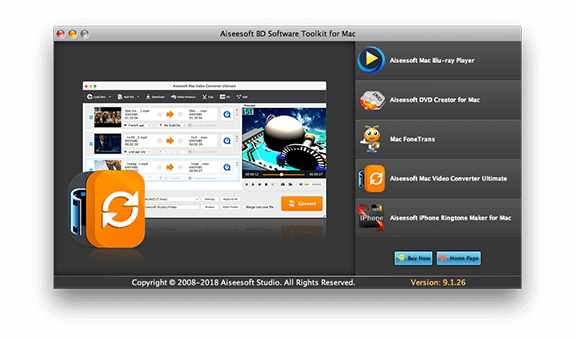
The toolkit's launcher (version 9.1.26 in this picture) with Mac Video Converter Ultimate selected, and buttons for Mac Blu-ray Player, DVD Creator for Mac, Mac FoneTrans and iPhone Ringtone Maker for Mac.
Features
Blu-ray playback on a Mac
Aiseesoft Mac Blu-ray Player, the first app in the toolkit, plays Blu-ray discs, Blu-ray folders and Blu-ray ISO image files, the thing macOS can't do by itself. It also plays ordinary video files, from MP4, MKV and MOV to camcorder MTS and M2TS, and audio from MP3 to FLAC and APE. Aiseesoft says it can deinterlace 1080i movies and passes DTS-HD Master Audio and Dolby TrueHD soundtracks, and you can take snapshots while you watch.
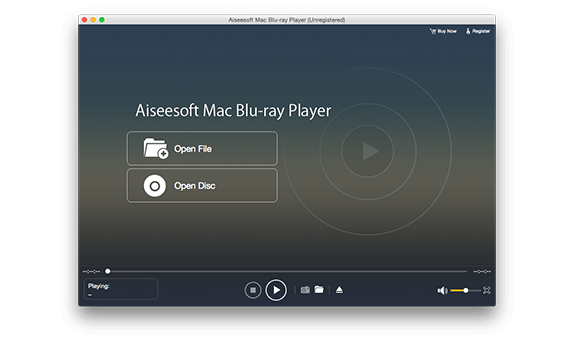
Mac Blu-ray Player's start screen (unregistered copy) with Open File and Open Disc buttons and the playback bar along the bottom.
DVDs with menus from your own videos
DVD Creator for Mac burns your video files to a DVD disc, a DVD folder or an ISO image that plays in a standard DVD player. It accepts MP4, MOV, AVI, MKV, WMV, FLV, VOB, MTS and about two dozen other formats. You pick a menu template, change its frame, buttons and text, add background music, a background picture or an opening clip, and add or edit subtitles and audio tracks. The bottom bar sets the drive, volume label, writing speed, number of copies and DVD type (D5, 4.7 GB, in the picture below).
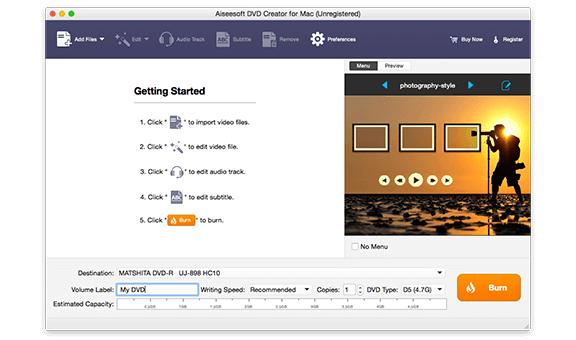
DVD Creator for Mac with its five Getting Started steps, the "photography-style" menu template preview, the burner selected as destination and the orange Burn button.
Video conversion and basic editing
Mac Video Converter Ultimate converts video and audio between common formats, including 4K output in H.265/HEVC, H.264, VP8 and VP9, and can load a home DVD as a source. Before converting, you can clip a video into parts, crop it, adjust brightness and other effects, add a text or image watermark, and turn a 2D video into 3D. It converts several files in one batch and can extract a soundtrack as FLAC, WAV, WMA or MP3.
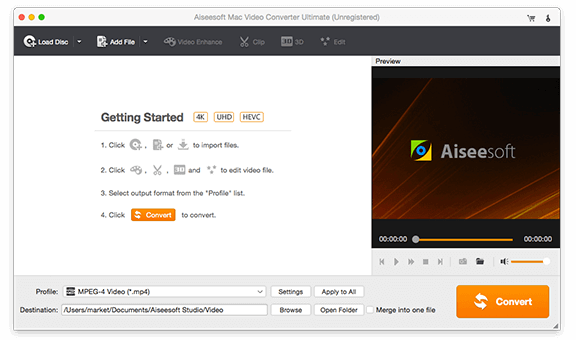
Mac Video Converter Ultimate with Load Disc, Add File, Video Enhance, Clip, 3D and Edit on the toolbar, the Profile set to MPEG-4 and the Convert button at the bottom right.
iPhone and iPad file transfer without iTunes
Mac FoneTrans copies files between an iPhone, iPad or iPod and your Mac over a USB cable. Its spec sheet lists music, movies, TV shows, podcasts, audiobooks, voice memos, photos, playlists, ePub and PDF files, and contacts going to the device, and the same media plus contacts and messages coming back to the Mac. It can also send media to iTunes, copy between two iOS devices, and back up and restore contacts.
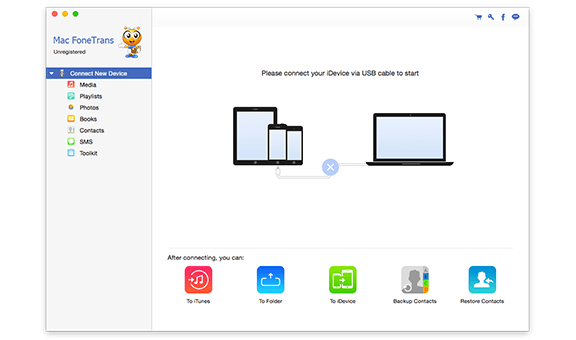
Mac FoneTrans before a device is connected: the sidebar lists Media, Playlists, Photos, Books, Contacts, SMS and Toolkit, with To iTunes, To Folder, To iDevice, Backup Contacts and Restore Contacts below.
Custom iPhone ringtones from any song or video
iPhone Ringtone Maker for Mac cuts a section of a song or video and saves it as an M4R iPhone ringtone. You set the start and end time, add a fade-in or fade-out, adjust the volume, and send the result straight to a connected iPhone, to iTunes, or to a folder on the Mac.
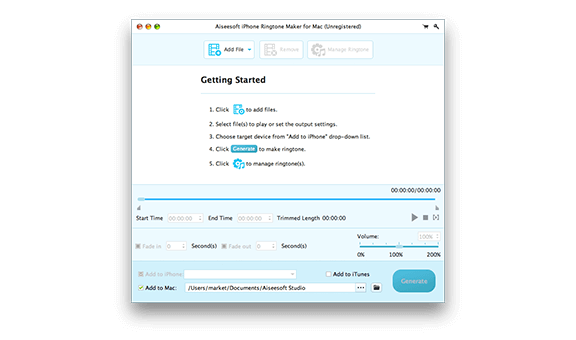
iPhone Ringtone Maker for Mac with Start Time and End Time fields, Fade in and Fade out settings, a volume slider and Add to iPhone, Add to iTunes and Add to Mac options.
Benefits
- One purchase instead of five. Bought separately on Aiseesoft's store, lifetime licenses for these five apps list at about $252. The toolkit is $115.
- Your disc collection works again. A USB Blu-ray drive plus the player turns a MacBook into something that can play the movies on your shelf.
- Family videos leave the computer. A DVD with a proper menu is still the easiest way to hand a video to relatives who don't stream.
Real-World Uses
- Watching your Blu-ray collection on a Mac. Plug in a USB Blu-ray drive, open Mac Blu-ray Player and press Open Disc.
- A wedding or birthday video on DVD. Add the MP4 files to DVD Creator, choose a menu template, add music, and burn copies for the family.
- Getting old camcorder clips onto an iPad. Convert MTS files to MP4 in Video Converter Ultimate, then copy them across with FoneTrans.
- Saving your iPhone's photos and contacts to the Mac without syncing through Finder or iTunes.
- A favorite song chorus as your ringtone, cut, faded and sent to the phone in one step.
Who It's For, and Who Should Skip It
It's a fit if you have, or plan to buy, an external Blu-ray drive and want to watch discs on your Mac and burn the occasional DVD, and you'd like the converter and iPhone tools thrown in. It's also a fit if you're on an Intel Mac or an older macOS, where these 2019 builds are at home.
Skip it if:
- You only need one of the five apps. Buying that app alone costs $15 to $62 for a lifetime license, and for the player, DVD creator, converter and FoneTrans it gets you a 2026 build.
- You want to burn Blu-ray discs. Nothing in the bundle writes a Blu-ray.
- You want software that runs natively on Apple silicon and will keep working when Rosetta 2 goes away. Look for an Apple silicon native player and use Finder for iPhone syncing.
- You don't own a disc drive and don't plan to. Without one, two of the five apps have nothing to do, and a plain video converter costs far less.
Usage Guide
- Download and install. Open the 240 MB DMG from Aiseesoft and drag the app to Applications. On an M-series Mac, macOS asks to install Rosetta 2 the first time if it isn't already there.
- Open the launcher and click the tool you need. Each opens as its own app.
- To play a Blu-ray, connect the drive, insert the disc, open Aiseesoft Mac Blu-ray Player and click Open Disc. Use Open File for an ISO image or a video file.
- To make a DVD, open DVD Creator for Mac, click Add Files, edit video, audio tracks and subtitles if you need to, choose a menu, pick the destination (the burner, a DVD folder or an ISO file) and click Burn.
- To convert a video, open Mac Video Converter Ultimate, add the files, choose an output format from the Profile list, and click Convert.
- To move files to or from an iPhone, open Mac FoneTrans, connect the device by USB, pick a category in the sidebar and use the export or add buttons.
- To make a ringtone, open iPhone Ringtone Maker for Mac, add a song or video, set the start and end times, choose where to send it, and click Generate.
- Register each app with the code from your order to remove the trial limits.
Where it falls short
- Old builds, no change log. Mac FoneTrans in the bundle is version 9.1.10 from 2019. Aiseesoft's spec sheet promises iPhone 17 and iOS 18 support, but that list describes the current standalone app, and we couldn't confirm the 2019 copy handles the newest iPhones.
- Spec pages disagree. The product page says Mac OS X 10.7 or higher, the tech specs say 10.6, and the apps themselves require 10.7.
- Player complaints. A user review of Aiseesoft's Blu-ray Player on AlternativeTo lists no thumbnail preview and no playback-speed control on the player's control bar.
- Refund complaints. About a third of Aiseesoft's Trustpilot reviews are 1-star, and many of them are about refunds being refused.
- The trial is tight. Blu-ray discs don't play at all until you register, and DVD Creator allows three burns within ten days, all watermarked.
What Users Say
There's no independent hands-on review of the Mac toolkit as a bundle. What exists is the vendor's own review list, Aiseesoft's company-wide Trustpilot page, and a user review of the Blu-ray player component.
On Aiseesoft's product page
Aiseesoft's page shows a 5.0 rating from 88 reviews and quotes eight short comments (the first, by lydia, is dated July 2018). They were picked by the vendor and are all positive:
- "The toolkit is very excellent. I can now play Blu-ray videos without any hassle. I like all the user-friendly interface of the toolkit." (lydia)
- "I purchase this app toolkit mainly for the Blu-ray player and DVD creator. It can play my BD discs smoothly, and easily make my own DVD. Like the products." (Carlo)
- "Easy to use! The Mac FoneTrans is the best iTunes alternative to manage my iPhone files. Now I can handily transfer photos from iPhone to Mac." (Tina)
- "I use the converting software to convert MKV to MOV on Mac, and it works great. The editing functions are also cool." (Portman)
Aiseesoft on Trustpilot
Trustpilot rates Aiseesoft as a company (all its products, Windows and Mac) at 3.8 out of 5 from 604 reviews, with 59% five-star and 34% one-star. The split is stark: praise for support, anger about refunds.
- "Great software, Great customer service!": "I've tried many PC blu ray players and most had issues of some sort, Aiseesoft's player never had any issues" (Máx Rockátánsky, 5 stars, September 24, 2026)
- "Customer Support as it should be.": "Bought a new computer but the licence for my BluRay player wouldn't authorise. I contacted the support team at Aiseesoft" (Ro, 5 stars, September 14, 2026)
- "FoneTrans software Update and Registration": "Thanks to the Aiseesoft customer service team for helping me out quickly!!" (Wayne Hall, October 12, 2026)
- "Refusal to comply with consumer rights": "Refusal to comply with consumer rights law, reported to trading standards." (caitlin hardwick, October 6, 2026)
- "Data recovery SW. Fraud. Do no buy it.": "The SW does not work and they dont reimburse customers." (Yann Duval, August 28, 2026, about a different Aiseesoft product)
Aiseesoft Blu-ray Player on AlternativeTo
One user, Anonim1488 (February 12, 2026), lists pluses and minuses of the player. On the plus side: "a large selection for opening media file formats" and resume playback, "when you can resume watching a videographic file". On the minus side: "there is NO miniature window preliminary viewing - Preview" and no way of changing "the playback speed of a media file (acceleration/deceleration)" from the control panel.
The recurring themes: people who keep using Aiseesoft's Blu-ray player say it plays discs reliably and that support helps with license problems. The complaints are about refunds and, for the player, a bare-bones control bar.
Comparisons
BD Software Toolkit vs buying the apps separately
Aiseesoft's store lists lifetime licenses for the five apps at $62.45 (Mac Blu-ray Player), $49.95 (DVD Creator for Mac), $62.45 (Mac FoneTrans), $62.45 (Mac Video Converter Ultimate) and $14.95 (iPhone Ringtone Maker for Mac), about $252 in all. The toolkit is $115. Four of the standalone downloads are newer (updated in 2026), so if you need only the Blu-ray player, buying it alone gets you a fresher build for less.
BD Software Toolkit vs Aiseesoft's other Mac toolkits
Aiseesoft sells two related Mac bundles. DVD Software Toolkit for Mac ($89 for a year, $129 lifetime) is described as creating DVDs, converting videos, playing Blu-ray discs and transferring iOS files. Mac Multimedia Software Toolkit ($115 for a year, $185 lifetime) adds iOS data recovery and video downloading. Both installers are also dated October 2019. The BD toolkit is the cheapest of the three.
Editions and Pricing
| License |
Price at checkout |
Term |
Macs |
| 1 Year License |
$75.00 |
1 year |
1 |
| Lifetime License |
$115.00 |
Lifetime |
1 |
The lifetime license costs $40 more than one year, so it pays for itself if you keep the toolkit past its first renewal. Both come with Aiseesoft's 30-day money-back guarantee.
FAQs
Does Aiseesoft BD Software Toolkit for Mac run on an M1, M2, M3 or M4 Mac?
Aiseesoft BD Software Toolkit for Mac runs on Apple silicon Macs through Rosetta 2, Apple's Intel translator. The apps contain only Intel code, so they aren't native, and they depend on Rosetta 2 staying in macOS.
Can Aiseesoft BD Software Toolkit for Mac burn Blu-ray discs?
No. Aiseesoft BD Software Toolkit for Mac plays Blu-ray discs, folders and ISO files, but its burner, DVD Creator for Mac, only makes DVD discs, DVD folders and DVD ISO files.
What can I do with the free trial of the toolkit?
The Aiseesoft BD Software Toolkit for Mac trial lets you try every app, with limits. Mac Blu-ray Player won't play Blu-ray discs until you buy, though it plays video files. DVD Creator adds a watermark and allows three burns within ten days. Video Converter Ultimate converts 5 minutes of a longer file, or half of a shorter one. Ringtone Maker caps ringtones at 10 seconds and 10 files in total, and FoneTrans masks contacts, call history and notes with "***".
Are the apps in the toolkit the same as the ones Aiseesoft sells separately?
The apps in Aiseesoft BD Software Toolkit for Mac are the same products, but older builds. The toolkit's installer dates from October 2019, while the standalone Mac Blu-ray Player, DVD Creator for Mac, Mac FoneTrans and Mac Video Converter Ultimate downloads were updated in 2026.
Can I install the toolkit on two Macs?
Not with one license. Both Aiseesoft BD Software Toolkit for Mac licenses, one-year and lifetime, cover one Mac, so a second Mac needs a second license.
Does the toolkit work without a disc drive?
Partly. Without a drive, Aiseesoft BD Software Toolkit for Mac can still play Blu-ray ISO files and folders, convert videos, save DVD projects as a folder or ISO image, transfer iPhone files and make ringtones. Playing a real Blu-ray disc needs a Blu-ray drive, and burning a DVD needs a DVD burner.
Is there a Windows version?
Yes. Aiseesoft sells a separate Windows product called BD Software Toolkit. A Mac license doesn't cover it.
System Requirements
- Mac OS X 10.7 or later, including macOS Sequoia
- Intel Mac, or Apple silicon Mac with Rosetta 2
- 1 GB RAM
- Blu-ray drive to play Blu-ray discs, DVD burner to burn DVDs
- USB cable to connect an iPhone, iPad or iPod
- 240 MB download
Conclusion
Aiseesoft BD Software Toolkit for Mac is worth $115 for one kind of buyer: someone with an external Blu-ray drive who wants to watch discs on a Mac, burn the odd DVD with a menu, and would use the converter and iPhone tools too. For that person it costs less than half of what the five apps cost separately.
The reason to hesitate is age. The toolkit ships 2019 Intel builds while four of the five standalone apps were updated in 2026, and on an M-series Mac it all depends on Rosetta 2. If you need only the Blu-ray player, buy it alone. If you need two or more of these apps, the bundle is the better deal. Try the free download first to check the apps on your Mac and drive.
Download Free TrialBuy Now