Aiseesoft Final Cut Pro Converter for Mac: Turn Unsupported Footage into ProRes for Final Cut Pro
Aiseesoft Final Cut Pro Converter for Mac is a $38 Mac app (lifetime license for one Mac) that converts video files Final Cut Pro or iMovie won't import, such as MKV, AVI or WMV, into Apple ProRes, DVCPRO HD and other MOV formats they accept. It's for Mac video editors who keep getting "unsupported file" errors and want a simple fix rather than a professional transcoding suite.
You drag a clip into Final Cut Pro and nothing happens, or it shows up greyed out. The footage came from an old camcorder, a screen recorder or a download in a container Final Cut doesn't read. This converter's job is to turn that file into a ProRes MOV that drops straight onto your timeline.
Quick facts
- Version: 1.1.16 (installer dated January 31, 2024)
- Developer: Aiseesoft Studio
- Runs on: Mac OS X 10.7 and later, including macOS Sequoia. It's an Intel app, so Apple silicon Macs run it through Rosetta 2
- Final Cut Pro outputs: Apple ProRes 422, 422 HQ, 422 LT, 422 Proxy and 4444, and DVCPRO HD (1080p, 1080i and 720p) in MOV
- Other outputs: QuickTime, iMovie and Final Cut Express, general video and audio, lossless audio, 4K, HD, 3D and device presets
- Price: $38.00 for a lifetime license on one Mac, with free lifetime updates
- Guarantee: 30-day money-back guarantee
What we checked: on October 17, 2026 we confirmed the $38.00 lifetime price on the order page, downloaded the Mac installer from Aiseesoft (49.6 MB), and read the app's version (1.1.16, build 97322) and minimum macOS (10.7) from the installer's app bundle. All 57 program binaries inside are Intel-only, with no native Apple silicon code. We didn't run conversions or import the results into Final Cut Pro ourselves.
Before you buy
- It isn't native on M-series Macs. On an Apple silicon Mac, macOS asks to install Rosetta 2 the first time you open it, and conversions run through translation rather than at full native speed.
- It hasn't changed in a while. The current installer dates from January 2024, and Aiseesoft publishes no change log.
- It's Mac-only. There's no Windows version of this program. Aiseesoft's Windows converters are separate products.
Download Free TrialBuy Now
Overview
Aiseesoft Final Cut Pro Converter for Mac is Aiseesoft's Mac video converter with a Final Cut Pro category added to the top of its format list and ProRes 422 set as the default output. The window is laid out the classic way: a toolbar with Add File, Video Enhance, Clip, 3D and Edit; your files in a list, each with its source and output size and length; a preview player on the right; and the Profile, Destination and Convert controls at the bottom.
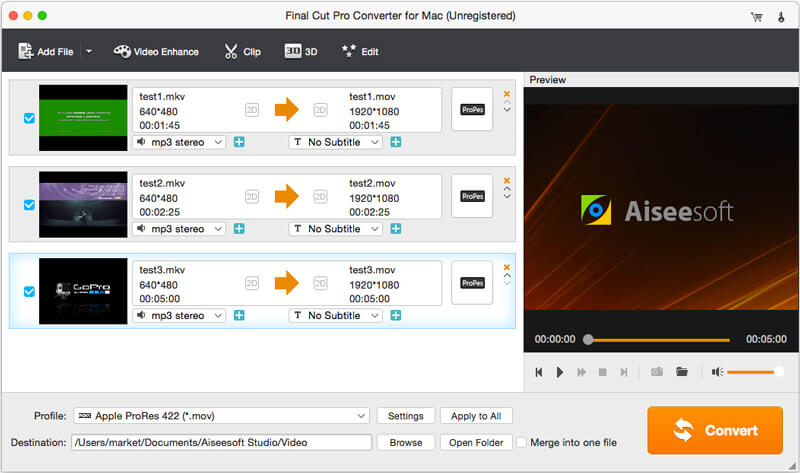
Three MKV files queued, each going from 640x480 to 1920x1080 MOV with the ProRes badge, the Profile set to Apple ProRes 422 (*.mov), and Merge into one file next to the Convert button.
Features
A ready-made Final Cut Pro format list
Aiseesoft Final Cut Pro Converter for Mac puts the editing formats Final Cut Pro prefers in one category: Apple ProRes 422, 422 HQ, 422 LT, 422 Proxy and 4444, plus DVCPRO HD at 1080p25, 1080p30, 1080i50, 1080i60 and 720p50. You don't need to know which codec does what. Pick ProRes 422 for general editing, HQ for higher quality, LT or Proxy to save disk space, or 4444 when you need the alpha channel. An iMovie and Final Cut Express category covers the older apps.
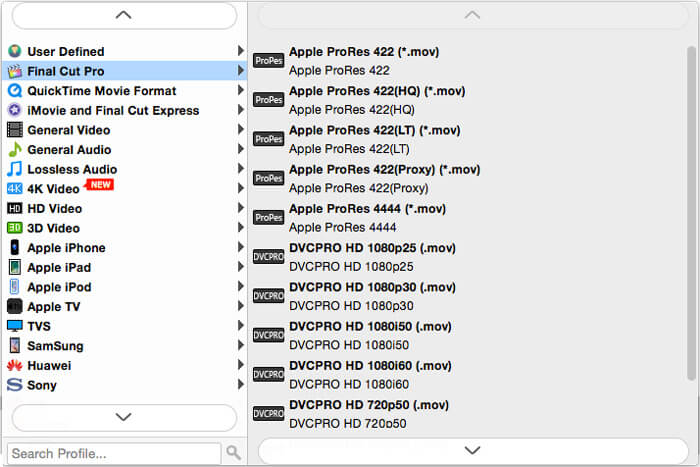
The Profile list with Final Cut Pro selected: five ProRes flavors and DVCPRO HD presets, and categories for QuickTime, iMovie and Final Cut Express, 4K, HD, 3D and devices on the left.
Batch conversion, merging and other formats
Aiseesoft Final Cut Pro Converter for Mac converts a whole list of files in one run, each with its own audio track and subtitle choice, or joins them into one file with Merge into one file. Beyond Final Cut formats, it outputs general video and audio, lossless audio, 4K and HD video, and presets for iPhone, iPad, Apple TV, Samsung, Sony, Huawei and TVs, so you can also use it as an everyday converter.
Quick fixes before you convert
Aiseesoft Final Cut Pro Converter for Mac includes a small editor with Rotate, 3D, Crop, Effect, Enhance and Watermark tabs, plus a Clip tool for trimming. The Enhance tab offers four options: upscale resolution, optimize brightness and contrast, remove video noise, and reduce video shaking. These are handy when the clip only needs a crop or a trim, so you're not importing footage you'll throw away.
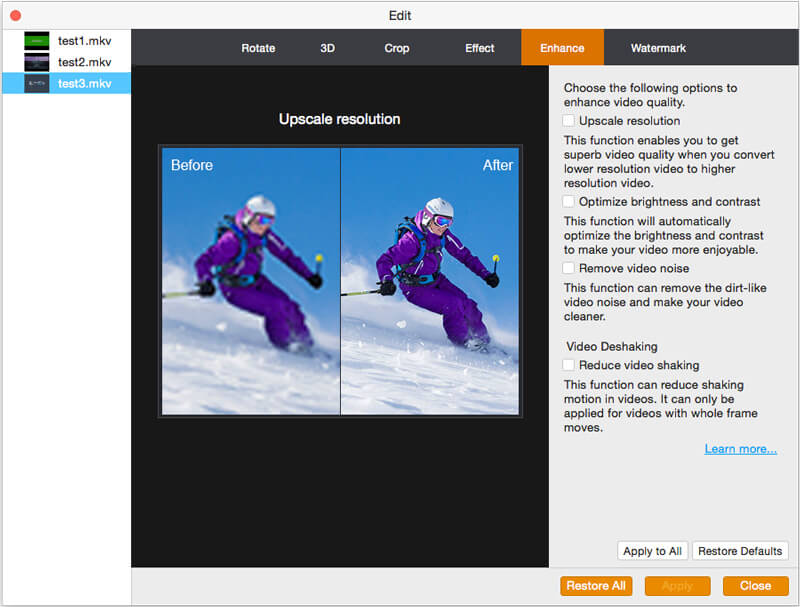
The Edit window on the Enhance tab: a before-and-after preview of upscaling and the four enhancement checkboxes, with the other files listed on the left.
Benefits
- No codec research: the Final Cut Pro category tells you which formats will import cleanly.
- Smoother editing: ProRes is an editing codec, so converted clips scrub and play on the timeline more easily than long-GOP files.
- One payment: the lifetime license includes free updates.
Real-World Uses
- Old home videos: convert AVI or WMV files from a Windows-era camcorder to ProRes before cutting them together.
- Screen recordings: turn MKV recordings from OBS into MOV for a tutorial edit.
- Proxy-style editing on a slow Mac: convert heavy 4K clips to ProRes 422 Proxy or LT so playback keeps up.
- Older Final Cut and iMovie projects: use the iMovie and Final Cut Express category for the formats those apps expect.
Who It's For, and Who Should Skip It
Aiseesoft Final Cut Pro Converter for Mac suits hobby and semi-pro editors on a Mac who occasionally run into files Final Cut Pro or iMovie won't take, and who want a simple, one-time purchase.
Skip it if:
- You want native Apple silicon speed. On an M-series Mac a converter built for Apple silicon will make better use of the hardware.
- You need professional transcoding. Timecode, metadata and camera-card workflows are what Apple Compressor and other pro tools are for.
- You want a broader toolkit. Aiseesoft's Mac Video Converter Ultimate is its bigger converter, editor and enhancer.
- You use Windows. This program is Mac-only.
Usage Guide
- Install: download the DMG from Aiseesoft, drag the app to Applications and open it. On an Apple silicon Mac, accept the prompt to install Rosetta 2.
- Add files: click Add File and choose the videos Final Cut Pro won't import.
- Pick a format: open Profile, choose the Final Cut Pro category and select a ProRes flavor. Click Apply to All to use it for every file.
- Edit if needed: use Clip to trim, or Edit and Video Enhance for crop, rotate, effects, watermark and enhancement.
- Convert: set the Destination folder and click Convert. A progress window shows each file and the elapsed and remaining time. Then import the MOV files into Final Cut Pro.
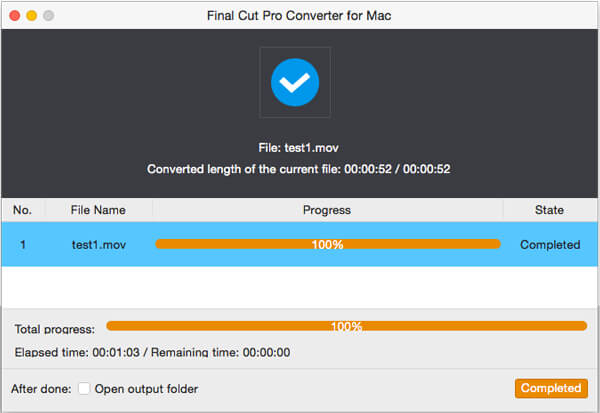
The progress window after converting test1.mov: 100% complete, elapsed time 1 minute 3 seconds, and an option to open the output folder when done.
Tips
- ProRes files are large. A few minutes of 1080p ProRes 422 can take several gigabytes, so point the destination at a drive with space.
- Use ProRes 422 LT or Proxy for long recordings you only need to cut down, and 422 HQ for footage you'll grade.
- Test the trial on one problem file and import the result into Final Cut Pro before buying.
Where it falls short
- Old foundations. The app is built on an old Qt 5.6 framework and Intel-only code, which shows in its dated look and in Rosetta 2 on newer Macs.
- Unclear trial. Aiseesoft's pages don't say what the free download leaves out before you register.
- Thin outside feedback. We found no independent, hands-on review of this specific program, only reviews of Aiseesoft's broader converters.
What Users Say
On Aiseesoft's product page
Aiseesoft's page shows 5.0 out of 5 from 281 reviews collected on its own site, with four short comments. They're hosted by the vendor, so read them as examples rather than an independent score.
"I always use Final Cut Pro X to edit videos on my MacBook. It is a really powerful video editor, but can't support many videos captured by my digital cam. Now this Final Cut Pro video converter solve this problem. Recommend it!" John J
"I'm very satisfied with the converting speed and output file quality. If you are looking for a converter to convert video to Final Cut Pro, now you find it!" Levin
"A great Final Cur Pro alternative for Mac users! I free download and try it on my MacBook Air and find out that, it is a better choice to make some simple editing jobs like crop, clip, merge or add watermark, easier to use." Miller
On Trustpilot (Aiseesoft as a company)
Aiseesoft Studio's Trustpilot profile covers all its products and stood at 3.8 out of 5 from 603 reviews in October 2026. Robert F, who gave 5 stars in April 2026, uses Aiseesoft's broader Video Converter for Mac "to convert output from Final Cut Pro to a format suitable for display." The 1-star reviews we saw were about accounts and refunds rather than conversion quality. Owend wrote in September 2026: "Whole point was to save time, and the return process was turning into an endless trap."
The overall picture is a simple tool that does one job, with little independent testing behind it. Buyers praise the ease of use; the company-level complaints are about service, not about the converted files.
Pricing
Aiseesoft Final Cut Pro Converter for Mac comes in one edition: a lifetime license for one Mac at $38.00, with free lifetime updates and a 30-day money-back guarantee. Aiseesoft's own store sometimes shows a 20% coupon price ($30.40 on October 17, 2026).
FAQs
Does Aiseesoft Final Cut Pro Converter for Mac run on M1, M2, M3 or M4 Macs?
Yes, but not natively. Aiseesoft Final Cut Pro Converter for Mac contains only Intel code, so on Apple silicon Macs it runs through Rosetta 2, which macOS installs the first time you open it.
Which ProRes formats does Aiseesoft Final Cut Pro Converter for Mac create?
Aiseesoft Final Cut Pro Converter for Mac creates Apple ProRes 422, 422 HQ, 422 LT, 422 Proxy and 4444 in MOV files, plus DVCPRO HD.
Can Aiseesoft Final Cut Pro Converter for Mac convert videos for iMovie?
Yes. Aiseesoft Final Cut Pro Converter for Mac has an iMovie and Final Cut Express profile category alongside the Final Cut Pro one.
Is Aiseesoft Final Cut Pro Converter for Mac a subscription?
No. Aiseesoft Final Cut Pro Converter for Mac is sold as a lifetime license for one Mac, paid once, with free updates.
Does Aiseesoft Final Cut Pro Converter for Mac work on older macOS versions?
Yes. Aiseesoft Final Cut Pro Converter for Mac requires only Mac OS X 10.7 or later, so it runs on much older Macs as well as current macOS versions such as Sequoia.
Can I get a refund for Aiseesoft Final Cut Pro Converter for Mac?
Aiseesoft Final Cut Pro Converter for Mac comes with a 30-day money-back guarantee.
System Requirements
- macOS: Mac OS X 10.7 or later, including macOS Sequoia
- Processor: Intel Mac, or Apple silicon Mac with Rosetta 2
- Disk: about 50 MB for the installer, plus plenty of space for ProRes output
Conclusion
Aiseesoft Final Cut Pro Converter for Mac is worth $38 if you're a casual Final Cut Pro or iMovie user who regularly hits files they won't import and wants a one-time purchase with the right ProRes presets ready to pick. The reason to buy it is simplicity: choose Final Cut Pro, choose ProRes, click Convert. The main reason not to is its age: it's Intel-only, runs through Rosetta 2 on current Macs, and the installer hasn't changed since January 2024. Try the free download on your own problem files on your own Mac before you pay.
Download Free TrialBuy Now